2023 LINCOLN NAVIGATOR warning light
[x] Cancel search: warning lightPage 142 of 660
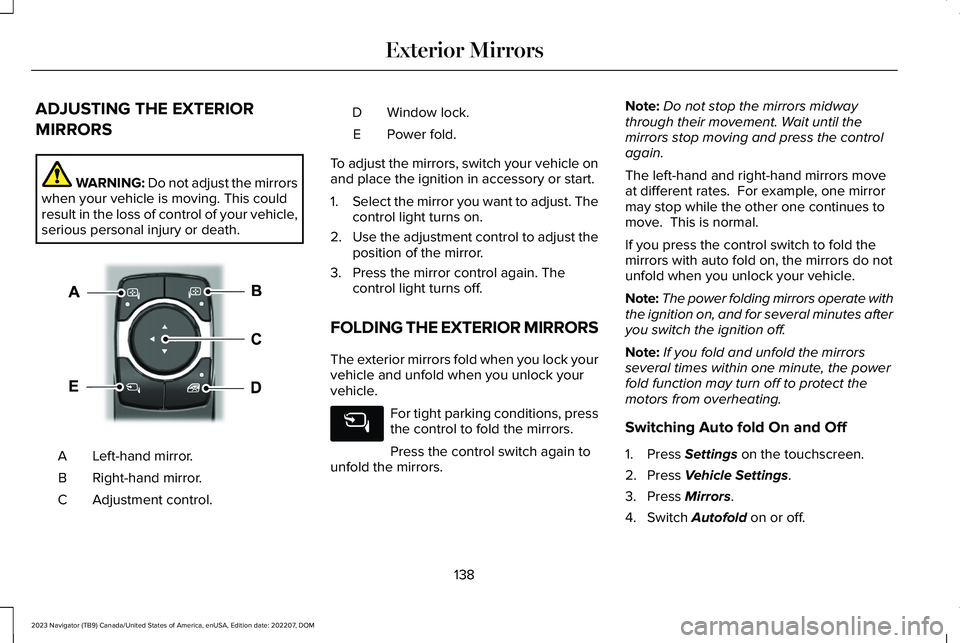
ADJUSTING THE EXTERIOR
MIRRORS
WARNING: Do not adjust the mirrorswhen your vehicle is moving. This couldresult in the loss of control of your vehicle,serious personal injury or death.
Left-hand mirror.A
Right-hand mirror.B
Adjustment control.C
Window lock.D
Power fold.E
To adjust the mirrors, switch your vehicle onand place the ignition in accessory or start.
1.Select the mirror you want to adjust. Thecontrol light turns on.
2.Use the adjustment control to adjust theposition of the mirror.
3.Press the mirror control again. Thecontrol light turns off.
FOLDING THE EXTERIOR MIRRORS
The exterior mirrors fold when you lock yourvehicle and unfold when you unlock yourvehicle.
For tight parking conditions, pressthe control to fold the mirrors.
Press the control switch again tounfold the mirrors.
Note:Do not stop the mirrors midwaythrough their movement. Wait until themirrors stop moving and press the controlagain.
The left-hand and right-hand mirrors moveat different rates. For example, one mirrormay stop while the other one continues tomove. This is normal.
If you press the control switch to fold themirrors with auto fold on, the mirrors do notunfold when you unlock your vehicle.
Note:The power folding mirrors operate withthe ignition on, and for several minutes afteryou switch the ignition off.
Note:If you fold and unfold the mirrorsseveral times within one minute, the powerfold function may turn off to protect themotors from overheating.
Switching Auto fold On and Off
1.Press Settings on the touchscreen.
2.Press Vehicle Settings.
3.Press Mirrors.
4.Switch Autofold on or off.
138
2023 Navigator (TB9) Canada/United States of America, enUSA, Edition date: 202207, DOMExterior MirrorsE369399
Page 152 of 660

USING THE INSTRUMENT
CLUSTER DISPLAY CONTROLS
WARNING: Driving while distractedcan result in loss of vehicle control, crashand injury. We strongly recommend thatyou use extreme caution when using anydevice that may take your focus off theroad. Your primary responsibility is the safeoperation of your vehicle. We recommendagainst the use of any hand-held devicewhile driving and encourage the use ofvoice-operated systems when possible.Make sure you are aware of all applicablelocal laws that may affect the use ofelectronic devices while driving.
Note:Some options could appear slightlydifferent or not at all if the items are optional.
The controls are on the steering wheel.
Return Button
Press to go back or exit a menu.
Toggle Buttons
Press the toggle button up or down to scrollthrough menu items.
OK Button
Press to make a selection.
Status Indicator
A check in the box indicates afeature is on, and uncheckedindicates the feature is off.
INSTRUMENT CLUSTER DISPLAY
MAIN MENU
Depending on your vehicle options, somemenu items can appear different or not atall.
Note:For your safety, some features arespeed-dependent and could be unavailablewhen your vehicle is above a certain speed.
148
2023 Navigator (TB9) Canada/United States of America, enUSA, Edition date: 202207, DOMInstrument Cluster DisplayE357886 E204495
Page 171 of 660

FRONT SEAT PRECAUTIONS
WARNING: Sitting improperly, out ofposition or with the seatback reclined toofar can take weight off the seat cushionand affect the decision of the passengersensing system, resulting in serious injuryor death in the event of a crash. Always situpright against your seat back, with yourfeet on the floor.
WARNING: Do not recline the seatbackrest too far as this can cause theoccupant to slide under the seatbelt,resulting in personal injury in the event ofa crash.
WARNING: Do not place objectshigher than the top of the seat backrest.Failure to follow this instruction could resultin personal injury or death in the event ofa sudden stop or crash.
WARNING: Do not adjust the driverseat or seat backrest when your vehicle ismoving. This may result in sudden seatmovement, causing the loss of control ofyour vehicle.
SITTING IN THE CORRECT
POSITION
When you use them properly, the seat, headrestraint, seatbelt and airbags will provideoptimum protection in the event of a crash.
We recommend that you follow theseguidelines:
•Sit in an upright position with the base ofyour spine as far back as possible.
•Do not recline the seat backrest so thatyour torso is more than 30 degrees fromthe upright position.
•Adjust the head restraint so that the topof it is level with the top of your head andas far forward as possible. Make sure thatyou remain comfortable.
•Keep sufficient distance betweenyourself and the steering wheel. Werecommend a minimum of 10 in (25 cm)between your breastbone and the airbagcover.
•Hold the steering wheel with your armsslightly bent.
167
2023 Navigator (TB9) Canada/United States of America, enUSA, Edition date: 202207, DOMFront SeatsE68595
Page 172 of 660

•Bend your legs slightly so that you canpress the pedals fully.
•Position the shoulder strap of the seatbeltover the center of your shoulder andposition the lap strap tightly across yourhips.
Make sure that your driving position iscomfortable and that you can maintain fullcontrol of your vehicle.
POWER SEATS
HEAD RESTRAINT COMPONENTS
The head restraints consist of:
An energy absorbing headrestraint.A
Two steel stems.B
Guide sleeve adjust and releasebutton.C
Guide sleeve unlock and removebutton (If equipped).D
ADJUSTING THE HEAD RESTRAINT
WARNING: Fully adjust the headrestraint before you sit in or operate yourvehicle. This will help minimize the risk ofneck injury in the event of a crash. Do notadjust the head restraint when your vehicleis moving.
WARNING: The head restraint is asafety device. Whenever possible it shouldbe installed and properly adjusted whenthe seat is occupied. Failure to adjust thehead restraint properly could reduce itseffectiveness during certain impacts.
WARNING: Adjust the head restraintsfor all passengers before you drive yourvehicle. This will help minimize the risk ofneck injury in the event of a crash. Do notadjust the head restraints when yourvehicle is moving.
To raise the head restraint, pull the headrestraint up.
To lower the head restraint:
1.Press and hold the adjust and releasebutton.
2.Push the head restraint down.
To tilt the head restraint - if equipped:
168
2023 Navigator (TB9) Canada/United States of America, enUSA, Edition date: 202207, DOMFront SeatsE327921
Page 177 of 660

You can also adjust this feature through thetouchscreen.
HEATED SEATS
HEATED SEAT PRECAUTIONS
WARNING: Use caution when usingthe heated seat if you are unable to feelpain to your skin because of advancedage, chronic illness, diabetes, spinal cordinjury, medication, alcohol use, exhaustionor other physical conditions. The heatedseat could cause burns even at lowtemperatures, especially if used for longperiods of time. Failure to follow thisinstruction could result in personal injury.
WARNING: Do not poke sharpobjects into the seat cushion or seatbackrest. This could damage the heatedseat element and cause it to overheat.Failure to follow this instruction could resultin personal injury.
WARNING: Do not place anything onthe seat that blocks the heat, for examplea seat cover or a cushion. This could causethe seat to overheat. Failure to follow thisinstruction could result in personal injury.
Do not:
•Place heavy objects on the seat.
•Operate the heated seat if water or anyother liquid spills on the seat. Allow theseat to dry.
SWITCHING THE HEATED SEATS ONAND OFF
The vehicle must be running to use thisfeature.
Press the heated seat symbol to cyclethrough the various heat settings and off.More indicator lights indicate warmersettings.
Note:The heated seats may remain on afteryou remote start your vehicle, based on yourremote start settings. The heated seats mayalso turn on when you start your vehicle ifthey were on when you switched yourvehicle off.
Automatic Climate Controlled Seats (If
Equipped)
When you switch the auto setting on, theclimate controlled seats switch between theheated seats and ventilated seats to matchyour climate control setting.
173
2023 Navigator (TB9) Canada/United States of America, enUSA, Edition date: 202207, DOMFront SeatsE146322
Page 192 of 660

GARAGE DOOR OPENER
INTRODUCTION
HomeLink Wireless Control System
The universal garage door opener replacesthe common handheld garage door openerwith a three-button transmitter integratedinto the driver-side sun visor.
How Does The Garage Door OpenerWork
The system includes two primary features, agarage door opener and a platform forremote activation of devices within the home.You can program garage doors as well asentry gate operators, security systems, entrydoor locks and home or office lighting.
Additional assistance can be found online atwww.homelink.com/Ford or by calling thetoll-free help line at 1-800-355-3515.
Garage Door Opener Limitations
Canadian radio-frequency laws requiretransmitter signals to time out, or quit, afterseveral seconds – which may not be longenough for HomeLink to pick up the signal.U.S. gate operators time-out in the samemanner.
GARAGE DOOR OPENER
PRECAUTIONS AND
FREQUENCIES
Garage Door Opener Precautions
WARNING: Do not use the systemwith any garage door opener that does nothave the safety stop and reverse featureas required by U.S. Federal SafetyStandards (this includes any garage dooropener manufactured before April 1, 1982).A garage door opener which cannot detectan object, signaling the door to stop andreverse, does not meet current federalsafety standards. Using a garage dooropener without these features increasesthe risk of serious injury or death.
188
2023 Navigator (TB9) Canada/United States of America, enUSA, Edition date: 202207, DOMGarage Door OpenerE188211
Page 199 of 660

WHAT IS THE POWER OUTLET
The power outlet can power devices usinga 12 V outlet adapter.
POWER OUTLET PRECAUTIONS
WARNING: Do not plug optionalelectrical accessories into the cigar lightersocket. Incorrect use of the cigar lightercan cause damage not covered by thevehicle warranty, and can result in fire orserious injury.
When you switch the vehicle on, you can usethe socket to power 12 V appliances with amaximum current rating of 20 A. Do not usethe power point over the vehicle capacity of12 V DC 240 W or a fuse could blow. Do notplug in any device that supplies power to thevehicle through the power points. This couldresult in damage to vehicle systems. Do nothang any accessory from the accessory plug.Always keep the power point caps closedwhen not in use. Do not insert objects otherthan an accessory plug into the power point.
To prevent the battery from running out ofcharge:
•Do not use the power point longer thannecessary when the vehicle is off.
•Do not leave devices plugged inovernight or when you park your vehiclefor extended periods.
LOCATING THE POWER OUTLETS
Power outlets may be in the followinglocations:
•On the lower instrument panel.
•Inside the center console.
•On the front of the center console.
•On the rear of the center console.
•In the cargo area.
•On the passenger side floor panel.
•3rd row on the quarter trim panels.
195
2023 Navigator (TB9) Canada/United States of America, enUSA, Edition date: 202207, DOMPower Outlet - Vehicles With: 12V Power Outlet
Page 212 of 660

WHAT IS AUTO-START-STOP
The system is designed to help reduce fuelconsumption and CO2 emissions by stopping
the engine when it is idling, for example attraffic lights.
AUTO-START-STOP PRECAUTIONS
WARNING: Apply the parking brake,shift into park (P), switch the ignition offand remove the key before you leave yourvehicle. Failure to follow this instructioncould result in personal injury or death.
WARNING: Apply the parking brake,shift into park (P), switch the ignition offand remove the key before you open thehood or have any service or repair workcompleted. If you do not switch the ignitionoff, the engine could restart at any time.Failure to follow this instruction could resultin personal injury or death.
SWITCHING AUTO-START-STOP
ON AND OFF
The system turns on when you switch theignition on.
Press the button to switch thesystem off.
Note:OFF illuminates in the switch.
Note:Deactivating the system using thebutton lasts only one key cycle.
Press the button again to switch the systemback on.
Note: The system turns off if it detects amalfunction. If the system malfunctions,have your vehicle checked as soon aspossible.
STOPPING THE ENGINE
Stop your vehicle, keep your foot on thebrake pedal and the transmission in drive(D).
RESTARTING THE ENGINE
Release the brake pedal or press theaccelerator pedal.
A message appears in the instrument clusterdisplay if the system requires you to takeaction.
AUTO-START-STOP INDICATORS
WARNING: The system may requirethe engine to automatically restart whenthe auto-start-stop indicator illuminatesgreen or flashes amber. Failure to followthis instruction could result in personalinjury.
The Auto-Start-Stop indicatorilluminates green when the enginestops. It flashes amber and amessage appears when you need to takeaction.
208
2023 Navigator (TB9) Canada/United States of America, enUSA, Edition date: 202207, DOMAuto-Start-Stop (If Equipped)E121377 E121377