2023 LINCOLN NAVIGATOR fold seats
[x] Cancel search: fold seatsPage 348 of 660

To move the board into the divider position,lift up on the handle and position the boardvertically at a 90° angle.
Note:The board operates with frictionhinges. This allows you to put it in anyposition between a 0° and a 90° angle.
Cargo Shelf
To move the board into the shelf position,lift the board and move it to the horizontalposition. Once the board is horizontal, insertthe forward-facing nubs into the hooks oneither side.
For the short wheelbase, it is necessary toraise up the second panel toward the frontof the vehicle when you have the seatsfolded down.
For the long wheelbase, it is necessary toraise up the second panel toward the frontof the vehicle.
Note:Before moving the board into the shelfposition, you may need to flip down thehooks.
Note:Do not put more than 50 lb (22 kg) onthe shelf.
Rear Barrier (Bulkhead Position)
To move the board into the rear barrier orbulkhead position, lift the board and move itto the vertical position. Once the board isvertical, insert the rearward facing nubs intothe hooks on either side.
Note:Before moving the board into the rearbarrier or bulkhead position, you may needto flip down the hooks.
344
2023 Navigator (TB9) Canada/United States of America, enUSA, Edition date: 202207, DOMLuggage CompartmentE250829 E250830
Page 409 of 660
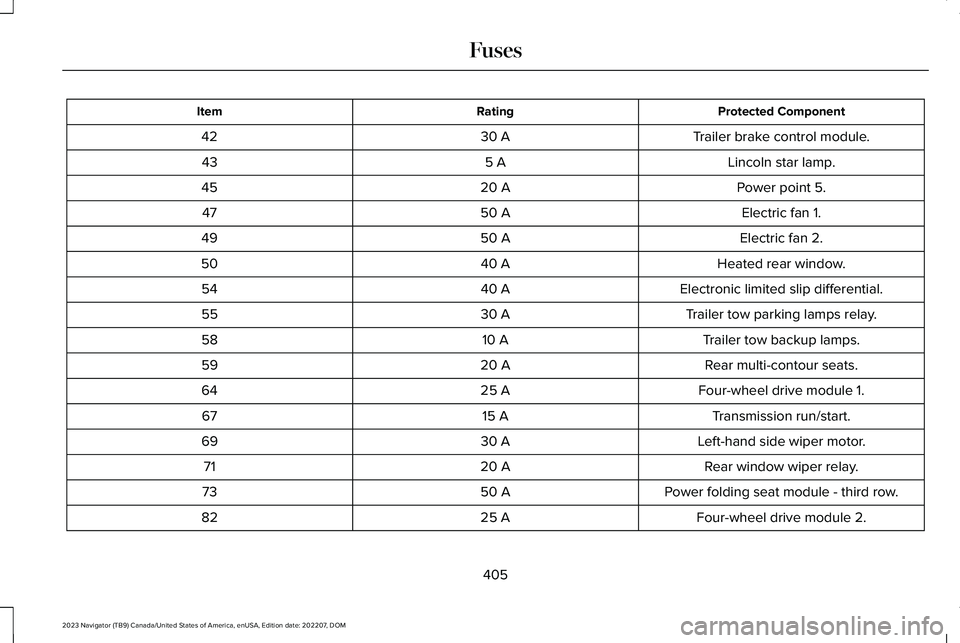
Protected ComponentRatingItem
Trailer brake control module.30 A42
Lincoln star lamp.5 A43
Power point 5.20 A45
Electric fan 1.50 A47
Electric fan 2.50 A49
Heated rear window.40 A50
Electronic limited slip differential.40 A54
Trailer tow parking lamps relay.30 A55
Trailer tow backup lamps.10 A58
Rear multi-contour seats.20 A59
Four-wheel drive module 1.25 A64
Transmission run/start.15 A67
Left-hand side wiper motor.30 A69
Rear window wiper relay.20 A71
Power folding seat module - third row.50 A73
Four-wheel drive module 2.25 A82
405
2023 Navigator (TB9) Canada/United States of America, enUSA, Edition date: 202207, DOMFuses
Page 647 of 660

Lane Keeping System – InformationMessages.........................................................308
Launching or Retrieving a Boat or PersonalWatercraft.....................................................351Liftgate...............................................................98Closing the Liftgate............................................100Liftgate – Troubleshooting................................104Opening the Liftgate............................................98
Liftgate Obstacle Detection.......................103Liftgate Precautions.......................................98Liftgate – Troubleshooting.........................104Liftgate – Frequently Asked Questions........105Liftgate – Information Messages.....................104Liftgate – Warning Lamps.................................104
Lincoln Personal Assistant..........................501Lincoln Personal Assistant – Frequently AskedQuestions.........................................................501Lincoln Personal Assistant Settings...............501Using Lincoln Personal Assistant....................501
Lincoln Protect..............................................526Linking or Unlinking a Personal Profile toa Remote Control.......................................516Live Traffic.......................................................517Switching Live Traffic On and Off....................517What Is Live Traffic..............................................517
Load Carrying................................................336Roof Rack.............................................................340
Load Carrying Precautions........................336
Loading Your Trailer.....................................350Locating the 360 Degree Cameras.........262Locating the Blind Spot Information SystemSensors.........................................................312Locating the Brake Fluid Reservoir.........232Locating the Cross Traffic AlertSensors.........................................................318Locating the Fuel Filler Funnel..................212Locating the Keyless Entry Keypad............93Locating the Memory FunctionButtons..........................................................186Locating the Power Outlets........................195Locating the Pre-Collision AssistSensors........................................................324Locating the Safety ComplianceCertification Labels....................................337Locating the Tire label.................................437Locating the USB Ports................................193Locating the Wireless AccessoryCharger.........................................................198Locating Your Vehicle....................................73Locking the Rear Window Controls..........135Luggage Compartment................................341Luggage Compartment Precautions........341
M
Maintenance...................................................414Engine Air Filter..................................................423Engine Oil..............................................................417Exterior Bulbs......................................................428Interior Bulbs.......................................................428
Maintenance Precautions...........................414Making and Receiving a Phone Call.......507Manually Releasing the Electric ParkingBrake.............................................................235Manually Shifting Gears...............................221Shifting Using the Paddle Shifters..................221
Manual Seats..................................................175Accessing the Third Row Seats.......................178Adjusting the Head Restraint...........................176Adjusting the Seat Backrest..............................177Folding the Seat Backrest.................................177Head Restraint Components............................175Installing the Head Restraint............................176Moving the Seat Backward andForward.............................................................176Removing the Head Restraint..........................176Unfolding the Seats............................................178
Massage Seats...............................................172Adjusting the Massage Seat Settings............172Massage Seat Limitations.................................172
643
2023 Navigator (TB9) Canada/United States of America, enUSA, Edition date: 202207, DOMIndex
Page 649 of 660

P
Parking Aid Indicators.................................259Parking Aid Precautions.............................255Parking Aids..................................................255Front Parking Aid................................................257Parking Aids – Troubleshooting.....................259Rear Parking Aid.................................................256Side Parking Aid.................................................258
Parking Aids – Troubleshooting...............259Parking Aids – Information Messages..........259
Passive Anti-Theft System..........................106How Does the Passive Anti-Theft SystemWork...................................................................106What Is the Passive Anti-Theft System..........106
Perchlorate....................................................590Performing a System Reset.......................523Personalized Settings...................................151Personal Profiles............................................515Personal Safety System Components......60Personal Safety System™..............................60Phone as a Key Limitations..........................78Phone as a Key................................................78Phone as a Key – Troubleshooting..................80
Phone as a Key – Troubleshooting............80Phone as a Key – Frequently AskedQuestions...........................................................80
Phone Menu..................................................505
Phone..............................................................505Phone Precautions......................................505Playing and Pausing the AudioSource..........................................................497Playing Media Using Bluetooth®................511Playing Media Using the USB Port...........193Playing or Pausing the AudioSource..........................................................486Post-Crash Alert System.............................392How Does the Post-Crash Alert SystemWork..................................................................392Post-Crash Alert System Limitations.............392Switching the Post-Crash Alert SystemOff......................................................................393What Is the Post-Crash Alert System............392
Post Impact Braking.....................................393How Does Post Impact Braking Work...........393Overriding Post Impact Braking......................393Post Impact Braking Indicators.......................393Post Impact Braking Limitations.....................393
Power Outlet Indicators...............................197Power Outlet Limitations.............................196Power Outlet..................................................195Power Outlet Precautions...........................195Power Running Board Precautions...........110Power Running Board Settings..................110
Power Running Boards.................................110Power Running Boards –Troubleshooting................................................111
Power Running Boards –Troubleshooting............................................111Power Running Boards – Frequently AskedQuestions............................................................111
Power Seats....................................................168Adjusting the Head Restraint...........................168Adjusting the Lumbar Support.........................172Adjusting the Seat Backrest..............................171Adjusting the Seat Cushion..............................170Adjusting the Seat Height.................................172Folding the Seat Backrest................................180Head Restraint Components............................168Installing the Head Restraint............................169Moving the Seat Backward andForward.............................................................170Removing the Head Restraint..........................169Unfolding the Seat Backrest.............................181
Pre-Collision Assist Limitations.................322Pre-Collision Assist Precautions................321Pre-Collision Assist.......................................321Automatic Emergency Braking.......................327Distance Alert......................................................327Distance Indication............................................325Evasive Steering Assist.....................................327Pre-Collision Assist – Troubleshooting.........328
645
2023 Navigator (TB9) Canada/United States of America, enUSA, Edition date: 202207, DOMIndex