2023 LINCOLN NAUTILUS phone
[x] Cancel search: phonePage 150 of 606

USING THE INSTRUMENT
CLUSTER DISPLAY CONTROLS
WARNING: Driving while distractedcan result in loss of vehicle control, crashand injury. We strongly recommend thatyou use extreme caution when using anydevice that may take your focus off theroad. Your primary responsibility is the safeoperation of your vehicle. We recommendagainst the use of any hand-held devicewhile driving and encourage the use ofvoice-operated systems when possible.Make sure you are aware of all applicablelocal laws that may affect the use ofelectronic devices while driving.
Note:Some options may appear slightlydifferent or not at all if the items are optional.
The controls are on the steering wheel. Youcan control various systems on your vehicleusing the quick action menu (QAM) buttons.Return button.A
Toggle up.B
OK buttonC
Toggle down.D
Phone QAM buttons.E
Audio QAM button.F
Navigation QAM button.G
Settings QAM button.H
Display QAM button.I
Return Button
Press to go back or exit a menu.
Toggle Buttons
Press the toggle button up or down to scrollthrough menu items.
OK Button
Press to make a selection.
Quick Action Menu Buttons
Press to open the correlating menu.
146
2023 Nautilus (CD9) Canada/United States of America, enUSA, Edition date: 202207, DOMInstrument Cluster DisplayE247519
Page 158 of 606

WHAT IS REMOTE START
The system allows you to remotely start yourvehicle and to adjust the interior temperatureaccording to the settings that you chose.
REMOTE START PRECAUTIONS
WARNING: Do not start the enginein a closed garage or in other enclosedareas. Exhaust fumes are toxic. Alwaysopen the garage door before you start theengine. Failure to follow this instructioncould result in personal injury or death.
REMOTE START LIMITATIONS
Remote start does not work under thefollowing conditions:
•The alarm horn is sounding.
•The hood is open.
•The transmission is not in park (P).
•The ignition is on.
•The battery voltage is below theminimum operating voltage.
Note:Do not use remote start if your fuellevel is low.
Note:To use remote start with Lincoln Wayor Phone as a Key, enable the modem. SeeConnecting Lincoln Way to the Modem(page 427).
ENABLING REMOTE START
1.Using the instrument cluster displaycontrols on the steering wheel, selectSettings.
2.Select Vehicle.
3.Select Remote Start.
4.Switch System on.
Note:To use remote start, make sure thatthe modem is enabled. See Enabling andDisabling the Modem (page 427).
REMOTELY STARTING AND
STOPPING THE VEHICLE
Remotely Starting the Vehicle
Press the button on the remotecontrol.
Within three seconds, press thebutton on the remote control.
Within three seconds, press thebutton again.
Note:You can also use the Lincoln Way appto start the vehicle.
Note:The turn signals flash twice.
Note:The parking lamps turn on when thevehicle is running.
Note:The horn sounds if the system fails tostart.
Note:All other vehicle systems remain offwhen you have remotely started the vehicle.
154
2023 Nautilus (CD9) Canada/United States of America, enUSA, Edition date: 202207, DOMRemote Start (If Equipped)E138623 E138625
Page 197 of 606

All electrical circuits and accessories areoperational and the warning lamps andindicators illuminate.
Note:Your vehicle has a battery saverfeature that shuts your vehicle off when itdetects a certain amount of battery drain, orafter approximately 30 minutes of inactivityin accessory mode.
Note:The system may not function if theremote control is close to metal objects orelectronic devices, for example keys or acell phone.
Note:You need a valid key inside yourvehicle to switch the ignition on and start theengine.
STARTING THE ENGINE
STARTING A GASOLINE ENGINE
Before starting your vehicle, check thefollowing:
•Make sure that the headlamps andelectrical accessories are off.
•Make sure that the parking brake is on.
•Make sure that the transmission is in park(P).
1.Fully press the brake pedal.
Note:Do not touch the accelerator pedal.
2.Press the push button ignition switch.
Note:The engine may continue cranking forup to 15 seconds or until it starts.
Note:The engine takes longer to start atlower temperatures. It may crank for severalseconds when very cold.
RESTARTING THE ENGINE AFTERSTOPPING IT
The system allows you to start the enginewithin 10 seconds of switching it off, even ifit does not detect a valid passive key.
Within 10 seconds of switching the engineoff, fully press the brake pedal and press thepush button ignition switch. After 10 seconds,you can no longer start the engine if thesystem does not detect a valid passive key.
When you start the engine, it remains runninguntil you press the push button ignitionswitch, even if your vehicle does not detecta valid passive key. If you open and close adoor when the engine is running, the systemsearches for a valid passive key.
193
2023 Nautilus (CD9) Canada/United States of America, enUSA, Edition date: 202207, DOMStarting and Stopping the EngineE357998
Page 207 of 606

FUEL AND REFUELING
PRECAUTIONS
WARNING: Do not overfill the fueltank. The pressure in an overfilled tankmay cause leakage and lead to fuel sprayand fire.
WARNING: The fuel system may beunder pressure. If you hear a hissing soundnear the fuel filler inlet, do not refuel untilthe sound stops. Otherwise, fuel may sprayout, which could cause serious personalinjury.
WARNING: Fuels can cause seriousinjury or death if misused or mishandled.
WARNING: Fuel may containbenzene, which is a cancer-causing agent.
WARNING: When refueling alwaysshut the engine off and never allow sparksor open flames near the fuel tank fillervalve. Never smoke or use a cell phonewhile refueling. Fuel vapor is extremelyhazardous under certain conditions. Avoidinhaling excess fumes.
WARNING: Read and follow all theinstructions on the pump island.
Follow these guidelines when refueling:
•Extinguish all smoking materials and anyopen flames before refueling yourvehicle.
•Switch the engine off before refueling.
•Automotive fuels can be harmful or fatalif swallowed. Fuel is highly toxic and ifswallowed can cause death or permanentinjury. If fuel is swallowed immediatelycall a physician, even if no symptoms areimmediately apparent. The toxic effectsof fuel may not be apparent for hours.
•Avoid inhaling fuel vapors. Inhaling fuelvapor can lead to eye and respiratorytract irritation. In severe cases, excessiveor prolonged breathing of fuel vapor cancause serious illness and permanentinjury.
•Avoid getting fuel in your eyes. If yousplash fuel in your eyes, immediatelyremove contact lenses, if worn, flush withwater for 15 minutes and seek medicalattention. Failure to seek proper medicalattention could lead to permanent injury.
•Fuels can be harmful if absorbed throughthe skin. If you splash fuel on your skin,clothing or both, promptly removecontaminated clothing and thoroughlywash your skin with soap and water.Repeated or prolonged skin contactcauses skin irritation.
•Be particularly careful if you are takingAntabuse or other forms of Disulfiram forthe treatment of alcoholism. Breathingfuel vapors could cause an adversereaction, serious personal injury orsickness. Immediately call a physician ifyou experience any adverse reactions.
203
2023 Nautilus (CD9) Canada/United States of America, enUSA, Edition date: 202207, DOMFuel and Refueling
Page 210 of 606
2.Fully insert the fuel filler funnel into thefuel filler inlet.
3.Add fuel to your vehicle from the fuelcontainer.
4.Remove the fuel filler funnel.
5.Fully close the fuel filler door.
6.Clean the fuel filler funnel and place itback in your vehicle or correctly disposeof it.
Note:If your vehicle runs out of fuel add aminimum of 1.3 gal (5 L) of fuel to restart theengine.
Note:You may need to switch the ignitionfrom off to on several times after refuelingto allow the fuel system to pump the fuelfrom the tank to the engine. When restarting,cranking time takes a few seconds longerthan normal.
Note:Extra funnels can be purchased froman authorized dealer if you choose todispose of the funnel.
REFUELING
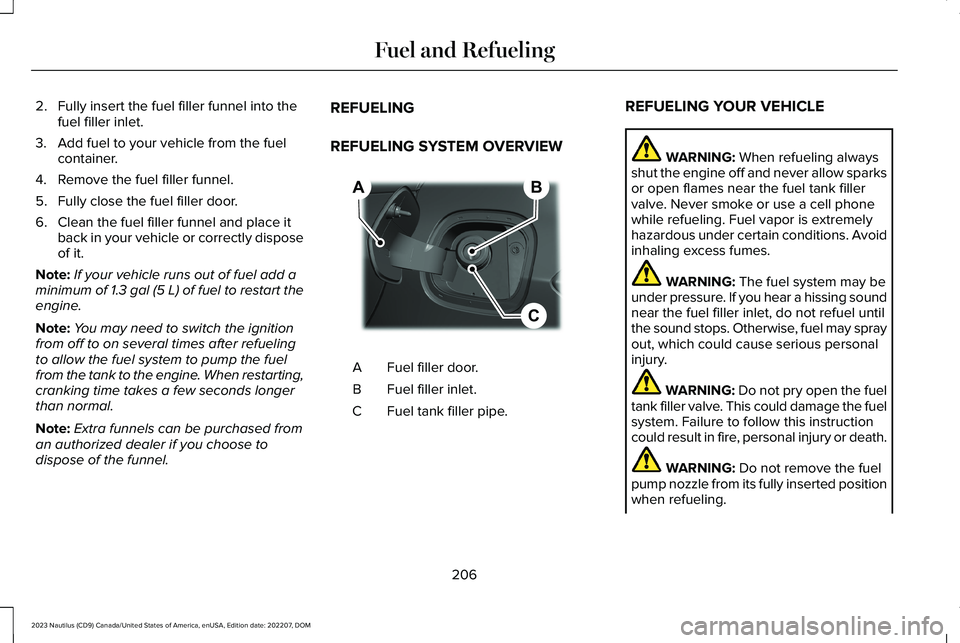
REFUELING SYSTEM OVERVIEW
Fuel filler door.A
Fuel filler inlet.B
Fuel tank filler pipe.C
REFUELING YOUR VEHICLE
WARNING: When refueling alwaysshut the engine off and never allow sparksor open flames near the fuel tank fillervalve. Never smoke or use a cell phonewhile refueling. Fuel vapor is extremelyhazardous under certain conditions. Avoidinhaling excess fumes.
WARNING: The fuel system may beunder pressure. If you hear a hissing soundnear the fuel filler inlet, do not refuel untilthe sound stops. Otherwise, fuel may sprayout, which could cause serious personalinjury.
WARNING: Do not pry open the fueltank filler valve. This could damage the fuelsystem. Failure to follow this instructioncould result in fire, personal injury or death.
WARNING: Do not remove the fuelpump nozzle from its fully inserted positionwhen refueling.
206
2023 Nautilus (CD9) Canada/United States of America, enUSA, Edition date: 202207, DOMFuel and RefuelingBCA E267248
Page 434 of 606
Possible Cause and ResolutionSymptom
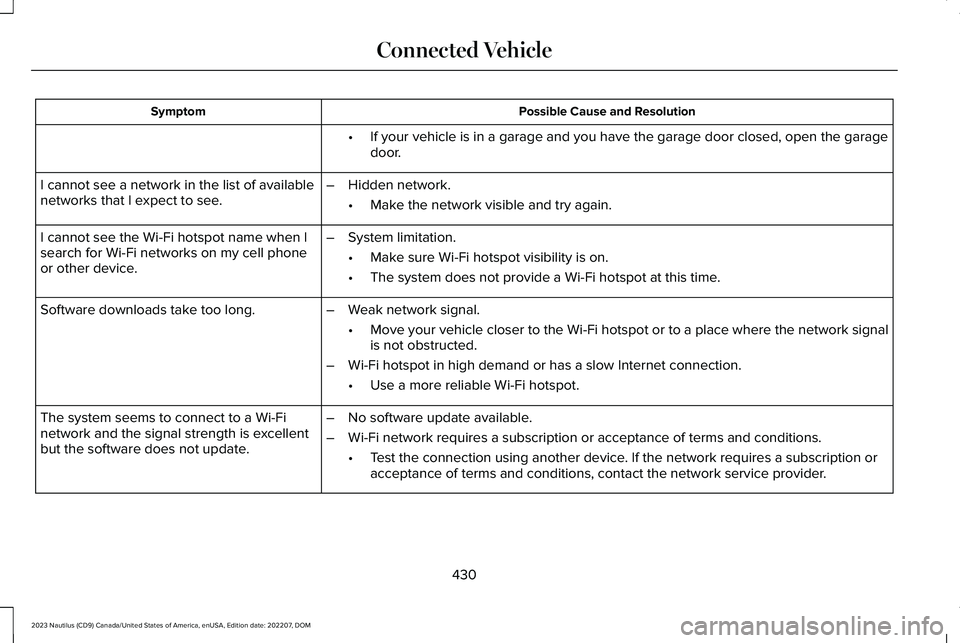
If your vehicle is in a garage and you have the garage door closed, open the garagedoor.•
I cannot see a network in the list of availablenetworks that I expect to see.–Hidden network.
•Make the network visible and try again.
I cannot see the Wi-Fi hotspot name when Isearch for Wi-Fi networks on my cell phoneor other device.
–System limitation.
•Make sure Wi-Fi hotspot visibility is on.
•The system does not provide a Wi-Fi hotspot at this time.
–Weak network signal.
•Move your vehicle closer to the Wi-Fi hotspot or to a place where the network signalis not obstructed.
–Wi-Fi hotspot in high demand or has a slow Internet connection.
•Use a more reliable Wi-Fi hotspot.
Software downloads take too long.
–No software update available.
–Wi-Fi network requires a subscription or acceptance of terms and conditions.
•Test the connection using another device. If the network requires a subscription oracceptance of terms and conditions, contact the network service provider.
The system seems to connect to a Wi-Finetwork and the signal strength is excellentbut the software does not update.
430
2023 Nautilus (CD9) Canada/United States of America, enUSA, Edition date: 202207, DOMConnected Vehicle
Page 436 of 606
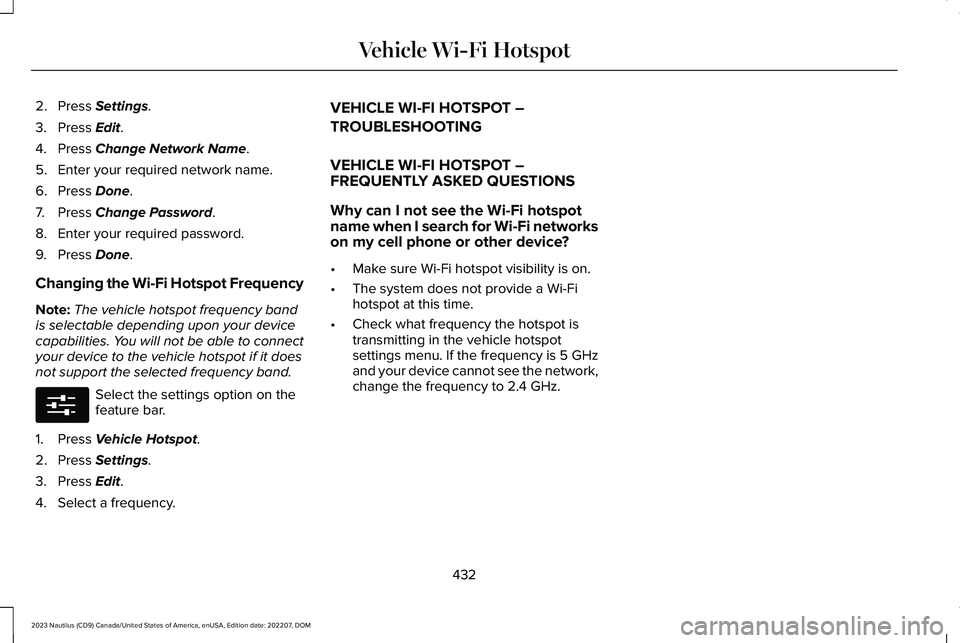
2.Press Settings.
3.Press Edit.
4.Press Change Network Name.
5.Enter your required network name.
6.Press Done.
7.Press Change Password.
8.Enter your required password.
9.Press Done.
Changing the Wi-Fi Hotspot Frequency
Note:The vehicle hotspot frequency bandis selectable depending upon your devicecapabilities. You will not be able to connectyour device to the vehicle hotspot if it doesnot support the selected frequency band.
Select the settings option on thefeature bar.
1.Press Vehicle Hotspot.
2.Press Settings.
3.Press Edit.
4.Select a frequency.
VEHICLE WI-FI HOTSPOT –
TROUBLESHOOTING
VEHICLE WI-FI HOTSPOT –FREQUENTLY ASKED QUESTIONS
Why can I not see the Wi-Fi hotspotname when I search for Wi-Fi networkson my cell phone or other device?
•Make sure Wi-Fi hotspot visibility is on.
•The system does not provide a Wi-Fihotspot at this time.
•Check what frequency the hotspot istransmitting in the vehicle hotspotsettings menu. If the frequency is 5 GHzand your device cannot see the network,change the frequency to 2.4 GHz.
432
2023 Nautilus (CD9) Canada/United States of America, enUSA, Edition date: 202207, DOMVehicle Wi-Fi HotspotE280315
Page 444 of 606

CENTER DISPLAY PRECAUTIONS
WARNING: Driving while distractedcan result in loss of vehicle control, crashand injury. We strongly recommend thatyou use extreme caution when using anydevice that may take your focus off theroad. Your primary responsibility is the safeoperation of your vehicle. We recommendagainst the use of any hand-held devicewhile driving and encourage the use ofvoice-operated systems when possible.Make sure you are aware of all applicablelocal laws that may affect the use ofelectronic devices while driving.
CENTER DISPLAY LIMITATIONS
Speed-restricted Features
For your safety, some features are notavailable while the vehicle is in motion at orabove 5 mph (8 km/h). Settings that are notcritical while driving your vehicle are shownas restricted on your display. Some of thesesettings include:
•Software updates.
•Personal profiles setup.
•Valet mode setup.
•Driver assistance settings.
•MyKey setup.
•Door keypad code setup.
These restricted features become availablewhen your vehicle is no longer in motion.
STATUS BAR
The bar is on top of the display and indicatesthe status of your vehicle's features.
Audio System
Audio system muted.
Connected Device
Cell phone microphone muted.
Phone call in progress.
Media player connected usingBluetooth®.
Cell phone network signalstrength.
Cell phone roaming.
Text message received.
Unread email message.
Automatic crash notification systemoff.
Cell phone battery status.
Vehicle Data
Wi-Fi available.
Wi-Fi connected.
440
2023 Nautilus (CD9) Canada/United States of America, enUSA, Edition date: 202207, DOMCenter Display OverviewE353221 E353213 E353208 E335295 E353216 E335293 E353219