2023 LINCOLN CORSAIR park assist
[x] Cancel search: park assistPage 305 of 690
This allows you to get a closer view of anobject behind your vehicle. The zoomedimage keeps the bumper in the image toprovide a reference. The zoom is only activewhile the transmission is in reverse (R).
Note:Manual zoom is only available whenthe transmission is in reverse (R).
Note:Only the centerline shows when youenable manual zoom.
SWITCHING REAR VIEW CAMERADELAY ON AND OFF
1.Press Features on the touchscreen.
2.Press Driver Assistance.
3.Press Rear View Camera.
4.Switch Rear View Camera Delay on oroff.
When shifting the transmission out of reverse(R) and into any gear other than park (P), thecamera image remains in the display until:
•Your vehicle speed reachesapproximately 5 mph (8 km/h).
•You shift your vehicle into park (P).
301
2023 Corsair (CTF) Canada/United States of America, enUSA, Edition date: 202208, DOMRear View Camera (If Equipped)
Page 309 of 690

WHAT IS ACTIVE PARK ASSIST
Assists you with parking in and out of parkingspaces.
HOW DOES ACTIVE PARK ASSIST
WORK
Active park assist uses sensors to detectparking spaces. The system steers,accelerates, brakes and shifts gears asnecessary to maneuver into or out of aparking space.
ACTIVE PARK ASSIST
PRECAUTIONS
WARNING: You must remain in yourvehicle when the system turns on. At alltimes, you are responsible for controllingyour vehicle, supervising the system andintervening, if required. Failure to take caremay result in the loss of control of yourvehicle, serious personal injury or death.
WARNING: The sensors may notdetect objects in heavy rain or otherconditions that cause interference.
WARNING: You are responsible forcontrolling your vehicle at all times. Thesystem is designed to be an aid and doesnot relieve you of your responsibility todrive with due care and attention. Failureto follow this instruction could result in theloss of control of your vehicle, personalinjury or death.
WARNING: Do not use the systemwith accessories that extend beyond thefront or rear of your vehicle, for example atrailer hitch or bike rack. The system is notable to make corrections for the additionallength of the accessories.
SWITCHING ACTIVE PARK ASSIST
ON AND OFF
Press the parking aid button, thenpress the active park assist iconon the touchscreen to bring up fullscreen notifications.
Press the soft keys on the touchscreen toswitch between the parallel park in,perpendicular park in, or parallel park outparking modes.
Cancelling Active Park Assist
To cancel parking assistance at any time,shift out of neutral (N).
Pausing Active Park Assist
To pause parking assistance at any time,release the parking aid button.
If you open the passenger or rear doors,active park assist pauses.
To resume parking, press and hold theparking aid button again.
305
2023 Corsair (CTF) Canada/United States of America, enUSA, Edition date: 202208, DOMActive Park Assist (If Equipped)PE326188
Page 310 of 690
ENTERING A PARALLEL PARKING
SPACE
1.Press the parking aid button.
Note:The system detects other vehicles andcurbs to find a parking space.
2.Press the active park assist icon on thetouchscreen.
3.Use the turn signal lever to search for aparking space on the driver or passengerside of your vehicle.
Note:If you do not use the turn signal lever,the system searches for a parking space onthe passenger side of your vehicle.
4.Drive your vehicle approximately 3 ft (1 m)away from and parallel to the otherparked vehicles when searching for aparking space.
Note:A tone sounds and a messageappears in the information andentertainment display when active parkassist finds a suitable parking space.
5.Press and hold the brake pedal.
6.Release the steering wheel and shift intoneutral (N).
7.Press and hold the parking aid button.
8.Release the brake pedal to allow yourvehicle to park.
Note:You can slow down your vehicle atany time by pressing the brake pedal.
Note:When parallel parking betweenobjects, the system parks closer to the objectin front of your vehicle to allow easier accessto the luggage compartment.
Note:When parking is complete, yourvehicle shifts into park (P).
ENTERING A PERPENDICULAR
PARKING SPACE
1.Press the parking aid button.
Note:Active park assist does not recognizeparking space lines and centers your vehiclebetween objects.
2.Press the active park assist icon on thetouchscreen.
3.Select perpendicular parking.
4.Use the turn signal lever to search for aparking space on the driver or passengerside of your vehicle.
Note:If you do not use the turn signal lever,the system searches for a parking space onthe passenger side of your vehicle.
5.Drive your vehicle approximately 3 ft (1 m)away from and perpendicular to the otherparked vehicles when searching for aparking space.
Note:A tone sounds and a messageappears in the information andentertainment display when active parkassist finds a parking space.
6.Press and hold the brake pedal.
7.Release the steering wheel and shift intoneutral (N).
8.Press and hold the parking aid button.
9.Release the brake pedal to allow thevehicle to park.
Note:Active park assist backs your vehicleinto parking spaces.
306
2023 Corsair (CTF) Canada/United States of America, enUSA, Edition date: 202208, DOMActive Park Assist (If Equipped)
Page 311 of 690
Note:Active park assist aligns the front endof your vehicle with the lane side of theobject next to it.
Note:When the system detects only oneobject, it allows enough distance to openthe door on either side.
Note:You can slow down your vehicle atany time by pressing the brake pedal.
Note:When parking is complete, yourvehicle shifts into park (P).
EXITING A PARKING SPACE
Active park assist only assists leaving parallelparking spaces.
1.Press the parking aid button.
2.Press the active park assist icon on thetouchscreen.
3.Select parallel park exit.
4.Use the turn signal to choose thedirection to exit the parking space.
5.Press and hold the brake pedal.
6.Release the steering wheel and shift intoneutral (N).
7.Release the parking brake.
8.Press and hold the parking aid button.
9.Release the brake pedal to allow yourvehicle to move.
Note:After active park assist drives yourvehicle to a position where you can exit theparking space in a forward movement, amessage appears instructing you to take fullcontrol of your vehicle.
10.Take control of your vehicle.
Note:You can slow down your vehicle atany time by pressing the brake pedal.
ACTIVE PARK ASSIST –
TROUBLESHOOTING
ACTIVE PARK ASSIST – INFORMATIONMESSAGES
ActionMessage
The system requiresservice. Have yourvehicle checked assoon as possible.
Active Park Fault
ACTIVE PARK ASSIST – FREQUENTLYASKED QUESTIONS
Why does active park assist not operatecorrectly?
The system is unable to detect a vehicle,curb or object to park next to or inbetween. The system needs boundaryobjects to operate correctly.
Why does active park assist not search fora parking space?
You have switched traction control off.
307
2023 Corsair (CTF) Canada/United States of America, enUSA, Edition date: 202208, DOMActive Park Assist (If Equipped)
Page 312 of 690

Why does active park assist not search fora parking space?
The transmission is in reverse (R). Yourvehicle must be moving forward to beable to detect a parking space.
Why does active park assist not offer aparking space?
The sensors could be blocked. Forexample, snow, ice or largeaccumulations of dirt. Blocked sensorscan affect how the system functions.
Why does active park assist not offer aparking space?
The sensors in the front or rear bumpercould be damaged.
Why does active park assist not offer aparking space?
There is not enough room in the parkingspace for your vehicle to safely park.
Why does active park assist not offer aparking space?
There is not enough space for theparking maneuver on the opposite sideof the parking space.
Why does active park assist not offer aparking space?
The parking space is more than 5 ft(1.5 m) or less than 2 ft (0.5 m) away fromyour vehicle.
Why does active park assist not offer aparking space?
Your vehicle's speed is greater than22 mph (35 km/h) for parallel parking orgreater than 19 mph (30 km/h) forperpendicular parking.
Why does active park assist not offer aparking space?
You recently disconnected or replacedthe battery. After you reconnect thebattery you must drive your vehicle ona straight road for a short period of time.
Why does active park assist not correctlyposition the vehicle into a parking space?
An irregular curb along the parkingspace prevents the system fromcorrectly aligning your vehicle.
Why does active park assist not correctlyposition the vehicle into a parking space?
Vehicles or objects bordering the spacecould not be correctly parked.
Why does active park assist not correctlyposition the vehicle into a parking space?
Your vehicle stopped too far past theparking space.
Why does active park assist not correctlyposition the vehicle into a parking space?
The tires are not correctly installed ormaintained. For example, using a sparetire, not inflated correctly, improper size,or of different sizes.
Why does active park assist not correctlyposition the vehicle into a parking space?
A repair or alteration changed thedetection capabilities.
Why does active park assist not correctlyposition the vehicle into a parking space?
A parked vehicle has a high attachment.For example, a salt sprayer, snowplowor moving truck bed.
308
2023 Corsair (CTF) Canada/United States of America, enUSA, Edition date: 202208, DOMActive Park Assist (If Equipped)
Page 313 of 690
Why does active park assist not correctlyposition the vehicle into a parking space?
The parking space length, or position ofparked objects, changes after yourvehicle passes the space.
Why does active park assist not correctlyposition the vehicle into a parking space?
The temperature around your vehiclequickly changes. For example, drivingfrom a heated garage into a cold outsidetemperature, or after leaving a car wash.
309
2023 Corsair (CTF) Canada/United States of America, enUSA, Edition date: 202208, DOMActive Park Assist (If Equipped)
Page 330 of 690
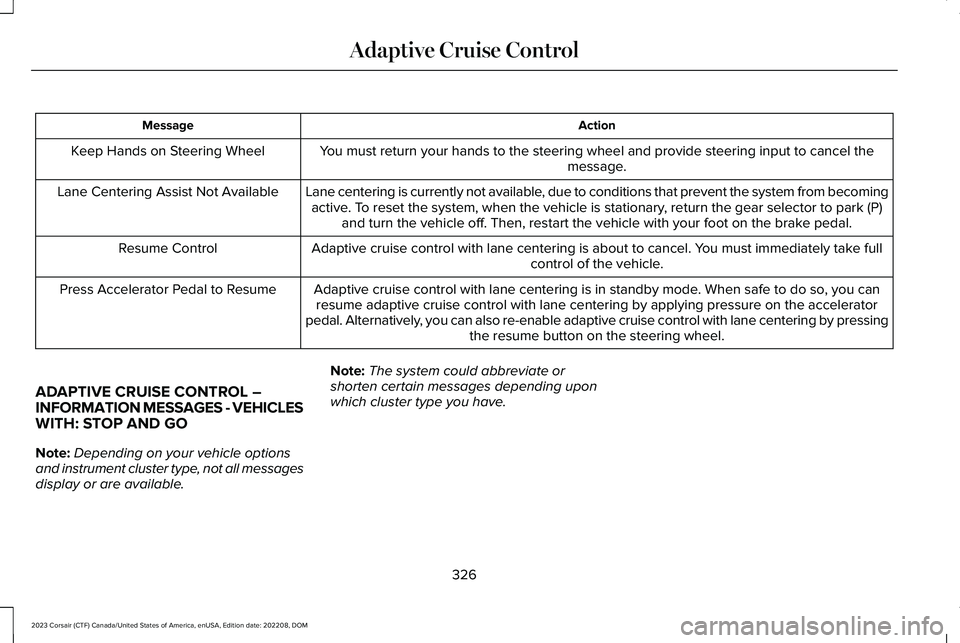
ActionMessage
You must return your hands to the steering wheel and provide steering input to cancel themessage.Keep Hands on Steering Wheel
Lane centering is currently not available, due to conditions that prevent the system from becomingactive. To reset the system, when the vehicle is stationary, return the gear selector to park (P)and turn the vehicle off. Then, restart the vehicle with your foot on the brake pedal.
Lane Centering Assist Not Available
Adaptive cruise control with lane centering is about to cancel. You must immediately take fullcontrol of the vehicle.Resume Control
Adaptive cruise control with lane centering is in standby mode. When safe to do so, you canresume adaptive cruise control with lane centering by applying pressure on the acceleratorpedal. Alternatively, you can also re-enable adaptive cruise control with lane centering by pressingthe resume button on the steering wheel.
Press Accelerator Pedal to Resume
ADAPTIVE CRUISE CONTROL –INFORMATION MESSAGES - VEHICLESWITH: STOP AND GO
Note:Depending on your vehicle optionsand instrument cluster type, not all messagesdisplay or are available.
Note:The system could abbreviate orshorten certain messages depending uponwhich cluster type you have.
326
2023 Corsair (CTF) Canada/United States of America, enUSA, Edition date: 202208, DOMAdaptive Cruise Control
Page 362 of 690

CROSS TRAFFIC ALERT
LIMITATIONS
The system may not correctly operate whenany of the following occur:
•Something is blocking the sensors.
•Adjacently parked vehicles or objects areobstructing the sensors.
•Vehicles approach at speeds less than4 mph (6 km/h) or greater than 37 mph(60 km/h).
•Your vehicle speed is greater than 7 mph(12 km/h).
•You reverse out of an angled parkingspace.
Cross Traffic Alert Limitations with aTrailer Attached
The system remains on when you attach atrailer in vehicles with blind spot informationsystem with trailer tow under the followingconditions:
•You connect a trailer.
•The trailer is a bike rack or cargo rackwith a maximum length of 3 ft (1 m).
•You set the trailer length to 3 ft (1 m) inthe instrument cluster display.
Note:The system may not correctly operatewhen towing a trailer. For vehicles with atrailer tow module and tow bar approved bythe manufacturer, the system turns off whenyou attach a trailer. For vehicles with anaftermarket trailer tow module or tow bar,we recommend that you switch the systemoff when you attach a trailer.
SWITCHING CROSS TRAFFIC
ALERT ON AND OFF
To switch cross traffic alert on or off use thetouchscreen.
1.Press Features on the touchscreen.
2.Press Driver Assistance.
3.Switch Cross Traffic Alert on or off.
Note:The system switches on every timeyou switch the ignition on. To permanentlyswitch the system off, contact an authorizeddealer.
LOCATING THE CROSS TRAFFIC
ALERT SENSORS
The sensors are behind the rear fascia onboth sides of your vehicle.
Note:Keep the sensors free from snow, iceand large accumulations of dirt.
358
2023 Corsair (CTF) Canada/United States of America, enUSA, Edition date: 202208, DOMCross Traffic AlertE205199