2023 LINCOLN CORSAIR navigation
[x] Cancel search: navigationPage 258 of 690
2.On the charging locations screen selectadd new location. You can also editsettings for previously saved locationslisted on this screen.
3.Select an address from the list of recentcharge locations.
4.Confirm that this is the location you wantto save with the help of the map view.Edit the location name if desired and seta maximum charge limit. Press continueto schedule.
Note:Depending on the GPS location, theaddress on the navigation may not preciselymatch up with your charging location.Confirm on the map that the pin is in theexpected location.
Note:Charging stops when your vehiclereaches the maximum charge limit setting.
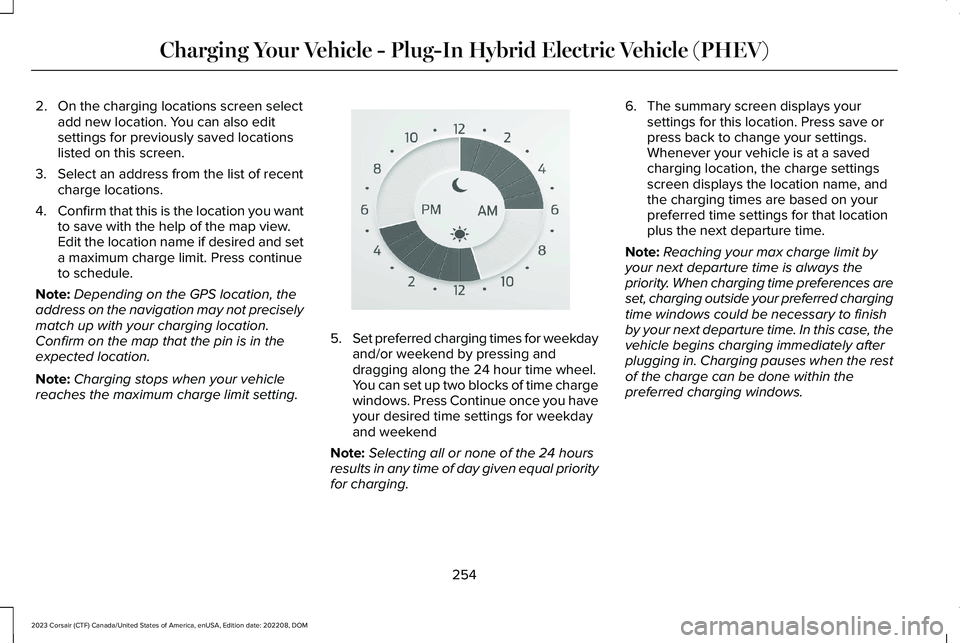
5.Set preferred charging times for weekdayand/or weekend by pressing anddragging along the 24 hour time wheel.You can set up two blocks of time chargewindows. Press Continue once you haveyour desired time settings for weekdayand weekend
Note:Selecting all or none of the 24 hoursresults in any time of day given equal priorityfor charging.
6.The summary screen displays yoursettings for this location. Press save orpress back to change your settings.Whenever your vehicle is at a savedcharging location, the charge settingsscreen displays the location name, andthe charging times are based on yourpreferred time settings for that locationplus the next departure time.
Note:Reaching your max charge limit byyour next departure time is always thepriority. When charging time preferences areset, charging outside your preferred chargingtime windows could be necessary to finishby your next departure time. In this case, thevehicle begins charging immediately afterplugging in. Charging pauses when the restof the charge can be done within thepreferred charging windows.
254
2023 Corsair (CTF) Canada/United States of America, enUSA, Edition date: 202208, DOMCharging Your Vehicle - Plug-In Hybrid Electric Vehicle (PHEV)E359594
Page 327 of 690
WARNING: The system does notactivate the turn signal.
Adaptive cruise control precautions apply topredictive speed assist unless statedotherwise or contradicted by a predictivespeed assist precaution. See AdaptiveCruise Control Precautions (page 310).
The system only applies limited braking. Youcan override the system with the acceleratorpedal or cancel the system by applying thebrakes.
The system may adapt to various factorssuch as time of day, lane width. This couldinfluence speed adjustments andaccelerations.
The system may adapt to various drivemodes. See Drive Mode Control (page 338).This could influence speed adjustments andaccelerations.
Note:The system does not activate the turnsignal automatically.
PREDICTIVE SPEED ASSISTLIMITATIONS
WARNING: The system may notalways adjust vehicle speed in certain roador weather conditions such as crossingtraffic, yield or stop signs, right of way,traffic lights, speed bumps, rain, snow, fog.You must always apply the brake oraccelerator pedal when necessary.
The road geometry and speed limitinformation provided by the navigation mapdata could be inaccurate or out of date.
The system may not detect and read speedlimit signs with conditional information, forexample, when a sign is flashing, duringspecific time ranges, or when children arepresent.
Note:The system does not set the vehiclespeed to speed limits shown with asupplementary traffic sign.
Under certain conditions, the system maynot adjust the vehicle speed until after yourvehicle passes the speed limit.
Detection of road geometry operates onlywhere related information is available. Roadgeometry information may not be availablein some areas.
SWITCHING PREDICTIVE SPEED
ASSIST MODE ON AND OFF
1.Press Features on the touchscreen.
2.Press Driver Assistance.
3.Press Cruise Control.
4.Press Adaptive Cruise Control.
5.Switch Predictive Speed Assist on or off.
ADJUSTING THE SET SPEEDTOLERANCE
1.Press Features on the touchscreen.
2.Press Driver Assistance.
3.Press Cruise Control.
4.Press Adaptive Cruise Control.
5.Switch Predictive Speed Assist on.
6.Press Tolerance.
7.Adjust the slider to set the tolerance.
323
2023 Corsair (CTF) Canada/United States of America, enUSA, Edition date: 202208, DOMAdaptive Cruise Control
Page 329 of 690
PREDICTIVE SPEED ASSIST – TROUBLESHOOTING
PREDICTIVE SPEED ASSIST – INFORMATION MESSAGES
ActionMessage
Navigation system based speed limit information is not available. If the message continues toappear, have your vehicle checked as soon as possible.Adaptive Cruise Control Speed SignRecognition Not Available
The system is going to cancel and you must take control.Driver Resume Control
ADAPTIVE CRUISE CONTROL –
TROUBLESHOOTING
ADAPTIVE CRUISE CONTROL –INFORMATION MESSAGES - VEHICLESWITH: LANE CENTERING
Note:Depending on your vehicle optionsand instrument cluster type, some messagescan appear different or not at all.
325
2023 Corsair (CTF) Canada/United States of America, enUSA, Edition date: 202208, DOMAdaptive Cruise Control
Page 334 of 690
Note:The system must meet certain locationrequirements for the hands-free mode ofActiveGlide to work.
Note:The system may require softwareupdates for hands-free mode. See VehicleSoftware Updates (page 554).
ACTIVEGLIDE™ LIMITATIONS
Any of the following conditions could resultin ActiveGlide not operating correctly:
•You do not have your vehicle centeredin the lane.
•The lane is too narrow or too wide.
•The system does not detect at least onelane marking or when lanes merge orsplit.
•You have limited steering input.
•Using the system in areas underconstruction.
•If you make any aftermarket modificationsto the steering system.
•When using a spare tire.
The driver-facing camera may not operatecorrectly due to any of the following:
•If you have a pre-existing eye condition,such as an eye misalignment, or havehad eye surgery.
•You cover your facial features by a mask,hat or other items.
•The lighting conditions changesignificantly.
•You are not in the field of view of thecamera.
•You position or tilt yourself to one side.
•You are moving around extensively.
•You are wearing glasses or sunglassesthat are too dark or reflective.
Note:The system has limited steeringassistance and may not be sufficient for alldriving situations.
Note:In exceptional conditions, such asinclement weather or direct sunlight, thesystem could deviate from the center line.
Note:The information provided by thenavigation map data could be inaccurate orout of date.
ACTIVEGLIDE™ SETTINGS
Enabling ActiveGlide
1.Press Features on the touchscreen.
2.Press Driver Assistance.
3.Press Cruise Control.
4.Press Adaptive Cruise Control.
5.Press Lane Centering with Hands-Free.
Enabling Activation Prompts
1.Press Features on the touchscreen.
2.Press Driver Assistance.
3.Press Cruise Control.
4.Press Adaptive Cruise Control.
5.Press Activation Prompts.
SWITCHING ACTIVEGLIDE™ ON
AND OFF
Switching ActiveGlide On
The controls are on the steering wheel.
330
2023 Corsair (CTF) Canada/United States of America, enUSA, Edition date: 202208, DOMActiveGlide™ (If Equipped)
Page 378 of 690

WHAT IS SPEED SIGN
RECOGNITION
Speed sign recognition detects speed limitsigns to inform you of the current speed limit.Detected speed signs appear in theinstrument cluster display.
HOW DOES SPEED SIGN
RECOGNITION WORK
Speed sign recognition uses a sensor behindthe interior mirror to detect speed signs.
If your vehicle has speed sign recognitionwith navigation, stored speed sign data mayinfluence the indicated speed limit value.
SPEED SIGN RECOGNITION
PRECAUTIONS
WARNING: You are responsible forcontrolling your vehicle at all times. Thesystem is designed to be an aid and doesnot relieve you of your responsibility todrive with due care and attention. Failureto follow this instruction could result in theloss of control of your vehicle, personalinjury or death.
WARNING: In cold and severeweather conditions the system may notfunction. Rain, snow and spray can all limitsensor performance.
WARNING: The system may notoperate properly if the sensor is blocked.Keep the windshield free from obstruction.
WARNING: Do not performwindshield repairs in the area surroundingthe sensor.
WARNING: The system may notcorrectly operate if your vehicle is fittedwith a suspension kit not approved byFord.
WARNING: Not all traffic signs canbe recognized by the system anddisplayed correctly.
Note:Always fit our original parts whenreplacing headlamp bulbs. Other bulbs mayreduce system performance. See ExteriorBulb Specification Chart (page 450).
SPEED SIGN RECOGNITION
LIMITATIONS
Speed sign recognition may not operatecorrectly due to:
•Outdated map data.
•Incorrect recognition of speed limits bythe sensor of signs on parallel roads orexit ramps.
•Missed recognition of faded, dirty, ordistorted signs.
374
2023 Corsair (CTF) Canada/United States of America, enUSA, Edition date: 202208, DOMSpeed Sign Recognition
Page 380 of 690

SPEED SIGN RECOGNITION – TROUBLESHOOTING
SPEED SIGN RECOGNITION – INFORMATION MESSAGES
ActionMessage
The traffic sign data provided by the navigation system is unavailabledue to weak or no signal. Wait for a short period of time for the signalto improve. If the message continues to appear, have the systemchecked as soon as possible.
Traffic Sign Reduced Performance See Manual
376
2023 Corsair (CTF) Canada/United States of America, enUSA, Edition date: 202208, DOMSpeed Sign Recognition
Page 447 of 690
WARNING: This vehicle may havemore than one battery. Removing thebattery cables from only one battery doesnot disconnect your vehicle electricalsystem. Make sure you disconnect thebattery cables from all batteries whendisconnecting power. Failure to do so maycause serious personal injury or propertydamage.
WARNING: For vehicles withAuto-Start-Stop the battery requirement isdifferent. You must replace the battery withone of exactly the same specification.
WHAT IS THE BATTERYMANAGEMENT SYSTEM
The battery management system monitorsbattery conditions and takes actions toextend battery life.
HOW DOES THE BATTERYMANAGEMENT SYSTEM WORK
If excessive battery drain is detected, thesystem temporarily disables some electricalsystems to protect the battery.
Systems included are:
•Heated rear window.
•Heated seats.
•Climate control.
•Heated steering wheel.
•Audio unit.
•Navigation system.
A message could appear in the informationdisplay to alert you that battery protectionactions are active. This message is only fornotification that an action is taking place, andnot intended to indicate an electrical problemor that the battery requires replacement.
BATTERY MANAGEMENT SYSTEMLIMITATIONS
After battery replacement, or in some casesafter charging the battery with an externalcharger, the battery management systemrequires eight hours of vehicle sleep time torelearn the battery state of charge. Duringthis time, your vehicle must remain fullylocked with the ignition switched off.
Note:Prior to relearning the battery state ofcharge, the battery management systemcould temporarily disable some electricalsystems.
Electrical Accessory Installation
To make sure the battery managementsystem works correctly, do not connect anelectrical device ground connection directlyto the battery negative post. This can causeinaccurate measurements of the batterycondition and potential incorrect systemoperation.
443
2023 Corsair (CTF) Canada/United States of America, enUSA, Edition date: 202208, DOMMaintenance
Page 537 of 690
Vehicle data sharing on.
Vehicle data sharing off.
Vehicle location sharing on.
Vehicle data and vehicle locationsharing on.
Vehicle Software Update
See Software Update Indicators (page 555).
Wireless Accessory Charger
Wireless accessory charger active.
HOME SCREEN
Features, such as navigation, audio andphone, are located in the main portion of thedisplay. The icons located on the side of thedisplay allow you to access other vehiclefeatures and settings.
Press to adjust system settings.
Press to view features.
Note:The icon may be different dependingon your vehicle.
Press to search for and usecompatible apps on your iOS orAndroid device.
INFORMATION ON DEMAND
SCREEN
The information on demand screen displayscards on the side of the display and allowsyou to see information from differentfeatures.
You can swipe up or down to view a differentcard.
You can swipe toward the main screen tomove the content into the main screen.
Note:This can only be done with someinformation on demand screens.
REBOOTING THE CENTER DISPLAY
You can reboot the center display using thecontrols on the steering wheel.
1.Simultaneously press and hold the seekforward and audio system power buttonfor 10 seconds.
CENTER DISPLAY OVERVIEW
VIDEOS
Lincoln SYNC 4 Basics Video Link
533
2023 Corsair (CTF) Canada/United States of America, enUSA, Edition date: 202208, DOMCenter Display Overview E335292 E353214 E280315 E335299 E353220