Page 5 of 84

4
ES350_ES250_QG_OM06255U_(U)
Parking brake switch ............................................................................................... P.24
Applying/releasing..............................................................................................................P.24
Precautions against winter season
*1
Warning buzzer/message*1
Turn signal lever ........................................................................................................ P.23
Headlight switch ....................................................................................................... P.33
Headlights/parking lights/tail lights/day time running lights .............................P.33
AHB (Automatic High Beam) ........................................................................................P.34
Windshield wiper and washer switch ................................................................. P.36
Usage .......................................................................................................................... ..............P.36
Adding washer fluid
*1
Warning messages*1
Emergency flasher switch*1
Hood lock release lever*1
Tilt and telescopic steering control switch*2/tilt and telescopic steering lock
release lever
*1, 2
Adjustment*1
Driving position memory*1, 2
Air conditioning system .......................................................................................... P.55
Usage .......................................................................................................................... ..............P.56
Rear window defogger ......................................................................................................P.55
Audio system.............................................................................................................. P.49
Trunk opener main switch
*1
*1: Refer to “OWNER’S MANUAL”.
*2: If equipped
E
F
G
H
I
J
K
L
M
Page 9 of 84
8
ES350_ES250_QG_OM06255U_(U)
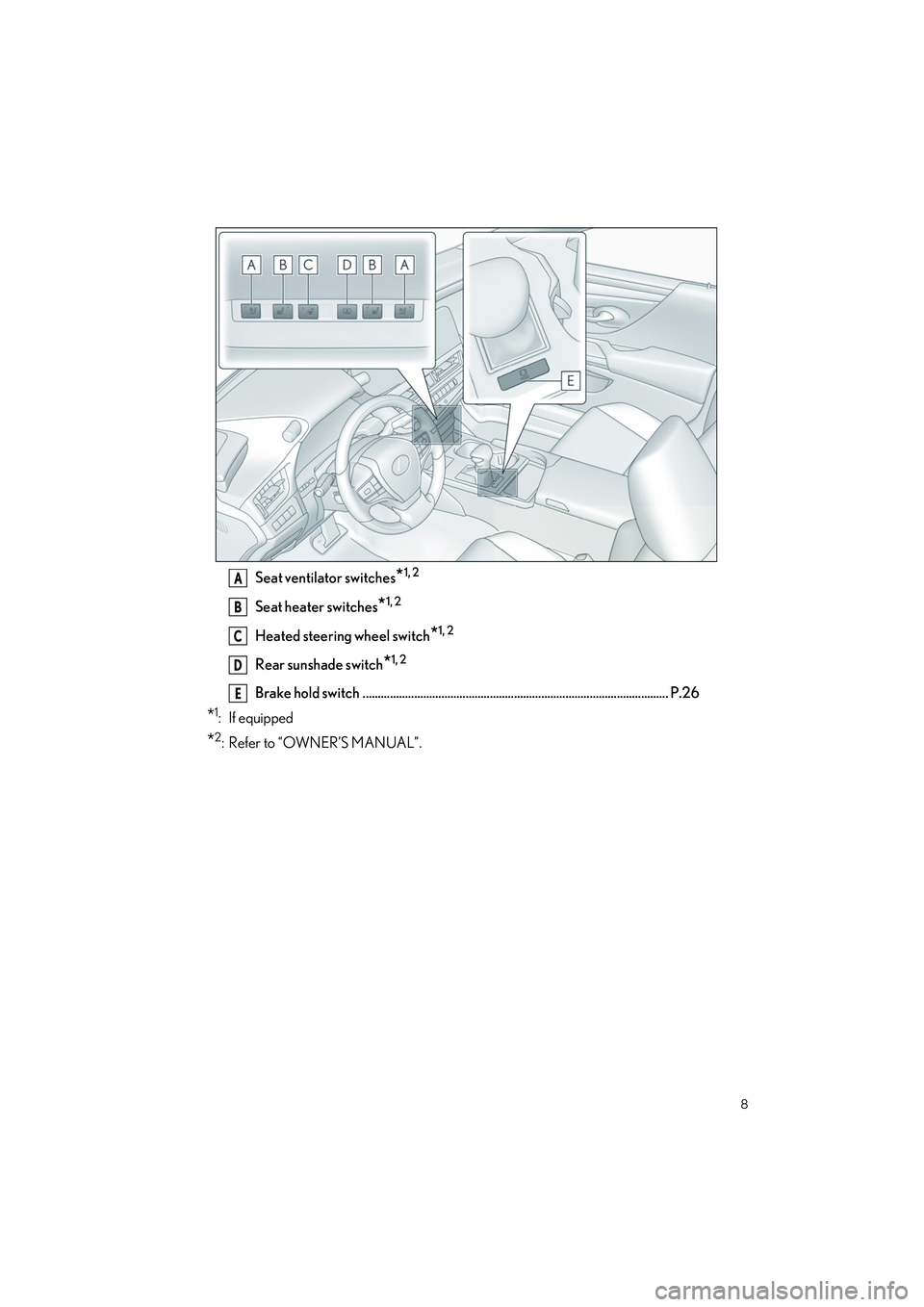
Seat ventilator switches*1, 2
Seat heater switches*1, 2
Heated steering wheel switch*1, 2
Rear sunshade switch*1, 2
Brake hold switch ..................................................................................................... P.26
*1: If equipped
*2: Refer to “OWNER’S MANUAL”.
A
B
C
D
E
Page 45 of 84

44
ES350_ES250_QG_OM06255U_(U)
A cellular phone or portable device must be registered in order to use hands-free calling or
Bluetooth
® audio. Once registration is complete, Bluetooth® will automatically be con-
nected each time the multimedia system is started.
When Apple CarPlay or Android Auto is connected via USB, the device will be automati-
cally registered.
If no Bluetooth
® device is connected, the registration screen can also be displayed by
pressing and holding the [ ] switch on the steering.
1Touch [ ] from the main menu.
2Touch [Bluetooth & Devices].
O If no device is registered, proceed to Procedure
4.
3Touch [Add another device].
O While a device is connected to the multimed ia system, the confirmation screen for dis-
connecting the device may be displayed. Disc onnect the device to perform registration.
4Touch [Search for devices].
5Touch the device to register from the main area.
O The Bluetooth
® address may be displayed instead of the device name.
O Certain models of Bluetooth
® devices may not be displayed in the device list, unless a
certain screen is displayed on the Bluetooth
® device. Refer to the Bluetooth® device’s
instruction manual for details.
Connecting a Smartphone or Communication Device
Registering a Bluetooth® device from the multimedia system
Page 47 of 84
![LEXUS ES350 2023 Owners Manual 46
ES350_ES250_QG_OM06255U_(U)
5Check that the displayed PIN code matches the PIN code displayed on the
Bluetooth
® device, and then touch [OK].
O Some Bluetooth
® devices may need to be operated t](/manual-img/36/58920/w960_58920-46.png "LEXUS ES350 2023 Owners Manual 46
ES350_ES250_QG_OM06255U_(U)
5Check that the displayed PIN code matches the PIN code displayed on the
Bluetooth
® device, and then touch [OK].
O Some Bluetooth
® devices may need to be operated t")
46
ES350_ES250_QG_OM06255U_(U)
5Check that the displayed PIN code matches the PIN code displayed on the
Bluetooth
® device, and then touch [OK].
O Some Bluetooth
® devices may need to be operated to complete registration.
O You may be prompted to install the Lexus Application on your phone. Please follow the
displayed instruction.
O Primary device settings may be displayed. Perform the operation according to the
screen guidance.
O The Apple CarPlay or Android Auto settings may be displayed. The Apple CarPlay or
Android Auto screen will be displayed if the use of either is enabled.
O A message indicating that connection is complete is displayed, and the name of the reg-
istered Bluetooth
® device is displayed in the sub menu.
O If an operation failed screen is displayed, fo llow the operation instructions on the screen.
QOperating with the steering switches
Some hands-free call functions can be operated from the steering switches, such as receiv-
ing or making calls. The steering switch functions change depending on the status of the
multimedia system.
OOperate the switches as necessary.
[+] switch
Increases the ringtone volume or receiver
volume.
Press and hold to adjust continuously.
[-] switch
Decreases the ringtone volume or receiver
volume.
Press and hold to adjust continuously.
[] switch
Calls can be made using voice command.
To end Intelligent Assistant, pr ess and hold the talk switch.
[] switch • While a call cannot be made, displays call history screen or phone menu.
• Makes a call.
• While making a call or during a call, ends the call.
• While receiving a call or during call waiting, answers the call.
Page 49 of 84
48
ES350_ES250_QG_OM06255U_(U)
Make a call from the contacts registered on the multimedia system.
1Touch [ ] from the main menu.
2Touch [Contacts].
3Select a contact.
4Touch the desired phone number.
When there is an incoming call, the incoming call sounds and the incoming call screen or
incoming call notification is displayed.
1Answer the call by doing one of the fol-
lowing.
O Touch [ ].
O Press the [ ] switch on the steering.
Hands-free calls can be made using the message function.
1Touch the blue number to make a call.
O Consecutive numbers may be recognized as phone numbers. In addition, some phone
numbers, such as phone numbers from ot her countries, may not be recognized.
Making calls from contacts
Answering calls
Making calls from the message function
Page 52 of 84
![LEXUS ES350 2023 Owners Manual 51
ES350_ES250_QG_OM06255U_(U)
OOperating SiriusXM Radio from the screen
(This function is not made available in some countries or areas)
[Ch]: Touch [ ] or [ ] to search for the receivable channels](/manual-img/36/58920/w960_58920-51.png "LEXUS ES350 2023 Owners Manual 51
ES350_ES250_QG_OM06255U_(U)
OOperating SiriusXM Radio from the screen
(This function is not made available in some countries or areas)
[Ch]: Touch [ ] or [ ] to search for the receivable channels")
51
ES350_ES250_QG_OM06255U_(U)
OOperating SiriusXM Radio from the screen
(This function is not made available in some countries or areas)
[Ch]: Touch [ ] or [ ] to search for the receivable channels. Touch and hold to
switch channels. When released, the current channel is received.
[ ]/[ ]: Fast rewind or fast forward the radio cache. Touch and hold to jump to the
start or end of the buffer.
[ ]: Pause the radio cache.
[ ]: Play the radio cache.
[Related]: Displays content related to the received channel.
[Notify me]: Select an artist or song, or both an artist and song, to receive a notification
when the corresponding broadcast starts. (When receiving a regular channel) Select a
sports team to receive a notification when the corresponding broadcast starts. (When
receiving a sport channel)
[ ]: Registers the currently received channe l in favorites. When registered, touch to
cancel.
Preset buttons of sub menu: Receive the registered channels.
O Operating with the steering switches
[<]/[>] switches
•AM/FM
Switch the frequencies or broadcasting sta-
tions registered in the preset buttons in
order.
Press and hold to switch frequencies. When
released, the broadcasting station closest to
that position with the best reception sensi-
tivity is selected automatically.
• SiriusXM Radio
Switch the channels registered in the preset buttons in order.
Press and hold to switch channels. When released, the channel closest to that position
with the best reception sensitivity is selected automatically.
Page 54 of 84
53
ES350_ES250_QG_OM06255U_(U)
[ ]: Performs repeat playback. Each touch switches the repeat setting.*
[Browse]: Displays the playback mode in the sub menu. Tracks can be selected from a
list sorted by artist, album, song, playlis t, genre, Podcast, composer, audiobook, or
radio.
[Shuffle play] is displayed when playing a track selected from the list. Touch this to
return to the playback screen and perform shuffle playback.
*: The order in which shuffle or repeat setti ngs switch depends on the connected device.
O Operating with the steering switches
[<]/[>] switches
Switches the tracks.
Press and hold to fast forward or fast
rewind. Release to start playback from that
position.
Page 55 of 84

54
ES350_ES250_QG_OM06255U_(U)
Lexus Climate Concierge can be operated using the air conditioning control screen on the
Center Display (P.56).
1Select in the main menu on the Center Display.
2Select “Climate”.
3Select “Front”.
4Select “Climate concierge”.
The indicator on the air conditioning control screen illuminates, and the automatic air condi-
tioning system, seat heaters and ventilators, and heated steering wheel operate in automatic
mode.
If any of the system is operated manually, the indicator turns off. However, all other functions
continue to operate in automatic mode.
Lexus Climate Concierge
The seat heaters (if equipped), seat ventilators (if equipped) and heated steering wheel (if
equipped) are each automatically controlled acc ording to the set temperature of the air
conditioning system, the outside and cabin temperature, etc. Lexus Climate Concierge
allows a comfortable condition to be maintained without adjusting each system.
Displaying the Lexus Climate Concierge
Turning on Lexus Climate Concierge
![LEXUS ES350 2023 Owners Manual 48
ES350_ES250_QG_OM06255U_(U)
Make a call from the contacts registered on the multimedia system.
1Touch [ ] from the main menu.
2Touch [Contacts].
3Select a contact.
4Touch the desired phone number.](/manual-img/36/58920/w960_58920-48.png "LEXUS ES350 2023 Owners Manual 48
ES350_ES250_QG_OM06255U_(U)
Make a call from the contacts registered on the multimedia system.
1Touch [ ] from the main menu.
2Touch [Contacts].
3Select a contact.
4Touch the desired phone number.")
![LEXUS ES350 2023 Owners Manual 53
ES350_ES250_QG_OM06255U_(U)
[ ]: Performs repeat playback. Each touch switches the repeat setting.*
[Browse]: Displays the playback mode in the sub menu. Tracks can be selected from a
list sorted b](/manual-img/36/58920/w960_58920-53.png "LEXUS ES350 2023 Owners Manual 53
ES350_ES250_QG_OM06255U_(U)
[ ]: Performs repeat playback. Each touch switches the repeat setting.*
[Browse]: Displays the playback mode in the sub menu. Tracks can be selected from a
list sorted b")