Page 2 of 84

1
ES350_ES250_QG_OM06255U_(U)
Pictorial Index ............................................................................................................................. 3
For safe use Floor Mat Installation......................................................................................................... ..............11
Entering and Exiting Keys ...................................................................................................................................................... 12
Smart Access System with Push-butto n Start .................................................................... 14
When Driving Front Seats .................................................................................................................... ..................... 16
Engine (Ignition) Switch ............................................................................................................... 17
Automatic Transmission ......................................................................................................... ....20
Turn Signal Lever .............................................................................................................. .............23
Parking Brake.................................................................................................................. ................ 24
Brake Hold ..................................................................................................................... .................. 26
Multi-information Display...................................................................................................... ..... 27
Head-up Display ................................................................................................................ ........... 30
Headlights.........................................................................................................................................33
AHB (Automatic High Beam)..................................................................................................34
Windshield Wipers and Washer.............................................................................................36
Contents
The Quick Guide is not intended as a substitute for yourOWNER’S MANUAL. We strongly encourage you to review
the OWNER’S MANUAL and supplementary manuals so you
will have a better understanding of your vehicle’s capabilities
and limitations.
Page 5 of 84

4
ES350_ES250_QG_OM06255U_(U)
Parking brake switch ............................................................................................... P.24
Applying/releasing..............................................................................................................P.24
Precautions against winter season
*1
Warning buzzer/message*1
Turn signal lever ........................................................................................................ P.23
Headlight switch ....................................................................................................... P.33
Headlights/parking lights/tail lights/day time running lights .............................P.33
AHB (Automatic High Beam) ........................................................................................P.34
Windshield wiper and washer switch ................................................................. P.36
Usage .......................................................................................................................... ..............P.36
Adding washer fluid
*1
Warning messages*1
Emergency flasher switch*1
Hood lock release lever*1
Tilt and telescopic steering control switch*2/tilt and telescopic steering lock
release lever
*1, 2
Adjustment*1
Driving position memory*1, 2
Air conditioning system .......................................................................................... P.55
Usage .......................................................................................................................... ..............P.56
Rear window defogger ......................................................................................................P.55
Audio system.............................................................................................................. P.49
Trunk opener main switch
*1
*1: Refer to “OWNER’S MANUAL”.
*2: If equipped
E
F
G
H
I
J
K
L
M
Page 9 of 84
8
ES350_ES250_QG_OM06255U_(U)
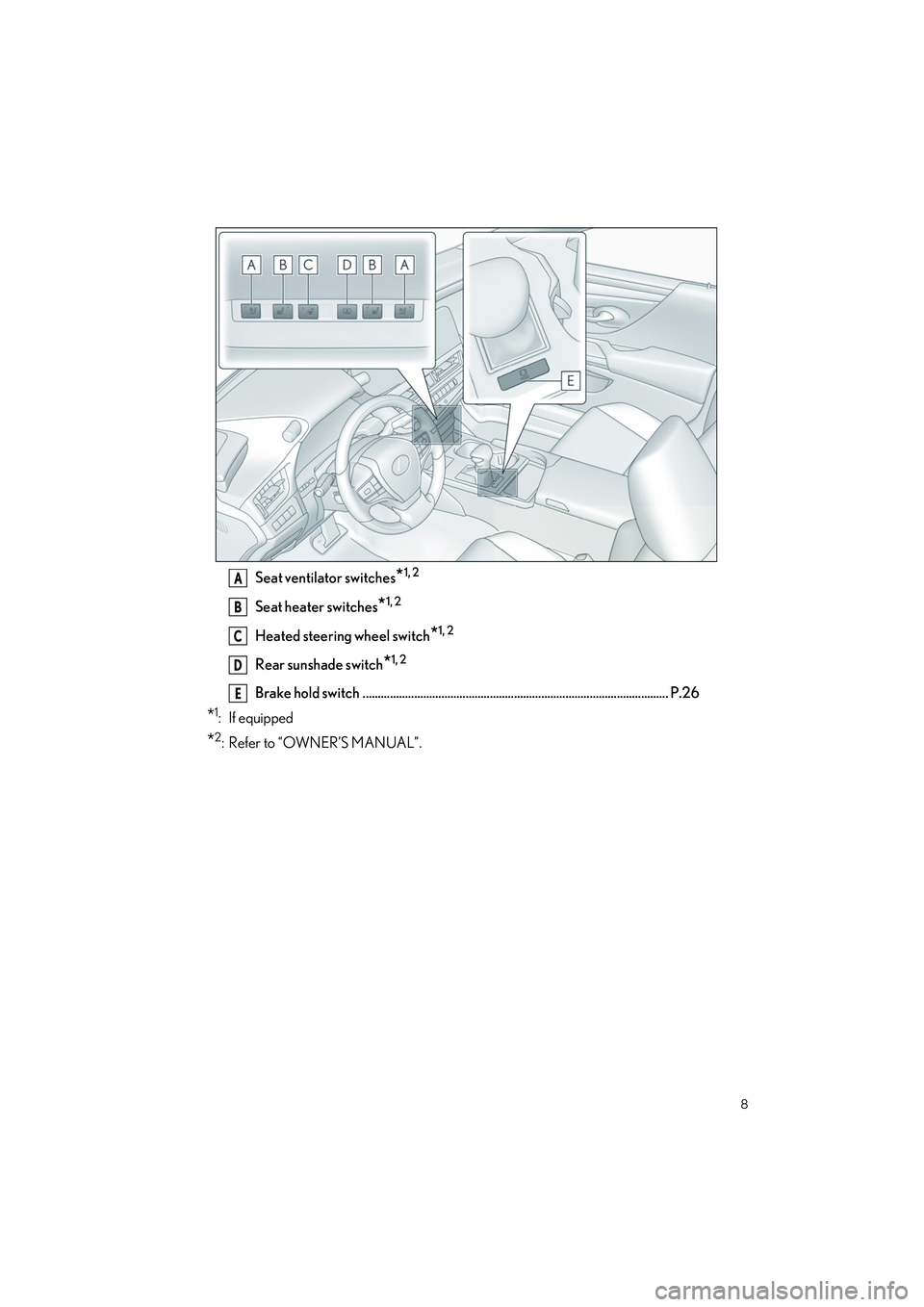
Seat ventilator switches*1, 2
Seat heater switches*1, 2
Heated steering wheel switch*1, 2
Rear sunshade switch*1, 2
Brake hold switch ..................................................................................................... P.26
*1: If equipped
*2: Refer to “OWNER’S MANUAL”.
A
B
C
D
E
Page 18 of 84
17
ES350_ES250_QG_OM06255U_(U)
1Press the parking brake switch to
check that the parking brake is set.
( P.24)
Parking brake indicator will come on.
2Check that the shift lever is in P
3Firmly depress the brake pedal.
and a message will be dis-
played on the multi-information dis-
play. If it is not displayed, the engine
cannot be started.
4Press the engine switch shortly and firmly.
When operating the engine switch, one short, firm press is enough. It is not necessary
to press and hold the switch.
The engine will crank until it starts or for up to 30 seconds, whichever is less. Continue
depressing the brake pedal until the engine is completely started.
The engine can be started from any engine switch mode.
Engine (Ignition) Switch
Performing the following operations when carrying the electronic key on your person
starts the engine or chan ges engine switch modes.
Starting the engine
Page 19 of 84
18
ES350_ES250_QG_OM06255U_(U)
1Stop the vehicle completely.
2Set the parking brake (P.24), and shift the shift lever to P ( P.20).
3Press the engine switch.
4Release the brake pedal and check that “ACCESSORY” or “IGNITION ON” is not
shown on the meter.
Modes can be changed by pressing the engine switch with the brake pedal released. (The
mode changes each time the switch is pressed.)
1Off*
The emergency flashers can be used.
2ACCESSORY mode
Some electrical components such as
the audio system can be used.
“ACCESSORY” will be displayed on
the meter.
3IGNITION ON mode
All electrical components can be used.
“IGNITION ON” will be displayed on
the meter.
*: If the shift lever is in a position other than
P when turning off the engine, the
engine switch will be turned to ACCES-
SORY mode, not to off.
Stopping the engine
Changing engine switch modes
Page 20 of 84
19
ES350_ES250_QG_OM06255U_(U)
Only in an emergency, such as if it becomes impossible to stop the vehicle in the normal way,
stop the vehicle using the following procedure:
1Steadily step on the brake pedal with both feet and firmly depress it.
Do not pump the brake pedal repeatedly as this will increase the effort required to slow
the vehicle.
2Shift the shift lever to N.
If the shift lever is shifted to N
3After slowing down, stop the vehicle in a safe place by the road.
4Stop the engine.
If the shift lever cannot be shifted to N
3Keep depressing the brake pedal with both feet to reduce vehicle speed as much as
possible.
4To stop the engine, press and hold the
engine switch for 2 consecutive sec-
onds or more, or press it briefly 3 times
or more in succession.
5Stop the vehicle in a safe place by the road.
If your vehicle has to be stopped in an emergency
Page 21 of 84
20
ES350_ES250_QG_OM06255U_(U)
While the engine switch is in IGNITION ON mode and the brake pedal
depressed
*, shift the shift lever while pushing the shift release button on the shift knob.
Shift the shift lever while pushing the shift release button on the shift knob.
Shift the shift lever normally.
When shifting the shift lever between P and D, make sure that the vehicle is completely
stopped and the brake pedal is depressed.
*: For the vehicle be able to be shifted from P, the brake pedal must be depressed before the shift release button is pushed. If the shif t release button is pushed first, the shift lock
will not be released.
Automatic Transmission
Shifting the shift lever
Page 25 of 84
24
ES350_ES250_QG_OM06255U_(U)
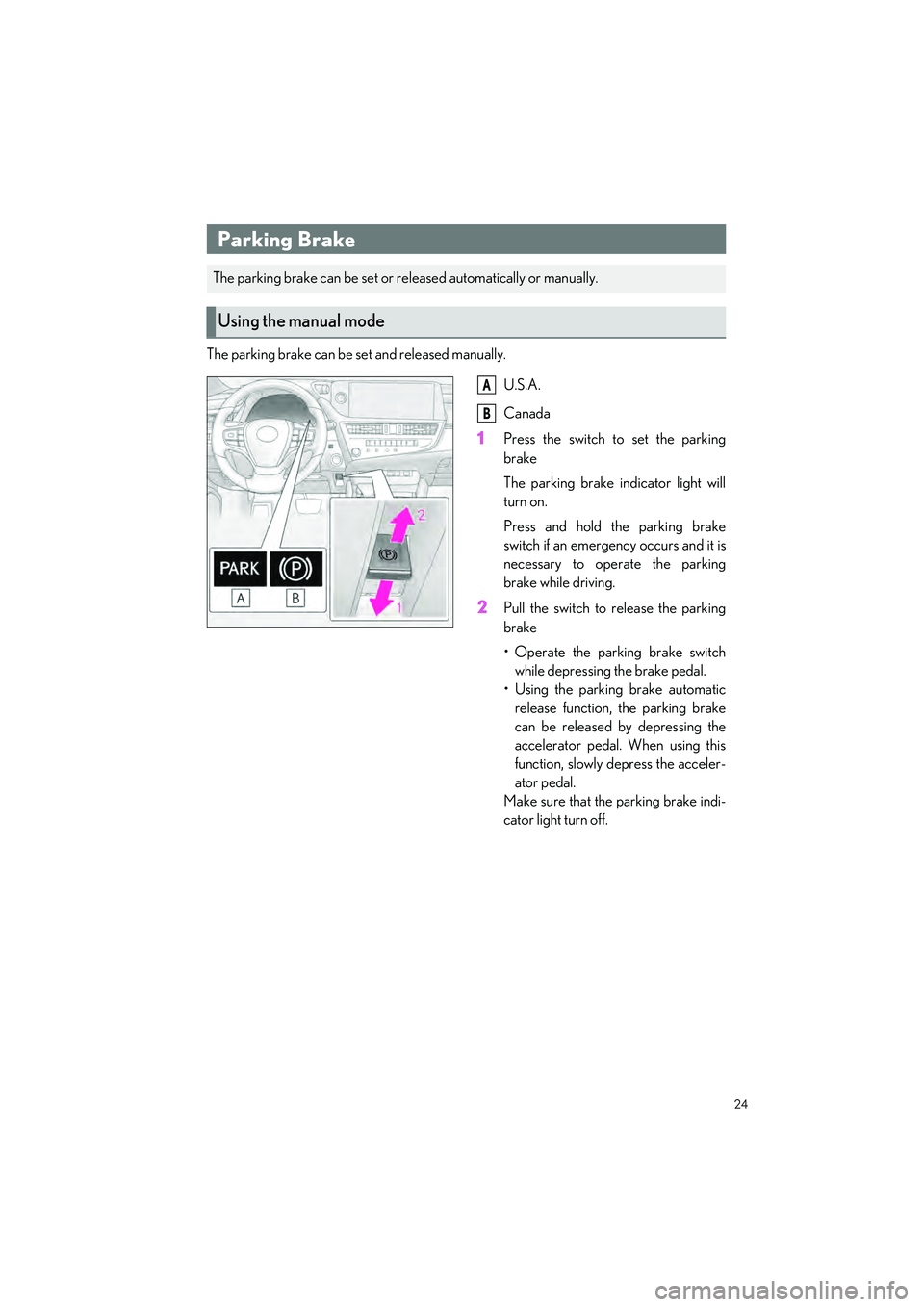
The parking brake can be set and released manually.U.S.A.
Canada
1Press the switch to set the parking
brake
The parking brake indicator light will
turn on.
Press and hold the parking brake
switch if an emergency occurs and it is
necessary to operate the parking
brake while driving.
2Pull the switch to release the parking
brake
• Operate the parking brake switchwhile depressing the brake pedal.
• Using the parking brake automatic release function, the parking brake
can be released by depressing the
accelerator pedal. When using this
function, slowly depress the acceler-
ator pedal.
Make sure that the parking brake indi-
cator light turn off.
Parking Brake
The parking brake can be set or re leased automatically or manually.
Using the manual mode
A
B