Page 126 of 364
5-6
Map screen
The map screen provides various functions and informations, as follows:
j
ih
k
a
b
c
d
e
f
lmn
g
Option A
o
2SWLRQ�%��(9\
�RQO\\f
a a Displays the Home screen.
b b Used to change the map display mode.
� (North Up 2D): Displays the map with the north fixed at the top.
� (Heading Up 2D): Rotates the map depending on the driving direction.
� (Heading Up 3D): Rotates the map depending on the driving direction for 3D view.
c c Adjust the navigation sound volume.
d d Zooms in the map.
e e Set the map scale change mode to automatic or manual.
f f Zooms out the map.
Page 131 of 364
5-11
2 Enter the location data such as place name, address, or coordinates and
then press OK.
A
To access the online user's manual on the Search screen, press >
User's Manual
on Web (QR Code) and then scan the displayed QR code.
A
When there are any similar matches, the recommendations appear at the left of
keypad.
3 Select a destination from the search result.
A
You can see the sites in the list on the preview screen at the right.
A
To sort the search results in a different order, press on the attribute to toggle between
options.
4 Check the location of the destination and then press Set as Destination.
A
If you press Parking at the bottom right of the screen, the map screen displays the
location icon of the parking a lot.
5 Select a route and press Start Guidance.
Page 132 of 364
5-12
Searching for nearby points of interest(POI)
You can set a destination after searching the nearby points of interest by the category.
1 On the Navigation Menu screen, press POI Categories.
AAvailable icons and their arrangement may differ depending on the vehicle model
and specifications.
2 Select a desired point according to the instructions.
A
To access the online user's manual on the POI Categories screen, press >
User's
Manual on Web (QR Code) and then scan the displayed QR code.
A
The screen may differ depending on the vehicle model and specifications.
Page 135 of 364
5-15
2 Select the desired destination from the list.
A
To access the online user's manual on the Previous Destinations screen, press >
User's Manual on Web (QR Code) and then scan the displayed QR code.
A
To sort the search results in a different order, press on the attribute to toggle between
options.
3 Check the location of the destination and then press Set as Destination.
4 Select a route and press Start Guidance.
Deleting a previous destination
1 On the Previous Destinations screen, press Delete.
2 Select the destination(s) to delete and press Delete.
You can delete the selected place(s) or all places.
Searching for Kia Dealerships
You can easily search for service centers or service stations.
1 On the Navigation Menu screen, press Kia Dealerships.
A
Available icons and their arrangement may differ depending on the vehicle model
and specifications.
Page 136 of 364
5-16
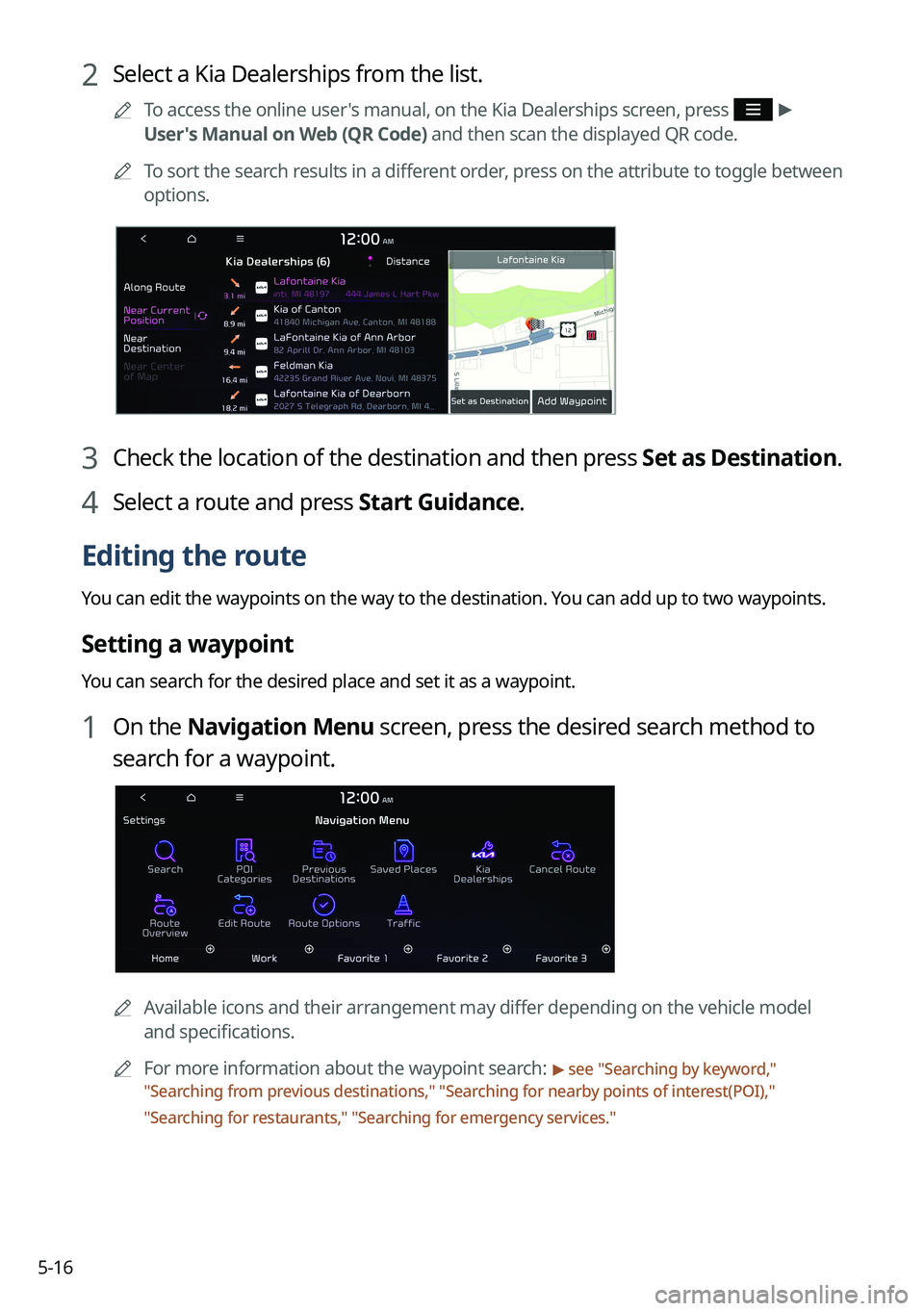
2 Select a Kia Dealerships from the list.
A
To access the online user's manual, on the Kia Dealerships screen, press >
User's Manual on Web (QR Code) and then scan the displayed QR code.
A
To sort the search results in a different order, press on the attribute to toggle between
options.
3 Check the location of the destination and then press Set as Destination.
4 Select a route and press Start Guidance.
Editing the route
You can edit the waypoints on the way to the destination. You can add up to two waypoints.
Setting a waypoint
You can search for the desired place and set it as a waypoint.
1 On the Navigation Menu screen, press the desired search method to
search for a waypoint.
A
Available icons and their arrangement may differ depending on the vehicle model
and specifications.
A
For more information about the waypoint search:
> see "Searching by keyword,"
" Searching from previous destinations," "Searching for nearby points of interest(POI),"
" Searching for restaurants," "Searching for emergency services."
Page 137 of 364
5-17
2 On the map for a search, press Add Waypoint.
The selected waypoint is added to the route.
3 After adding waypoints, press Calculate.
A
To access the online user's manual on the Edit Route screen, press >
User's
Manual on Web (QR Code) and then scan the displayed QR code.
4 Select the updated route and then press Start Guidance.
Changing the order of waypoints
You can change the order of waypoints on the route.
1 On the Navigation Menu screen, press Edit Route.
2 Select a waypoint to change the order and then press Change Order.
A
To change the order of waypoints, press Change Order, then drag it to reposition.
A
To add another waypoint on the Edit Route screen, press Add Waypoint.
A
To see waypoint on the map, press waypoint name >
Map.
Page 139 of 364
5-19
3 Select the roads to avoid and press Reroute.
A
To access the online user's manual on the Route Info. / Avoid screen, press >
User's Manual on Web (QR Code) and then scan the displayed QR code.
4 Press Yes .
5 Select the updated route and then press Start Guidance.
A
When there is any zone under construction ahead on the way, you are prompted to
confirm whether or not to exclude the zone from the route. To avoid the zone, press Yes
to resume routing.
Changing the route search option
You can change the route search option.
1 On the Navigation Menu screen, press Route Options.
2 Select a route and press Route Options.
Page 140 of 364
5-20
3 Select the search option and press Calculate.
A
To access the online user's manual on the Route Options screen, press >
User's
Manual on Web (QR Code) and then scan the displayed QR code.
A
Available options may differ depending on the vehicle model and specifications.
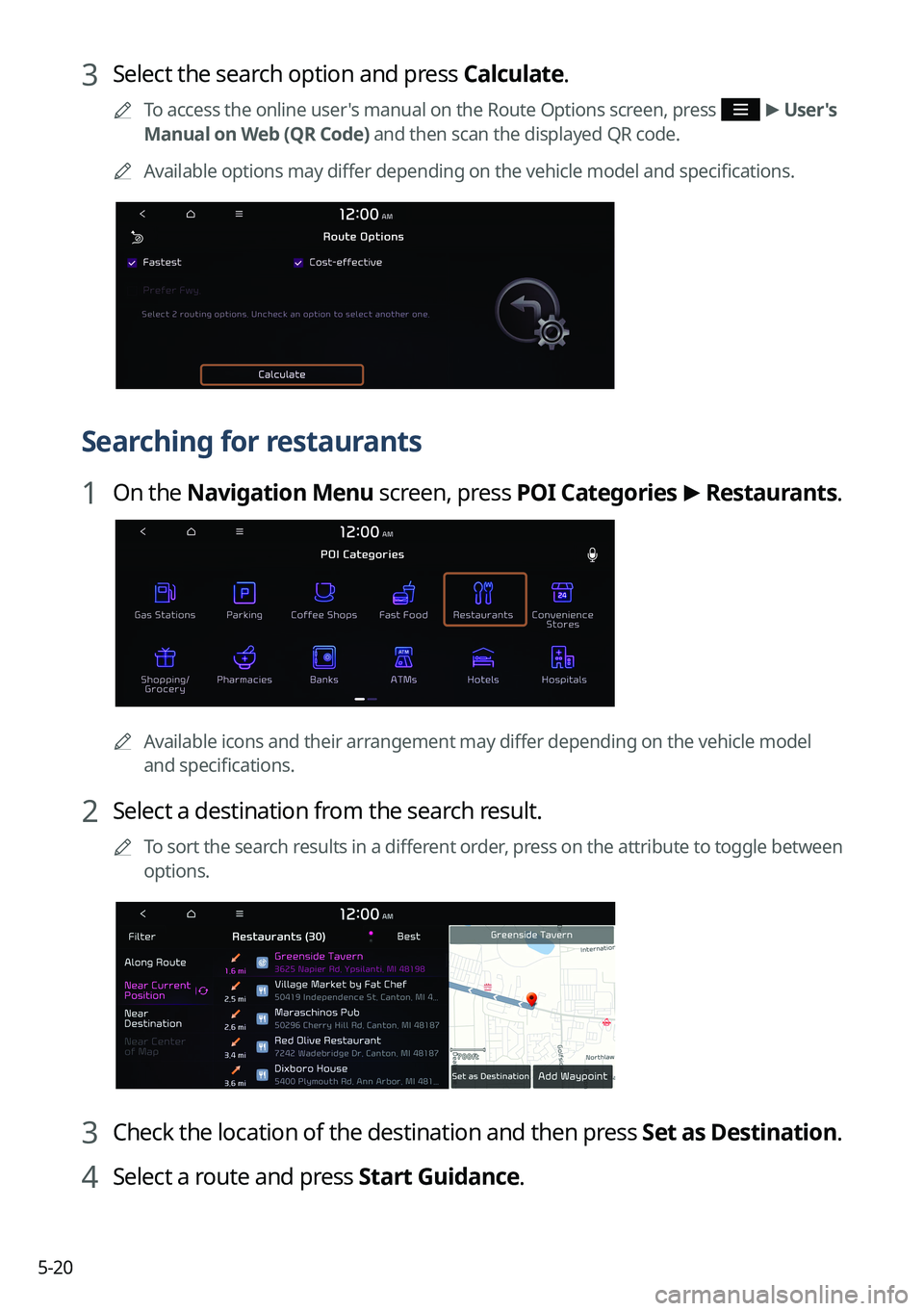
Searching for restaurants
1 On the Navigation Menu screen, press POI Categories >
Restaurants.
A
Available icons and their arrangement may differ depending on the vehicle model
and specifications.
2 Select a destination from the search result.
A
To sort the search results in a different order, press on the attribute to toggle between
options.
3 Check the location of the destination and then press Set as Destination.
4 Select a route and press Start Guidance.