2023 JEEP WRANGLER door lock
[x] Cancel search: door lockPage 52 of 396

50GETTING TO KNOW YOUR VEHICLE
TROUBLESHOOTING TIPS
If you are having trouble programming HomeLink®, here
are some of the most common solutions:
Replace the battery in the garage door opener
hand-held transmitter.
Push the LEARN button on the garage door opener to
complete the training for a rolling code.
Did you unplug the device for programming and
remember to plug it back in?
If you have any problems, or require assistance, please
call toll-free 1-800-355-3515 or, on the Internet at
HomeLink.com for information or assistance.
EXTERIOR LIGHTS
HEADLIGHT SWITCH
The headlight switch is located on the left side of the
instrument panel. This switch controls the operation of the
headlights, parking lights, automatic headlights (if
equipped), instrument panel lights, interior lights, and fog
lights (if equipped).
Headlight Switch Headlight Switch (Vehicles Sold In Canada)
NOTE:Vehicles sold in Canada are equipped with a headlight
switch with an AUTO and ON detent but without an OFF
detent. Headlights will be deactivated when the headlight
switch is placed in the parking lights position. However,
the Daytime Running Lights (DRLs) will be activated along
with the front and rear marker lights. The DRLs may be
deactivated when the parking brake is engaged.
Rotate the headlight switch clockwise to the first detent
for parking light and instrument panel light operation.
Rotate the headlight switch to the second detent for
headlight, parking light, and instrument panel light
operation.
WARNING!
Vehicle exhaust contains carbon monoxide, a
dangerous gas. Do not run your vehicle in the garage
while programming the transceiver. Exhaust gas can
cause serious injury or death.
Your motorized door or gate will open and close while
you are programming the universal transceiver. Do
not program the transceiver if people, pets or other
objects are in the path of the door or gate. Only use
this transceiver with a garage door opener that has a
“stop and reverse” feature as required by Federal
safety standards. This includes most garage door
opener models manufactured after 1982. Do not use
a garage door opener without these safety features.
1 — Headlight Control
2 — Fog Light Switch
3 — Dimmer Control
1 — Headlight Control
2 — Fog Light Switch
3 — Dimmer Control
23_JL_OM_EN_USC_t.book Page 50
Page 53 of 396

GETTING TO KNOW YOUR VEHICLE51
NOTE:For vehicles sold in Canada, rotate the headlight switch
clockwise from the parking lights and instrument panel
lights position to the first detent to turn on headlights,
parking lights, and instrument panel lights. Rotate the
headlight switch to the second detent for the AUTO
position.
DAYTIME RUNNING LIGHTS (DRLS) —
I
F EQUIPPED
The Daytime Running Lights are active when the low
beams are not on, and the engine is running. DRLs may be
deactivated by applying the parking brake.
NOTE:
For vehicles sold in Canada, the Daytime Running
Lights will automatically deactivate when the front fog
lights are turned on.
On some vehicles, the Daytime Running Lights may
deactivate, or reduce intensity, on one side of the
vehicle (when a turn signal is activated on that side), or
on both sides of the vehicle (when the hazard warning
lights are activated).
HIGH/LOW BEAM SWITCH
Push the multifunction lever toward the instrument panel
to switch the headlights to high beams. The lever will
return to the centered position. To return the headlights to
low beam, pull the lever toward the steering wheel, or
push the lever toward the instrument panel.
Multifunction Lever
AUTOMATIC HIGH BEAM HEADLAMP
C
ONTROL — IF EQUIPPED
The Automatic High Beam Headlamp Control system
provides increased forward lighting at night by
automatically controlling the high beams through the use
of a camera mounted on the vehicle’s header. This
camera detects vehicle specific light and automatically
switches from high beams to low beams until the
approaching vehicle is out of view.
NOTE:
The Automatic High Beam Headlamp Control can be
turned on or off by selecting “ON” under “Auto High
Beam” within your Uconnect Settings
Úpage 184, as
well as turning the headlight switch to the AUTO posi -
tion and placing the multifunction lever in the high
beam position.
Broken, muddy, or obstructed headlights and taillights
of vehicles in the field of view will cause headlights to
remain on longer (closer to the vehicle). Also, dirt, film,
and other obstructions on the windshield or camera
lens will cause the system to function improperly.
FLASH-TO-PASS
You can signal another vehicle with your headlights by
lightly pulling the multifunction lever toward you. This will
cause the high beam headlights to turn on, and remain on,
until the lever is released.
AUTOMATIC HEADLIGHTS — IF EQUIPPED
This system automatically turns the headlights on or off
according to ambient light levels. To turn the system on,
rotate the headlight switch clockwise to the last detent for
automatic headlight operation. When the system is on, the
headlight time delay feature is also on. This means the
headlights will stay on for up to 90 seconds after you place
the ignition into the OFF position. To turn the automatic
system off, move the headlight switch out of the AUTO
position.
NOTE:The engine must be running before the headlights will
come on in the automatic mode.
LIGHTS-ON REMINDER
If the headlights, parking lights, or cargo lights are left on
after the ignition is placed in the OFF position, a chime will
sound when the driver’s door is opened.
2
23_JL_OM_EN_USC_t.book Page 51
Page 54 of 396

52GETTING TO KNOW YOUR VEHICLE
FRONT FOG LIGHTS — IF EQUIPPED
To activate the Front Fog Lights, turn on the parking lights
or low beam headlights and push the fog light switch.
Pushing the fog light switch a second time will turn the
front fog lights off.
Front Fog Light Switch
Front Fog Light Switch (Vehicles Sold In Canada)
TURN SIGNALS
Move the multifunction lever up or down to activate the
turn signals. The arrows on each side of the instrument
cluster flash to show proper operation.
NOTE:If either light remains on and does not flash, or there is a
very fast flash rate, check for a defective outside light
bulb.
LANE CHANGE ASSIST — IF EQUIPPED
Lightly push the multifunction lever up or down, without
moving beyond the detent, and the turn signal will flash
three times then automatically turn off.
INTERIOR LIGHTS
INTERIOR COURTESY LIGHTS
The courtesy lights will turn on when the front doors are
opened, by rotating the dimmer controls on the headlight
switch fully upward, or, if equipped, when the unlock
button is pushed on the key fob. The interior courtesy lights are located in the center of the
vehicle’s sport bar, and consist of one large center light
and four smaller reading lights. Each reading light can be
turned on by pushing the lens. Pushing the lens a second
time will turn the light off.
Dome Lights
When a door is open and the interior lights are on, rotating
the dimmer control to the extreme bottom position will
cause all the interior lights to turn off. This allows the
doors to stay open for extended periods of time without
discharging the vehicle’s battery.
23_JL_OM_EN_USC_t.book Page 52
Page 68 of 396

66GETTING TO KNOW YOUR VEHICLE
AUTO-DOWN FEATURE
The driver door power and the passenger door power
window switches have an Auto-Down feature. Push the
window switch down to the second detent and release,
and the window will go down automatically.
To stop the window from going all the way down during the
Auto-Down operation, pull up on the switch briefly.
WINDOW LOCKOUT SWITCH
Window Lockout Switch
The window lockout switch allows you to disable the
window controls on the rear passenger doors. To disable
the window controls, rotate the switch downward. To
enable the window controls, rotate the switch upward.
WIND BUFFETING
Wind buffeting can be described as the perception of
pressure on the ears or a helicopter-type sound in the
ears. Your vehicle may exhibit wind buffeting with the
windows down in certain open or partially open positions.
This is a normal occurrence and can be minimized. If the
buffeting occurs with the rear windows open, open the
front and rear windows together to minimize the buffeting.
WRANGLER TOPS
PROVIDED TOOLS
For your convenience, a tool kit is provided with your
vehicle located in the center console. This kit includes the
necessary tools required for the operations described in
the following sections. All pieces fit into the ratchet for
easy use.
NOTE:The soft top and the hard top are to be used inde -
pendently. Your vehicle warranty will not cover damage
resulting from both tops being installed at the same time.
Provided Tools
If your vehicle is equipped with a Dual Top (four door
models only), the soft top system will be provided in a
separate box located in the rear of the vehicle for shipping
purposes only.
WARNING!
There is no anti-pinch protection when the window is
almost closed. Be sure to clear all objects from the
window before closing.
1 — Ratchet
2 — #T50 Torx Head Driver
3 — #T40 Torx Head Driver
4 — 15 mm Socket
23_JL_OM_EN_USC_t.book Page 66
Page 88 of 396

86GETTING TO KNOW YOUR VEHICLE
NOTE:
All hard top removal and installation instructions are
applicable to both two and four door model vehicles.
Images shown are of four door models, and appear -
ance of two door model components may differ.
The left side panel must be removed before removing
the right side panel.
To remove the hard top front panel(s), proceed as follows:
1. Fold down the sun visor against the windshield.
2. Turn the three L-shaped locks on the left side panel (one at the front, the rear, and outside), unlocking
them from the roof.
Step Two
3. Unlatch the left side header panel latch located at the top of the windshield.
Step Three
4. Remove the left side panel.
5. Repeat the previous steps to remove the right side panel.
Hard Top Panel(s) Storage Bag —
If Equipped
The Freedom Top panels storage bag allows you to store
your hard top panels. The storage bag contains two
compartments.
Lay the bag for the Freedom Top panels down so the loops
and hooks are facing upward. Unzip the bag and fold back
the outer flap.
NOTE:Ensure the front panel latch is closed prior to inserting the
panel into the panels bag.
1. Insert the left side hard top panel into the bag with
the latches facing upward.
2. Unfold the black panel divider (ensure the divider is lying flat).
3. Insert the right side Freedom Top panel into the bag with the latches facing downward.
NOTE:Ensure the front panel latch is closed prior to inserting the
panel into the bag.
4. Unfold the outer flap and zip the hard top bag closed.
Step Four
5. Lift the Freedom Top bag into the vehicle with the hooks and straps facing the back of the rear seat.
Attach the clip at the bottom of the bag to the child
restraint anchorage, located at the base of the rear
seat.
6. Wrap the upper strap around the rear head restraints and loop the strap through the buckle. Pull on the
strap to tighten the Freedom Top bag securely
against the rear seat.
1 — Header Panel Latched
2 — Unlatched Position
23_JL_OM_EN_USC_t.book Page 86
Page 89 of 396
GETTING TO KNOW YOUR VEHICLE87
HARD TOP FRONT PANEL(S)
I
NSTALLATION
1. Open the header latch inside the vehicle, and the
three L-shaped locks on each panel.
2. Set the right side panel on the windshield frame with the locating pin in the front receiver mounting hole
followed by the left side panel, making sure there is
no overhang. Also, make sure that the panels are
sitting flush with the body.
3. Reinstall the panel(s) using the same steps for removal in reverse order.
NOTE:To prevent water leaks, the seals and hard top panels
should be clear of any dust and debris prior to reinstal -
lation.
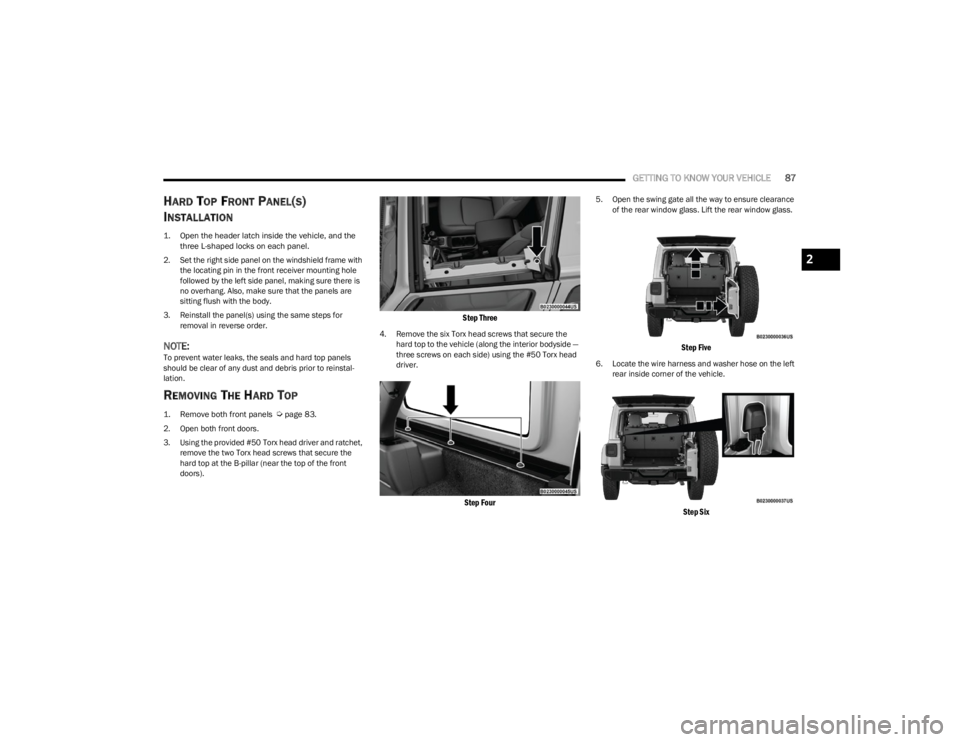
REMOVING THE HARD TOP
1. Remove both front panels
Ú
page 83.
2. Open both front doors.
3. Using the provided #50 Torx head driver and ratchet, remove the two Torx head screws that secure the
hard top at the B-pillar (near the top of the front
doors).
Step Three
4. Remove the six Torx head screws that secure the hard top to the vehicle (along the interior bodyside —
three screws on each side) using the #50 Torx head
driver.
Step Four
5. Open the swing gate all the way to ensure clearance of the rear window glass. Lift the rear window glass.
Step Five
6. Locate the wire harness and washer hose on the left rear inside corner of the vehicle.
Step Six
2
23_JL_OM_EN_USC_t.book Page 87
Page 92 of 396

90GETTING TO KNOW YOUR VEHICLE
3. Swing the front frame bracket around the side of the
rail, and insert the door rail attachment bolt (provided
bolt without spacer) from underneath. Tighten with a
#40 Torx head driver until snug.
Attach Front Door Rail Bolt
4. Insert the rear door rail attachment bolt (provided bolt with spacer) from underneath. Tighten with
#40 Torx head driver until snug.
Attach Rear Door Rail Bolt
5. Repeat steps 3 and 4 on the other side of the vehicle.
NOTE:The recommended torque specification for the front and
rear door rail attachment bolts is 8.8 ft-lb (12 N·m).
6. Attach the rear clamp at the rear center of the Sunrider® top using the two provided rear clamp
attachment bolts. Tighten with #40 Torx head driver
until snug.
Rear Clamp Location
NOTE:The recommended torque specification for the rear clamp
attachment bolts is 3.7 ft-lb (5 N·m).
7. From inside the vehicle, lift and pull the Sunrider® top forward using the integrated handle on the front
header of the top. Manually guide the top into the
closed position.
Push Sunrider® Top Forward
8. From inside the vehicle, pull the handle on the header latch downward to engage the hook into its receiver.
Pull the handle back upward while squeezing the
hook, locking the latch into place. Repeat on the
other side.
Engage Both Header Latches
23_JL_OM_EN_USC_t.book Page 90
Page 95 of 396

GETTING TO KNOW YOUR VEHICLE93
Ignition Off Operation
The power top switch can remain active in Accessory Delay
for up to approximately 10 minutes after the vehicle’s
ignition is placed to the OFF position. Opening either front
door will cancel this feature.
NOTE:Ignition Off time is programmable through the Uconnect
system Úpage 184.
Relearn Procedure
For vehicles equipped with a power top, there is a relearn
procedure that allows you to calibrate the power top when
the “Express Mode” stops working. To reset the power top,
follow these steps:
1. Place the ignition in the RUN position, and start the
vehicle.
NOTE:The engine must be running to perform the relearn
procedure.
2. Ensure the power top is in the fully closed position.
3. Push and hold the Close switch for 10 seconds. This will put the power top into calibration mode.
4. Continue holding down the close button while the top goes fully open and then back to fully close.
5. Once the power top has stopped in the fully closed position, release the close button. The power top is
now reset and ready to use.
NOTE:If the close button is released anytime during the
relearning process, the relearn may not be complete, and
the procedure must be repeated.
Rear Quarter Window Removal
On vehicles equipped with a Power Sliding Top, the rear
quarter windows can be removed. To remove these
windows, follow this procedure:
1. Open the swing gate, and lift the rear window.
2. Open both side doors nearest the quarter windows.
3. Locate the rear quarter window latches (two on each window) on the interior of the windows.
4. Rotate the left hand side latch clockwise to release.
5. Rotate the right hand side latch counterclockwise to
release.
Step Five
6. From the outside of the vehicle, lift each window upward and away from the vehicle.
NOTE:Do not pull down or apply any weight to the windows after
the latches are released. Damage could result to the pins
holding the windows in place.
Step Six
Step Six
1 — Rotate Left Handle Clockwise
2 — Rotate Right Handle Counterclockwise
2
23_JL_OM_EN_USC_t.book Page 93