2023 JEEP WRANGLER ECU
[x] Cancel search: ECUPage 43 of 396

GETTING TO KNOW YOUR VEHICLE41
(Continued)
HEATED SEATS — IF EQUIPPED
The heated seat control buttons are located on
the center instrument panel below the
touchscreen and also in the Climate Control
touchscreen menu.
Press the heated seat button once to turn the HI setting
on.
Press the heated seat button a second time to turn the
MED setting on.
Press the heated seat button a third time to turn the LO
setting on.
Press the heated seat button a fourth time to turn the
heating elements off.
NOTE:
The engine must be running for the heated seats to
operate.
The level of heat selected will stay on until the operator
changes it.
For information on use with the Remote Start system, see
Úpage 18.
REAR SEAT ARMREST — IF EQUIPPED
The center part of the rear seat can also be used as a rear
armrest with cupholders. To unfold it, grab the pull strap
under the head restraint and pull it forward.
Rear Seat Armrest
NOTE:The cupholder liner can be removed for cleaning.
HEAD RESTRAINTS
Head restraints are designed to reduce the risk of injury by
restricting head movement in the event of a rear impact.
Head restraints should be adjusted so that the top of the
head restraint is located above the top of your ear.
WARNING!
Persons who are unable to feel pain to the skin
because of advanced age, chronic illness, diabetes,
spinal cord injury, medication, alcohol use, exhaus -
tion or other physical condition must exercise care
when using the seat heater. It may cause burns even
at low temperatures, especially if used for long
periods of time.
Do not place anything on the seat or seatback that
insulates against heat, such as a blanket or cushion.
This may cause the seat heater to overheat. Sitting in
a seat that has been overheated could cause serious
burns due to the increased surface temperature of
the seat.
WARNING!WARNING!
Be certain that the seatback is securely locked into
position. If the seatback is not securely locked into
position the seat will not provide the proper stability for
child seats and/or passengers. An improperly latched
seat could cause serious injury.
WARNING!
All occupants, including the driver, should not
operate a vehicle or sit in a vehicle’s seat until the
head restraints are placed in their proper positions in
order to minimize the risk of neck injury in the event
of a crash.
Head restraints should never be adjusted while the
vehicle is in motion. Driving a vehicle with the head
restraints improperly adjusted or removed could
cause serious injury or death in the event of a colli -
sion.
2
23_JL_OM_EN_USC_t.book Page 41
Page 44 of 396

42GETTING TO KNOW YOUR VEHICLE
Front Head Restraints
To raise the head restraint, pull upward on the head
restraint. To lower the head restraint, push the adjustment
button located on the base of the head restraint, and push
downward on the head restraint. The release button does
not need to be pushed to adjust the head restraint.
To remove the head restraint, raise it as far as it can go
then push the adjustment button and the release button
at the base of each post while pulling the head restraint
up. To reinstall the head restraint, put the head restraint
posts into the holes and push downward. Then adjust it to
the appropriate height.
Front Head Restraint
NOTE:Do not reposition the head restraint 180 degrees to the
incorrect position in an attempt to gain additional
clearance to the back of the head.
Rear Head Restraints — Two Door Models
The rear seat is equipped with non-adjustable, but
foldable head restraints.
To fold the outboard head restraint, pull on the release
strap located on the upper outboard side of each rear
seat.
Rear Head Restraint Folding Strap Locations
Rear Head Restraints Folded
To return the head restraint to its upward position, lift up
on the head restraint until it locks into place.
For information on child seat tether routing, see
Úpage 261.
1 — Release Button
2 — Adjustment Button
WARNING!
A loose head restraint thrown forward in a collision or
hard stop could cause serious injury or death to occu -
pants of the vehicle. Always securely stow removed
head restraints in a location outside the occupant
compartment.
ALL the head restraints MUST be reinstalled in the
vehicle to properly protect the occupants. Follow the
reinstallation instructions prior to operating the
vehicle or occupying a seat.
23_JL_OM_EN_USC_t.book Page 42
Page 45 of 396

GETTING TO KNOW YOUR VEHICLE43
Rear Head Restraints — Four Door Models
The rear seat is equipped with nonadjustable, but
foldable, outboard head restraints, as well as an
adjustable, removable center head restraint.
To fold the outboard head restraint, pull on the inner
release lever, located on the upper part of the rear seat.
Rear Head Restraint Lever
Rear Head Restraint Folded
To return the head restraint to its upward position, lift up
on the head restraint until it locks into place.
To raise the center head restraint, lift up on the head
restraint. To lower the center head restraint, push the
adjustment button, located at the base of the head
restraint, and push down on the head restraint. To remove the center head restraint, push the release
button, located on the base of the head restraint, and pull
upward on the head restraint.
To install the head restraint, hold the release button while
pushing downward on the head restraint. For information
on child seat tether routing, see
Úpage 261.
NOTE:Lower the center head restraint to avoid contact with the
center console when folding the seat down.
WARNING!
Do not drive the vehicle without the rear seat head
restraints installed while passengers are occupying
the rear seat. In a collision, people riding in this area
without the head restraints installed are more likely
to be seriously injured or killed.
A loose head restraint thrown forward in a collision or
hard stop could cause serious injury or death to occu -
pants of the vehicle. Always securely stow removed
head restraints in a location outside the occupant
compartment.
ALL the head restraints MUST be reinstalled in the
vehicle to properly protect the occupants. Follow the
reinstallation instructions prior to operating the
vehicle or occupying a seat.
WARNING!
Do not drive the vehicle without the rear seat head
restraints installed while passengers are occupying
the rear seat. In a collision, people riding in this area
without the head restraints installed are more likely
to be seriously injured or killed.
A loose head restraint thrown forward in a collision or
hard stop could cause serious injury or death to occu -
pants of the vehicle. Always securely stow removed
head restraints in a location outside the occupant
compartment.
ALL the head restraints MUST be reinstalled in the
vehicle to properly protect the occupants. Follow the
reinstallation instructions prior to operating the
vehicle or occupying a seat.
2
23_JL_OM_EN_USC_t.book Page 43
Page 49 of 396

GETTING TO KNOW YOUR VEHICLE47
The power mirror controls consist of mirror select buttons
and a four-way mirror control switch. To adjust a mirror,
push either the L (left) or R (right) button to select the
mirror that you want to adjust.
Using the mirror control switch, push any of the four
arrows for the direction that you want the mirror to move.
UNIVERSAL GARAGE DOOR OPENER
(HOMELINK®) — IF EQUIPPED
HomeLink® Buttons On Sun Visor
Use this QR code to access your digital
experience.
HomeLink® replaces up to three
hand-held transmitters that operate
devices such as garage door
openers, motorized gates, lighting,
or home security systems. The
HomeLink® unit is powered by your
vehicle’s 12 Volt battery.
The HomeLink® buttons that are located in the over -
head console or sunvisor designate the three different
HomeLink® channels.
To operate HomeLink®, push and release any of the
programmed HomeLink® buttons. These buttons will
activate the devices they are programmed to with each
press of the corresponding HomeLink® button.
The HomeLink® indicator light is located above the
center button.
NOTE:HomeLink® is disabled when the Vehicle Security system
is active Úpage 381.
BEFORE YOU BEGIN PROGRAMMING
H
OMELINK®
For efficient programming and accurate transmission of
the radio-frequency signal, it is recommended that a new
battery be placed in the hand-held transmitter of the
device that is being programmed to the HomeLink®
system. Make sure your hand-held transmitter is
programmed to activate the device you are trying to
program your HomeLink® button to.
Ensure that your vehicle is parked outside of the garage
before you begin programming.
It is recommended that you erase all the channels of your
HomeLink® before you use it for the first time.
ERASING ALL THE HOMELINK®
C
HANNELS
To erase the channels, follow this procedure:
1. Place the ignition switch into the ON/RUN position.
2. Push and hold the two outside HomeLink® buttons
(I and III) for up to 20 seconds, or until the
HomeLink® indicator light flashes.
NOTE:Erasing all channels should only be performed when
programming HomeLink® for the first time. Do not erase
channels when programming additional buttons.
IDENTIFYING WHETHER YOU HAVE A
R
OLLING CODE OR NON-ROLLING CODE
D
EVICE
Before programming a device to one of your HomeLink®
buttons, you must determine whether the device has a
rolling code or non-rolling code.
Rolling Code Devices
To determine if your device has a rolling code, a good
indicator is its manufacturing date. Typically, devices
manufactured after 1995 have rolling codes. A device with
a rolling code will also have a “LEARN” or “TRAIN” button
located where the antenna is attached to the device. The
button may not be immediately visible when looking at the
device. The name and color of the button may vary slightly
by manufacturer.
2
23_JL_OM_EN_USC_t.book Page 47
Page 51 of 396

GETTING TO KNOW YOUR VEHICLE49
REPROGRAMMING A SINGLE
H
OMELINK® BUTTON
To reprogram a single HomeLink® button that has been
previously trained, without erasing all the channels,
proceed as follows. Be sure to determine if the new device
you want to program the HomeLink® button to has a
rolling code or a non-rolling code.
1. Place the ignition in the ON/RUN position, without
starting the engine.
2. Push and hold the desired HomeLink® button until the HomeLink® Indicator light begins to flash after
20 seconds. Do not release the button.
3. Without releasing the button , proceed with Step 2 in
“Programming HomeLink® To A Garage Door
Opener” and follow all remaining steps.
CANADIAN/GATE OPERATOR
P
ROGRAMMING
For programming transmitters in Canada/United States
that require the transmitter signals to “time-out” after
several seconds of transmission.
Canadian radio frequency laws require transmitter signals
to time-out (or quit) after several seconds of transmission
– which may not be long enough for HomeLink® to pick up
the signal during programming. Similar to this Canadian
law, some U.S. gate operators are designed to time-out in
the same manner.
It may be helpful to unplug the device during the cycling
process to prevent possible overheating of the garage
door or gate motor.
1. Place the ignition in the ON/RUN position.
2. Place the hand-held transmitter 1 to 3 inches (3 to
8 cm) away from the HomeLink® button you wish to
program while keeping the HomeLink® indicator light
in view.
3. Continue to press and hold the HomeLink® button, while you press and release (cycle) your hand-held
transmitter every two seconds until HomeLink® has
successfully accepted the frequency signal. The
indicator light will flash slowly and then rapidly when
fully trained.
4. Watch for the HomeLink® indicator to change flash rates. When it changes, it is programmed. It may take
up to 30 seconds or longer in rare cases. The garage
door may open and close while you are programming.
5. Press and hold the programmed HomeLink® button and observe the indicator light.
NOTE:
If the indicator light stays on constantly, program -
ming is complete and the garage door/device
should activate when the HomeLink® button is
pressed.
To program the two remaining HomeLink®
buttons, repeat each step for each remaining
button. DO NOT erase the channels.
If you unplugged the garage door opener/device for
programming, plug it back in at this time. Reprogramming A Single HomeLink® Button
(Canadian/Gate Operator)
To reprogram a channel that has been previously trained,
follow these steps:
1. Place the ignition in the ON/RUN position.
2. Press and hold the desired HomeLink® button until
the indicator light begins to flash after 20 seconds.
Do not release the button.
3. Without releasing the button, proceed with “Canadian/Gate Operator Programming” step 2 and
follow all remaining steps.
SECURITY
It is advised to erase all channels before you sell or turn in
your vehicle.
To do this, push and hold the two outside buttons for 20
seconds until the indicator flashes. Note that all channels
will be erased. Individual channels cannot be erased.
The HomeLink® Universal Transceiver is disabled when
the Vehicle Security system is active.
NOTE:The universal garage door opener only operates when the
engine is running for security reasons associated with
removable tops and doors.
2
23_JL_OM_EN_USC_t.book Page 49
Page 69 of 396

GETTING TO KNOW YOUR VEHICLE67
(Continued)
LOWERING THE SOFT TOP INTO
S
UNRIDER® POSITION
Use this QR code to access your digital
experience. If the temperature is below 72°F (24°C) and/or the top
has been folded down for a period of time, the top will
appear to have shrunk when you raise it, making it difficult
to put up. This is caused by a natural contraction of the
vinyl or acrylic materials of the fabric top.
Place the vehicle in a warm area. Pull steadily on the top
fabric. The vinyl will stretch back to its original size and the
top can then be installed.
If the temperature is 41°F (5°C)
or below, do not attempt to put the top down or roll the
rear or side curtains.
WARNING!
The fabric quarter windows and fabric top are
designed only for protection against the elements.
Do not rely on them to contain occupants within the
vehicle or to protect against injury during an acci -
dent. Remember, always wear seat belts.
Make sure hands and fingers are clear of all pinch
points when installing and removing the soft tops.
The lift assist mechanism and side bows may cause
serious injury if fingers or hands get caught in
between.
CAUTION!
The soft top is not designed to carry any additional
loads such as roof racks, spare tires, building, hunting,
or camping supplies, and/or luggage, etc. Also, it was
not designed as a structural member of the vehicle
and, thus, cannot properly carry any additional loads
other than environmental (rain, snow, etc.).
CAUTION!
Do not run a fabric top through an automatic car
wash. Window scratches and wax buildup may result.
Do not lower the top when the temperature is below
41°F (5°C). Damage to the top may result.
Do not move your vehicle until the top has been
either fully attached to the windshield frame, or fully
lowered.
Do not fully lower the top with the windows installed.
Window and top damage may occur.
For important information on cleaning and caring for
your vehicle's fabric top
Úpage 361.
Do not use any tools (screwdrivers, etc.) to pry or
force any of the clamps, clips, or retainers securing
the soft top. Do not force or pry the soft top frame -
work when opening or closing. Damage to the top
may result.
Failure to follow these cautions may cause interior water
damage, stains or mildew on the top material:
It is recommended that the top be free of water prior
to opening it. Operating the top, opening a door or
lowering a window while the top is wet may allow
water to drip into the vehicle's interior.
Careless handling and storage of the soft top may
damage the seals, causing water to leak into the
vehicle's interior.
The soft top must be positioned properly to ensure
sealing. Improper installation can cause water to leak
into the vehicle's interior.
CAUTION!
2
23_JL_OM_EN_USC_t.book Page 67
Page 73 of 396
GETTING TO KNOW YOUR VEHICLE71
NOTE:
All lowering and raising the soft top instructions are
applicable to both two and four door model vehicles.
Images shown are of four door models, and appear -
ance of two door model components may differ.
The following options are available to you when lowering
your vehicle’s soft top:
Sunrider® position with rear and quarter windows
installed
Sunrider® position with rear and quarter panels
removed
Sunrider® position with rear window installed and
quarter panels removed
Fully lowered position with rear and quarter windows
removed
Both quarter windows should be removed and installed
together.
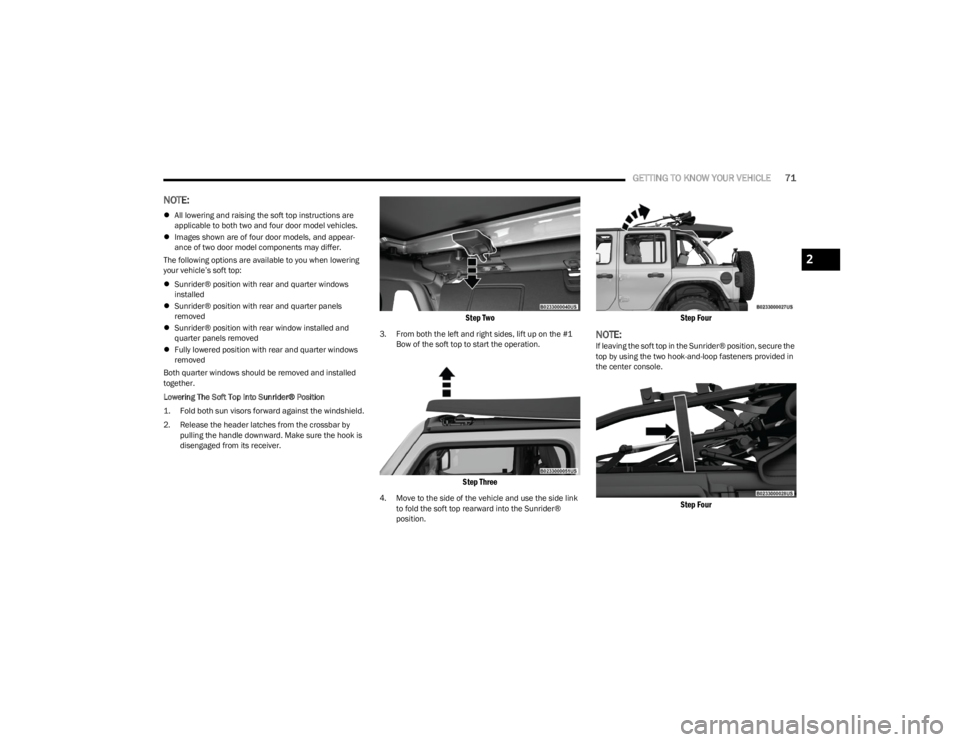
Lowering The Soft Top Into Sunrider® Position
1. Fold both sun visors forward against the windshield.
2. Release the header latches from the crossbar by pulling the handle downward. Make sure the hook is
disengaged from its receiver.
Step Two
3. From both the left and right sides, lift up on the #1 Bow of the soft top to start the operation.
Step Three
4. Move to the side of the vehicle and use the side link to fold the soft top rearward into the Sunrider®
position.
Step Four
NOTE:If leaving the soft top in the Sunrider® position, secure the
top by using the two hook-and-loop fasteners provided in
the center console.
Step Four
2
23_JL_OM_EN_USC_t.book Page 71
Page 77 of 396
GETTING TO KNOW YOUR VEHICLE75
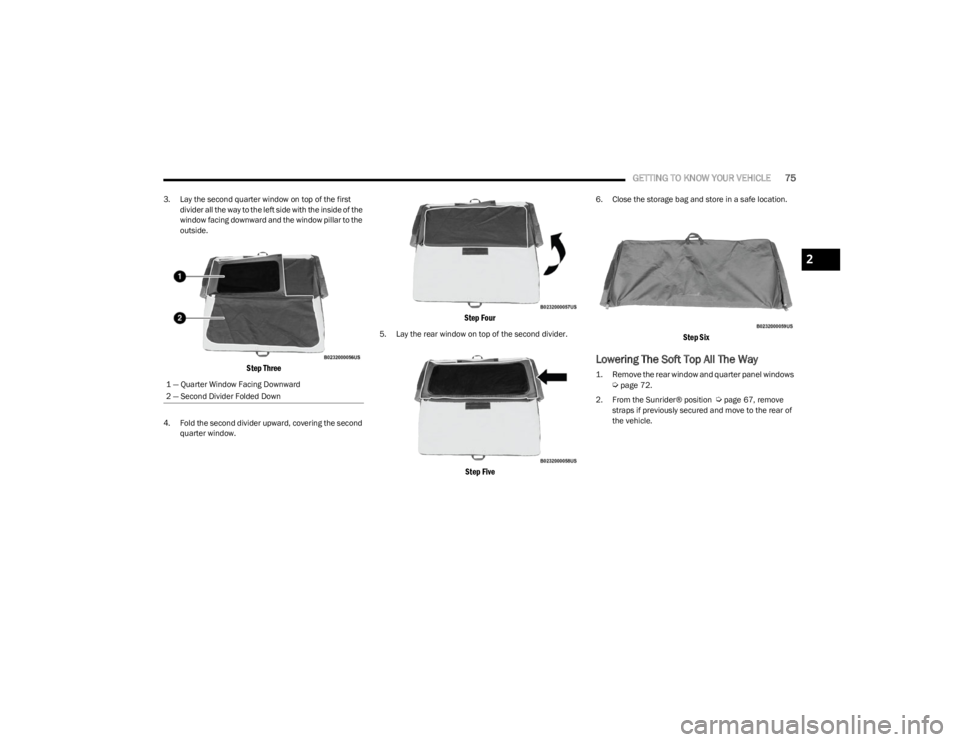
3. Lay the second quarter window on top of the first
divider all the way to the left side with the inside of the
window facing downward and the window pillar to the
outside.
Step Three
4. Fold the second divider upward, covering the second quarter window.
Step Four
5. Lay the rear window on top of the second divider.
Step Five
6. Close the storage bag and store in a safe location.
Step Six
Lowering The Soft Top All The Way
1. Remove the rear window and quarter panel windows
Ú
page 72.
2. From the Sunrider® position
Úpage 67, remove
straps if previously secured and move to the rear of
the vehicle.
1 — Quarter Window Facing Downward
2 — Second Divider Folded Down
2
23_JL_OM_EN_USC_t.book Page 75