2023 JEEP RENEGADE ignition
[x] Cancel search: ignitionPage 93 of 364

STARTING AND OPERATING 91
FOUR-WHEEL DRIVE (4WD)
The four-wheel drive (4WD) is fully automatic in
normal driving mode.
NOTE:
It is not possible to carry out the change of mode
when t
he vehicle exceeds the speed of 75 mph
( 1
2 0
k m
/h).
Enabling Four-Wheel Drive (4WD)
The buttons for the activation of four-wheel drive
a re l oc
ated on the Selec-Terrain switch and allow
you to select the following:
4WD LOCK
4WD LOW — (Trailhawk models only)
Active Drive Control — If Equipped
4WD LOCK Button
The Power Transfer Unit (PTU) is locked to ensure
immed
i
ate availability of torque to the rear drive
axles. This feature is selectable in AUTO mode and
automatic in the other driving mode. 4WD LOCK
can be enabled by the following ways:
When the 4WD LOCK button is pushed.
When the Selec-Terrain switch is rotated from
AUTO to any other off-road modes.
Active Drive With Low Control
(Trailhawk Models Only)
4WD LOW Button (Trailhawk)
The 4WD LOW mode helps to improve the off-road
perform
ance in all modes. To enable 4WD LOW,
please follow the steps below:
Enabling 4WD LOW
With the vehicle stationary, the ignition in RUN
p osition
or with the engine running, shift the
transmission into NEUTRAL and push the 4WD
LOW button once. The instrument cluster will
display the message "4WD LOW" once the shift is
complete.
NOTE:
Both LOCK and LOW LED lights will blink and
then become active on the Selec-Terrain switch
until the shift is complete.
The instrument cluster display will illuminate the
"4WD LOW" icon.
Disabling 4WD LOW
To disable the 4WD LOW mode, the vehicle must
be st a
tionary and the transmission shifted into
NEUTRAL. Push the 4WD LOW button once.
4
Page 97 of 364
STARTING AND OPERATING 95
TO MANUALLY TURN OFF THE STOP/
S
TART SYSTEM
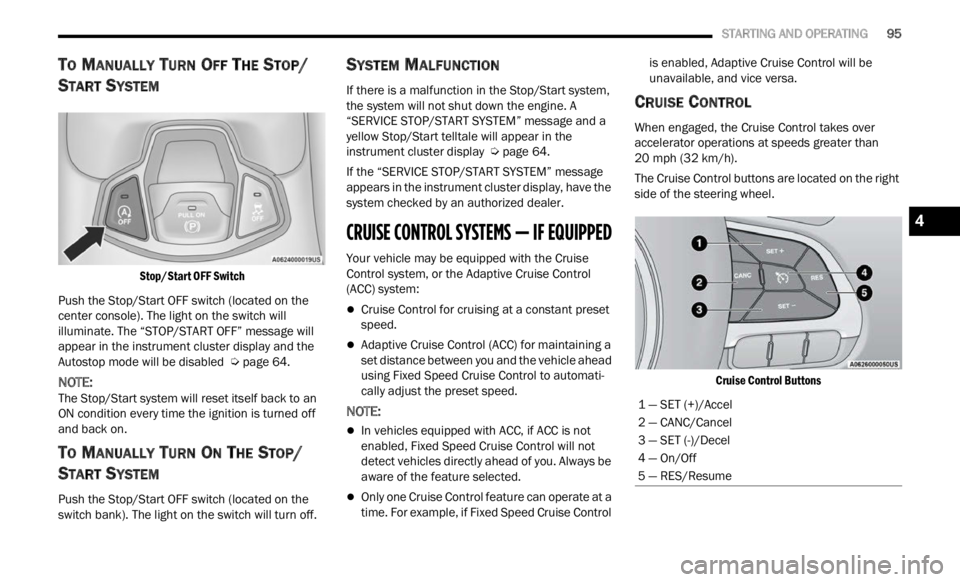
Stop/Start OFF Switch
Push the Stop/Start OFF switch (located on the
center
console). The light on the switch will
illuminate. The “STOP/START OFF” message will
appear in the instrument cluster display and the
Autostop mode will be disabled Ú page 64.
NOTE:
The Stop/Start system will reset itself back to an
ON con d
ition every time the ignition is turned off
and back on.
TO MANUALLY TURN ON THE STOP/
S
TART SYSTEM
Push the Stop/Start OFF switch (located on the
switch bank). The light on the switch will turn off.
SYSTEM MALFUNCTION
If there is a malfunction in the Stop/Start system,
the system will not shut down the engine. A
“SERVICE STOP/START SYSTEM” message and a
yellow Stop/Start telltale will appear in the
instrument cluster display Ú page 64.
If the “SERVICE STOP/START SYSTEM” message
appea r
s in the instrument cluster display, have the
system checked by an authorized dealer.
CRUISE CONTROL SYSTEMS — IF EQUIPPED
Your vehicle may be equipped with the Cruise
Control system, or the Adaptive Cruise Control
(ACC) system:
Cruise Control for cruising at a constant preset
speed.
Adaptive Cruise Control (ACC) for maintaining a
set distance between you and the vehicle ahead
using Fixed Speed Cruise Control to automati -
cally adjust the preset speed.
NOTE:
In vehicles equipped with ACC, if ACC is not
enabled, Fixed Speed Cruise Control will not
detect vehicles directly ahead of you. Always be
aware of the feature selected.
Only one Cruise Control feature can operate at a
time. For example, if Fixed Speed Cruise Control is enabled, Adaptive Cruise Control will be
unavailable, and vice versa.
CRUISE CONTROL
When engaged, the Cruise Control takes over
accelerator operations at speeds greater than
20
mph (32 km/h).
The Cruise Control buttons are located on the right
side of
the steering wheel.
Cruise Control Buttons
1 — SET (+)/Accel
2 — CANC/Cancel
3 — SET (-)/Decel
4 — On/Off
5 — RES/Resume
4
Page 99 of 364

STARTING AND OPERATING 97
(Continued)
Resume Speed
To resume a previously set speed, push the RES
button and release. Resume can be used at any
speed above 20 mph (32 km/h).
Deactivation
A soft tap on the brake pedal, pushing the CANC
button, or normal brake pressure while slowing the
vehicle will deactivate the Cruise Control without
erasing the set speed from memory.
Pushing the on/off button or placing the ignition in
the OF
F position erases the set speed from
memory.
ADAPTIVE CRUISE CONTROL (ACC)
Adaptive Cruise Control (ACC) increases the driving
convenience provided by Cruise Control while
traveling on highways and major roadways.
However, it is not a safety system and not designed
to prevent collisions. The Cruise Control function
performs differently if your vehicle is not equipped
with ACC Ú page 95.
ACC will allow you to keep Cruise Control engaged
in li g
ht to moderate traffic conditions without the
constant need to reset your speed. ACC utilizes a
radar sensor and a forward facing camera
designed to detect a vehicle directly ahead of you
to maintain a set speed.
NOTE:
If the ACC sensor detects a vehicle ahead, ACC
will apply limited braking or accelerate (not to
exceed the original set speed) automatically to
maintain a preset following distance, while
matching the speed of the vehicle ahead.
Any chassis/suspension or tire size modifica -
tions to the vehicle will affect the performance
of t
h e
Adaptive Cruise Control and Forward Colli -
sion Warning system.
Fixed Speed Cruise Control (ACC not enabled)
will not detect vehicles directly ahead of you.
Always be aware of the feature selected
Ú page 349.
WARNING!
Adaptive Cruise Control (ACC) is a convenience
system. It is not a substitute for active driver
involvement. It is always the driver’s responsi
-
bility to be attentive of road, traffic, and weather
condi t
ions, vehicle speed, distance to the
vehicle ahead and, most importantly, brake
operation to ensure safe operation of the
vehicle under all road conditions. Your
complete attention is always required while
driving to maintain safe control of your vehicle.
Failure to follow these warnings can result in a
collision and death or serious personal injury.
The ACC system:
Does not react to pedestrians, oncoming
vehicles, and stationary objects (e.g., a
stopped vehicle in a traffic jam or a
disabled vehicle).
Cannot take street, traffic, and weather
conditions into account, and may be
limited upon adverse sight distance condi -
tions.
Does not always fully recognize complex
driving conditions, which can result in
wrong or missing distance warnings.
You should turn the ACC system off:
When driving in fog, heavy rain, heavy snow,
sleet, heavy traffic, and complex driving situa -
tions (i.e., in highway construction zones).
When entering a turn lane or highway
off-ramp; when driving on roads that are
winding, icy, snow-covered, slippery, or have
steep uphill or downhill slopes.
When towing a trailer up or down steep slopes.
When circumstances do not allow safe driving
at a constant speed.
WARNING!
4
Page 101 of 364

STARTING AND OPERATING 99
To Activate/Deactivate
Push and release the Adaptive Cruise Control
(ACC) on/off button. The ACC menu in the
instrument cluster display will read “ACC Ready.”
To turn the system off, push and release the
Adapt i
ve Cruise Control (ACC) on/off button again.
At this time, the system will turn off and the
instrument cluster display will read “Adaptive
Cruise Control (ACC) Off.”
To Set A Desired Speed
When the vehicle reaches the speed desired, push
the SET (+) button or the SET (-) button and
release. The instrument cluster display will show
the set speed.
NOTE:
Fixed Speed Cruise Control can be used without
ACC e n
abled. To change between the different
modes, push the ACC on/off button which turns
the ACC and the Fixed Speed Cruise Control off. Pushing the Fixed Speed Cruise Control on/off
button will result in turning on (changing to) Fixed
Speed Cruise Control mode.
ACC or Fixed Speed Cruise Control is set when the
vehic
l
e speed is above 20 mph (32 km/h), the set
s p
ee
d
shall be the current speed of the vehicle.
Neither system cannot be set below 20 mph
(32 km/
h).
NOTE:
Keeping your foot on the accelerator pedal can
cause the vehicle to continue to accelerate
beyond the set speed. If this occurs, the
message “DRIVER OVERRIDE” will display in the
instrument cluster display.
If you continue to accelerate beyond the set
speed while ACC is enabled, the system will not
be controlling the distance between your vehicle and the vehicle ahead. The vehicle speed will
only be determined by the position of the accel
-
erator pedal.
To Cancel
The following conditions cancel the system:
The brake pedal is applied.
The CANC button is pushed.
An Anti-Lock Brake System (ABS) event occurs.
The gear selector is removed from the DRIVE
position.
The braking temperature exceeds normal range
(overheated).
The Electronic Stability Control/Traction Control
System (ESC/TCS) activates.
The vehicle parking brake is applied.
The driver switches ESC to Full Off mode.
To Turn Off
The system will turn off and clear the set speed in
memory if:
The Adaptive Cruise Control (ACC) on/off button
is pushed
The Fixed Speed Cruise Control on/off button is
pushed
The ignition is placed in the OFF position
4WD Low is engaged
WARNING!
Leaving the Adaptive Cruise Control (ACC)
system on when not in use is dangerous. You
could accidentally set the system or cause it to
go faster than you want. You could lose control
and have a collision. Always ensure that the
system is off when you are not using it.
WARNING!
In Fixed Speed Cruise Control mode, the system
will not react to vehicles ahead. In addition, the
proximity warning does not activate and no
alarm will sound even if you are too close to the
vehicle ahead since neither the presence of the
vehicle ahead nor the vehicle-to-vehicle distance
is detected. Be sure to maintain a safe distance
between your vehicle and the vehicle ahead.
Always be aware which mode is selected.
4
Page 105 of 364

STARTING AND OPERATING 103
SERVICE ACC/FCW WARNING
If the system turns off, and the instrument cluster
display reads “ACC/FCW Limited Functionality
Frontal Camera Service Required”, “Cruise Control
Service Required”, or “Cruise Control Temporarily
Unavailable", there may be an internal system fault
or a temporary malfunction that limits ACC
functionality. Although the vehicle is still drivable
under normal conditions, ACC will be temporarily
unavailable. If this occurs, try activating ACC again
later, following an ignition cycle. If the problem
persists, see an authorized dealer.
Precautions While Driving With ACC
In certain driving situations, ACC may have
detection issues. In these cases, ACC may brake
late or unexpectedly. The driver needs to stay alert
and may need to intervene. The following are
examples of these types of situations:
TOWING A TRAILER
Towing a trailer is not advised when using ACC.
OFFSET DRIVING
ACC may not detect a vehicle in the same lane that
is offset from your direct line of travel, or a vehicle
merging in from a side lane. There may not be
sufficient distance to the vehicle ahead. The offset
vehicle may move in and out of the line of travel,
which can cause your vehicle to brake or
accelerate unexpectedly.
Offset Driving Condition Example
TURNS AND BENDS
When driving on a curve with ACC engaged, the
system may increase or decrease the vehicle
speed for stability, with no vehicle ahead detected.
Once the vehicle is out of the curve, the system will
resume your original set speed. This is a part of
normal ACC system functionality.
NOTE:
On tight turns ACC performance may be limited.
USING ACC ON HILLS
ACC performance may be limited when driving on
hills. ACC may not detect a vehicle in your lane
depending on the speed, vehicle load, traffic
conditions, and the steepness of the hill.
ACC Hill Example
4
Page 107 of 364

STARTING AND OPERATING 105
PARKSENSE FRONT/REAR PARK ASSIST
SYSTEM — IF EQUIPPED
The ParkSense Park Assist system provides visual
and audible indications of the distance between
the rear and/or front fascia and a detected
obstacle when backing up or moving forward (e.g.
during a parking maneuver).
For limitations of this system and
recomm e
ndations, see Ú page 108.
ParkSense will retain the last system state
( enabl
ed or disabled) from the last ignition cycle
when the ignition is changed to the ON/RUN
position.
ParkSense is active when the gear selector is
shifte
d to REVERSE or to a forward gear and an
obstacle is detected, as long as the system is on.
When the gear selector is shifted to NEUTRAL (or
PARK in case of automatic gearbox), the system
becomes inactive. When the vehicle is moving
forward, the system will remain active until the
vehicle speed remains below approximately
11 mph (18 km/h). Reducing the speed
approx i
mately below 9 mph (15 km/h), the system
will c
ome back active. When the vehicle is moving
in REVERSE, the system will remain active as long
as the speed remains below the maximum
operating speed of 7 mph (11 km/h). When the
maximu
m speed limit is exceeded, the system is
disabled and the ParkSense switch LED with illuminate. The system will become active again if
the vehicle speed reduces below approximately
6
mph (9 km/h).
PARKSENSE SENSORS
On vehicles equipped with both Front and Rear
ParkSense, there are six sensors located in the
rear fascia/bumper. Vehicles only equipped with
Rear ParkSense have four sensors located in the
rear fascia/bumper.
The sensors monitor the area behind the vehicle
that i
s within the sensors’ field of view. The sensors
can detect obstacles from approximately
12 inches (30 cm) up to 59 inches (150 cm) from
the r e
ar fascia/bumper in the horizontal direction,
depending on the location, type and orientation of
the obstacle.
NOTE:
For information on ParkSense Active Park Assist,
see Ú p
age 111 .
The six ParkSense sensors, located in the front
f ascia
/bumper, monitor the area in front of the
vehicle that is within the sensors’ field of view. The
sensors can detect obstacles from approximately
12 inches (30 cm) up to 39 inches (100 cm) from
the fr
ont fascia/bumper in the horizontal direction,
depending on the location, type and orientation of
the obstacle.
PARKSENSE WARNING DISPLAY
The ParkSense Warning screen will only be
displayed if “Sound and Display” is selected from
the Customer - Programmable Features section of
the Uconnect system Ú page 133.
The ParkSense Warning screen is located within
t he in
strument cluster display Ú page 64. It
provides visual warnings to indicate the distance
b etwee
n the rear fascia/bumper and/or front
fascia/bumper and the detected obstacle.
PARKSENSE DISPLAY
The warning display will turn on indicating the
system status when the vehicle is in REVERSE or
when the vehicle is in DRIVE and an obstacle has
been detected.
The system will indicate a detected obstacle by
showing
a single arc in the left and/or right front or
rear regions based on the object’s distance and
location relative to the vehicle.
If an object is detected in the left and/or right rear
region,
the display will show a single arc in the left
and/or right rear region and the system will
produce a tone. As the vehicle moves closer to the
object, the display will show the single arc moving
closer to the vehicle, and the audible chime will
increase as the object gets closer to the vehicle.
4
Page 110 of 364

108 STARTING AND OPERATING
Front Park Assist Audible Alerts
ParkSense will turn off the Front Park Assist
audib l
e alert (chime) after approximately three
seconds when an obstacle has been detected, and
the vehicle is stationary. If the obstacle has been
detected within less than 12 inches (30 cm), then
the Pa
rksense will not turn off the Front Park Assist
audible alert.
Adjustable Chime Volume Settings
Front and Rear chime volume settings can be
s elect
ed from the Customer-Programmable
Features section of the Uconnect system
Ú page 133.
If the Uconnect system is equipped, chime volume
s ettin
gs will not be accessible from the instrument
cluster display.
The chime volume settings include low, medium,
and h i
gh. The factory default volume setting is
medium.
ParkSense will retain its last known configuration
state
through ignition cycles.
ENABLING AND DISABLING PARKSENSE
ParkSense can be enabled and disabled
with the ParkSense switch, located on
th e
s
w
itch panel below the Uconnect
display.
When the ParkSense switch is pushed to disable
the s y
stem, the instrument cluster display Ú
page 64 will show the “ParkSense Disabled”
message for approximately five seconds.
The ParkSense switch LED turns on when the
s yste m
is disabled by pushing the switch, as well
as in case of failure or temporary disabling
conditions. The ParkSense switch LED will be off
when the system is enabled. If the ParkSense
switch is pushed, and requires service, the
ParkSense switch LED will blink momentarily, and
then the LED will be on.
SERVICE THE PARKSENSE PARK ASSIST
S
YSTEM
When the ParkSense System has detected a
faulted condition, the instrument cluster display
will actuate a single chime, and it will show the
"PARKSENSE UNAVAILABLE WIPE REAR
SENSORS", "PARKSENSE UNAVAILABLE WIPE
FRONT SENSORS", or the "PARKSENSE
UNAVAILABLE SERVICE REQUIRED" message for
five seconds. Under this condition, ParkSense will
not operate.
If "PARKSENSE UNAVAILABLE WIPE REAR
SENSO R
S" or "PARKSENSE UNAVAILABLE WIPE
FRONT SENSORS" appears in the instrument
cluster display make sure the outer surface and
the underside of the rear fascia/bumper and/or
front fascia/bumper is clean and clear of snow,
ice, mud, dirt or other obstruction and then cycle the ignition. If the message continues to appear
see an authorized dealer.
If the "PARKSENSE UNAVAILABLE SERVICE
REQUI
R
ED" message appears in the instrument
cluster display, see an authorized dealer.
CLEANING THE PARKSENSE SYSTEM
Clean the ParkSense sensors with water, car wash
soap and a soft cloth. Do not use rough or hard
cloths. Do not scratch or poke the sensors.
Otherwise, you could damage the sensors.
PARKSENSE SYSTEM USAGE
P
RECAUTIONS
NOTE:
Ensure that the front and rear fascia/bumper
are free of snow, ice, mud, dirt and debris to
keep the ParkSense system operating properly.
Construction equipment, large trucks, and other
vibrations could affect the performance of Park -
Sense.
When you turn ParkSense off, the instrument
cluster display will read “PARKSENSE OFF.”
Furthermore, once you turn ParkSense off, it
remains off until you turn it on again, even if you
cycle the ignition key.
ParkSense, when on, will reduce the volume of
the radio when it is sounding a tone.
Page 112 of 364

110 STARTING AND OPERATING
The system warns the driver with an acoustic
signal and where provided, with visual indications
on the instrument panel display.
NOTE:
Parksense will reduce the volume of the radio if
on when the system is sounding an audible
tone.
The alert chime is activated only when the
obstacle is in the vehicle path.
Activation — Deactivation
The system can operate only after driving a short
distance and if the vehicle speed is between 0 and
11
mph (0 and 18 km/h). The system can be
activa
ted/deactivated via the "Settings" menu of
the Uconnect system. If the ParkSense System is
deactivated via the ParkSense Hard switch then
the Side Distance Warning system will
automatically be deactivated.
Message on the display for Side Distance Warning
featu r
e:
“Wipe Sensors” — This message is displayed in the
case o
f a failure of the Side Distance Warning
system sensors. Free the bumpers of any
obstacles, ensure that the front and rear bumper
are free of snow, ice, mud, dirt and debris to keep
the ParkSense system operating properly.
“SDW Not Available” — This message is displayed
if the
Side Distance Warning system is not
available. The failed operation of the system might
be due to the insufficient voltage from the battery
or other failures on the electrical system. Contact
an authorized dealer as soon as possible to have
the electrical system checked.
Operation With A Trailer
The system is automatically deactivated when the
trailer's electric plug is inserted in the vehicle's tow
hook socket. The rear sensors are automatically
reactivated when the trailer's cable plug is
removed.
ParkSense Usage Precautions
Some conditions may influence the performance
of the Side Distance Warning system:
NOTE:
Ensure that the front and rear bumper are free
of snow, ice, mud, dirt and debris to keep the
ParkSense system operating properly.
Construction equipment, large trucks, and other
vibrations could affect the performance of Park -
Sense.
When you turn ParkSense off, the message to
appear in the instrument cluster display will
read “PARKSENSE OFF.” Furthermore, once you
turn ParkSense off, it remains off until you turn
it on again, even if you cycle the ignition key.
ParkSense, when on, will reduce the volume of
the radio when it is sounding a tone.
WARNING ALERTS
Distance
(inches/cm) Less than
12 inc h
es
( 3 0
c
m
) 12–65
inches
(30–6 0
cm)
Arcs-Left 11th Flashing 12th Flashing
Arcs-Right 11th Flashing 12th Flashing
Audible Alert Chime C
on
tinuousAudible chime
incre
a
ses as
the objects within the
vehicle’s path get close to the vehicle
Radio Volume Reduc e
d Yes
Yes