2023 JEEP COMPASS instrument cluster
[x] Cancel search: instrument clusterPage 87 of 344

GETTING TO KNOW YOUR INSTRUMENT PANEL85
STOP/START – IF EQUIPPED
Push and release the up or down arrow
button until the Stop/Start menu title is displayed
in the instrument cluster display.
AUDIO
Push and release the up or down arrow
button until the Audio menu title is displayed in the
instrument cluster display.
STORED MESSAGES
Push and release the up or down arrow
button until the Messages Menu Icon is highlighted
in the instrument cluster display. This feature
shows the number of stored warning messages.
Pushing the left or right arrow button will
allow you to scroll through the stored messages.
SCREEN SETUP
Push and release the up or down arrow
button until the Screen Setup Menu Icon/Title is
highlighted in the instrument cluster display. Push
and release the OK button to enter the submenus
and follow the prompts on the screen as needed.
The Screen Setup feature allows you to change
what information is displayed in the instrument
cluster as well as the location that information is
displayed. Screen Setup Driver Selectable Items
Restore Defaults (Restores All Settings To Default
Settings)
Yes
No
Current Gear — If Equipped
On
Off
Upper Left
None Range To
EmptyDate
Outside Temp Current
EconomyIgnition State
Time Compass Average
Economy
Upper Right
NoneRange To
EmptyDate
Outside Temp Current
EconomyIgnition State
Time Compass Average
Economy
Upper Center
NoneRange to
EmptyDate
Average
Economy Current
EconomyOutside Temp
Compass Menu Title Audio Info
Time Trip A Distance Speedometer
Trip B Distance
3
22_MP_OM_EN_USC_t.book Page 85
Page 88 of 344

86GETTING TO KNOW YOUR INSTRUMENT PANEL
VEHICLE SETTINGS — IF EQUIPPED
Push and release the up or down arrow
button until the Vehicle Setup Menu item is
displayed in the instrument cluster display. This
menu item allows you to change the settings for
the following:
Display
Navigation Repetition
Security
Passenger Airbag
Seat Belt Reminder
Safety and Assistance
Speed Warning
Hill Start Assist
NOTE:Most vehicle settings will be moved into the radio
if a touchscreen radio is present Ú page 165.
Display
By selecting Display, the following settings can be
selected:
Language: select the language in which to
display the information/warnings.
Phone Repetition: displays information relating
to the phone mode. Units
By selecting Units, the unit of measurement to use
for displaying various values can be set. Possible
options are:
US
Metric
Custom: allows individual changes of units for
temperature, distance, consumption, and tire
pressure.
Clock And Date
By selecting Clock and Date, the time and date can
be set. Possible options are:
Set Time: adjust hours/minutes
Set Format: adjust the time format “12h”
(12 hours) or “24h” (24 hours)
Set Date: adjust day/month/year
Security
Passenger Air Bag Disable (PAD): a selection of
Passenger Air Bag Disable (ON/OFF) may be made
if a child restraint must be installed in the front
seat. Safety And Assistance
By selecting the item Safety and Assistance, the
following adjustments can be made:
ParkSense (If Equipped): a selection of the type
of information provided by ParkSense
Front ParkSense Volume (If Equipped): selec
-
tion of the volume of the beeps provided by the
front ParkSense
Rear ParkSense Volume (If Equipped): selection
of the volume of the beeps provided by the rear
ParkSense
Forward Collision Warning (FCW) (If Equipped): a
selection of operating modes of the system
Forward Collision Warning Plus
FCW Sensitivity (If Equipped): a selection of the
“readiness” of intervention of the Forward Colli -
sion Warning Plus system, based on the
distance to the obstacle
Rain Sensing Wipers (If Equipped): enabling/
disabling the automatic operation of wipers in
the event of rain
Active Lane Management Force (If Equipped):
selection of the force to be applied to the
steering wheel to put the car in the roadway
through the system of electrical drive, in case of
operation of the system Active Lane Manage -
ment
22_MP_OM_EN_USC_t.book Page 86
Page 89 of 344

GETTING TO KNOW YOUR INSTRUMENT PANEL87
Active Lane Management Warning (If
Equipped): a selection of the “readiness” of
intervention of Active Lane Management
Buzzer Volume: There are 4 options: Off, Low,
Medium, Loud
Brake Service (If Equipped): activation of the
procedure to carry out braking system mainte-
nance
Auto Park Brake (If Equipped): enable/disable
auto insertion of the Electric Park Brake
Hill Start Assist: Activation/Deactivation of the
Hill Start Assist system
Lights — If Equipped
By selecting Lights, the following adjustments can
be made:
Ambient Lights (If Equipped): adjust the sensi -
tivity of lighting in the doors and overhead
console
Lights Off Delay: set the delay for headlight
shutoff after engine shutoff
Headlight Sensitivity: adjust the sensitivity of
headlight brightness
Greeting Lights: activate the direction indicators
when unlocking the doors
Daytime Lights (If Equipped): activate/deacti -
vate the daytime running lights
Cornering Lights (If Equipped): activate/deacti-
vate the cornering lights
Auto High Beam (If Equipped): activate/deacti -
vate the automatic high beam headlights
Doors And Locks
By selecting Doors and Locks, the following
adjustments can be made:
Auto Unlock Doors: automatic unlocking of the
doors when exiting the vehicle
Lights with Lock: activate the direction indica -
tors when locking the doors
Horn With Remote Lock: activate/deactivate the
horn when pressing the lock button on the key.
The options are “Off”, “First Press”, and
“Second Press”
Horn With Remote Start (If Equipped): activate/
deactivate the horn at the Remote Starting of
the engine with the key
Door Unlock: allow you to choose whether to
unlock all the doors or only the driver’s side door
on the first push of the unlock button on the key
Auto Driver Comfort (If Equipped): activate/
deactivate automatic climate control during
vehicle starts
Key in Memory (If Equipped): activate/deacti -
vate memory linked to a key
Compass
By selecting Compass, the following settings can
be changed:
Calibration (If Equipped)
This compass is self-calibrating, which eliminates
the need to set the compass manually. When the
vehicle is new, the compass may appear erratic,
and the cluster will display dashes (- -) until the
compass is calibrated. You may also calibrate the
compass by completing one or more 360 degree
turns (in an area free from large metal or metallic
objects) until the dashes (- -) displayed in the
instrument cluster display turns off. The compass
will now function normally.
3
22_MP_OM_EN_USC_t.book Page 87
Page 90 of 344
88GETTING TO KNOW YOUR INSTRUMENT PANEL
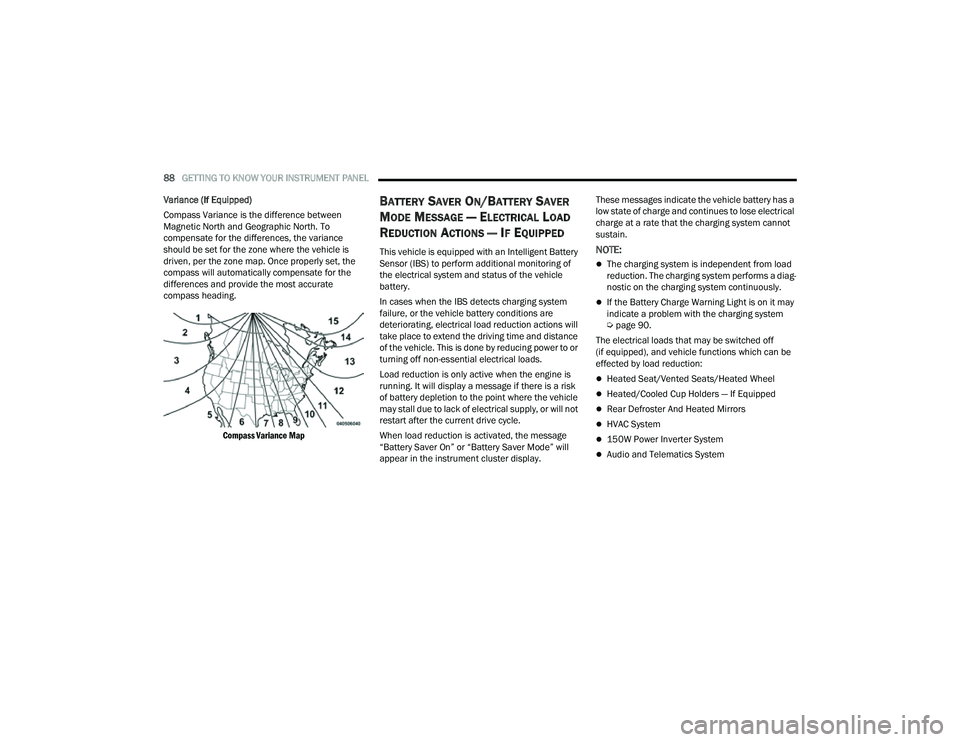
Variance (If Equipped)
Compass Variance is the difference between
Magnetic North and Geographic North. To
compensate for the differences, the variance
should be set for the zone where the vehicle is
driven, per the zone map. Once properly set, the
compass will automatically compensate for the
differences and provide the most accurate
compass heading.
Compass Variance Map
BATTERY SAVER ON/BATTERY SAVER
M
ODE MESSAGE — ELECTRICAL LOAD
R
EDUCTION ACTIONS — IF EQUIPPED
This vehicle is equipped with an Intelligent Battery
Sensor (IBS) to perform additional monitoring of
the electrical system and status of the vehicle
battery.
In cases when the IBS detects charging system
failure, or the vehicle battery conditions are
deteriorating, electrical load reduction actions will
take place to extend the driving time and distance
of the vehicle. This is done by reducing power to or
turning off non-essential electrical loads.
Load reduction is only active when the engine is
running. It will display a message if there is a risk
of battery depletion to the point where the vehicle
may stall due to lack of electrical supply, or will not
restart after the current drive cycle.
When load reduction is activated, the message
“Battery Saver On” or “Battery Saver Mode” will
appear in the instrument cluster display. These messages indicate the vehicle battery has a
low state of charge and continues to lose electrical
charge at a rate that the charging system cannot
sustain.NOTE:
The charging system is independent from load
reduction. The charging system performs a diag
-
nostic on the charging system continuously.
If the Battery Charge Warning Light is on it may
indicate a problem with the charging system
Ú page 90.
The electrical loads that may be switched off
(if equipped), and vehicle functions which can be
effected by load reduction:
Heated Seat/Vented Seats/Heated Wheel
Heated/Cooled Cup Holders — If Equipped
Rear Defroster And Heated Mirrors
HVAC System
150W Power Inverter System
Audio and Telematics System
22_MP_OM_EN_USC_t.book Page 88
Page 94 of 344
92GETTING TO KNOW YOUR INSTRUMENT PANEL
Oil Temperature Warning Light
This warning light will illuminate to
indicate the engine oil temperature is
high. If the light turns on while driving,
stop the vehicle and shut off the engine
as soon as possible. Wait for oil temperature to
return to normal levels.
Seat Belt Reminder Warning Light
This warning light indicates when the
driver or passenger seat belt is
unbuckled. When the ignition is first
placed in the ON/RUN position and if the
driver’s seat belt is unbuckled, a chime will sound
and the light will turn on. When driving, if the driver
or front passenger seat belt remains unbuckled,
the Seat Belt Reminder Light will flash or remain on
continuously and a chime will sound Ú page 204.
Transmission Fault Warning Light
This light will illuminate (together with a
message in the instrument cluster
display and a buzzer) to indicate a
transmission fault. Contact an authorized
dealer if the message remains after restarting
the engine.
Transmission Temperature Warning Light —
If Equipped
This warning light will illuminate to warn
of a high transmission fluid temperature.
This may occur with strenuous usage
such as trailer towing. If this light turns
on, stop the vehicle and run the engine at idle or
slightly faster, with the transmission in PARK or
NEUTRAL, until the light turns off. Once the light
turns off, you may continue to drive normally.
Vehicle Security Warning Light —
If Equipped
This light will flash at a fast rate for
approximately 15 seconds when the
Vehicle Security system is arming,
and then will flash slowly until the vehicle
is disarmed.
YELLOW WARNING LIGHTS
Anti-Lock Brake System (ABS) Warning
Light
This warning light monitors the ABS.
The light will turn on when the ignition is
placed in the ON/RUN position and may
stay on for as long as four seconds.
If the ABS light remains on or turns on while
driving, then the Anti-Lock portion of the brake
system is not functioning and service is required as
soon as possible. However, the conventional brake
system will continue to operate normally,
assuming the Brake Warning Light is not also on.
If the ABS light does not turn on when the ignition
is placed in the ON/RUN position, have the brake
system inspected by an authorized dealer.WARNING!
If you continue operating the vehicle when the
Transmission Temperature Warning Light is
illuminated you could cause the fluid to boil over,
come in contact with hot engine or exhaust
components and cause a fire.
CAUTION!
Continuous driving with the Transmission
Temperature Warning Light illuminated will
eventually cause severe transmission damage
or transmission failure.
22_MP_OM_EN_USC_t.book Page 92
Page 95 of 344

GETTING TO KNOW YOUR INSTRUMENT PANEL93
Electronic Park Brake Warning Light
This warning light will illuminate to
indicate the Electronic Park Brake is not
functioning properly and service is
required. Contact an authorized dealer.
Electronic Stability Control (ESC) Active
Warning Light — If Equipped
This warning light will indicate when the
ESC system is Active. The ESC Indicator
Light in the instrument cluster will come
on when the ignition is placed in the ON/
RUN position, and when ESC is activated. It should
go out with the engine running. If the ESC Indicator
Light comes on continuously with the engine
running, a malfunction has been detected in the
ESC system. If this warning light remains on after
several ignition cycles, and the vehicle has been
driven several miles (kilometers) at speeds greater
than 30 mph (48 km/h), see an authorized dealer
as soon as possible to have the problem
diagnosed and corrected.
The ESC OFF Indicator Light and the ESC Indi -
cator Light come on momentarily each time the
ignition is placed in the ON/RUN position.
The ESC system will make buzzing or clicking
sounds when it is active. This is normal; the
sounds will stop when ESC becomes inactive.
This light will come on when the vehicle is in an
ESC event.
Electronic Stability Control (ESC) OFF
Warning Light — If Equipped
This warning light indicates the
ESC is off.
Each time the ignition is turned to ON/RUN, the
ESC system will be on, even if it was turned off
previously.
Fuel Cutoff Warning Light — If Equipped
This warning light will illuminate after an
accident has occurred, and the system
has shut the fuel off.
Active Lane Management Warning Light —
If Equipped
The Active Lane Management Warning
Light will be solid yellow when the vehicle
is approaching a lane marker. The
warning light will flash when the vehicle is
crossing the lane marker.
Service Active Lane Management Warning
Light — If Equipped
This warning light will illuminate when the
Active Lane Management system is not
operating and requires service. Please
see an authorized dealer.
Low Coolant Level Warning Light
This telltale will turn on to indicate the
vehicle coolant level is low Ú page 279.
Low Fuel Warning Light
Depending on whether the tank size is
13.5 gal (51 L) or 15.8 gal (60 L), the
Low Fuel Indicator Light will turn on when
the fuel level goes below 1.5 gal (5.6 L) or
1.7 gal (6.6 L) respectively.
Low Washer Fluid Warning Light —
If Equipped
This warning light will illuminate when the
windshield washer fluid is low.
Engine Check/Malfunction Indicator (MIL)
Warning Light
The MIL is a part of an Onboard
Diagnostic System called OBD II that
monitors engine and automatic
transmission control systems. This
warning light will illuminate when the ignition is in
the ON/RUN position before engine start. If the
bulb does not come on when turning the ignition
switch from OFF to ON/RUN, have the condition
checked promptly.
3
22_MP_OM_EN_USC_t.book Page 93
Page 98 of 344

96GETTING TO KNOW YOUR INSTRUMENT PANEL
YELLOW INDICATOR LIGHTS
4WD Low Indicator Light — If Equipped
This light alerts the driver that the vehicle
is in the 4WD Low mode. The front and
rear driveshafts are mechanically locked
together forcing the front and rear
wheels to rotate at the same speed. Low range
provides a greater gear reduction ratio to provide
increased torque at the wheels Ú page 112.
4WD Lock Indicator Light
This light alerts the driver that the vehicle
is in the 4WD Lock mode. The front and
rear driveshafts are mechanically locked
together, forcing the front and rear
wheels to rotate at the same speed Ú page 112.
Auto HOLD! Fault Indicator Light —
If Equipped
The Auto HOLD! Fault Indicator light will
illuminate if a fault is detected, it will be
indicated by a yellow HOLD! indicator
light that will stay on as long as the fault
condition exists.
Active Speed Limiter Fault Indicator Light —
If Equipped
This warning light will illuminate to signal
when there is a fault detected with the
Active Speed Limiter.
Forward Collision Warning (FCW) Indicator
Light — If Equipped
This telltale will turn on to warn you of a
possible collision with the vehicle in front
of you.
Forward Collision Warning (FCW) OFF
Indicator Light — If Equipped
This indicator light illuminates to indicate
that Forward Collision Warning is off.
Immobilizer Fail / VPS Electrical Alarm
Indicator Light
This telltale will illuminate when the
Vehicle Security system has detected an
attempt to break into the vehicle.
NOTE:After cycling the ignition to the ON/RUN position,
the Vehicle Security Warning Light could illuminate
if a problem with the system is detected. This
condition will result in the engine being shut off
after two seconds.
GREEN INDICATOR LIGHTS
Auto HOLD Indicator Light — If Equipped
Auto HOLD keeps your vehicle at a
complete stop without you having to keep
your foot on the brake pedal. Once
engaged a green HOLD indicator will
appear in the Instrument Cluster Display.
Active Lane Management Indicator Light —
If Equipped
The Active Lane Management indicator
light illuminates solid green when both
lane markings have been detected and
the system is “armed” and ready to
provide visual and torque warnings if an
unintentional lane departure occurs.
Parking/Headlights On Indicator Light
This indicator light will illuminate when
the parking lights or headlights are
turned on.
Front Fog Indicator Light — If Equipped
This indicator light will illuminate when
the front fog lights are on Ú page 43.
22_MP_OM_EN_USC_t.book Page 96
Page 99 of 344

GETTING TO KNOW YOUR INSTRUMENT PANEL97
Turn Signal Indicator Lights
When the left or right turn signal is
activated, the turn signal indicator will
flash independently and the
corresponding exterior turn signal lamps
will flash. Turn signals can be activated when
the multifunction lever is moved down (left) or
up (right).
NOTE:
A continuous chime will sound if the vehicle is
driven more than 1 mile (1.6 km) with either
turn signal on.
Check for an inoperative outside light bulb if
either indicator flashes at a rapid rate.
Cruise Control SET Indicator Light —
If Equipped With A Premium Instrument
Cluster
This indicator light will illuminate when
the Cruise Control is set to the desired
speed Ú page 117.
Stop/Start Active Indicator Light —
If Equipped
This indicator light will illuminate when
the Stop/Start function is in “Autostop”
mode.
Automatic High Beam Indicator Light —
If Equipped
This indicator shows that the automatic
high beam headlights are on Úpage 43.
WHITE INDICATOR LIGHTS
Active Lane Management Indicator Light —
If Equipped
When the Active Lane Management
system is ON, but not armed, the Active
Lane Management indicator light
illuminates solid white. This occurs when
only left, right, or neither lane line has been
detected. If a single lane line is detected, the
system is ready to provide only visual warnings if
an unintentional lane departure occurs on the
detected lane line Ú page 145.
Hill Descent Control (HDC) Indicator
Light — If Equipped
This indicator shows when the HDC
feature is turned on. The lamp will be on
solid when HDC is armed. HDC can only
be armed when the transfer case is in the
4WD Low position and the vehicle speed is less
then 30 mph (48 km/h). If these conditions are not
met while attempting to use the HDC feature, the
HDC indicator light will flash on/off.
Cruise Control Ready Indicator Light —
If Equipped With A Premium Instrument
Cluster
This light will turn on when the Cruise
Control has been turned on, but not set
Ú page 117.
Cruise Control SET Indicator Light —
If Equipped
This indicator light will illuminate when
the Cruise Control is set Ú page 117.
BLUE INDICATOR LIGHTS
High Beam Indicator Light
This indicator light will illuminate to
indicate that the high beam headlights
are on. With the low beams activated,
push the multifunction lever forward
(toward the front of the vehicle) to turn on the high
beams. Pull the multifunction lever rearward
(toward the rear of the vehicle) to turn off the high
beams. If the high beams are off, pull the lever
toward you for a temporary high beam on, “flash to
pass” scenario.
3
22_MP_OM_EN_USC_t.book Page 97