2023 JEEP COMPASS climate control
[x] Cancel search: climate controlPage 59 of 344

GETTING TO KNOW YOUR VEHICLE57
Window Fogging
Vehicle windows tend to fog on the inside in mild,
rainy, and/or humid weather. To clear the
windows, select Defrost or Mix mode and increase
the front blower speed. Do not use the
Recirculation mode without A/C for long periods,
as fogging may occur.
Outside Air Intake
Make sure the air intake, located directly in front of
the windshield, is free of obstructions, such as
leaves. Leaves collected in the air intake may
reduce airflow, and if they enter the air distribution
box, they could plug the water drains. In Winter
months, make sure the air intake is clear of ice,
slush, and snow.
Cabin Air Filter
The Climate Control system filters out dust and
pollen from the air. Contact an authorized dealer to
service your cabin air filter, and to have it replaced
when needed.
Stop/Start System — If Equipped
While in an Autostop, the Climate Control system
may automatically adjust airflow to maintain cabin
comfort. Customer settings will be maintained
upon return to an engine running condition.
Windshield Wiper De-Icer — If Equipped
The windshield wiper De-Icer is a heating element
located at the base of the windshield.
It operates automatically once the following
conditions are met:
Activation By Front Defrost
The wiper De-Icer activates automatically during
a cold weather manual start with full defrost,
and when the ambient temperature is below
33°F (6°C) .
Activation By Rear Defrost
The wiper De-Icer activates automatically when
the Rear Defrost is operating and the ambient
temperature is below 33°F (6°C) .
Activation By Remote Start Operation
When Remote Start is activated and the outside
ambient temperature is less than 33°F (6°C)
the windshield wiper De-Icer is activated. Exiting
Remote Start will resume its previous operation.
If the Windshield Wiper De-Icer was active, the
timer and operation will continue.
Operating Tips Chart
WEATHER CONTROL SETTINGS
Hot Weather And
Vehicle Interior Is Very Hot Set the mode control to
(Panel Mode),
(MAX A/C) on, and
blower on high. Roll
down the windows for a minute to flush out the hot air. Adjust the
controls as needed to achieve comfort.
Warm Weather Turn (A/C) on and
set the mode control to
(Panel Mode).
Cool Sunny Operate in (Bi-Level
Mode).
Cool & Humid Conditions Set the mode control to
(Mix Mode) and
turn (A/C) on to
keep windows clear.
Cold Weather Set the mode control to
(Floor Mode). If
windshield fogging
starts to occur, move
the control to (Mix Mode).
2
22_MP_OM_EN_USC_t.book Page 57
Page 70 of 344

68GETTING TO KNOW YOUR VEHICLE
The key fob and the overhead console switch will
open the liftgate when the liftgate is locked. The
outside handle requires the liftgate to be unlocked.
If the vehicle is equipped with Passive Entry, and a
valid Passive Entry key fob is within 5 ft (1.5 m) of the liftgate, pulling the outside handle will unlock
and open the liftgate.
NOTE:
Before closing the liftgate, make sure to be in
possession of the key because the liftgate may
be locked.
Use the interior door lock/unlock button on the
door panel or the key fob to lock and unlock the
liftgate. The manual door locks on the doors and
the exterior door lock cylinder will not lock and
unlock the liftgate.
The liftgate will either unlock along with the
vehicle doors, or it will need to be unlocked by
pushing the electronic liftgate release,
depending on the selected setting in the
Uconnect system Ú page 165.
The power liftgate buttons will not operate if the
vehicle is in gear or the vehicle speed is above
0 mph (0 km/h).
The power liftgate will not operate in tempera -
tures below −22°F (−30°C) or temperatures
above 150°F (65°C). Be sure to remove any
buildup of snow or ice from the liftgate before
pushing any of the power liftgate switches.
If anything obstructs the power liftgate while it is
closing or opening, the liftgate will automatically
reverse to the closed or open position. After
multiple obstructions in the same cycle, the lift -
gate will automatically stop and must be opened
or closed manually.
There are pinch sensors attached to the side of
the liftgate. Light pressure anywhere along
these strips will cause the liftgate to return to
the open position.
The power liftgate must be in the full open posi -
tion in order for the rear liftgate close button, on
the left rear trim near the liftgate opening, to
operate. If the liftgate is not fully open, push the
liftgate button on the key fob to fully open the
liftgate and then push it again to close.
If the electronic liftgate release handle is
pushed a second time while the power liftgate is
opening, the liftgate motor will disengage to
allow manual operation.
If your liftgate is power closing and you put the
vehicle in gear, the liftgate will continue to
power close. However, vehicle movement may
result in the detection of an obstruction.
Allow the power system to open the liftgate.
Manually pushing or pulling the liftgate may acti -
vate the liftgate obstacle detection feature and
stop the power operation or reverse its direc -
tion. Lock The Vehicle
With a valid Passive Entry key fob within 5 ft
(1.5 m) of the liftgate, pushing the Passive Entry
lock button located to the right of the electronic
liftgate release handle will lock the vehicle.
WARNING!
Driving with the liftgate open can allow
poisonous exhaust gases into your vehicle.
You and your passengers could be injured by
these fumes. Keep the liftgate closed when
you are operating the vehicle.
If you are required to drive with the liftgate
open, make sure that all windows are closed,
and the climate control blower switch is set at
high speed. Do not use the recirculation
mode.
During power operation, personal injury or
cargo damage may occur. Ensure the liftgate
travel path is clear. Make sure the liftgate is
closed and latched before driving away.
Personal injury or cargo damage may occur if
caught in the path of the liftgate. Make sure
the liftgate path is clear before activating the
liftgate.
22_MP_OM_EN_USC_t.book Page 68
Page 71 of 344
GETTING TO KNOW YOUR VEHICLE69
(Continued)
HANDS-FREE LIFTGATE — IF EQUIPPED
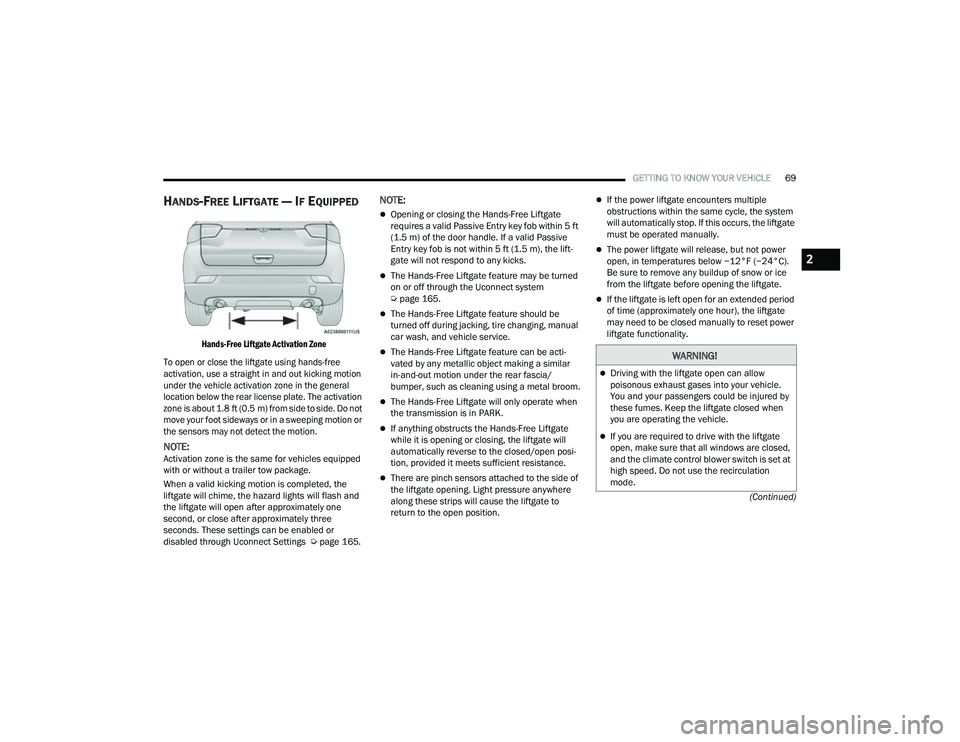
Hands-Free Liftgate Activation Zone
To open or close the liftgate using hands-free
activation, use a straight in and out kicking motion
under the vehicle activation zone in the general
location below the rear license plate. The activation
zone is about 1.8 ft (0.5 m) from side to side. Do not move your foot sideways or in a sweeping motion or
the sensors may not detect the motion.
NOTE:Activation zone is the same for vehicles equipped
with or without a trailer tow package.
When a valid kicking motion is completed, the
liftgate will chime, the hazard lights will flash and
the liftgate will open after approximately one
second, or close after approximately three
seconds. These settings can be enabled or
disabled through Uconnect Settings Ú page 165.
NOTE:
Opening or closing the Hands-Free Liftgate
requires a valid Passive Entry key fob within 5 ft
(1.5 m) of the door handle. If a valid Passive
Entry key fob is not within 5 ft (1.5 m), the lift -
gate will not respond to any kicks.
The Hands-Free Liftgate feature may be turned
on or off through the Uconnect system
Ú page 165.
The Hands-Free Liftgate feature should be
turned off during jacking, tire changing, manual
car wash, and vehicle service.
The Hands-Free Liftgate feature can be acti -
vated by any metallic object making a similar
in-and-out motion under the rear fascia/
bumper, such as cleaning using a metal broom.
The Hands-Free Liftgate will only operate when
the transmission is in PARK.
If anything obstructs the Hands-Free Liftgate
while it is opening or closing, the liftgate will
automatically reverse to the closed/open posi -
tion, provided it meets sufficient resistance.
There are pinch sensors attached to the side of
the liftgate opening. Light pressure anywhere
along these strips will cause the liftgate to
return to the open position.
If the power liftgate encounters multiple
obstructions within the same cycle, the system
will automatically stop. If this occurs, the liftgate
must be operated manually.
The power liftgate will release, but not power
open, in temperatures below −12°F (−24°C).
Be sure to remove any buildup of snow or ice
from the liftgate before opening the liftgate.
If the liftgate is left open for an extended period
of time (approximately one hour), the liftgate
may need to be closed manually to reset power
liftgate functionality.
WARNING!
Driving with the liftgate open can allow
poisonous exhaust gases into your vehicle.
You and your passengers could be injured by
these fumes. Keep the liftgate closed when
you are operating the vehicle.
If you are required to drive with the liftgate
open, make sure that all windows are closed,
and the climate control blower switch is set at
high speed. Do not use the recirculation
mode.
2
22_MP_OM_EN_USC_t.book Page 69
Page 89 of 344

GETTING TO KNOW YOUR INSTRUMENT PANEL87
Active Lane Management Warning (If
Equipped): a selection of the “readiness” of
intervention of Active Lane Management
Buzzer Volume: There are 4 options: Off, Low,
Medium, Loud
Brake Service (If Equipped): activation of the
procedure to carry out braking system mainte-
nance
Auto Park Brake (If Equipped): enable/disable
auto insertion of the Electric Park Brake
Hill Start Assist: Activation/Deactivation of the
Hill Start Assist system
Lights — If Equipped
By selecting Lights, the following adjustments can
be made:
Ambient Lights (If Equipped): adjust the sensi -
tivity of lighting in the doors and overhead
console
Lights Off Delay: set the delay for headlight
shutoff after engine shutoff
Headlight Sensitivity: adjust the sensitivity of
headlight brightness
Greeting Lights: activate the direction indicators
when unlocking the doors
Daytime Lights (If Equipped): activate/deacti -
vate the daytime running lights
Cornering Lights (If Equipped): activate/deacti-
vate the cornering lights
Auto High Beam (If Equipped): activate/deacti -
vate the automatic high beam headlights
Doors And Locks
By selecting Doors and Locks, the following
adjustments can be made:
Auto Unlock Doors: automatic unlocking of the
doors when exiting the vehicle
Lights with Lock: activate the direction indica -
tors when locking the doors
Horn With Remote Lock: activate/deactivate the
horn when pressing the lock button on the key.
The options are “Off”, “First Press”, and
“Second Press”
Horn With Remote Start (If Equipped): activate/
deactivate the horn at the Remote Starting of
the engine with the key
Door Unlock: allow you to choose whether to
unlock all the doors or only the driver’s side door
on the first push of the unlock button on the key
Auto Driver Comfort (If Equipped): activate/
deactivate automatic climate control during
vehicle starts
Key in Memory (If Equipped): activate/deacti -
vate memory linked to a key
Compass
By selecting Compass, the following settings can
be changed:
Calibration (If Equipped)
This compass is self-calibrating, which eliminates
the need to set the compass manually. When the
vehicle is new, the compass may appear erratic,
and the cluster will display dashes (- -) until the
compass is calibrated. You may also calibrate the
compass by completing one or more 360 degree
turns (in an area free from large metal or metallic
objects) until the dashes (- -) displayed in the
instrument cluster display turns off. The compass
will now function normally.
3
22_MP_OM_EN_USC_t.book Page 87
Page 245 of 344

SAFETY243
EXHAUST GAS The best protection against carbon monoxide entry
into the vehicle body is a properly maintained
engine exhaust system.
Whenever a change is noticed in the sound of the
exhaust system, when exhaust fumes can be
detected inside the vehicle, or when the underside
or rear of the vehicle is damaged, have an
authorized dealer inspect the complete exhaust
system and adjacent body areas for broken,
damaged, deteriorated, or mispositioned parts.
Open seams or loose connections could permit
exhaust fumes to seep into the passenger
compartment. In addition, inspect the exhaust
system each time the vehicle is raised for
lubrication or oil change. Replace as required.CARBON MONOXIDE WARNINGS
WARNING!
Exhaust gases can injure or kill. They contain
carbon monoxide (CO), which is colorless and
odorless. Breathing it can make you
unconscious and can eventually poison you. To
avoid breathing (CO), follow these safety tips:
Do not run the engine in a closed garage or in
confined areas any longer than needed to
move your vehicle in or out of the area.
If you are required to drive with the trunk/lift -
gate/rear doors open, make sure that all
windows are closed and the climate control
BLOWER switch is set at high speed. DO NOT
use the recirculation mode.
If it is necessary to sit in a parked vehicle with
the engine running, adjust your heating or
cooling controls to force outside air into the
vehicle. Set the blower at high speed.
WARNING!
Carbon monoxide (CO) in exhaust gases is
deadly. Follow the precautions below to prevent
carbon monoxide poisoning:
Do not inhale exhaust gases. They contain
carbon monoxide, a colorless and odorless
gas, which can kill. Never run the engine in a
closed area, such as a garage, and never sit in
a parked vehicle with the engine running for
an extended period. If the vehicle is stopped in
an open area with the engine running for more
than a short period, adjust the ventilation
system to force fresh, outside air into the
vehicle.
Guard against carbon monoxide with proper
maintenance. Have the exhaust system
inspected every time the vehicle is raised.
Have any abnormal conditions repaired
promptly. Until repaired, drive with all side
windows fully open.
6
22_MP_OM_EN_USC_t.book Page 243
Page 292 of 344

290SERVICING AND MAINTENANCE
Interior Fuses
The interior fuse panel is located in the passenger compartment on the left side dash panel under the instrument panel.
CavityBlade Fuse Description
*If Equipped
F31 7.5 Amp Brown Occupant Restraint Controller
F33 20 Amp Yellow Window Motor Passenger
F34 20 Amp Yellow Window Motor Driver
F36 20 Amp YellowIntrusion Module/Siren, Radio, UCI/USB Port, VSU, Climate Control,
Electronic Steering Lock, Power Folding Mirrors, Security Gateway/DTV
F37 10 Amp RedInstrument Panel Cluster, Drivetrain Control Module, Adaptive Cruise,
ECC (HVAC) Blower
F38 20 Amp Yellow Door Lock/Unlock, Liftgate Release
F42 7.5 Amp Brown Brake System Module, Electric Power Steering
F43 20 Amp Yellow Washer Pump Front And Rear
F47 20 Amp Yellow Rear Left Window Lifter
F48 20 Amp Yellow Rear Right Window Lifter
F49 7.5 Amp BrownPark Assist, Blind Spot, Voltage Stabilizer, Humidity Sensor, Electronic Steering Lock,
Temp Sense, Mirror, Heated Seats, Light And Rain Sensor, Start Stop Switch
F50 7.5 Amp Brown Occupant Restraint Controller
F51 7.5 Amp BrownElectronic Climate Control, Occupant Classification, Rear View Camera, Climate Control,
Headlamp Leveling, Terrain Select, Heated Rear Window, Trailer Tow, Haptic Lane Mod
F53 7.5 Amp Brown Keyless Ignition Node Module, Electric Park Brake, RF Hub, Cluster
F94 15 Amp Blue Lumbar Adjust Driver Seat, Power Outlets
22_MP_OM_EN_USC_t.book Page 290
Page 316 of 344

314SERVICING AND MAINTENANCE
DEPARTMENT OF TRANSPORTATION
UNIFORM TIRE QUALITY GRADES
The following tire grading categories
were established by the National
Highway Traffic Safety Administration.
The specific grade rating assigned by the
tire's manufacturer in each category is
shown on the sidewall of the tires on
your vehicle.
All passenger vehicle tires must conform
to Federal safety requirements in
addition to these grades.
TREADWEAR
The Treadwear grade is a comparative
rating, based on the wear rate of the tire
when tested under controlled conditions
on a specified government test course.
For example, a tire graded 150 would
wear one and one-half times as well on
the government course as a tire graded
100. The relative performance of tires
depends upon the actual conditions of
their use, however, and may depart significantly from the norm due to
variations in driving habits, service
practices, and differences in road
characteristics and climate.
TRACTION GRADES
The Traction grades, from highest to
lowest, are AA, A, B, and C. These grades
represent the tire's ability to stop on wet
pavement, as measured under
controlled conditions on specified
government test surfaces of asphalt and
concrete. A tire marked C may have poor
traction performance.
TEMPERATURE GRADES
The Temperature grades are A (the
highest), B, and C, representing the tire's
resistance to the generation of heat and
its ability to dissipate heat, when tested
under controlled conditions on a
specified indoor laboratory test wheel.
Sustained high temperature can cause
the material of the tire to degenerate
and reduce tire life, and excessive
temperature can lead to sudden tire
failure. The grade C corresponds to a
level of performance, which all
passenger vehicle tires must meet
under the Federal Motor Vehicle Safety
Standard No. 109. Grades B and A
represent higher levels of performance
on the laboratory test wheel, than the
minimum required by law.
WARNING!
The traction grade assigned to this tire is based
on straight-ahead braking traction tests, and
does not include acceleration, cornering,
hydroplaning, or peak traction characteristics.
WARNING!
The temperature grade for this tire is
established for a tire that is properly inflated and
not overloaded. Excessive speed, underinflation,
or excessive loading, either separately or in
combination, can cause heat build-up and
possible tire failure.
22_MP_OM_EN_USC_t.book Page 314
Page 332 of 344

330 Brake System
...................................... 282, 319Anti-Lock (ABS).......................................... 319Fluid Check..................................... 282, 324Master Cylinder......................................... 282Parking...................................................... 103Warning Light.............................................. 90Brake/Transmission Interlock....................... 107Brightness, Interior Lights......................... 46, 47Bulb Replacement......................................... 291Bulbs, Light.................................................... 242
C
Camera, Rear...................................... 148, 150Capacities, Fuel............................................. 323Caps, Filler Fuel........................................................... 152Oil (Engine)................................................ 271Radiator (Coolant Pressure)...................... 281Car Washes................................................... 316Carbon Monoxide Warning............................ 243Cargo Area Cover............................................. 70Cargo Load Floor............................................. 70Cargo Tie-Downs....................................... 70, 71Cellular Phone............................................... 186Certification Label......................................... 153Chains, Tire.................................................... 311Change Oil Indicator........................................ 80Changing A Flat Tire....................................... 247Chart, Tire Sizing............................................ 299
Check Engine Light
(Malfunction Indicator Light)............................ 99Checking Your Vehicle For Safety................. 240Checks, Safety.............................................. 240Child Restraint.............................................. 228Child RestraintsBooster Seats........................................... 231Child Seat Installation.............................. 239How To Stow An unused ALR Seat Belt.... 236Infant And Child Restraints....................... 230Lower Anchors And TethersFor Children......................................... 233Older Children And Child Restraints......... 230Seating Positions...................................... 232Child Safety Locks........................................... 25Clean Air Gasoline......................................... 320CleaningWheels..................................................... 315Windshield Wiper Blades.......................... 275Climate Control................................................ 50Automatic.................................................... 50Manual........................................................ 53Coin Holder...................................................... 58Cold Weather Operation............................... 101Compact Spare Tire...................................... 310ConnectorUniversal Consumer Interface (UCI)............. 58Console............................................................ 58Floor............................................................ 58
Contract, Service........................................... 326Cooling Pressure Cap (Radiator Cap)............ 281Cooling System............................................. 279Adding Coolant (Antifreeze)...................... 280Coolant Level................................... 280, 281Cooling Capacity....................................... 323Disposal Of Used Coolant......................... 281Drain, Flush, And Refill............................. 280Inspection................................................. 281Points To Remember................................ 281Pressure Cap............................................ 281Radiator Cap............................................. 281Selection Of Coolant (Antifreeze)..... 280, 323Corrosion Protection..................................... 315Cruise Control (Speed Control)...................... 116Cruise Light............................................... 97, 98Customer Assistance.................................... 325Cybersecurity................................................ 164
D
Daytime Running Lights............................43, 44Defroster, Windshield................................... 241Dimmer SwitchHeadlight..............................................43, 44DipsticksOil (Engine)............................................... 272Disabled Vehicle Towing............................... 264DisposalAntifreeze (Engine Coolant)...................... 281
22_MP_OM_EN_USC_t.book Page 330