2023 JEEP COMPASS U connect settings
[x] Cancel search: U connect settingsPage 71 of 344
GETTING TO KNOW YOUR VEHICLE69
(Continued)
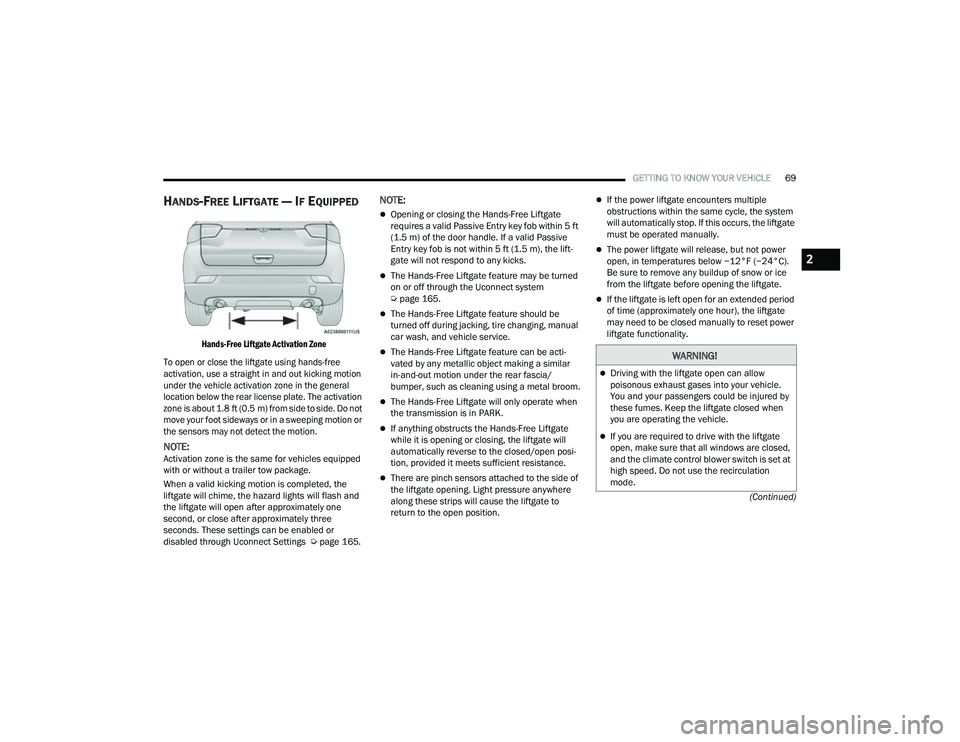
HANDS-FREE LIFTGATE — IF EQUIPPED
Hands-Free Liftgate Activation Zone
To open or close the liftgate using hands-free
activation, use a straight in and out kicking motion
under the vehicle activation zone in the general
location below the rear license plate. The activation
zone is about 1.8 ft (0.5 m) from side to side. Do not move your foot sideways or in a sweeping motion or
the sensors may not detect the motion.
NOTE:Activation zone is the same for vehicles equipped
with or without a trailer tow package.
When a valid kicking motion is completed, the
liftgate will chime, the hazard lights will flash and
the liftgate will open after approximately one
second, or close after approximately three
seconds. These settings can be enabled or
disabled through Uconnect Settings Ú page 165.
NOTE:
Opening or closing the Hands-Free Liftgate
requires a valid Passive Entry key fob within 5 ft
(1.5 m) of the door handle. If a valid Passive
Entry key fob is not within 5 ft (1.5 m), the lift -
gate will not respond to any kicks.
The Hands-Free Liftgate feature may be turned
on or off through the Uconnect system
Ú page 165.
The Hands-Free Liftgate feature should be
turned off during jacking, tire changing, manual
car wash, and vehicle service.
The Hands-Free Liftgate feature can be acti -
vated by any metallic object making a similar
in-and-out motion under the rear fascia/
bumper, such as cleaning using a metal broom.
The Hands-Free Liftgate will only operate when
the transmission is in PARK.
If anything obstructs the Hands-Free Liftgate
while it is opening or closing, the liftgate will
automatically reverse to the closed/open posi -
tion, provided it meets sufficient resistance.
There are pinch sensors attached to the side of
the liftgate opening. Light pressure anywhere
along these strips will cause the liftgate to
return to the open position.
If the power liftgate encounters multiple
obstructions within the same cycle, the system
will automatically stop. If this occurs, the liftgate
must be operated manually.
The power liftgate will release, but not power
open, in temperatures below −12°F (−24°C).
Be sure to remove any buildup of snow or ice
from the liftgate before opening the liftgate.
If the liftgate is left open for an extended period
of time (approximately one hour), the liftgate
may need to be closed manually to reset power
liftgate functionality.
WARNING!
Driving with the liftgate open can allow
poisonous exhaust gases into your vehicle.
You and your passengers could be injured by
these fumes. Keep the liftgate closed when
you are operating the vehicle.
If you are required to drive with the liftgate
open, make sure that all windows are closed,
and the climate control blower switch is set at
high speed. Do not use the recirculation
mode.
2
22_MP_OM_EN_USC_t.book Page 69
Page 105 of 344

STARTING AND OPERATING103
While cruising, brief full-throttle acceleration within
the limits of local traffic laws contributes to a good
break-in. Wide-open throttle acceleration in low
gear can be detrimental and should be avoided.
The engine oil installed in the engine at the factory
is a high-quality energy conserving type lubricant.
Oil changes should be consistent with anticipated
climate conditions under which vehicle operations
will occur. For the recommended viscosity and
quality grades Ú page 323.
NOTE:A new engine may consume some oil during its first
few thousand miles (kilometers) of operation. This
should be considered a normal part of the break-in
and not interpreted as a problem.
PARK BRAKE
ELECTRIC PARK BRAKE (EPB)
Your vehicle is equipped with an EPB system that
offers simple operation, and some additional
features that make the parking brake more
convenient and useful. The parking brake is primarily intended to prevent
the vehicle from rolling while parked. Before
leaving the vehicle, make sure that the parking
brake is applied. Also, be certain to leave the
transmission in PARK.
You can engage the parking brake in two ways:
Manually, by applying the EPB switch.
Automatically, by enabling the Auto Park Brake
feature in the Customer Programmable
Features section of the Uconnect settings
Ú
page 165.
The EPB switch is located in the center console.
Electric Park Brake Switch
To apply the parking brake manually, pull up on the
switch momentarily. You may hear a sound from
the back of the vehicle while the parking brake
engages. Once the parking brake is fully engaged,
the BRAKE warning lamp in the instrument cluster and an indicator on the switch will illuminate. If
your foot is on the brake pedal while you apply the
parking brake, you may notice a small amount of
brake pedal movement. The parking brake can be
applied even when the ignition switch is OFF. The
Brake Warning Light will not illuminate and can
only be released when the ignition switch is in the
ON/RUN position.NOTE:The EPB fault lamp will illuminate if the EPB switch
is held for longer than 60 seconds in either the
released or applied position. The light will extin
-
guish upon releasing the switch.
If the Auto Park Brake feature is enabled, the
parking brake will automatically engage whenever
the transmission is placed into PARK. If your foot is
on the brake pedal, you may notice a small amount
of brake pedal movement while the parking brake
is engaging.
The parking brake will release automatically when
the ignition switch is ON/RUN, the transmission is
in DRIVE or REVERSE, the driver’s seat belt is
buckled, and an attempt is made to drive away.
To release the parking brake manually, the ignition
switch must be in the ON/RUN position. Put your
foot on the brake pedal, then push the EPB switch
down momentarily. You may hear a sound from the
back of the car while the parking brake
disengages. You may also notice a small amount of
movement in the brake pedal. Once the parking
CAUTION!
Never use Non-Detergent Oil or Straight Mineral
Oil in the engine or damage may result.
4
22_MP_OM_EN_USC_t.book Page 103
Page 107 of 344

STARTING AND OPERATING105
In the unlikely event of a malfunction of the EPB
system, a yellow EPB fault lamp will illuminate. This
may be accompanied by the Brake Warning Light
flashing. In this event, urgent service of the EPB
system is required. Do not rely on the parking
brake to hold the vehicle stationary.
Auto Park Brake
The EPB can be programmed to be applied
automatically whenever the vehicle speed is below
1.9 mph (3 km/h) and the transmission is placed
in PARK. Auto Park Brake is enabled and disabled
by customer selection through the Customer
Programmable Features section of the Uconnect
Settings Ú page 165.
Any single Auto Park Brake application can be
bypassed by pushing the EPB switch to the release
position while the transmission is placed in PARK
and the ignition is in the ON/RUN position.
SafeHold
SafeHold is a safety feature of the EPB system that
will engage the parking brake automatically if the
vehicle is left unsecured while the ignition switch is
in ON/RUN. For automatic transmissions, the EPB will
automatically engage if all of the following
conditions are met:
Vehicle speed is below 1.9 mph (3 km/h).
There is no attempt to press the brake pedal
and accelerator pedal.
The seat belt is unbuckled.
The driver’s door is open.
The vehicle is not in the PARK position.
SafeHold can be temporarily bypassed by pushing
the EPB switch while the driver’s door is open and
the brake pedal is pressed. Once manually
bypassed, SafeHold will be enabled again once the
vehicle reaches 12 mph (20 km/h) or the ignition
is turned to the OFF position and back to ON/RUN
again.
Auto Hold — If Equipped
Auto Hold is a comfort feature that allows the
driver to remove their foot from the brake pedal
once the vehicle has come to a stop. The vehicle
must be held at a standstill for a predetermined
amount of time by hydraulic braking. The EPB will
then engage and continue to hold the vehicle at a
stop until the driver applies the accelerator pedal. Auto Hold can be activated or deactivated by
pushing the HOLD button located on the switch
bank.
Auto Hold Switch
The following conditions must be met for Auto Hold
to activate:
Driver’s door is closed
Driver's seat belt is fastened
Vehicle is at a standstill
Forward gear is selected
Adaptive Cruise Control (ACC) is not engaged
EPB is not applied
ParkSense Active Park Assist System auto
parking maneuver is not activated
4
22_MP_OM_EN_USC_t.book Page 105
Page 108 of 344

106STARTING AND OPERATING
(Continued)
Brake Service Mode
We recommend having your brakes serviced by an
authorized dealer.
You should only make repairs for which you have
the knowledge and the right equipment. You
should only enter Brake Service Mode during
brake service.
When servicing your rear brakes, it may be
necessary for you or your technician to push the
rear piston into the rear caliper bore. With the EPB
system, this can only be done after retracting the
EPB actuator. The actuator retraction can be done
easily by entering the Brake Service Mode through
the Uconnect Settings in your vehicle. This
menu-based system will guide you through the
steps necessary to retract the EPB actuator in
order to perform rear brake service.
Service Mode has requirements that must be met
in order to be activated:
The vehicle must be at a standstill.
The parking brake must be disabled.
The transmission must be in PARK or NEUTRAL.
The EPB switch not activated.
The vehicle in ignition ON/RUN position.
The brake pedal not pressed.While in Service Mode, the EPB fault lamp will flash
continuously while the ignition switch is ON/RUN.
NOTE:A dedicated message will appear in the instrument
cluster display if Brake Service Mode cannot be
activated.
When brake service work is complete, the following
steps must be followed to reset the parking brake
system to normal operation:
Ensure the vehicle is at a standstill.
Press the brake pedal with moderate force.
Apply the EPB Switch.
NOTE:A dedicated message will appear in the instrument
cluster display if Brake Service Mode cannot be
deactivated.
AUTOMATIC TRANSMISSION
You must press and hold the brake pedal while
shifting out of PARK.
WARNING!
You can be badly injured working on or around a
motor vehicle. Do only that service work for
which you have the knowledge and the right
equipment. If you have any doubt about your
ability to perform a service job, take your vehicle
to a competent mechanic.
WARNING!
Never use the PARK (P) position as a substi
-
tute for the parking brake. Always apply the
parking brake fully when exiting the vehicle to
guard against vehicle movement and possible
injury or damage.
Your vehicle could move and injure you and
others if it is not in PARK. Check by trying to
move the gear selector out of PARK with the
brake pedal released. Make sure the trans -
mission is in PARK before exiting the vehicle.
It is dangerous to shift out of PARK or
NEUTRAL (N) if the engine speed is higher
than idle speed. If your foot is not firmly
pressing the brake pedal, the vehicle could
accelerate quickly forward or in reverse. You
could lose control of the vehicle and hit
someone or something. Only shift into gear
when the engine is idling normally and your
foot is firmly pressing the brake pedal.
The vehicle may not engage a newly selected
gear when shifting between PARK, REVERSE
(R), or DRIVE (D) if the vehicle is moving while
shifting.
22_MP_OM_EN_USC_t.book Page 106
Page 115 of 344

STARTING AND OPERATING113
Active Drive Control — If Equipped
The Power Transfer Unit (PTU) is locked to ensure
immediate availability of torque to the rear drive
axles. This feature is selectable in AUTO mode and
automatic in the other driving mode. 4WD LOCK
can be enabled by the following ways:
When the 4WD LOCK button is pushed.
When the Selec-Terrain switch is moved from
AUTO to any other off-road modes.
Active Drive With Low Control — (Trailhawk models
only)
The 4WD LOW mode helps to improve the off-road
performance in all modes. To enable 4WD LOW,
please follow the steps below:
Enabling 4WD LOW
With the vehicle stationary, the ignition in the ON/
RUN position or with the engine running, shift the
transmission into NEUTRAL and push the 4WD
LOW button once. The instrument cluster will
display the message “4WD LOW” once the shift is
complete.
NOTE:
Both LOCK and LOW LED lights will blink and
then become active on the buttons until the
shift is complete.
The instrument cluster display will illuminate the
4WD LOW icon. Disabling 4WD LOW
To disable the 4WD LOW mode, the vehicle must
be stationary and the transmission shifted into
NEUTRAL. Push the 4WD LOW button once.
SELEC-TERRAIN — IF EQUIPPED
Selec-Terrain combines the capabilities of the
vehicle control systems, along with driver input, to
provide the best performance for all terrains.
MODE SELECTION GUIDE
Selec-Terrain Switch
AUTO
: This four-wheel drive operation is a
continuous operation, is fully automatic and can
be used on and off road. This mode balances
traction to ensure maneuverability and acceler -
ation improvement compared to a vehicle with
two wheel drive. This mode also reduces fuel consumption, since it allows the disconnect of
the drive shaft where conditions permit.
SNOW
: This mode allows you to have greater
stability under conditions of bad weather. For
use on and off road on surfaces with poor trac-
tion, such as roads covered with snow. When in
SNOW mode (depending on certain operating
conditions), the transmission may use SECOND
gear (rather than FIRST gear) during launches,
to minimize wheel slippage.
SAND/MUD : For off-road driving or use on
surfaces with poor traction, such as dry sand
and roads covered by mud or wet grass. The
transmission is set to provide maximum trac -
tion.
ROCK : (Trailhawk only): This mode is only avail -
able in 4WD LOW range. The device sets the
vehicle to maximize traction and allow the
highest steering capacity for off-road surfaces.
This mode gives you the maximum performance
off-road. Use for low speed obstacles such as
large rocks, deep ruts, etc.
SPORT : This mode is only available in 4WD
AUTO, and alters the transmission's automatic
shift schedule for sportier driving. Upshift
speeds are increased to make full use of avail -
able engine power. Suspension settings are
optimized and steering assist is modified to
provide better handling performance.
4
22_MP_OM_EN_USC_t.book Page 113
Page 129 of 344

STARTING AND OPERATING127
STATIONARY OBJECTS AND VEHICLES
ACC does not react to stationary objects or
vehicles. For example, ACC will not react in
situations where the vehicle you are following exits
your lane and the vehicle ahead is stopped in your
lane. It will consider this stopped vehicle a
stationary object as it did not previously detect
movement from it. Always be attentive and ready
to apply the brakes if necessary.
Stationary Object And Stationary Vehicle Example
TRAFFIC SIGN ASSIST SYSTEM —
IF EQUIPPED
The Traffic Sign Assist (TSA) system uses a camera
mounted on the windshield, as well as map data
when the vehicle is equipped with Navigation, to
detect recognizable road signs such as:
Speed limits
School zones
No passing zones
NOTE:
The TSA system will automatically display the
road sign detected in the unit of measurement
(mph or km/h) selected within Uconnect
Settings or within the instrument cluster display.
If no speed limit signs are detected, the system
will revert to the speed limit signs that are
stored in the Navigation system.
The system always checks the traffic signs indi -
cating the current speed limit signs. The system
is able to recognize and display up to two
different road signs in the instrument cluster
display.
ACTIVATION/DEACTIVATION
The TSA System can be enabled/disabled within
the Uconnect system through the Safety/Driver
Assistance menu. System ON is signaled by road
signs shown on the instrument cluster display.
NOTE:Even if the system is OFF, the speed limit sign will
be displayed when the driver selects it in the HOME
screen.
TRAFFIC SIGN ASSIST MODES
TSA has three selectable modes of operation that
are available through the Uconnect system.
Visual
When Visual is selected, the system will alert the
driver when the current speed of the vehicle
exceeds the detected speed limit by showing a
graphic in the instrument cluster display.
Visual + Chime
When Visual + Chime is selected, the system will
alert the driver when the current speed of the
vehicle exceeds the detected speed limit by
showing a graphic in the instrument cluster
display, and by sounding an audible alert. The
audible alert will last for 10 seconds, and the
visual alert will remain on as long as the vehicle is
exceeding the speed limit.
4
22_MP_OM_EN_USC_t.book Page 127
Page 138 of 344

136STARTING AND OPERATING
NOTE:ParkSense will reduce the volume of the radio, if
on, when the system is sounding an audible tone.
Front Park Assist Audible Alerts
ParkSense will turn off the Front Park Assist
audible alert (chime) after approximately three
seconds when an obstacle has been detected, the
vehicle is stationary, and brake pedal is applied. Adjustable Chime Volume Settings
Front and Rear chime volume settings can be
selected from the Uconnect system Ú
page 165.
The chime volume settings include low, medium,
and high.
ParkSense will retain its last known configuration
state through ignition cycles.ENABLING AND DISABLING PARKSENSE
ParkSense can be enabled and disabled
with the ParkSense switch, located on
the switch panel below the Uconnect
display.
When the ParkSense switch is pushed to disable
the system, the instrument cluster display
Ú page 77 will show the “PARKSENSE OFF”
message for approximately five seconds.
The ParkSense switch LED will be on when
ParkSense is disabled or requires service. The
ParkSense switch LED will be off when the system
is enabled. If the ParkSense switch is pushed, and
requires service, the ParkSense switch LED will
blink momentarily, and then the LED will be on.
WARNING ALERTS FOR FRONT
Front Distance (inches/cm) Greater than 47 inches
(120 cm) 47-39 inches
(120-100 cm) 39-25 inches
(100-65 cm) 25-12 inches
(65-30 cm) Less than 12 inches (30
cm)
Arcs — Left NoneNoneNone3rd Flashing 4th Flashing
Arcs — Center None1st Solid2nd Flashing 3rd Flashing4th Flashing
Arcs — Right NoneNoneNone3rd Flashing 4th Flashing
Audible Alert Chime NoneNoneNoneAudible chime increases
as the objects get close to the vehicle Continuous
Radio Volume Reduced No Yes
22_MP_OM_EN_USC_t.book Page 136
Page 140 of 344

138STARTING AND OPERATING
SIDE DISTANCE WARNING (SDW)
S
YSTEM
The Side Distance Warning system has the
function of detecting the presence of side
obstacles near the vehicle using the parking
sensors located in the front and rear bumpers.
Side Distance Warning Display
The Side Distance Warning screen will only be
displayed if this feature is enabled within Uconnect
Settings Ú page 165.
The system warns the driver with an acoustic
signal and when selected, with visual indications
on the instrument panel display Ú page 77.
NOTE:ParkSense will reduce the volume of the radio if on
when the system is sounding an audible tone.
Activation/Deactivation
The system can operate only after driving a short
distance and if the vehicle speed is between 0 and
7 mph (0 and 11 km/h). The system can be
activated/deactivated via the "Settings" menu of
the Uconnect system. If the ParkSense System is
deactivated via the ParkSense switch, then the
side distance warning system will automatically be
deactivated.
Side Distance Warning System Status
Before using ParkSense, it is strongly recom -
mended that the ball mount and hitch ball
assembly be disconnected from the vehicle
when the vehicle is not used for towing. Failure
to do so can result in injury or damage to vehi -
cles or obstacles because the hitch ball will be
much closer to the obstacle than the rear
fascia when the vehicle sounds the continuous
tone. Also, the sensors could detect the ball
mount and hitch ball assembly, depending on
its size and shape, giving a false indication that
an obstacle is behind the vehicle.
CAUTION!
ParkSense is only a parking aid and it is
unable to recognize every obstacle, including
small obstacles. Parking curbs might be
temporarily detected or not detected at all.
Obstacles located above or below the sensors
will not be detected when they are in close
proximity.
The vehicle must be driven slowly when using
ParkSense in order to be able to stop in time
when an obstacle is detected. It is recom -
mended that the driver looks over his/her
shoulder when using ParkSense.
WARNING!
WARNING ALERTS
Distance
(in/cm) Less than
30 inches
(76 cm)30 –
65 inches
(76–165 cm)
Arcs-Left 11th Flashing 12th Flashing
Arcs-Right 11th Flashing 12th Flashing
Audible Alert
Chime Audible alert only when the
vehicle is on course for a
collision
Radio Volume
Reduced Yes
Yes
1 — System Not Active
2 — System Active
22_MP_OM_EN_USC_t.book Page 138