2023 JEEP CHEROKEE traction control
[x] Cancel search: traction controlPage 87 of 276

STARTING AND OPERATING85
The transmission will automatically downshift to FIRST or
SECOND gear (depending on model) when coming to a
stop. After a stop, the driver should manually upshift (+)
the transmission as the vehicle is accelerated.
You can start out (from a stop) in FIRST or SECOND
gear. Starting out in SECOND gear can be helpful in
snow or icy conditions. Tap the gear selector forward or
rearward to select the desired gear after the vehicle is
brought to a stop.
If a requested downshift would cause the engine to
overspeed, that shift will not occur.
The system will ignore attempts to upshift at too low of
a vehicle speed.
Avoid using Cruise Control when AutoStick is engaged
because the transmission will not shift automatically.
Transmission shifting will be more noticeable when
AutoStick is enabled.
The system may revert to automatic shift mode if a
fault or overheat condition is detected.
To disengage AutoStick mode, return the gear selector to
the DRIVE position. You can shift in or out of the AutoStick
position at any time without taking your foot off the
accelerator pedal.Torque Converter Clutch
A feature designed to improve fuel economy has been
included in the automatic transmission on your vehicle. A
clutch within the torque converter engages automatically
at calibrated speeds. This may result in a slightly different
feeling or response during normal operation in the upper
gears. When the vehicle speed drops or during some
accelerations, the clutch automatically disengages.
NOTE:The torque converter clutch will not engage until the trans -
mission fluid is warm (usually after 1 to 3 miles [2 to 5 km]
of driving). Because the engine speed is higher when the
torque converter clutch is not engaged, it may seem as if
the transmission is not shifting properly when cold. This is
normal. The torque converter clutch will function normally
once the transmission is sufficiently warm.
FOUR-WHEEL DRIVE OPERATION
1-SPEED FOUR-WHEEL DRIVE
(4WD) — IF EQUIPPED
This feature provides on-demand four-wheel drive (4WD).
The system is automatic with no driver inputs or additional
driving skills required. Under normal driving conditions,
the front wheels provide most of the traction. If the front
wheels begin to lose traction, power is shifted
automatically to the rear wheels. The greater the front
wheel traction loss, the greater the power transfer to the
rear wheels. Additionally, on dry pavement under heavy throttle input
(where one may have no wheel spin), torque will be sent to
the rear in a preemptive effort to improve vehicle launch
and performance characteristics.
2-SPEED FOUR-WHEEL DRIVE
(4WD) — I
F EQUIPPED
2-Speed 4x4 Switch
WARNING!
Do not downshift for additional engine braking on a
slippery surface. The drive wheels could lose their grip
and the vehicle could skid, causing a collision or
personal injury.
CAUTION!
All wheels must have the same size and type tires.
Unequal tire sizes must not be used. Unequal tire size
may cause failure of the power transfer unit.
4
23_KL_OM_EN_USC_t.book Page 85
Page 90 of 276

88STARTING AND OPERATING
SELEC-TERRAIN
DESCRIPTION
Selec-Terrain allows the driver to specify the driving
surface to allow the vehicle systems to provide the best
performance possible across a wide range of conditions.
Rotate the Selec-Terrain knob to select the desired mode.
Selec-Terrain Switch
Selec-Terrain offers the following modes:
AUTO — Fully automatic, full-time four-wheel drive oper -
ation can be used on and off-road. Balances traction
with a seamless steering feel to provide improved
handling and acceleration.
SNOW — Tuning set for additional stability in inclement
weather. Use when driving on loose traction surfaces
such as snow, while either on or off-road. When in
SNOW mode (depending on certain operating condi -tions), the transmission may use SECOND gear (rather
than FIRST gear) during launches, to minimize wheel
slippage.
SPORT — This mode alters the transmission's auto -
matic shift schedule for sportier driving. Upshift speeds
are increased to make full use of available engine
power.
NOTE:SPORT mode is not available when 4WD LOW is selected.
SAND/MUD — Off-road calibration for use on low trac -
tion surfaces such as mud, sand, or wet grass. The
4WD system provides maximum capability to all
wheels. Some binding may be felt on high traction
surfaces. The electronic brake system will be adjusted
to reduce the automatic braking of slipping wheels and
to allow the engine to operate without restriction.
ROCK — Off-road calibration is only available in 4WD
LOW range. ROCK mode provides the most aggressive
four-wheel drive performance for extreme off-road
terrain. Use for low speed obstacles such as large
rocks, deep ruts, etc. The driver may notice additional
tire scrubbing and steering wheel feedback while
driving in ROCK mode on higher traction off-road
surfaces. For use only in off-road driving situations.
NOTE:
ROCK mode is only available on the vehicles equipped
with the Off-Road package.
Activate the Hill Descent Control or Selec-Speed
Control for steep downhill control
Úpage 143.
Instrument Cluster Display Messages
When the appropriate conditions exist, a message will
appear in the instrument cluster Úpage 63.
POWER STEERING
The power steering system will provide increased vehicle
response and ease of maneuverability. The power steering
system adapts to different driving conditions.
If the “SERVICE POWER STEERING” or “POWER
STEERING ASSIST OFF - SERVICE SYSTEM”
message and a steering wheel icon are
displayed on the instrument cluster display
screen, it indicates that the vehicle needs to be taken to
an authorized dealer for service. It is likely the vehicle has
lost power steering assistance
Úpage 68.
If the “POWER STEERING SYSTEM HOT - PERFORMANCE
MAY BE LIMITED” message and an icon are displayed on
the instrument cluster display screen, it indicates that
extreme steering maneuvers may have occurred, which
caused an over temperature condition in the power
steering system. You will lose power steering assistance
momentarily until the over temperature condition no
longer exists. Once driving conditions are safe, pull over
and let the vehicle idle for a few moments until the light
turns off
Úpage 68.
WARNING!
Continued operation with reduced assist could pose a
safety risk to yourself and others. Service should be
obtained as soon as possible.
23_KL_OM_EN_USC_t.book Page 88
Page 96 of 276

94STARTING AND OPERATING
To Activate/Deactivate
Push and release the Adaptive Cruise Control (ACC) on/off
button. The ACC menu in the instrument cluster display
will read “ACC Ready.”
To turn the system off, push and release the Adaptive
Cruise Control (ACC) on/off button again. At this time, the
system will turn off and the instrument cluster display will
read “Adaptive Cruise Control (ACC) Off.”
To Set A Desired Speed
When the vehicle reaches the speed desired, push the
SET (+) button or the SET (-) button and release. The
instrument cluster display will show the set speed.
NOTE:Fixed Speed Cruise Control can be used without ACC
enabled. To change between the different modes, push
the ACC on/off button which turns the ACC and the Fixed
Speed Cruise Control off. Pushing the Fixed Speed Cruise
Control on/off button will result in turning on (changing to)
Fixed Speed Cruise Control mode.
If ACC is set when the vehicle speed is
below
20 mph
(32 km/h), the set speed will default to 20 mph (32 km/h).
NOTE:Fixed Speed Cruise Control cannot be set below 20 mph
(32 km/h).
If either system is set when the vehicle speed is above
20 mph (32 km/h), the set speed shall be the current speed of the vehicle.
NOTE:
Keeping your foot on the accelerator pedal can cause
the vehicle to continue to accelerate beyond the set
speed. If this occurs, the message “DRIVER OVERRIDE”
will display in the instrument cluster display.
If you continue to accelerate beyond the set speed
while ACC is enabled, the system will not be controlling
the distance between your vehicle and the vehicle
ahead. The vehicle speed will only be determined by
the position of the accelerator pedal.
To Cancel
The following conditions cancel the ACC or Fixed Speed
Cruise Control systems:
The brake pedal is applied
The CANC (cancel) button is pushed
The Anti-Lock Brake System (ABS) activates
The gear selector is removed from the DRIVE position
The Electronic Stability Control/Traction Control
System (ESC/TCS) activates
The vehicle parking brake is applied
The Trailer Sway Control (TSC) activates
The driver switches ESC to Full Off mode
The braking temperature exceeds normal range (over -
heated)
The following conditions will only cancel the ACC system:
Driver seat belt is unbuckled at low speeds
Driver door is opened at low speeds
To Turn Off
The system will turn off and erase the set speed in
memory if:
The Adaptive Cruise Control (ACC) on/off button is
pushed
The Fixed Speed Cruise Control on/off button is pushed
The ignition is placed in the OFF position
4WD Low is engaged
WARNING!
Leaving the Adaptive Cruise Control (ACC) system on
when not in use is dangerous. You could accidentally
set the system or cause it to go faster than you want.
You could lose control and have a collision. Always leave
the system off when you are not using it.
WARNING!
In Fixed Speed Cruise Control mode, the system will not
react to vehicles ahead. In addition, the proximity
warning does not activate and no alarm will sound even
if you are too close to the vehicle ahead since neither
the presence of the vehicle ahead nor the
vehicle-to-vehicle distance is detected. Be sure to
maintain a safe distance between your vehicle and the
vehicle ahead. Always be aware which mode is
selected.
23_KL_OM_EN_USC_t.book Page 94
Page 114 of 276

112STARTING AND OPERATING
(Continued)
CHANGING LANESENSE SETTINGS
The LaneSense system has settings to adjust the intensity
of the torque warning and the warning zone sensitivity
(early/late) that you can configure through the Uconnect
system
Úpage 126.
NOTE:
When enabled the system operates above 37 mph
(60 km/h) and below 112 mph (180 km/h).
The warnings are disabled with use of the turn signal.
The system will not apply torque to the steering wheel
whenever a safety system engages (Anti-Lock Brakes,
Traction Control System, Electronic Stability Control,
Forward Collision Warning, etc.).
PARKVIEW REAR BACK UP CAMERA
Your vehicle is equipped with the ParkView Rear Back Up
Camera that allows you to see an on-screen image of the
rear surroundings of your vehicle whenever the gear
selector is put into REVERSE. The image will be displayed
in the touchscreen display along with a caution note to
“Check Entire Surroundings” across the top of the screen.
After five seconds this note will disappear. The ParkView
camera is located on the rear of the vehicle above the rear
license plate.
NOTE:The ParkView Rear Back Up Camera has programmable
modes of operation that may be selected through the
Uconnect system
Úpage 126.
When the vehicle is shifted out of REVERSE with camera
delay turned off, the rear camera mode is exited and the
previous screen appears. When the vehicle is shifted out of REVERSE with camera delay turned on, the camera
image will continue to be displayed for up to 10 seconds
unless the following conditions occur: the vehicle speed
exceeds 8 mph (13 km/h), the vehicle is shifted into
PARK, the vehicle’s ignition is placed in the OFF position,
or the touchscreen X button to disable the display of the
Rear View Camera is pressed.
Manual Activation Of The Rear View Camera
1. Press the Controls button located on the bottom of the Uconnect display.
2. Press the Back Up Camera button to turn the Rear View Camera system on.
NOTE:If the Rear View Camera was manually activated, the timer
will start again only after the vehicle speed exceeds 8 mph
(13 km/h).
NOTE:
If the vehicle speed remains below 8 mph (13 km/h),
the Rear View Camera image will be displayed continu -
ously until deactivated via the touchscreen X button,
the vehicle is shifted into PARK, or the ignition is placed
in the OFF position.
The touchscreen X button to disable display of the
camera image is made available ONLY when the
vehicle is not in REVERSE.
When enabled, active guidelines are overlaid on the image
to illustrate the width of the vehicle and its projected back
up path based on the steering wheel position. A dashed
center line overlay indicates the center of the vehicle to
assist with parking or aligning to a hitch/receiver. Different colored zones indicate the distance to the rear of
the vehicle.
The following table shows the approximate distances for
each zone:
Zone Distance To The Rear Of The
Vehicle
Red 0 - 1 ft (0 - 30 cm)
Yellow 1 ft - 6.5 ft (30 cm - 2 m)
Green 6.5 ft or greater (2 m or
greater)
WARNING!
Drivers must be careful when backing up even when
using the ParkView Rear Back Up Camera. Always
check carefully behind your vehicle, and be sure to
check for pedestrians, animals, other vehicles,
obstructions, or blind spots before backing up. You are
responsible for the safety of your surroundings and
must continue to pay attention while backing up.
Failure to do so can result in serious injury or death.
CAUTION!
To avoid vehicle damage, ParkView should only be
used as a parking aid. The ParkView camera is
unable to view every obstacle or object in your drive
path.
23_KL_OM_EN_USC_t.book Page 112
Page 125 of 276
STARTING AND OPERATING123
Shifting Out Of N (NEUTRAL)
Use the following procedure to prepare your vehicle for
normal use.
1. Bring the vehicle to a complete stop, leaving it
connected to the tow vehicle.
2. Apply the parking brake.
3. Turn the ignition to the ON/RUN position, but do not start the engine.
4. Press and hold the brake pedal.
5. Shift the transmission into NEUTRAL.
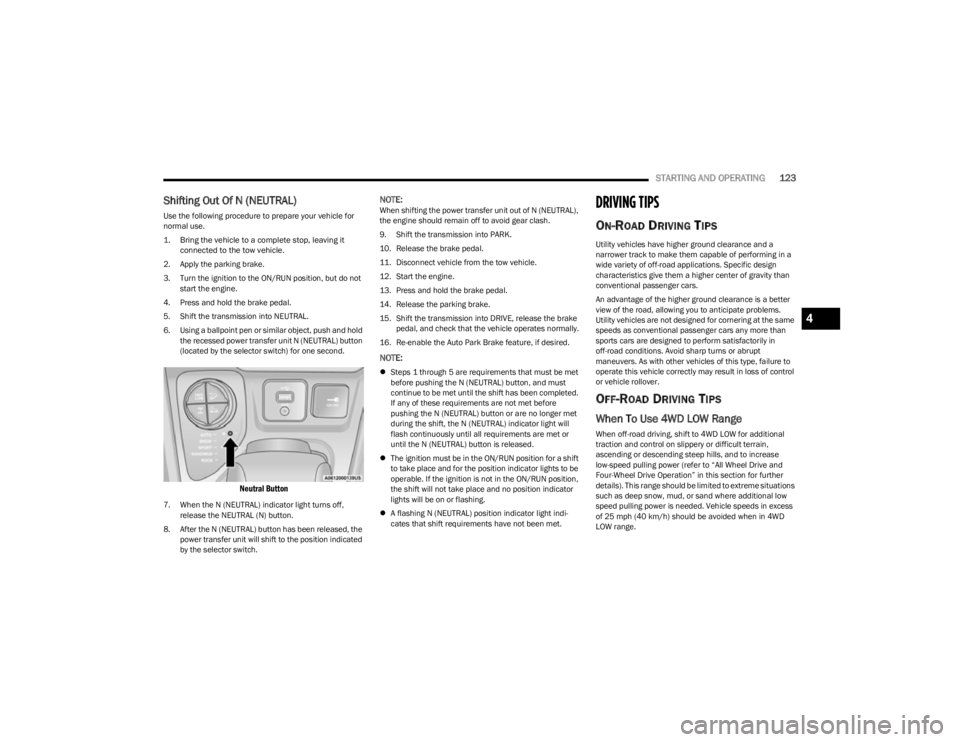
6. Using a ballpoint pen or similar object, push and hold the recessed power transfer unit N (NEUTRAL) button
(located by the selector switch) for one second.
Neutral Button
7. When the N (NEUTRAL) indicator light turns off, release the NEUTRAL (N) button.
8. After the N (NEUTRAL) button has been released, the power transfer unit will shift to the position indicated
by the selector switch.
NOTE:When shifting the power transfer unit out of N (NEUTRAL),
the engine should remain off to avoid gear clash.
9. Shift the transmission into PARK.
10. Release the brake pedal.
11. Disconnect vehicle from the tow vehicle.
12. Start the engine.
13. Press and hold the brake pedal.
14. Release the parking brake.
15. Shift the transmission into DRIVE, release the brake pedal, and check that the vehicle operates normally.
16. Re-enable the Auto Park Brake feature, if desired.
NOTE:
Steps 1 through 5 are requirements that must be met
before pushing the N (NEUTRAL) button, and must
continue to be met until the shift has been completed.
If any of these requirements are not met before
pushing the N (NEUTRAL) button or are no longer met
during the shift, the N (NEUTRAL) indicator light will
flash continuously until all requirements are met or
until the N (NEUTRAL) button is released.
The ignition must be in the ON/RUN position for a shift
to take place and for the position indicator lights to be
operable. If the ignition is not in the ON/RUN position,
the shift will not take place and no position indicator
lights will be on or flashing.
A flashing N (NEUTRAL) position indicator light indi -
cates that shift requirements have not been met.
DRIVING TIPS
ON-ROAD DRIVING TIPS
Utility vehicles have higher ground clearance and a
narrower track to make them capable of performing in a
wide variety of off-road applications. Specific design
characteristics give them a higher center of gravity than
conventional passenger cars.
An advantage of the higher ground clearance is a better
view of the road, allowing you to anticipate problems.
Utility vehicles are not designed for cornering at the same
speeds as conventional passenger cars any more than
sports cars are designed to perform satisfactorily in
off-road conditions. Avoid sharp turns or abrupt
maneuvers. As with other vehicles of this type, failure to
operate this vehicle correctly may result in loss of control
or vehicle rollover.
OFF-ROAD DRIVING TIPS
When To Use 4WD LOW Range
When off-road driving, shift to 4WD LOW for additional
traction and control on slippery or difficult terrain,
ascending or descending steep hills, and to increase
low-speed pulling power (refer to “All Wheel Drive and
Four-Wheel Drive Operation” in this section for further
details). This range should be limited to extreme situations
such as deep snow, mud, or sand where additional low
speed pulling power is needed. Vehicle speeds in excess
of 25 mph (40 km/h) should be avoided when in 4WD LOW range.
4
23_KL_OM_EN_USC_t.book Page 123
Page 126 of 276

124STARTING AND OPERATING
Driving Through Water
Although your vehicle is capable of driving through water,
there are a number of precautions that must be
considered before entering the water:
Driving through water more than a few inches/
centimeters deep will require extra caution to ensure
safety and prevent damage to your vehicle. If you must
drive through water, try to determine the depth and the
bottom condition (and location of any obstacles) prior to
entering. Proceed with caution and maintain a steady
controlled speed less than 5 mph (8 km/h) in deep water
to minimize wave effects.
Flowing Water
If the water is swift flowing and rising (as in storm run-off)
avoid crossing until the water level recedes and/or the
flow rate is reduced. If you must cross flowing-water, avoid
depths in excess of 9 inches (22 cm). The flowing water
can erode the streambed causing your vehicle to sink into
deeper water. Determine exit point(s) that are
downstream of your entry point to allow for drifting. Standing Water
Avoid driving in standing water deeper than 16 inches
(40.5 cm), and reduce speed appropriately to minimize
wave effects. Maximum speed in 16 inches (40.5 cm) of
water is less than 5 mph (8 km/h).
(Trailhawk only): Avoid driving in standing water deeper
than 19 inches (48 cm), and reduce speed appropriately
to minimize wave effects. Maximum speed in 19 inches
(48 cm) of water is less than 5 mph (8 km/h).
Maintenance
After driving through deep water, inspect your vehicle
fluids and lubricants (engine, transmission, Power
Transfer Unit, and Rear Drive Module) to ensure they have
not been contaminated. Contaminated fluids and
lubricants (milky, foamy in appearance) should be
flushed/changed as soon as possible to prevent
component damage.
Driving In Snow, Mud And Sand
In heavy snow, when pulling a load, or for additional
control at slower speeds, shift the transmission to a low
gear and shift the 4WD system to the appropriate terrain
mode, using 4WD LOW if necessary
Úpage 85. Only shift
into a lower gear to maintain forward motion. Over-revving
the engine can spin the wheels and traction will be lost.
Avoid abrupt downshifts on icy or slippery roads because
engine braking may cause skidding and loss of control.
Hill Climbing
NOTE:Before attempting to climb a hill, determine the conditions
at the crest and/or on the other side.
Before climbing a steep hill, shift the transmission to a
lower gear and shift the 4WD system to 4WD LOW. Use
FIRST gear and 4WD LOW for very steep hills.
NOTE:Brakes should be applied at increased slippage, but
before coming to a stop to avoid digging into the loose
surface and rendering the operator of the vehicle stuck/
immobile.
If you stall or begin to lose headway while climbing a steep
hill, allow your vehicle to come to a stop and immediately
apply the brakes. Once stopped, shift to REVERSE. Back
slowly down the hill allowing the compression braking of
the engine to help regulate your speed. If the brakes are
required to control vehicle speed, apply them lightly and
avoid locking or skidding the tires.
CAUTION!
When driving through water, do not exceed 5 mph
(8 km/h). Always check water depth before entering as
a precaution, and check all fluids afterward. Driving
through water may cause damage that may not be
covered by the New Vehicle Limited Warranty.
WARNING!
If the engine stalls or you lose headway or cannot make
it to the top of a steep hill or grade, never attempt to
turn around. To do so may result in tipping and rolling
the vehicle. Always back straight down a hill in
REVERSE gear carefully. Never back down a hill in
NEUTRAL using only the brake.
23_KL_OM_EN_USC_t.book Page 124
Page 127 of 276

STARTING AND OPERATING125
NOTE:Remember, never drive diagonally across a hill — drive
straight up or down.
If the wheels start to slip as you approach the crest of a
hill, ease off the accelerator and maintain headway by
turning the front wheels slowly left and right. This may
provide a fresh “bite” into the surface and may provide
traction to complete the climb.
Traction Downhill
Shift the transmission into a low gear and the 4WD system
to 4WD LOW range or Select Hill Descent Control (if
equipped)
Úpage 143. Let the vehicle go slowly down the
hill with all four wheels turning against engine
compression drag. This will permit you to control the
vehicle speed and direction.
When descending mountains or hills, repeated braking
can cause brake fade with loss of braking control. Avoid
repeated heavy braking by downshifting the transmission
whenever possible.
After Driving Off-Road
Off-road operation puts more stress on your vehicle than
does most on-road driving. After going off-road, it is always
a good idea to check for damage.
Completely inspect the underbody of your vehicle.
Check tires, body structure, steering, suspension, and
exhaust system for damage.
Inspect the radiator for mud and debris and clean as
required.
Check threaded fasteners for looseness, particularly
on the chassis, drivetrain components, steering, and
suspension. Retighten them, if required, and torque to
the values specified in the Service Manual.
Check for accumulations of plants or brush. These
things could be a fire hazard. They might hide damage
to fuel lines, brake hoses, axle pinion seals, and
propeller shafts.
After extended operation in mud, sand, water, or
similar dirty conditions, have the radiator, fan, brake
rotors, wheels, brake linings, and axle yokes inspected
and cleaned as soon as possible.
Impacted material can cause wheel imbalance.
Freeing the wheels of impacted material will likely
rectify imbalance condition.
WARNING!
Abrasive material in any part of the braking system may
cause excessive wear or unpredictable braking
performance. Full braking power may not be available
to prevent a collision. If you have been operating your
vehicle in dirty conditions, inspect and clean the
braking components as soon as possible.
4
23_KL_OM_EN_USC_t.book Page 125
Page 145 of 276
143
SAFETY
SAFETY FEATURES
ANTI-LOCK BRAKE SYSTEM (ABS)
The ABS provides increased vehicle stability and brake
performance under most braking conditions. The system
automatically prevents wheel lock and enhances vehicle
control during braking.
The ABS performs a self-check cycle to ensure that the
ABS is working properly each time the vehicle is started
and driven. During this self-check, you may hear a slight
clicking sound as well as some related motor noises.
The ABS is activated during braking when the system
detects one or more wheels are beginning to lock. Road
conditions such as ice, snow, gravel, bumps, railroad
tracks, loose debris, or panic stops may increase the
likelihood of ABS activation(s).
You also may experience the following normal
characteristics when the ABS activates:
ABS motor noise or clicking sounds (you may continue
to hear for a short time after the stop).
Brake pedal pulsations.
A slight drop of the brake pedal at the end of the stop.
The ABS is designed to function with the Original
Equipment Manufacturer (OEM) tires. Modification may
result in degraded ABS performance.
Anti-Lock Brake System (ABS) Warning
Light
The yellow ABS Warning Light will turn on when the ignition
is placed in the ON/RUN mode and may stay on for as long
as four seconds.
If the ABS Warning Light remains on or comes on while
driving, it indicates that the anti-lock portion of the brake
system is not functioning and that service is required.
However, the conventional brake system will continue to
operate normally if the ABS Warning Light is on.
If the ABS Warning Light is on, the brake system should be
serviced as soon as possible to restore the benefits of
Anti-Lock Brakes. If the ABS Warning Light does not come
on when the ignition is placed in the ON/RUN mode, have
the light repaired as soon as possible.
ELECTRONIC BRAKE CONTROL (EBC)
S
YSTEM
Your vehicle is equipped with an advanced EBC system.
This system includes Anti-Lock Brake System (ABS), Brake
Assist System (BAS), Electronic Brake Force Distribution
(EBD), Electronic Roll Mitigation (ERM), Electronic Stability
Control (ESC), Hill Start Assist (HSA), and Traction Control
System (TCS). These systems work together to enhance
both vehicle stability and control in various driving
conditions.
WARNING!
The ABS contains sophisticated electronic equip -
ment that may be susceptible to interference caused
by improperly installed or high output radio transmit -
ting equipment. This interference can cause possible
loss of anti-lock braking capability. Installation of
such equipment should be performed by qualified
professionals.
Pumping of the Anti-Lock Brakes will diminish their
effectiveness and may lead to a collision. Pumping
makes the stopping distance longer. Just press firmly
on your brake pedal when you need to slow down or
stop.
The ABS cannot prevent the natural laws of physics
from acting on the vehicle, nor can it increase
braking or steering efficiency beyond that afforded
by the condition of the vehicle brakes and tires or the
traction afforded.
The ABS cannot prevent collisions, including those
resulting from excessive speed in turns, following
another vehicle too closely, or hydroplaning.
The capabilities of an ABS equipped vehicle must
never be exploited in a reckless or dangerous
manner that could jeopardize the user’s safety or the
safety of others.
6
23_KL_OM_EN_USC_t.book Page 143