2023 INFINITI QX60 lights
[x] Cancel search: lightsPage 124 of 636

AUDIBLE REMINDERS
Brake pad wear warning
The disc brake pads have audible wear warn-
ings. When a disc brake pad requires replace-
ment, it makes a high pitched scraping sound
when the vehicle is in motion, whether or not
the brake pedal is depressed. Have the brakes
checked as soon as possible if the warning
sound is heard.
Lane Departure Warning (LDW)
and Lane Departure Prevention
(LDP) warning chime (if so
equipped)
When the LDW or LDP system is on, the
chime sounds if the vehicle is traveling close
to either the left or the right of a traveling
lane with detectable lane markers.
For additional information, see “Lane Depar-
ture Warning (LDW) system” (P. 5-36) or
“Lane Departure Prevention (LDP) system”
(P. 5-43).
Light reminder chime
With the ignition switch placed in the OFF
position, a chime sounds when the driver's
door is opened if the headlights or parking
lights are on.
Turn the headlight control switch off before
leaving the vehicle.
Door lock warning chime
When the chime sounds, be sure to check
both the vehicle and the Intelligent Key.
For additional information, see “Trouble-
shooting guide” (P. 3-16).The vehicle information display is located to
the left of the speedometer. It displays such
items as:
• Vehicle settings
• Indicators and warnings
• Information/warning messages
• Tire pressure information
• Drive computer information
• Cruise control system information
• Driving Aids (if so equipped)
• ProPILOT Assist (if so equipped)
• INFINITI Intelligent Key operationinformation
LIC3224
VEHICLE INFORMATION DISPLAY 7
INCH (18 cm) TYPE A (if so equipped)
2-22Instruments and controls
Page 133 of 636
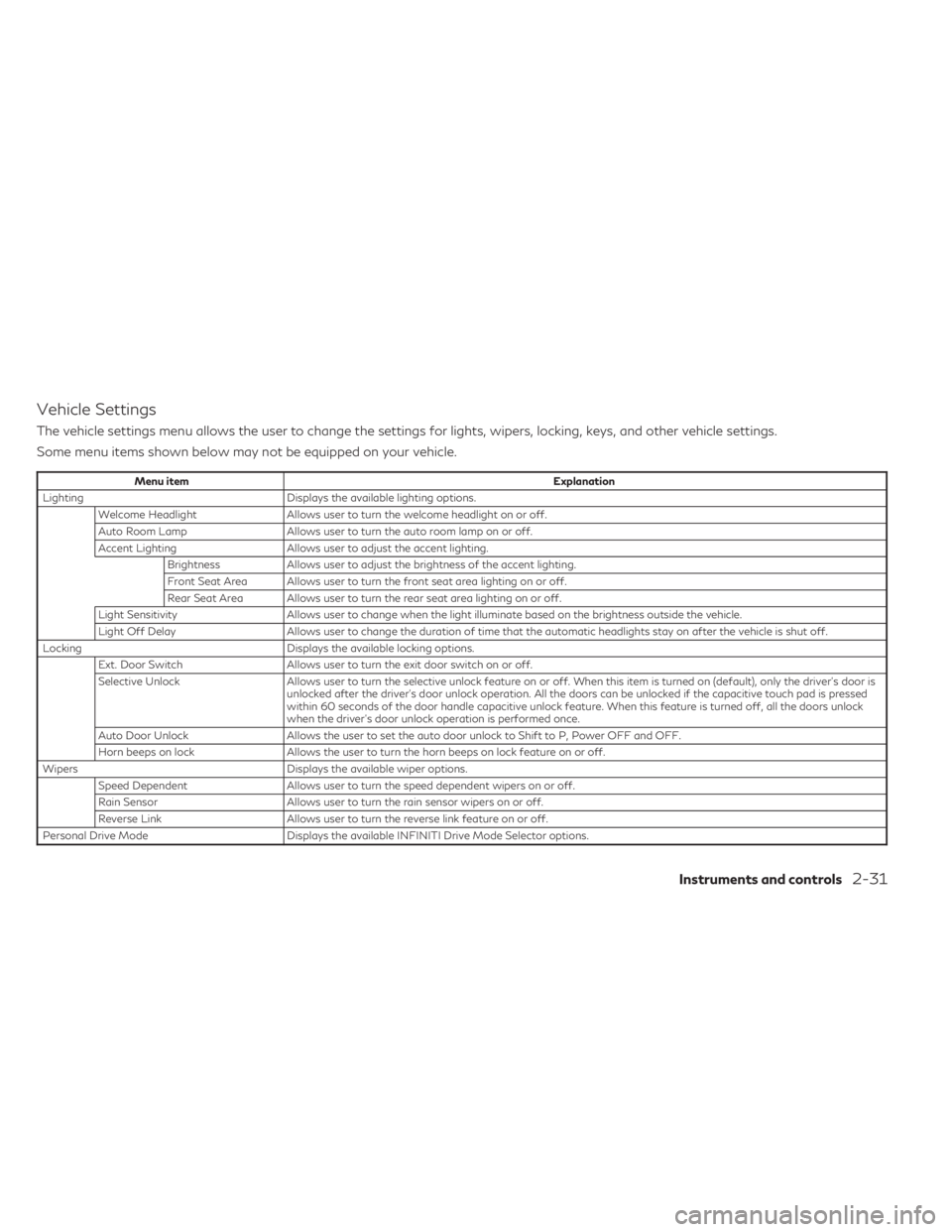
Vehicle Settings
The vehicle settings menu allows the user to change the settings for lights, wipers, locking, keys, and other vehicle settings.
Some menu items shown below may not be equipped on your vehicle.
Menu itemExplanation
Lighting Displays the available lighting options.
Welcome Headlight Allows user to turn the welcome headlight on or off.
Auto Room Lamp Allows user to turn the auto room lamp on or off.
Accent Lighting Allows user to adjust the accent lighting.
Brightness Allows user to adjust the brightness of the accent lighting.
Front Seat Area Allows user to turn the front seat area lighting on or off.
Rear Seat Area Allows user to turn the rear seat area lighting on or off.
Light Sensitivity Allows user to change when the light illuminate based on the brightness outside the vehicle.
Light Off Delay Allows user to change the duration of time that the automatic headlights stay on after the vehicle is shut off.
Locking Displays the available locking options.
Ext. Door Switch Allows user to turn the exit door switch on or off.
Selective Unlock Allows user to turn the selective unlock feature on or off. When this item is turned on (default), only the driver’s door is
unlocked after the driver’s door unlock operation. All the doors can be unlocked if the capacitive touch pad is pressed
within 60 seconds of the door handle capacitive unlock feature. When this feature is turned off, all the doors unlock
when the driver’s door unlock operation is performed once.
Auto Door Unlock Allows the user to set the auto door unlock to Shift to P, Power OFF and OFF.
Horn beeps on lock Allows the user to turn the horn beeps on lock feature on or off.
Wipers Displays the available wiper options.
Speed Dependent Allows user to turn the speed dependent wipers on or off.
Rain Sensor Allows user to turn the rain sensor wipers on or off.
Reverse Link Allows user to turn the reverse link feature on or off.
Personal Drive Mode Displays the available INFINITI Drive Mode Selector options.
Instruments and controls2-31
Page 137 of 636

Menu itemExplanation
Operation guidance Displays the available operation guidance settings.
Lights Allows user to turn the light mode guidance on or off.
Wiper Displays the available wiper settings.
Front Allows user to turn the front wiper guidance on or off.
Rear Allows user to turn the rear wiper guidance on or off.
High Beam Assist Allows user to turn the High Beam Assist on or off.
Seat Memory Allows user to turn the seat memory on or off.
Cruise Control Allows user to turn the cruise control on or off.
Unit/Language
The unit/language menu allows the user to change the units shown in the vehicle information display.
Some menu items shown below may not be equipped on your vehicle.
Menu item Explanation
Mileage/Fuel Displays the available mileage/fuel display units and allows user to select preferred unit for display.
Tire Pressure Allows user to select the tire pressure display units.
Temperature Allows user to select the temperature display units.
Language Displays the available language options and allows user to select preferred language for display.
Instruments and controls2-35
Page 142 of 636

Press brake to operate switch
This indicator appears if the automatic brake
hold switch is pushed without depressing the
brake pedal while the automatic brake hold
function is activated. Depress the brake pedal
and push the switch to deactivate the auto-
matic brake hold function.
For additional information, see “Automatic
brake hold” (P. 5-27).
Push brake and start switch
to drive
This indicator appears when the shift position
is in the P (Park) position.
This indicator also appears when the vehicle
has been started using the Remote Engine
Start (if so equipped) function.
This indicator means that the engine will start
by pushing the ignition switch with the brake
pedal depressed. You can start the engine
from any position of the ignition switch.
Rear seat belt reminder
This rear seat belt reminder appears after
placing the ignition switch in the ON position.If any of the rear passenger seat belts are not
fastened, the seat belt icon illuminates in red
to show which seat belt is not fastened.
When a rear passenger’s seat belt has been
securely fastened, the color of the corre-
sponding seat belt icon will change. The
warning will automatically turn off after ap-
proximately 65 seconds.
After the initial reminder is turned off (by 65
second timer or dismissing the warning in
vehicle information display) and the vehicle
speed is less than 10 mph (15 km/h), if any
rear seat belt is unfastened, the rear seat belt
reminder will display. The warning will auto-
matically turn off after approximately 95
seconds.
After the initial reminder is turned off (by 65
second timer or dismissing the warning in
vehicle information display) and the vehicle
speed is greater than 10 mph (15 km/h), if
any rear seat belt is unfastened, the rear seat
belt reminder will display and a warning
chime will sound every two seconds until the
corresponding seat belt is fastened. The
chime will automatically turn off after ap-
proximately 95 seconds. The rear seat belt
reminder will be displayed until it is dismissed
in the vehicle information display.
Reminder: Turn OFF
headlights
This warning appears when the headlights
are left in the ON position when exiting the
vehicle. Place the headlight switch in the OFF
or AUTO position. For additional informa-
tion, see “Headlight and turn signal switch”
(P. 2-77).
Shipping Mode On Push Storage Fuse
This warning may appear if the extended
storage switch is not pushed in. When this
warning appears, push in the extended stor-
age switch to turn off the warning. For addi-
tional information, see “Extended storage
switch” (P. 2-99).
Steep Slope Apply foot brake
This indicator appears, and chime sounds if
the “Caution Steep slope” has appeared over
about 3 minutes. Then the parking brake will
automatically be applied and the brake force
of the automatic brake hold will be released,
and the vehicle may move or roll away unex-
pectedly. Apply the foot brake to stop the
vehicle moving.
For additional information, see “Automatic
brake hold” (P. 5-27).
2-40Instruments and controls
Page 157 of 636

Clock
Allows user to adjust the clock settings and time within the vehicle information display.
Some menu items shown below may not be equipped on your vehicle.
Menu itemExplanation
Display Allows user to turn the display on or off.
Clock Mode Allows user to adjust the clock mode to Auto, Manual or Time Zone.
Clock Format Allows user to adjust the clock format to 24H or 12H.
Daylight Saving Allows user to turn on or off the daylight saving mode.
Time Zone Allows user to select a time zone.
Set Clock Manually Allows user to set the clock manually.
Vehicle Settings
The vehicle settings menu allows the user to change the settings for lights, wipers, locking, keys, and other vehicle settings.
Some menu items shown below may not be equipped on your vehicle.
Menu item Explanation
Lighting Displays the available lighting options. Welcome Headlight Allows user to turn the welcome headlight on or off.
Auto Room Lamp Allows user to turn the auto room lamp on or off.
Accent Lighting Allows user to adjust the accent lighting. Brightness Allows user to adjust the brightness of the accent lighting.
Front Seat Area Allows user to turn the front seat area lighting on or off.
Rear Seat Area Allows user to turn the rear seat area lighting on or off.
Light Sensitivity Allows user to change when the light illuminate based on the brightness outside the vehicle.
Light Off Delay Allows user to change the duration of time that the automatic headlights stay on after the vehicle is shut off.
Locking Displays the available locking options.
Instruments and controls2-55
Page 161 of 636

Menu itemExplanation
Operation guidance Displays the available operation guidance settings.
Lights Allows user to turn the light mode guidance on or off.
Wiper Displays the available wiper settings.
Front Allows user to turn the front wiper guidance on or off.
Rear Allows user to turn the rear wiper guidance on or off.
High Beam Assist Allows user to turn the High Beam Assist on or off.
Seat Memory Allows user to turn the seat memory on or off.
Cruise Control Allows user to turn the cruise control on or off.
Unit/Language
The unit/language menu allows the user to change the units shown in the vehicle information display.
Some menu items shown below may not be equipped on your vehicle.
Menu item Explanation
Mileage/Fuel Displays the available mileage/fuel display units and allows user to select preferred unit for display.
Tire Pressure Allows user to select the tire pressure display units.
Temperature Allows user to select the temperature display units.
Language Displays the available language options and allows user to select preferred language for display.
Factory Reset
The factory reset menu allows the user to restore the vehicle information display settings to factory status.
Some menu items shown below may not be equipped on your vehicle.
Menu item Explanation
Factory Reset Allows user to reset the vehicle information display settings to the original factory settings. Once selected, the
user can confirm or cancel the reset.
Instruments and controls2-59
Page 164 of 636

Headlight System Error: See Owner’s
Manual
This warning appears when there is an error
with the system. For additional information,
see “Headlight and turn signal switch” (P. 2-77).
High Beam Assist indicator
(green)
This indicator appears when the headlights
come on while the headlight switch is in the
AUTO position with the high beams selected
and the engine running. This indicates that
the high beam assist is operational.
For additional information, see “Headlight
and turn signal switch” (P. 2-77).
High beam indicator (blue)
This blue indicator appears when the head-
light high beams are on and goes out when
the low beams are selected.
The high beam indicator also appears when
the passing signal is activated.
INFINITI Drive Mode Selector indicator
When a driving mode is selected using the
INFINITI Drive Mode Selector, the selected
mode indicator is displayed.
• PERSONAL
• SPORT• STANDARD (2WD models)
• AUTO (AWD models)
• ECO
• SNOW
For additional information, see “INFINITI
Drive Mode Selector” (P. 5-29).
Low beam indicator
This indicator appears when the switch is
turned to theposition. The headlights
will come on; and the front side, tail, number
plate, and instrument lights remain on.
Low Fuel
This warning appears when the fuel level in
the fuel tank is getting low. Refuel as soon as
it is convenient, preferably before the fuel
gauge reaches 0 (Empty). There will be a
small reserve of fuel in the tank when the fuel
gauge needle reaches 0 (Empty).
Low Oil Pressure: See
Owner’s Manual
This warning appears in the message area of
the vehicle information display if low oil pres-
sure is detected. This gauge is not designed
to indicate low oil level. The low oil pressure
warning is not designed to indicate a low oil level.
Use the dipstick to check the oil level.
For additional information, see “Engine oil”
(P. 8-6).
Low Outside Temperature
This warning appears if the outside tempera-
ture is below 37°F (3°C). The temperature
can be changed to display in Celsius or Fahr-
enheit. For additional information, see “Driver
Assistance” (P. 2-51).
Low Washer Fluid
This warning appears when the windshield-
washer fluid is at a low level. Add windshield-
washer fluid as necessary. For additional infor-
mation, see “Windshield-washer fluid” (P. 8-11).
Low tire pressure indicator
Your vehicle is equipped with a Tire Pressure
Monitoring System (TPMS) that monitors the
tire pressure of all tires except the spare.
The low tire pressure indicator warns of low
tire pressure or indicates that the TPMS is
not functioning properly.
After the ignition switch is placed in the ON
position, this indicator appears for about 1
second and turns off.
2-62Instruments and controls
Page 168 of 636

When a rear passenger’s seat belt has been
securely fastened, the color of the corre-
sponding seat belt icon will change. The
warning will automatically turn off after ap-
proximately 65 seconds.
After the initial reminder is turned off (by 65
second timer or dismissing the warning in
vehicle information display) and the vehicle
speed is less than 10 mph (15 km/h), if any
rear seat belt is unfastened, the rear seat belt
reminder will display. The warning will auto-
matically turn off after approximately 95
seconds.
After the initial reminder is turned off (by 65
second timer or dismissing the warning in
vehicle information display) and the vehicle
speed is greater than 10 mph (15 km/h), if
any rear seat belt is unfastened, the rear seat
belt reminder will display and a warning
chime will sound every two seconds until the
corresponding seat belt is fastened. The
chime will automatically turn off after ap-
proximately 95 seconds. The rear seat belt
reminder will be displayed until it is dismissed
in the vehicle information display.Reminder: Turn OFF
headlights
This warning appears when the headlights
are left in the ON position when exiting the
vehicle. Place the headlight switch in the OFF
or AUTO position. For additional informa-
tion, see “Headlight and turn signal switch”
(P. 2-77).
Seat belt indicator and chime
The light and chime remind you to fasten the
driver and front passenger seat belts.
The 2nd and 3rd row seats may also be
equipped with a seat belt indicator.
For additional information, see “Seat belts”
(P. 1-17).
Shipping Mode On Push Storage Fuse
This warning may appear if the extended
storage switch is not pushed in. When this
warning appears, push in the extended stor-
age switch to turn off the warning. For addi-
tional information, see “Extended storage
switch” (P. 2-99).
Side light and headlight
indicator (green)
The side indicator and headlight indicator ap-
pears when the side light or headlights are on
(not including the Daytime Running Lights
(DRL) system or signature lights). If the head-
light switch is in the AUTO position, the side
indicator and headlight indicator will appear
when the headlights turn on. For additional
information, see “Headlight and turn signal
switch” (P. 2-77).
Steep Slope Apply foot brake
This indicator appears, and chime sounds if
the “Caution Steep slope” has appeared over
about 3 minutes. Then the parking brake will
automatically be applied and the brake force
of the automatic brake hold will be released,
and the vehicle may move or roll away unex-
pectedly. Apply the foot brake to stop the
vehicle moving.
For additional information, see “Automatic
brake hold” (P. 5-27).
Timer Alert — Have a break?
This indicator appears when the set time is
reached. The time can be set up to six hours.
For additional information, see “Driver Assis-
tance” (P. 2-51).
2-66Instruments and controls