2023 INFINITI QX55 hood release
[x] Cancel search: hood releasePage 17 of 526

12. Front passenger supplemental knee airbag (P. 1-41)
13. Glove box (P. 2-59)
14. Audio system controls*
15. INFINITI controller*
16. Power outlet (P. 2-55) USB port*
Cup holders (P. 2-61)
Storage (P. 2-57)
17. Shift lever (P. 5-18)
18. Push-button ignition switch (P. 5-13) Electronic parking brake switch (P. 5-24)
Automatic brake hold switch (P. 5-27)
INFINITI Drive Mode Selector (P. 5-29)
19. Hazard warning flasher switch (P. 6-2)
20. ProPILOT Assist switches (P. 5-76) Control panel and vehicle information
display switches (P. 2-20)
21. Driver supplemental knee air bag
(P. 1-41)
22. Tilt and telescopic steering wheel control
(P. 3-32)
23. Hood release (P. 3-21) 24. Instrument brightness control (P. 2-46)
Front and rear sonar system switch
(P. 5-147)
Steering assist switch (for vehicles with
ProPILOT Assist) (P. 5-83)
Instrument panel liftgate switch (P. 3-27)
Headlight switch (P. 2-40)
Fog light switch (P. 2-47)
Head Up Display (HUD) OFF switch
(if so equipped) (P. 2-53)
*: Refer to the separate INFINITI InTouchTM
Owner's Manual.
Refer to the page number indicated in paren-
theses for operating details.
Illustrated table of contents0-7
Page 84 of 526

WARNING
• The pop-up engine hood will not activate
in the event of a side impact, rear impact
or rollover collision.
• The pop-up engine hood may not acti-
vate in the event of a corner impact col-
lision of the front bumper.
• No unauthorized changes should be
made to any components including hood
and front bumper, or wiring of the
pop-up engine hood system. This is to
prevent accidental or improper activa-
tion, or damage to the pop-up engine
hood system.
• It is recommended that work performed
around or on the pop-up engine hood
system should be done by an INFINITI
retailer. The wiring of the pop-up engine
hood system should not be modified or
disconnected. Unauthorized electrical
test equipment and probing devices
should not be used on the pop-up engine
hood system. This could affect proper
operation of the pop-up engine hood and
cause accidental and improper
activation. •
Do not pull the hood lock release handle
or push the hood down after the pop-up
engine hood system activates. Doing so
could cause personal injury or damage to
the hood because the hood cannot be
closed manually after the system is acti-
vated. When the pop-up engine hood ac-
tivates, it is recommended that you visit
an INFINITI retailer.
• If you need to dispose of the pop-up en-
gine hood system, or scrap the vehicle, it
is recommended that you visit an
INFINITI retailer. Correct pop-up engine
hood system disposal procedures are set
forth in the appropriate INFINITI Service
Manual. Incorrect disposal procedures
could cause personal injury.
• The pop-up engine hood cannot be re-
used after activation. It is recommended
that you visit an INFINITI retailer for re-
placement. If the vehicle becomes in-
volved in a frontal collision but the
pop-up engine hood system is not acti-
vated, it is recommended that you have
the pop-up engine hood system checked
and, if necessary, replaced by an
INFINITI retailer. •
Immediately after the pop-up engine
hood has been activated, do not touch
the components because the lifters will
be hot. You may severely burn yourself.
POP-UP ENGINE HOOD
ACTIVATION CONDITIONS
When the pop-up engine hood will activate
The pop-up engine hood activates in certain
frontal collisions with pedestrians or objects
when the vehicle is driven at speeds between
approximately 12 and 37 mph (20 and 60
km/h).
The pop-up engine hood activates when the
collision impact reaches a certain level even if
the collision does not cause damage to the
front bumper. In addition, it may activate
when the vehicle collides with small animals,
lumps of snow or any other objects, depend-
ing on the condition and speed of collision.
When the vehicle receives an impact to the
undercarriage or a lower part of the front
bumper, the pop-up engine hood may also
activate. Reduce speed and be careful when
driving on a road surface that seems likely to
impact the undercarriage or a lower part of
the front bumper. Some examples are shown
in the following illustrations.
1-64Safety-Seats, seat belts and supplemental restraint system
Page 89 of 526

12. Front passenger supplemental knee airbag (P. 1-41)
13. Glove box (P. 2-59)
14. Audio system controls*
15. INFINITI controller*
16. Power outlet (P. 2-55) USB port*
Cup holders (P. 2-61)
Storage (P. 2-57)
17. Shift lever (P. 5-18)
18. Push-button ignition switch (P. 5-13) Electronic parking brake switch (P. 5-24)
Automatic brake hold switch (P. 5-27)
INFINITI Drive Mode Selector (P. 5-29)
19. Hazard warning flasher switch (P. 6-2)
20. ProPILOT Assist switches (P. 5-76) Control panel and vehicle information
display switches (P. 2-20)
21. Driver supplemental knee air bag
(P. 1-41)
22. Tilt and telescopic steering wheel control
(P. 3-32)
23. Hood release (P. 3-21) 24. Instrument brightness control (P. 2-46)
Front and rear sonar system switch
(P. 5-147)
Steering assist switch (for vehicles with
ProPILOT Assist) (P. 5-83)
Instrument panel liftgate switch (P. 3-27)
Headlight switch (P. 2-40)
Fog light switch (P. 2-47)
Head Up Display (HUD) OFF switch
(if so equipped) (P. 2-53)
*: Refer to the separate INFINITI InTouchTM
Owner's Manual.
Refer to the page number indicated in paren-
theses for operating details.
Instruments and controls2-3
Page 120 of 526

The system helps deter vehicle theft but can-
not prevent it nor can it prevent the theft of
interior or exterior vehicle components in all
situations. Always secure your vehicle even if
parking for a brief period. Never leave your
Intelligent Key in the vehicle, and always lock
the vehicle when unattended. Be aware of
your surroundings, and park in secure, well-lit
areas whenever possible.
Many devices offering additional protection,
such as component locks, identification
markers, and tracking systems, are available
at auto supply stores and specialty shops. An
INFINITI retailer may also offer such equip-
ment. Check with your insurance company to
see if you may be eligible for discounts for
various theft protection features.
How to arm the vehicle security
system
1. Close all windows and the moonroof (if soequipped). (The system can be armed even
if the windows and moonroof are open.)
2. Remove the Intelligent Key from the vehicle.
3. Close all doors, hood and liftgate. Lock all doors. The doors can be locked with the
Intelligent Key, door handle request
switch, or power door lock switch. 4. Confirm that the
security indicator
light stays on for about 30 seconds. The
vehicle security system is now pre-armed.
The vehicle security system will automati-
cally shift into the armed phase. The
security light begins to flash once every
three seconds. If during the pre-armed
phase one of the following occurs, the
system will not arm:
• Any door is unlocked with the Intelligent Key or door request switch.
• Ignition switch is placed in AUTO ACC or ON position.
• Even when the driver and/or passengers
are in the vehicle, the system will activate
with all the doors, hood and liftgate locked
with the ignition switch placed in the
LOCK position. When placing the ignition
switch in the AUTO ACC or ON position,
the system will be released.
Vehicle security system activation
The vehicle security system will give the fol-
lowing alarm:
• The turn signals blink and the horn sounds intermittently. • The alarm automatically turns off after a
period of time. However, the alarm reacti-
vates if the vehicle is tampered with again.
The alarm can be shut off by pressing the
button on the Intelligent Key.
The alarm is activated by:
• Opening the door or liftgate without using the Intelligent Key (even if the door is un-
locked by releasing the door inside lock
switch).
How to stop an activated alarm
The alarm stops only by unlocking the driver’s
door or the liftgate by pressing the
button on the Intelligent Key or pushing the
request switch on the driver's or passenger's
door with the Intelligent Key in range of the
door handle.
INFINITI VEHICLE IMMOBILIZER
SYSTEM
The INFINITI Vehicle Immobilizer System will
not allow the engine to start without the use
of a registered INFINITI Vehicle Immobilizer
System key.
2-34Instruments and controls
Page 163 of 526

3 Pre-driving checks and adjustments
Keys.............................................3-2
INFINITI Intelligent Key .......................3-2
INFINITI Vehicle Immobilizer System
keys ..........................................3-4
Doors ...........................................3-4
Locking with key ..............................3-5
Locking with inside lock knob ..................3-5
Locking with power door lock switch ..........3-5
Automatic door locks .........................3-6
Child safety rear door lock .....................3-6
INFINITI Intelligent Key System ...................3-6
Operating range ..............................3-8
Door locks/unlocks precaution ................3-9
INFINITI Intelligent Key operation .............3-9
How to use the remote keyless entry
function .................................... 3-14
Warning signals ............................. 3-16
Troubleshooting guide ......................3-16
Log-in function ............................. 3-18
Remote Engine Start ........................... 3-18
Remote Engine Start operating range ........3-19
Remote starting the vehicle ..................3-19
Extending engine run time ...................3-20
Canceling a Remote Engine Start ............3-20
Conditions the Remote Engine Start will
not work ................................... 3-20Hood
.......................................... 3-21
Liftgate ....................................... 3-22
Operating the power liftgate ................3-22
Motion-Activated Liftgate
(if so equipped) ............................. 3-25
Power liftgate main switch ..................3-27
Liftgate release ............................. 3-27
Liftgate position setting .....................3-28
Fuel-filler door ................................. 3-29
Opening the fuel-filler door ..................3-29
Fuel-filler cap ............................... 3-29
Steering wheel ................................. 3-32
Manual operation (if so equipped) ...........3-32
Automatic operation (if so equipped) .........3-32
Sun visors ..................................... 3-33
Vanity mirrors .............................. 3-34
Card holder ................................. 3-34
Mirrors ........................................ 3-34
Automatic
anti-glare rearview mirror ........3-34
Outside mirrors ............................. 3-35
Memory Seat (if so equipped) ...................3-37
Memory storage function ...................3-37
Entry/exit function .......................... 3-38
Setting memory function ....................3-38
System operation ........................... 3-39
Page 183 of 526
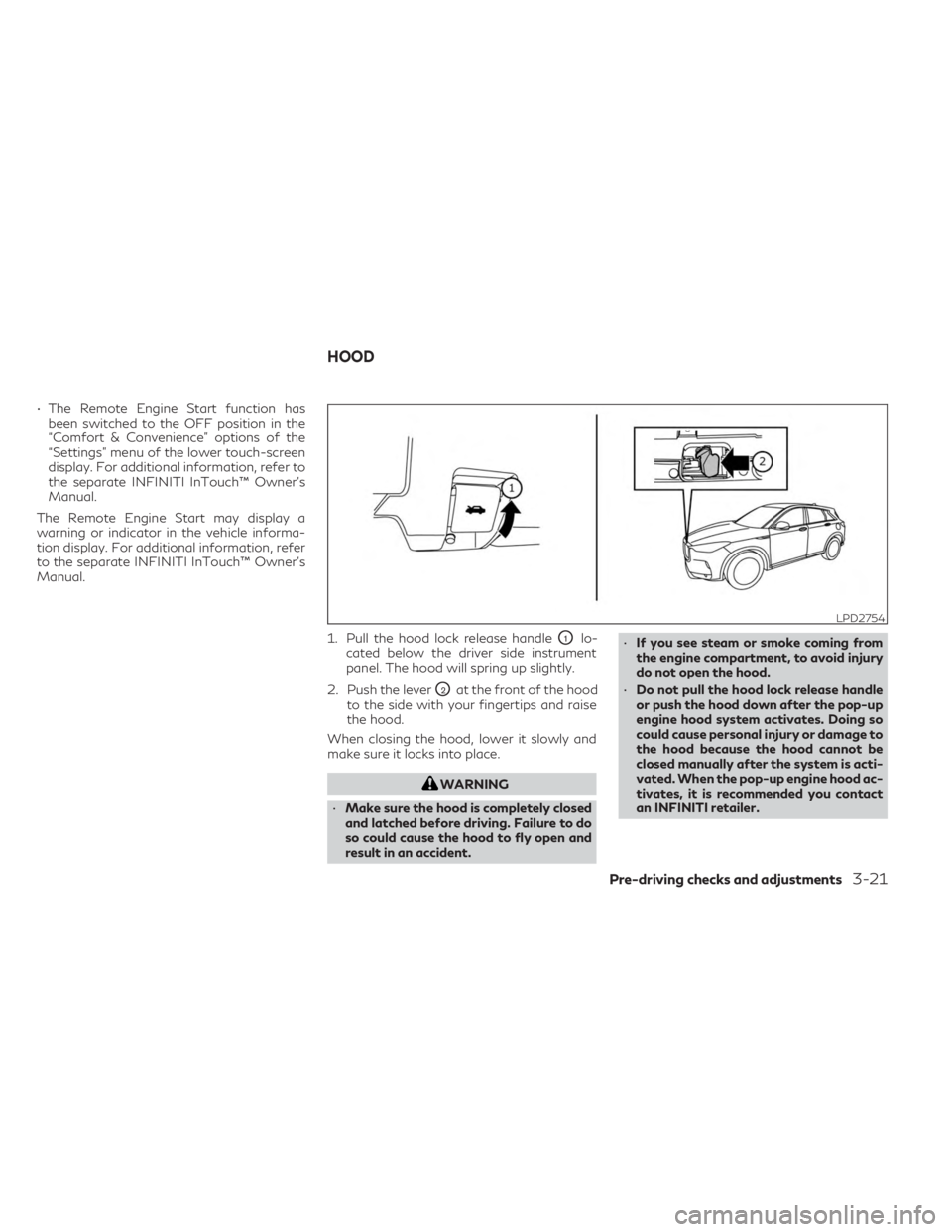
• The Remote Engine Start function hasbeen switched to the OFF position in the
“Comfort & Convenience” options of the
“Settings” menu of the lower touch-screen
display. For additional information, refer to
the separate INFINITI InTouch™ Owner’s
Manual.
The Remote Engine Start may display a
warning or indicator in the vehicle informa-
tion display. For additional information, refer
to the separate INFINITI InTouch™ Owner’s
Manual.
1. Pull the hood lock release handle
O1lo-
cated below the driver side instrument
panel. The hood will spring up slightly.
2. Push the lever
O2at the front of the hood
to the side with your fingertips and raise
the hood.
When closing the hood, lower it slowly and
make sure it locks into place.
WARNING
• Make sure the hood is completely closed
and latched before driving. Failure to do
so could cause the hood to fly open and
result in an accident. •
If you see steam or smoke coming from
the engine compartment, to avoid injury
do not open the hood.
• Do not pull the hood lock release handle
or push the hood down after the pop-up
engine hood system activates. Doing so
could cause personal injury or damage to
the hood because the hood cannot be
closed manually after the system is acti-
vated. When the pop-up engine hood ac-
tivates, it is recommended you contact
an INFINITI retailer.
LPD2754
HOOD
Pre-driving checks and adjustments3-21
Page 256 of 526

Please note that this procedure is only a gen-
eral guide. The vehicle must be driven as ap-
propriate based on the conditions of the ve-
hicle, road and traffic.
WARNING
The following actions can increase the
chance of losing control of the vehicle if
there is a sudden loss of tire air pressure.
Losing control of the vehicle may cause a
collision and result in personal injury.
• The vehicle generally moves or pulls in
the direction of the flat tire.
• Do not rapidly apply the brakes.
• Do not rapidly release the accelerator
pedal.
• Do not rapidly turn the steering wheel.
1. Remain calm and do not overreact.
2. Maintain a firm grip on the steering wheel with both hands and try to hold a straight
course.
3. When appropriate, slowly release the ac- celerator pedal to gradually slow the
vehicle.
4. Gradually steer the vehicle to a safe loca- tion off the road and away from traffic if
possible. 5. Lightly apply the brake pedal to gradually
stop the vehicle.
6. Turn on the hazard warning flashers and contact a roadside emergency service to
change the tire. For additional informa-
tion, see “Flat tire” (P. 6-3).
DRINKING ALCOHOL/DRUGS
AND DRIVING
WARNING
Never drive under the influence of alcohol
or drugs. Alcohol in the bloodstream re-
duces coordination, delays reaction time
and impairs judgement. Driving after
drinking alcohol increases the likelihood of
being involved in an accident injuring your-
self and others. Additionally, if you are in-
jured in an accident, alcohol can increase
the severity of the injury.
INFINITI is committed to safe driving. How-
ever, you must choose not to drive under the
influence of alcohol. Every year thousands of
people are injured or killed in alcohol-related
accidents. Although the local laws vary on
what is considered to be legally intoxicated,
the fact is that alcohol affects all people dif-
ferently and most people underestimate the
effects of alcohol. Remember, drinking and driving don't mix!
And that is true for drugs, too (over-the-
counter, prescription, and illegal drugs). Don't
drive if your ability to operate your vehicle is
impaired by alcohol, drugs, or some other
physical condition.
DRIVING SAFETY PRECAUTIONS
Your INFINITI is designed for both normal
and off-road use. However, avoid driving in
deep water or mud as your INFINITI is mainly
designed for leisure use, unlike a conventional
off-road vehicle.
Remember that 2-Wheel Drive (2WD) mod-
els are less capable than All-Wheel Drive
(AWD) models for rough road driving and
extrication when stuck in deep snow or mud,
or the like.
Please observe the following precautions:
WARNING
• Spinning the front wheels on slippery
surfaces may cause the AWD warning
message to display and the AWD system
to automatically switch from the AWD
to the 2WD mode. This could reduce the
traction.
5-10Starting and driving
Page 387 of 526

Normal operation
The Anti-lock Braking System (ABS) operates
at speeds above3-6mph(5-10km/h). The
speed varies according to road conditions.
When the ABS senses that one or more
wheels are close to locking up, the actuator
rapidly applies and releases hydraulic pres-
sure. This action is similar to pumping the
brakes very quickly. You may feel a pulsation
in the brake pedal and hear a noise from
under the hood or feel a vibration from the
actuator when it is operating. This is normal
and indicates that the ABS is operating prop-
erly. However, the pulsation may indicate
that road conditions are hazardous and extra
care is required while driving.
BRAKE ASSIST
When the force applied to the brake pedal
exceeds a certain level, the Brake Assist is
activated generating greater braking force
than a conventional brake booster even with
light pedal force.
WARNING
The Brake Assist is only an aid to assist
braking operation and is not a collision
warning or avoidance device. It is the driv-
er’s responsibility to stay alert, drive safely
and be in control of the vehicle at all times. The VDC system uses various sensors to
monitor driver inputs and vehicle motion. Un-
der certain driving conditions, the VDC sys-
tem helps to perform the following functions:
• Controls brake pressure to reduce wheel
slip on one slipping drive wheel so power is
transferred to a non-slipping drive wheel
on the same axle.
• Controls brake pressure and engine output to reduce drive wheel slip based on vehicle
speed (traction control function).
• Controls brake pressure at individual wheels and engine output to help the driver
maintain control of the vehicle in the fol-
lowing conditions:
Understeer (vehicle tends to not follow the
steered path despite increased steering input)
Oversteer (vehicle tends to spin due to certain
road or driving conditions)
The VDC system can help the driver to main-
tain control of the vehicle, but it cannot pre-
vent loss of vehicle control in all driving
situations.
When the VDC system operates, the
indicator light in the instrument panel flashes
to note the following:
• The road may be slippery or the system may determine some action is required to help
keep the vehicle on the steered path.
VEHICLE DYNAMIC CONTROL (VDC)
SYSTEM
Starting and driving5-141