2023 HYUNDAI TUCSON spec
[x] Cancel search: specPage 273 of 638
05
5-129
The indicator light will blink orange for 10
seconds if there is a malfunction in the
wireless charging system.
In this case, temporarily stop the
charging process, and re-attempt to
charge your smart phone again.
The system warns you with a message on
the LCD display if the smart phone is still
on the wireless charging unit after the
vehicle is turned OFF and the front door
is opened.
For some manufacturer’s smart phones,
the system may not warn you even
though the smart phone is left on the
wireless charging unit. This is due to the
particular characteristic of the smart
phone and not a malfunction of the
wireless charging.
Information
For some manufacturers’ cellular phones,
the system may not warn you even though
the cellular phone is left on the wireless
charging unit. This is due to the particular
characteristic of the cellular phone and
not a malfunction of the wireless charging.
NOTICE
• The wireless smart phone charging
system may not support certain
smart phones, which are not verified
for the Qi specification (
).
• When placing your smart phone on
the charging pad, position the phone
in the middle of the mat for optimal
charging performance. If your smart
phone is off to the side, the charging
rate may be less and in some cases
the smart phone may experience
higher heat conduction.
• In some cases, the wireless charging
may stop temporarily when the
smart key is used, either when
starting the vehicle or locking/
unlocking the doors, etc.
• When charging certain smart
phones, the charging indicator may
not change to blue when the smart
phone is fully charged.
• The wireless charging process may
temporarily stop, when temperature
abnormally increases inside the
wireless smart phone charging
system. The wireless charging
process restarts, when temperature
falls to a certain level.
• The wireless charging process may
temporarily stop when there is
any metallic item, such as a coin,
between the wireless smart phone
charging system and smart phone.
Page 279 of 638
05
5-135
EXTERIOR FEATURES
Roof rack (if equipped)
ONX4050057
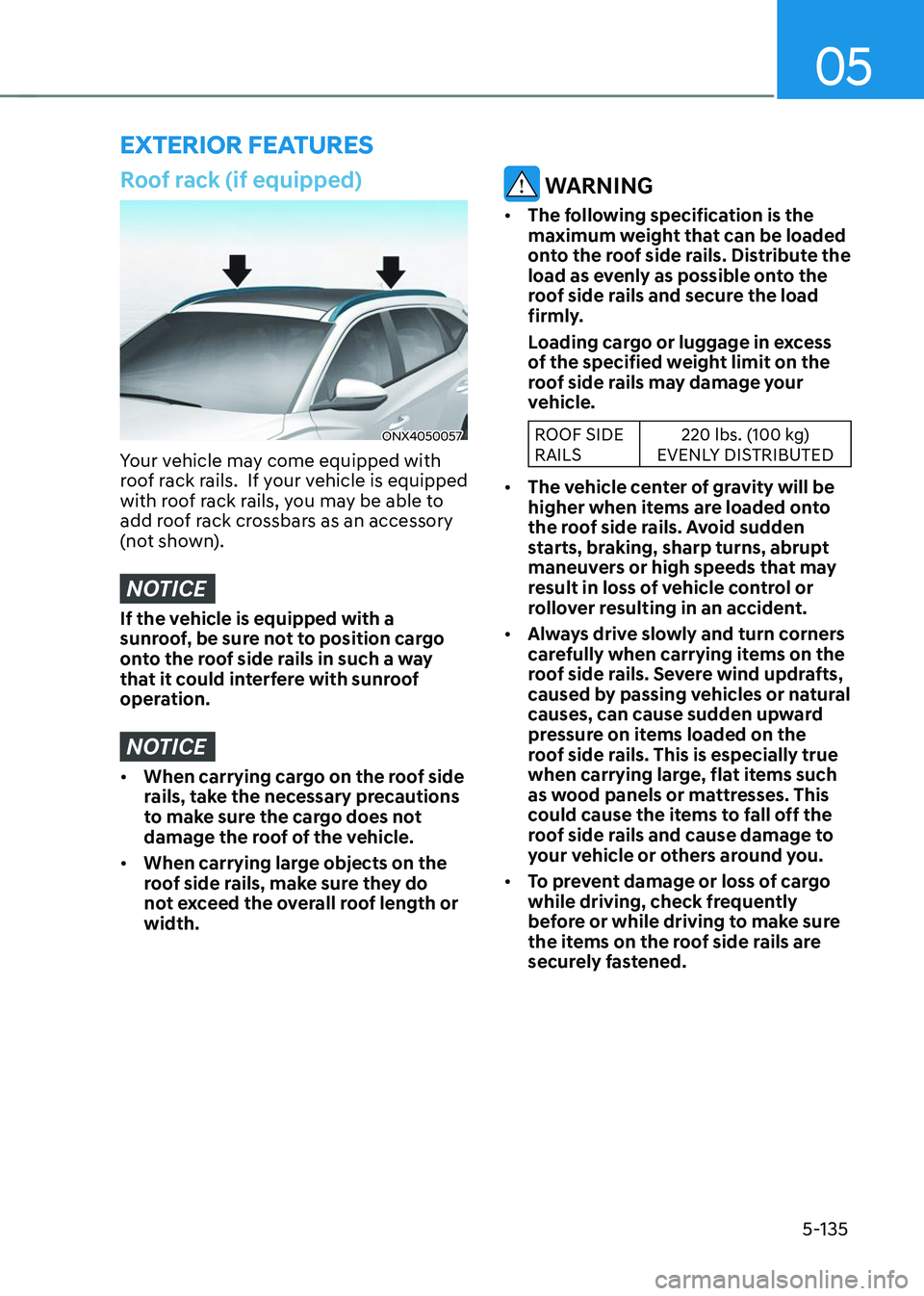
Your vehicle may come equipped with
roof rack rails. If your vehicle is equipped
with roof rack rails, you may be able to
add roof rack crossbars as an accessory
(not shown).
NOTICE
If the vehicle is equipped with a
sunroof, be sure not to position cargo
onto the roof side rails in such a way
that it could interfere with sunroof
operation.
NOTICE
• When carrying cargo on the roof side
rails, take the necessary precautions
to make sure the cargo does not
damage the roof of the vehicle.
• When carrying large objects on the
roof side rails, make sure they do
not exceed the overall roof length or
width.
WARNING
• The following specification is the
maximum weight that can be loaded
onto the roof side rails. Distribute the
load as evenly as possible onto the
roof side rails and secure the load
firmly.
Loading cargo or luggage in excess
of the specified weight limit on the
roof side rails may damage your
vehicle.
ROOF SIDE
RAILS 220 lbs. (100 kg)
EVENLY DISTRIBUTED
• The vehicle center of gravity will be
higher when items are loaded onto
the roof side rails. Avoid sudden
starts, braking, sharp turns, abrupt
maneuvers or high speeds that may
result in loss of vehicle control or
rollover resulting in an accident.
• Always drive slowly and turn corners
carefully when carrying items on the
roof side rails. Severe wind updrafts,
caused by passing vehicles or natural
causes, can cause sudden upward
pressure on items loaded on the
roof side rails. This is especially true
when carrying large, flat items such
as wood panels or mattresses. This
could cause the items to fall off the
roof side rails and cause damage to
your vehicle or others around you.
• To prevent damage or loss of cargo
while driving, check frequently
before or while driving to make sure
the items on the roof side rails are
securely fastened.
Page 287 of 638

Special driving conditions ........................................................................\
......6-58Hazardous driving conditions ........................................................................\
..........6-58
Rocking the vehicle ........................................................................\
...........................6-58
Smooth cornering ........................................................................\
.............................6-59
Driving at night ........................................................................\
..................................6-59
Driving in the rain ........................................................................\
..............................6-59
Driving in flooded areas ........................................................................\
....................6-60
Highway driving ........................................................................\
................................6-60
Reducing the risk of a rollover ........................................................................\
..........6-60
Winter driving ........................................................................\
...........................6-61Snow or icy conditions ........................................................................\
.......................6-61
Winter precautions ........................................................................\
............................6-63
Trailer towing ........................................................................\
...........................6-65If you decide to pull a trailer? ........................................................................\
...........6-66
Trailer towing equipment ........................................................................\
.................. 6-69
Driving with a trailer
........................................................................\
...........................6-70
Maintenance when towing a trailer ........................................................................\
..6-73
Vehicle load limit ........................................................................\
..................... 6 -74The Loading Information Label ........................................................................\
.........6-75
6
Page 300 of 638
06
6-15
The indicator in the instrument cluster
displays the shift lever/button position
when the ignition switch is in the ON
position.
WARNING
To reduce the risk of serious injury or
death:
• ALWAYS check the surrounding
areas near your vehicle for people,
especially children, before shifting a
vehicle into D (Drive) or R (Reverse).
• Before leaving the driver’s seat,
always make sure the shift lever
is in the P (Park) position, then set
the parking brake, and place the
ignition switch in the LOCK/OFF
position. Unexpected and sudden
vehicle movement can occur if these
precautions are not followed.
• When using the paddle shifter
(manual shift mode), do not use
engine braking (shifting from a
high gear to lower gear) rapidly on
slippery roads. The vehicle may slip
causing an accident.
P (Park)
Always come to a complete stop before
shifting into P (Park).
To shift from P (Park), you must depress
firmly on the brake pedal and make sure
your foot is off the accelerator pedal.
If you have done all of the above and
still cannot shift the lever out of P
(Park), see "Shift-Lock Release" in this
chapter. (shift lever type)
The shift lever/button must be in P (Park)
before turning the engine off.
WARNING
• Shifting into P (Park) while the
vehicle is in motion may cause you to
lose control of the vehicle.
• After the vehicle has stopped, always
make sure the shift lever is in P
(Park), apply the parking brake, and
turn the engine off.
• When parking on an incline, shift
the gear to P (Park) and apply the
parking brake to prevent the vehicle
from rolling downhill.
• Do not use the P (Park) position in
place of the parking brake.
R (Reverse)
Use this position to drive the vehicle
backward.
NOTICE
Always come to a complete stop before
shifting into or out of R (Reverse); you
may damage the transmission if you
shift into R (Reverse) while the vehicle is
in motion.
When the vehicle is stopped in R
(Reverse) or D (Drive) position, if you
open the driver’s door with the seat
belt unfastened, the gear is shifted to P
(Park) position automatically.
However when the vehicle moves in R
(Reverse) or D (Drive) position, if you
open the driver’s door with the seat belt
unfastened, the gear may be not shifted
to P (Park) position automatically for
protecting the automatic transmission.
Page 304 of 638
06
6-19
Information
• Only the eight forward gears can be
selected. To reverse or park the vehicle,
move the shift lever to the R (Reverse)
or P (Park) position as required.
• Downshifts are made automatically
when the vehicle slows down. When the
vehicle stops, 1st gear is automatically
selected.
• When the engine RPM approaches the
red zone the transmission will upshift
automatically.
•
If the driver presses the lever to + (Up) or - (Down) position, the transmission may not make the requested gear
change if the next gear is outside of
the allowable engine RPM range.
The driver must execute upshifts in
accordance with road conditions,
taking care to keep the engine RPMs
below the red zone.
• When driving on a slippery road, push
the shift lever forward into the + (Up) position. This causes the transmission
to shift into the 2nd gear which is better
for smooth driving on a slippery road.
Push the shift lever to the - (Down) side to shift back to the 1st gear.
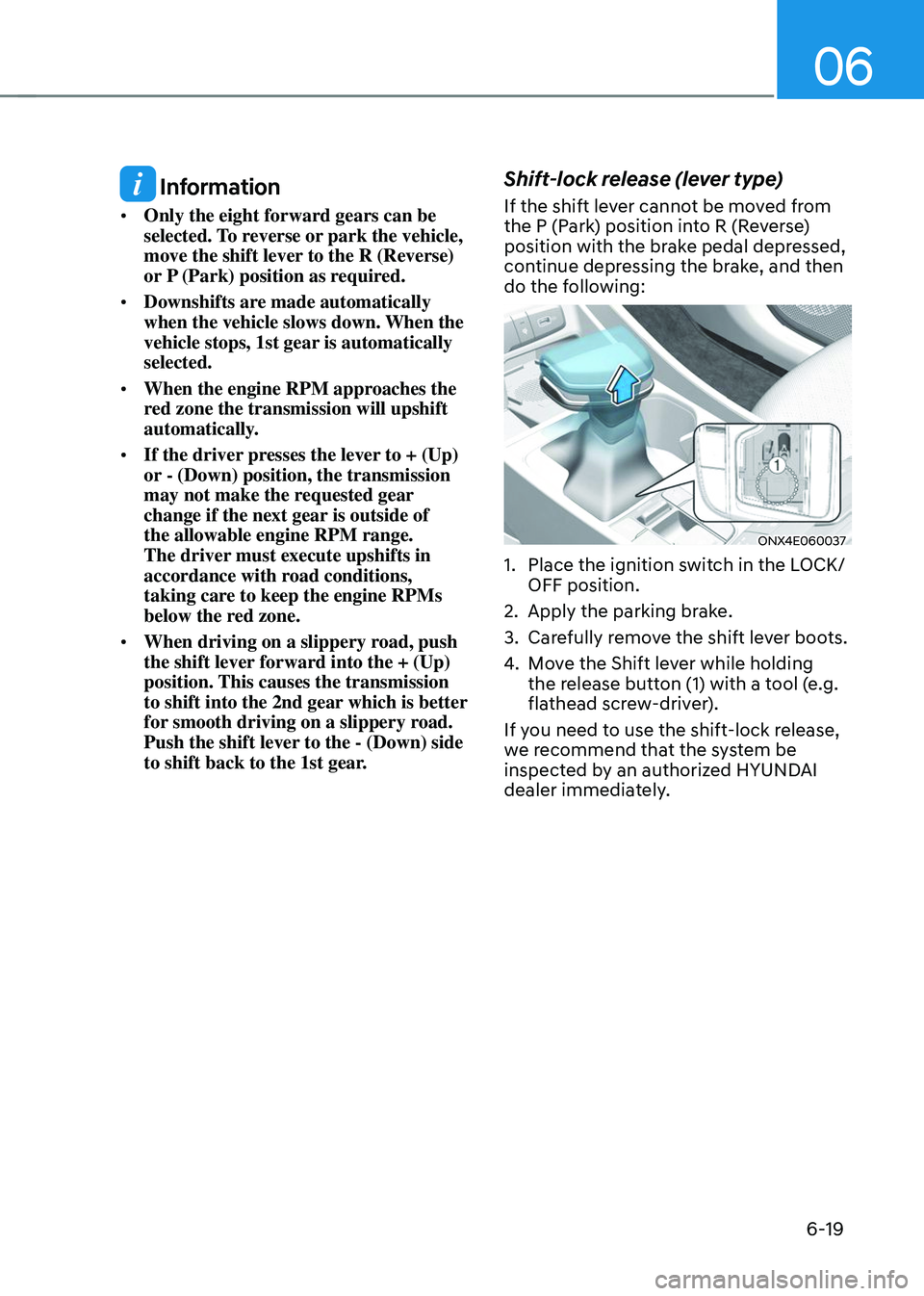
Shift-lock release (lever type)
If the shift lever cannot be moved from
the P (Park) position into R (Reverse)
position with the brake pedal depressed,
continue depressing the brake, and then
do the following:
ONX4E060037
1. Place the ignition switch in the LOCK/
OFF position.
2. Apply the parking brake.
3. Carefully remove the shift lever boots.
4. Move the Shift lever while holding
the release button (1) with a tool (e.g.
flathead screw-driver).
If you need to use the shift-lock release,
we recommend that the system be
inspected by an authorized HYUNDAI
dealer immediately.
Page 307 of 638
Driving your vehicle
6-22
Shift button held down / Shift
button is stuck
The warning message appears on the
LCD display, when the shift button is
pressed continuously or the shift button
does not properly operate. Clean the
surroundings of gear shift button.
If this message appears again, we
recommend you to have the vehicle
inspected by an authorized HYUNDAI
dealer.
Shifter system malfunction! Service
immediately
The warning message appears on the
LCD display, when the transmission
or the shift button does not properly
operate in the P (Park) position.
In this case, we recommend you to
immediately have the vehicle inspected
by an authorized HYUNDAI dealer.
Check shift controls
The warning message appears on the
LCD display, when there is a malfunction
with transmission shift button.
In this case, we recommend you to
immediately have the vehicle inspected
by an authorized HYUNDAI dealer.
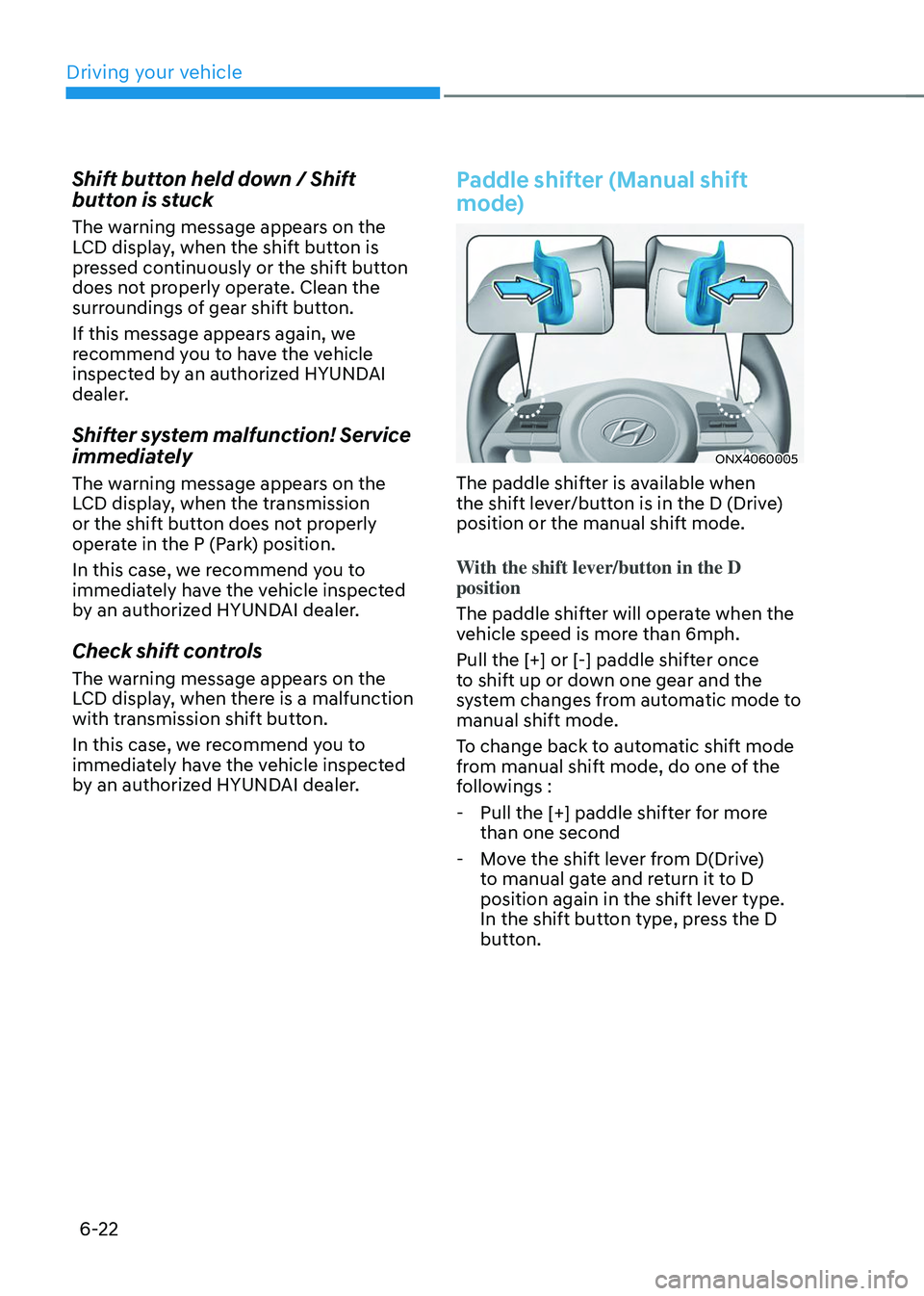
Paddle shifter (Manual shift
mode)
ONX4060005
The paddle shifter is available when
the shift lever/button is in the D (Drive)
position or the manual shift mode.
With the shift lever/button in the D
position
The paddle shifter will operate when the
vehicle speed is more than 6mph.
Pull the [+] or [-] paddle shifter once
to shift up or down one gear and the
system changes from automatic mode to
manual shift mode.
To change back to automatic shift mode
from manual shift mode, do one of the
followings :
-Pull the [+] paddle shifter for more
than one second
-Move the shift lever from D(Drive)
to manual gate and return it to D
position again in the shift lever type.
In the shift button type, press the D
button.
Page 309 of 638

Driving your vehicle
6-24
• Exercise extreme caution when
driving on a slippery surface. Be
especially careful when braking,
accelerating or shifting gears. On a
slippery surface, an abrupt change
in vehicle speed can cause the drive
wheels to lose traction and may cause
loss of vehicle control resulting in an
accident.
• Optimum vehicle performance and
economy is obtained by smoothly
depressing and releasing the
accelerator.
WARNING
To reduce the risk of SERIOUS INJURY
or DEATH:
• ALWAYS wear your seatbelt. In a
collision, an unbelted occupant
is significantly more likely to be
seriously injured or killed than a
properly belted occupant.
• Avoid high speeds when cornering or
turning.
• Do not make quick steering wheel
movements, such as sharp lane
changes or fast, sharp turns.
• The risk of rollover is greatly
increased if you lose control of your
vehicle at highway speeds.
• Loss of control often occurs if two or
more wheels drop off the roadway
and the driver over steers to reenter
the roadway.
• In the event your vehicle leaves
the roadway, do not steer sharply.
Instead, slow down before pulling
back into the travel lanes.
• HYUNDAI recommends you follow all
posted speed limits.
Page 315 of 638
Driving your vehicle
6-30
Parking brake warning light
Check the Parking Brake
warning light by pressing the
Engine Stop/Start button to the
ON position.
This light will be illuminated when the
parking brake is applied with the Engine
Stop/Start button in the START or ON
position.
Before driving, be sure the parking
brake is released and the Parking Brake
warning light is OFF.
If the Parking Brake warning light
remains on after the parking brake is
released while the engine is running,
there may be a malfunction in the
brake system. Immediate attention is
necessary.
If at all possible, cease driving the vehicle
immediately. If that is not possible,
use extreme caution while operating
the vehicle and only continue to drive
the vehicle until you can reach a safe
location.
Electronic Parking Brake (EPB)
Malfunction
If the Electronic Parking Brake (EPB) does
not release normally, DO NOT DRIVE THE
VEHICLE. Have your vehicle inspected at
an authorized HYUNDAI dealer.
It is recommended to have your vehicle
towed on a flatbed tow truck if the EPB
malfunction occurs.
Auto Hold
Auto Hold maintains the vehicle in a
standstill even though the brake pedal is
not depressed after the driver brings the
vehicle to a complete stop by depressing
the brake pedal.
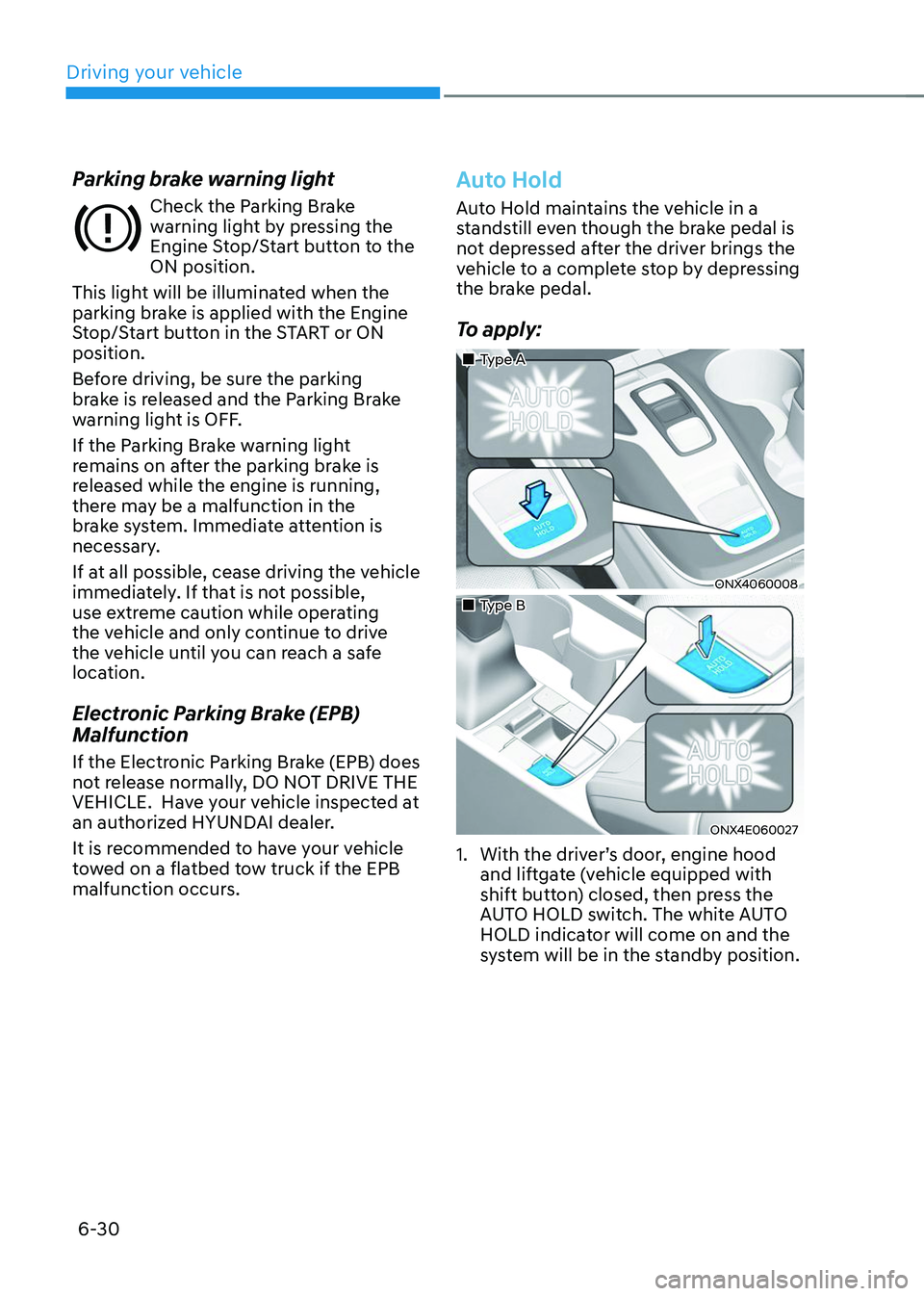
To apply:
„„Type A
ONX4060008
„„Type B
ONX4E060027
1. With the driver’s door, engine hood
and liftgate (vehicle equipped with
shift button) closed, then press the
AUTO HOLD switch. The white AUTO
HOLD indicator will come on and the
system will be in the standby position.