2023 HYUNDAI SONATA ECU
[x] Cancel search: ECUPage 64 of 555
03
3-35
OHI038145
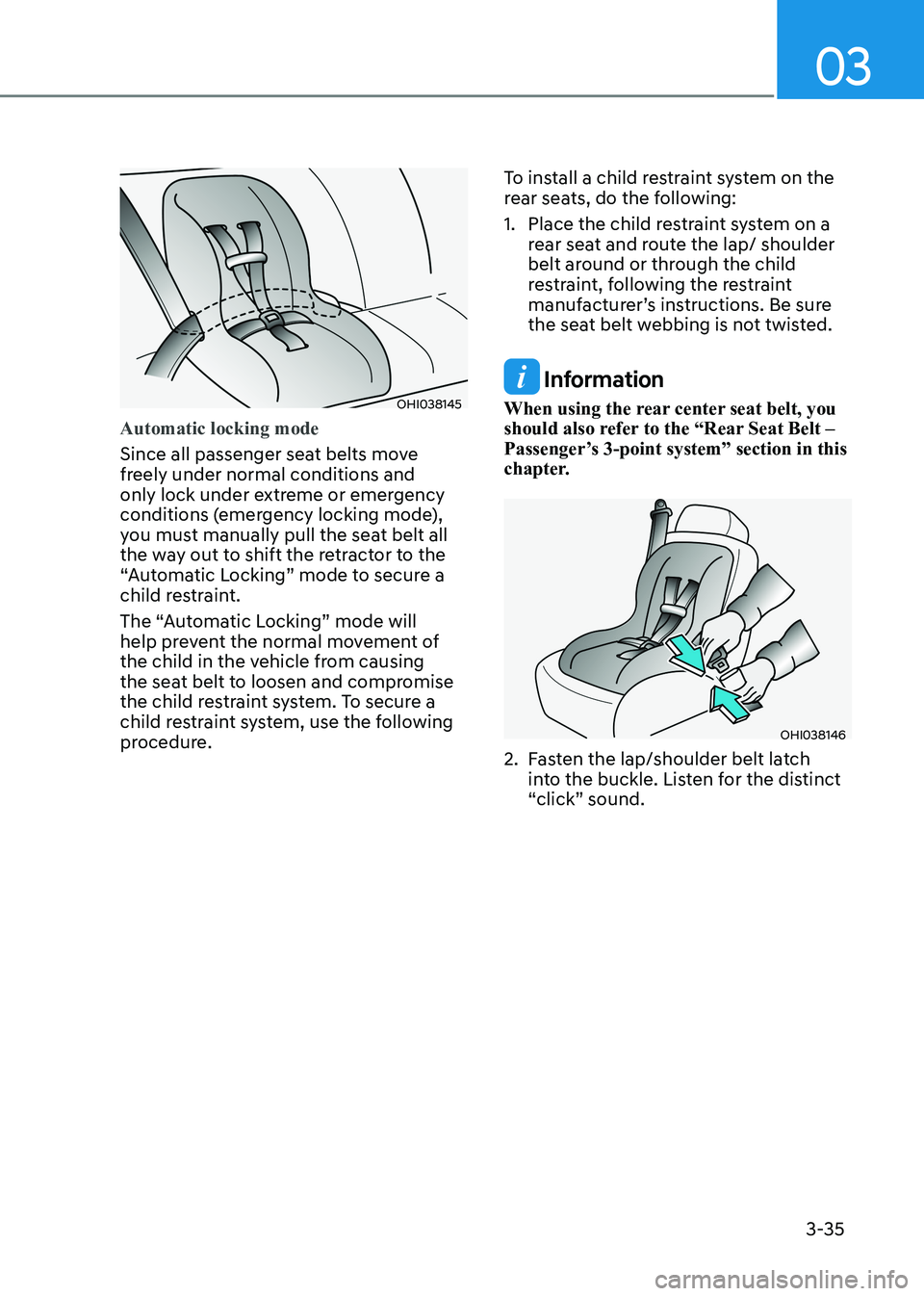
Automatic locking mode
Since all passenger seat belts move
freely under normal conditions and
only lock under extreme or emergency
conditions (emergency locking mode),
you must manually pull the seat belt all
the way out to shift the retractor to the
“Automatic Locking” mode to secure a
child restraint.
The “Automatic Locking” mode will
help prevent the normal movement of
the child in the vehicle from causing
the seat belt to loosen and compromise
the child restraint system. To secure a
child restraint system, use the following
procedure.To install a child restraint system on the
rear seats, do the following:
1. Place the child restraint system on a
rear seat and route the lap/ shoulder
belt around or through the child
restraint, following the restraint
manufacturer’s instructions. Be sure
the seat belt webbing is not twisted.
Information
When using the rear center seat belt, you
should also refer to the “Rear Seat Belt –
Passenger’s 3-point system” section in this
chapter.
OHI038146
2. Fasten the lap/shoulder belt latch into the buckle. Listen for the distinct
“click” sound.
Page 71 of 555
Seats & Safety System
3-42
WARNING
To reduce the risk of serious injury or
death from an inflating curtain air bag,
take the following precautions: • All seat occupants must wear
seat belts at all times to help keep
occupants positioned properly.
• Properly secure child restraints as far
away from the door as possible.
• Do not place any objects over the air
bag. Also, do not attach any objects
around the area the air bag inflates
such as the door, side door glass,
front and rear pillar, roof side rail.
• Do not hang other objects except
clothes, especially hard or breakable
objects. In an accident, it may cause
vehicle damage or personal injury.
• Do not allow passengers to lean their
heads or bodies onto doors, put their
arms on the doors, stretch their arms
out of the window, or place objects
between the doors and seats.
• Do not open or repair the side curtain air bags.How Does the Air Bag System
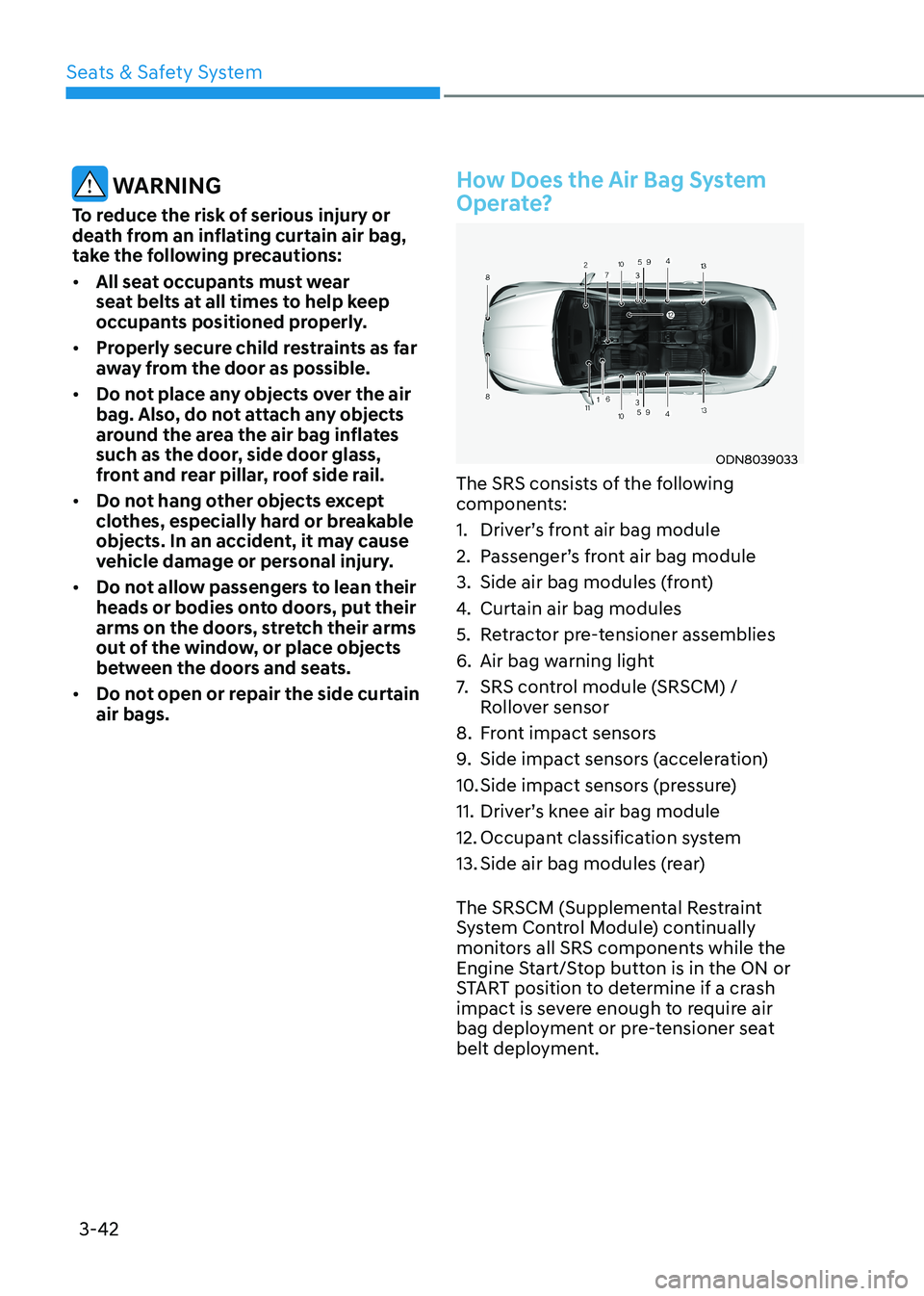
Operate?
ODN8039033
The SRS consists of the following
components:
1. Driver’s front air bag module
2. Passenger’s front air bag module
3. Side air bag modules (front)
4. Curtain air bag modules
5. Retractor pre-tensioner assemblies
6. Air bag warning light
7. SRS control module (SRSCM) /
Rollover sensor
8. Front impact sensors
9. Side impact sensors (acceleration)
10. Side impact sensors (pressure)
11. Driver’s knee air bag module
12. Occupant classification system
13. Side air bag modules (rear)
The SRSCM (Supplemental Restraint
System Control Module) continually
monitors all SRS components while the
Engine Start/Stop button is in the ON or
START position to determine if a crash
impact is severe enough to require air
bag deployment or pre-tensioner seat
belt deployment.
Page 106 of 555
Instrument Cluster
4-20
Press START button with key
(for smart key system)
This warning message is displayed if you
press the Engine Start/Stop button while
the warning message "Key not detected"
is displayed.
At this time, the immobilizer indicator
light blinks.
Check BRAKE SWITCH fuse
(for smart key system)
This warning message is displayed if the
brake switch fuse is disconnected.
You need to replace the fuse with a new
one before starting the engine.
If that is not possible, you can start the
engine by pressing the Engine Start/
Stop button for 10 seconds in the ACC position.
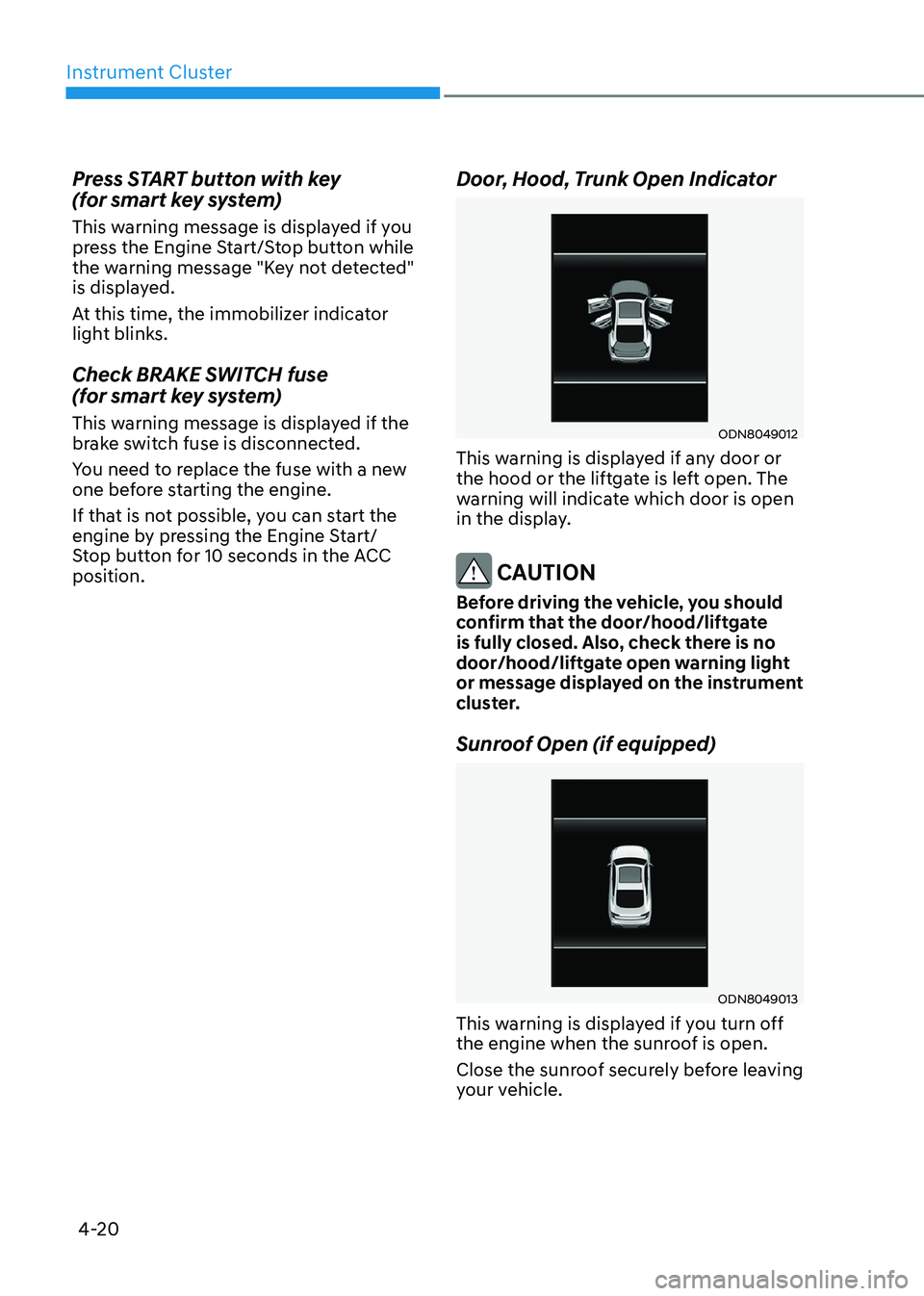
Door, Hood, Trunk Open Indicator
ODN8049012
This warning is displayed if any door or
the hood or the liftgate is left open. The
warning will indicate which door is open
in the display.
CAUTION
Before driving the vehicle, you should
confirm that the door/hood/liftgate
is fully closed. Also, check there is no
door/hood/liftgate open warning light
or message displayed on the instrument
cluster.
Sunroof Open (if equipped)
ODN8049013
This warning is displayed if you turn off
the engine when the sunroof is open.
Close the sunroof securely before leaving
your vehicle.
Page 161 of 555
05
5-15
Information
This device complies with Industry Canada RSS-210 standard.
Operation is subject to the following three conditions: 1. This device may not cause harmful
interference.
2. This device must accept any
interference received, including
interference that may cause undesired operation.
3. Changes or modifications not expressly
approved by the party responsible
for compliance could void the user’s authority to operate the device.
“Limp Home” Mode and Related
Procedures
If the immobilizer warning indicator
blinks for five seconds when the ignition
key is turned to the “ON” position,
this indicates the immobilizer system
requires service. The engine cannot be
started without using the procedure
below.
The following procedure describes
how to start the engine using the limp
home function (0, 1, 2, 3 as a sample
password).
NOTICE
You can get a limp home password
when the vehicle is first delivered to
you. If you do not have a password,
consult your authorized HYUNDAI
dealer.
1. To activate the password, turn the ignition key “ON” and “OFF“
according to the digit numbers. The
immobilizer indicator will blink along
with the operation of the ignition
key. For example, turn the ignition
key once for digit number “1”, and
twice for “2”, and so on. For the digit
number “0”, you must cycle the
ignition key 10 times.
2. Wait for 3~10 seconds.
3. You may set the remaining number of digits by following steps 1 and 2.
4. If all of the four password digits have
been successfully entered, turn the
ignition key “ON” and check that the
immobilizer indicator illuminates.
From this time, you have to start your
engine within 30 seconds. If you try
to start your engine after 30 seconds,
your engine will not start.
NOTICE
If the engine stalls while driving in the
“limp home” mode, you can start your
engine within 3 seconds without re-
entering the password.
If the immobilizer indicator blinks for
five seconds, you must re-enter the
password (steps 1~4).
After performing the limp home
activation procedure, consult with your
authorized HYUNDAI dealer as soon as possible.
CAUTION
• If the password is entered incorrectly
three consecutive times, wait for
about one hour to perform the limp
home activation procedure again.
• If you cannot start your engine using
the limp home activation procedure,
have your vehicle towed by an
authorized HYUNDAI dealer.
Page 162 of 555
Convenience Features
5-16
Door locks
Operating Door Locks from
Outside the Vehicle
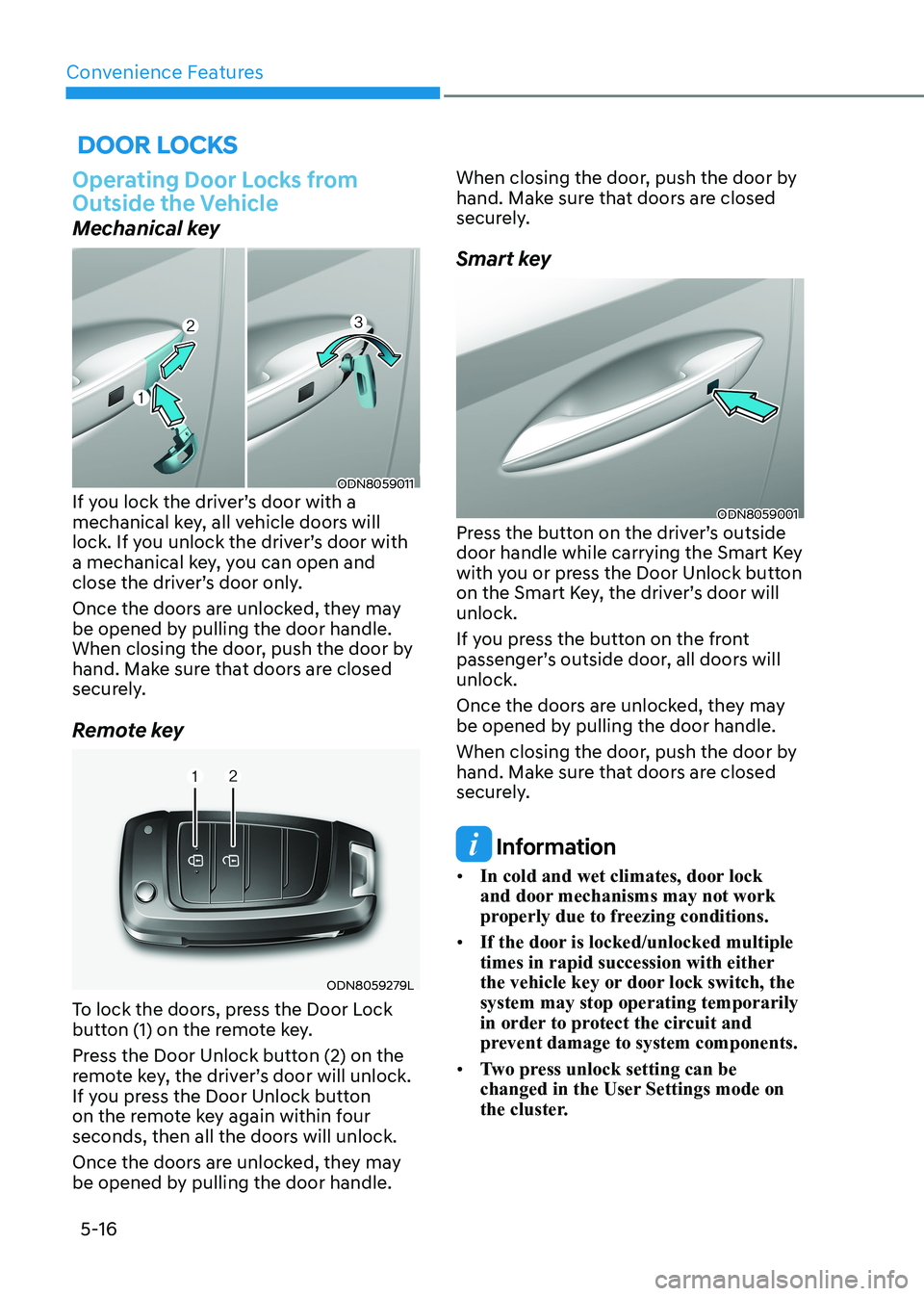
Mechanical key
ODN8059011
If you lock the driver’s door with a
mechanical key, all vehicle doors will
lock. If you unlock the driver’s door with
a mechanical key, you can open and
close the driver’s door only.
Once the doors are unlocked, they may
be opened by pulling the door handle.
When closing the door, push the door by
hand. Make sure that doors are closed
securely.
Remote key
ODN8059279L
To lock the doors, press the Door Lock
button (1) on the remote key.
Press the Door Unlock button (2) on the
remote key, the driver’s door will unlock.
If you press the Door Unlock button
on the remote key again within four
seconds, then all the doors will unlock.
Once the doors are unlocked, they may
be opened by pulling the door handle. When closing the door, push the door by
hand. Make sure that doors are closed
securely.
Smart key
ODN8059001
Press the button on the driver’s outside
door handle while carrying the Smart Key
with you or press the Door Unlock button
on the Smart Key, the driver’s door will unlock.
If you press the button on the front
passenger’s outside door, all doors will unlock.
Once the doors are unlocked, they may
be opened by pulling the door handle.
When closing the door, push the door by
hand. Make sure that doors are closed
securely.
Information
• In cold and wet climates, door lock
and door mechanisms may not work
properly due to freezing conditions.
• If the door is locked/unlocked multiple
times in rapid succession with either
the vehicle key or door lock switch, the system may stop operating temporarily
in order to protect the circuit and
prevent damage to system components.
• Two press unlock setting can be
changed in the User Settings mode on
the cluster.
Page 163 of 555
05
5-17
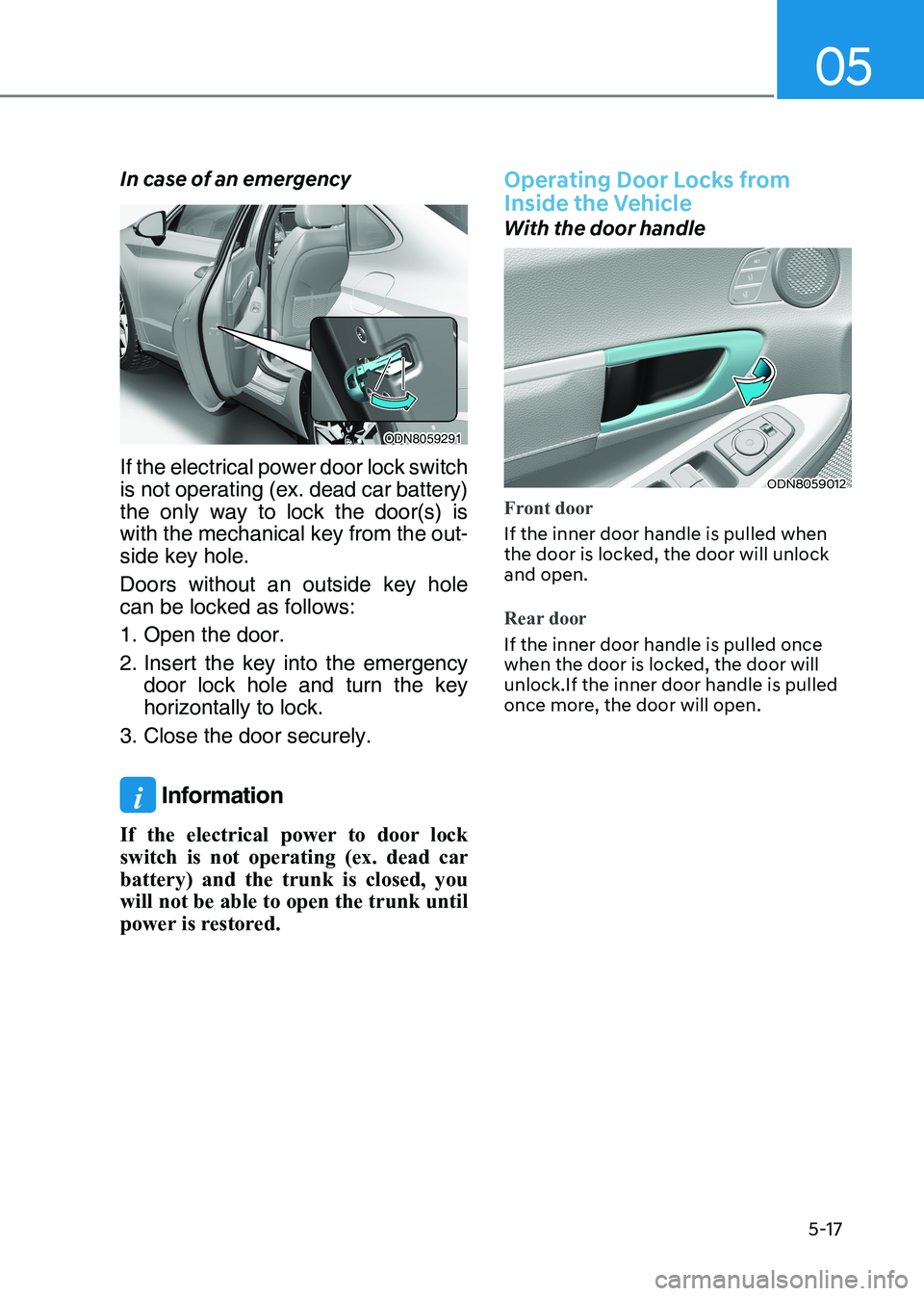
In case of an emergency
ODN8059291
If the electrical power door lock switch
is not operating (ex. dead car battery)
the only way to lock the door(s) is
with the mechanical key from the out -
side key hole.
Doors without an outside key hole can be locked as follows:
1. Open the door.
2. Insert the key into the emergency door lock hole and turn the key horizontally to lock.
3. Close the door securely.
i Information
If the electrical power to door lock
switch is not operating (ex. dead car
battery) and the trunk is closed, you
will not be able to open the trunk until
power is restored.
Operating Door Locks from
Inside the Vehicle
With the door handle
ODN8059012
Front door
If the inner door handle is pulled when
the door is locked, the door will unlock and open.
Rear door
If the inner door handle is pulled once
when the door is locked, the door will unlock.If the inner door handle is pulled
once more, the door will open.
Page 165 of 555
05
5-19
WARNING
• The doors should always be fully
closed and locked while the
vehicle is in motion. If the doors
are unlocked, the risk of being
thrown from the vehicle in a crash is
increased.
• Do not pull the inner door handle of
the driver’s or passenger’s door while
the vehicle is moving.
WARNING
Do not leave children or animals
unattended in your vehicle. An enclosed
vehicle can become extremely hot,
causing death or serious injury to
unattended children or animals who
cannot escape the vehicle.
Children might operate features of the
vehicle that could injure them, or they
could encounter other harm, possibly
from someone gaining entry to the
vehicle.
WARNING
Always secure your vehicle.
Leaving your vehicle unlocked increases
the potential risk to you or others from
someone hiding in your vehicle.
To secure your vehicle, while depressing
the brake, move the shift button to the
P (Park) position, engage the parking
brake, and place the ignition switch
in the LOCK/OFF position, close all
windows, lock all doors, and always
take the key with you.
CAUTION
Opening a door when something is
approaching may cause damage or
injury. Be careful when opening doors
and watch for vehicles, motorcycles,
bicycles or pedestrians approaching the
vehicle in the path of the door.
WARNING
If you stay in the vehicle for a long time
while the weather is very hot or cold,
there are risks of injuries or danger to
life. Do not lock the vehicle from the
outside when someone is in the vehicle.
WARNING
Opening a door when something is
approaching may cause damage or
injury. Be careful when opening doors
and watch for vehicles, motorcycles,
bicycles or pedestrians approaching the
vehicle in the path of the door.
Page 169 of 555
05
5-23
This system helps to protect your vehicle
and valuables. The horn will sound and
the hazard warning lights will blink
continuously if any of the following occur:
- A door is opened without using the remote key or smart key.
- The trunk is opened without using the remote key or smart key.
- The engine hood is opened.
The alarm continues for 30 seconds, then
the system resets. To turn off the alarm,
unlock the doors with the remote key or
smart key.
The Theft Alarm System automatically
sets 30 seconds after you lock the doors
and the trunk. For the system to activate,
you must lock the doors and the trunk
from outside the vehicle with the remote
key or smart key or by pressing the
button on the outside of the door handle
with the smart key in your possession.
The hazard warning lights will blink and
the chime will sound once to indicate the
system is armed.
Once the security system is set, opening
any door, the trunk, or the hood without
using the remote key or smart key will
cause the alarm to activate.
The Theft Alarm System will not set if the
hood, the trunk, or any door is not fully
closed. If the system will not set, check
the hood, the trunk, or the doors are fully closed.
Do not attempt to alter this system or
add other devices to it.
Information
• Do not lock the doors until all passengers have left the vehicle. If the
remaining passenger leaves the vehicle when the system is armed, the alarm will be activated.
• If the vehicle is not disarmed with the
remote key or smart key, open the doors by using the mechanical key and place the ignition switch in the
ON position (for remote key) or start
the engine (for smart key) by directly
pressing the ignition switch with the
smart key.
• If the system is disarmed by unlocking
the vehicle, but neither a door or the trunk is opened within 30 seconds, the
doors will relock and the system will
rearm automatically.
ThefT-AlArm SySTem