2023 HYUNDAI NEXO navigation
[x] Cancel search: navigationPage 14 of 558
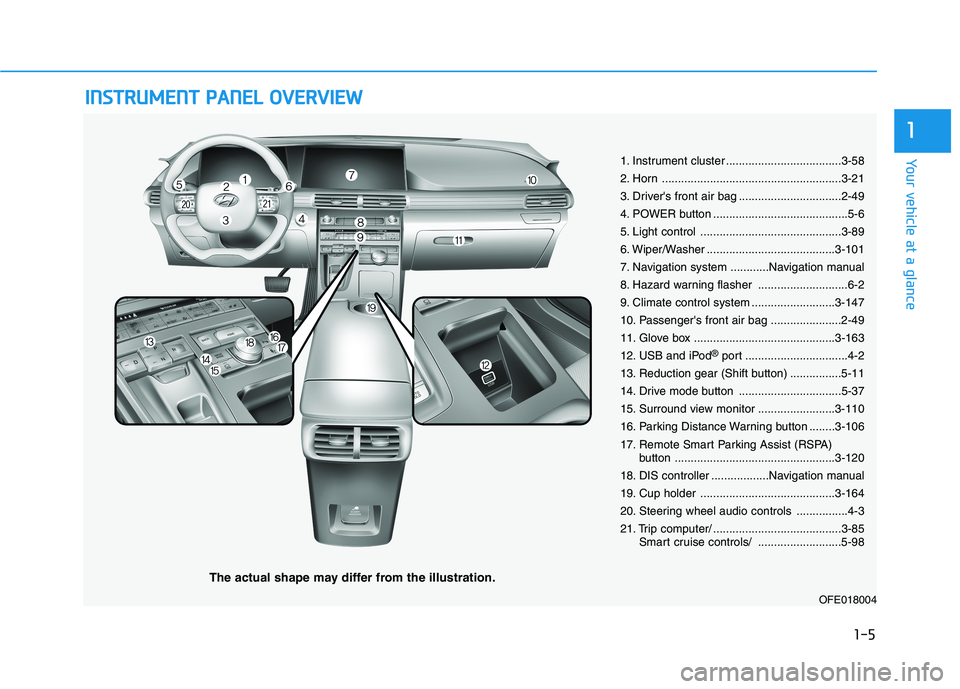
IINN SSTT RR UU MM EENN TT PP AA NN EELL OO VVEERR VV IIEE WW
The actual shape may differ from the illustration.
1-5
Your vehicle at a glance
1
1. Instrument cluster ....................................3-58
2. Horn ........................................................3-21
3. Driver's front air bag ................................2-49
4. POWER button ..........................................5-6
5. Light control ............................................3-89
6. Wiper/Washer ........................................3-101
7. Navigation system ............Navigation manual
8. Hazard warning flasher ............................6-2
9. Climate control system ..........................3-147
10. Passenger's front air bag ......................2-49
11. Glove box ............................................3-163
12. USB and iPod®
port ................................4-2
13. Reduction gear (Shift button) ................5-11
14. Drive mode button ................................5-37
15. Surround view monitor ........................3-110
16. Parking Distance Warning button ........3-106
17. Remote Smart Parking Assist (RSPA) button ..................................................3-120
18. DIS controller ..................Navigation manual
19. Cup holder ..........................................3-164
20. Steering wheel audio controls ................4-3
21. Trip computer/ ........................................3-85 Smart cruise controls/ ..........................5-98
OFE018004
Page 17 of 558
2-2
You will find many safety precautions and recommendations throughoutthis section, and throughout this
manual. The safety precautions inthis section are among the most
important.
Always Wear Your Seat Belt
A seat belt is your best protection in
all types of accidents. Air bags are
designed to supplement seat belts,
not replace them. So even though
your vehicle is equipped with air
bags, ALWAYS make sure you and
your passengers wear your seat
belts, and wear them properly.
Restrain All Children
All children under age 13 should ride
in your vehicle properly restrained in
a rear seat, not the front seat. Infantsand small children should be
restrained in an appropriate child
restraint. Larger children should usea booster seat with the lap/shoulder
belt until they can use the seat belt
properly without a booster seat.
Air Bag Hazards
While air bags can save lives, they
can also cause serious or fatal
injuries to occupants who sit tooclose to them, or who are not prop-
erly restrained. Infants, young chil-
dren, and shorter adults are at the
greatest risk of being injured by an
inflating air bag. Follow all instruc-
tions and warnings in this manual.
Driver Distraction
Driver distraction presents a serious
and potentially deadly danger, espe-
cially for inexperienced drivers.
Safety should be the first concern
when behind the wheel and drivers
need to be aware of the wide array of
potential distractions, such as
drowsiness, reaching for objects,
eating, personal grooming, other
passengers, and using cellular
phones.
Drivers can become distracted when
they take their eyes and attention offthe road or their hands off the wheel
to focus on activities other than driv-
ing. To reduce your risk of distractionor getting into an accident:
• ALWAYS set up your mobile
devices (i.e., MP3 players, phones,
navigation units, etc.) when your
vehicle is parked or safely stopped.
IIMM PPOO RRTTAA NN TT SS AA FFEE TT YY PP RR EECCAA UU TTIIOO NNSS
Safety system of your vehicle
Page 132 of 558
3-45
Convenient features of your vehicle
3
Power Tailgate (if equipped)
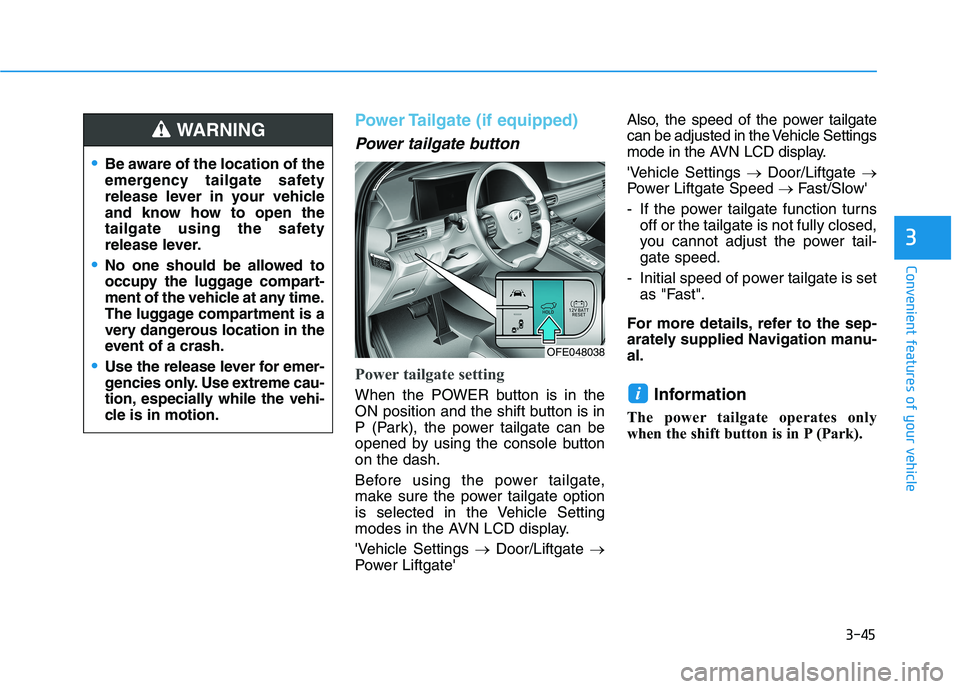
Power tailgate button
Power tailgate setting
When the POWER button is in the
ON position and the shift button is in
P (Park), the power tailgate can be
opened by using the console buttonon the dash.
Before using the power tailgate,
make sure the power tailgate option
is selected in the Vehicle Setting
modes in the AVN LCD display.
'Vehicle Settings Door/Liftgate
Power Liftgate' Also, the speed of the power tailgate
can be adjusted in the Vehicle Settings
mode in the AVN LCD display.
'Vehicle Settings
Door/Liftgate
Power Liftgate Speed Fast/Slow'
- If the power tailgate function turns off or the tailgate is not fully closed,
you cannot adjust the power tail-gate speed.
- Initial speed of power tailgate is set as "Fast".
For more details, refer to the sep-
arately supplied Navigation manu-al.
Information
The power tailgate operates only
when the shift button is in P (Park).i
Be aware of the location of the
emergency tailgate safety
release lever in your vehicle
and know how to open the
tailgate using the safety
release lever.
No one should be allowed to
occupy the luggage compart-
ment of the vehicle at any time.
The luggage compartment is a
very dangerous location in the
event of a crash.
Use the release lever for emer-
gencies only. Use extreme cau-
tion, especially while the vehi-
cle is in motion.
WARNING
OFE048038
Page 139 of 558
3-52
Convenient features of your vehicle
How to use the Smart Tailgate
The hands-free smart tailgate sys- tem can be opened automatically
when the following conditions aremet:
The Smart Tailgate option isenabled in the User Settings in the
AVN screen.
The Smart Tailgate is activated and ready 15 seconds after all the
doors are closed and locked
The Smart Tailgate will open when the smart key is detected in the
area behind the vehicle for 3 sec-onds Information
The Smart Tailgate will NOT operate
when:
Any door is open, or all doors are closed but not locked
The smart key is detected within 15 seconds from when the doors were
closed and locked
For vehicles equipped with illumi- nated exterior front door handles, if
the smart key is detected within 15
seconds from when the doors were
closed and locked or if the smart key
is within 1.5 m (60 inches) from the
front door handles
The smart key is in the vehicle. 1. Setting
To activate the Smart Tailgate, go to
"Vehicle settings
Door/Liftgate"
and select Smart Liftgate on the AVNscreen.
For more details refer to the sepa-
rately supplied Navigation manu-al.
2.Detect and Alert
The Smart Tailgate detecting area
extends approximately 50-100 cm
(20-40 in) behind the vehicle. If youare positioned in the detecting area
and are carrying the smart key, the
hazard warning lights will blink and
the chime will sound to alert you that
the smart tailgate will open.
Information
Do not approach the detecting area if
you do not want the tailgate to open. If
you have unintentionally entered the
detecting area and the hazard warn-
ing lights and chime starts to operate,
move away from the area behind the
vehicle with the smart key. The tail-
gate will remain closed.
i
i
Page 170 of 558
3-83
Convenient features of your vehicle
3
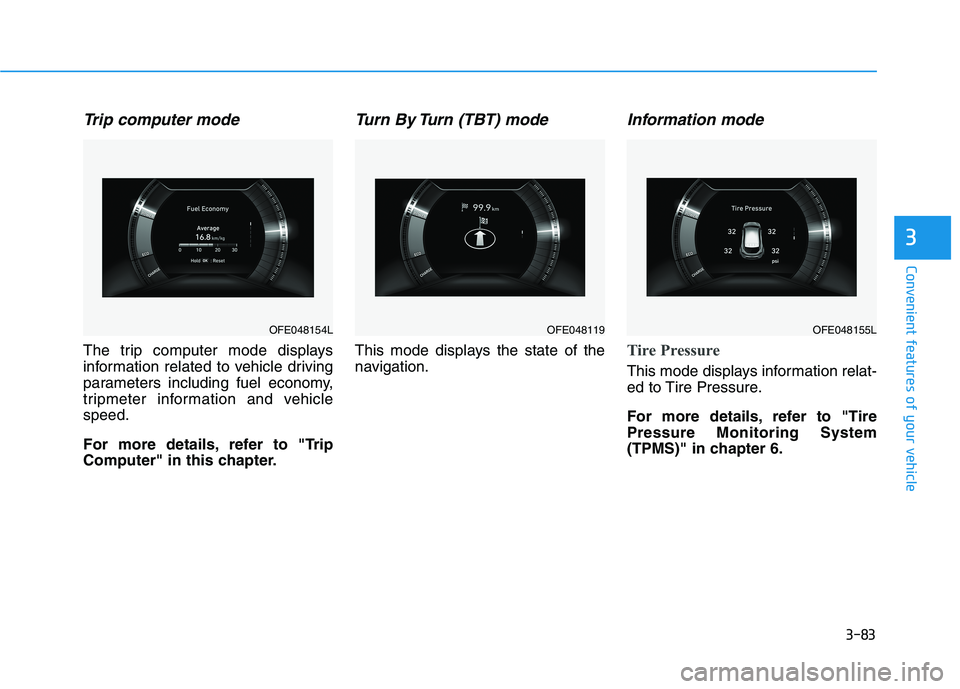
Trip computer mode
The trip computer mode displays
information related to vehicle driving
parameters including fuel economy,
tripmeter information and vehiclespeed.
For more details, refer to "Trip
Computer" in this chapter.
Turn By Turn (TBT) mode
This mode displays the state of the
navigation.
Information mode
Tire Pressure
This mode displays information relat-
ed to Tire Pressure.
For more details, refer to "Tire Pressure Monitoring System
(TPMS)" in chapter 6.
OFE048154LOFE048119 OFE048155L
Page 182 of 558

3-95
Convenient features of your vehicle
3
One-touch turn signal function
To activate the One Touch Turn
Signal function, push the turn signal
lever up or down to position (B) andthen release it.
The lane change signals will blink 3,
5 or 7 times.
You can activate or deactivate the
One Touch Turn Signal function or
choose the number of blinks (3, 5, or
7) from the Vehicle Settings mode in
the AVN screen.
For more details, refer to the sepa-
rately supplied Navigation manual.
Battery saver function
The purpose of this feature is to pre-
vent the battery from being dis-
charged. The system automatically
turns off the parking lamp when the
driver turns the vehicle off and opens
the driver-side door.
With this feature, the parking lamps
will turn off automatically if the driver
parks on the side of road at night.
If necessary, to keep the lamps on
when the vehicle is turned off, perform
the following:
1) Open the driver-side door.
2) Turn the parking lamps OFF andON again using the headlamp
switch on the steering column.
Headlight time-out function
(if equipped)
If the POWER button is placed in the
ACC position or the OFF positionwith the headlamps ON, the head-
lamps (and/or parking lamps) remain
on for about 5 minutes. However, if
the driver's door is opened and
closed, the headlights are turned off
after 15 seconds. Also, with the vehi-
cle off if the driver's door is openedand closed, the headlamps (and/or
parking lamps) are turned off after 15
seconds.
The headlamps (and/or parking
lamps) can be turned off by pressing
the lock button on the smart key
twice or turning the light switch to the
OFF or AUTO position.
You can activate or deactivate the
Headlamp Delay function from the
Vehicle Settings mode (Light) on the
AVN screen.
For more details, refer to the sepa-
rately supplied Navigation manual.
Page 186 of 558
3-99
Convenient features of your vehicle
3
Escort light
When the vehicle is turned OFF and
the driver's door is opened, the pud-
dle lamp will come on for 30 sec-
onds. If the driver's door is closed
within the 30 seconds, the puddle
lamp will turn off after 15 seconds. If
the driver's door is closed and
locked, the puddle lamp will turn off
immediately.
The Puddle Lamp Escort Light will
turn on only the first time the driver's
door is opened after the vehicle is
turned off.
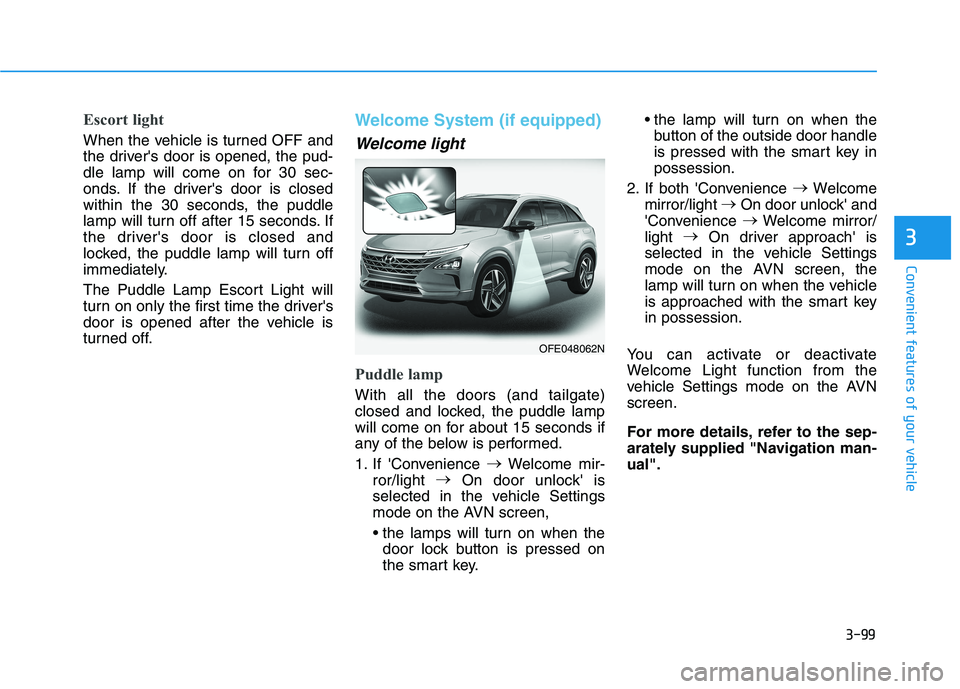
Welcome System (if equipped)
Welcome light
Puddle lamp
With all the doors (and tailgate)
closed and locked, the puddle lamp
will come on for about 15 seconds if
any of the below is performed.
1. If 'Convenience
Welcome mir-
ror/light
On door unlock' is
selected in the vehicle Settings
mode on the AVN screen,
door lock button is pressed on
the smart key. the lamp will turn on when the
button of the outside door handle
is pressed with the smart key inpossession.
2. If both 'Convenience
Welcome
mirror/light
On door unlock' and
'Convenience
Welcome mirror/
light
On driver approach' is
selected in the vehicle Settings
mode on the AVN screen, the
lamp will turn on when the vehicle
is approached with the smart keyin possession.
You can activate or deactivate
Welcome Light function from the
vehicle Settings mode on the AVNscreen.
For more details, refer to the sep-
arately supplied "Navigation man-ual".
OFE048062N
Page 207 of 558

3-120
Convenient features of your vehicle
How the System Works
(Smart Parking)
Smart Parking is available with the
driver on board. Make sure the con-
ditions available before activating the
Smart parking function.
1. Select Smart Parking:Press the RSPA button with the
shift lever placed in D (Drive) or N
(Neutral) position. ❈However, the Smart Exit is
selected if you press the RSPA
button when the gear is in N
(Neutral) position after the initial
startup.
2. Search for parking space: Slowly move forward below 20 km/h (12mph)
3. Search complete: Automatic search by sensor.
However, check the actual parking
environment before parking the
vehicle.
4. Select parking type: Reverse (left/right), parallel (left/right)
5. Operating instructions: Smart Parking/Remote Smart Parking 6. Smart Parking assist: Steering
wheel, gear shift and vehicle
speed control (reverse parking).
7. Parking complete: Smart Parking complete after reaching the park-ing position
❈ After the parking is complete,
arrange the vehicle position manu-
ally, if necessary.
❈ You can use Smart Parking after
navigation or home screen display
on AVN (You cannot use Smart
Parking if you don't choose
"Confirm" on AVN booting)
1. Selecting Parking mode
Press the Remote Smart Parking
Assist button and the button indica-
tor will illuminate.
The Parking Distance Warning but- ton will illuminate and the AVN
screen will display the instructionscreen.
A warning sound will be heard if an obstacle is detected.
Always check for obstacles
around your vehicle beforedriving.
The function may be can-
celled if you attach something
(cover, etc.) to the steeringwheel.
CAUTION
OFE048414
Remote Smart Parking Assist
button
Parking Distance Warning button