2023 HYUNDAI NEXO brake sensor
[x] Cancel search: brake sensorPage 370 of 558
5-103
Driving your vehicle
5
To temporarily accelerate withthe Smart Cruise Control on
If you want to speed up temporarily
when the Smart Cruise Control is on,
depress the accelerator pedal.
Increased speed will not interfere
with Smart Cruise Control operationor change the set speed.
To return to the set speed, take your
foot off the accelerator pedal.
If you push the toggle switch down
(SET-) at increased speed, the cruis-ing speed will be set again pedal.
Smart Cruise Control set speedwill be temporarily canceled
when:
Canceled manually
Depressing the brake pedal.
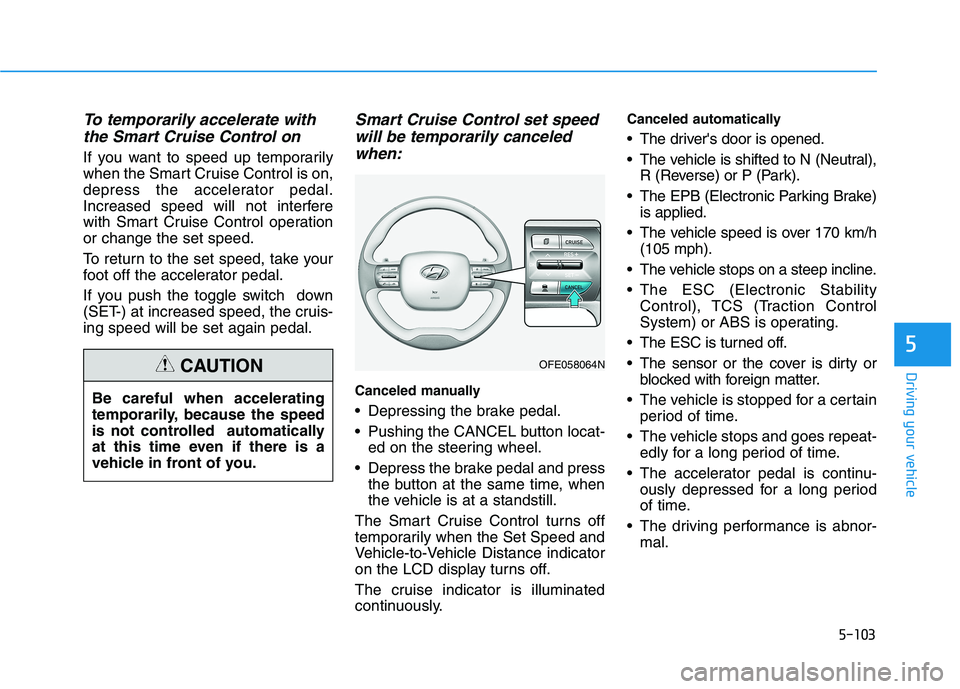
Pushing the CANCEL button locat- ed on the steering wheel.
Depress the brake pedal and press the button at the same time, when
the vehicle is at a standstill.
The Smart Cruise Control turns off
temporarily when the Set Speed and
Vehicle-to-Vehicle Distance indicator
on the LCD display turns off.
The cruise indicator is illuminated
continuously. Canceled automatically
The driver's door is opened.
The vehicle is shifted to N (Neutral),
R (Reverse) or P (Park).
The EPB (Electronic Parking Brake) is applied.
The vehicle speed is over 170 km/h (105 mph).
The vehicle stops on a steep incline.
The ESC (Electronic Stability Control), TCS (Traction Control
System) or ABS is operating.
The ESC is turned off.
The sensor or the cover is dirty or blocked with foreign matter.
The vehicle is stopped for a certain period of time.
The vehicle stops and goes repeat- edly for a long period of time.
The accelerator pedal is continu- ously depressed for a long period
of time.
The driving performance is abnor- mal.
Be careful when accelerating
temporarily, because the speed
is not controlled automatically
at this time even if there is a
vehicle in front of you.
CAUTIONOFE058064N
Page 379 of 558
5-112
Driving your vehicle
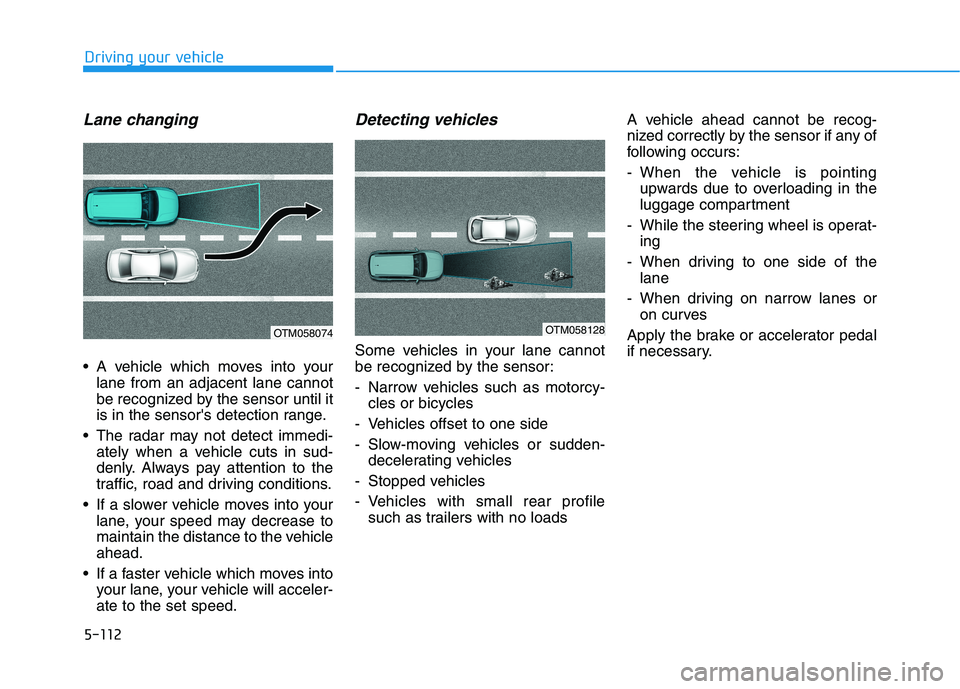
Lane changing
A vehicle which moves into yourlane from an adjacent lane cannot
be recognized by the sensor until it
is in the sensor's detection range.
The radar may not detect immedi- ately when a vehicle cuts in sud-
denly. Always pay attention to the
traffic, road and driving conditions.
If a slower vehicle moves into your lane, your speed may decrease to
maintain the distance to the vehicleahead.
If a faster vehicle which moves into your lane, your vehicle will acceler-ate to the set speed.
Detecting vehicles
Some vehicles in your lane cannot
be recognized by the sensor:
- Narrow vehicles such as motorcy-cles or bicycles
- Vehicles offset to one side
- Slow-moving vehicles or sudden- decelerating vehicles
- Stopped vehicles
- Vehicles with small rear profile such as trailers with no loads A vehicle ahead cannot be recog-
nized correctly by the sensor if any of
following occurs:
- When the vehicle is pointing
upwards due to overloading in the
luggage compartment
- While the steering wheel is operat- ing
- When driving to one side of the lane
- When driving on narrow lanes or on curves
Apply the brake or accelerator pedal
if necessary.
OTM058074OTM058128
Page 422 of 558
6-25
What to do in an emergency
6
When towing your vehicle in an emergency without wheel dollies:
1. Place the POWER button in theACC position.
2. Place the shift button in N (Neutral).
3. Release the parking brake.
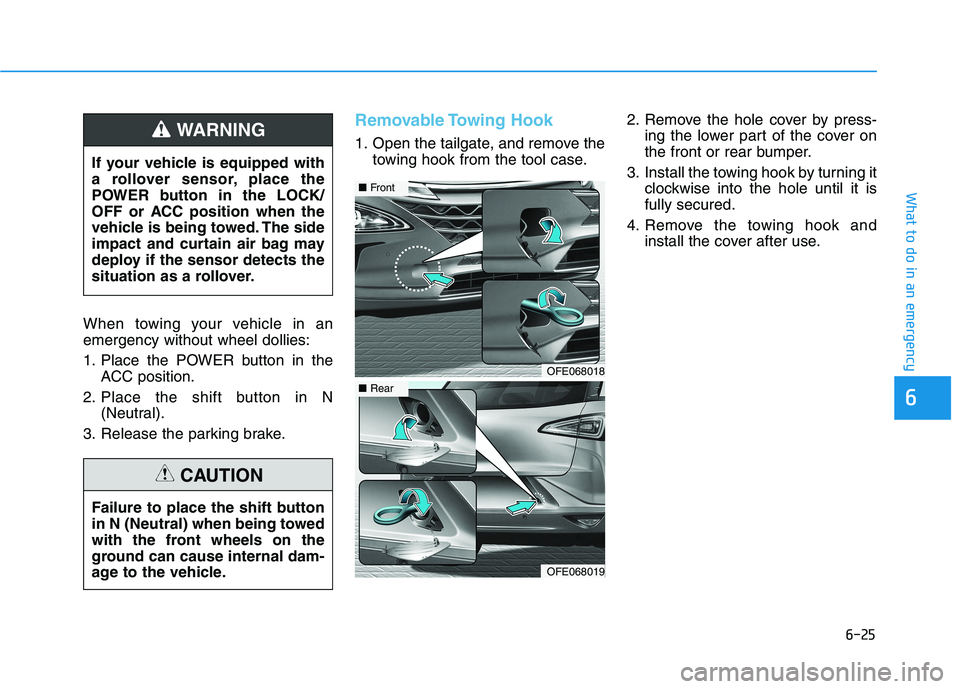
Removable Towing Hook
1. Open the tailgate, and remove the towing hook from the tool case. 2. Remove the hole cover by press-
ing the lower part of the cover on
the front or rear bumper.
3. Install the towing hook by turning it clockwise into the hole until it isfully secured.
4. Remove the towing hook and install the cover after use.
If your vehicle is equipped with
a rollover sensor, place the
POWER button in the LOCK/
OFF or ACC position when the
vehicle is being towed. The side
impact and curtain air bag may
deploy if the sensor detects the
situation as a rollover.WARNING
Failure to place the shift button
in N (Neutral) when being towed
with the front wheels on the
ground can cause internal dam-
age to the vehicle.
CAUTION
OFE068018
■
Front
OFE068019
■Rear
Page 474 of 558
7-50
Maintenance
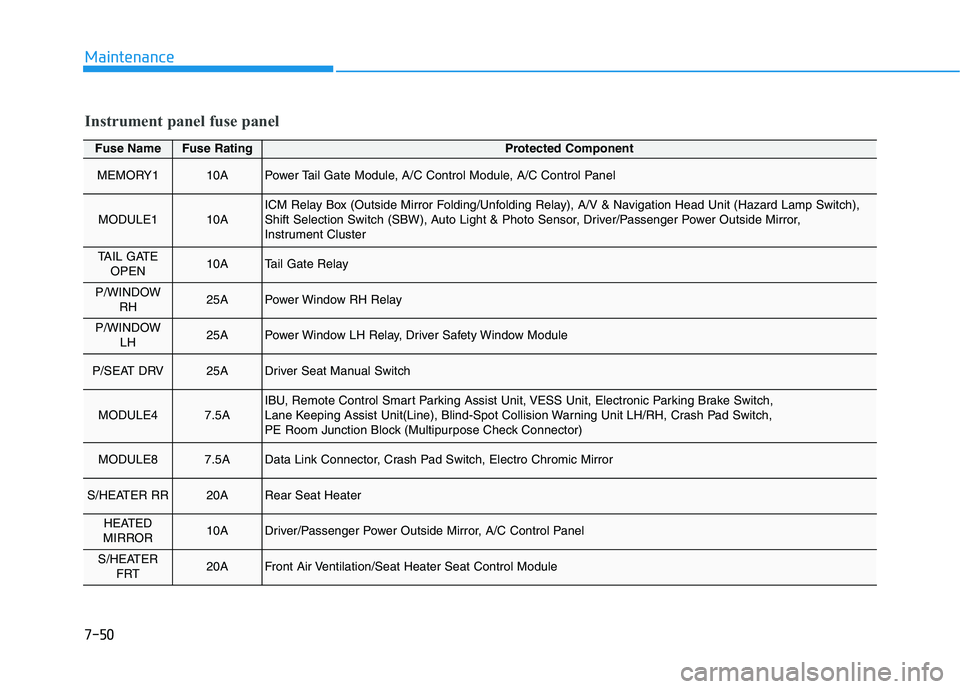
Fuse NameFuse RatingProtected Component
MEMORY110APower Tail Gate Module, A/C Control Module, A/C Control Panel
MODULE110AICM Relay Box (Outside Mirror Folding/Unfolding Relay), A/V & Navigation Head Unit (Hazard Lamp Switch),
Shift Selection Switch (SBW), Auto Light & Photo Sensor, Driver/Passenger Power Outside Mirror,
Instrument Cluster
TAIL GATEOPEN10ATail Gate Relay
P/WINDOW RH25APower Window RH Relay
P/WINDOW LH25APower Window LH Relay, Driver Safety Window Module
P/SEAT DRV25ADriver Seat Manual Switch
MODULE47.5AIBU, Remote Control Smart Parking Assist Unit, VESS Unit, Electronic Parking Brake Switch,
Lane Keeping Assist Unit(Line), Blind-Spot Collision Warning Unit LH/RH, Crash Pad Switch,
PE Room Junction Block (Multipurpose Check Connector)
MODULE87.5AData Link Connector, Crash Pad Switch, Electro Chromic Mirror
S/HEATER RR20ARear Seat Heater
HEATED
MIRROR10ADriver/Passenger Power Outside Mirror, A/C Control Panel
S/HEATER FRT20AFront Air Ventilation/Seat Heater Seat Control Module
Instrument panel fuse panel
Page 475 of 558
7-51
7
Maintenance
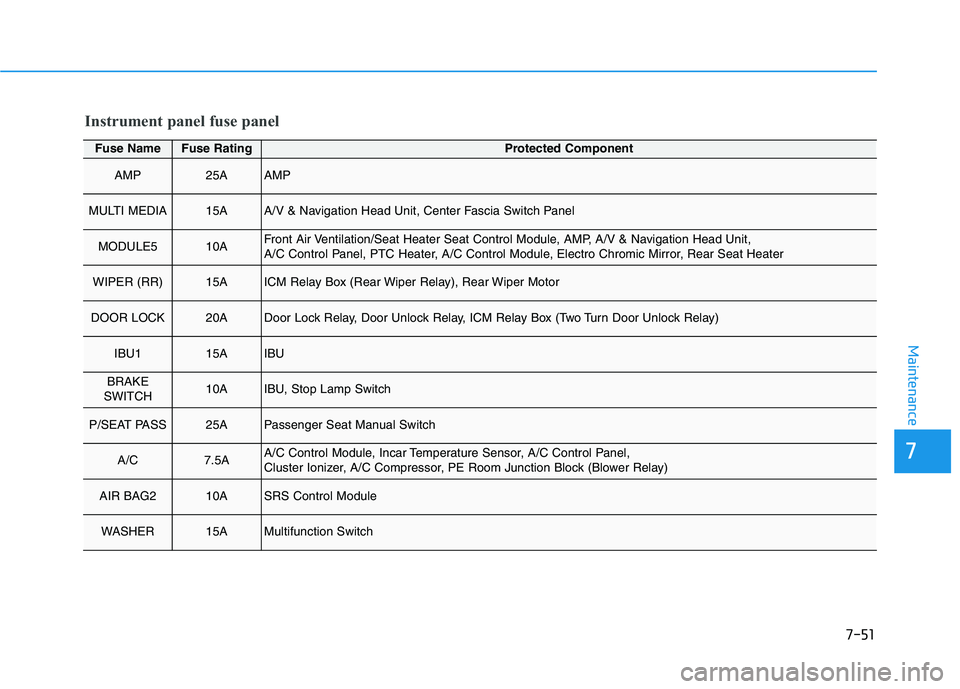
Fuse NameFuse RatingProtected Component
AMP25AAMP
MULTI MEDIA15AA/V & Navigation Head Unit, Center Fascia Switch Panel
MODULE510AFront Air Ventilation/Seat Heater Seat Control Module, AMP, A/V & Navigation Head Unit,
A/C Control Panel, PTC Heater, A/C Control Module, Electro Chromic Mirror, Rear Seat Heater
WIPER (RR)15AICM Relay Box (Rear Wiper Relay), Rear Wiper Motor
DOOR LOCK20ADoor Lock Relay, Door Unlock Relay, ICM Relay Box (Two Turn Door Unlock Relay)
IBU115AIBU
BRAKE
SWITCH10AIBU, Stop Lamp Switch
P/SEAT PASS25APassenger Seat Manual Switch
A/C7.5AA/C Control Module, Incar Temperature Sensor, A/C Control Panel,
Cluster Ionizer, A/C Compressor, PE Room Junction Block (Blower Relay)
AIR BAG210ASRS Control Module
WASHER15AMultifunction Switch
Instrument panel fuse panel
Page 486 of 558
7-62
MaintenanceA
A PPPPEEAA RRAA NN CCEE CC AA RREE
Exterior Care
Exterior general caution
It is very important to follow the label
directions when using any chemical
cleaner or polish. Read all warningand caution statements that appearon the label.
High-pressure washing
When using high-pressure wash-
ers, make sure to maintain suffi-
cient distance from the vehicle.
Insufficient clearance or excessivepressure can lead to component
damage or water penetration.
Do not spray the camera, sensors or its surrounding area directly with
a high pressure washer. Shock
applied from high pressure water
may cause the device to not oper-
ate normally.
Do not bring the nozzle tip close to boots (rubber or plastic covers)or
connectors as they may be dam-
aged if they come into contact with
high pressure water.
Do not use any high-pressure noz- zles, which induce either one-direct
water stream or water swirling.
Protecting your vehicle’s finish
Washing
To help protect your vehicle’s finish
from rust and deterioration, wash itthoroughly and frequently at least
once a month with lukewarm or cold
water.
If you use your vehicle for off-road
driving, you should wash it after each
off-road trip. Pay special attention to
the removal of any accumulation of
salt, dirt, mud, and other foreign
materials. Make sure the drain holes
in the lower edges of the doors and
rocker panels are kept clear andclean.
Insects, tar, tree sap, bird droppings,
industrial pollution and similar
deposits can damage your vehicle’s
finish if not removed immediately.
Even prompt washing with plain
water may not completely remove all
these deposits. A mild soap, safe for
use on painted surfaces, should beused. After washing, rinse the vehicle thor-
oughly with lukewarm or cold water.
Do not allow soap to dry on the fin-ish.
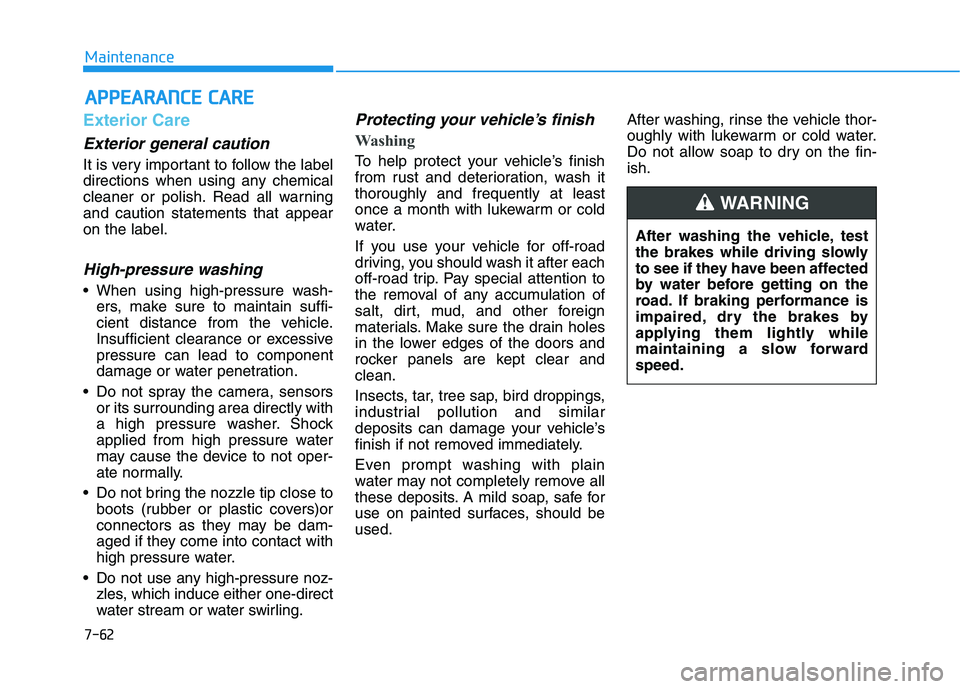
After washing the vehicle, test
the brakes while driving slowly
to see if they have been affected
by water before getting on the
road. If braking performance is
impaired, dry the brakes by
applying them lightly while
maintaining a slow forwardspeed.
WARNING
Page 517 of 558

H15
Warning and indicator lights
OFE048100C1. Power gauge
2. Speedometer
3. Fuel cell stack temperature gauge
4. Fuel gauge
5. Odometer/LCD display/Trip computer
6. Warning and indicator lights
Air bag warningCharging system warningElectronic Stability Control (ESC) OFF indicator Forward Collision-
Avoidance Assist (FCA)
system warning
Seat belt warningLow fuel level warning Immobilizer Indicator
Parking brake &
brake fluid warningLow tire pressure warningTurn Signal IndicatorEPBElectronic Parking Brake
(EPB) warning
Regenerative brake
warningService warning High Beam IndicatorAUTO
HOLDAUTO HOLD Indicator
Anti-lock brake system
(ABS) warningPower down warning Light ON IndicatorMaster Warning
Electronic Brake force
Distribution (EBD) warning
Hydrogen gas leak
warning (Red) Ready indicatorLED Headlamp warning
Hydrogen leak sensor
warning (Yellow)Lane Keeping Assist (LKA) system indicator
Electric Power Steering
(EPS) warningElectronic Stability Control (ESC) indicator
Yellow
❈ For more details, refer to the ‘Instrument cluster’ in Chapter 3.
Page 549 of 558
I-2
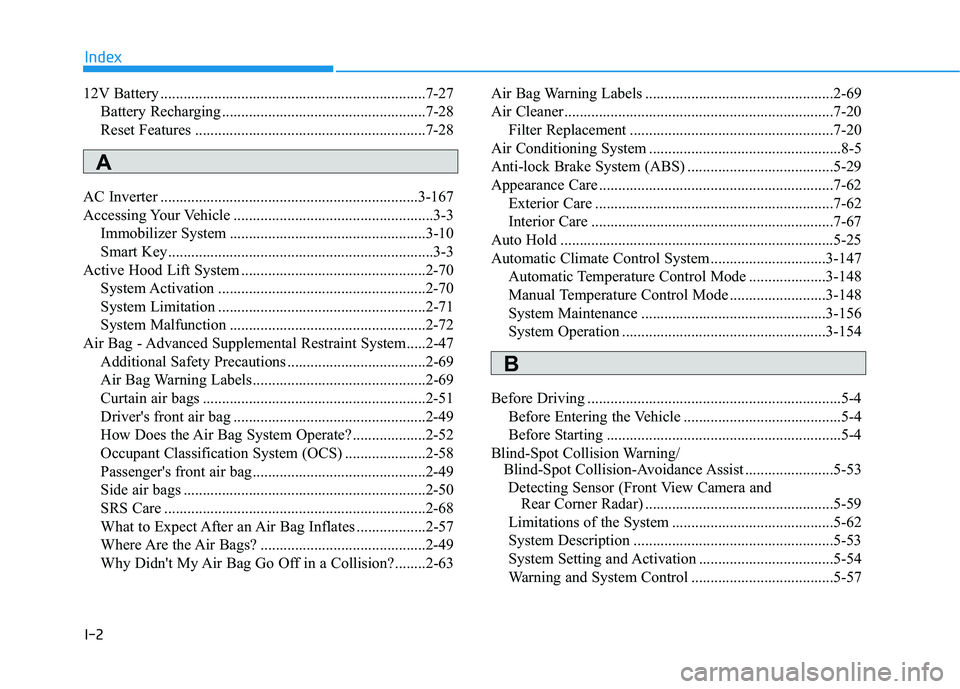
12V Battery .....................................................................7-27
Battery Recharging .....................................................7-28
Reset Features ............................................................7-28
AC Inverter ...................................................................3-167
Accessing Your Vehicle ....................................................3-3 Immobilizer System ...................................................3-10
Smart Key.....................................................................3-3
Active Hood Lift System ................................................2-70 System Activation ......................................................2-70
System Limitation ......................................................2-71
System Malfunction ...................................................2-72
Air Bag - Advanced Supplemental Restraint System.....2-47 Additional Safety Precautions ....................................2-69
Air Bag Warning Labels.............................................2-69
Curtain air bags ..........................................................2-51
Driver's front air bag ..................................................2-49
How Does the Air Bag System Operate? ...................2-52
Occupant Classification System (OCS) .....................2-58
Passenger's front air bag.............................................2-49
Side air bags ...............................................................2-50
SRS Care ....................................................................2-68
What to Expect After an Air Bag Inflates ..................2-57
Where Are the Air Bags? ...........................................2-49
Why Didn't My Air Bag Go Off in a Collision?........2-63 Air Bag Warning Labels .................................................2-69
Air Cleaner......................................................................7-20
Filter Replacement .....................................................7-20
Air Conditioning System ..................................................8-5
Anti-lock Brake System (ABS) ......................................5-29
Appearance Care .............................................................7-62 Exterior Care ..............................................................7-62
Interior Care ...............................................................7-67
Auto Hold .......................................................................5-25
Automatic Climate Control System..............................3-147 Automatic Temperature Control Mode ....................3-148
Manual Temperature Control Mode .........................3-148
System Maintenance ................................................3-156
System Operation .....................................................3-154
Before Driving ..................................................................5-4 Before Entering the Vehicle .........................................5-4
Before Starting .............................................................5-4
Blind-Spot Collision Warning/ Blind-Spot Collision-Avoidance Assist .......................5-53
Detecting Sensor (Front View Camera and Rear Corner Radar) .................................................5-59
Limitations of the System ..........................................5-62
System Description ....................................................5-53
System Setting and Activation ...................................5-54
Warning and System Control .....................................5-57
Index
A
B