2023 HYUNDAI IONIQ 5 lights
[x] Cancel search: lightsPage 421 of 680
07
7-19
•
Your vehicle is being towed
• The surrounding is very bright
• The surrounding is very dark, such as
in a tunnel, etc.
• The brightness changes suddenly, for
example when entering or exiting a tunnel
• The brightness outside is low, and the
headlamps are not on or are not bright
• Driving through steam, smoke or
shadow
• Only part of the vehicle, pedestrian or
cyclist is detected
• The vehicle in front is a bus, heavy truck, truck with an unusually shaped
cargo, trailer, etc.
• The vehicle in front has no tail lights,
tail lights are located unusually, etc.
• The brightness outside is low, and the
tail lamps are not on or are not bright
• The rear of the front vehicle is small
or the vehicle does not look normal,
such as when the vehicle is tilted,
overturned, or the side of the vehicle
is visble, etc.
• The front vehicle’s ground clearance is
low or high
• A vehicle, pedestrian or cyclist
suddenly cuts in front
• The bumper around the front radar is
impacted, damaged or the front radar
is out of position
• The temperature around the front
radar is high or low
• Driving through a tunnel or iron bridge
• Driving in vast areas where there
are few vehicles or structures (for
example, desert, meadow, suburb,
etc.)
• Driving near areas containing metal
substances, such as a construction
zone, railroad, etc. •
A material is near that reflects very
well on the front radar, such as a
guardrail, nearby vehicle, etc.
• The cyclist in front is on a bicycle
made of material that does not reflect
on the front radar
• The vehicle in front is detected late
• The vehicle in front is suddenly
blocked by an obstacle
• The vehicle in front suddenly changes
lane or suddenly reduces speed
• The vehicle in front is bent out of shape
• The front vehicle’s speed is fast or
slow
• The vehicle in front steers in the
opposite direction of your vehicle to
avoid a collision
• With a vehicle in front, your vehicle
changes lane at low speed
• The vehicle in front is covered with
snow
• You are departing or returning to the lane
• Unstable driving
• You are on a roundabout and the
vehicle in front is not detected
• You are continuously driving in a circle
• The vehicle in front has an unusual shape
• The vehicle in front is driving uphill or
downhill
• The pedestrian or cyclist is not
fully detected, for example, if the
pedestrian is leaning over or is not
fully walking upright
• The pedestrian or cyclist is wearing
clothing or equipment that makes it
difficult to detect
Page 422 of 680
Driver Assistance System
7-20
OADAS044
The illustration above shows the image
the front view camera and front radar
is capable of detecting as a vehicle,
pedestrian and cyclist. • The pedestrian or cyclist in front is
moving very quickly
• The pedestrian or cyclist in front is
short or is posing a low posture
• The pedestrian or cyclist in front has
impaired mobility
• The pedestrian or cyclist in front is
moving intersected with the driving
direction
• There is a group of pedestrians,
cyclists or a large crowd in front
• The pedestrian or cyclist is wearing
clothing that easily blends into the
background, making it difficult to
detect
• The pedestrian or cyclist is difficult to
distinguish from the similarly shaped
structure in the surroundings •
You are driving by a pedestrian,
cyclist, traffic signs, structures, etc.,
near the intersection
• Driving in a parking lot
• Driving through a tollgate,
construction area, unpaved road,
partial paved road, uneven road,
speed bumps, etc.
• Driving on an incline road, curved
road, etc.
• Driving through a roadside with trees
or streetlights
• The adverse road conditions cause
excessive vehicle vibrations while driving
• Your vehicle height is low or high
due to heavy loads, abnormal tire
pressure, etc.
• Driving through a narrow road where
trees or grass are overgrown
• There is interference by
electromagnetic waves, such as
driving in an area with strong radio
waves or electrical noise
Page 463 of 680
07
7-61
•
The distance between the vehicle and
the road signs is too far
• The vehicle encounters illuminant
road signs
• Intelligent Speed Limit Assist
incorrectly recognizes numbers in the
street signals or other signs as the speed limit
• The minimum speed limit sign is on
the road
• The brightness changes suddenly, for
example when entering or exiting a tunnel or passing under a bridge
• Headlamps are not used or the
brightness of the headlamps are weak
at night or in the tunnel
• Road signs are difficult to recognize
due to the reflection of sunlight, street
lights, or oncoming vehicles
• The navigation information or GPS
information contain errors.
• The driver does not follow the guide
of the navigation.
• The driver is driving a new road that is
not in the navigation system yet.
• The field of view of the front view
camera is obstructed by sun glare
• Driving on a road that is sharply
curved or continuously curved
• Driving through speed bumps, or
driving up and down or left to right on
steep inclines
• The vehicle is shaking heavily
• There is an error in the navigation map
information or GPS information
• The driver is not driving along the
navigation guide route
• Driving on a newly opened road
Information
For more details on the limitations of the
front view camera, refer to “Forward
Collision-Avoidance Assist (FCA)” section
in this chapter.
WARNING
• Intelligent Speed Limit Assist is a
supplemental function that helps the
driver to comply with the speed limit
on the road, and may not display the
correct speed limit or control the
driving speed properly.
• Always set the vehicle speed to the
speed limit in your country.
Page 486 of 680
Driver Assistance System
7-84
•
Only part of the vehicle is detected
• The vehicle in front has no tail lights,
tail lights are located unusually, etc.
• The brightness outside is low, and the
tail lamps are not on or are not bright
• The rear of the front vehicle is small
or does not look normal (for example,
tilted, overturned, etc.)
• The front vehicle’s ground clearance is
low or high
• A vehicle suddenly cuts in front
• Your vehicle is being towed
• Driving through a tunnel or iron bridge
• Driving near areas containing metal
substances, such as a construction
zone, railroad, etc.
• An object reflecting off the front radar
such as a guardrail, nearby vehicle,
etc.
• The bumper around the front radar is
impacted, damaged or the front radar
is out of position
• The temperature around the front
radar is high or low
• Driving in vast areas where there
are few vehicles or structures (for
example, desert, meadow, suburb,
etc.)
• The vehicle in front is made of
material that does not reflect on the
front radar
• Driving near a highway interchange or
tollgate
• Driving on a slippery surface due to
snow, water puddle, ice, etc.
• Driving on a curved road
• The vehicle in front is detected late
• The vehicle in front is suddenly
blocked by an obstacle
• The vehicle in front suddenly changes
lane or suddenly reduces speed •
The vehicle in front is bent out of shape
• The front vehicle’s speed is fast or
slow
• With a vehicle in front, your vehicle
changes lane at low speed
• The vehicle in front is covered with
snow
• Unstable driving
• You are on a roundabout and the
vehicle in front is not detected
• You are continuously driving in a circle
• Driving in a parking lot
• Driving through a construction area,
unpaved road, partial paved road,
uneven road, speed bumps, etc.
• Driving on an incline road, curved
road, etc.
• Driving through a roadside with trees
or streetlights
• The adverse road conditions cause
excessive vehicle vibrations while driving
• Your vehicle height is low or high
due to heavy loads, abnormal tire
pressure, etc.
• Driving through a narrow road where
trees or grass are overgrown
• There is interference by
electromagnetic waves, such as
driving in an area with strong radio
waves or electrical noise
Page 576 of 680

Driver Assistance System
7-174
WARNING
Take the following precautions when
using Remote Smart Parking Assist: • The driver is responsible for safe
parking and exit when using Remote
Smart Parking Assist.
• When using Remote Smart Parking
Assist, stay out of the way in the
direction the vehicle moves for your
safety.
• Always check surroundings when
using Remote Smart Parking Assist.
You may collide with pedestrians,
animals, or objects if they are near
the sensor or are in the sensor’s blind
spot area.
• A collision may occur if a pedestrian,
animal, or object suddenly appears
while Remote Smart Parking Assist is
operating.
• Do not use Remote Smart Parking
Assist when under the influence of
alcohol.
• Do not let children or other people to
use the smart key.
• If Remote Smart Parking Assist is
used continuously for a long period,
it may adversely affect Remote
Smart Parking Assist performance.• Remote Smart Parking Assist may not
operate properly if the vehicle needs
wheel alignment adjustment such
as when the vehicle tilts to one side.
Have the vehicle be inspected by an
authorized HYUNDAI dealer.
• Noise may be heard when braking
occurs by Remote Smart Parking
Assist or when the brake pedal is
depressed by the driver.
• Remote Smart Parking Assist may
suddenly apply the brake to avoid
collision.
• Use Remote Smart Parking Assist
only in a parking space that is large
enough for the vehicle to move
safely.
NOTICE
• If the 3rd stage warning (continuous
beep) of the Forward/Reverse
Parking Distance Warning sounds
while Remote Smart Parking
Assist is operating, it means the
obstacle detected is close to your
vehicle. At this time, Remote Smart
Parking Assist will temporarily stop
operating. Make sure there are no
pedestrians, animals, or objects
around your vehicle.
• Depending on brake operation, the
stop lights may come on while the
vehicle is moving.
• If the vehicle is remotely started that
has been parked in cold weather for
a long time, the operation of Remote
Smart Parking function may be
delayed or canceled depending on
vehicle condition.
Page 580 of 680
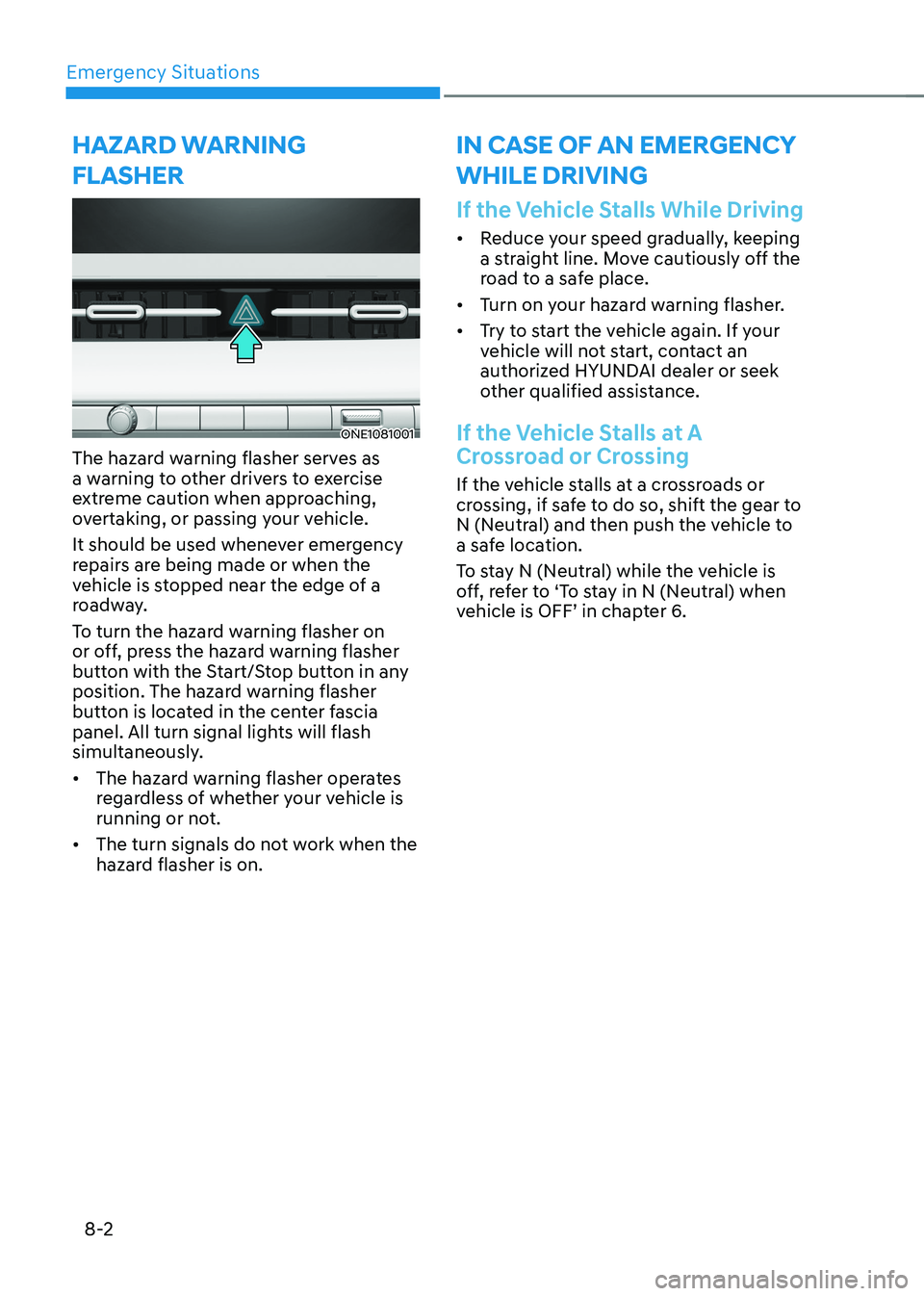
Emergency Situations
8-2
ONE1081001
The hazard warning flasher serves as
a warning to other drivers to exercise
extreme caution when approaching,
overtaking, or passing your vehicle.
It should be used whenever emergency
repairs are being made or when the
vehicle is stopped near the edge of a
roadway.
To turn the hazard warning flasher on
or off, press the hazard warning flasher
button with the Start/Stop button in any
position. The hazard warning flasher
button is located in the center fascia
panel. All turn signal lights will flash
simultaneously. • The hazard warning flasher operates
regardless of whether your vehicle is
running or not.
• The turn signals do not work when the
hazard flasher is on.
If the Vehicle Stalls While Driving
• Reduce your speed gradually, keeping
a straight line. Move cautiously off the
road to a safe place.
• Turn on your hazard warning flasher.
• Try to start the vehicle again. If your
vehicle will not start, contact an
authorized HYUNDAI dealer or seek
other qualified assistance.
If the Vehicle Stalls at A
Crossroad or Crossing
If the vehicle stalls at a crossroads or
crossing, if safe to do so, shift the gear to
N (Neutral) and then push the vehicle to
a safe location.
To stay N (Neutral) while the vehicle is
off, refer to ‘To stay in N (Neutral) when
vehicle is OFF’ in chapter 6.
Hazard warning
flasHer in case of an emergency wHile driving
Page 583 of 680

08
8-5
Jump starting procedure
Information
When you jump start your vehicle,
use the jumper terminal in the motor compartment.
1. Position the vehicles close enough that the jumper cables will reach, but
do not allow the vehicle body parts to
contact.
2. Avoid fans or any moving parts in the motor compartment at all times, even
when the vehicles are turned off.
3. Turn off all electrical devices such as radios, lights, air conditioning, etc.
Put the vehicles in P (Park) and set the
parking brake. Turn both vehicles OFF.
4. Open the hood.
5. Remove the battery cover located inside of the front trunk.
6. Remove the motor compartment fuse box cover.
CAUTION
Before jump starting, make sure to
correctly identify the positive (+) and
negative (-) terminals to avoid reverse
polarity connections.
ONE1081003
7. Connect the jumper cables in
the exact sequence shown in the
illustration. First connect one jumper
cable to the red, positive (+) jumper
terminal of your vehicle (1).
8. Connect the other end of the jumper cable to the red, positive (+) battery/
jumper terminal of the assisting
vehicle (2).
9. Connect the second jumper cable to
the black, negative (-) battery/jumper
terminal of the assisting vehicle (3).
10. Connect the other end of the second
jumper cable to the black, negative (-)
chassis ground of your vehicle (4).
Do not allow the jumper cables to
contact anything except the correct
battery or jumper terminals or the
correct ground. Do not lean over the
battery when making connections.
WARNING
Do not connect the jumper cable to
the negative (-) jumper terminal of the
discharged battery. A spark could cause
the battery to explode and lead to a
personal injury or vehicle damage.
Page 607 of 680

Maintenance
9-6
Owner Maintenance Schedule
When you stop for charging: • Check the coolant level in the coolant
reservoir.
• Check the windshield washer fluid
level.
• Check for low or under-inflated tires.
WARNING
Be careful when checking your coolant
level when the motor compartment is
hot. This may result in coolant being
blown out of the opening and cause
serious burns and other injuries.
While operating your vehicle: • Check for vibrations in the steering
wheel. Notice if there is any increased
steering effort or looseness in the
steering wheel, or change in its
straight-ahead position.
• Notice if your vehicle constantly turns
slightly or “pulls” to one side when
traveling on smooth, level road.
• When stopping, listen and check for
unusual sounds, pulling to one side,
increased brake pedal travel or “hard-
to-push” brake pedal.
• If any slipping or changes in the
operation of your gear shift occurs,
check the shift gear fluid level.
• Check the shift gear P (Park) function.
• Check the parking brake.
• Check for fluid leaks under your
vehicle (water dripping from the air
conditioning system during or after use is normal). At least monthly: •
Check coolant level in the coolant
reservoir.
• Check the operation of all exterior
lights, including the stoplights, turn
signals and hazard warning flashers.
• Check the inflation pressures of all
tires including the spare for tires that
are worn, show uneven wear, or are damaged.
• Check for loose wheel lug nuts.
At least twice a year: (for example,
every Spring and Autumn) • Check radiator, heater and air
conditioning hoses for leaks or damage.
• Check windshield washer spray and
wiper operation. Clean wiper blades
with a clean cloth dampened with
washer fluid.
• Check headlamp alignment.
• Check the seat belts for wear and function.
At least once a year: • Clean body and door drain holes.
• Lubricate door hinges and hood hinges.
• Lubricate door and hood locks and
latches.
• Lubricate door rubber weather strips.
• Check the air conditioning system.
• Inspect and lubricate shift gear
linkage and controls.
• Clean the battery (12V) and terminals.
• Check the brake fluid level.