2023 HYUNDAI I30 ignition
[x] Cancel search: ignitionPage 303 of 533
5-38
Driving your vehicle
Shift-lock system
For your safety, the dual clutch trans-
mission has a shift-lock system
which prevents shifting the transmis-
sion from P (Park) into R (Reverse)
unless the brake pedal is depressed.
To shift the transmission from P
(Park) into R (Reverse):
1. Depress and hold the brake pedal.
2. Start the engine or place the igni-
tion switch in the ON position.
3. Move the shift lever.
Shift-lock release
If the shift lever cannot be moved
from the P (Park) position into R
(Reverse) position with the brake
pedal depressed, continue depress-
ing the brake, and then do the follow-
ing:
1. Place the ignition switch in the
LOCK/OFF position.
2. Apply the parking brake.
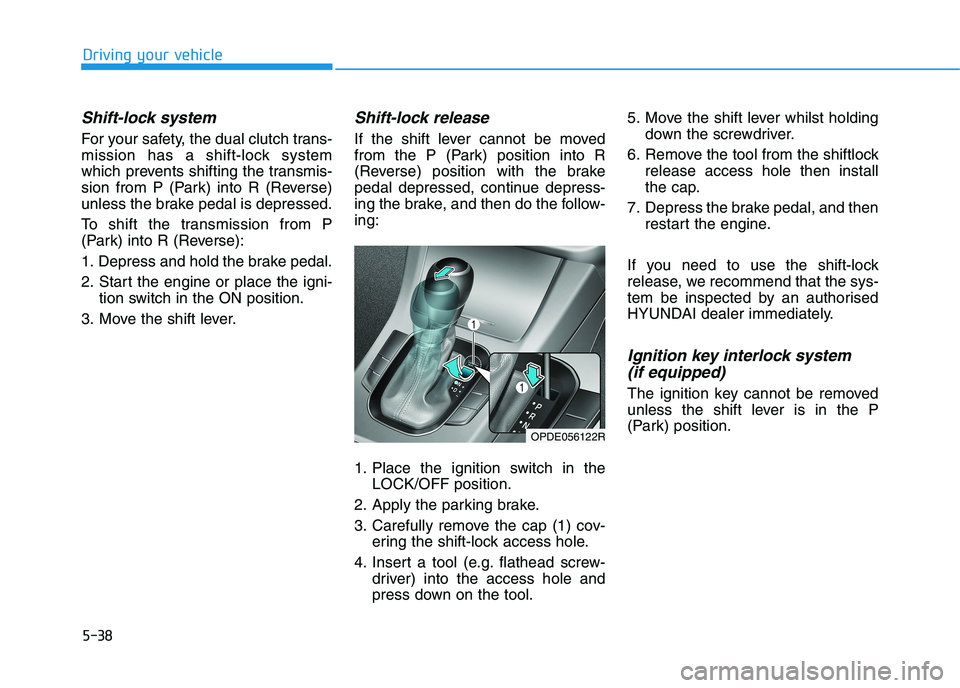
3. Carefully remove the cap (1) cov-
ering the shift-lock access hole.
4. Insert a tool (e.g. flathead screw-
driver) into the access hole and
press down on the tool.5. Move the shift lever whilst holding
down the screwdriver.
6. Remove the tool from the shiftlock
release access hole then install
the cap.
7. Depress the brake pedal, and then
restart the engine.
If you need to use the shift-lock
release, we recommend that the sys-
tem be inspected by an authorised
HYUNDAI dealer immediately.
Ignition key interlock system
(if equipped)
The ignition key cannot be removed
unless the shift lever is in the P
(Park) position.
OPDE056122R
Page 304 of 533

5-39
Driving your vehicle
5
Parking
Always come to a complete stop and
continue to depress the brake pedal.
Move the shift lever into the P (Park)
position, apply the parking brake,
and place the ignition switch in the
LOCK/OFF position. Take the key
with you when exiting the vehicle.
Good driving practices
Never move the shift lever from P
(Park) or N (Neutral) to any other
position with the accelerator pedal
depressed.
Never move the shift lever into P
(Park) when the vehicle is in
motion.
Be sure the vehicle is completely
stopped before you attempt to shift
into R (Reverse) or D (Drive).
Do not move the shift lever to N
(Neutral) when driving. Doing so
may result in an accident because
of a loss of engine braking and the
transmission could be damaged.
Do not drive with your foot resting
on the brake pedal. Even light, but
consistent pedal pressure can
result in the brakes overheating,
brake wear and possibly even
brake failure.
When driving in manual shift mode,
slow down before shifting to a
lower gear. Otherwise, the lower
gear may not be engaged if the
engine rpms are outside of the
allowable range. Always apply the parking brake
when leaving the vehicle. Do not
depend on placing the transmis-
sion in P (Park) to keep the vehicle
from moving.
Exercise extreme caution when
driving on a slippery surface. Be
especially careful when braking,
accelerating or shifting gears. On a
slippery surface, an abrupt change
in vehicle speed can cause the
drive wheels to lose traction and
may cause loss of vehicle control
resulting in an accident.
Optimum vehicle performance and
economy is obtained by smoothly
depressing and releasing the
accelerator. When you stay in the vehicle
with the engine running, be
careful not to depress the accel-
erator pedal for a long period of
time. The engine or exhaust
system may overheat and start
a fire.
The exhaust gas and the
exhaust system are very hot.
Keep away from the exhaust
system components.
Do not stop or park over flam-
mable materials, such as dry
grass, paper or leaves. They
may ignite and cause a fire.
WARNING
Page 308 of 533

5-43
Driving your vehicle
5 Do not apply the accelerator
pedal whilst the parking brake is
engaged. If you depress the
accelerator pedal with the park-
ing brake engaged, a warning
will sound. Damage to the park-
ing brake may occur.
Driving with the parking brake on
can overheat the braking system
and cause premature wear or
damage to brake parts. Make sure
the parking brake is released and
the Brake Warning Light is off
before driving.Check the Parking
Brake Warning Light
by placing the ignition
switch to the ON posi-
tion (do not start the
engine).
This light will be illuminated when the
parking brake is applied with the igni-
tion switch in the START or ON posi-
tion.
Before driving, be sure the parking
brake is released and the Brake
Warning Light is OFF.
If the Parking Brake Warning Light
remains on after the parking brake is
released whilst the engine is run-
ning, there may be a malfunction in
the brake system. Immediate atten-
tion is necessary.
If at all possible, cease driving the
vehicle immediately. If that is not pos-
sible, use extreme caution whilst
operating the vehicle and only con-
tinue to drive the vehicle until you
can reach a safe location.
NOTICE
Whenever leaving the vehicle
or parking, always come to a
complete stop and continue
to depress the brake pedal.
Move the shift lever into the
1st gear (for manual transmis-
sion vehicle) or P (Park, for
automatic transmission/dual
clutch transmission vehicle)
position, then apply the park-
ing brake, and place the igni-
tion switch in the LOCK/OFF
position.
Vehicles with the parking
brake not fully engaged are at
risk of moving inadvertently
and causing injury to yourself
or others.
When parking on an incline,
place the shift lever in P (Park)
and apply the parking brake to
prevent the vehicle from
rolling downhill.
(Continued)
WARNING (Continued)
NEVER allow anyone who is
unfamiliar with the vehicle to
touch the parking brake. If the
parking brake is released
unintentionally, serious injury
may occur.
Only release the parking
brake when you are seated
inside the vehicle with your
foot firmly on the brake pedal.
Page 321 of 533
5-56
Driving your vehicle
ESC operation
ESC ON condition
When the ignition switch is in the ON
position, the ESC and the ESC OFF
indicator lights illuminate for approxi-
mately three seconds and go off,
then the ESC is turned on.
When operating
When the ESC is in opera-
tion, the ESC indicator light
blinks:
conditions which may lock the
wheels, you may hear sounds from
the brakes, or feel a corresponding
sensation in the brake pedal. This is
normal and it means your ESC is
active.
engine may not respond to the
accelerator as it does under routine
conditions.
when the ESC activates, the Cruise
Control automatically disengages.
The Cruise Control can be reen-
gaged when the road conditions
allow.See "Cruise Control System"
later in this chapter (if equipped).
driving on a slippery road, the
engine rpm (revolutions per minute)
may not increase even if you press
the accelerator pedal heavily. This
is to maintain the stability and trac-
tion of the vehicle and does not
indicate a problem.
ESC OFF condition
To cancel ESC operation :
Press the ESC OFF button briefly.
The ESC OFF indicator light and
message "Traction Control disabled"
will illuminate. In this state, the trac-
tion control function of ESC (engine
management) is disabled, but the
brake control function of ESC (brak-
ing management) still operates.
Page 322 of 533

5-57
Driving your vehicle
5
Press and hold the ESC OFF button
continuously for more than 3 sec-
onds. The ESC OFF indicator light
and message "Traction & Stability
Control disabled" illuminates and a
warning chime sounds. In this state,
both the traction control function of
ESC (engine management) and the
brake control function of ESC (brak-
ing management) are disabled.
If the ignition switch is placed in the
LOCK/OFF position when ESC is off,
ESC remains off. Upon restarting the
vehicle, the ESC will automatically
turn on again.Indicator lights
When the ignition switch is in the ON
position, the ESC indicator light illu-
minates, then goes off if the ESC
system is operating normally.
The ESC indicator light blinks when-
ever the ESC is operating.
If the ESC indicator light stays on,
your vehicle may have a malfunction
with the ESC system. When this
warning light illuminates we recom-
mend that the vehicle be checked by
an authorised HYUNDAI dealer as
soon as possible.The ESC OFF indicator light comes
on when the ESC is turned off with
the button.
Driving with wheels and tyres with
different sizes may cause the ESC
system to malfunction. Before
replacing tyres, make sure all four
tyres and wheels are the same
size. Never drive the vehicle with
different sized wheels and tyres
installed.
NOTICE
■ESC indicator light (blinks)
■ ESC OFF indicator light (comes on)
When the ESC is blinking, this
indicates the ESC is active:
Drive slowly and NEVER attempt
to accelerate. NEVER turn the
ESC off whilst the ESC indicator
light is blinking or you may lose
control of the vehicle resulting in
an accident.
WARNING
Page 326 of 533
5-61
Driving your vehicle
5
Good braking practices Wet brakes can be dangerous! The
brakes may get wet if the vehicle is
driven through standing water or if it
is washed. Your vehicle will not stop
as quickly if the brakes are wet. Wet
brakes may cause the vehicle to pull
to one side.
To dry the brakes, apply the brakes
lightly until the braking action returns
to normal, taking care to keep the
vehicle under control at all times. If
the braking action does not return to
normal, stop as soon as it is safe to
do so and we recommend that you
call an authorised HYUNDAI dealer
for assistance.
DO NOT drive with your foot resting
on the brake pedal. Even light, but
constant pedal pressure can result in
the brakes overheating, brake wear,
and possibly even brake failure.If a tyre goes flat whilst you are driv-
ing, apply the brakes gently and
keep the vehicle pointed straight
ahead whilst you slow down. When
you are moving slowly enough for it
to be safe to do so, pull off the road
and stop in a safe location.
Keep your foot firmly on the brake
pedal when the vehicle is stopped to
prevent the vehicle from rolling for-
ward. Whenever leaving the vehicle or
parking, always come to a com-
plete stop and continue to
depress the brake pedal. Move
the shift lever into the P (Park)
position, then apply the parking
brake, and place the ignition
switch in the LOCK/OFF posi-
tion.
Vehicles parked with the park-
ing brake not applied or not
fully engaged may roll inadver-
tently and may cause injury to
the driver and others. ALWAYS
apply the parking brake before
exiting the vehicle.
WARNING
Page 330 of 533
5-65
Driving your vehicle
BCW (if equipped)
Operating conditions
To operate:
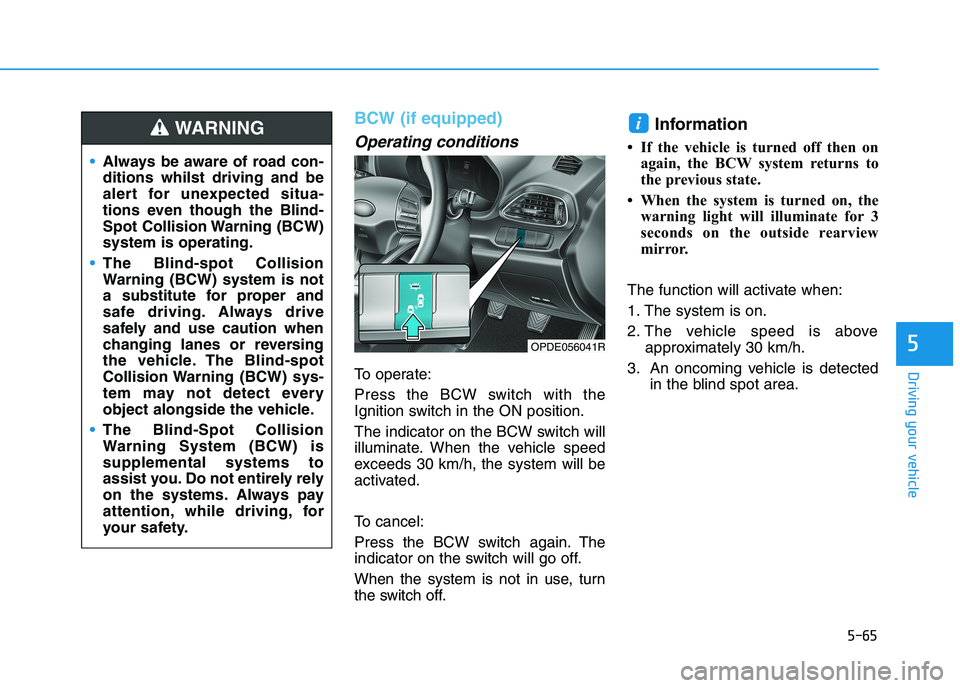
Press the BCW switch with the
Ignition switch in the ON position.
The indicator on the BCW switch will
illuminate. When the vehicle speed
exceeds 30 km/h, the system will be
activated.
To cancel:
Press the BCW switch again. The
indicator on the switch will go off.
When the system is not in use, turn
the switch off.
Information
• If the vehicle is turned off then on
again, the BCW system returns to
the previous state.
• When the system is turned on, the
warning light will illuminate for 3
seconds on the outside rearview
mirror.
The function will activate when:
1. The system is on.
2. The vehicle speed is above
approximately 30 km/h.
3. An oncoming vehicle is detected
in the blind spot area.
i
5
Always be aware of road con-
ditions whilst driving and be
alert for unexpected situa-
tions even though the Blind-
Spot Collision Warning (BCW)
system is operating.
The Blind-spot Collision
Warning (BCW) system is not
a substitute for proper and
safe driving. Always drive
safely and use caution when
changing lanes or reversing
the vehicle. The Blind-spot
Collision Warning (BCW) sys-
tem may not detect every
object alongside the vehicle.
The Blind-Spot Collision
Warning System (BCW) is
supplemental systems to
assist you. Do not entirely rely
on the systems. Always pay
attention, while driving, for
your safety.
WARNING
OPDE056041R
Page 341 of 533
5-76
Driving your vehicle
The Forward Collision-Avoidance
Assist (FCA) system is designed to
help detect and monitor the vehicle
ahead or detect a pedestrian (if
equipped) in the roadway through
radar signals and camera recognition
to warn the driver that a collision is
imminent, and if necessary, apply
emergency braking.
System setting and activation
System setting
The driver can activate the FCA by
placing the ignition switch in the
ON position and by selecting:
"User Settings →Driver
Assistance →FCA (Forward
Collision-Avoidance Assist)"
The FCA deactivates, when the driv-
er cancels the system setting.
F FO
OR
RW
WA
AR
RD
D
C
CO
OL
LL
LI
IS
SI
IO
ON
N
A
AS
SS
SI
IS
ST
T
(
(F
FC
CA
A)
)
S
SY
YS
ST
TE
EM
M
( (F
FR
RO
ON
NT
T
R
RA
AD
DA
AR
R
+
+
F
FR
RO
ON
NT
T
C
CA
AM
ME
ER
RA
A)
)
(
(I
IF
F
E
EQ
QU
UI
IP
PP
PE
ED
D)
)
Take the following precautions
when using the Forward
Collision-Avoidance Assist
(FCA) system:
This system is only a supple-
mental system and it is not
intended to, nor does it
replace the need for extreme
care and attention of the driv-
er. The sensing range and
objects detectable by the sen-
sors are limited. Pay attention
to the road conditions at all
times.
NEVER drive too fast and
drive in accordance with the
road conditions.
Always drive cautiously to
prevent unexpected and sud-
den situations from occur-
ring. FCA does not stop the
vehicle completely and is not
a collision avoidance system.
WARNING