2023 HYUNDAI I30 reset
[x] Cancel search: resetPage 327 of 533
5-62
Driving your vehicle
D DR
RI
IV
VE
E
M
MO
OD
DE
E
I
IN
NT
TE
EG
GR
RA
AT
TE
ED
D
C
CO
ON
NT
TR
RO
OL
L
S
SY
YS
ST
TE
EM
M
(
(I
IF
F
E
EQ
QU
UI
IP
PP
PE
ED
D)
)
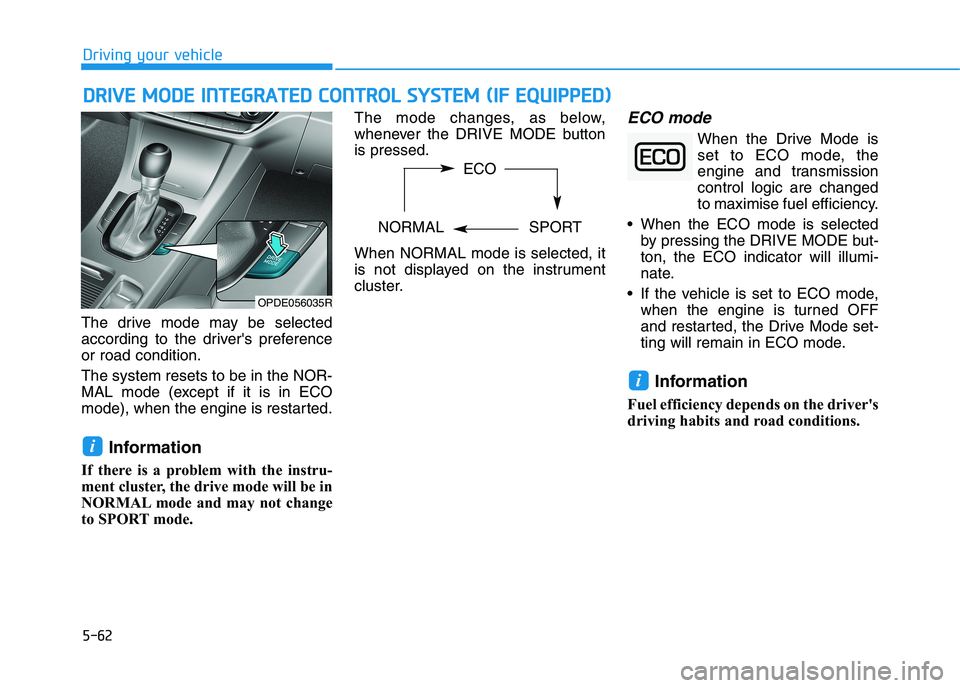
The drive mode may be selected
according to the driver's preference
or road condition.
The system resets to be in the NOR-
MAL mode (except if it is in ECO
mode), when the engine is restarted.
Information
If there is a problem with the instru-
ment cluster, the drive mode will be in
NORMAL mode and may not change
to SPORT mode. The mode changes, as below,
whenever the DRIVE MODE button
is pressed.
When NORMAL mode is selected, it
is not displayed on the instrument
cluster.
ECO mode
When the Drive Mode is
set to ECO mode, the
engine and transmission
control logic are changed
to maximise fuel efficiency.
When the ECO mode is selected
by pressing the DRIVE MODE but-
ton, the ECO indicator will illumi-
nate.
If the vehicle is set to ECO mode,
when the engine is turned OFF
and restarted, the Drive Mode set-
ting will remain in ECO mode.
Information
Fuel efficiency depends on the driver's
driving habits and road conditions.
i
i
OPDE056035R
ECO
NORMAL SPORT
Page 362 of 533

5-97
Driving your vehicle
5
The driver can monitor their driving
conditions on the LCD display.
The DAW screen will appear when
you select the Assist mode tab ( )
on the LCD display if the system is
activated. For more information,
refer to "LCD Display Modes" in
chapter 3.
The driver's attention level is dis-
played on the scale from 1 to 5.
The lower the number is, the more
inattentive the driver is.
The number decreases when the
driver does not take a break for a
certain period of time.
The number increases when the
driver attentively drives for a cer-
tain period of time.
When the driver turns on the sys-
tem whilst driving, it displays 'Last
Break time' and level.Take a break
The "Consider taking a break"
message appears on the LCD dis-
play and a warning sounds in order
to suggest the driver to take a
break, when the driver’s attention
level is below 1.
The Driver Attention Warning
(DAW) system does not suggest
the driver to take a break, when the
total driving time is shorter than 10
minutes.
Resetting the System
The last break time is set to 00:00
and the driver's attention level is
set to 5 (very attentive) when the
driver resets the Driver Attention
Warning (DAW) system.
The Driver Attention Warning
(DAW) system resets in the follow-
ing situations.
- The engine is turned OFF.
- The driver unfastens the seat belt
and then opens the driver's door.
- The vehicle is stopped for more
than 10 minutes.
The Driver Attention Warning
(DAW) system operates again,
when the driver restarts driving.
OPDE056063
Page 370 of 533
5-105
Driving your vehicle
5
Information
Each of the above actions will cancel
Cruise Control operation (the SET
indicator light in the instrument clus-
ter will go off), but only pressing the
CRUISE button will turn the system
off. If you wish to resume Cruise
Control operation, push the toggle
switch up (RES+) located on your
steering wheel. You will return to your
previously preset speed, unless the
system was turned off using the
CRUISE button.
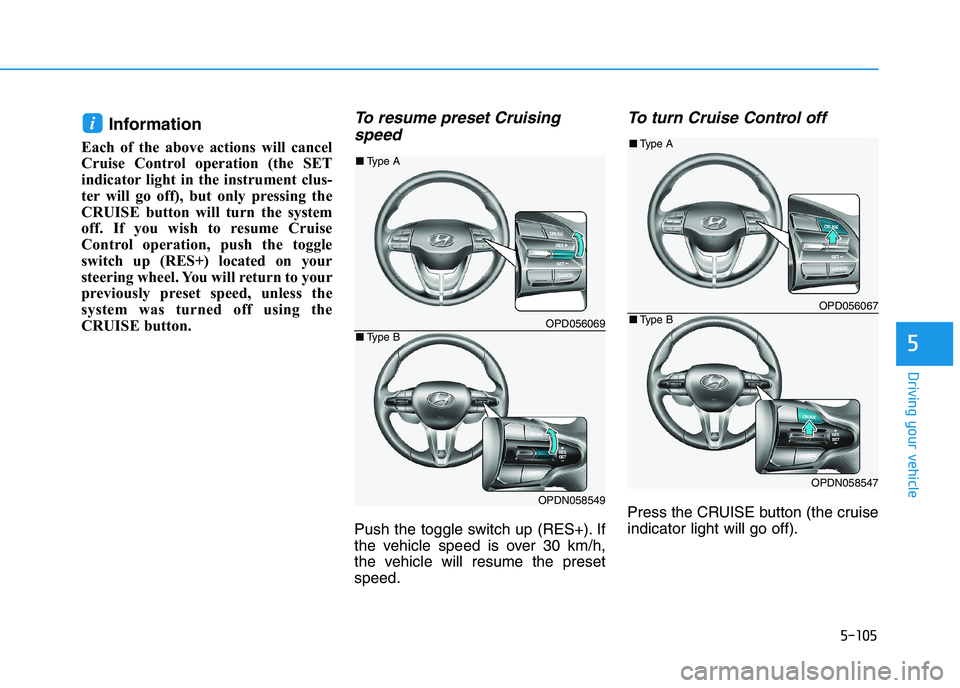
To resume preset Cruising
speed
Push the toggle switch up (RES+). If
the vehicle speed is over 30 km/h,
the vehicle will resume the preset
speed.
To turn Cruise Control off
Press the CRUISE button (the cruise
indicator light will go off).
i
OPD056069
OPDN058549
■Type A
■Type B
OPD056067
OPDN058547
■Type A
■Type B
Page 432 of 533
7
Maintenance
7
Maintenance
Engine compartment .............................................7-3
Maintenance services ...........................................7-5
Owner's responsibility ......................................................7-5
Owner maintenance precautions ..................................7-5
Owner maintenance ...............................................7-6
Owner maintenance schedule ........................................7-7
Scheduled maintenance services.........................7-9
Normal Maintenance Schedule
(Petrol Engine [1.6 T-GDI]) ..........................................7-10
Maintenance Under Severe Usage and
Low Mileage Conditions
(Petrol Engine [1.6 T-GDI]) ..........................................7-13
Normal Maintenance Schedule
(Petrol Engine [2.0 GDI])...............................................7-15
Maintenance Under Severe Usage and
Low Mileage Conditions
(Petrol Engine [2.0 GDI])...............................................7-18
Normal Maintenance Schedule (Diesel Engine) ......7-20
Maintenance Under Severe Usage and
Low Mileage Conditions (Diesel Engine) ...................7-23
Explanation of scheduled maintenance items .7-25
Engine oil ..............................................................7-28
Checking the engine oil level (Petrol engine) ..........7-28
Checking the engine oil level (Diesel Engine)..........7-29
Checking the engine oil and filter ..............................7-30
Engine coolant......................................................7-31
Checking the engine coolant level..............................7-31
Changing the engine coolant .......................................7-33
Brake/clutch fluid ................................................7-34
Checking the brake/clutch fluid level ........................7-34
Washer fluid .........................................................7-35
Checking the washer fluid level ..................................7-35
Parking brake .......................................................7-35
Checking the parking brake .........................................7-35
Fuel filter (For Diesel) ........................................7-36
Draining water from fuel filter ....................................7-36
Fuel filter cartridge replacement ................................7-36
Air cleaner ............................................................7-36
Filter replacement ...........................................................7-36
Climate control air filter .....................................7-38
Filter inspection ...............................................................7-38
Filter replacement ...........................................................7-38
Wiper blades .........................................................7-39
Blade inspection ..............................................................7-39
Blade replacement ..........................................................7-40
Battery...................................................................7-43
For best battery service................................................7-44
Battery capacity label ...................................................7-44
Battery recharging .........................................................7-44
Reset items .......................................................................7-46
7
Page 477 of 533

7-46
Maintenance
By jump starting
After a jump start from a good bat-
tery, drive the vehicle for 20-30 min-
utes before it is shutoff. The vehicle
may not restart if you shut it off
before the battery had a chance to
adequately recharge. See “Jump
Starting” in chapter 6 for more infor-
mation on jump starting procedures.
Information
An inappropriately disposed
battery can be harmful to
the environment and human
health. Dispose of the bat-
tery according to your local
law(s) or regulation.
Reset items
The following items may need to be
reset after the battery has been dis-
charged or the battery has been dis-
connected.
Auto up/down window
Sunroof
Trip computer
Climate control system
Clock
Audio system
i
Page 481 of 533
7-50
Maintenance
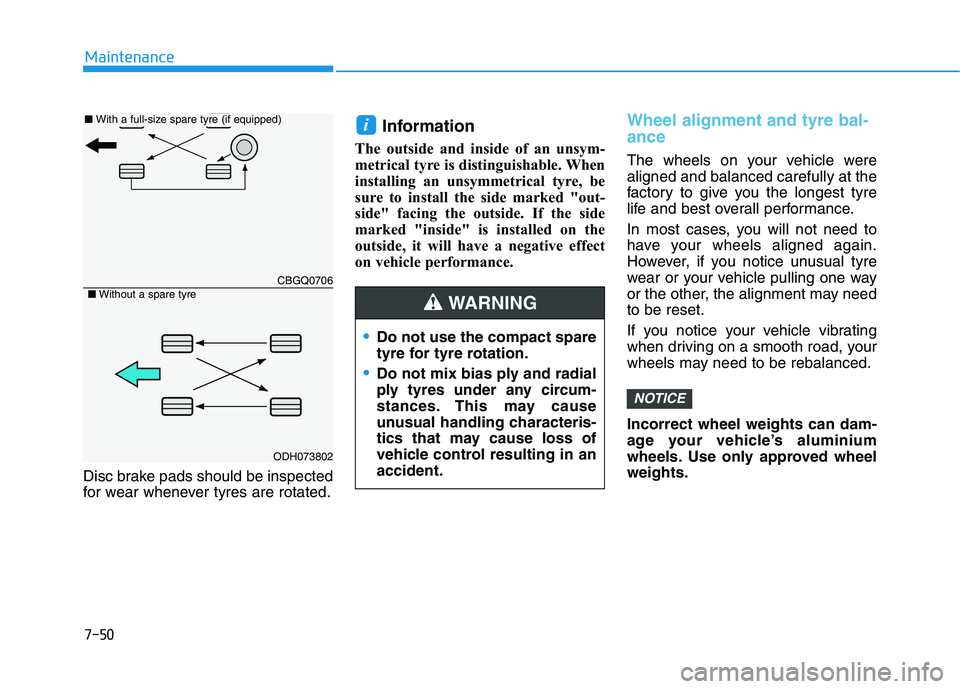
Disc brake pads should be inspected
for wear whenever tyres are rotated.
Information
The outside and inside of an unsym-
metrical tyre is distinguishable. When
installing an unsymmetrical tyre, be
sure to install the side marked "out-
side" facing the outside. If the side
marked "inside" is installed on the
outside, it will have a negative effect
on vehicle performance.
Wheel alignment and tyre bal-
ance
The wheels on your vehicle were
aligned and balanced carefully at the
factory to give you the longest tyre
life and best overall performance.
In most cases, you will not need to
have your wheels aligned again.
However, if you notice unusual tyre
wear or your vehicle pulling one way
or the other, the alignment may need
to be reset.
If you notice your vehicle vibrating
when driving on a smooth road, your
wheels may need to be rebalanced.
Incorrect wheel weights can dam-
age your vehicle’s aluminium
wheels. Use only approved wheel
weights.
NOTICE
i
CBGQ0706
ODH073802
■ With a full-size spare tyre (if equipped)
■Without a spare tyre
Do not use the compact spare
tyre for tyre rotation.
Do not mix bias ply and radial
ply tyres under any circum-
stances. This may cause
unusual handling characteris-
tics that may cause loss of
vehicle control resulting in an
accident.
WARNING
Page 492 of 533

7-61
7
Maintenance
Fuse switch
Always, place the fuse switch to the
ON position.
If you move the switch to the OFF
position, some items such as the
audio system and digital clock must
be reset and the smart key may not
work properly.
Information
If the fuse switch is OFF, “Turn on
FUSE SWITCH” message will appear.
Always place the fuse switch in
the ON position whilst driving
the vehicle.
Place the fuse switch in the OFF
position when the vehicle is
parked more than a month to
prevent battery discharge.
Do not move the transportation
fuse switch repeatedly. The fuse
switch may be damaged.
Engine compartment panel
fuse replacement
1. Turn the vehicle off.
2. Turn all other switches OFF.
3. Remove the fuse panel cover by
pressing the tab and pulling up.
NOTICE
i
OPDE076036ROPDE046119OPD077032L
OPD077033L
■Blade type fuse
■Cartridge type fuse