2023 HYUNDAI I30 ECO mode
[x] Cancel search: ECO modePage 160 of 533
3-77
Convenient features of your vehicle
3
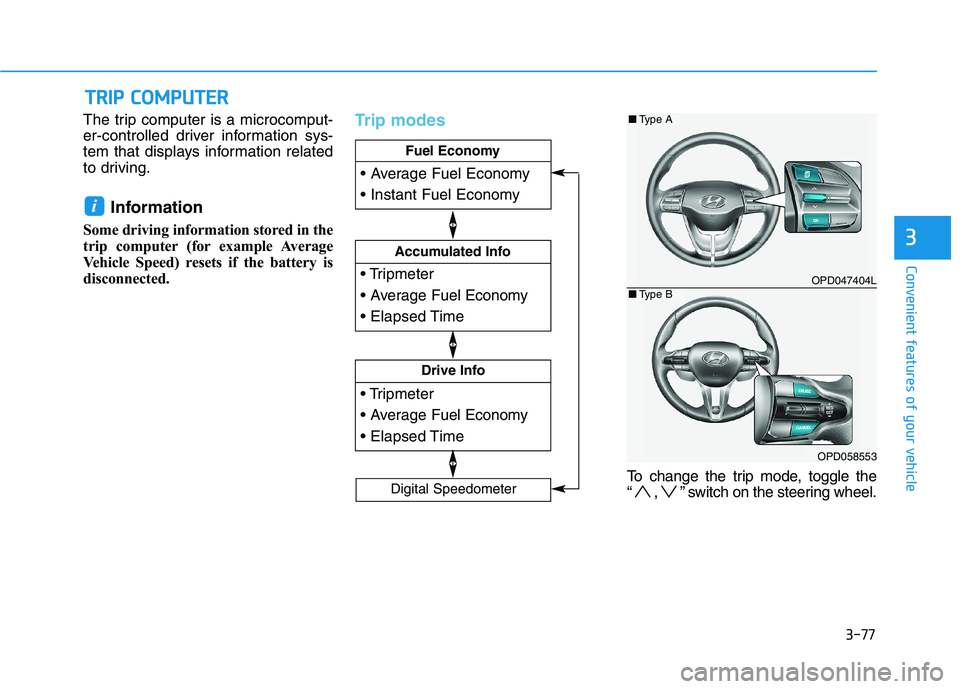
The trip computer is a microcomput-
er-controlled driver information sys-
tem that displays information related
to driving.
Information
Some driving information stored in the
trip computer (for example Average
Vehicle Speed) resets if the battery is
disconnected.
Trip modes
To change the trip mode, toggle the
“ , ” switch on the steering wheel.
i
T TR
RI
IP
P
C
CO
OM
MP
PU
UT
TE
ER
R
Drive Info
Accumulated Info
Fuel Economy
Digital Speedometer
OPD047404L
OPD058553
■Type A
■Type B
Page 161 of 533
3-78
Convenient features of your vehicle
Fuel economy
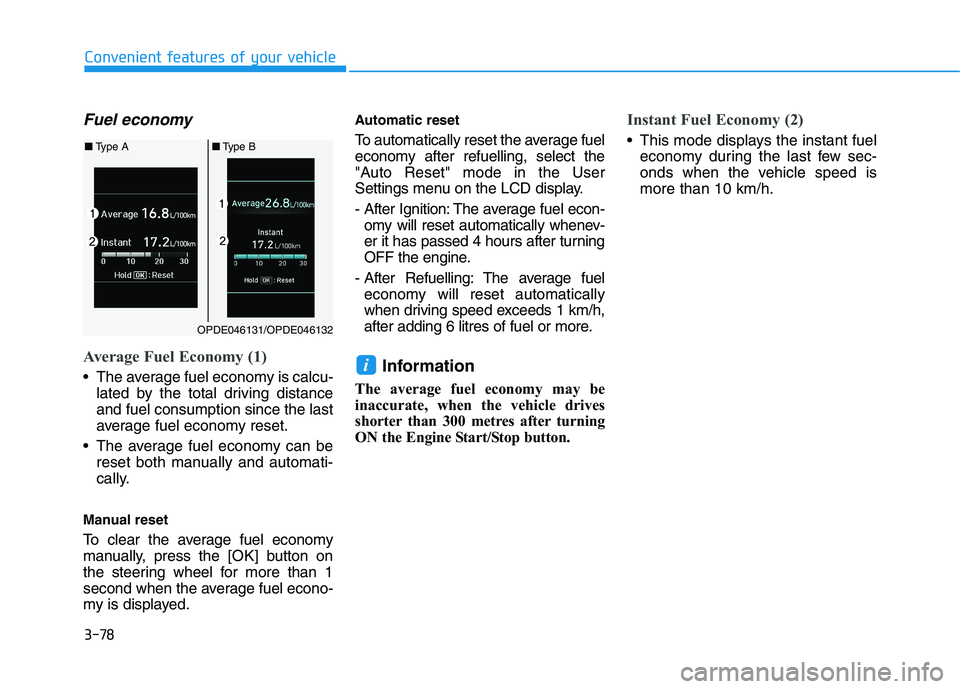
Average Fuel Economy (1)
The average fuel economy is calcu-
lated by the total driving distance
and fuel consumption since the last
average fuel economy reset.
The average fuel economy can be
reset both manually and automati-
cally.
Manual reset
To clear the average fuel economy
manually, press the [OK] button on
the steering wheel for more than 1
second when the average fuel econo-
my is displayed.
Automatic reset
To automatically reset the average fuel
economy after refuelling, select the
"Auto Reset" mode in the User
Settings menu on the LCD display.
- After Ignition: The average fuel econ-
omy will reset automatically whenev-
er it has passed 4 hours after turning
OFF the engine.
- After Refuelling: The average fuel
economy will reset automatically
when driving speed exceeds 1 km/h,
after adding 6 litres of fuel or more.
Information
The average fuel economy may be
inaccurate, when the vehicle drives
shorter than 300 metres after turning
ON the Engine Start/Stop button.
Instant Fuel Economy (2)
This mode displays the instant fuel
economy during the last few sec-
onds when the vehicle speed is
more than 10 km/h.
i
OPDE046131/OPDE046132
■Type A■Type B
Page 168 of 533
3-85
Convenient features of your vehicle
3
Headlamp delay function
(if equipped)
If you place the ignition switch to the
ACC or OFF position with the head-
lamps ON, the headlamps (and/or
position lamps) remain on for about 5
minutes. However, with the engine off
if the driver’s door is opened and
closed, the headlamps (and/or posi-
tion lamps) are turned off after 15
seconds.
The headlamps (and/or position
lamps) can be turned off by pressing
the lock button on the remote key or
smart key twice or turning the light
switch to the OFF or AUTO position.
However, if you turn the light switch
to the AUTO position when it is dark
outside, the headlamps will not be
turned off.
You can activate or deactivate the
Headlamp Delay function from the
User Settings mode on the LCD dis-
play.For more details, refer to
"LCD Display" in this chapter.If the driver gets out of the vehicle
through other doors (except dri-
ver's door), the battery saver func-
tion does not operate and the
headlamp delay function does not
turn off automatically. Therefore, It
causes the battery to be dis-
charged. In this case, make sure to
turn off the lamp before getting out
of the vehicle.
Daytime running light (DRL)
(if equipped)
The Daytime Running Lights (DRL)
can make it easier for others to see
the front of your vehicle during the
day, especially after dawn and before
sunset.
The DRL system will turn the dedi-
cated lamp OFF when:
1. The headlamps are in the ON
position.
2. The position lamp switch is in the
ON position.
3. The engine is turned off.
NOTICE
Page 170 of 533
3-87
Convenient features of your vehicle
3
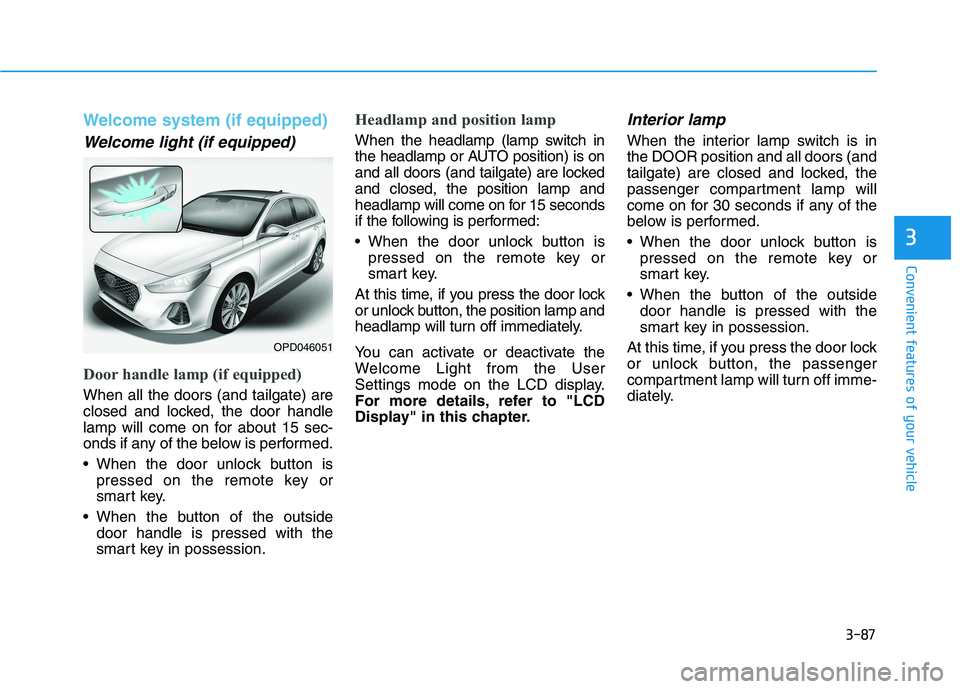
Welcome system (if equipped)
Welcome light (if equipped)
Door handle lamp (if equipped)
When all the doors (and tailgate) are
closed and locked, the door handle
lamp will come on for about 15 sec-
onds if any of the below is performed.
When the door unlock button is
pressed on the remote key or
smart key.
When the button of the outside
door handle is pressed with the
smart key in possession.
Headlamp and position lamp
When the headlamp (lamp switch in
the headlamp or AUTO position) is on
and all doors (and tailgate) are locked
and closed, the position lamp and
headlamp will come on for 15 seconds
if the following is performed:
When the door unlock button is
pressed on the remote key or
smart key.
At this time, if you press the door lock
or unlock button, the position lamp and
headlamp will turn off immediately.
You can activate or deactivate the
Welcome Light from the User
Settings mode on the LCD display.
For more details, refer to "LCD
Display" in this chapter.
Interior lamp
When the interior lamp switch is in
the DOOR position and all doors (and
tailgate) are closed and locked, the
passenger compartment lamp will
come on for 30 seconds if any of the
below is performed.
When the door unlock button is
pressed on the remote key or
smart key.
When the button of the outside
door handle is pressed with the
smart key in possession.
At this time, if you press the door lock
or unlock button, the passenger
compartment lamp will turn off imme-
diately.
OPD046051
Page 195 of 533
3-112
Convenient features of your vehicle
Air conditioning system operation
tips
If the vehicle has been parked in
direct sunlight during hot weather,
open the windows for a short time
to let the hot air inside the vehicle
escape.
achieved, switch back from the
recirculated air to the fresh outside
air position.
To help reduce moisture inside of
the windows on rainy or humid
days, decrease the humidity inside
the vehicle by operating the air
conditioning system with the win-
dows and sunroof closed.
Use the air conditioning system
every month for a few minutes to
ensure maximum system perform-
ance.
If you operate the air conditioner
excessively, the difference between
the temperature of the outside air
and that of the windscreen could
cause the outer surface of the wind-
screen to fog up, causing loss of vis-
ibility. In this case, set the mode
selection button to the position
and set the blower speed control
knob to the lowest speed setting.
System maintenance
Climate control air filter
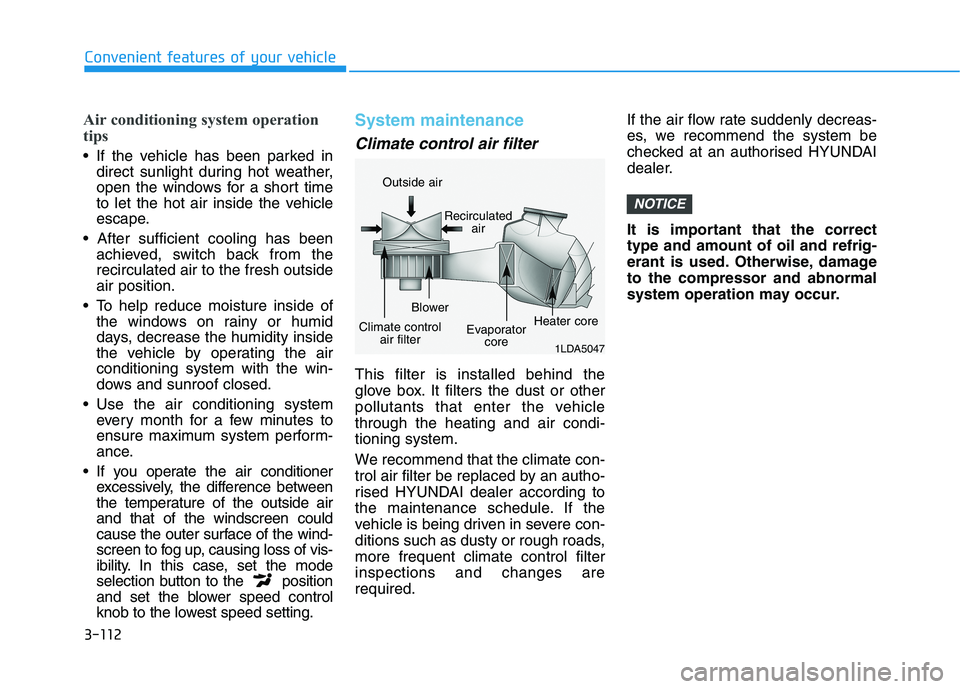
This filter is installed behind the
glove box. It filters the dust or other
pollutants that enter the vehicle
through the heating and air condi-
tioning system.
We recommend that the climate con-
trol air filter be replaced by an autho-
rised HYUNDAI dealer according to
the maintenance schedule. If the
vehicle is being driven in severe con-
ditions such as dusty or rough roads,
more frequent climate control filter
inspections and changes are
required.If the air flow rate suddenly decreas-
es, we recommend the system be
checked at an authorised HYUNDAI
dealer.
It is important that the correct
type and amount of oil and refrig-
erant is used. Otherwise, damage
to the compressor and abnormal
system operation may occur.
NOTICE
1LDA5047
Outside air
Recirculated
air
Climate control
air filterBlower
Evaporator
coreHeater core
Page 207 of 533
3-124
Convenient features of your vehicle
excessively, the difference between
the temperature of the outside air
and that of the windscreen could
cause the outer surface of the
windscreen to fog up, causing loss
of visibility. In this case, set the
mode selection button to the
position and set the blower speed
control knob to the lowest speed
setting.
System maintenance
Climate control air filter
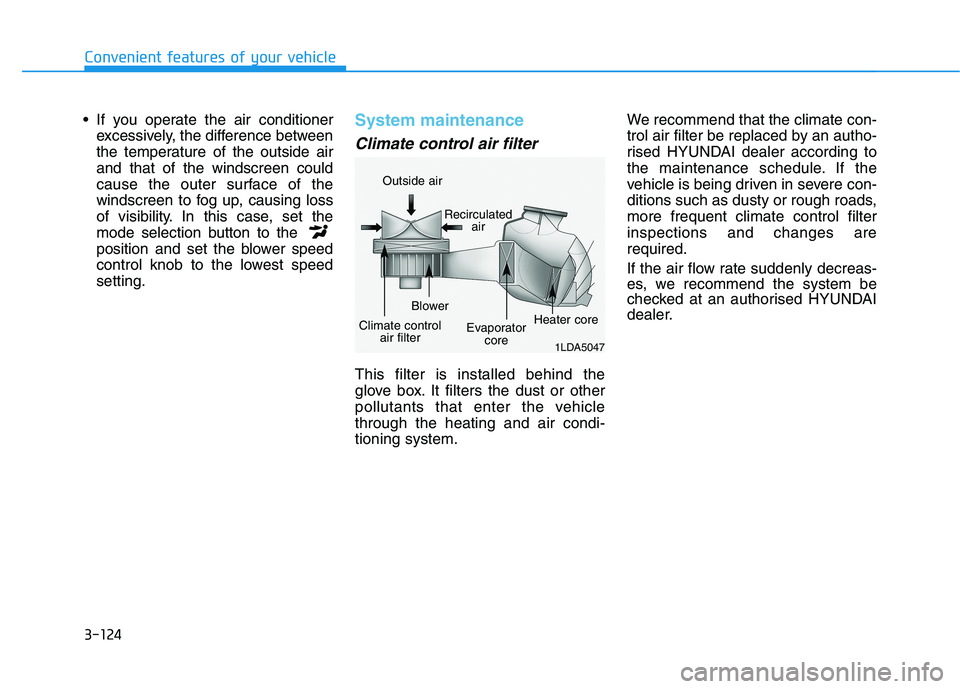
This filter is installed behind the
glove box. It filters the dust or other
pollutants that enter the vehicle
through the heating and air condi-
tioning system.We recommend that the climate con-
trol air filter be replaced by an autho-
rised HYUNDAI dealer according to
the maintenance schedule. If the
vehicle is being driven in severe con-
ditions such as dusty or rough roads,
more frequent climate control filter
inspections and changes are
required.
If the air flow rate suddenly decreas-
es, we recommend the system be
checked at an authorised HYUNDAI
dealer.
1LDA5047
Outside air
Recirculated
air
Climate control
air filterBlower
Evaporator
coreHeater core
Page 209 of 533
3-126
Convenient features of your vehicle
For maximum windscreen defrost-
ing, set the temperature control
knob to the highest temperature
setting and the blower speed con-
trol knob to the highest blower
speed. Select the front defrost but-
ton on the climate control display.
After the engine warm-up period,
warm air will be directed to the
front windscreen.
If warm air to the floor is desired
whilst defrosting or defogging, set the
mode to the floor-defrost position.
Before driving, clear all snow and
ice from the windscreen, rear win-
dow, outside rear view mirrors, and
all side windows.
Clear all snow and ice from the bon-
net and air inlet in the cowl grill to
improve heater and defroster effi-
ciency and to reduce the probability
of fogging up inside of the wind-
screen.
Information
If the engine temperature is still cold
after starting, then a brief engine
warm up period may be required for
the vented air flow to become warm or
hot.
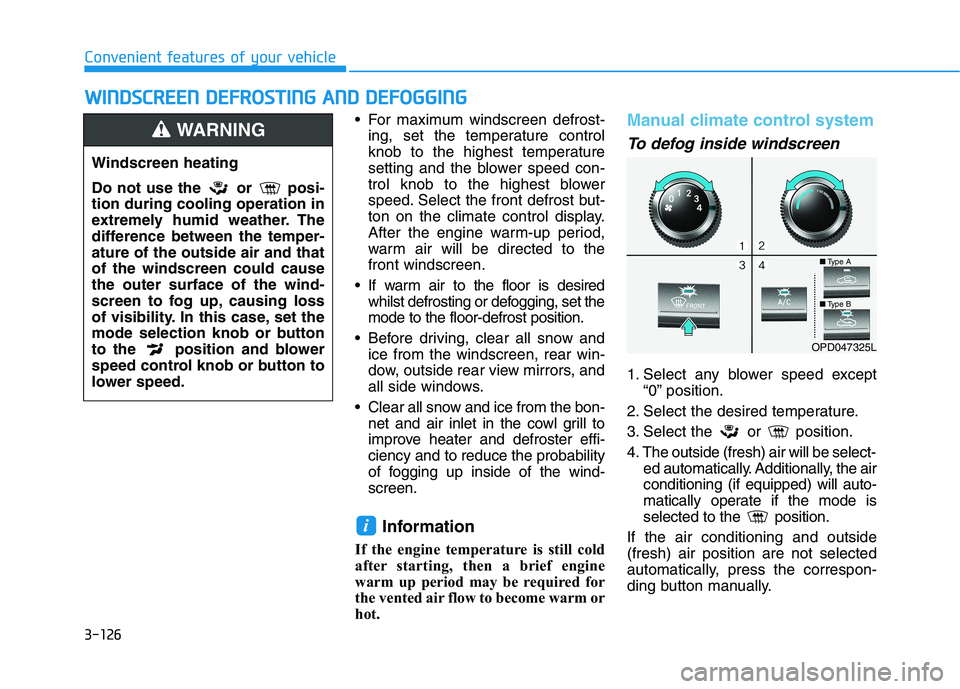
Manual climate control system
To defog inside windscreen
1. Select any blower speed except
“0” position.
2. Select the desired temperature.
3. Select the or position.
4. The outside (fresh) air will be select-
ed automatically. Additionally, the air
conditioning (if equipped) will auto-
matically operate if the mode is
selected to the position.
If the air conditioning and outside
(fresh) air position are not selected
automatically, press the correspon-
ding button manually.
i
W WI
IN
ND
DS
SC
CR
RE
EE
EN
N
D
DE
EF
FR
RO
OS
ST
TI
IN
NG
G
A
AN
ND
D
D
DE
EF
FO
OG
GG
GI
IN
NG
G
Windscreen heating
Do not use the or posi-
tion during cooling operation in
extremely humid weather. The
difference between the temper-
ature of the outside air and that
of the windscreen could cause
the outer surface of the wind-
screen to fog up, causing loss
of visibility. In this case, set the
mode selection knob or button
to the position and blower
speed control knob or button to
lower speed.
WARNING
OPD047325L
■Type A
■Type B
Page 213 of 533
3-130
Convenient features of your vehicle
C CL
LI
IM
MA
AT
TE
E
C
CO
ON
NT
TR
RO
OL
L
A
AD
DD
DI
IT
TI
IO
ON
NA
AL
L
F
FE
EA
AT
TU
UR
RE
ES
S
Cluster ionizer (if equipped)
When the ignition switch is in the ON
position, the clean air function turns
on automatically.
Also, the clean air function turns off
automatically, when the ignition
switch is in the OFF position.
Automatic ventilation
(if equipped)
When the ignition switch is in the ON
position or when the engine is run-
ning and the outside temperature is
low, the automatic ventilation feature
will activate if the recirculated air
intake position is selected for more
than 30 minutes whilst A/C is on. In
this condition, the air intake position
will automatically switch to the out-
side (fresh) air position.
To cancel or set the Automatic
Ventilation
When the air conditioning system is
on, select Face Level mode and
whilst pressing the A/C button, press
the recirculated air position button for
three seconds.
When the automatic ventilation is set,
the air intake control button (recircu-
lated air position) indicator will blink 6
times. When cancelled, the air intake
control button (recirculated air posi-
tion) indicator will blink 3 times.
Sunroof inside air recirculation
(if equipped)
When the sunroof is opened, outside
(fresh) air will be automatically
selected. At this time, if you press the
air intake control button, recirculated
air position will be selected but will
change back to outside (fresh) air
after 3 minutes. When the sunroof is
closed, the air intake position will
return to the original position that
was selected.