Page 243 of 572
Convenience Features5-108
DefrosterNOTICE
To prevent damage to the conductors
bonded to the inside surface of the rear
window, never use sharp instruments or
window cleaners containing abrasives
to clean the window.
Information
If you want to defrost and defog the
front windshield, refer to “Windshield
Defrosting and Defogging” in this chapter.
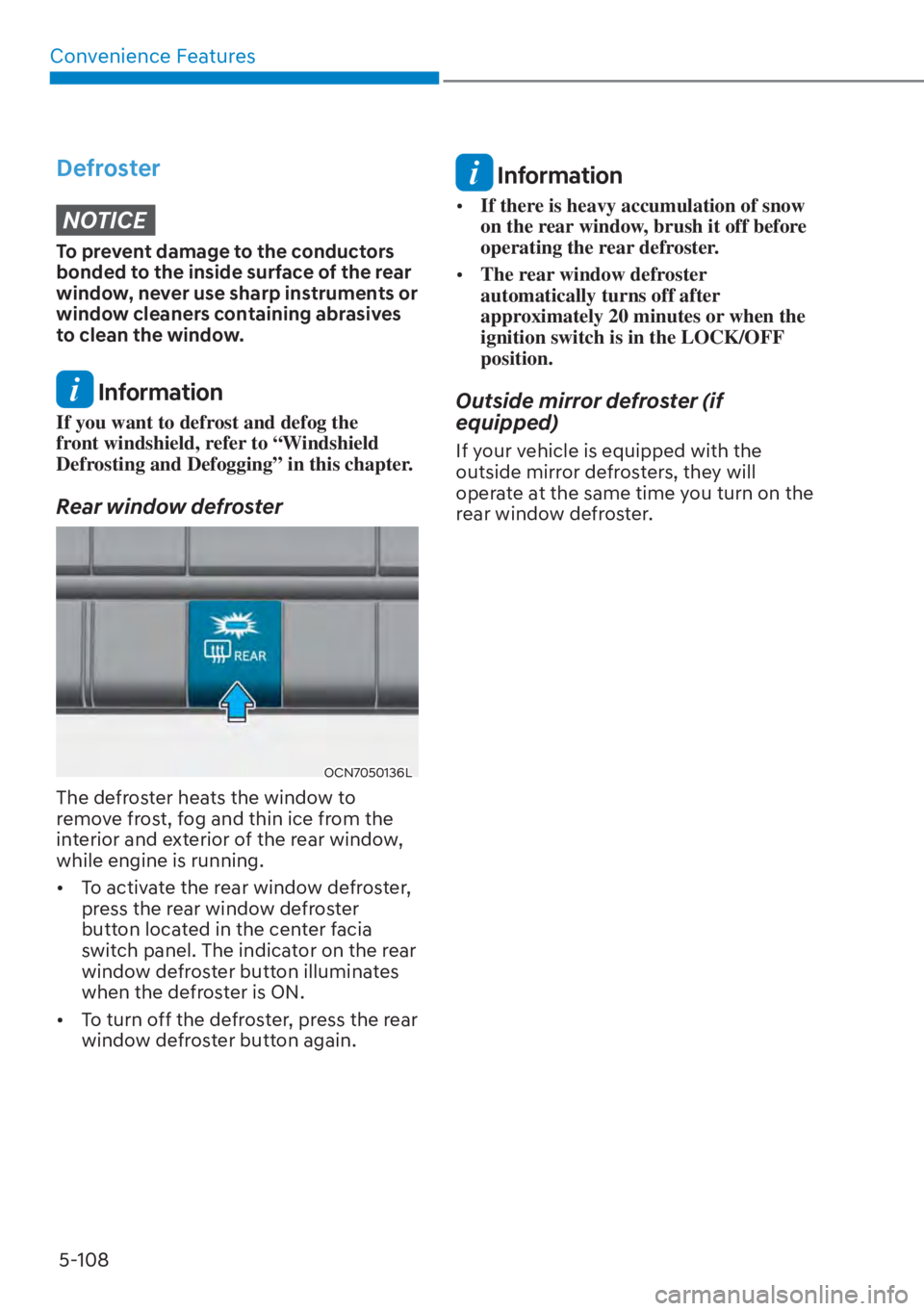
Rear window defroster
OCN7050136L
The defroster heats the window to
remove frost, fog and thin ice from the
interior and exterior of the rear window,
while engine is running.
�[� To activate the rear window defroster,
press the rear window defroster
button located in the center facia
switch panel. The indicator on the rear
window defroster button illuminates
when the defroster is ON.
�[� To turn off the defroster, press the rear
window defroster button again.
Information
�[�If there is heavy accumulation of snow
on the rear window, brush it off before
operating the rear defroster.
�[� The rear window defroster
automatically turns off after
approximately 20 minutes or when the
ignition switch is in the LOCK/OFF
position.
Outside mirror defroster (if
equipped)
If your vehicle is equipped with the
outside mirror defrosters, they will
operate at the same time you turn on the
rear window defroster.
Page 325 of 572
06
6-67
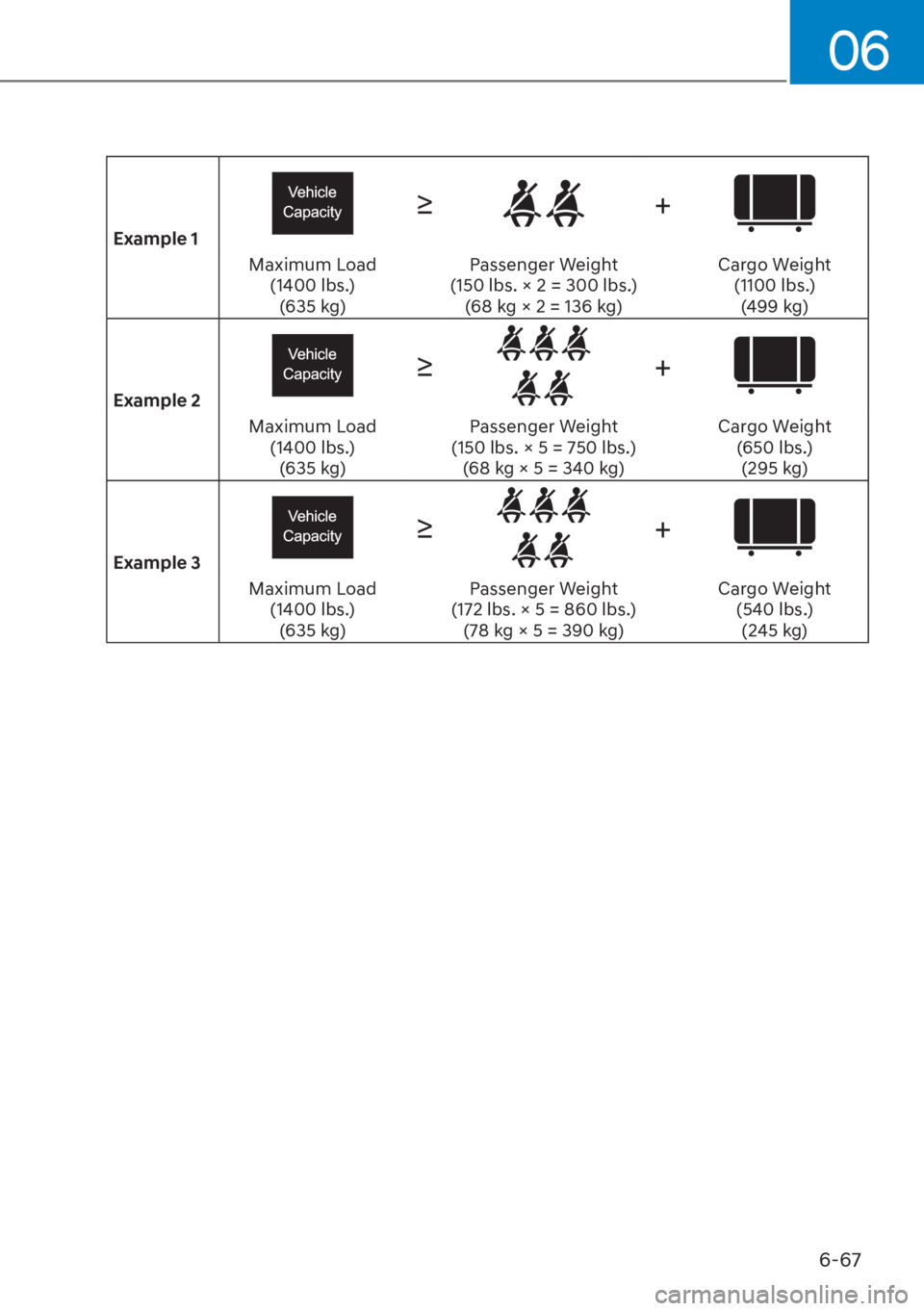
Example 1
�g+
Maximum Load (1400 lbs.)(635 kg) Passenger Weight
(150 lbs. × 2 = 300 lbs.) (68 kg × 2 = 136 kg) Cargo Weight
(1100 lbs.)(499 kg)
Example 2
�g+
Maximum Load (1400 lbs.)(635 kg) Passenger Weight
(150 lbs. × 5 = 750 lbs.) (68 kg × 5 = 340 kg) Cargo Weight
(650 lbs.)(295 kg)
Example 3
�g+
Maximum Load (1400 lbs.)(635 kg) Passenger Weight
(172 lbs. × 5 = 860 lbs.) (78 kg × 5 = 390 kg) Cargo Weight
(540 lbs.)(245 kg)
Page 355 of 572
![HYUNDAI ELANTRA 2023 Owners Manual Driver Assistance System7-28
OADAS031[A] : Your vehicle, [B] : Lane changing vehicle,
[C] : Same lane vehicle
When a vehicle in front of you
merges out of the lane, Forward
Collision-Avoidance Assi](/manual-img/35/56086/w960_56086-354.png "HYUNDAI ELANTRA 2023 Owners Manual Driver Assistance System7-28
OADAS031[A] : Your vehicle, [B] : Lane changing vehicle,
[C] : Same lane vehicle
When a vehicle in front of you
merges out of the lane, Forward
Collision-Avoidance Assi")
Driver Assistance System7-28
OADAS031[A] : Your vehicle, [B] : Lane changing vehicle,
[C] : Same lane vehicle
When a vehicle in front of you
merges out of the lane, Forward
Collision-Avoidance Assist may not
immediately detect the vehicle that
is now in front of you. In this case,
you must maintain a safe braking
distance, and if necessary, steer your
vehicle and depress the brake pedal
to reduce your driving speed in order
to maintain a safe distance. �[�
Detecting vehicle
OCN7060136
If the vehicle in front of you has
cargo that extends rearward from
the cab, or when the vehicle in front
of you has higher ground clearance,
additional special attention is
required. Forward Collision-
Avoidance Assist may not be able
to detect the cargo extending from
the vehicle. In these instances,
you must maintain a safe braking
distance from the rearmost object,
and if necessary, steer your vehicle
and depress the brake pedal to
reduce your driving speed in order to
maintain distance.
Page 420 of 572
07
7-93
OCN7060136
In the following cases, the vehicle
in front cannot be detected by the
sensor: - Vehicles with higher ground clearance or vehicles carrying loads
that stick out of the back of the
vehicle
- Vehicles that has the front lifted due
to heavy loads
- You are steering your vehicle
- Driving on narrow or sharply curved roads
Adjust your vehicle speed by
depressing the brake pedal according
to the road and driving conditions
ahead.
OHI058322L
�[� When a vehicle ahead disappears
at an intersection, your vehicle may
accelerate.
Always pay attention to road and
driving conditions while driving.
OHI058308L
�[�When a vehicle in front of you merges
out of the lane, Smart Cruise Control
may not immediately detect the new
vehicle that is now in front of you.
Always pay attention to road and
driving conditions while driving.
OHI058323L
�[�Always look out for pedestrians when
your vehicle is maintaining a distance
with the vehicle ahead.
Page 463 of 572

Driver Assistance System7-136
Reverse Parking Distance
Warning Operation
Reverse Parking Distance Warning
�[� Reverse Parking Distance Warning
will operate when the gear is in R
(Reverse).
�[� Reverse Parking Distance Warning
helps detect a person, animal or
REMHFW�LQ�WKH�UHDU�ZKHQ�WKH�YHKLFOH�TV�
rearward speed is below 6 mph (10
km/h).
Distance
from object Warning
indicator When
driving
backward Warning
sound
24~48 in.
(
60~120 cm)Buzzer beeps
intermittently
12~24 in.
(30~60 cm)
Beeps more frequently
12 in. (within 30 cm)
Beeps
continuously
�[� The corresponding indicator will
illuminate whenever each ultrasonic
senor detects a person, animal or
object in its sensing range. Also an
audible warning will sound.
�[� When more than two objects are
detected at the same time, the closest
one will be warned with an audible
warning.
�[� The shape of the indicator in the
illustration may differ from the actual
vehicle.
Reverse Parking Distance
Warning Malfunction and
Precautions
Reverse Parking Distance Warning
malfunction
After starting the engine, a beep will
sound when the gear is shifted to R
(Reverse) to indicate Reverse Parking
Distance Warning is operating properly.
However, if one or more of the following
occurs, first check whether the ultrasonic
sensor is damaged or whether the
system is in a non operating condition.
If it still does not work properly, have
the vehicle inspected by an authorized
HYUNDAI dealer.
�[�The audible warning does not sound.
�[� The buzzer sounds intermittently.
�[� 7KH��S3DUNLQJ�VHQVRU�HUURU�RU�EORFNDJH�T� warning message appears on the
cluster.
OCN7070066L