Page 212 of 814
Continued211
uuWindows uOpening/Closing the Power Windows
Controls
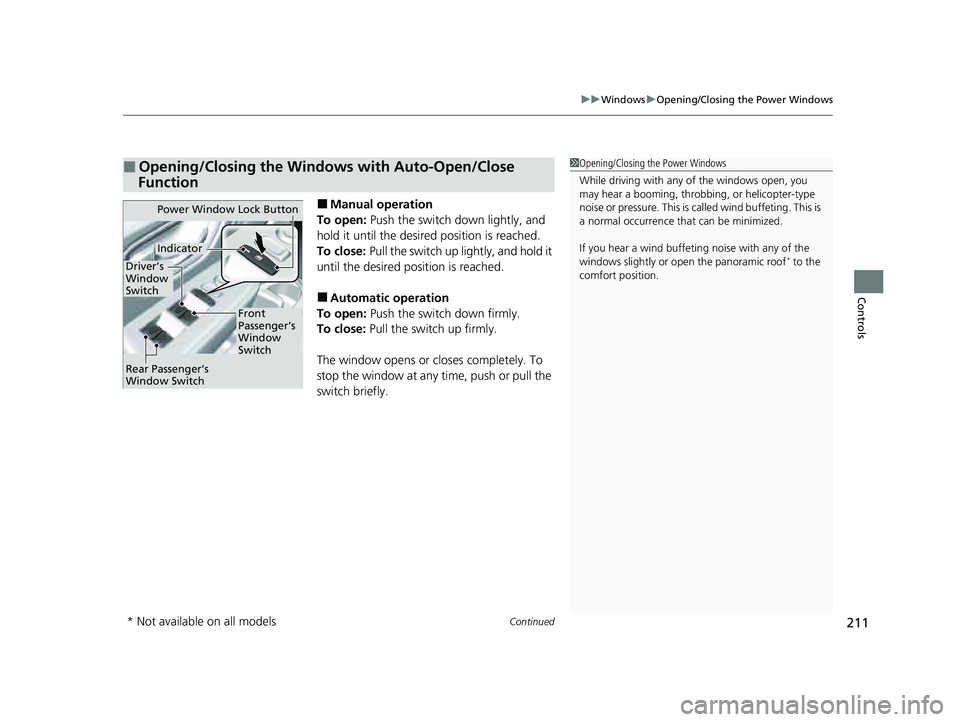
■Manual operation
To open: Push the switch down lightly, and
hold it until the desired position is reached.
To close: Pull the switch up lightly, and hold it
until the desired position is reached.
■Automatic operation
To open: Push the switch down firmly.
To close: Pull the switch up firmly.
The window opens or closes completely. To
stop the window at any time, push or pull the
switch briefly.
■Opening/Closing the Windows with Auto-Open/Close
Function1 Opening/Closing the Power Windows
While driving with any of the windows open, you
may hear a booming, throbbi ng, or helicopter-type
noise or pressure. This is ca lled wind buffeting. This is
a normal occurrence th at can be minimized.
If you hear a wind buffeti ng noise with any of the
windows slightly or ope n the panoramic roof
* to the
comfort position.
Power Window Lock Button
Front
Passenger’s
Window
Switch
Driver’s
Window
Switch
Indicator
Rear Passenger’s
Window Switch
* Not available on all models
23 PILOT-31T906000_03.book 211 ページ 2022年10月31日 月曜日 午前10時26分
Page 213 of 814
uuWindows uOpening/Closing th e Power Windows
212
Controls
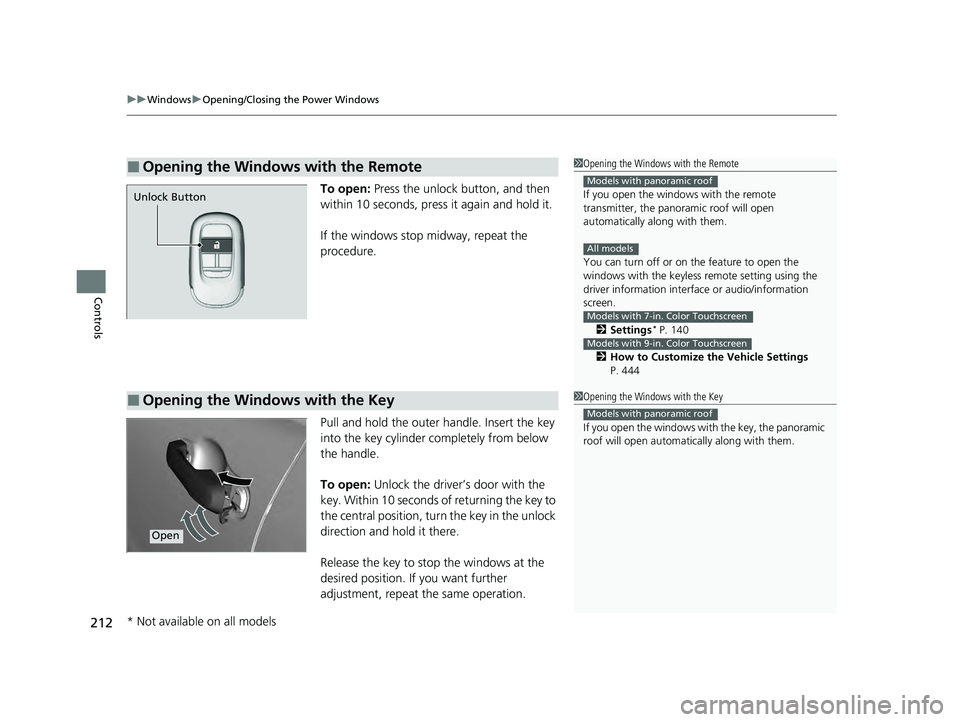
To open: Press the unlock button, and then
within 10 seconds, press it again and hold it.
If the windows stop midway, repeat the
procedure.
Pull and hold the outer handle. Insert the key
into the key cylinder completely from below
the handle.
To open: Unlock the driver’s door with the
key. Within 10 seconds of returning the key to
the central position, turn the key in the unlock
direction and hold it there.
Release the key to stop the windows at the
desired position. If you want further
adjustment, repeat the same operation.
■Opening the Windows with the Remote1 Opening the Windows with the Remote
If you open the window s with the remote
transmitter, the panoramic roof will open
automatically along with them.
You can turn off or on the feature to open the
windows with the keyless re mote setting using the
driver information interf ace or audio/information
screen.
2 Settings
* P. 140
2 How to Customize the Vehicle Settings
P. 444
Models with panoramic roof
All models
Models with 7-in. Color Touchscreen
Models with 9-in. Color Touchscreen
Unlock Button
■Opening the Windows with the Key1 Opening the Windows with the Key
If you open the windows with the key, the panoramic
roof will open automa tically along with them.
Models with panoramic roof
Open
* Not available on all models
23 PILOT-31T906000_03.book 212 ページ 2022年10月31日 月曜日 午前10時26分
Page 219 of 814
218
uuOperating the Switches Around the Steering Wheel uENGINE START/STOP Button
Controls
If you leave the vehicle for 30 to 60 minutes with the transmission in (P and the
power mode in ACCESSORY, the vehicle auto matically goes into the mode similar to
VEHICLE OFF (LOCK) to avoid draining the battery.
If you open the driver’s door when the power mode is set to ACCESSORY, a warning
beep sounds.
■Automatic Power Off
■Power Mode Reminder
23 PILOT-31T906000_03.book 218 ページ 2022年10月31日 月曜日 午前10時26分
Page 221 of 814
220
uuOperating the Switches Around the Steering Wheel uLights
Controls
Lights
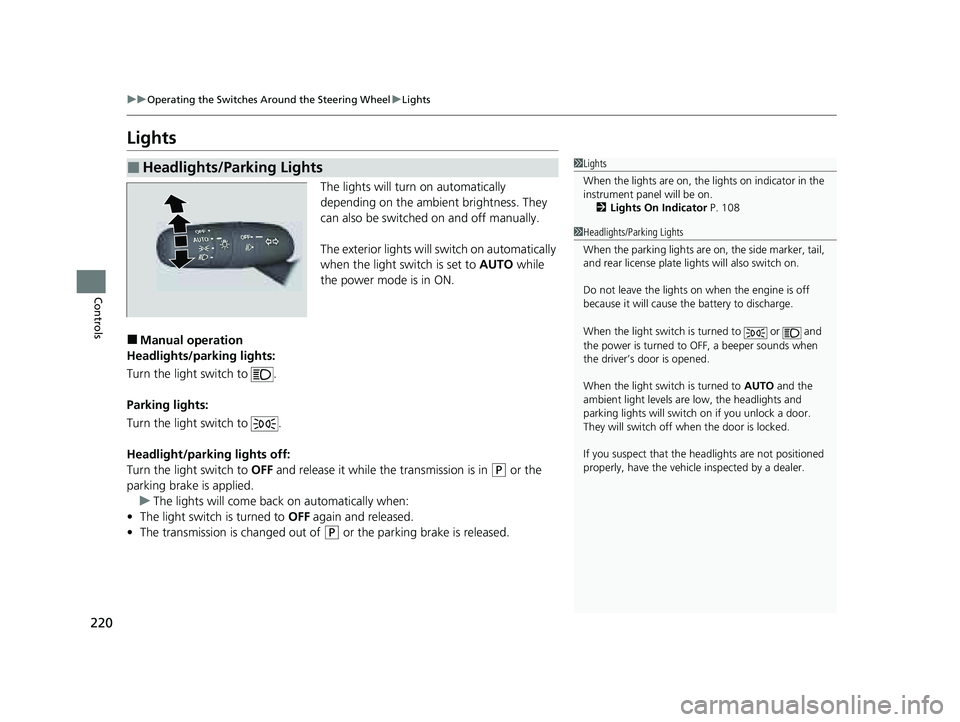
The lights will turn on automatically
depending on the ambient brightness. They
can also be switched on and off manually.
The exterior lights will switch on automatically
when the light switch is set to AUTO while
the power mode is in ON.
■Manual operation
Headlights/parking lights:
Turn the light switch to .
Parking lights:
Turn the light switch to .
Headlight/parking lights off:
Turn the light switch to OFF and release it while the transmission is in
(P or the
parking brake is applied. u The lights will come back on automatically when:
• The light switch is turned to OFF again and released.
• The transmission is changed out of
(P or the parking brake is released.
■Headlights/Parking Lights1Lights
When the lights are on, the lights on indicator in the
instrument pane l will be on.
2 Lights On Indicator P. 108
1Headlights/Parking Lights
When the parking lights are on, the side marker, tail,
and rear license plate li ghts will also switch on.
Do not leave the lights on when the engine is off
because it will cause the battery to discharge.
When the light switch is turned to or and
the power is turned to OFF, a beeper sounds when
the driver’s door is opened.
When the light switch is turned to AUTO and the
ambient light levels are low, the headlights and
parking lights will switch on if you unlock a door.
They will switch off when the door is locked.
If you suspect that the he adlights are not positioned
properly, have the vehicl e inspected by a dealer.
23 PILOT-31T906000_03.book 220 ページ 2022年10月31日 月曜日 午前10時26分
Page 224 of 814
Continued223
uuOperating the Switches Around the Steering Wheel uLights
Controls
The headlights automatically come on when th e wipers are used several times within
a certain number of intervals with the headlight switch in AUTO.
The headlights automatically go off a few mi nutes later if the wipers are stopped.
The headlights, all other exterior lights, and the instrument panel lights turn off 15
seconds after you set the power mode to VEHICLE OFF, take the remote with you,
and close the driver’s door.
If you set the power mode to VEHICLE OFF with the headlight switch on, but do not
open the door, the lights turn off after 10 minu tes (3 minutes, if the switch is in the
AUTO position).
The lights turn on again when you unlock or open the driver’s door. If you unlock
the door, but do not open it within 15 seconds, the lights go off. If you open the
driver’s door, you will hear a reminder chime alerting you that the lights are on.
■Headlight Integration with Wipers
■Automatic Lighting Off Feature
1 Headlight Integration with Wipers
This feature activates while the headlights are off in
AUTO .
The instrument panel br ightness does not change
when the headlights come on.
At dark ambient light leve ls, the automatic lighting
control feature turns on the headlights, regardless of
the number of wiper sweeps.
You can turn the headlight integration with wipers
function on and off.
2 Settings
* P. 140
2 How to Customize the Vehicle Settings
P. 444
Models with 7-in. Color Touchscreen
Models with 9-in. Color Touchscreen
1 Automatic Lighting Off Feature
You can change the headlight auto off timer setting.
2 Settings
* P. 140
2 How to Customize the Vehicle Settings
P. 444
Models with 7-in. Color Touchscreen
Models with 9-in. Color Touchscreen
* Not available on all models
23 PILOT-31T906000_03.book 223 ページ 2022年10月31日 月曜日 午前10時26分
Page 234 of 814
233
uuOperating the Switches Around the Steering Wheel uDriving Position Memory System*
Continued
Controls
Driving Position Memory System*
You can store two driver’s seat positions (except for power lumbar) and outside
mirrors position with the driv ing position memory system.
When you unlock and open the driver’s door with a keyless remote, the seat and
outside mirrors automatically adjust to one of the preset positions.
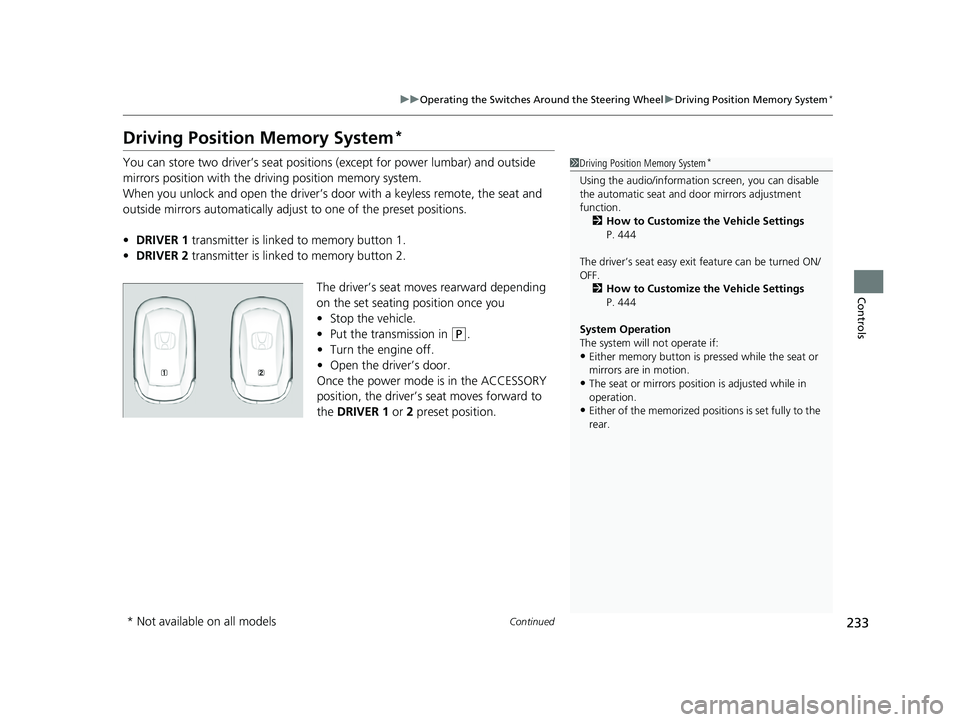
• DRIVER 1 transmitter is linked to memory button 1.
• DRIVER 2 transmitter is linked to memory button 2.
The driver’s seat moves rearward depending
on the set seating position once you
•Stop the vehicle.
• Put the transmission in
(P.
• Turn the engine off.
• Open the driv er’s door.
Once the power mode is in the ACCESSORY
position, the driver’s seat moves forward to
the DRIVER 1 or 2 preset position.
1 Driving Position Memory System*
Using the audio/informati on screen, you can disable
the automatic seat and d oor mirrors adjustment
function. 2 How to Customize the Vehicle Settings
P. 444
The driver’s seat easy exit feature can be turned ON/
OFF. 2 How to Customize the Vehicle Settings
P. 444
System Operation
The system will not operate if:
•Either memory button is pressed while the seat or
mirrors are in motion.
•The seat or mirrors positi on is adjusted while in
operation.
•Either of the memorized positions is set fully to the
rear.
* Not available on all models
23 PILOT-31T906000_03.book 233 ページ 2022年10月31日 月曜日 午前10時26分
Page 236 of 814
235
uuOperating the Switches Around the Steering Wheel uAdjusting the Steering Wheel
Controls
Adjusting the Steering Wheel
The steering wheel height and distance from your body can be adjusted so that you
can comfortably grip the steering wheel in an appropriate driving posture.
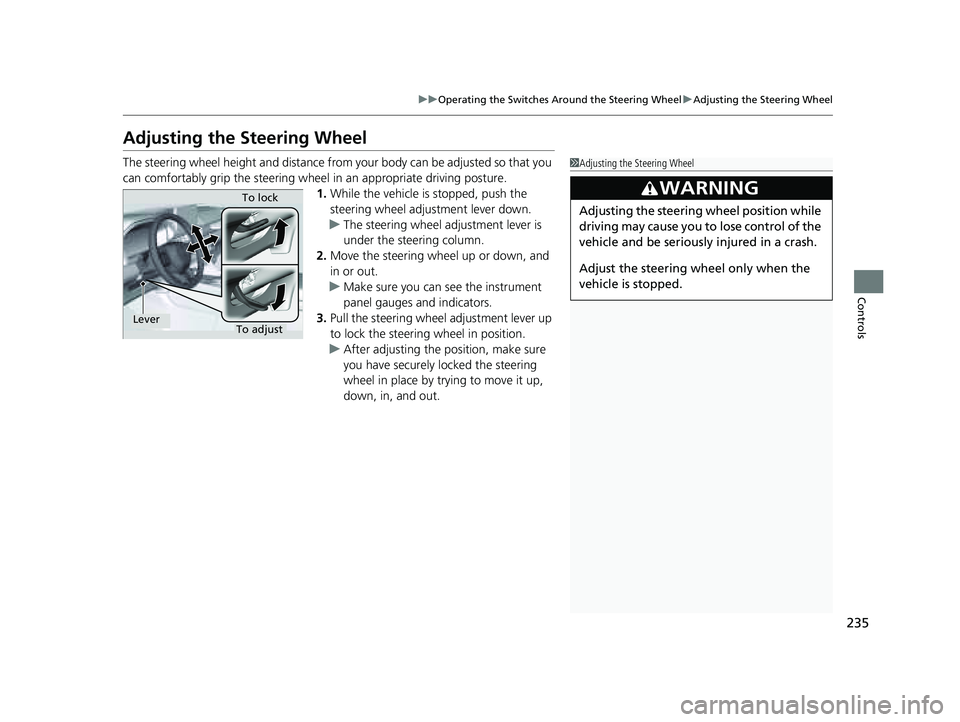
1. While the vehicle is stopped, push the
steering wheel adjustment lever down.
u The steering wheel adjustment lever is
under the steering column.
2. Move the steering wheel up or down, and
in or out.
u Make sure you can see the instrument
panel gauges and indicators.
3. Pull the steering wheel adjustment lever up
to lock the steering wheel in position.
u After adjusting the position, make sure
you have securely locked the steering
wheel in place by trying to move it up,
down, in, and out.1Adjusting the Steering Wheel
3WARNING
Adjusting the steering wheel position while
driving may cause you to lose control of the
vehicle and be seriously injured in a crash.
Adjust the steering wheel only when the
vehicle is stopped.
To adjustTo lockLever
23 PILOT-31T906000_03.book 235 ページ 2022年10月31日 月曜日 午前10時26分
Page 239 of 814
uuMirrors uPower Door Mirrors
238
Controls
■Folding in the door mirrors
Press the lock button on the remote transmi tter, or touch the door lock sensor on
any door. u The mirrors start folding in automatically.
■Folding out the door mirrors
Unlock the driver’s door using the key, press the unlock button on the remote
transmitter, or grab the door handle on any door.
u The mirrors start folding out automatically.
■Automatic Folding Door Mirror Function*1Automatic Folding Door Mirror Function*
If you use the fold button to fold the door mirrors,
the auto folding door mirror function will not work.
You can turn the automa tic folding door mirror
function on and off.
2 How to Customize the Vehicle Settings
P. 444
Door mirrors will not fold automatically when locking
from inside the vehicle usi ng the lock tab or master
door lock switch.
* Not available on all models
23 PILOT-31T906000_03.book 238 ページ 2022年10月31日 月曜日 午前10時26分

