Page 681 of 814
680
uuSurround View Camera System*uUsing the Surround View Camera System
Driving
Using the Surround Vi ew Camera System
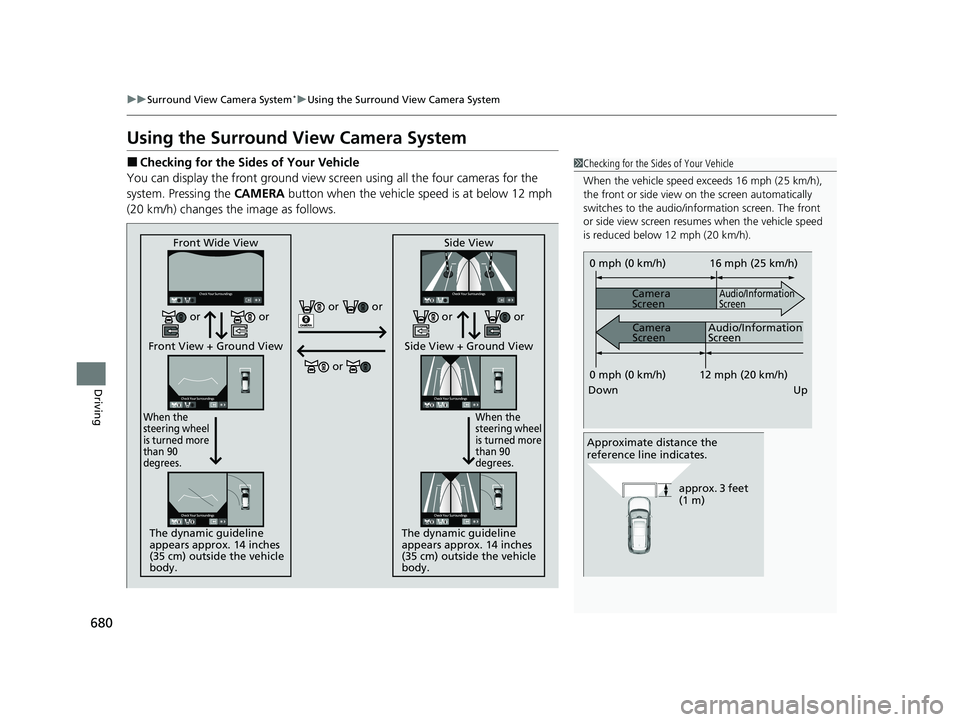
■Checking for the Sides of Your Vehicle
You can display the front ground view screen using all the four cameras for the
system. Pressing the CAMERA button when the vehicle speed is at below 12 mph
(20 km/h) changes the image as follows.1 Checking for the Sides of Your Vehicle
When the vehicle speed exceeds 16 mph (25 km/h),
the front or side view on the screen automatically
switches to the audio/information screen. The front
or side view screen resumes when the vehicle speed
is reduced below 12 mph (20 km/h).
0 mph (0 km/h)
Down Up Camera
Screen
Camera
Screen
Audio/Information
Screen
Audio/Information
Screen 16 mph (25 km/h)
12 mph (20 km/h)
0 mph (0 km/h)
Approximate distance the
reference line indicates.
approx. 3 feet
(1 m)
Front Wide View
Front View + Ground View
When the
steering wheel
is turned more
than 90
degrees.
The dynamic guideline
appears approx. 14 inches
(35 cm) outside the vehicle
body. Side View
Side View + Ground View
When the
steering wheel
is turned more
than 90
degrees.
The dynamic guideline
appears approx. 14 inches
(35 cm) outside the vehicle
body.
or or
or
or or or or
23 PILOT-31T906000_03.book 680 ページ 2022年10月31日 月曜日 午前10時26分
Page 684 of 814
Continued683
uuSurround View Camera System*uUsing the Surround View Camera System
Driving
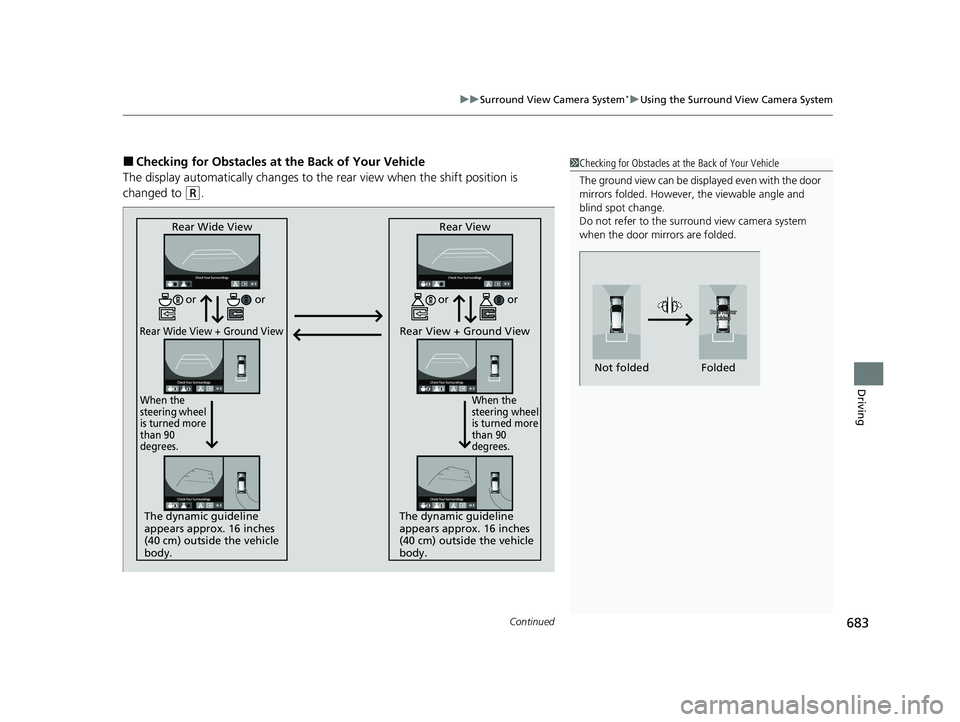
■Checking for Obstacles at the Back of Your Vehicle
The display automatically changes to the rear view when the shift position is
changed to
(R.
1 Checking for Obstacles at the Back of Your Vehicle
The ground view can be displayed even with the door
mirrors folded. However, the viewable angle and
blind spot change.
Do not refer to the surround view camera system
when the door mirrors are folded.
Folded
Not folded
Rear Wide View
Rear Wide View + Ground View
When the
steering wheel
is turned more
than 90
degrees.
The dynamic guideline
appears approx. 16 inches
(40 cm) outside the vehicle
body. Rear View
Rear View + Ground View
When the
steering wheel
is turned more
than 90
degrees.
The dynamic guideline
appears approx. 16 inches
(40 cm) outside the vehicle
body.
or
or or or
23 PILOT-31T906000_03.book 683 ページ 2022年10月31日 月曜日 午前10時26分
Page 699 of 814
698
uuMaintenance MinderTMuTo Use Maintenance MinderTM
Maintenance
*1:Models with A-type meter
*2:Models with B-type meter
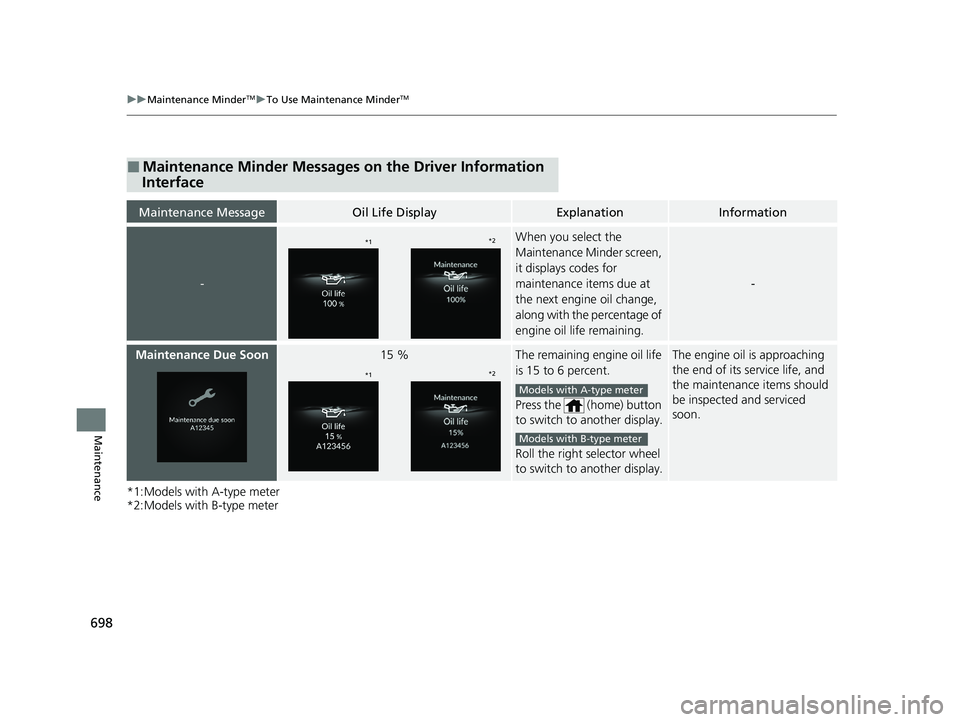
■Maintenance Minder Messages on the Driver Information
Interface
Maintenance MessageOil Life DisplayExplanationInformation
-
When you select the
Maintenance Minder screen,
it displays codes for
maintenance items due at
the next engine oil change,
along with the percentage of
engine oil life remaining.
-
Maintenance Due Soon15 %The remaining engine oil life
is 15 to 6 percent.
Press the (home) button
to switch to another display.
Roll the right selector wheel
to switch to another display.The engine oil is approaching
the end of its service life, and
the maintenance items should
be inspected and serviced
soon.
*1*2
*1*2
Models with A-type meter
Models with B-type meter
23 PILOT-31T906000_03.book 698 ページ 2022年10月31日 月曜日 午前10時26分
Page 767 of 814

766
uuEngine Does Not StartuEmergency Engine Stop
Handling the Unexpected
Emergency Engine Stop
The ENGINE START/STOP button may be used to stop the engine due to an
emergency situation even while driving. If you must stop the engine, do either of the
following operations:
• Press and hold the ENGINE START/STOP button for about two seconds.
• Firmly press the ENGINE START/STOP button three times.
The steering wheel will not lock. However, because turning off the engine disables
the power assist the engine provides to the steering and braking systems, it will
require significantly more physical effort an d time to steer and slow the vehicle. Use
both feet on the brake pedal to slow down the vehicle and stop immediately in a
safe place.
The gear position automatically changes to
(P after the vehicle comes to a complete
stop. Then, the power mode changes to VEHICLE OFF.
1 Emergency Engine Stop
Do not press the ENGINE START/STOP button while
driving unless it is absolute ly necessary for the engine
to be turned off.
If you press the ENGINE START/STOP button while
driving, the beeper sounds.
23 PILOT-31T906000_03.book 766 ページ 2022年10月31日 月曜日 午前10時26分
Page 792 of 814
791
uuSpecifications u
Information
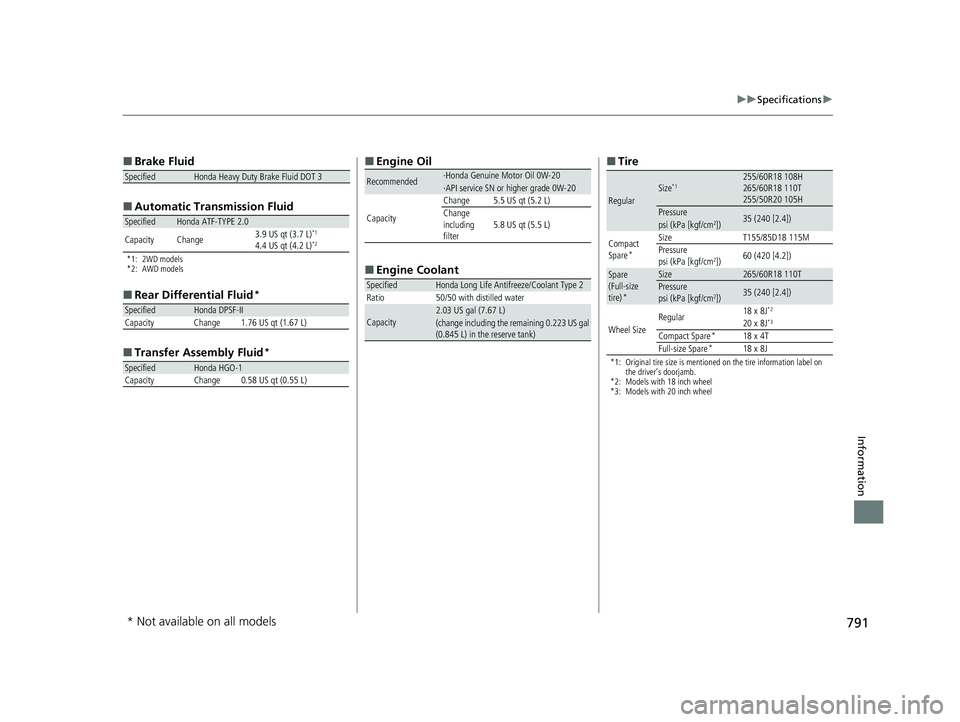
■
Brake Fluid
■ Automatic Tran smission Fluid
*1: 2WD models
*2: AWD models
■
Rear Differential Fluid*
■Transfer Assembly Fluid*
SpecifiedHonda Heavy Duty Brake Fluid DOT 3
SpecifiedHonda ATF-TYPE 2.0
Capacity Change 3.9 US qt (3.7 L)*1
4.4 US qt (4.2 L)*2
SpecifiedHonda DPSF-II
Capacity Change 1.76 US qt (1.67 L)
SpecifiedHonda HGO-1CapacityChange0.58 US qt (0.55 L)
■ Engine Oil
■ Engine Coolant
Recommended·Honda Genuine Motor Oil 0W-20·API service SN or higher grade 0W-20
Capacity
Change5.5 US qt (5.2 L)Change
including
filter5.8 US qt (5.5 L)
SpecifiedHonda Long Life Antifreeze/Coolant Type 2
Ratio 50/50 with distilled water
Capacity2.03 US gal (7.67 L)(change including the remaining 0.223 US gal
(0.845 L) in the reserve tank)
■ Tire
*1: Original tire size is mentioned on the tire information label on
the driver’s doorjamb.
*2: Models with 18 inch wheel
*3: Models with 20 inch wheel
RegularSize*1255/60R18 108H
265/60R18 110T
255/50R20 105H
Pressure35 (240 [2.4])psi (kPa [kgf/cm2])
Compact
Spare*
SizeT155/85D18 115MPressure
psi (kPa [kgf/cm2])60 (420 [4.2])
Spare
(Full-size
tire)
*
Size265/60R18 110TPressure
psi (kPa [kgf/cm2])35 (240 [2.4])
Wheel Size Regular
18 x 8J
*2
20 x 8J*3
Compact Spare*18 x 4T
Full-size Spare*18 x 8J
* Not available on all models
23 PILOT-31T906000_03.book 791 ページ 2022年10月31日 月曜日 午前10時26分