2023 HONDA PILOT ECU
[x] Cancel search: ECUPage 247 of 814
uuSeats uSecond Row Seats
246
Controls
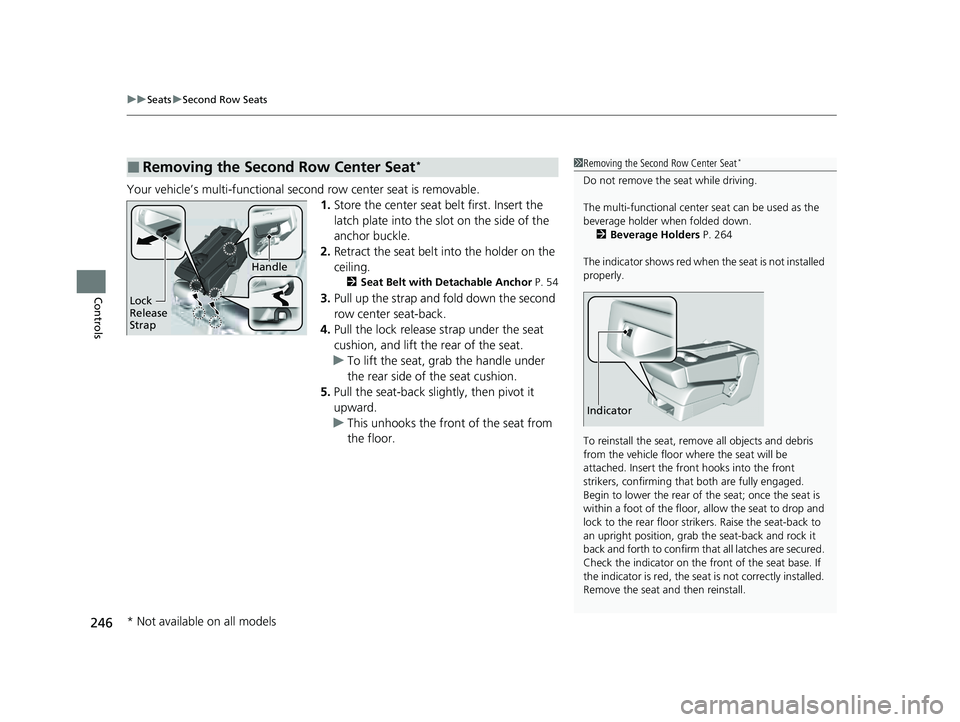
Your vehicle’s multi-functional second row center seat is removable.
1.Store the center seat belt first. Insert the
latch plate into the slot on the side of the
anchor buckle.
2. Retract the seat belt into the holder on the
ceiling.
2 Seat Belt with Detachable Anchor P. 54
3.Pull up the strap and fold down the second
row center seat-back.
4. Pull the lock release strap under the seat
cushion, and lift the rear of the seat.
u To lift the seat, grab the handle under
the rear side of the seat cushion.
5. Pull the seat-back slig htly, then pivot it
upward.
u This unhooks the front of the seat from
the floor.
■Removing the Second Row Center Seat*1Removing the Second Row Center Seat*
Do not remove the seat while driving.
The multi-functional center seat can be used as the
beverage holder when folded down. 2 Beverage Holders P. 264
The indicator shows red when the seat is not installed
properly.
To reinstall the seat, remove all objects and debris
from the vehicle floor where the seat will be
attached. Insert the front hooks into the front
strikers, confirming that both are fully engaged.
Begin to lower the rear of the seat; once the seat is
within a foot of the floor, allow the seat to drop and
lock to the rear floor strikers. Raise the seat-back to
an upright position, grab the seat-back and rock it
back and forth to confirm that all latches are secured.
Check the indicator on the fr ont of the seat base. If
the indicator is red, the seat is not correctly installed.
Remove the seat and then reinstall.
Indicator
Lock
Release
Strap
Handle
* Not available on all models
23 PILOT-31T906000_03.book 246 ページ 2022年10月31日 月曜日 午前10時26分
Page 248 of 814
Continued247
uuSeats uSecond Row Seats
Controls
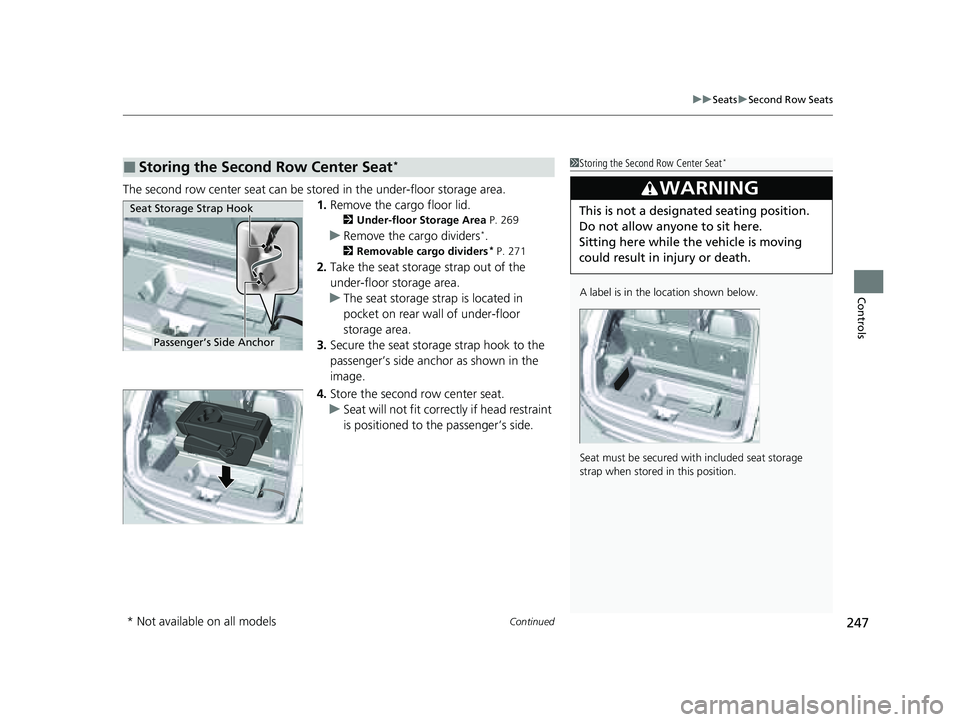
The second row center seat can be stored in the under-floor storage area.
1.Remove the cargo floor lid.
2 Under-floor Storage Area P. 269
uRemove the cargo dividers*.
2 Removable cargo dividers* P. 271
2.Take the seat storage strap out of the
under-floor storage area.
u The seat storage strap is located in
pocket on rear wall of under-floor
storage area.
3. Secure the seat storage strap hook to the
passenger’s side anchor as shown in the
image.
4. Store the second row center seat.
u Seat will not fit correctly if head restraint
is positioned to the passenger’s side.
■Storing the Second Row Center Seat*1Storing the Second Row Center Seat*
A label is in the location shown below.
Seat must be secured with included seat storage
strap when stored in this position.
3WARNING
This is not a designated seating position.
Do not allow anyone to sit here.
Sitting here while th e vehicle is moving
could result in injury or death.Seat Storage Strap Hook
Passenger’s Side Anchor
* Not available on all models
23 PILOT-31T906000_03.book 247 ページ 2022年10月31日 月曜日 午前10時26分
Page 249 of 814
248
uuSeats uSecond Row Seats
Controls
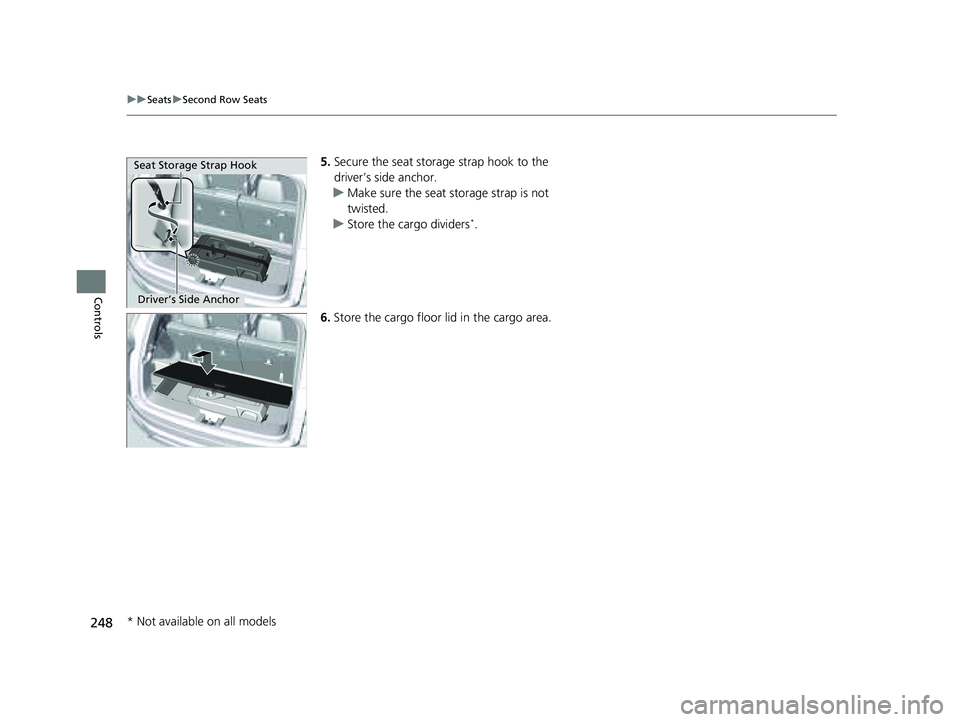
5. Secure the seat storage strap hook to the
driver’s side anchor.
u Make sure the seat storage strap is not
twisted.
u Store the cargo dividers
*.
6. Store the cargo floor lid in the cargo area.
Seat Storage Strap Hook
Driver’s Side Anchor
* Not available on all models
23 PILOT-31T906000_03.book 248 ページ 2022年10月31日 月曜日 午前10時26分
Page 251 of 814
uuSeats uThird Row Seats
250
Controls
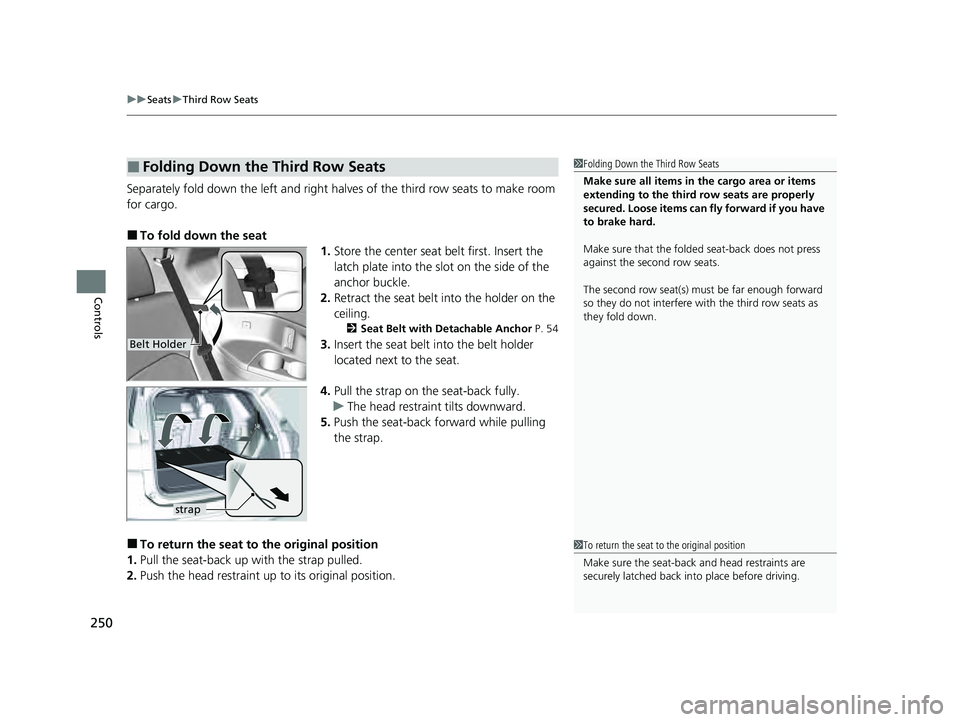
Separately fold down the left and right halv es of the third row seats to make room
for cargo.
■To fold down the seat 1.Store the center seat belt first. Insert the
latch plate into the slot on the side of the
anchor buckle.
2. Retract the seat belt into the holder on the
ceiling.
2 Seat Belt with Detachable Anchor P. 54
3.Insert the seat belt into the belt holder
located next to the seat.
4. Pull the strap on the seat-back fully.
u The head restraint tilts downward.
5. Push the seat-back forward while pulling
the strap.
■To return the seat to the original position
1. Pull the seat-back up with the strap pulled.
2. Push the head restraint up to its original position.
■Folding Down the Third Row Seats1Folding Down the Third Row Seats
Make sure all items in the cargo area or items
extending to the third row seats are properly
secured. Loose items can fly forward if you have
to brake hard.
Make sure that the folded seat-back does not press
against the second row seats.
The second row seat(s) must be far enough forward
so they do not interfere with the third row seats as
they fold down.
Belt Holder
strap
1To return the seat to the original position
Make sure the seat-back and head restraints are
securely latched back in to place before driving.
23 PILOT-31T906000_03.book 250 ページ 2022年10月31日 月曜日 午前10時26分
Page 267 of 814
uuInterior Convenience Items uStorage Items
266
Controls
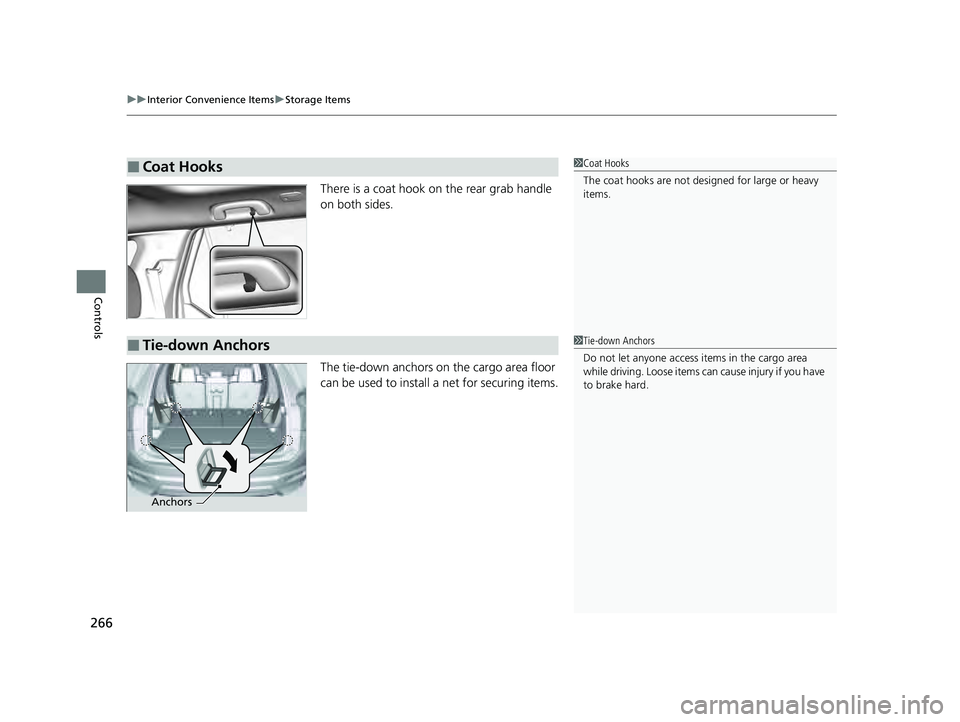
There is a coat hook on the rear grab handle
on both sides.
The tie-down anchors on the cargo area floor
can be used to install a net for securing items.
■Coat Hooks1Coat Hooks
The coat hooks are not desi gned for large or heavy
items.
■Tie-down Anchors1 Tie-down Anchors
Do not let anyone access items in the cargo area
while driving. Loose items can cause injury if you have
to brake hard.
Anchors
23 PILOT-31T906000_03.book 266 ページ 2022年10月31日 月曜日 午前10時26分
Page 269 of 814
268
uuInterior Convenience Items uStorage Items
Controls
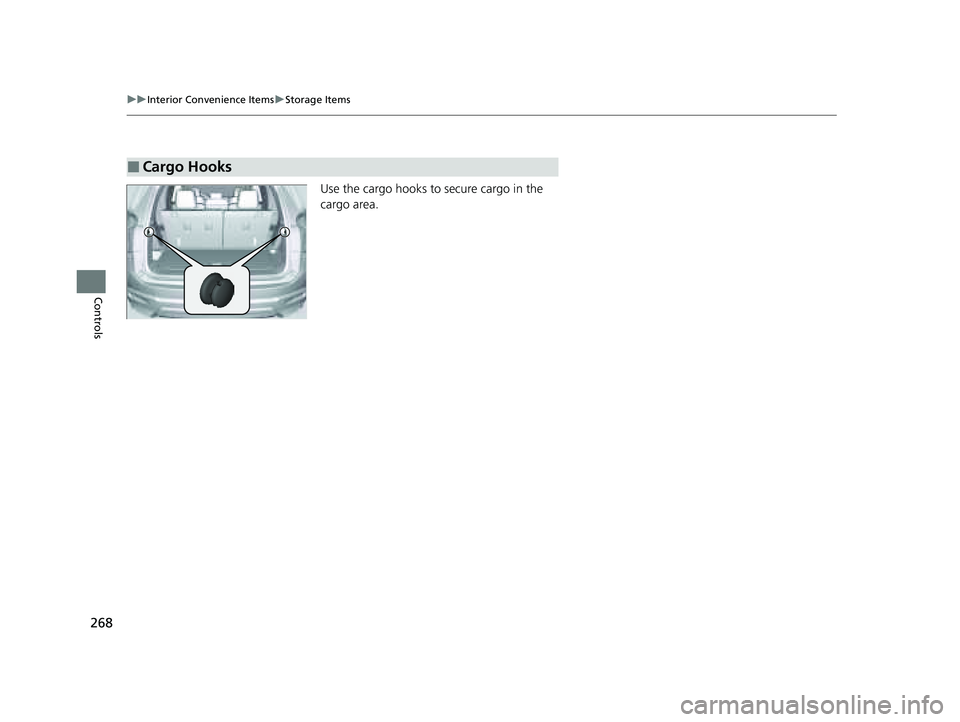
Use the cargo hooks to secure cargo in the
cargo area.
■Cargo Hooks
23 PILOT-31T906000_03.book 268 ページ 2022年10月31日 月曜日 午前10時26分
Page 402 of 814

401
uuGeneral Information on the Audio System uCompatible iPod, iPhone, and USB Flash Drives
Features
Compatible iPod, iPhone , and USB Flash Drives
•Please use a FAT16 or FAT32 format USB flash drive.
• A USB flash drive of 256 MB or higher is recommended.
• Some digital audio players may not be compatible.
• Some USB flash drives (e.g., a device with security lockout) may not work.
• Some software files may not allow for audio play or text data display.
• Some versions of MP3, WMA, AAC, FLAC, or WAV formats may be unsupported.
*1 : Models with 9-in. Color Touchscreen
*2 : Models with 7-in. Color Touchscreen
■iPod and iPhone Model Compatibility
Model
Made for iPod touch (6th to 7th generation) released between 2015 and 2019
Made for iPhone 5/iPhone 5s/iPhone 5c/iPhone 6/iPhone 6 Plus/iPhone 6S/iPhone 6S
Plus/iPhone SE/iPhone 7/iPhone 7 Plus/iPhon e 8/iPhone 8 Plus/iPhone X/iPhone XS/
iPhone XS Max/iPhone XR/iP hone 11/iPhone 11 Pro/iPhone 11 Pro Max/iPhone SE
(2nd generation)/iPhone 12/iPhone 12 Pro/iPhone 12 Pro Max/iPhone 12 mini/
iPhone 13/iPhone 13 Pro/iP hone 13 Pro Max/iPhone 13 mini
Model
Made for iPod touch (5th to 6th generation) released between 2012 and 2015
Made for iPhone 4s/iPhone 5/ iPhone 5s/iPhone 5c/iPhone 6/iPhone 6 Plus/iPhone 6S/
iPhone 6S Plus/iPhone SE/i Phone 7/iPhone 7 Plus/iPhone 8/iPhone 8 Plus/iPhone X/
iPhone XS/iPhone XS Max/iP hone XR/iPhone 11/iPhone 11 Pro/iPhone 11 Pro Max/
iPhone SE (2nd generation)/iPhone 12/iPhone 12 Pro/iPhone 12 Pro Max/
iPhone 12 mini
■USB Flash Drives
1 iPod and iPhone Model Compatibility
This system may not work with all software versions
of these devices.
The Lightning connector work s with iPhone 5, iPhone
5s, iPhone 5c, iPhone 6, iPhone 6 Plus, iPhone 6S,
iPhone 6S Plus, iPhone SE, iPhone 7, iPhone 7 Plus,
iPhone 8, iPhone 8 Plus, iP hone X, iPhone XS, iPhone
XS Max, iPhone XR, iPhone 11, iPhone 11 Pro, iPhone
11 Pro Max, iPhone SE (2nd generation), iPhone 12,
iPhone 12 Pro, iPhone 12 Pro Max, iPhone 12 mini,
iPhone 13
*2, iPhone 13 Pro*2, iPhone 13 Pro Max*2,
iPhone 13 mini*2, iPod touch (5th*1, 6th, 7th*2
generation).
The 30-pin connector works with iPhone 4s
*1.
USB works with iPhone 4s
*1, iPhone 5, iPhone 5s,
iPhone 5c, iPhone 6, iPhone 6 Plus, iPhone 6S, iPhone
6S Plus, iPhone SE, iPhone 7, iPhone 7 Plus, iPhone 8,
iPhone 8 Plus, iPhone X, iP hone XS, iPhone XS Max,
iPhone XR, iPhone 11, iPhone 11 Pro, iPhone 11 Pro
Max, iPhone SE (2nd gene ration), iPhone 12, iPhone
12 Pro, iPhone 12 Pro Max, iPhone 12 mini, iPhone
13
*2, iPhone 13 Pro*2, iPhone 13 Pro Max*2, iPhone
13 mini*2, iPod touch (5th*1, 6th, 7th*2 generation).
Models with 7-in. Color Touchscreen
Models with 9-in. Color Touchscreen
1 USB Flash Drives
Files on the USB flash drive are played in their stored
order. This order may be different from the order
displayed on your PC or device.
23 PILOT-31T906000_03.book 401 ページ 2022年10月31日 月曜日 午前10時26分
Page 403 of 814
402
uuGeneral Information on the Audio System uHonda App License Agreement
Features
Honda App License Agreement
PLEASE CAREFULLY READ THIS END USER LICENSE AGREEMENT (T HIS “AGREEMENT”) WHICH GOVERNS YOUR USE OF THE SOFTWARE
INSTALLED ON YOUR HONDA OR ACURA VEHICLE (YOUR “VEHICLE”) AS WELL AS THE APPLICATIONS, SERVICES, FUNCTIONS, AND
CONTENT PROVIDED THROUGH THE SOFTWARE (COLLECTIVELY, THE “SERVICES”). YOUR USE OF THE SOFTWARE OR SERVICES WILL
SERVE AS YOUR CONSENT TO THE TERMS OF THIS AGREEMENT. THE SOFTWARE IS OWNED (OR LICENSED), PROVIDED, AND/OR
OPERATED BY AMERICAN HONDA MOTOR CO. INC., (“HONDA,” “U S,” “WE,” OR “OUR”), WITH ITS BUSINESS ADDRESS AT 1919
TORRANCE BLVD., TORRANCE, CA 90501. REFERENCE TO “HONDA ” IN THIS AGREEMENT INCLUDES HONDA’S PARENT COMPANY AND
ITS AFFILIATES AND DESIGNATED AGENTS. TH E SERVICES ARE OWNED (OR LICENSED), PROV IDED, AND/OR OPERATED BY HONDA OR A
THIRD-PARTY SERVICE PROVIDER (A “PROVIDER”). REFERENCE TO A “PROVIDER” IN THIS AGREEMENT INCLUDES SUCH PROVIDER’S
PARENT COMPANY, AFFILIATES, AND DESIGNATED AGENTS.
A. Description of the Software. The SOFTWARE includes the software, firmware and the like, installe d and executing on your VEHICLE
during manufacture, and thereafter updated from time to time by HONDA, you or an authorized HONDA dealer (a “DEALER”). The
SOFTWARE allows you to access and use a va riety of SERVICES, including but not limited to: (a) HONDA applications, services, an d content
provided through the SOFTWARE (together, “H ONDA SERVICES”); and (b) PROVIDER applications, services, and content provided through
the SOFTWARE (together, “PROVIDER SERVICES” ), each of which may provide access to various information, media, content, and services.
B. SOFTWARE Licensing and Intellectual Property.
1. SOFTWARE. This AGREEMENT grants you a non-exclusive, limited, and re vocable license to use the SOFTWARE and SERVICES solely (a)
as installed on your VEHICLE by HONDA, (b) as updated on your Vehicle by HONDA, you (but only as and when directed by HONDA), o r a
DEALER and (c) as permitted unde r the terms of this AGREEMENT.
2. HONDA Services. The SOFTWARE may provide you with access to various HONDA SERVICES. Installation, activation, or use of HONDA
SERVICES may require your consent to additi onal terms, conditions, and privacy policies applicable to those HONDA SERVICES (the
“HONDA TERMS”). You acknowledge a nd agree that any collection, use, sharing of data generated by your VEHICLE or your use of your
VEHICLE, and your use of the HONDA SERVI CES shall be subject to this AGREEMENT and any additional HONDA TERMS that may be
specifically applicable to such HONDA SERVI CES or data generation. The HONDA SERVICES may collect, use, and share such data whi le
you are using the SOFTWARE.
■END USER LICENSE AGREEMENT
23 PILOT-31T906000_03.book 402 ページ 2022年10月31日 月曜日 午前10時26分