Page 569 of 814
568
uuHonda Sensing ®u
Driving
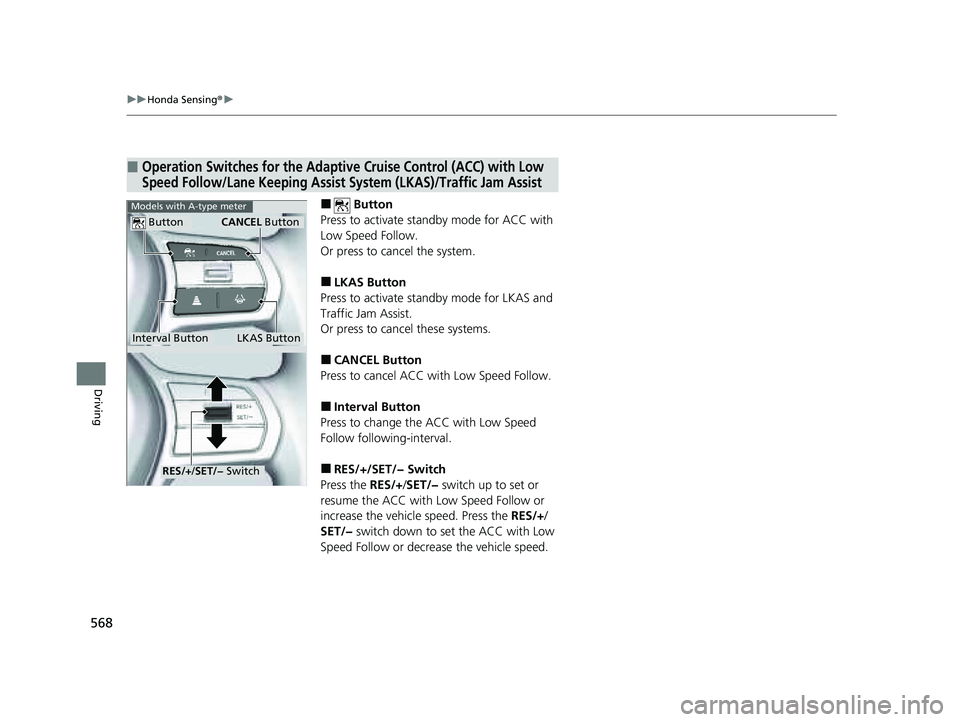
■ Button
Press to activate standby mode for ACC with
Low Speed Follow.
Or press to cancel the system.
■LKAS Button
Press to activate standby mode for LKAS and
Traffic Jam Assist.
Or press to cancel these systems.
■CANCEL Button
Press to cancel ACC with Low Speed Follow.
■Interval Button
Press to change the ACC with Low Speed
Follow following-interval.
■RES/+/SET/− Switch
Press the RES/+/SET/− switch up to set or
resume the ACC with Low Speed Follow or
increase the vehicl e speed. Press the RES/+/
SET/− switch down to set the ACC with Low
Speed Follow or decrease the vehicle speed.
■Operation Switches for the Adaptive Cruise Control (ACC) with Low
Speed Follow/Lane Keeping Assist System (LKAS)/Traffic Jam Assist
Interval Button
Button
LKAS Button
CANCEL Button
Models with A-type meter
RES/+/SET/− Switch
23 PILOT-31T906000_03.book 568 ページ 2022年10月31日 月曜日 午前10時26分
Page 571 of 814
uuHonda Sensing ®u
570
Driving
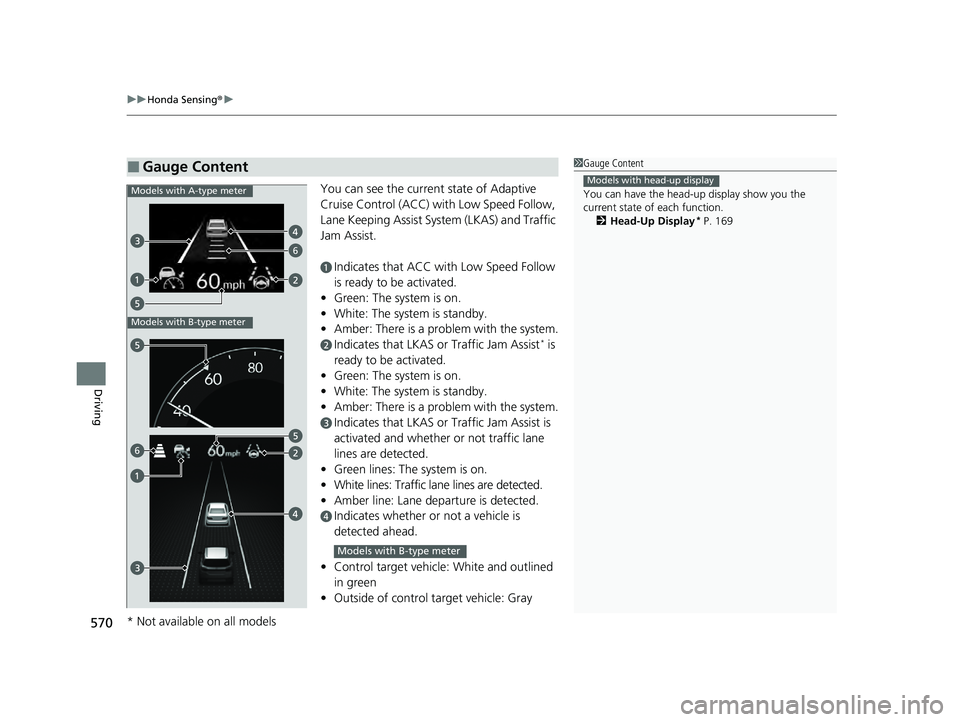
You can see the current state of Adaptive
Cruise Control (ACC) wi th Low Speed Follow,
Lane Keeping Assist System (LKAS) and Traffic
Jam Assist.
aIndicates that ACC with Low Speed Follow
is ready to be activated.
• Green: The system is on.
• White: The system is standby.
• Amber: There is a problem with the system.
bIndicates that LKAS or Traffic Jam Assist* is
ready to be activated.
• Green: The system is on.
• White: The system is standby.
• Amber: There is a problem with the system.
cIndicates that LKAS or Traffic Jam Assist is
activated and whether or not traffic lane
lines are detected.
• Green lines: The system is on.
• White lines: Traffic lane lines are detected.
• Amber line: Lane departure is detected.
dIndicates whether or not a vehicle is
detected ahead.
• Control target vehicle: White and outlined
in green
• Outside of control target vehicle: Gray
■Gauge Content1Gauge Content
You can have the head-up display show you the
current state of each function.
2 Head-Up Display
* P. 169
Models with head-up display
6
Models with A-type meter
Models with B-type meter
6
Models with B-type meter
* Not available on all models
23 PILOT-31T906000_03.book 570 ページ 2022年10月31日 月曜日 午前10時26分
Page 593 of 814

uuHonda Sensing ®u Adaptive Cruise Control (ACC) with Low Speed Follow
592
Driving
*1 : Models with A-type meter
*2 : Models with B-type meter
When driving at about 25 mph (40 km/h) or above: Take your foot off the
pedal and press the RES/+/SET/− switch up or down when you reach the desired
speed. The moment you release the switch, the set speed is fixed, and ACC with
Low Speed Follow begins.
When you use ACC with Low Speed Follow, Stra ight Driving Assist (a feature of the
Electric Power Steering system) is activated.
By enabling the steering system to automatically compensate for natural steering pull,
Straight Driving Assist makes it easier for you to keep your vehicle in a straight line.
■To Set the Vehicle Speed1To Set the Vehicle Speed
The radar sensor for ACC with Low Speed Follow is shared
with the Collision Mitigation Braking System
TM (CMBSTM).
2 Collision Mitigation Braking SystemTM
(CMBSTM) P. 572
ACC with Low Speed Follow may not work properly
under certain conditions.
2 ACC with Low Speed Follow Conditions
and Limitations P. 599
When not using ACC with Low Speed Follow: Turn
off adaptive cruise by pressing the button.
Do not use ACC with Low Speed Follow under the
following conditions:
•On roads with frequent la ne-change or continuous
stop and go traffic, ACC with Low Speed Follow
cannot keep an appropriate distance between your
vehicle and the vehicle ahead of you.
•On roads with sharp turns.•On roads with toll collection facilities or other
objects between lanes of traffic, or in parking
areas, or faci lities with driv e through access.
•On roads with bad weather (rain, fog, snow, etc.),
ACC with Low Speed Follow may not detect the
distance between your vehicle and the vehicle
ahead of you properly.
•On roads with slippery or icy surfaces. The wheels
may spin out and your vehi cle may lose the control
on the condition.
•On roads with steep uphill or steep downhill slopes.
•On roads with undulating slopes.
On when ACC with Low
Speed Follow begins RES/+
/SET/− Switch
(green)
Interval Up or down
*1
*2
23 PILOT-31T906000_03.book 592 ページ 2022年10月31日 月曜日 午前10時26分
Page 613 of 814

612
uuHonda Sensing ®u Lane Keeping Assist System (LKAS)
Driving
Lane Keeping Assist System (LKAS)
Provides steering input to help keep the vehicle in the middle of a detected lane and
provides tactile and visual alerts if the ve hicle is detected drifting out of its lane.1Lane Keeping Assist System (LKAS)
Important Safety Reminders
The LKAS is for your convenience only. It is not an
autonomous driving system and always requires
driver attention and control. The system does not
work if you take your hands off the steering wheel or
fail to steer the vehicle.
The LKAS is convenient when it is used on
expressways or freeways.
Do not place objects on the instrument panel.
Objects may reflect on th e windshield and prevent
correct detection of the traffic lanes.
The LKAS only alerts you when lane drift is detected
without a turn signal in use. The LKAS may not detect
all lane markings or lane departures; accuracy will
vary based on weather, speed, and lane marker
condition.
It is always your responsibility to safely operate the
vehicle and avoid collisions.
You can read about handling information for the
camera equipped with this system. 2 Front Sensor Camera P. 648
The LKAS may not work properly or may work
improperly under the certain conditions: 2 LKAS Conditions and Limitations P. 621
When you operate the turn signals to chan ge lanes, the system is suspended, and
resumes after the signals are off.
If you make a lane change without operating the turn signals, the LKAS alerts
activate, and torque is applied to the steering.
■Front Sensor
Camera
Monitors the
lane lines■Tactile and visual alerts
Rapid vibrations on the steering wheel
and a warning display alert you that the
vehicle is drifting out of a detected lane.
■Steering input assist
The system applies torque to the steering to keep the vehicle between the left
and right lane lines. The applied torque becomes stronger as the vehicle gets
closer to either of the lane lines.
23 PILOT-31T906000_03.book 612 ページ 2022年10月31日 月曜日 午前10時26分
Page 614 of 814
Continued613
uuHonda Sensing ®u Lane Keeping Assist System (LKAS)
Driving
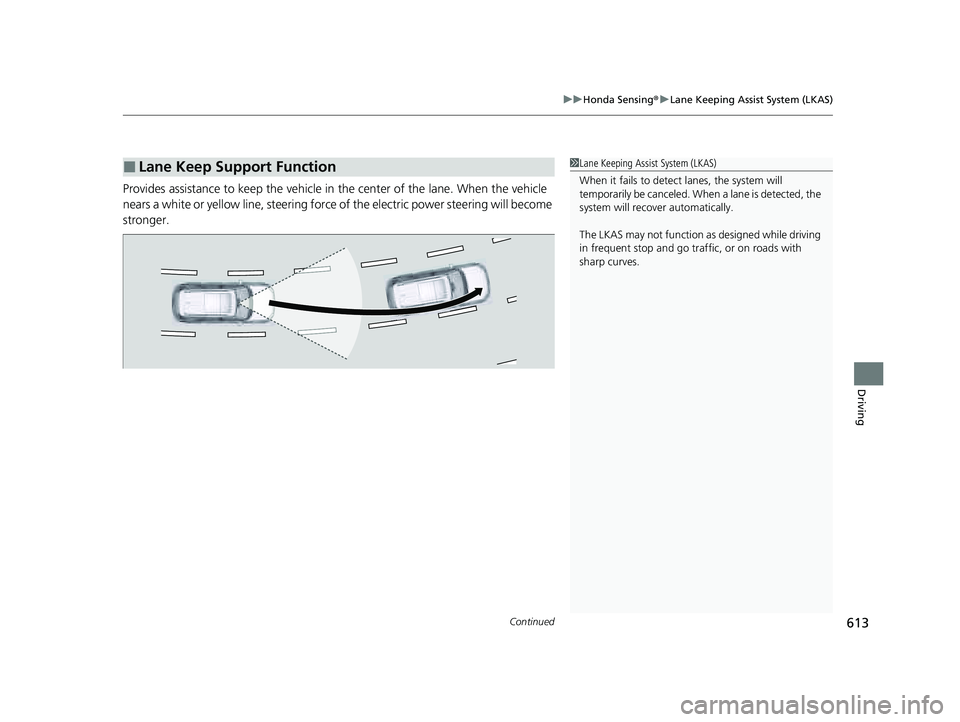
Provides assistance to keep the vehicle in the center of the lane. When the vehicle
nears a white or yellow line, steering force of the electric power steering will become
stronger.
■Lane Keep Support Function1 Lane Keeping Assist System (LKAS)
When it fails to detect lanes, the system will
temporarily be canceled. When a lane is detected, the
system will recover automatically.
The LKAS may not function as designed while driving
in frequent stop and go traf fic, or on roads with
sharp curves.
23 PILOT-31T906000_03.book 613 ページ 2022年10月31日 月曜日 午前10時26分
Page 615 of 814
614
uuHonda Sensing ®u Lane Keeping Assist System (LKAS)
Driving
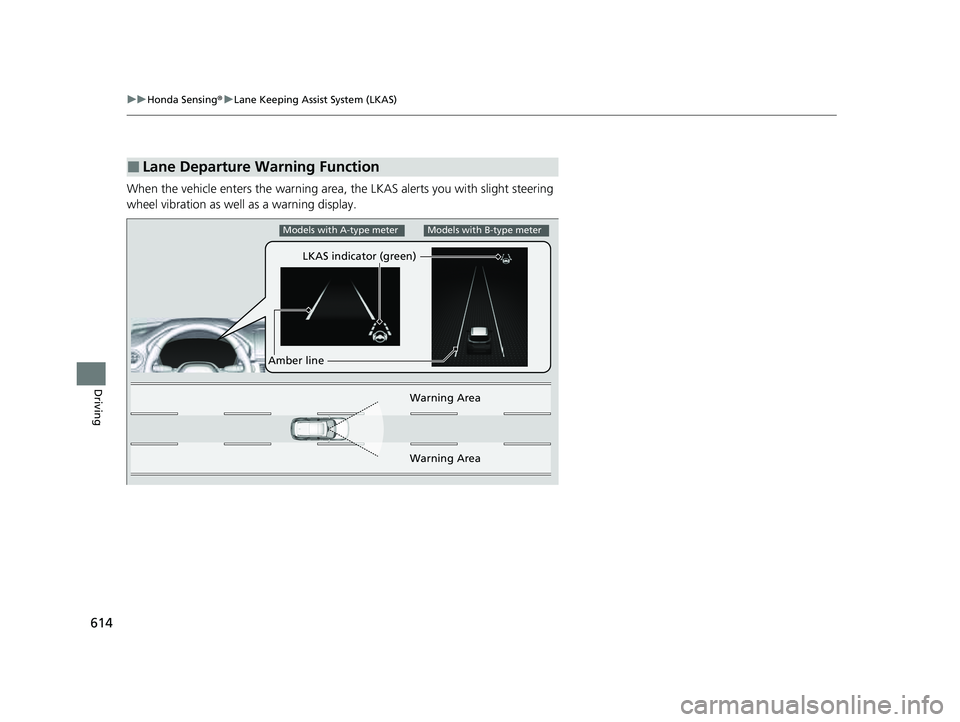
When the vehicle enters the warning area, the LKAS alerts you with slight steering
wheel vibration as well as a warning display.
■Lane Departure Warning Function
LKAS indicator (green)
Amber line Warning Area
Warning Area
Models with A-type meterModels with B-type meter
23 PILOT-31T906000_03.book 614 ページ 2022年10月31日 月曜日 午前10時26分
Page 616 of 814
Continued615
uuHonda Sensing ®u Lane Keeping Assist System (LKAS)
Driving
The system can be used when th e following conditions are met.
• The lane in which you are driving has detectable lane markers on both sides, and
your vehicle is in the center of the lane.
• The vehicle is traveling between about 45 and 90 mph (72 and 145 km/h).
• You are driving on a straight or slightly curved road.
• The turn signals are off.
• The brake pedal is not depressed.
■When the System can be Used1When the System can be Used
If the vehicle drifts toward ei ther left or right lane line
due to the system applying torque, turn off the LKAS
and have your vehicle checked by a dealer.
Follow the points below to properly activate the
system:
•Always keep the windshi eld around the camera
clean.
•When cleaning the windshield, be careful not to
apply windshield cleanser to the camera lens.
•Do not touch the camera lens.
•Do not attach a sticker to the area around the
camera.
If LKAS button is pressed when the system can be
used, LKAS is on without standby.
23 PILOT-31T906000_03.book 615 ページ 2022年10月31日 月曜日 午前10時26分
Page 617 of 814
616
uuHonda Sensing ®u Lane Keeping Assist System (LKAS)
Driving
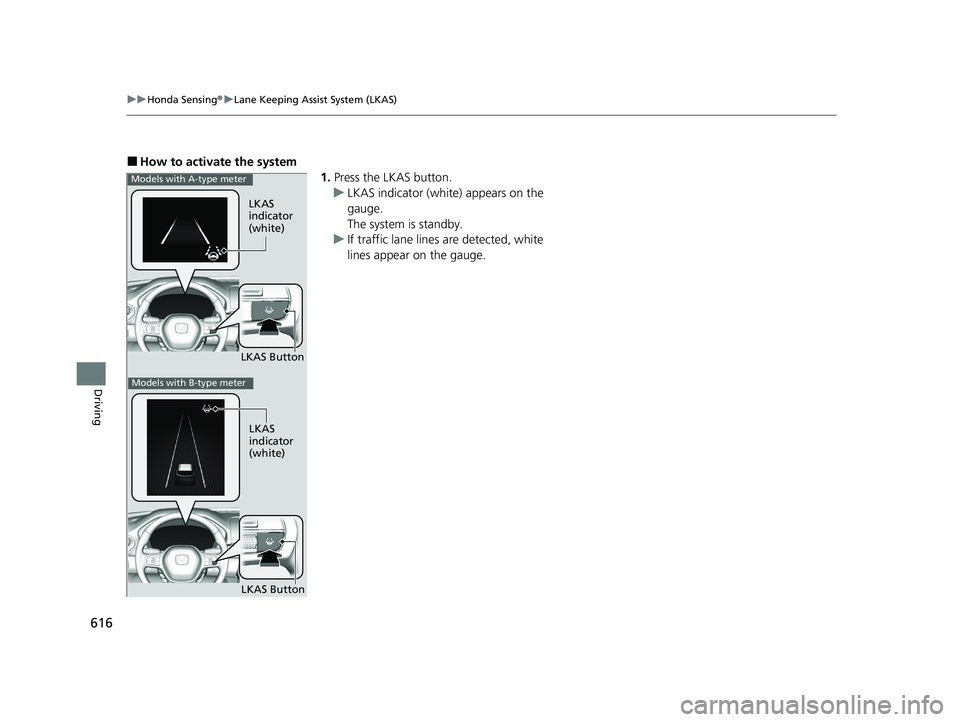
■How to activate the system
1.Press the LKAS button.
u LKAS indicator (white) appears on the
gauge.
The system is standby.
u If traffic lane lines are detected, white
lines appear on the gauge.
LKAS
indicator
(white)
LKAS Button
Models with A-type meter
LKAS
indicator
(white)
LKAS Button
Models with B-type meter
23 PILOT-31T906000_03.book 616 ページ 2022年10月31日 月曜日 午前10時26分