2023 HONDA PILOT charging
[x] Cancel search: chargingPage 295 of 814

294
uuAudio System uUSB Ports
Features
■On the back of the console
compartment
The USB ports (2.5A) are only for charging
devices.
u You cannot play music even if you have
connected music players to them.
■On the left side of the third row seats*
The USB ports (2.5A) are only for charging
devices.
u You cannot play music even if you have
connected music players to them.
* Not available on all models
23 PILOT-31T906000_03.book 294 ページ 2022年10月31日 月曜日 午前10時26分
Page 400 of 814
399
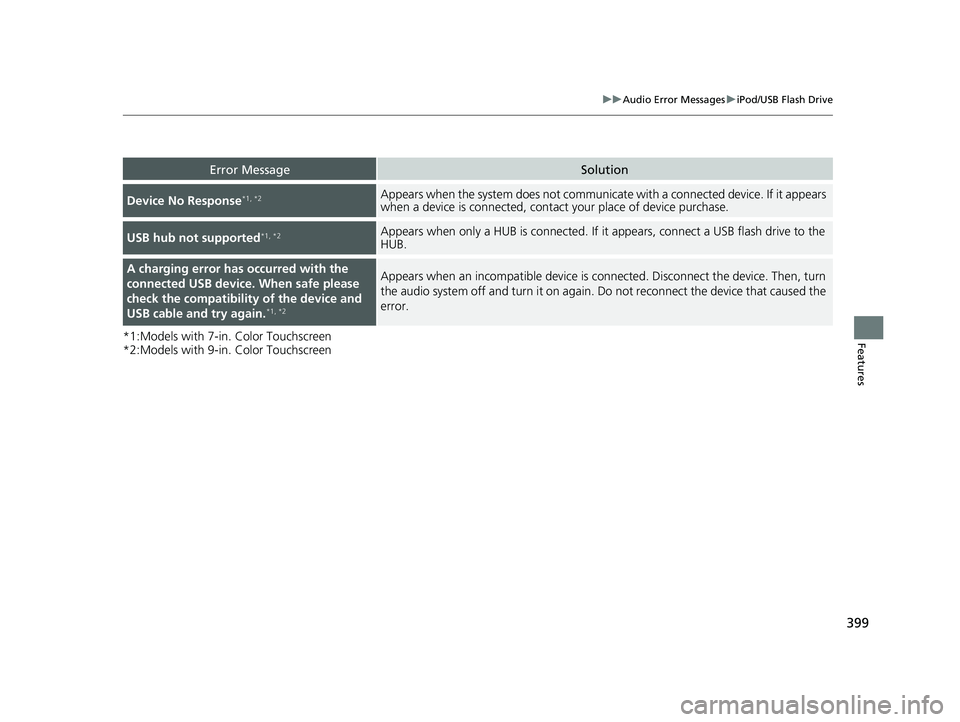
uuAudio Error Messages uiPod/USB Flash Drive
Features*1:Models with 7-in. Color Touchscreen
*2:Models with 9-in. Color Touchscreen
Error MessageSolution
Device No Response*1, *2Appears when the system does not communicat e with a connected device. If it appears
when a device is connected, contact your place of device purchase.
USB hub not supported*1, *2Appears when only a HUB is conn ected. If it appears, connect a USB flash drive to the
HUB.
A charging error has occurred with the
connected USB device. When safe please
check the compatibility of the device and
USB cable and try again.
*1, *2
Appears when an incompatible device is co nnected. Disconnect the device. Then, turn
the audio system off and turn it on again. Do not reconnect the device that caused the
error.
23 PILOT-31T906000_03.book 399 ページ 2022年10月31日 月曜日 午前10時26分
Page 409 of 814
408
uuGeneral Information on the Audio System uHonda App License Agreement
Features
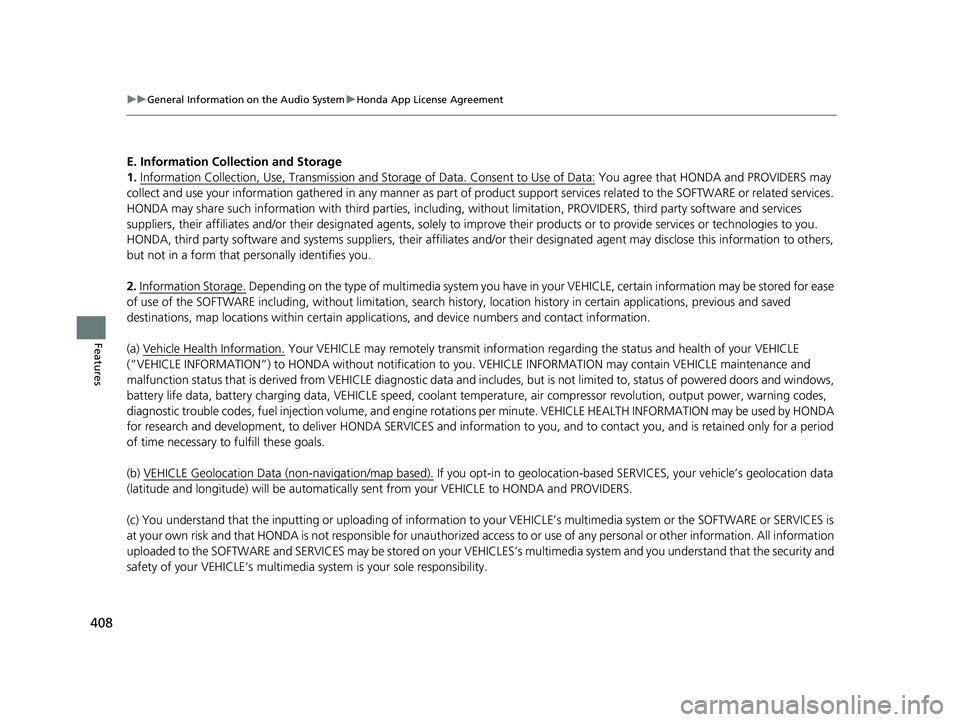
E. Information Coll ection and Storage
1. Information Collection, Use, Transmission and Storage of Data. Consent to Use of Data:
You agree that HONDA and PROVIDERS may
collect and use your information gathered in any manner as part of product support services related to the SOFTWARE or related services.
HONDA may share such information with third parties, including, without limitation, PROVIDERS, th ird party software and services
suppliers, their affiliates and/or their desi gnated agents, solely to improve their products or to provide services or technolo gies to you.
HONDA, third party software and systems s uppliers, their affiliates and/or their designated agent may disclose this information to others,
but not in a form that pe rsonally identifies you.
2. Information Storage.
Depending on the type of multimedia system you have in your VEHICLE, certain information may be stored for ease
of use of the SOFTWARE including, without limitation, search hi story, location history in certain applications, previous and saved
destinations, map locations within certain applications, and device numbers and contact information.
(a) Vehicle Health Information.
Your VEHICLE may remotely trans mit information regarding the status and health of your VEHICLE
(“VEHICLE INFORMATION”) to HONDA without notification to you. VEHICLE INFORMATION may contain VEHICLE maintenance and
malfunction status that is derived from VEHICLE diagnostic data and includes, but is not limited to, status of powered doors and windows,
battery life data, battery charging data, VEHICLE speed, coolant temperat ure, air compressor revolution, output power, warning codes,
diagnostic trouble codes, fuel injection volu me, and engine rotations per minute. VEHICL E HEALTH INFORMATION may be used by HON DA
for research and development, to deliver HONDA SERVICES and information to you, and to contact you, and is retained only for a period
of time necessary to fulfill these goals.
(b) VEHICLE Geolocation Data (non-navigation/map based).
If you opt-in to geolocation-based SERVICES, your vehicle’s geolocation data
(latitude and longitude) will be automatically se nt from your VEHICLE to HONDA and PROVIDERS.
(c) You understand that the inputting or uploading of information to your VEHICLE’s multimedia system or the SOFTWARE or SERVIC ES is
at your own risk and that HONDA is not responsible for unauthorized access to or use of any personal or other information. All information
uploaded to the SOFTWARE and SERVICES may be stored on your VEHICLES’s multimedia system and you understand that the security and
safety of your VEHICLE’s multimedia system is your sole responsibility.
23 PILOT-31T906000_03.book 408 ページ 2022年10月31日 月曜日 午前10時26分
Page 538 of 814
![HONDA PILOT 2023 Owners Manual Continued537
uuWhen Driving uShifting
Driving
■If you want to keep the transmission in (N position [car wash mode]
With the engine running:
1. Press and hold the brake pedal.
2. Select
(N, then rel](/manual-img/13/58877/w960_58877-537.png "HONDA PILOT 2023 Owners Manual Continued537
uuWhen Driving uShifting
Driving
■If you want to keep the transmission in (N position [car wash mode]
With the engine running:
1. Press and hold the brake pedal.
2. Select
(N, then rel")
Continued537
uuWhen Driving uShifting
Driving
■If you want to keep the transmission in (N position [car wash mode]
With the engine running:
1. Press and hold the brake pedal.
2. Select
(N, then release the button to display (Neutral) (N hold mode on the driver
information interface.
3. Press and hold
(N again for two seconds.
u This puts the vehicle in car wash mode which must be used when your vehicle
is pulled through a conveyor type automatic car wash where you or an
attendant do not remain in the vehicle.
1If you want to keep the transmission in (N position [car wash mode]
Note that the transmiss ion may not stay in (N
position while any of the following indicators is on:
•Transmission system indicator.
•Malfunction indicator lamp.•Charging system indicator.
23 PILOT-31T906000_03.book 537 ページ 2022年10月31日 月曜日 午前10時26分
Page 739 of 814

738
uuBattery uCharging the AGM Battery
Maintenance
Charging the AGM Battery
AGM labeled batteries like those installe d in your vehicle require a compatible
charger to be properly charged. Damage to the battery can result if the battery is
charged improperly or with the wrong equipment. For more information on how to
charge your vehicle’s AGM battery, consult a dealer.1Battery
The battery installed in this vehicle is specifically
designed for a model wi th Auto Idle Stop.
Using a battery other than this specified type may
shorten the battery life, a nd prevent Auto Idle Stop
from activating. If you need to replace the battery,
make sure to select the specified type and size. Ask a
dealer for more details.
The Vehicle Stability Assist
TM (VSA ®) system, Adaptive
Cruise Control (ACC) with Low Speed Follow, brake
system (amber), and safety support indicators may
come on in amber along with a message in the driver
information interface when you set the power mode
to ON after reconnecting the battery.
Drive a short distance at more than 12 mph
(20 km/h). Each indicator should go off. If any does
not, have your vehicle checked by a dealer.
23 PILOT-31T906000_03.book 738 ページ 2022年10月31日 月曜日 午前10時26分
Page 750 of 814

749
Handling the Unexpected
This chapter explains how to handle unexpected troubles.
ToolsTypes of Tools .................................. 750
If a Tire Goes Flat Changing a Flat Tire ......................... 751
Engine Does Not Start Checking the Engine ........................ 762
If the Keyless Remote Battery is Weak .. 764
Emergency Engine Start ................... 765
Emergency Engine Stop ................... 766
If the Battery Is Dead ....................... 767
Overheating How to Handle Overheating ............. 769 Indicator Coming On/Blinking
If the Engine oil pressure low Warning
Appears ............................................. 771
If the Charging System Indicator Comes On ....772If the Malfunction Indicator Lamp Comes
On or Blinks ................................... 772
If the Brake System Indicator (Red) Comes
On or Blinks ................................... 773
If the Electric Power Steering (EPS) System Indicator Comes On ....................... 774
If the Brake System Indicator (Red) Comes On or Blinks at the Same Time When the Brake
System Indicator (Amber) Comes On .. 775 If the Low Tire Pressure/TPMS Indicator
Comes On or Blinks ....................... 776
If the Transmission System Indicator Blinks
along with the Warning Message ....... 777
Fuses Fuse Locations ................................. 778
Inspecting and Changing Fuses ........ 783
Emergency Towing ........................... 785
If You Cannot Unlock the Fuel Fill Door.. 786If You Cannot Open the Tailgate .... 787
Refueling
Refueling From a Portable Fuel
Container ................................... 788
23 PILOT-31T906000_03.book 749 ページ 2022年10月31日 月曜日 午前10時26分
Page 768 of 814

767Continued
Handling the Unexpected
If the Battery Is Dead
Jump Starting Procedure
Turn off the power to electric devices, such as audio and lights. Turn off the engine,
then open the hood. 1.Connect the first jumper cable to your
vehicle’s battery + terminal.
2. Connect the other end of the first jumper
cable to the booster battery + terminal.
u Use a 12-volt booster battery only.
u When using an automotive battery
charger to boost your 12-volt battery,
select a lower charging voltage than 15-
volt. Check the charger manual for the
proper setting.
3. Connect the second jumper cable to the
booster battery - terminal.
4. Connect the other end of the second
jumper cable to the ground bolt as shown.
Do not connect this jumper cable to any
other part.
5. If your vehicle is connected to another
vehicle, start the assisting vehicle’s engine
and increase its RPM slightly.
6. Attempt to start your ve hicle’s engine. If it
turns over slowly, check that the jumper
cables have good metal-to-metal contact.1 Jump Starting Procedure
Securely attach the jumper cables clips so that they
do not come off when the e ngine vibrates. Be careful
not to tangle the jumper cables or allow the cable
ends to touch each other while attaching or
detaching the jumper cables.
Battery performance degrades in cold conditions and
may prevent the engi ne from starting.
3WARNING
A battery can explode if you do not follow
the correct procedure, seriously injuring
anyone nearby.
Keep all sparks, open flames, and smoking
materials away from the battery.
Booster Battery
23 PILOT-31T906000_03.book 767 ページ 2022年10月31日 月曜日 午前10時26分
Page 773 of 814

772
uuIndicator Coming On/BlinkinguIf the Charging System Indicator Comes On
Handling the Unexpected
If the Charging System Indicator Comes On
■Reasons for the indicator to come on
Comes on when there is a prob lem with the charging system.
■What to do when the indicator comes on
Stop in a safe place and have yo ur vehicle checked by a dealer
immediately.
If the Malfunction Indicator Lamp Comes On or Blinks
■Reasons for the indicator la mp to come on or blink
• Comes on when there is a problem with the engine emissions control
system.
• Blinks when engine misfiring is detected.
■What to do when the indicator lamp comes on
Avoid high speeds and immediately get your vehicle inspected at a
dealer.
■What to do when the indicator lamp blinks
Park the vehicle in a safe place with no flammable items and wait at least
10 minutes or more with the engine stopped until it cools.
1 If the Charging System Indicator Comes On
If you need to stop temporarily, do not turn off the
engine. Restarting the engi ne may rapidly discharge
the battery.
1 If the Malfunction Indicato r Lamp Comes On or Blinks
NOTICE
If you drive with the malf unction indicator lamp on,
the emissions control system and the engine could be
damaged.
If the malfunction indicator lamp blinks again when
restarting the engine, drive to the nearest dealer at
31 mph (50 km/h) or less. Have your vehicle
inspected.
23 PILOT-31T906000_03.book 772 ページ 2022年10月31日 月曜日 午前10時26分