Page 9 of 610
8
Quick Reference Guide
Quick Reference Guide
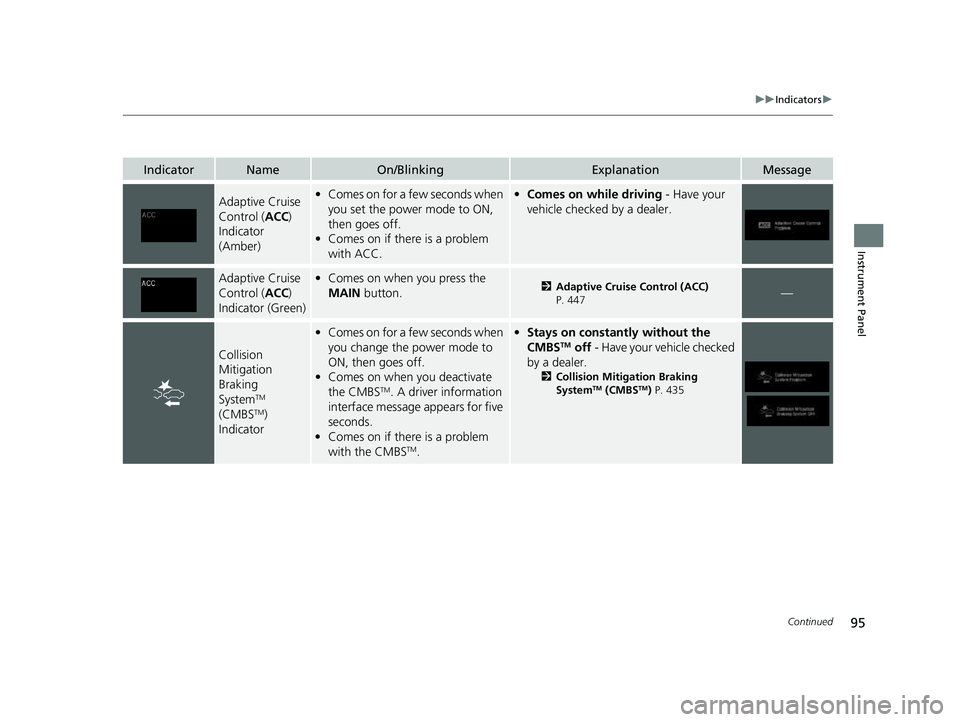
Visual Index
❚Gauges (P109)
❚Driver Information
Interface
(P110)
❚System Indicators (P82)
❚ECON Button (P418)
❚Audio System (P230)
❚Navigation System*
() See the Navigation System Manual
❚ (Vehicle Stability AssistTM (VSA ®)
System OFF) Button
(P422)
❚Collision Mitigation Braking SystemTM
(CMBSTM) OFF Button (P438)
❚Heated Windshield Button* (P176)
❚Road Departure Mitigation (RDM)
Button
(P471)
❚Parking Sensor System Button* (P484)
❚Steering Wheel Adjustments (P180)
❚ENGINE START/STOP Button (P160)
❚Front Seat Heater Buttons* (P209)
❚Front Seat Heaters and Seat
Ventilator Buttons* (P210)
❚Rear Defogger/Heated Door Mirror*
Button
(P175)
❚Audio/Information Screen (P231)
❚Hazard Warning Button
❚Climate Control System (P215)
23 PASSPORT-31TGS6400.book 8 ページ 2022年8月5日 金曜日 午後9時2分
Page 17 of 610
16
Quick Reference Guide
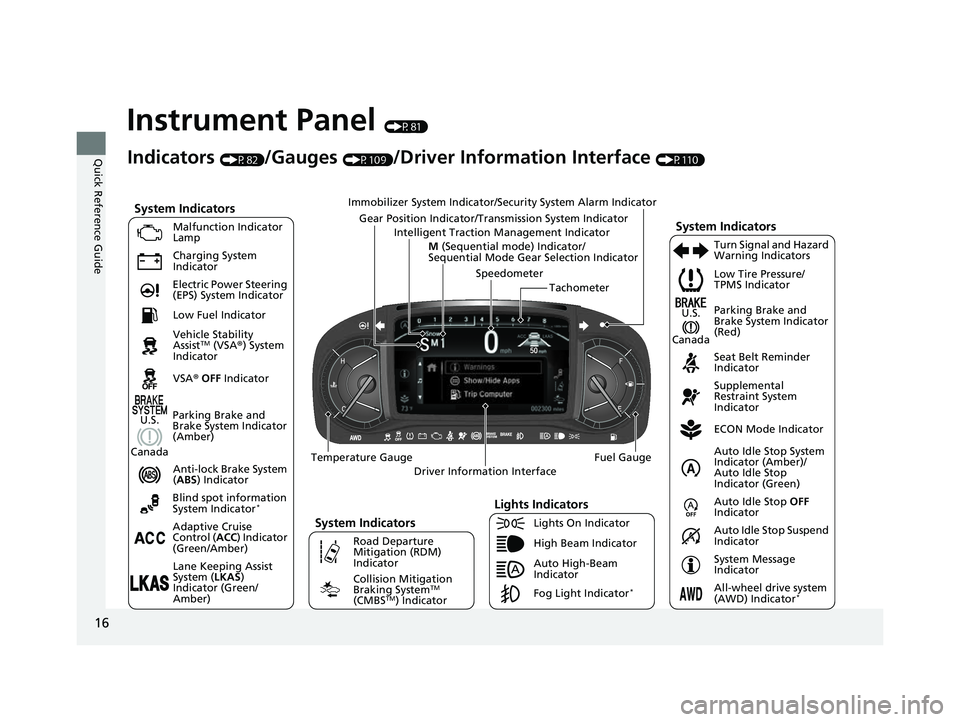
Instrument Panel (P81)
System Indicators
Malfunction Indicator
Lamp
Charging System
Indicator
Anti-lock Brake System
(ABS ) Indicator
Vehicle Stability
Assist
TM (VSA
®) System
Indicator
VSA ® OFF Indicator Low Tire Pressure/
TPMS Indicator
Immobilizer System Indicator/Security System Alarm Indicator
Lights Indicators
Lights On Indicator
High Beam Indicator
Fog Light Indicator
*
Lane Keeping Assist
System (
LKAS)
Indicator (Green/
Amber) Seat Belt Reminder
Indicator
System Indicators
ECON Mode Indicator
System Message
Indicator Parking Brake and
Brake System Indicator
(Red)
Supplemental
Restraint System
Indicator
Driver Information Interface Tachometer
M
(Sequential mode) Indicator/
Sequential Mode Gear Selection Indicator
Speedometer
Fuel Gauge
Gear Position Indicator/Tran
smission System Indicator
Auto Idle Stop System
Indicator (Amber)/
Auto Idle Stop
Indicator (Green)
Indicators (P82)/Gauges (P109)/Driver Information Interface (P110)
Adaptive Cruise
Control ( ACC) Indicator
(Green/Amber) Turn Signal and Hazard
Warning Indicators
Electric Power Steering
(EPS) System Indicator
Blind spot information
System Indicator
*
Temperature Gauge
Parking Brake and
Brake System Indicator
(Amber)
U.S.
Canada
System Indicators
U.S.
CanadaLow Fuel Indicator
Auto High-Beam
Indicator
Road Departure
Mitigation (RDM)
Indicator
Collision Mitigation
Braking SystemTM
(CMBSTM) Indicator All-wheel drive system
(AWD) Indicator*
Intelligent Traction Management Indicator
Auto Idle Stop
OFF
Indicator
Auto Idle Stop Suspend
Indicator
23 PASSPORT-31TGS6400.book 16 ページ 2022年8月5日 金曜日 午後9時2分
Page 27 of 610
26
Quick Reference Guide
VSA® On and Off (P422)
●The Vehicle Stability AssistTM (VSA® )
system helps stabilize the vehicle during
cornering and helps maintain traction
while accelerating on loose or slippery
road surfaces.
●VSA ® comes on automatically every time
you start the engine.
●To partially disable or fully restore VSA ®
function, press and hold the (VSA ®
OFF ) button until you hear a beep.
CMBSTM On and Off
(P438)
●When a possible frontal collision is likely
unavoidable, the CMBSTM can reduce the
vehicle speed and the severity of the
collision.
●The CMBSTM is turned on every time you
start the engine.
●To turn the CMBSTM on or off, press and
hold the button until you hear a beep.
Tire Pressure Monitoring System (TPMS) with Tire
Fill Assist
(P428, 573)
●The TPMS monitors tire pressure.●TPMS is turned on automatically every time you start the engine.●TPMS fill assist provides audible and visual guidance during tire pressure adjustment.
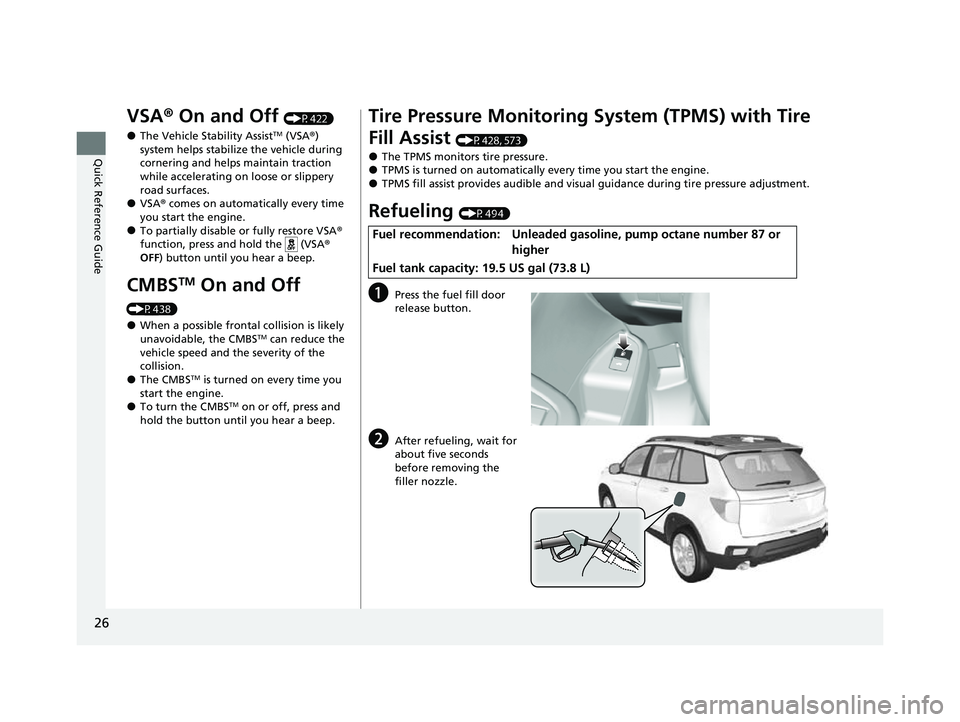
Refueling (P494)
aPress the fuel fill door
release button.
bAfter refueling, wait for
about five seconds
before removing the
filler nozzle.
Fuel recommendation: Unleaded gaso line, pump octane number 87 or
higher
Fuel tank capacity: 19.5 US gal (73.8 L)
23 PASSPORT-31TGS6400.book 26 ページ 2022年8月5日 金曜日 午後9時2分
Page 28 of 610
27
Quick Reference Guide
Honda Sensing® (P432)
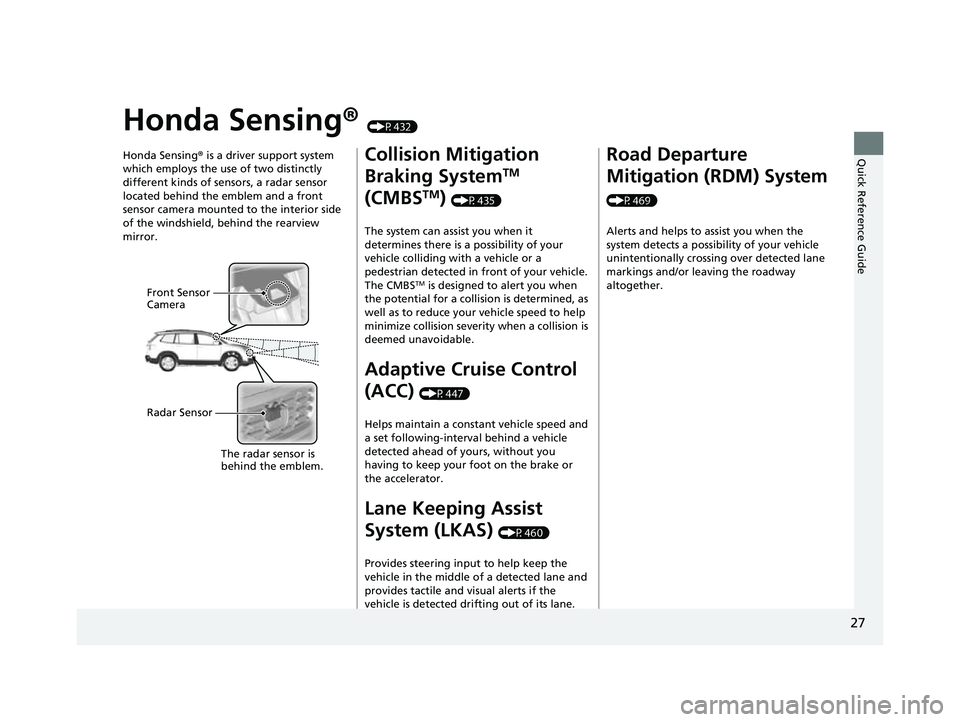
Honda Sensing ® is a driver support system
which employs the use of two distinctly
different kinds of sensors, a radar sensor
located behind the emblem and a front
sensor camera mounted to the interior side
of the windshield, behind the rearview
mirror.
Front Sensor
Camera
Radar Sensor
The radar sensor is
behi
nd the emblem.
Collision Mitigation
Braking System
TM
(CMBS
TM) (P435)
The system can assist you when it
determines there is a possibility of your
vehicle colliding with a vehicle or a
pedestrian detected in front of your vehicle.
The CMBS
TM is designed to alert you when
the potential for a collision is determined, as
well as to reduce your vehicle speed to help
minimize collision severity when a collision is
deemed unavoidable.
Adaptive Cruise Control
(ACC)
(P447)
Helps maintain a constant vehicle speed and
a set following-interval behind a vehicle
detected ahead of yours, without you
having to keep your foot on the brake or
the accelerator.
Lane Keeping Assist
System (LKAS)
(P460)
Provides steering input to help keep the
vehicle in the middle of a detected lane and
provides tactile and visual alerts if the
vehicle is detected drifting out of its lane.
Road Departure
Mitigation (RDM) System
(P469) Alerts and helps to assist you when the
system detects a possibility of your vehicle
unintentionally crossing over detected lane
markings and/or leaving the roadway
altogether.
23 PASSPORT-31TGS6400.book 27 ページ 2022年8月5日 金曜日 午後9時2分
Page 96 of 610
95
uuIndicators u
Continued
Instrument Panel
IndicatorNameOn/BlinkingExplanationMessage
Adaptive Cruise
Control (ACC)
Indicator
(Amber)• Comes on for a few seconds when
you set the power mode to ON,
then goes off.
• Comes on if there is a problem
with ACC.•Comes on while driving - Have your
vehicle checked by a dealer.
Adaptive Cruise
Control ( ACC)
Indicator (Green)• Comes on when you press the
MAIN button.2Adaptive Cruise Control (ACC)
P. 447—
Collision
Mitigation
Braking
System
TM
(CMBSTM)
Indicator
• Comes on for a few seconds when
you change the power mode to
ON, then goes off.
• Comes on when you deactivate
the CMBS
TM. A driver information
interface message appears for five
seconds.
• Comes on if there is a problem
with the CMBS
TM.
•Stays on constant ly without the
CMBSTM off - Have your vehicle checked
by a dealer.
2 Collision Mitigation Braking
SystemTM (CMBSTM) P. 435
23 PASSPORT-31TGS6400.book 95 ページ 2022年8月5日 金曜日 午後9時2分
Page 97 of 610
96
uuIndicators u
Instrument Panel
IndicatorNameOn/BlinkingExplanationMessage
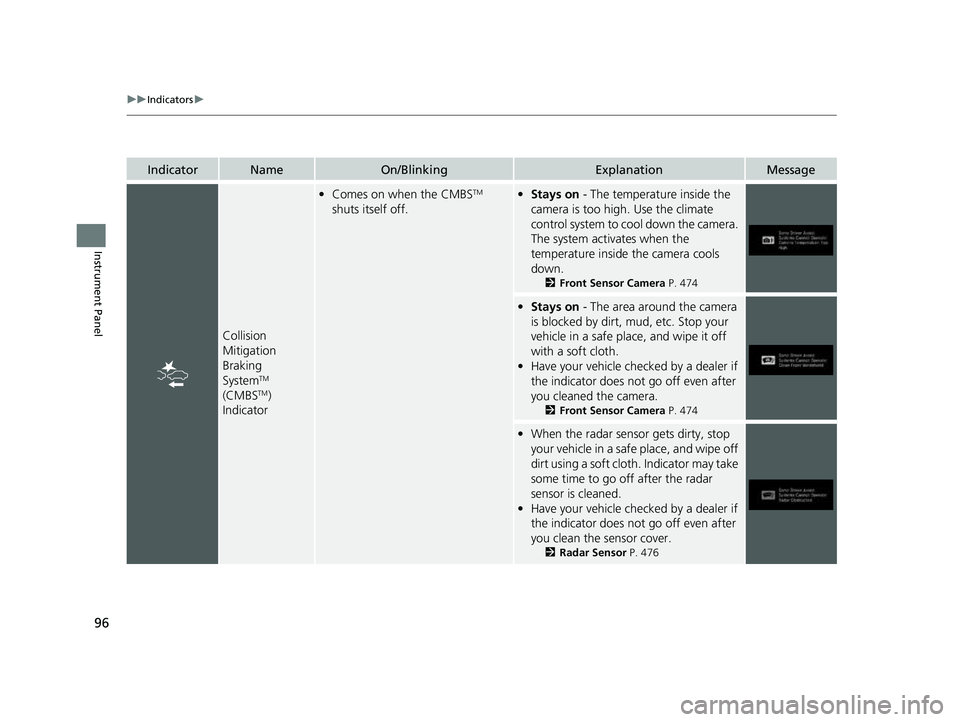
Collision
Mitigation
Braking
System
TM
(CMBSTM)
Indicator
• Comes on when the CMBSTM
shuts itself off.• Stays on - The temperature inside the
camera is too high. Use the climate
control system to cool down the camera.
The system activates when the
temperature inside the camera cools
down.
2 Front Sensor Camera P. 474
•Stays on - The area around the camera
is blocked by dirt, mud, etc. Stop your
vehicle in a safe place, and wipe it off
with a soft cloth.
• Have your vehicle checked by a dealer if
the indicator does not go off even after
you cleaned the camera.
2 Front Sensor Camera P. 474
•When the radar sensor gets dirty, stop
your vehicle in a safe place, and wipe off
dirt using a soft clot h. Indicator may take
some time to go off after the radar
sensor is cleaned.
• Have your vehicle checked by a dealer if
the indicator does not go off even after
you clean the sensor cover.
2 Radar Sensor P. 476
23 PASSPORT-31TGS6400.book 96 ページ 2022年8月5日 金曜日 午後9時2分
Page 103 of 610
102
uuIndicators uDriver Information Interface Wa rning and Information Messages
Instrument Panel
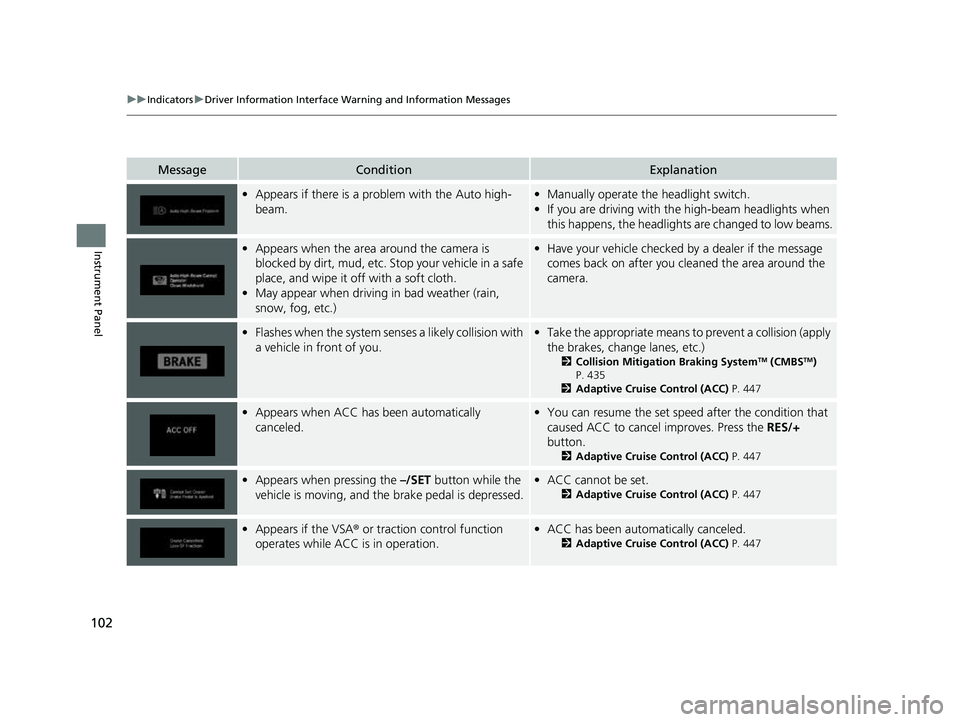
MessageConditionExplanation
•Appears if there is a prob lem with the Auto high-
beam.• Manually operate the headlight switch.
• If you are driving with th e high-beam headlights when
this happens, the headlights are changed to low beams.
• Appears when the area around the camera is
blocked by dirt, mud, etc. Stop your vehicle in a safe
place, and wipe it off with a soft cloth.
• May appear when driving in bad weather (rain,
snow, fog, etc.)•Have your vehicle checked by a dealer if the message
comes back on after you cl eaned the area around the
camera.
• Flashes when the system senses a likely collision with
a vehicle in front of you.•Take the appropriate means to prevent a collision (apply
the brakes, change lanes, etc.)
2 Collision Mitigation Braking SystemTM (CMBSTM)
P. 435
2 Adaptive Cruise Control (ACC) P. 447
•Appears when ACC has been automatically
canceled.•You can resume the set speed after the condition that
caused ACC to cancel improves. Press the RES/+
button.
2 Adaptive Cruise Control (ACC) P. 447
•Appears when pressing the –/SET button while the
vehicle is moving, and the brake pedal is depressed.• ACC cannot be set.
2 Adaptive Cruise Control (ACC) P. 447
•Appears if the VSA ® or traction control function
operates while ACC is in operation.• ACC has been automatically canceled.
2 Adaptive Cruise Control (ACC) P. 447
23 PASSPORT-31TGS6400.book 102 ページ 2022年8月5日 金曜日 午後9時2分
Page 343 of 610
342
uuCustomized Features u
Features
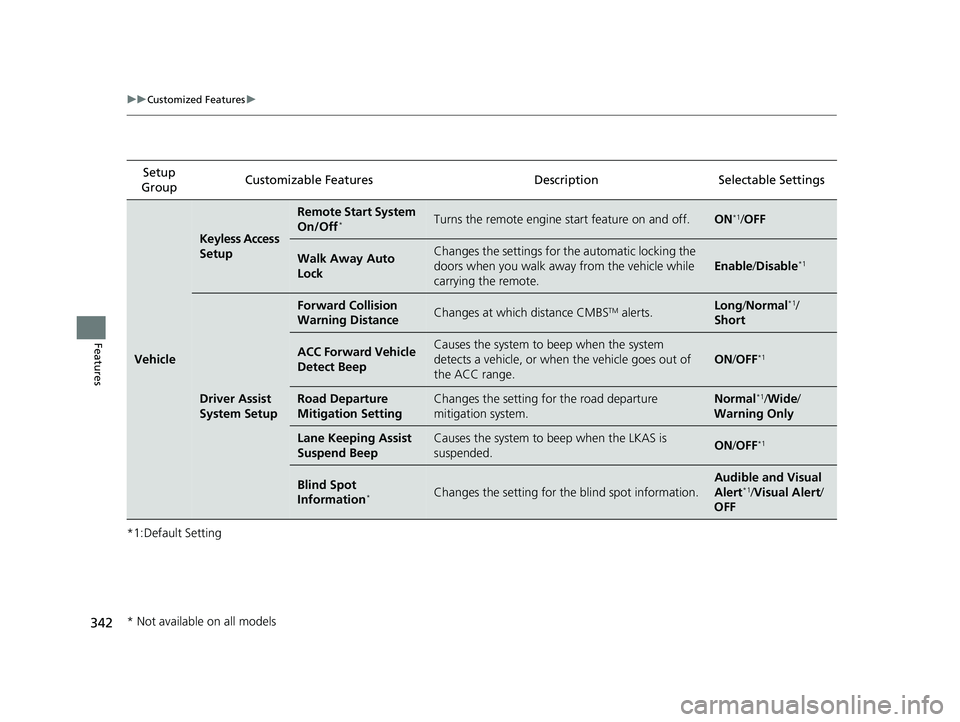
*1:Default SettingSetup
Group Customizable Features Description Selectable Settings
Vehicle
Keyless Access
Setup
Remote Start System
On/Off*Turns the remote engine start feature on and off.ON*1/
OFF
Walk Away Auto
LockChanges the settings for the automatic locking the
doors when you walk away from the vehicle while
carrying the remote.
Enable /Disable*1
Driver Assist
System Setup
Forward Collision
Warning DistanceChanges at which distance CMBSTM alerts.Long /Normal*1/
Short
ACC Forward Vehicle
Detect BeepCauses the system to beep when the system
detects a vehicle, or when the vehicle goes out of
the ACC range.
ON /OFF*1
Road Departure
Mitigation SettingChanges the setting for the road departure
mitigation system.Normal*1/ Wide /
Warning Only
Lane Keeping Assist
Suspend BeepCauses the system to b eep when the LKAS is
suspended.ON /OFF*1
Blind Spot
Information*Changes the setting for th e blind spot information.
Audible and Visual
Alert*1/Visual Alert /
OFF
* Not available on all models
23 PASSPORT-31TGS6400.book 342 ページ 2022年8月5日 金曜日 午後9時2分