2023 HONDA ODYSSEY warning light
[x] Cancel search: warning lightPage 17 of 707

15
Quick Reference Guide
Instrument Panel (P87)
System Indicators
Malfunction Indicator
Lamp
Charging System
Indicator
Anti-lock Brake System
(ABS ) Indicator
Vehicle Stability
Assist
TM (VSA®
) System
Indicator
VSA ® OFF Indicator Low Tire Pressure/TPMS
Indicator
Immobilizer System Indicator/
Security System Alarm Indicator
Lights Indicators
Lights On Indicator
High Beam Indicator
Fog Light Indicator
Lane Keeping Assist
System (LKAS)
Indicator (Green/
Amber/White) Seat Belt Reminder
Indicator
System Indicators
Econ Mode Indicator
System Message
Indicator Parking Brake and
Brake System Indicator
(Red)
Supplemental Restraint
System Indicator
Driver Information Interface Auto Idle Stop
OFF
Indicator
Tachometer
M
(Sequential mode) Indicator/
Sequential Mode Gear Selection
Indicator
Speedometer
Fuel Gauge
Gear Position Indicator/
Transmission System
Indicator Auto Idle Stop System
Indicator (Amber)/
Auto Idle Stop
Indicator (Green)
Indicators (P88)/Gauges (P127)/
Driver Information Interface
(P128)
Automatic Brake Hold
Indicator Adaptive Cruise
Control (ACC) with
Low Speed Follow
Indicator (Green/
Amber/White) Turn Signal and Hazard
Warning Indicators
Electric Power Steering
(EPS) System Indicator
Cruise Mode Indicator
(White/Green) Auto Idle Stop
Suspend Indicator
Temperature Gauge
Parking Brake and
Brake System Indicator
(Amber)
U.S.
Canada
U.S.
Canada
System Indicators
U.S.
Canada
Low Fuel Indicator
Automatic Brake Hold
System Indicator
Auto High-Beam
Indicator Snow
Mode Indicator
Normal Mode
Indicator
Safety Support
Indicator (Green/
Amber/Gray)
23 US ODYSSEY-31THR6500.book 15 ページ 2022年1月24日 月曜日 午前11時35分
Page 95 of 707

93
uuIndicators u
Continued
Instrument Panel
IndicatorNameOn/BlinkingExplanationMessage
Transmission
System Indicator
•All the gear positions may light for
several seconds, and go off.•When all the gear positions light,
immediately stop your vehicle in a safe
place.
• Indicators go off if there is no problem.
However, even if they go off, take your
vehicle to a dealer for inspection.
•The indicated current gear
selection blinks if there is a
problem with th e transmission
system.• Avoid sudden start and acceleration, and
stop in a safe place immediately.
Have your vehicle checked by a dealer.
•The current gear position or all the
gear positions blink if there is a
problem with th e transmission
system and the vehicle will no
longer move.• Immediately stop in a safe place.
2 Emergency Towing P. 676
•Have your vehicle checked by a dealer.
•The current gear position or all the
gear positions blink if you cannot
select
(P due to a transmission
system failure.
• The engine can be activated as a
temporary measure.
2 If the Transmission System
Indicator Blinks along with the
Warning Message P. 668
•Set the parking brake when parking.
• Have your vehicle checked by a dealer
immediately.
23 US ODYSSEY-31THR6500.book 93 ページ 2022年1月24日 月曜日 午前11時35分
Page 99 of 707

97
uuIndicators u
Continued
Instrument Panel
IndicatorNameOn/BlinkingExplanationMessage
Low Tire
Pressure/TPMS
Indicator
•Comes on for a few seconds when
you set the power mode to ON,
then goes off.
• Comes on if the tire pressure of
any of the tires becomes
significantly low.•Comes on while driving - Stop in a
safe place, check tire pressures, and
inflate the tire(s) if necessary.
• Blinks for about one minute, and
then stays on if there is a problem
with the TPMS with Tire Fill Assist,
or when a compact spare tire is
temporarily installed.•Blinks and remains on - Have your
vehicle checked by a dealer. If the vehicle
is fitted with a compact spare, get your
regular tire repaired or replaced and put
back on your vehicle as soon as you can.
Turn Signal and
Hazard Warning
Indicators
• Blinks when you operate the turn
signal lever.
• Blinks along with all turn signals
when you press the hazard
warning button.•Does not blink or blinks rapidly
2 Replacing Light Bulbs P. 611, 613
—
High Beam
Indicator•Comes on when the high beam
headlights are on.——
23 US ODYSSEY-31THR6500.book 97 ページ 2022年1月24日 月曜日 午前11時35分
Page 186 of 707

184
Controls
Windows
Opening/Closing the Power Windows
The power windows can be opened and closed when the power mode is in ON,
using the switches on the doors. The driver’s side switches can be used to open and
close all of the windows.
The power window lock button on the driver’s side must be switched off (not
pushed in, indicator off) to open and close the windows from anywhere other than
the driver’s seat.
When the power window lock button is pu shed in, the indicator comes on and you
can only operate the driver’s window. Turn the power window lock button on if a
child is in the vehicle.
■Manual operation
To open: Push the switch down lightly, and
hold it until the desired position is reached.
To close: Pull the switch up lightly, and hold it
until the desired position is reached.
■Automatic operation
To open: Push the switch down firmly.
To close: Pull the switch up firmly.
The window opens or cl oses completely. To
stop the window at any time, push or pull the
switch briefly.
■Opening/Closing the Windows with Auto-Open/Close
Function
1 Opening/Closing the Power Windows
The power windows can be operated for up to 10
minutes after you set the power mode to VEHICLE
OFF.
Opening either front door cancels this function.
Auto Reverse
If a power window senses resistance when closing
automatically, it will stop closing and reverse
direction.
The driver’s window auto re verse function is disabled
when you continuously pull up the switch.
The auto reverse function stops sensing when the
window is almost closed to en sure that it fully closes.
3WARNING
Closing a power window on someone’s
hands or fingers can cause serious injury.
Make sure your passengers are away from
the windows before closing them.
ON
OFF
Power Window
Lock Button
IndicatorDriver’s
Window
Switch
Front
Passenger’s
Window
Switch
Rear Passenger’s
Window Switch
23 US ODYSSEY-31THR6500.book 184 ページ 2022年1月24日 月曜日 午前11時35分
Page 189 of 707

187
Controls
Moonroof*
Opening/Closing the Moonroof
You can operate the moonroof when the power mode is in ON. Use the switch in
the front of the ceiling to open and close the moonroof.
■Automatic operation
To open: Pull the switch back firmly.
To close: Push the switch forward firmly.
The moonroof will automatically open or close
all the way. To stop the moonroof midway,
pull or push the switch briefly.
■Manual operation
To open: Pull the switch back lightly, and
hold it until the desired position is reached.
To close: Push the switch forward lightly, and
hold it until the desired position is reached.
■Tilting the moonroof up
To tilt: Push on the center of the moonroof
switch.
To close: Push the switch forward firmly,
then release.
■Using the Moonroof Switch
1 Opening/Closing the Moonroof
NOTICE
Opening the moonroof in below freezing
temperature or when it is covered with snow or ice
can damage the moonr oof panel or motor.
The moonroof can be opera ted for up to 10 minutes
after you set the power mode to VEHICLE OFF.
Opening either front door cancels this function.
When resistance is detected, the auto reverse
function causes the moonroof to change directions,
then stop. Auto reverse stops sensing when the
moonroof is almost closed to ensure that it fully
closes.
You can use the remote transmitter or the key to
operate the moonroof. 2 Opening the Windows with the Remote
P. 185
2 Opening/Closing the Windows with the
Key P. 186
3WARNING
Opening or closing the moonroof on
someone’s hands or fingers can cause
serious injury.
Make sure all hands and fingers are clear of
the moonroof before opening or closing it.
Open
CloseTilt
* Not available on all models
23 US ODYSSEY-31THR6500.book 187 ページ 2022年1月24日 月曜日 午前11時35分
Page 420 of 707
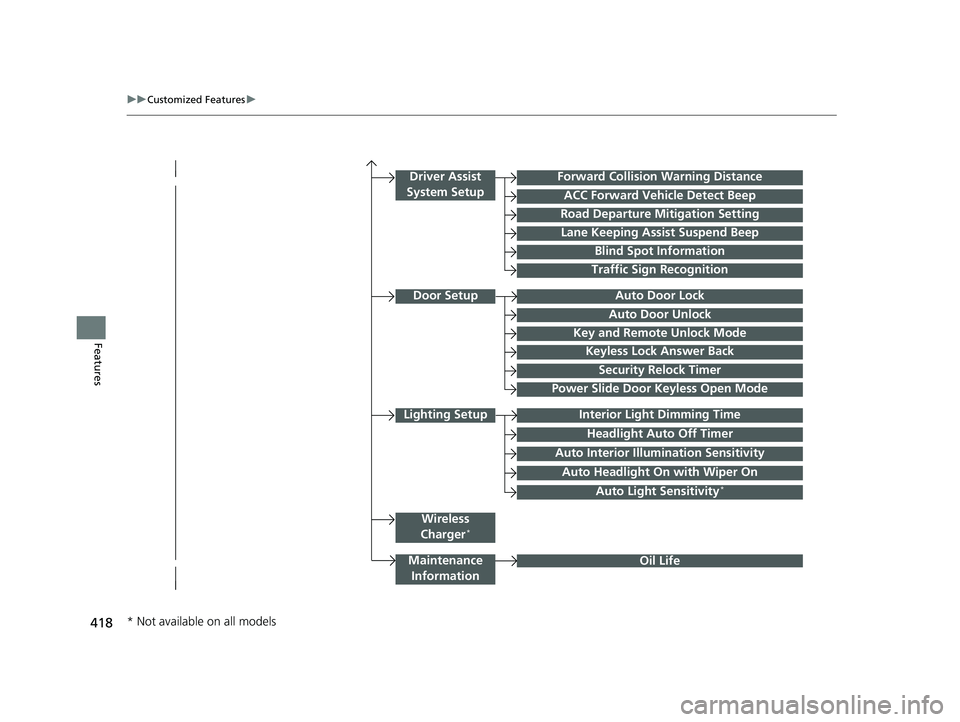
418
uuCustomized Features u
Features
Lighting SetupInterior Light Dimming Time
Headlight Auto Off Timer
Forward Collision Warning Distance
ACC Forward Vehicle Detect Beep
Auto Interior Illu mination Sensitivity
Door SetupAuto Door Lock
Auto Door Unlock
Key and Remote Unlock Mode
Keyless Lock Answer Back
Security Relock Timer
Driver Assist
System Setup
Oil Life
Road Departure Mitigation Setting
Lane Keeping Assist Suspend Beep
Blind Spot Information
Power Slide Door Keyless Open Mode
Wireless
Charger*
Traffic Sign Recognition
Maintenance Information
Auto Headlight On with Wiper On
Auto Light Sensitivity*
* Not available on all models
23 US ODYSSEY-31THR6500.book 418 ページ 2022年1月24日 月曜日 午前11時35分
Page 480 of 707
uuWhen Driving uStarting the Engine
478
Driving
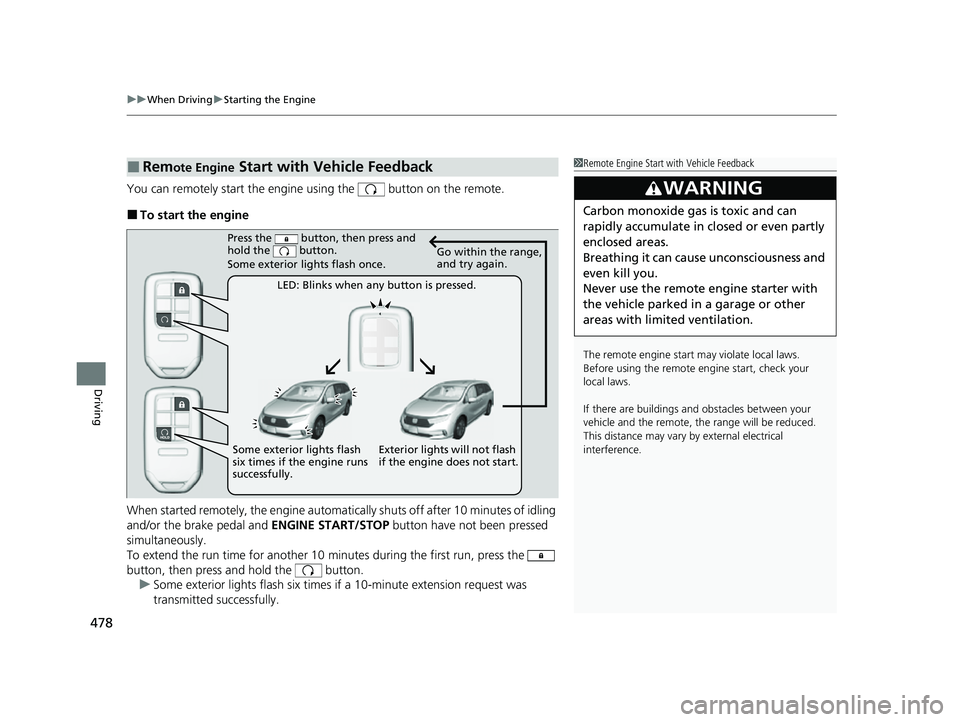
You can remotely start the engine using the button on the remote.
■To start the engine
When started remotely, the engine automati cally shuts off after 10 minutes of idling
and/or the brake pedal and ENGINE START/STOP button have not been pressed
simultaneously.
To extend the run time for another 10 minutes during the first run, press the
button, then press and hold the button. u Some exterior lights flash six times if a 10-minute extension request was
transmitted successfully.
■Remote Engine Start with Vehicle Feedback1Remote Engine Start with Vehicle Feedback
The remote engine start may violate local laws.
Before using the remote e ngine start, check your
local laws.
If there are buildings an d obstacles between your
vehicle and the remote, th e range will be reduced.
This distance may vary by external electrical
interference.
3WARNING
Carbon monoxide ga s is toxic and can
rapidly accumulate in closed or even partly
enclosed areas.
Breathing it can cause unconsciousness and
even kill you.
Never use the remote engine starter with
the vehicle parked in a garage or other
areas with limited ventilation.
Press the button, then press and
hold the button.
Some exterior lights flash once.
LED: Blinks when any button is pressed. Go within the range,
and try again.
Exterior lights will not flash
if the engine does not start.
Some exterior lights flash
six times if the engine runs
successfully.
23 US ODYSSEY-31THR6500.book 478 ページ 2022年1月24日 月曜日 午前11時35分
Page 517 of 707

515
uuHonda Sensing ®u Collision Mitigation Braking SystemTM (CMBSTM)
Continued
Driving
The system has three alert stages for a possible collis ion. However, depending on circumstances, the CMBSTM may not go through all of
the stages before initiating the last stage.
■Collision Alert Stages
Distance between vehiclesCMBSTM
The sensors detect a vehicleAudible & Visu al WARNINGSBraking
Stage
oneThere is a risk of a collision with
the vehicle ahead of you.
When in Long, visual and
audible alerts come on at a
longer distance from a vehicle
ahead than in Normal setting,
and in Short , at a shorter
distance than in Normal.
—
Stage
twoThe risk of a collision has
increased, time to respond is
reduced.
Visual and audible alerts.
Lightly applied
Stage three The CMBSTM determines that a
collision is unavoidable.Forcefully applied
Your Vehicle Vehicle
Ahead
Normal
Short
Long
Your
Vehicle Vehicle
Ahead
Your
Vehicle
Vehicle
Ahead
23 US ODYSSEY-31THR6500.book 515 ページ 2022年1月24日 月曜日 午前11時35分