Page 196 of 707
uuOperating the Switches Around the Steering Wheel uLight Switches
194
Controls
The headlights automatically come on when the wipers are used several times within
a certain number of intervals wi th the headlight switch in AUTO.
The headlights automatically go off a few minutes later if the wipers are stopped.
The headlights, all other exterior lights, an d the instrument panel lights turn off 15
seconds after you set the power mode to VE HICLE OFF, take the remote with you,
and close the driver’s door.
If you set the power mode to VEHICLE OFF with the headlight switch on, but do not
open the door, the lights turn off after 10 minutes (3 minutes, if the switch is in the
AUTO position).
The lights turn on again when you unlock or open the driver’s door. If you unlock
the door, but do not open it within 15 seconds, the lights go off. If you open the
driver’s door, you will hear a reminder chime alerting you that the lights are on.
■Headlight Integration with Wiper
■Automatic Lighting Off Feature
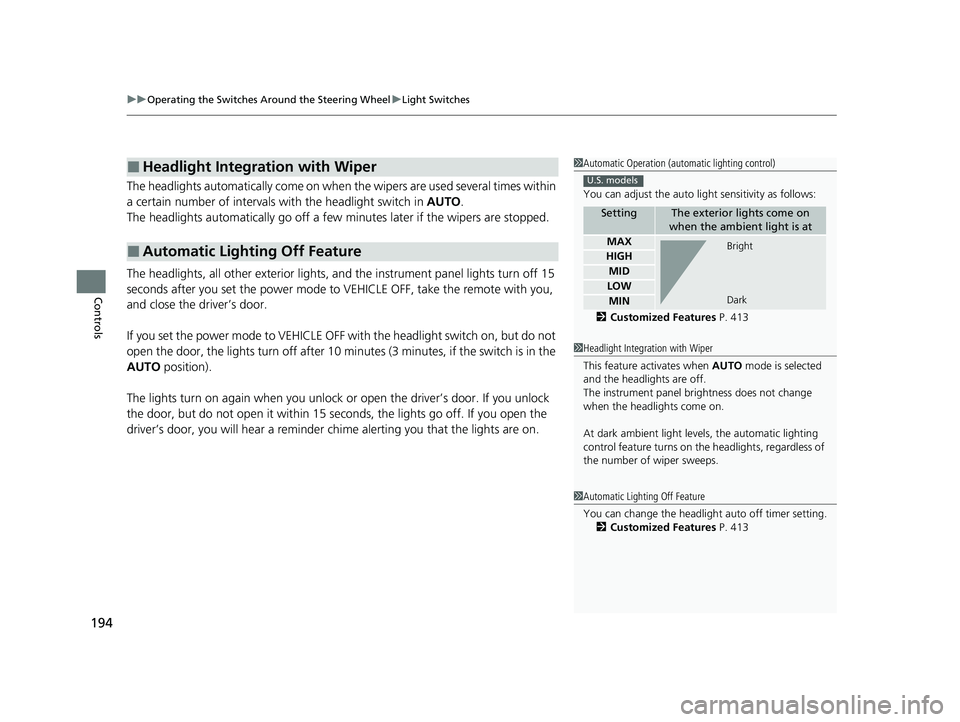
1Automatic Operation (aut omatic lighting control)
You can adjust the auto li ght sensitivity as follows:
2 Customized Features P. 413
SettingThe exterior lights come on
when the ambient light is at
MAX
HIGH
MID
LOW
MIN
U.S. models
Bright
Dark
1 Headlight Integration with Wiper
This feature activates when AUTO mode is selected
and the headlights are off.
The instrument panel br ightness does not change
when the headlights come on.
At dark ambient light leve ls, the automatic lighting
control feature turns on the headlights, regardless of
the number of wiper sweeps.
1 Automatic Lighting Off Feature
You can change the headlight auto off timer setting.
2 Customized Features P. 413
23 US ODYSSEY-31THR6500.book 194 ページ 2022年1月24日 月曜日 午前11時35分
Page 208 of 707
206
uuOperating the Switches Around the Steering Wheel uDriving Position Memory System*
Controls
Driving Position Memory System*
You can store two driver’s seat positions (except for power lumbar) and outside
mirror positions with the driv ing position memory system.
When you unlock and open the driver’s door with a remote, the seat and outside
mirrors adjust automatically to one of the two preset positions.
When you enter the vehicle, the driver in formation interface briefly shows you which
remote transmitter you used to unlock the vehicle.
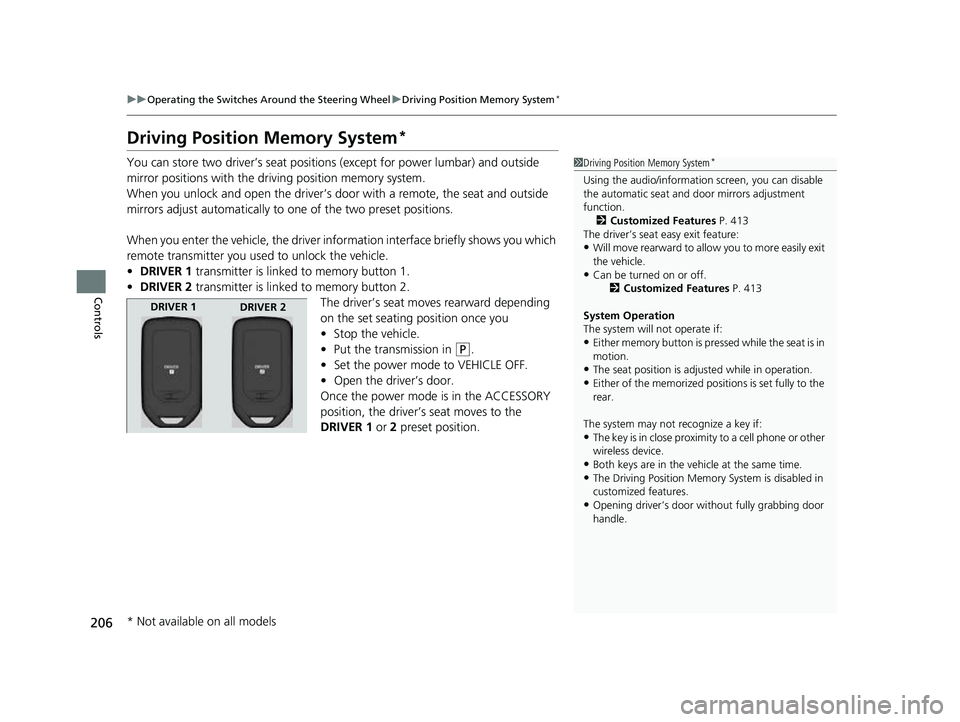
• DRIVER 1 transmitter is linked to memory button 1.
• DRIVER 2 transmitter is linked to memory button 2.
The driver’s seat moves rearward depending
on the set seating position once you
•Stop the vehicle.
• Put the transmission in
(P.
• Set the power mode to VEHICLE OFF.
• Open the driver’s door.
Once the power mode is in the ACCESSORY
position, the driver’s seat moves to the
DRIVER 1 or 2 preset position.
1Driving Position Memory System*
Using the audio/informati on screen, you can disable
the automatic seat and d oor mirrors adjustment
function.
2 Customized Features P. 413
The driver’s seat easy exit feature:
•Will move rearward to allow you to more easily exit
the vehicle.
•Can be turned on or off. 2Customized Features P. 413
System Operation
The system will not operate if:
•Either memory button is pressed while the seat is in
motion.
•The seat position is adju sted while in operation.•Either of the memorized positions is set fully to the
rear.
The system may not recognize a key if:
•The key is in close proximity to a cell phone or other
wireless device.
•Both keys are in the vehicle at the same time.
•The Driving Position Memory System is disabled in
customized features.
•Opening driver’s door wi thout fully grabbing door
handle.
DRIVER 1 DRIVER 2
* Not available on all models
23 US ODYSSEY-31THR6500.book 206 ページ 2022年1月24日 月曜日 午前11時35分
Page 210 of 707
208
uuOperating the Switches Around the Steering Wheel uAdjusting the Steering Wheel
Controls
Adjusting the Steering Wheel
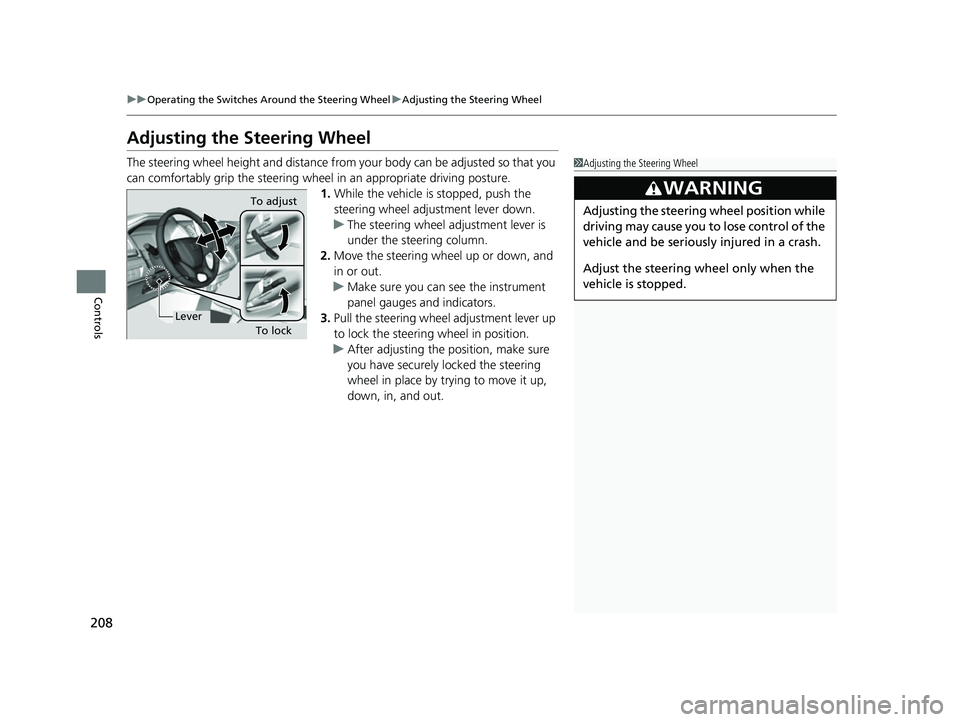
The steering wheel height and distance from your body can be adjusted so that you
can comfortably grip the steering wheel in an appropriate driving posture.
1.While the vehicle is stopped, push the
steering wheel adjustment lever down.
u The steering wheel adjustment lever is
under the steering column.
2. Move the steering wheel up or down, and
in or out.
u Make sure you can see the instrument
panel gauges and indicators.
3. Pull the steering wheel adjustment lever up
to lock the steerin g wheel in position.
u After adjusting the position, make sure
you have securely locked the steering
wheel in place by trying to move it up,
down, in, and out.1Adjusting the Steering Wheel
3WARNING
Adjusting the steering wheel position while
driving may cause you to lose control of the
vehicle and be seriously injured in a crash.
Adjust the steering wheel only when the
vehicle is stopped.To adjust
To lock
Lever
23 US ODYSSEY-31THR6500.book 208 ページ 2022年1月24日 月曜日 午前11時35分
Page 217 of 707
215
uuSeats uSecond Row Seats
Continued
Controls
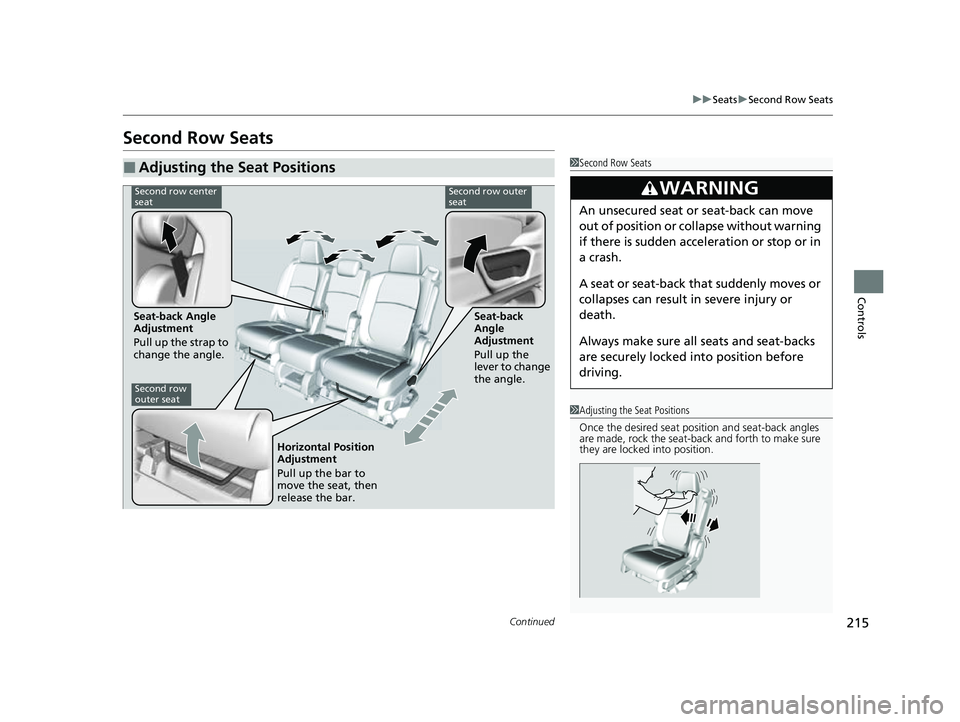
Second Row Seats
■Adjusting the Seat Positions1Second Row Seats
3WARNING
An unsecured seat or seat-back can move
out of position or collapse without warning
if there is sudden acce leration or stop or in
a crash.
A seat or seat-back that suddenly moves or
collapses can result in severe injury or
death.
Always make sure all seats and seat-backs
are securely locked in to position before
driving.
1 Adjusting the Seat Positions
Once the desired seat posit ion and seat-back angles
are made, rock the seat-back and forth to make sure
they are locked into position.
Second row center
seatSecond row outer
seat
Seat-back Angle
Adjustment
Pull up the strap to
change the angle. Seat-back
Angle
Adjustment
Pull up the
lever to change
the angle.
Second row
outer seat
Horizontal Position
Adjustment
Pull up the bar to
move the seat, then
release the bar.
23 US ODYSSEY-31THR6500.book 215 ページ 2022年1月24日 月曜日 午前11時35分
Page 218 of 707

uuSeats uSecond Row Seats
216
Controls
1. Pull up the armrest(s).
2. Lower the head restra int to its lowest
position.
3. Move the seat to it s rearmost position.
4. Pull the seat-back angle adjustment lever,
then fold the seat-back down.
To return the seat to th e original position, pull
up the seat-back angle adjustment lever and
fold the seat-back in the upright position.
1. Pulling forward on the walk-in lever or
pulling the release strap tilts the second row
outer seat’s seat-back forward.
u The whole seat slides forward.
2. When re-positioning th e seat, push it firmly
to the rear to ensure the horizontal
adjusters and the seat-back lock completely
into place.
■Folding Down the Second Row Outer Seat1 Folding Down the Second Row Outer Seat
Make sure that the folded seat-back does not press
against the front passenger’s seat, as this can cause
the weight sensors in the front passenger’s seat to
work improperly. 2 Passenger Airbag Off Indicator P. 64
The front seat(s) must be far enough forward so they
do not interfere with the second row seats as they
fold down.
Make sure the seat-back and seat cushion are
securely latched back in to place before driving.
Seat-back Angle
Adjustment Lever
■Third Row Seat Access
LeverStrap
23 US ODYSSEY-31THR6500.book 216 ページ 2022年1月24日 月曜日 午前11時35分
Page 219 of 707
Continued217
uuSeats uSecond Row Seats
Controls
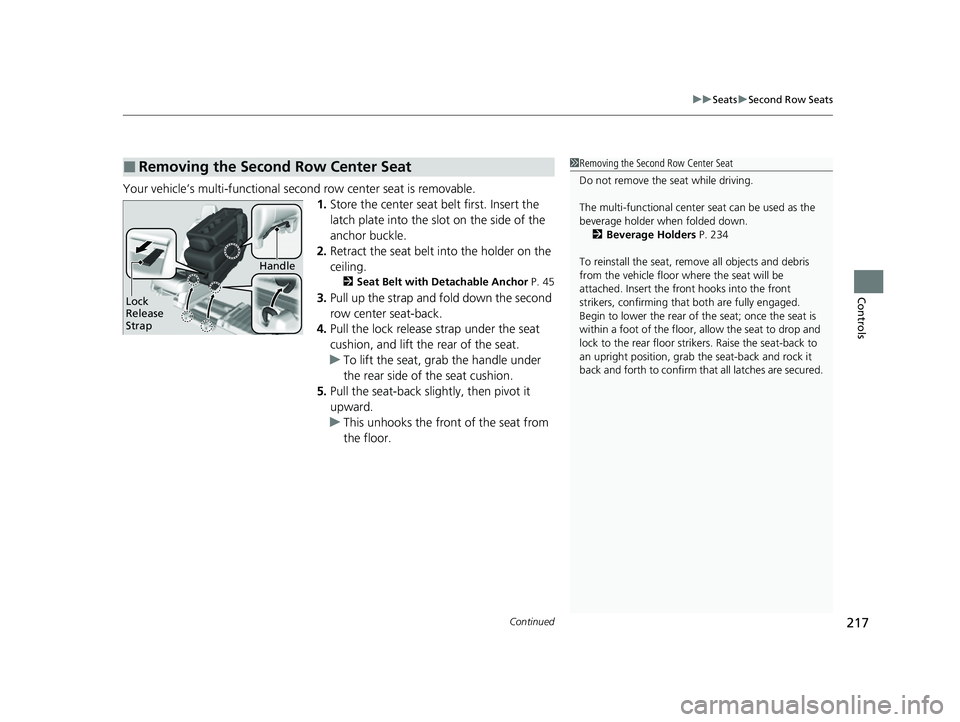
Your vehicle’s multi-functional second row center seat is removable.
1.Store the center seat belt first. Insert the
latch plate into the slot on the side of the
anchor buckle.
2. Retract the seat belt into the holder on the
ceiling.
2 Seat Belt with Detachable Anchor P. 45
3.Pull up the strap and fold down the second
row center seat-back.
4. Pull the lock release strap under the seat
cushion, and lift the rear of the seat.
u To lift the seat, gr ab the handle under
the rear side of the seat cushion.
5. Pull the seat-back slightly, then pivot it
upward.
u This unhooks the front of the seat from
the floor.
■Removing the Second Row Center Seat1Removing the Second Row Center Seat
Do not remove the seat while driving.
The multi-functional center seat can be used as the
beverage holder when folded down. 2 Beverage Holders P. 234
To reinstall the seat, remove all objects and debris
from the vehicle floor where the seat will be
attached. Insert the front hooks into the front
strikers, confirming that both are fully engaged.
Begin to lower the rear of the seat; once the seat is
within a foot of the floor, allow the seat to drop and
lock to the rear floor strikers. Raise the seat-back to
an upright position, grab the seat-back and rock it
back and forth to confirm th at all latches are secured.
Lock
Release
Strap
Handle
23 US ODYSSEY-31THR6500.book 217 ページ 2022年1月24日 月曜日 午前11時35分
Page 220 of 707

uuSeats uSecond Row Seats
218
Controls
Your vehicle’s second row outer seats are removable.
1.Lower the head restra int to its lowest
position.
2. Move the seat to it s rearmost position.
3. Pull the seat-back angle adjustment lever,
then fold the seat-back down.
4. Pull the lock release lever, tilt the seat-back
forward and lift the rear of the seat.
u To lift the seat, grab the handle under
the rear side of the seat.
5. Pivot the rear of the seat upward to unhook
the front of the seat from the floor.
■Removing a Second Row Outer Seat1Removing a Second Row Outer Seat
Do not remove the seat while driving.
Reinstalling a Second Row Outer Seat
With the seat-back folded forward, insert the front
seat hooks into the front floor strikers.
After confirming both front hooks are fully inserted
into the front strikers, begin to lower the seat, then
allow it to drop and lock to the rear floor strikers.
Raise the seat-back to an upright position, then rock
the seat-back and forth to confirm both the inner and
outer latches are securely locked into position.
Handle
Seat-back Angle
Adjustment Lever
Lock Release Lever
23 US ODYSSEY-31THR6500.book 218 ページ 2022年1月24日 月曜日 午前11時35分
Page 222 of 707
220
uuSeats uThird Row Seats
Controls
Third Row Seats
■Adjusting the Seat Positions1Adjusting the Seat Positions
Once a seat is adjusted co rrectly, rock it back and
forth to make sure it is locked in position.
Seat-back Angle
Adjustment
Pull up the strap to
change the angle.
23 US ODYSSEY-31THR6500.book 220 ページ 2022年1月24日 月曜日 午前11時35分