Page 128 of 664

126
uuGauges and Driver Information Interface uDriver Information Interface
Instrument Panel
*1:Default Setting Setup Group Customizable Features
Description Selectable Settings
Meter setup
Language selectionChanges the displayed language.English*1/Français /
Español
Adjust outside temp.
displayAdjusts the temperature reading by a few degrees.
-5°F ~ ±0°F*1 ~ +5°F
(U.S.)
-3°C ~ ±0°C
*1 ~ +3°C
(Canada)
“Trip A” reset timingChanges the setting of how to reset trip meter A,
average fuel economy A, average speed A, and elapsed
time A.When fully refueled /
IGN OFF /Manually reset*1
“Trip B” reset timing
Changes the setting of how to reset trip meter B,
average fuel economy B, av erage speed B, and elapsed
time B.When fully refueled /
IGN OFF /Manually reset*1
Adjust alarm volumeChanges the alarm volume, su ch as buzzers, warnings,
turn signal sound, and so on.High /Mid*1/Low
Fuel efficiency backlightTurns the ambient meter feature on and off.ON*1/OFF
Rear seat reminderTurns the Rear Seat Reminder feature on and off.ON*1/OFF
Speed/distance unitsSelects the trip meter units.
km/h∙km/ mph∙miles*1
(U.S.)
km/h∙km
*1/ mph∙miles
(Canada)
TachometerSelects whether the tachomet er is displayed on the
instrument panel.ON*1/ OFF
23 HR-V-313V06000_01.book 126 ページ 2022年4月4日 月曜日 午前10時49分
Page 129 of 664

127
uuGauges and Driver Information Interface uDriver Information Interface
Continued
Instrument Panel
*1:Default Setting Setup Group Customizable Features
Description Selectable Settings
Keyless access
setup
*
Door unlock mode Changes which doors unlock when you grab the driver’s
door handle. Driver door only*1/
All
doors
Keyless access light
flash Causes some exterior lights
to flash when you unlock/
lock the doors. ON
*1/
OFF
Keyless access beep Causes the beeper to sound when you unlock/lock the
doors.
ON
*1/
OFF
Remote start system
ON/OFF Turns the remote engine start feature on and off.
ON
*1/OFF
Lighting setup
Auto high-beamTurns the auto high -beam on and off.ON*1/OFF
Interior light dimming
timeChanges the length of time the interior lights stay on
after you close the doors.60sec /30sec*1/ 15sec
Headlight auto off
timerChanges the length of time the exterior lights stay on
after you close the driver’s door.60sec /30sec /15sec*1/0sec
Auto light sensitivity*Changes the timing for th e headlights to come on.Max/High /Mid*1/Low /Min
Auto headlight ON
with wiper ONChanges the settings for the wiper operation when the
headlights automatically come on while the headlight
switch is in the AUTO position.
ON*1/OFF
* Not available on all models
23 HR-V-313V06000_01.book 127 ページ 2022年4月4日 月曜日 午前10時49分
Page 132 of 664
130
uuGauges and Driver Information Interface uDriver Information Interface
Instrument Panel
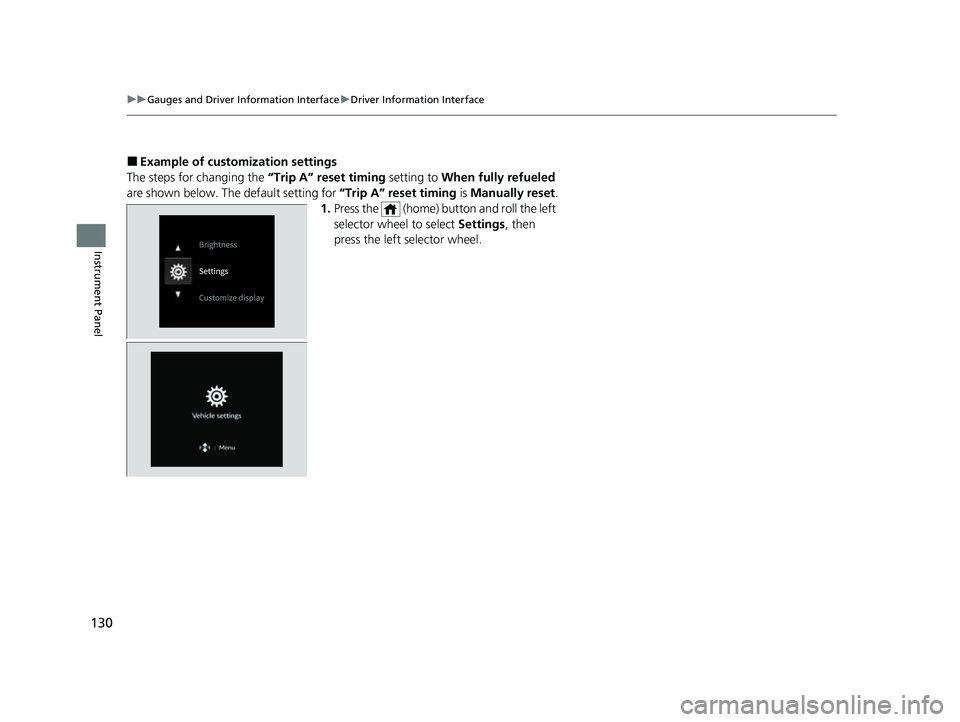
■Example of customization settings
The steps for changing the “Trip A” reset timing setting to When fully refueled
are shown below. The default setting for “Trip A” reset timing is Manually reset.
1. Press the (home) button and roll the left
selector wheel to select Settings, then
press the left selector wheel.
23 HR-V-313V06000_01.book 130 ページ 2022年4月4日 月曜日 午前10時49分
Page 133 of 664
131
uuGauges and Driver Information Interface uDriver Information Interface
Continued
Instrument Panel
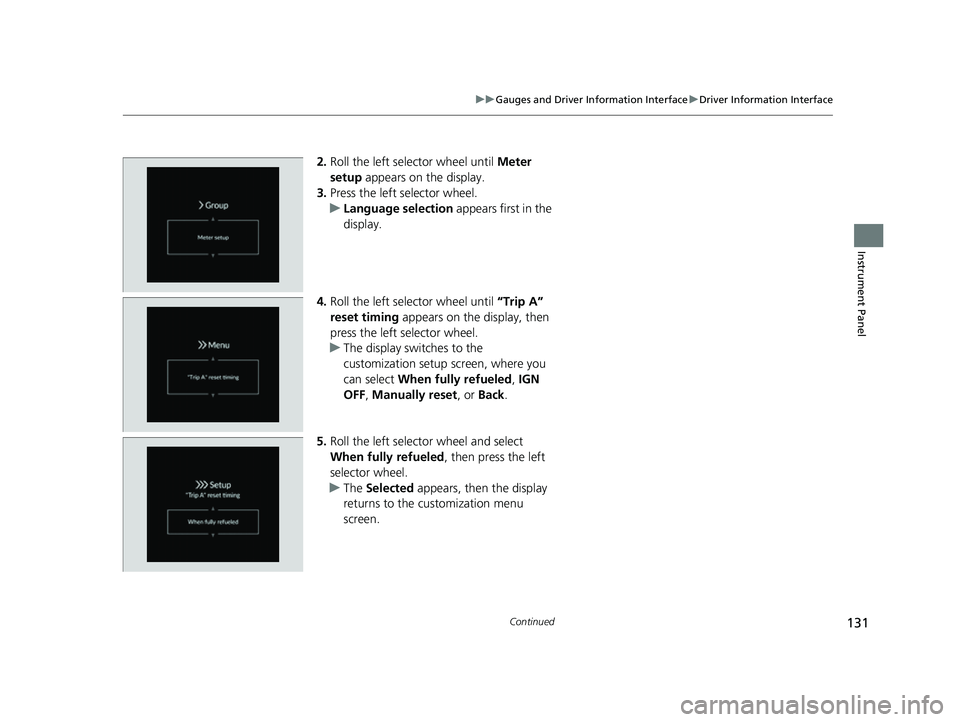
2. Roll the left selector wheel until Meter
setup appears on the display.
3. Press the left selector wheel.
u Language selection appears first in the
display.
4. Roll the left selector wheel until “Trip A”
reset timing appears on the display, then
press the left selector wheel.
u The display swit ches to the
customization setup screen, where you
can select When fully refueled , IGN
OFF , Manually reset , or Back .
5. Roll the left selector wheel and select
When fully refueled , then press the left
selector wheel.
u The Selected appears, then the display
returns to the customization menu
screen.
23 HR-V-313V06000_01.book 131 ページ 2022年4月4日 月曜日 午前10時49分
Page 173 of 664
171
uuOperating the Switches Around the Steering Wheel uAuto High-Beam
Continued
Controls
Auto High-Beam
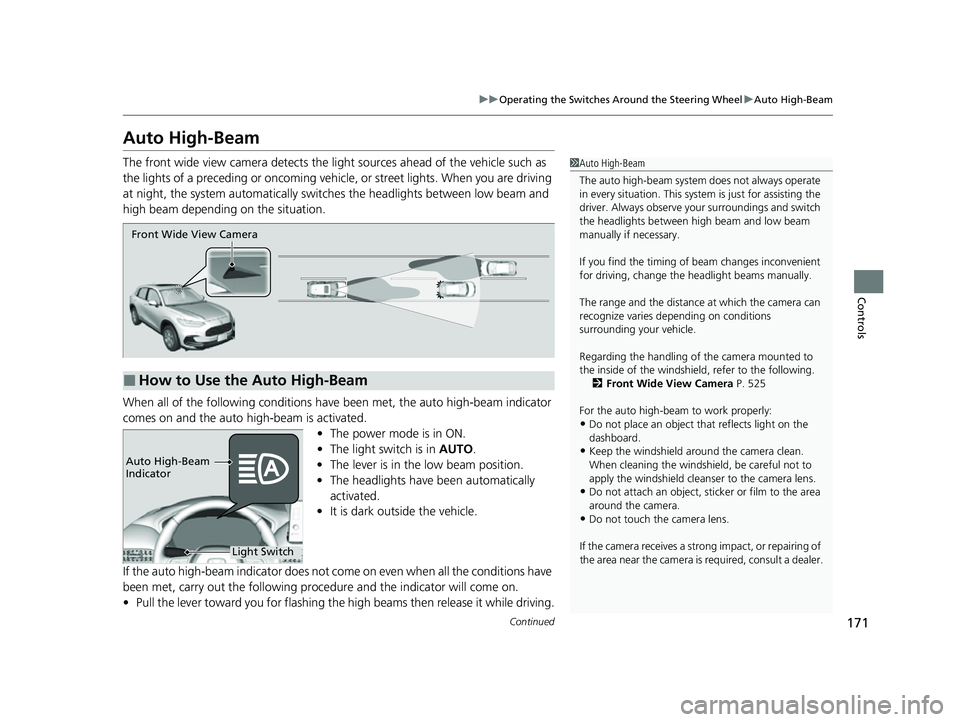
The front wide view camera detects the li ght sources ahead of the vehicle such as
the lights of a preceding or oncoming vehicle, or street lights. When you are driving
at night, the system automa tically switches the headlights between low beam and
high beam depending on the situation.
When all of the following conditions have been met, the auto high-beam indicator
comes on and the auto high-beam is activated.
•The power mode is in ON.
• The light switch is in AUTO.
• The lever is in the low beam position.
• The headlights have been automatically
activated.
• It is dark outside the vehicle.
If the auto high-beam indica tor does not come on even when all the conditions have
been met, carry out the following procedure and the indicator will come on.
• Pull the lever toward you for flashing the high beams then release it while driving.1Auto High-Beam
The auto high-beam system does not always operate
in every situation. This syst em is just for assisting the
driver. Always observe your surroundings and switch
the headlights between high beam and low beam
manually if necessary.
If you find the timing of beam changes inconvenient
for driving, change the headlight beams manually.
The range and the distance at which the camera can
recognize varies de pending on conditions
surrounding your vehicle.
Regarding the handling of the camera mounted to
the inside of the windshiel d, refer to the following.
2 Front Wide View Camera P. 525
For the auto high-beam to work properly:
•Do not place an object that reflects light on the
dashboard.
•Keep the windshield around the camera clean.
When cleaning the windshield, be careful not to
apply the windshield cleans er to the camera lens.
•Do not attach an object, sticker or film to the area
around the camera.
•Do not touch the camera lens.
If the camera receives a st rong impact, or repairing of
the area near the camera is required, consult a dealer.
■How to Use the Auto High-Beam
Front Wide View Camera
Light Switch
Auto High-Beam
Indicator
23 HR-V-313V06000_01.book 171 ページ 2022年4月4日 月曜日 午前10時49分
Page 174 of 664

uuOperating the Switches Around the Steering Wheel uAuto High-Beam
172
Controls
■Automatic switching between high-beam and low-beam
When auto high-beam is ac tive, the headlights switch between high beam and low
beam based on the following conditions.1 How to Use the Auto High-Beam
In the following cases, th e auto high-beam system
may not switch the head lights properly or the
switching timing may be ch anged. In case of the
automatic switching operati on does not fit for your
driving habits, please swit ch the headlights manually.
•The brightness of the lights from the preceding or
oncoming vehicle is intense or poor.
•Visibility is poor due to the weather (rain, snow,
fog, windshield frost, etc.).
•Surrounding light sources, such as street lights,
electric billboards and traf fic lights are illuminating
the road ahead.
•The brightness level of th e road ahead constantly
changes.
•The road is bumpy or has many curves.•A vehicle suddenly appears in front of you, or a
vehicle in front of you is not in the preceding or
oncoming direction.
•Your vehicle is tilted with a heavy load in the rear.•A traffic sign, mirror, or other reflective object
ahead is reflecting strong light toward the vehicle.
•The oncoming vehicle freq uently disappears under
roadside trees or be hind median barriers.
•The preceding or oncoming vehicle is a motorcycle,
bicycle, mobility scooter, or other small vehicle.
The auto high-beam system keeps the headlight low
beam when:
•Windshield wipers are op erating at a high speed.
•The camera has detected a dense fog.
Switching to high beam:
All of the following conditions
must be met before the high
beams turn on.
•Your vehicle speed is 25 mph
(40 km/h) or more.
• There are no preceding or
oncoming vehicle with
headlights or taillights turned
on.
• There are few street lights on
the road ahead.
Switching to low beam:
One of the following conditions
must be met before the low beams
turn on.
• Your vehicle speed is 15 mph
(24 km/h) or less.
• There is a preceding or
oncoming vehicle with
headlights or taillights turned
on.
• There are many street lights on
the road ahead.
23 HR-V-313V06000_01.book 172 ページ 2022年4月4日 月曜日 午前10時49分
Page 250 of 664
248
uuAudio System Basic Operation uAudio/Information Screen
Features
■Trip Computer
Displays the trip computer information.
• Current Drive tab: Displays the current trip information.
• Trip A /Trip B tab: Displays information for the current and three previous drives.
The information is stored ever y time you reset Trip A/B.
To reset the Trip A/B, select Settings, then select Delete Trip History .
To change the setting of how to reset Trip A/B, select Settings, then select “Trip A”
Reset Timing or “Trip B” Reset Timing .
■System Updates
Updates the software versi on of the audio system.
2System Updates P. 257
■Clock
Displays the clock.
■Smart Shortcuts
Displays the Smart Shortcuts screen.
2Smart Shortcuts P. 297
■Display Mode
Displays the brightness bar.
■Compass*
Displays the compass screen.
* Not available on all models
23 HR-V-313V06000_01.book 248 ページ 2022年4月4日 月曜日 午前10時49分
Page 361 of 664
359
uuCustomized Features u
Continued
Features
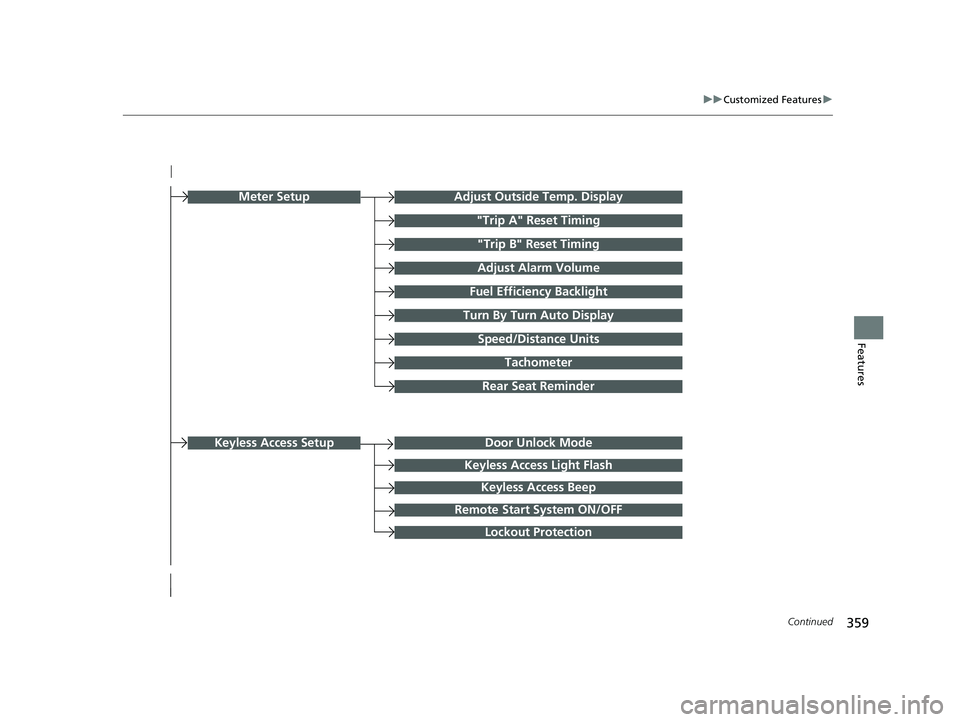
Turn By Turn Auto Display
Speed/Distance Units
Keyless Access Light Flash
Rear Seat Reminder
Door Unlock Mode
Keyless Access Beep
Remote Start System ON/OFF
Lockout Protection
Keyless Access Setup
Meter SetupAdjust Outside Temp. Display
"Trip A" Reset Timing
"Trip B" Reset Timing
Adjust Alarm Volume
Fuel Efficiency Backlight
Tachometer
23 HR-V-313V06000_01.book 359 ページ 2022年4月4日 月曜日 午前10時49分