Page 12 of 664
Visual Index
10
Quick Reference Guide❚Power Window Switches (P159)
❚Master Door Lock Switch (P151)
❚Door Mirror Controls (P179)
❚Interior Fuse Box (P630)
❚Hood Release Handle (P564)
❚Driver’s Front Airbag (P53)
❚Passenger’s Front Airbag (P53)
❚Drive Mode Switch (P429)
❚ (Hill Decent Control) Button (P433)
❚Rearview Mirror (P178)
❚Automatic Brake Hold Button (P532)
❚Electric Parking Brake Switch (P528)
❚Glove Box (P192)
❚Shift Lever (P427)
❚USB Port (P213)
❚Knee Airbags (P58)
❚Knee Airbags (P58)
❚Passenger Airbag Off Indicator
(P67)
❚Wireless Charger* (P197)
23 HR-V-313V06000_01.book 10 ページ 2022年4月4日 月曜日 午前10時49分
Page 27 of 664

25
Quick Reference Guide
CMBSTM On and Off
(P457)
●When a possible frontal collision is likely
unavoidable, the CMBSTM can reduce the
vehicle speed and the severity of the
collision.
●The CMBSTM is turned on every time you
start the engine.
●To turn the CMBSTM on or off, use the
safety support of th e driver information
interface.
VSA ® On and Off (P435)
●The Vehicle Stability AssistTM (VSA® )
system helps stabilize the vehicle during
cornering and helps maintain traction
while accelerating on loose or slippery
road surfaces.
●VSA ® comes on automatically every time
you start the engine.
●To partially disable or fully restore VSA®
function, press and ho ld the button until
you hear a beep.
Tire Pressure Monitoring
System (TPMS)
(P438)
●Detects a change in tire conditions and
overall dimensions due to decrease in tire
pressures.
●The TPMS is turned on automatically
every time you start the engine.
●A calibration procedure must be
performed when certain conditions arise.
U.S. models only
Refueling (P547)
Fuel recommendation: Unl eaded gasoline, pump octa ne number 87 or higher
Fuel tank capacity: 14.0 US gal (53 L)
aUnlock the driver’s
door.
(P 149)
bPress on the edge of
the fuel fill door to
make it pop up
slightly.
cAfter refueling, wait
for about five
seconds before
removing the filler
nozzle.
23 HR-V-313V06000_01.book 25 ページ 2022年4月4日 月曜日 午前10時49分
Page 32 of 664
30
Quick Reference Guide
What to Do If
The power mode does not
change from ACCESSORY
to VEHICLE OFF (LOCK).
Why?The shift lever should be moved to (P.
Why does the brake pedal
pulsate slightly when
applying the brakes?This can occur when the ABS activates and does not indicate a
problem. Apply firm, steady pressure on the brake pedal. Never
pump the brake pedal.
2Anti-lock Brake System (ABS) (P535)
The rear door cannot be
opened from inside the
vehicle. Why?Check if the childproof lock is in the lock
position. If so, open the rear door with
the outside door handle.
To cancel this function, slide the lever up
to the unlock position.
Why do the doors lock
after I unlocked the doors?If you do not open the doors within 30 seconds, the doors are
relocked automatically for security.
23 HR-V-313V06000_01.book 30 ページ 2022年4月4日 月曜日 午前10時49分
Page 33 of 664
31
Quick Reference Guide
Why does the beeper
sound when I open the
driver’s door?The beeper sounds when:
•The exterior lights are left on.
•The power mode is in ACCESSORY.
Why does a beeper sound
when I walk away from the
vehicle after I close the
door?
The beeper sounds if you move outside the walk away auto lock
operating range before the door completely closes.
2Locking the doors and tailgate (Walk away auto lock ®) (P142)
Why does the beeper
sound when I start driving?The beeper sounds when the driver and/or front passenger are
not wearing their seat belts.
Why do I hear a screeching
sound when I apply the
brake pedal?The brake pads may need to be replaced. Have your vehicle
inspected by a dealer.
Pressing the electric
parking brake switch does
not release the parking
brake. Why?Press the electric parking brake switch with the brake pedal
depressed.
Models with keyless access system
23 HR-V-313V06000_01.book 31 ページ 2022年4月4日 月曜日 午前10時49分
Page 129 of 664

127
uuGauges and Driver Information Interface uDriver Information Interface
Continued
Instrument Panel
*1:Default Setting Setup Group Customizable Features
Description Selectable Settings
Keyless access
setup
*
Door unlock mode Changes which doors unlock when you grab the driver’s
door handle. Driver door only*1/
All
doors
Keyless access light
flash Causes some exterior lights
to flash when you unlock/
lock the doors. ON
*1/
OFF
Keyless access beep Causes the beeper to sound when you unlock/lock the
doors.
ON
*1/
OFF
Remote start system
ON/OFF Turns the remote engine start feature on and off.
ON
*1/OFF
Lighting setup
Auto high-beamTurns the auto high -beam on and off.ON*1/OFF
Interior light dimming
timeChanges the length of time the interior lights stay on
after you close the doors.60sec /30sec*1/ 15sec
Headlight auto off
timerChanges the length of time the exterior lights stay on
after you close the driver’s door.60sec /30sec /15sec*1/0sec
Auto light sensitivity*Changes the timing for th e headlights to come on.Max/High /Mid*1/Low /Min
Auto headlight ON
with wiper ONChanges the settings for the wiper operation when the
headlights automatically come on while the headlight
switch is in the AUTO position.
ON*1/OFF
* Not available on all models
23 HR-V-313V06000_01.book 127 ページ 2022年4月4日 月曜日 午前10時49分
Page 130 of 664

128
uuGauges and Driver Information Interface uDriver Information Interface
Instrument Panel
*1:Default Setting Setup Group Customizable Features
Description Selectable Settings
Door setup Auto door lock
Changes the setting for when the doors and the tailgate
automatically lock. With vehicle speed
*1/
Shift from P /OFF
Auto door unlock Changes the setting for when the doors and the tailgate
automatically unlock. All doors when driver’s
door opens
*1/
All doors
when shifted to Park /
All doors when ignition
switched OFF /OFF
Walk away auto lock
*Changes the settings for the auto lock function when
you walk away from the vehicle. ON
/OFF*1
Keyless lock answer
back LOCK/UNLOCK- The exterior lights flash.
LOCK (2nd push)- The beeper sounds.
ON*1/
OFF
Keyless remote power
window control Turns remote window control using the keyless remote
on and off.
ON
*1/
OFF
Lockout prevention
*Changes the settings for the lockout protection
function. ON*1/
OFF
Lock presetting Changes the settings for the Lock Presetting function. ON
*1/OFF
* Not available on all models
23 HR-V-313V06000_01.book 128 ページ 2022年4月4日 月曜日 午前10時49分
Page 135 of 664

133
Controls
This chapter explains how to operate the various controls necessary for driving.
Clock.................................................. 134
Locking and Unlocking the Doors Key .................................................. 136
Low Keyless Remote Signal Strength ... 138
Locking/Unlocking the Doors from the Outside .......................................... 139
Locking/Unlocking the Doors from the Inside ............................................. 149
Childproof Door Locks ..................... 151
Auto Door Locking/Unlocking .......... 152
Tailgate .............................................. 153
Security System
Immobilizer System .......................... 156
Security System Alarm ...................... 156
Windows ........................................... 159 Moonroof*........................................ 162
Operating the Switches Around the Steering Wheel
ENGINE START/STOP Button............. 163
Lights............................................... 166
Auto High-Beam .............................. 171
Wipers and Washers ........................ 174
Rear Defogger/Heat ed Door Mirror
*
Button ........................................... 176
Heated Windshield Button ............... 176
Adjusting the Steering Wheel........... 177
Canadian models
Mirrors Interior Rearview Mirror ................... 178
Power Door Mirrors ......................... 179
Seats Front Seats ...................................... 180
Rear Seats........................................ 183
Maintain a Proper Sitting Position .... 185
Head Restraints................................ 186
Armrest ........................................... 188
Interior Convenience Items .............. 189
Climate Control System Using Automatic Climate Control .... 203
Automatic Climate Control Sensors ... 209
* Not available on all models
23 HR-V-313V06000_01.book 133 ページ 2022年4月4日 月曜日 午前10時49分
Page 141 of 664
139
uuLocking and Unlocking the Doors uLocking/Unlocking the Doors from the Outside
Continued
Controls
Locking/Unlocking the Doors from the Outside
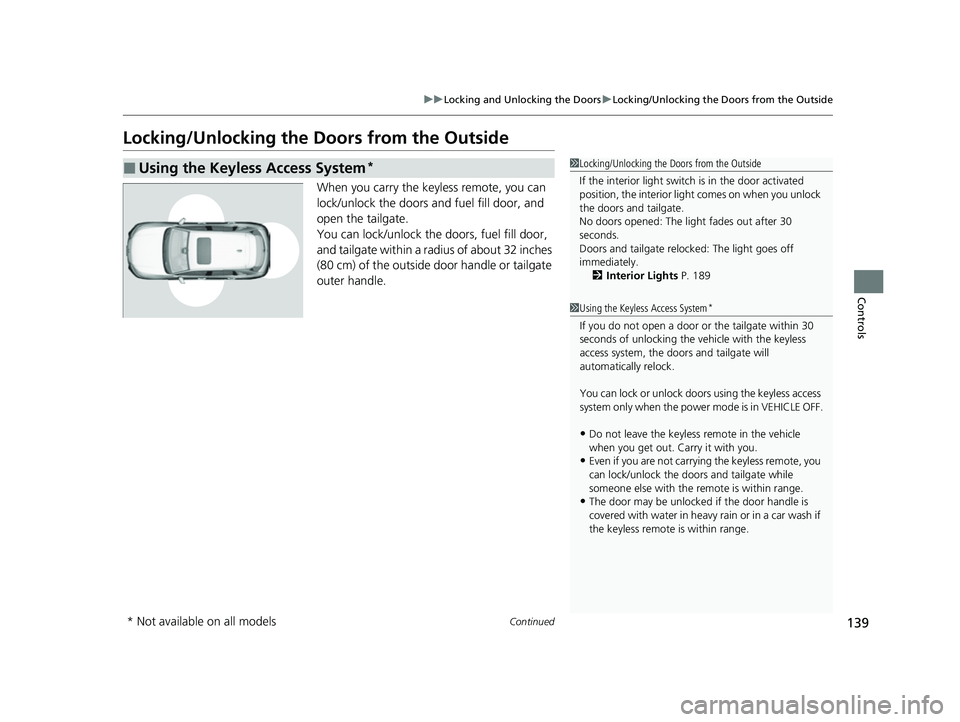
When you carry the keyless remote, you can
lock/unlock the doors and fuel fill door, and
open the tailgate.
You can lock/unlock the doors, fuel fill door,
and tailgate within a radius of about 32 inches
(80 cm) of the outside door handle or tailgate
outer handle.
■Using the Keyless Access System*1Locking/Unlocking the Doors from the Outside
If the interior light switch is in the door activated
position, the interior light comes on when you unlock
the doors and tailgate.
No doors opened: The li ght fades out after 30
seconds.
Doors and tailgate relo cked: The light goes off
immediately. 2 Interior Lights P. 189
1Using the Keyless Access System*
If you do not open a door or the tailgate within 30
seconds of unlocking the vehicle with the keyless
access system, the doors and tailgate will
automatically relock.
You can lock or unlock doors using the keyless access
system only when the power mode is in VEHICLE OFF.
•Do not leave the keyless remote in the vehicle
when you get out. Carry it with you.
•Even if you are not carrying the keyless remote, you
can lock/unlock the doors and tailgate while
someone else with the remote is within range.
•The door may be unlocked if the door handle is
covered with water in heavy rain or in a car wash if
the keyless remote is within range.
* Not available on all models
23 HR-V-313V06000_01.book 139 ページ 2022年4月4日 月曜日 午前10時49分


