Page 156 of 664
154
uuTailgate uOpening/Closing the Tailgate
Controls
Opening/Closing the Tailgate
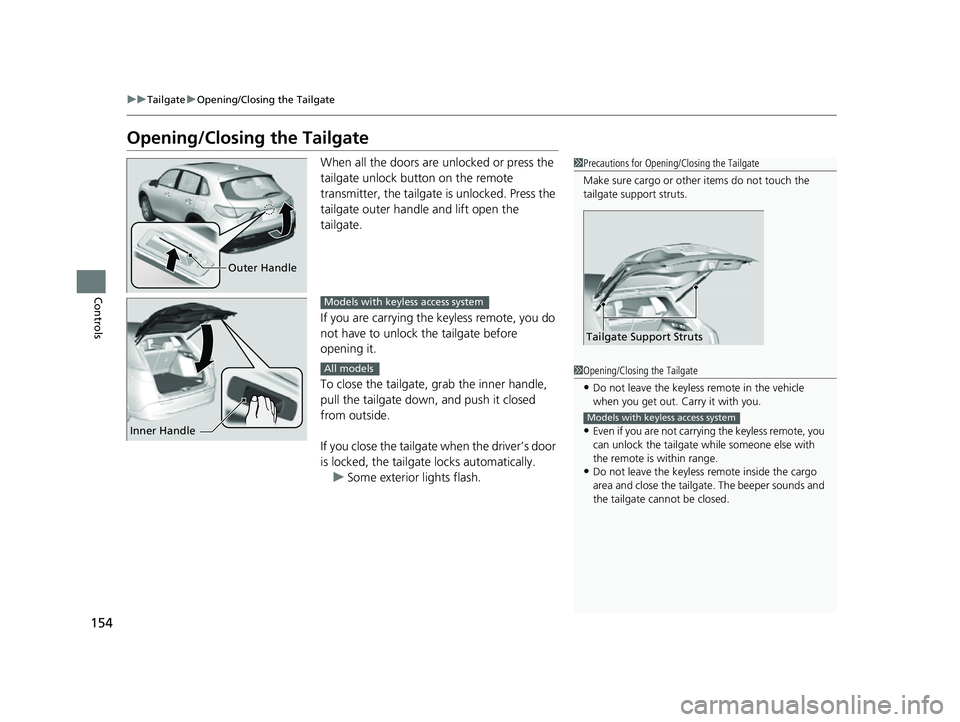
When all the doors are unlocked or press the
tailgate unlock button on the remote
transmitter, the tailgate is unlocked. Press the
tailgate outer handle and lift open the
tailgate.
If you are carrying the keyless remote, you do
not have to unlock the tailgate before
opening it.
To close the tailgate, grab the inner handle,
pull the tailgate down, and push it closed
from outside.
If you close the tailgate when the driver’s door
is locked, the tailgate locks automatically. u Some exterior lights flash.1Precautions for Opening/Closing the Tailgate
Make sure cargo or othe r items do not touch the
tailgate support struts.
Tailgate Support Struts
Outer Handle
Inner Handle
Models with keyless access system
All models1 Opening/Closing the Tailgate
•Do not leave the keyless remote in the vehicle
when you get out. Carry it with you.
•Even if you are not carrying the keyless remote, you
can unlock the tailgate wh ile someone else with
the remote is within range.
•Do not leave the keyless re mote inside the cargo
area and close the tailgate. The beeper sounds and
the tailgate cannot be closed.
Models with keyless access system
23 HR-V-313V06000_01.book 154 ページ 2022年4月4日 月曜日 午前10時49分
Page 158 of 664
156
Controls
Security System
Immobilizer System
This system prevents a key that has not been pre-registered from starting the
engine.
Pay attention to the follo wing when pressing the ENGINE START/STOP button:
• Do not allow objects that emit strong radio waves near the ENGINE START/
STOP button.
• Make sure the key is not covered by or touching a metal object.
• Do not bring a key from another vehi cle’s immobilizer system near the ENGINE
START/STOP button.
• Do not put the key near magnetic items. El ectronic device, such as televisions and
audio systems emit strong magnetic fields. Note that even a key chain can
become magnetic.
Security System Alarm
The security system alarm activates when the tailgate, hood or doors are forcibly
opened. The alarm does not activate if the tailgate or doors are opened with the key,
remote transmitter or keyless access system
*.
However, the alarm activates if a door is opened with the key and then the
transmission is taken out of
(P or the hood is opened before the power mode is in
ON.
■When the security sy stem alarm activates
The horn sounds intermittently, and some exterior lights flash.
1 Immobilizer System
NOTICE
Leaving the key in the vehicl e can result in theft or
accidental movement of the vehicle.
Always take the key with you whenever you leave the
vehicle unattendedM
Do not alter the system or add other devices to itM
Doing so may damage the system and make your
vehicle inoperableM
Apply and hold the brake pedal before turning the
vehicle on the first time after the battery has been
disconnectedM
Canadian models
1 Security System Alarm
Do not alter the system or add other devices to it.
Doing so may damage the system and make your
vehicle inoperable.
The security system alarm continues for a maximum
of two minutes until the security system alarm
deactivates.
* Not available on all models
23 HR-V-313V06000_01.book 156 ページ 2022年4月4日 月曜日 午前10時49分
Page 159 of 664

Continued157
uuSecurity System uSecurity System Alarm
Controls
■To deactivate the security system alarm
Unlock the vehicle using the key, the remo te transmitter or keyless access system*,
or set the power mode to ON. The system, along with the horn and flashing lights,
is deactivated.
■Setting the security system alarm
The security system alarm automatically sets when the following conditions have
been met:
• The power mode is set to VEHICLE OFF.
• The hood is closed.
• All doors and the tailgate are locked from outside with the remote transmitter or
keyless access system
*.
■When the security system alarm sets
The security system alarm in dicator in the instrument panel blinks and the blinking
interval changes after about 15 seconds.
■To cancel the security system alarm
The security system alarm is canceled when the vehicle is unlocked using the remote
transmitter or keyle ss access system
*, or when the power mode is set to ON. The
security system alarm indicato r goes off at the same time.
1Security System Alarm
Do not set the security system alarm when someone
is in the vehicle or a window is open. The system can
accidentally activate when:
•Unlocking the door with the lock tab.•Opening the hood with the hood release handle.
•Taking the transmission out of ( P.
If the battery goes dead after you have set the
security system alarm, the security alarm may activate
once the battery is re charged or replaced.
If this occurs, deactivate the security system alarm by
unlocking a door using the ke y, remote transmitter,
or keyless access system
*.
* Not available on all models
23 HR-V-313V06000_01.book 157 ページ 2022年4月4日 月曜日 午前10時49分
Page 160 of 664
158
uuSecurity System uSecurity System Alarm
Controls
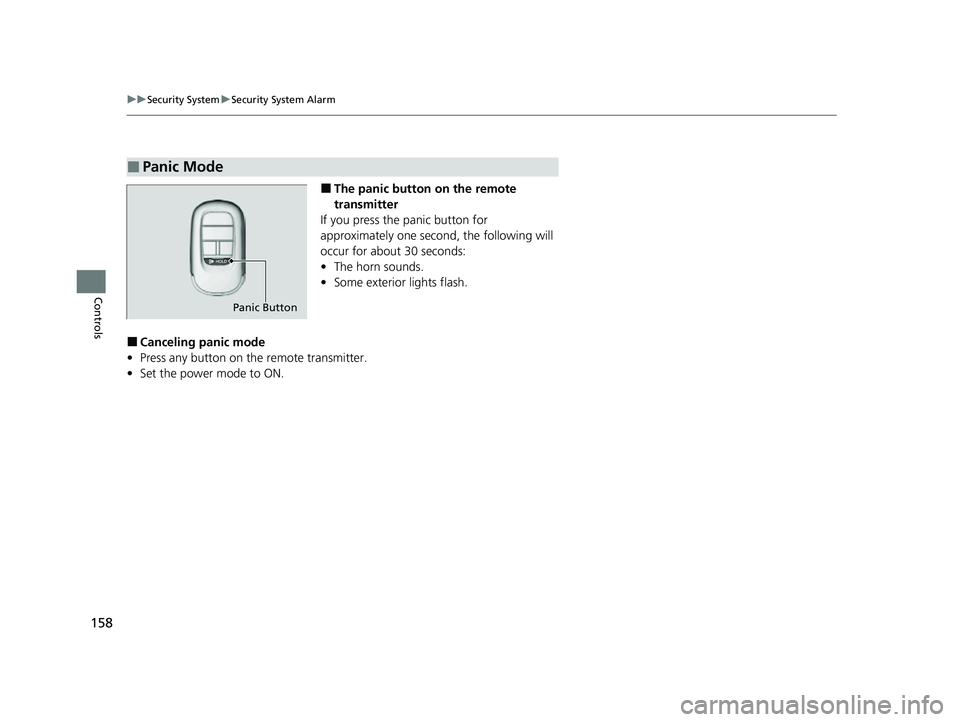
■The panic button on the remote
transmitter
If you press the panic button for
approximately one seco nd, the following will
occur for about 30 seconds:
• The horn sounds.
• Some exterior lights flash.
■Canceling panic mode
• Press any button on the remote transmitter.
• Set the power mode to ON.
■Panic Mode
Panic Button
23 HR-V-313V06000_01.book 158 ページ 2022年4月4日 月曜日 午前10時49分
Page 168 of 664
166
uuOperating the Switches Around the Steering Wheel uLights
Controls
Lights
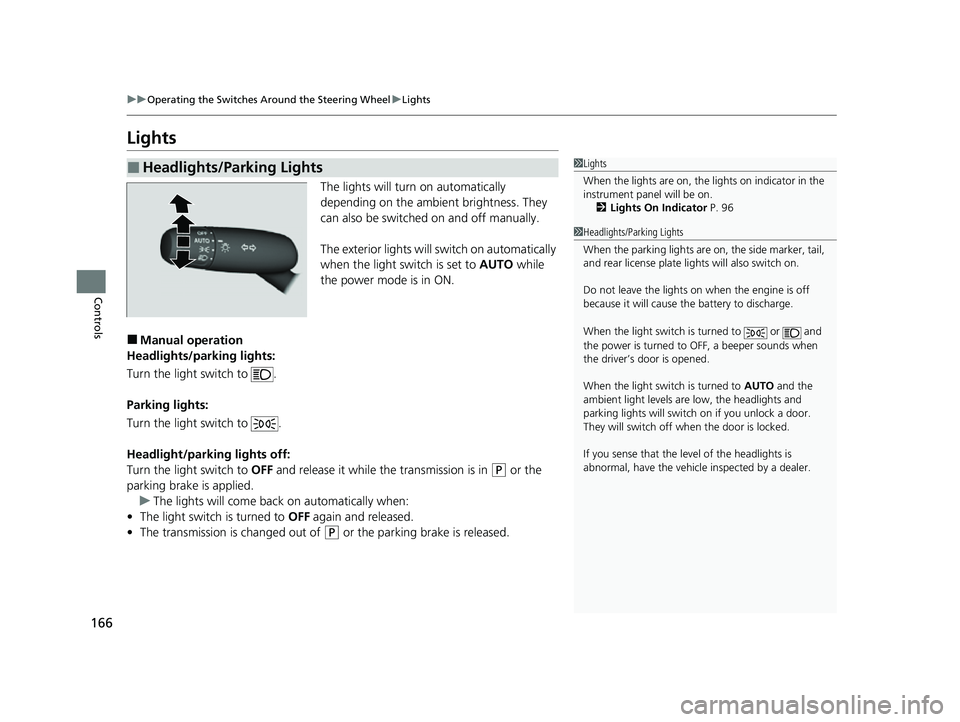
The lights will turn on automatically
depending on the ambient brightness. They
can also be switched on and off manually.
The exterior lights will switch on automatically
when the light switch is set to AUTO while
the power mode is in ON.
■Manual operation
Headlights/parking lights:
Turn the light switch to .
Parking lights:
Turn the light switch to .
Headlight/parking lights off:
Turn the light switch to OFF and release it while the transmission is in
(P or the
parking brake is applied. u The lights will come back on automatically when:
• The light switch is turned to OFF again and released.
• The transmission is changed out of
(P or the parking brake is released.
■Headlights/Parking Lights1Lights
When the lights are on, the lights on indicator in the
instrument pane l will be on.
2 Lights On Indicator P. 96
1Headlights/Parking Lights
When the parking lights are on, the side marker, tail,
and rear license plate li ghts will also switch on.
Do not leave the lights on when the engine is off
because it will cause the battery to discharge.
When the light switch is turned to or and
the power is turned to OFF, a beeper sounds when
the driver’s door is opened.
When the light switch is turned to AUTO and the
ambient light levels are low, the headlights and
parking lights will switch on if you unlock a door.
They will switch off when the door is locked.
If you sense that the le vel of the headlights is
abnormal, have the vehicl e inspected by a dealer.
23 HR-V-313V06000_01.book 166 ページ 2022年4月4日 月曜日 午前10時49分
Page 169 of 664
Continued167
uuOperating the Switches Around the Steering Wheel uLights
Controls
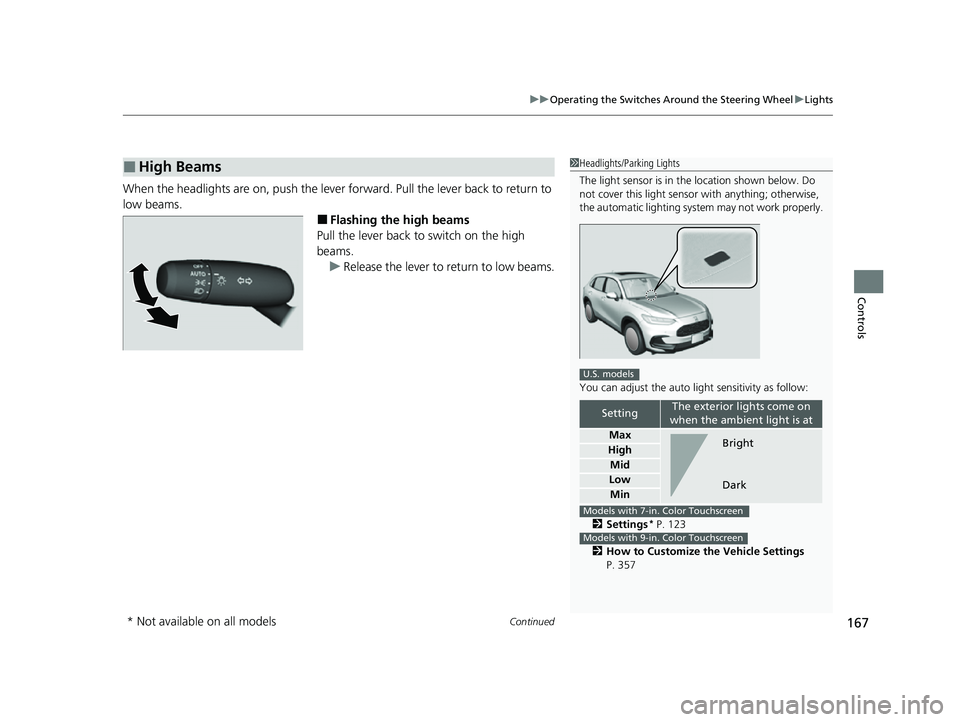
When the headlights are on, push the lever forward. Pull the lever back to return to
low beams.
■Flashing the high beams
Pull the lever back to switch on the high
beams.
u Release the lever to return to low beams.
■High Beams1Headlights/Parking Lights
The light sensor is in the location shown below. Do
not cover this light sensor with anything; otherwise,
the automatic lighting system may not work properly.
You can adjust the auto li ght sensitivity as follow:
2 Settings
* P. 123
2 How to Customize the Vehicle Settings
P. 357
SettingThe exterior lights come on
when the ambient light is at
Max
High
Mid
Low
Min
U.S. models
Bright
Dark
Models with 7-in. Color Touchscreen
Models with 9-in. Color Touchscreen
* Not available on all models
23 HR-V-313V06000_01.book 167 ページ 2022年4月4日 月曜日 午前10時49分
Page 170 of 664
uuOperating the Switches Around the Steering Wheel uLights
168
Controls
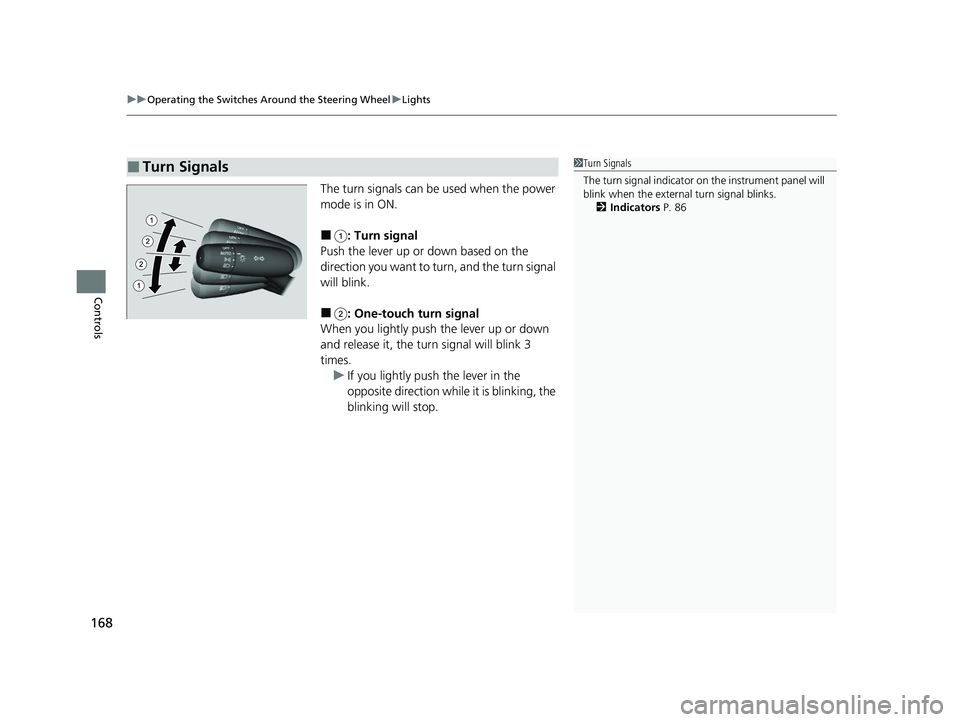
The turn signals can be used when the power
mode is in ON.
■: Turn signal
Push the lever up or down based on the
direction you want to turn, and the turn signal
will blink.
■: One-touch turn signal
When you lightly push the lever up or down
and release it, the turn signal will blink 3
times. u If you lightly push the lever in the
opposite direction while it is blinking, the
blinking will stop.
■Turn Signals1Turn Signals
The turn signal indicator on the instrument panel will
blink when the external turn signal blinks.
2 Indicators P. 86
23 HR-V-313V06000_01.book 168 ページ 2022年4月4日 月曜日 午前10時49分
Page 171 of 664

Continued169
uuOperating the Switches Around the Steering Wheel uLights
Controls
The headlights automatically come on when th e wipers are used several times within
a certain number of intervals with the headlight switch in AUTO.
The headlights automatically go off a few mi nutes later if the wipers are stopped.
The headlights, all other exterior lights, and the instrument panel lights turn off 15
seconds after you set the power mode to VEHICLE OFF, take the remote with you,
and close the driver’s door.
If you set the power mode to VEHICLE OFF with the headlight switch on, but do not
open the door, the lights turn off after 10 minu tes (3 minutes, if the switch is in the
AUTO position).
The lights turn on again when you unlock or open the driver’s door. If you unlock
the door, but do not open it within 15 seconds, the lights go off. If you open the
driver’s door, you will hear a reminder chime alerting you that the lights are on.
■Headlight Integration with Wipers
■Automatic Lighting Off Feature
1 Headlight Integration with Wipers
This feature activates while the headlights are off in
AUTO .
The instrument panel br ightness does not change
when the headlights come on.
At dark ambient light leve ls, the automatic lighting
control feature turns on the headlights, regardless of
the number of wiper sweeps.
You can turn the headlight integration with wipers
function on and off.
2 Settings
* P. 123
2 How to Customize the Vehicle Settings
P. 357
Models with 7-in. Color Touchscreen
Models with 9-in. Color Touchscreen
1 Automatic Lighting Off Feature
You can change the headlight auto off timer setting.
2 Settings
* P. 123
2 How to Customize the Vehicle Settings
P. 357
Models with 7-in. Color Touchscreen
Models with 9-in. Color Touchscreen
* Not available on all models
23 HR-V-313V06000_01.book 169 ページ 2022年4月4日 月曜日 午前10時49分