2023 HONDA HRV light
[x] Cancel search: lightPage 33 of 664

31
Quick Reference Guide
Why does the beeper
sound when I open the
driver’s door?The beeper sounds when:
•The exterior lights are left on.
•The power mode is in ACCESSORY.
Why does a beeper sound
when I walk away from the
vehicle after I close the
door?
The beeper sounds if you move outside the walk away auto lock
operating range before the door completely closes.
2Locking the doors and tailgate (Walk away auto lock ®) (P142)
Why does the beeper
sound when I start driving?The beeper sounds when the driver and/or front passenger are
not wearing their seat belts.
Why do I hear a screeching
sound when I apply the
brake pedal?The brake pads may need to be replaced. Have your vehicle
inspected by a dealer.
Pressing the electric
parking brake switch does
not release the parking
brake. Why?Press the electric parking brake switch with the brake pedal
depressed.
Models with keyless access system
23 HR-V-313V06000_01.book 31 ページ 2022年4月4日 月曜日 午前10時49分
Page 53 of 664

51
uuAirbags uAirbag System Components
Continued
Safe Driving
The front, driver’s kn ee, front passenger’s
knee, side, and side curtain airbags are
deployed according to the direction and
severity of impact. Both side curtain airbags
are deployed in a rollover. The airbag
system includes:
aTwo SRS (Supplemental Restraint System)
front airbags. The driver’s airbag is stored
in the center of the steering wheel; the
front passenger’s airbag is stored in the
dashboard. Both are marked SRS
AIRBAG.
bTwo knee airbags. The driver’s knee
airbag is stored under the steering
column; the front passenger’s knee
airbag is stored under the glove box.
Both are marked SRS AIRBAG.
cFour side airbags, one for the driver, one
for the front passenger and two for the
rear outboard seat occupants. The front
airbags are stored in the outer edges of
the seat-backs and the rear airbags are
stored next to the outer rear seating
positions. All are marked SIDE AIRBAG.
dTwo side curtain airbags, one for each
side of the vehicle. The airbags are stored
in the ceiling, abov e the side windows.
The front and rear pillars are marked
SIDE CURTAIN AIRBAG .
eAn electronic control unit that, when the
power mode is in ON, continually
monitors information about the various
impact sensors, seat and buckle sensors,
rollover sensor, airbag activators, seat
belt tensioners, and other vehicle
information. During a crash event the
unit can record such information.
fAutomatic seat belt tensioners for the
front seats and outer rear seats. In
addition, the driver’s and front
passenger’s seat belt buckles incorporate
sensors that detect whether or not the
belts are fastened.
gDriver’s seat position sensor. This sensor
detects the driver’s s eat slide position to
help determine the optimal deployment
of the driver’s airbag.
hWeight sensors in the front passenger’s
seat. The sensors are used for occupant
classification to activate or deactivate the
front passenger’s airbag.
iImpact sensors that can detect a
moderate-to-severe front or side impact.
jAn indicator near the front map lights
that alerts you that the front passenger’s
front airbag has been turned off.
kAn indicator on the instrument panel that
alerts you to a possib le problem with your
airbag system or seat belt tensioners.
lA rollover sensor that can detect if your
vehicle is about to ro ll over and signal the
control unit to deploy both side curtain
airbags.
mPressure sensors inside each front door
that control side airbag deployment.
23 HR-V-313V06000_01.book 51 ページ 2022年4月4日 月曜日 午前10時49分
Page 58 of 664
uuAirbags uFront Airbags (SRS)
56
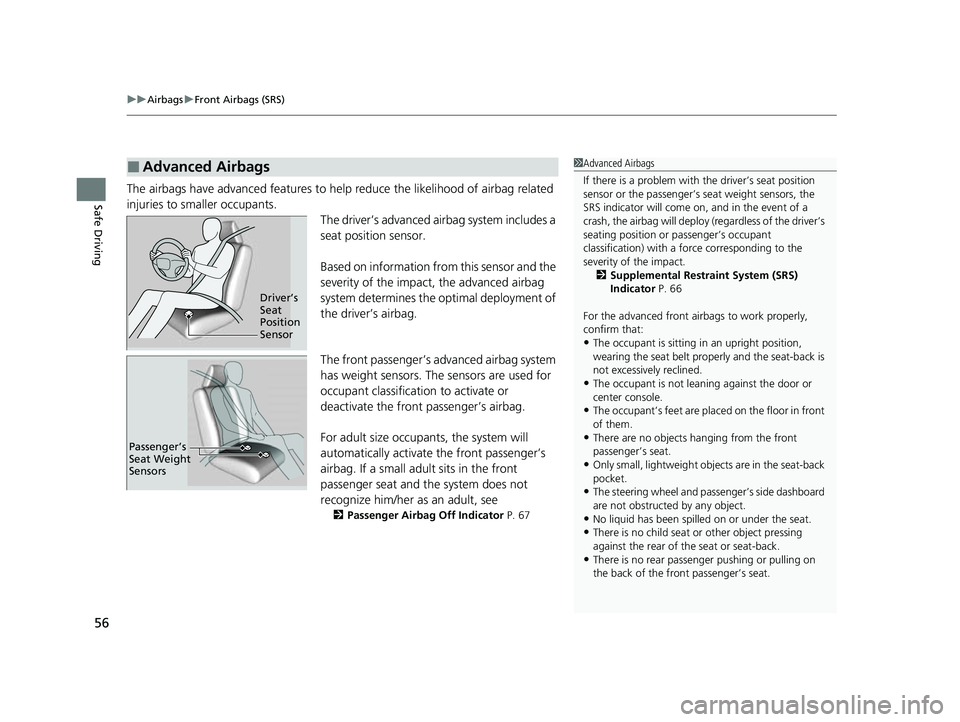
Safe DrivingThe airbags have advanced features to help reduce the likelihood of airbag related
injuries to smaller occupants.
The driver’s advanced airbag system includes a
seat position sensor.
Based on information from this sensor and the
severity of the impact, the advanced airbag
system determines the optimal deployment of
the driver’s airbag.
The front passenger’s advanced airbag system
has weight sensors. The sensors are used for
occupant classification to activate or
deactivate the front passenger’s airbag.
For adult size occupants, the system will
automatically activate the front passenger’s
airbag. If a small adult sits in the front
passenger seat and the system does not
recognize him/her as an adult, see
2Passenger Airbag Off Indicator P. 67
■Advanced Airbags1Advanced Airbags
If there is a problem with the driver’s seat position
sensor or the passenger’s s eat weight sensors, the
SRS indicator will come on, and in the event of a
crash, the airbag will deploy (regardless of the driver’s
seating position or passenger’s occupant
classification) with a force corresponding to the
severity of the impact. 2 Supplemental Restraint System (SRS)
Indicator P. 66
For the advanced front airbags to work properly,
confirm that:
•The occupant is sitting in an upright position,
wearing the seat belt prope rly and the seat-back is
not excessively reclined.
•The occupant is not leaning against the door or
center console.
•The occupant’s feet are plac ed on the floor in front
of them.
•There are no objects ha nging from the front
passenger’s seat.
•Only small, lightweight objects are in the seat-back
pocket.
•The steering wheel and passenger’s side dashboard
are not obstructed by any object.
•No liquid has been spille d on or under the seat.•There is no child seat or other object pressing
against the rear of the seat or seat-back.
•There is no rear passenger pushing or pulling on
the back of the front passenger’s seat.
Driver’s
Seat
Position
Sensor
Passenger’s
Seat Weight
Sensors
23 HR-V-313V06000_01.book 56 ページ 2022年4月4日 月曜日 午前10時49分
Page 69 of 664
Continued67
uuAirbags uAirbag System Indicators
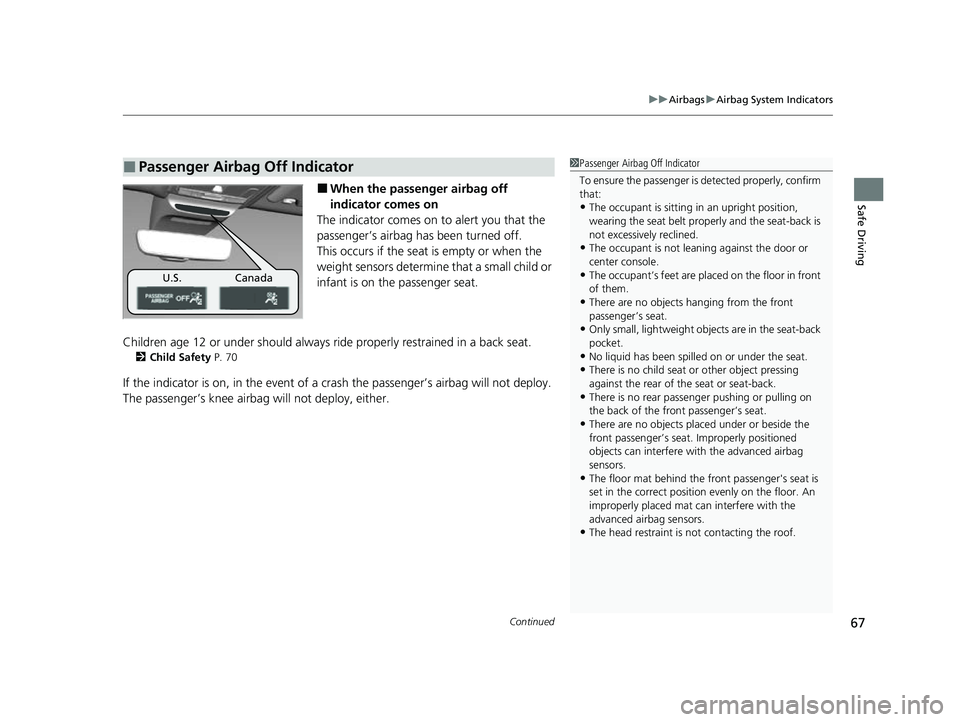
Safe Driving■When the passenger airbag off
indicator comes on
The indicator comes on to alert you that the
passenger’s airbag has been turned off.
This occurs if the seat is empty or when the
weight sensors determine that a small child or
infant is on the passenger seat.
Children age 12 or under should always ride properly restrained in a back seat.
2 Child Safety P. 70
If the indicator is on, in the event of a cr ash the passenger’s airbag will not deploy.
The passenger’s knee airbag will not deploy, either.
■Passenger Airbag Off Indicator1 Passenger Airbag Off Indicator
To ensure the passenger is detected properly, confirm
that:
•The occupant is sitting in an upright position,
wearing the seat belt prope rly and the seat-back is
not excessively reclined.
•The occupant is not leaning against the door or
center console.
•The occupant’s feet are plac ed on the floor in front
of them.
•There are no objects ha nging from the front
passenger’s seat.
•Only small, lightweight objects are in the seat-back
pocket.
•No liquid has been spille d on or under the seat.
•There is no child seat or other object pressing
against the rear of the seat or seat-back.
•There is no rear passenger pushing or pulling on
the back of the front passenger’s seat.
•There are no objects placed under or beside the
front passenger’s seat . Improperly positioned
objects can interfere with the advanced airbag
sensors.
•The floor mat behind the front passenger's seat is
set in the correct position evenly on the floor. An
improperly placed mat can interfere with the
advanced airbag sensors.
•The head restraint is not contacting the roof.
U.S. Canada
23 HR-V-313V06000_01.book 67 ページ 2022年4月4日 月曜日 午前10時49分
Page 89 of 664

87
uuIndicators u
Continued
Instrument Panel
Parking Brake and
Brake System
Indicator (Red)
Parking Brake and
Brake System
Indicator (Amber)
U.S.
Canada
U.S.
Canada Automatic Brake
Hold System Indicator
Automatic Brake Hold
Indicator
U.S.
Canada
*1 : When you set the power mode to ON, these indicators come on to indicate that system checks are being performed. They go off a few seconds later or after the engine
has started. If an indicator does not come on or turn off, ther e may be a malfunction in the corresponding system. To resolve the issue, follow the instructions in the
owner's manual.
P. 88*1
Malfunction Indicator
Lamp
Charging System
Indicator
Anti-lock Brake System
(ABS ) Indicator
Seat Belt Reminder
Indicator
Low Fuel Indicator
(Amber)
Vehicle Stability AssistTM
(VSA®) System Indicator
Vehicle Stability Assist
TM
(VSA®) OFF Indicator
Supplemental Restraint
System Indicator
Auto High-Beam
Indicator
Low Tire Pressure/TPMS
Indicator*
Electric Power Steering
(EPS) System Indicator
Turn Signal and Hazard
Warning Indicators
Lights On Indicator
High Beam Indicator
System Message Indicator
Adaptive Cruise Control
(ACC) with Low Speed
Follow Indicator (Amber)
Lane Keeping Assist System
(LKAS) Indicator (Amber)
Safety Support Indicator
(Green/Gray)
P. 90
P. 90
P. 90
P. 91
P. 91*1 *1
P. 95
*1
Shift Position Indicator P. 91
Transmission System
Indicator P. 91
P. 92
P. 92
P. 93
P. 93
P. 96
P. 94
*1
*1
P. 94
*1 P. 93
P. 99
*1
P. 96
P. 96
P. 96
Immobilizer System
Indicator
Security System Alarm
Indicator P. 97
P. 98
P. 100
P. 103
*1
Adaptive Cruise Control
(ACC) with Low Speed
Follow Indicator (White/
Green) P. 99
*1
Lane Keeping Assist
System (LKAS) Indicator
(White/Green) P. 100
*1Safety Support Indicator
(Amber) P. 101
*1
Cruise Mode Indicator
(White/Green) P. 99
*1
Low Temperature
Indicator P. 92
P. 97*1 *1
ECON
Mode Indicator P. 98
NORMAL Mode Indicator P. 98
SNOW Mode Indicator P. 98
Hill Descent Control System
Indicator (White/Green) P. 98*1
*1 *1
*1
*1
* Not available on all models
23 HR-V-313V06000_01.book 87 ページ 2022年4月4日 月曜日 午前10時49分
Page 98 of 664

96
uuIndicators u
Instrument Panel
IndicatorNameOn/BlinkingExplanation
Turn Signal and
Hazard Warning
Indicators•Blinks when you oper ate the turn signal
lever.
• Blinks along with all turn signals when you
press the hazard warning button.•Does not blink or blinks rapidly - Have your
vehicle checked by a dealer.
Lights On
Indicator• Comes on when the parking, tail, and other
external lights are on.2 Lights P. 166
High Beam
Indicator•Comes on when the high beam headlights
are on.—
Auto High-Beam
Indicator•Comes on when all the operating conditions
of the auto high-beam are met.2 Auto High-Beam P. 171
23 HR-V-313V06000_01.book 96 ページ 2022年4月4日 月曜日 午前10時49分
Page 100 of 664

98
uuIndicators u
Instrument Panel
IndicatorNameOn/BlinkingExplanation
ECON Mode
Indicator• Comes on when you set the drive mode to
ECON .2Drive Mode Switch P. 429
NORMAL Mode
Indicator• Comes on when you set the drive mode to
NORMAL .2Drive Mode Switch P. 429
SNOW Mode
Indicator• Comes on when you set the drive mode to
SNOW .2Drive Mode Switch P. 429
Hill Descent
Control System
Indicator (White/
Green)•Lights up in white when the hill descent
control system is on and ready to use.
• Lights up in green when the hill descent
control system is in operation.
2 Hill Descent Control System P. 432
System Message
Indicator
•Comes on along with a beep when a
problem is detected. A system message on
the driver information interface appears at
the same time.•While the indicator is on, press the (home)
button, and select Warnings to see the message
again.
2 Accessing contents in the display P. 107
•Refer to the Indicators in formation in this chapter
when a system message appears on the driver
information interface. Respond to the message
accordingly.
• The driver information interface will not return to
the normal screen unless the warning is canceled,
or the (home) button is pressed.
23 HR-V-313V06000_01.book 98 ページ 2022年4月4日 月曜日 午前10時49分
Page 101 of 664

99
uuIndicators u
Continued
Instrument Panel
IndicatorNameOn/BlinkingExplanation
Adaptive Cruise
Control (ACC)
with Low Speed
Follow Indicator
(Amber)
●Comes on if there is a problem with ACC
with Low Speed Follow.●Comes on while driving - Have your vehicle
checked by a dealer.
●Indicator may come on temporarily when the
Maximum Load Limit is exceeded.
●ACC with Low Speed Follow has been
automatically canceled.
●Make sure the total load is within the Maximum
Load Limit.
2 Maximum Load Limit P. 413●Stays on constantly - Have your vehicle checked
by a dealer.
●Comes on if the ACC with Low Speed Follow
is deactivated temporarily after the battery
has been disconnected, then re-connected.●Drive a short distance at more than 12 mph (20
km/h). The indicator should go off. If it does not,
have your vehicle checked by a dealer.
Adaptive Cruise
Control (ACC)
with Low Speed
Follow Indicator
(White/Green)●Lights up in white when you press the
button.
●Lights up in green when you press the
RES/+/SET/− switch up or down.2Adaptive Cruise Control (ACC) with Low
Speed Follow P. 471
Cruise Mode
Indicator (White/
Green)●Lights up in white when you change to
cruise mode.
●Lights up in green when you have set a
speed for cruise control.
2To Switch ACC with Low Speed Follow to
Cruise Control P. 488
23 HR-V-313V06000_01.book 99 ページ 2022年4月4日 月曜日 午前10時49分