2023 HONDA HRV light
[x] Cancel search: lightPage 515 of 664
Continued513
uuHonda Sensing ®u Road Departure Mitigation System
Driving
The system activates when all of the following conditions are met:
• The vehicle is traveling between about 45 and 90 mph (72 and 145 km/h).
• The vehicle is on a straight or slightly curved road.
• The turn signals are off.
• The system makes a determination that th e driver is not actively accelerating,
braking, or steering.
■How the System Activates1 How the System Activates
The Road Departure Mi tigation system may
automatically shut off and the safety support
indicator (amber) co mes and stays on.
2 Indicators P. 86
The Road Departure Mitiga tion system function can
be impacted when the vehicle is:
•Driven on the inside edge of a curve, or outside of
a lane.
•Driven in a narrow lane.
23 HR-V-313V06000_01.book 513 ページ 2022年4月4日 月曜日 午前10時49分
Page 517 of 664
515
uuHonda Sensing ®u Road Departure Mitigation System
Continued
Driving
The system may not properly detect lane ma rkings (in white or yellow), the outer
edge of the pavement (into grass or grav el border) or an oncoming vehicle under
certain conditions. Some ex amples of these conditions are listed below.
■Environmental conditions
• There is little contrast between lane lines and the roadway surface.
• Driving in bad weather (rain, fog, snow, etc.).
• Driving on a snowy or wet roadway.
• Driving into low sunlight (e.g., at dawn or dusk).
• Shadows of adjacent objects (trees, buildings, guard rails, vehicles, etc.) are
parallel to white (or yellow) lines.
• Sudden changes between light and dark, such as the entrance or exit of a tunnel
or the shadows of trees, buildings, etc.
• Strong light is reflec ted onto the roadway.
• Driving at night or in a dark place such as a tunnel (due to low-light conditions,
lane lines, the road surface, or onc oming vehicles may not be illuminated).
• The distance between your vehicle and the vehicle ahead of you is too short, and
lane lines and the road surface are not visible.
• The outer edge of the road is bordered by objects, materials, etc. other than grass
or gravel.
■Road Departure Mitigation syst em Conditions and Limitations
23 HR-V-313V06000_01.book 515 ページ 2022年4月4日 月曜日 午前10時49分
Page 519 of 664

517
uuHonda Sensing ®u Road Departure Mitigation System
Continued
Driving
■Vehicle conditions
• When lighting is weak due to dirt covering the headlight lenses, or there is poor
visibility in a dark place due to the headlights being improperly adjusted.
• The front of the camera is covered by dirt, fog, rain, mud, wet snow, seals,
accessories, stickers, or film on the windshield.
• Driving at night or in a dark place (e.g., a tunnel) with the headlights off.
• When the driver operates the brake pedal and steering wheel.
• There is residue on the windshi eld from the windshield wipers.
• An abnormal tire or wheel condition (inco rrect sizes, varied sizes or construction,
improperly inflated, co mpact spare tire, etc.).
• The vehicle is tilted due to heavy load in the cargo area or rear seats.
• Tire chains are installed.
• The suspension has been modified.
■Examples of limitations on detectio n due to the condition of oncoming
vehicles
• The oncoming vehicle or vehicle ahead of you is sideways.
• The oncoming vehicle jumps out in front of you.
• When the oncoming vehicle blends in with the background, preventing the
system from recognizing it.
• The headlights of an oncoming vehicle are lit on one side or not lit on either side
in a dark place.
• The distance between your vehicle and the oncoming vehicle is too short.
• Part of the oncoming vehicle is not visi ble due to the vehicle ahead of you.
• There are multiple oncoming lanes or turning lanes.
• The vehicle in the adjacent lane is parked or moving at an extremely slow speed.
23 HR-V-313V06000_01.book 517 ページ 2022年4月4日 月曜日 午前10時49分
Page 523 of 664

Continued521
uuHonda Sensing ®u Traffic Sign Recognition System
Driving
The traffic sign recognition system may not be able to recognize a traffic sign in the
following cases.
■Environmental conditions
• Driving into low sunlight (e.g., at dawn or dusk).
• Strong light is reflec ted onto the roadway.
• Driving at night, in dark areas such as long tunnels.
• Driving in bad weather (rain, fog, snow, etc.).
• Sudden changes between light and dark, such as the entrance or exit of a tunnel
or the shadows of trees, buildings, etc.
• Water is sprayed by or snow blown from a vehicle ahead.
■Roadway conditions
• Your vehicle is strongly shaken on uneven road surfaces.
■Vehicle conditions
• When lighting is weak due to dirt covering the headlight lenses, or there is poor
visibility in a dark place due to the headlights being improperly adjusted.
• The front of the camera is covered by dirt, fog, rain, mud, wet snow, seals,
accessories, stickers, or film on the windshield.
• There is residue on the windshi eld from the windshield wipers.
• An abnormal tire or wheel condition (inco rrect sizes, varied sizes or construction,
improperly inflated, co mpact spare tire, etc.).
• The vehicle is tilted due to heavy load in the cargo area or rear seats.
• The suspension has been modified.
• Tire chains are installed.
• Driving at night or in a dark place (e.g., a tunnel) with the headlights off.
■Traffic Sign Recognition System Conditions and Limitations1Traffic Sign Recognition System Conditions and Limitations
When the traffic sign recognition system
malfunctions, appears on the gauge. If this
message does not disappear, have your vehicle
checked by a dealer.
23 HR-V-313V06000_01.book 521 ページ 2022年4月4日 月曜日 午前10時49分
Page 524 of 664
522
uuHonda Sensing ®u Traffic Sign Recognition System
Driving
■The position or the cond ition of the traffic sign
• The sign is in a place that makes it hard to find.
• The sign is located far away from your vehicle.
• The sign is located where it is hard for headlight beams to reach.
• The sign is on a corner or bend in the road.
• The sign is faded or bent.
• The sign is rotated or damaged signs.
• The sign is covered with mud, snow, or frost.
• Part of the sign is hidden by the trees, or is in the shadow of a vehicle or other
object.
• Light (such as a streetlight) is reflected on the surface of the sign, or it is hidden
in shadow.
• The sign is too bright or too dark (electric signs).
• Small signs (auxiliary signs, etc.).
■Other conditions
• When you are driving at a high speed.
23 HR-V-313V06000_01.book 522 ページ 2022年4月4日 月曜日 午前10時49分
Page 530 of 664
528
Driving
Braking
Brake System
Use the parking brake to keep the vehicle stationary when parked. When the
parking brake is applied, you can ma nually or automatically release it.
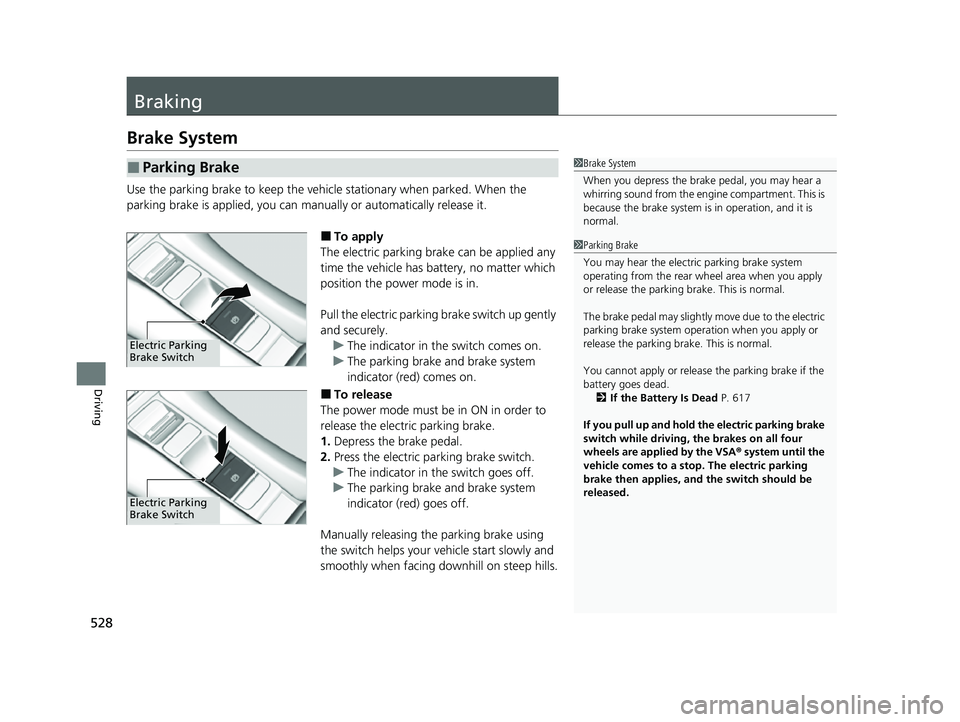
■To apply
The electric parking brake can be applied any
time the vehicle has battery, no matter which
position the power mode is in.
Pull the electric parking brake switch up gently
and securely. u The indicator in the switch comes on.
u The parking brake and brake system
indicator (red) comes on.
■To release
The power mode must be in ON in order to
release the electric parking brake.
1. Depress the brake pedal.
2. Press the electric parking brake switch.
u The indicator in the switch goes off.
u The parking brake and brake system
indicator (red) goes off.
Manually releasing the parking brake using
the switch helps your ve hicle start slowly and
smoothly when facing downhill on steep hills.
■Parking Brake1 Brake System
When you depress the brak e pedal, you may hear a
whirring sound from the engine compartment. This is
because the brake system is in operation, and it is
normal.
Electric Parking
Brake Switch
Electric Parking
Brake Switch
1 Parking Brake
You may hear the electric parking brake system
operating from the rear wh eel area when you apply
or release the parking brake. This is normal.
The brake pedal may slightly move due to the electric
parking brake system opera tion when you apply or
release the parking br ake. This is normal.
You cannot apply or release the parking brake if the
battery goes dead.
2 If the Battery Is Dead P. 617
If you pull up and hold the electric parking brake
switch while driving, the brakes on all four
wheels are applied by the VSA ® system until the
vehicle comes to a stop. The electric parking
brake then applies, and the switch should be
released.
23 HR-V-313V06000_01.book 528 ページ 2022年4月4日 月曜日 午前10時49分
Page 533 of 664

Continued531
uuBraking uBrake System
Driving
Your vehicle is equipped with disc brakes at all four wheels. The brake assist system
increases the stopping force when you depress the brake pedal hard in an
emergency situation. The an ti-lock brake system (ABS) helps you retain steering
control when brak ing very hard.
2Brake Assist System P. 536
2 Anti-lock Brake System (ABS) P. 535
■Foot Brake1Foot Brake
Check the brakes after driving through deep water,
or if there is a buildup of road surface water. If
necessary, dry the brakes by lightly depressing the
pedal several times.
If you hear a continuous me tallic friction sound when
applying the brakes, this is caused by the brake wear
indicator rubbing on the brake rotor and indicates
that the brake pads need to be replaced. Have the
vehicle checked by a deal er. If you hear only an
occasional squeak or squeal when you initially apply
the brake pedal, this may be normal and caused by
high frequency vibr ation of the brake pads against
the rotating brake disc.
Constantly using the brake pedal while going down a
long hill builds up heat, which reduces the brake
effectiveness. Apply engine braking by taking your
foot off the accelerator pe dal and downshifting to a
lower speed position.
Do not rest your foot on the brake pedal while
driving, as it will lightly apply the brakes and cause
them to lose effectiveness over time and reduce pad
life. It will also conf use drivers behind you.
Whenever the brakes are activated by CMBS
TM or
another system that automa tically controls braking,
the brake pedal is depressed and released in
accordance with braking function.
23 HR-V-313V06000_01.book 531 ページ 2022年4月4日 月曜日 午前10時49分
Page 534 of 664
uuBraking uBrake System
532
Driving
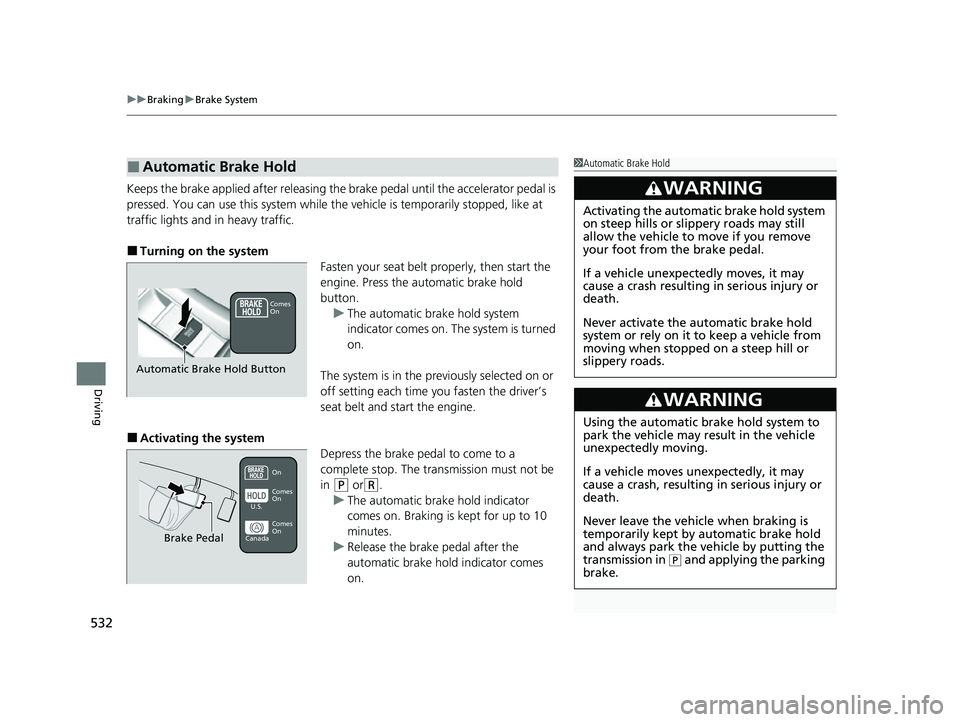
Keeps the brake applied after releasing the brake pedal until the accelerator pedal is
pressed. You can use this system while the vehicle is temporarily stopped, like at
traffic lights and in heavy traffic.
■Turning on the system
Fasten your seat belt properly, then start the
engine. Press the automatic brake hold
button.u The automatic brake hold system
indicator comes on. The system is turned
on.
The system is in the previously selected on or
off setting each time you fasten the driver’s
seat belt and start the engine.
■Activating the system Depress the brake pedal to come to a
complete stop. The transmission must not be
in
(P or(R.
u The automatic brake hold indicator
comes on. Braking is kept for up to 10
minutes.
u Release the brake pedal after the
automatic brake hold indicator comes
on.
■Automatic Brake Hold1Automatic Brake Hold
3WARNING
Activating the automatic brake hold system
on steep hills or slippery roads may still
allow the vehicle to move if you remove
your foot from the brake pedal.
If a vehicle unexpectedly moves, it may
cause a crash resulting in serious injury or
death.
Never activate the automatic brake hold
system or rely on it to keep a vehicle from
moving when stopped on a steep hill or
slippery roads.
3WARNING
Using the automatic brake hold system to
park the vehicle may result in the vehicle
unexpectedly moving.
If a vehicle moves unexpectedly, it may
cause a crash, resulting in serious injury or
death.
Never leave the vehicle when braking is
temporarily kept by automatic brake hold
and always park the vehicle by putting the
transmission in
( P and applying the parking
brake.
Comes
On
Automatic Brake Hold Button
On
Brake Pedal
Comes
On Comes
On
U.S.
Canada
23 HR-V-313V06000_01.book 532 ページ 2022年4月4日 月曜日 午前10時49分