Page 98 of 719

97
uuIndicators u
Continued
Instrument Panel
*1 : When you set the power mode to ON, these indicators come on to indicate that system checks are being performed. They go off a few seconds later or after the power
system has started. If an indicator does not come on or turn o ff, there may be a malfunction in the corresponding system. To re solve the issue, follow the instructions in
the owner's manual. Adaptive Cruise Control
(ACC) with Low S
p
eed
Follow Indicator (Amber)
Lane Keeping Assist System
(LKAS) Indicator (Amber)
Safety Support Indicator
(Green/Gray)
P. 109
P. 110
P. 113*1
Adaptive Cruise Control
(ACC) with Low Speed
Follow Indicator (White/
Green) P. 109
*1
Lane Keeping Assist
System (LKAS) Indicator
(White/Green) P. 110
*1Safety Support Indicator
(Amber) P. 111
System Message Indicator
Immobilizer System
Indicator
P. 107
P. 108
Cruise Mode Indicator
(White/Green) P. 109
P. 107
Hill Descent Control System
Indicator (White/Green) P. 108*1
Security System Alarm
Indicator
ECON Mode Indicator P. 108
NORMAL Mode Indicator P. 108
SNOW Mode Indicator P. 108
SPORT Mode Indicator P. 108
Auto High-Beam
Indicator
Lights On Indicator
High Beam Indicator
P. 106
P. 106
P. 106*1
Turn Signal and Hazard
Warning Indicators P. 106
Page 107 of 719
106
uuIndicators u
Instrument Panel
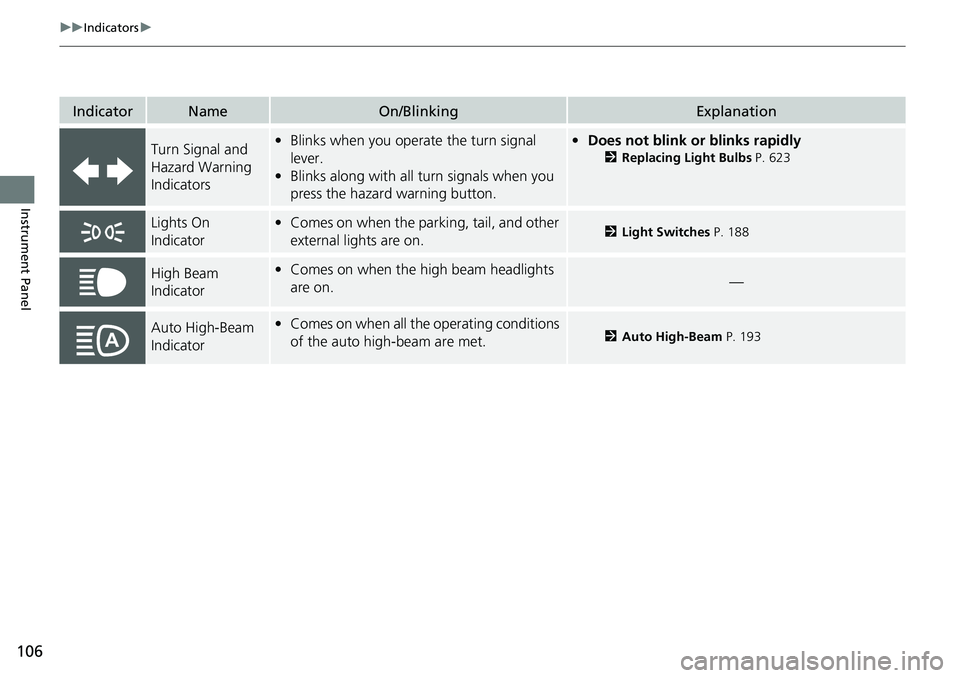
IndicatorNameOn/BlinkingExplanation
Turn Signal and
Hazard Warning
Indicators•Blinks when you oper ate the turn signal
lever.
• Blinks along with all turn signals when you
press the hazard warning button.•Does not blink or blinks rapidly
2 Replacing Light Bulbs P. 623
Lights On
Indicator•Comes on when the parking, tail, and other
external lights are on.2 Light Switches P. 188
High Beam
Indicator•Comes on when the high beam headlights
are on.—
Auto High-Beam
Indicator•Comes on when all the operating conditions
of the auto high-beam are met.2 Auto High-Beam P. 193
Page 109 of 719

108
uuIndicators u
Instrument Panel
IndicatorNameOn/BlinkingExplanation
ECON Mode
Indicator• Comes on when you set the drive mode to
ECON .2Drive Mode Switch P. 470
SPORT Mode
Indicator●Comes on when you se t the drive mode to
SPORT.●The ambient meter remains lit up in red as long as
SPORT mode is selected.
2 Drive Mode Switch P. 470
NORMAL Mode
Indicator• Comes on when you set the drive mode to
NORMAL .2Drive Mode Switch P. 470
SNOW Mode
Indicator• Comes on when you set the drive mode to
SNOW .2Drive Mode Switch P. 470
Hill Descent
Control System
Indicator (White/
Green)•Lights up in white wh en the Hill Descent
Control System is on and ready to use.
• Lights up in green when the Hill Descent
Control System is in operation.
2 Hill Descent Control System P. 474
System Message
Indicator
•Comes on along with a beep when a
problem is detected. A system message on
the driver information interface appears at
the same time.•While the indicator is on, press the (home)
button, and select Warnings to see the message
again.
2 Switching the Display P. 117
•Refer to the Indicators in formation in this chapter
when a system message appears on the driver
information interface. Take the appropriate action
for the message.
• The driver information interface will not return to
the normal screen unless the warning is canceled,
or the (home) button is pressed.
Page 118 of 719

117
uuGauges and Driver Information Interface uDriver Information Interface
Continued
Instrument Panel
Driver Information Interface
The driver information interface shows information such as the estimated travelable
distance and fuel economy of the vehicle. It also displays messages such as warnings
and other helpful information.
When a warning message displays, please check the message and contact a dealer
to have the vehicle inspected if necessary. Please refer to the pages below if the
Engine oil pressure low, Engine temperature too hot or Limited stopping
power! message is displayed.
2If the Engine oil pressure low Warning Appears P. 676
2 Overheating P. 674
2 If the Limited stopping power Warning Appears P. 677
Press the (home) button, then roll the left selector wheel to scroll to the content
you want to see. Press the left sele ctor wheel to see detailed information.
■Switching the Display1Switching the Display
You can add or delete the meter contents.
2 Gauge Display Settings P. 134
Page 119 of 719
118
uuGauges and Driver Information Interface uDriver Information Interface
Instrument PanelGauge display
settings
P. 134
Left Selector
Wheel
(Home) Button
Roll the left
selector wheel.No content
P. 132
Speed & time
P. 123
Warnings
P. 134
Power flow
P. 119
Settings
*
P. 135
Driver
attention
P. 126
Seat belts
P. 130
Safety
support
P. 130
Maintenance
P. 130 Phone
P. 124 Audio
P. 124
Navigation
*
P. 125
AWD torque
distribution
*
P. 129
Brightness
P. 133
Range & fuel
P. 121
* Not available on all models
Page 135 of 719
uuGauges and Driver Information Interface uDriver Information Interface
134
Instrument Panel
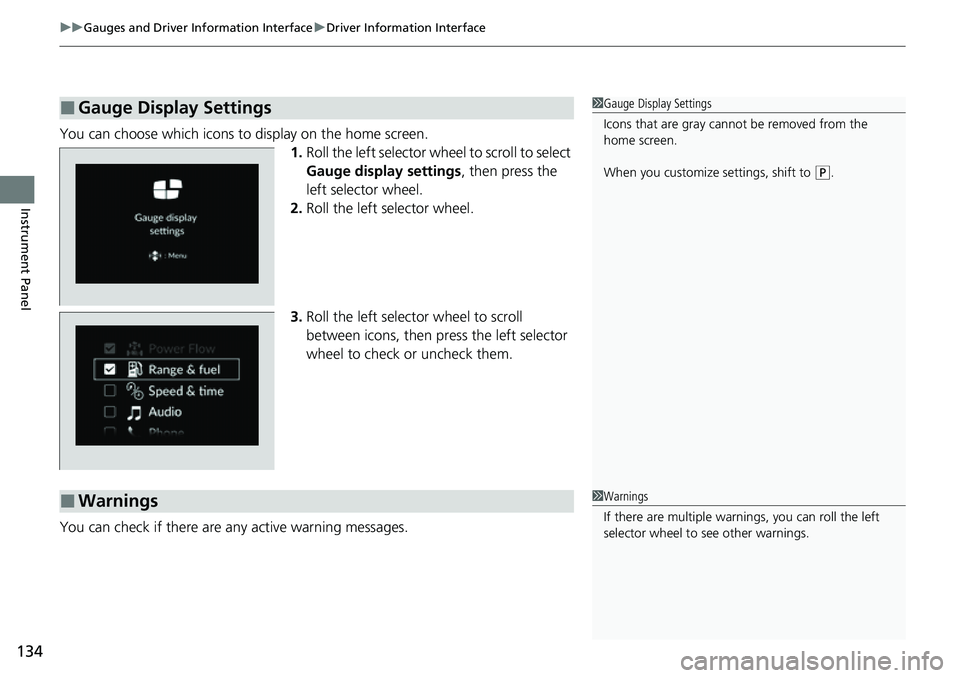
You can choose which icons to display on the home screen.
1.Roll the left selector wheel to scroll to select
Gauge display settings, then press the
left selector wheel.
2. Roll the left selector wheel.
3. Roll the left selector wheel to scroll
between icons, then press the left selector
wheel to check or uncheck them.
You can check if there are any active warning messages.
■Gauge Display Settings1 Gauge Display Settings
Icons that are gray cannot be removed from the
home screen.
When you customize settings, shift to
(P.
■Warnings1 Warnings
If there are multiple warnings, you can roll the left
selector wheel to see other warnings.
Page 137 of 719
136
uuGauges and Driver Information Interface uDriver Information Interface
Instrument Panel
■List of customizable options
*1:Default Setting Setup Group Customizable Features
Description Selectable Settings
TPMS
calibration*—Calibrates the TPMS.Cancel/Calibrate
Driver assist
system setup
Forward collision
warning distanceChanges the distance at which CMBSTM alerts.Long/ Normal*1/Short
ACC forward vehicle
detect beepCauses the system to beep wh en a vehicle is detected or
when the vehicle is out of ACC with Low Speed Follow
range.
ON /OFF*1
Road departure
mitigation settingChanges the setting for the Road Departure Mitigation
system.Narrow/ Normal*1/Wide /
Warning only
Lane keeping assist
suspend beepCauses the system to beep when the LKAS is suspended.ON/OFF*1
Blind spot informationChanges the setting for th e blind spot information.Audible and visual
alert*1/ Visual alert
* Not available on all models
Page 138 of 719
137
uuGauges and Driver Information Interface uDriver Information Interface
Continued
Instrument Panel
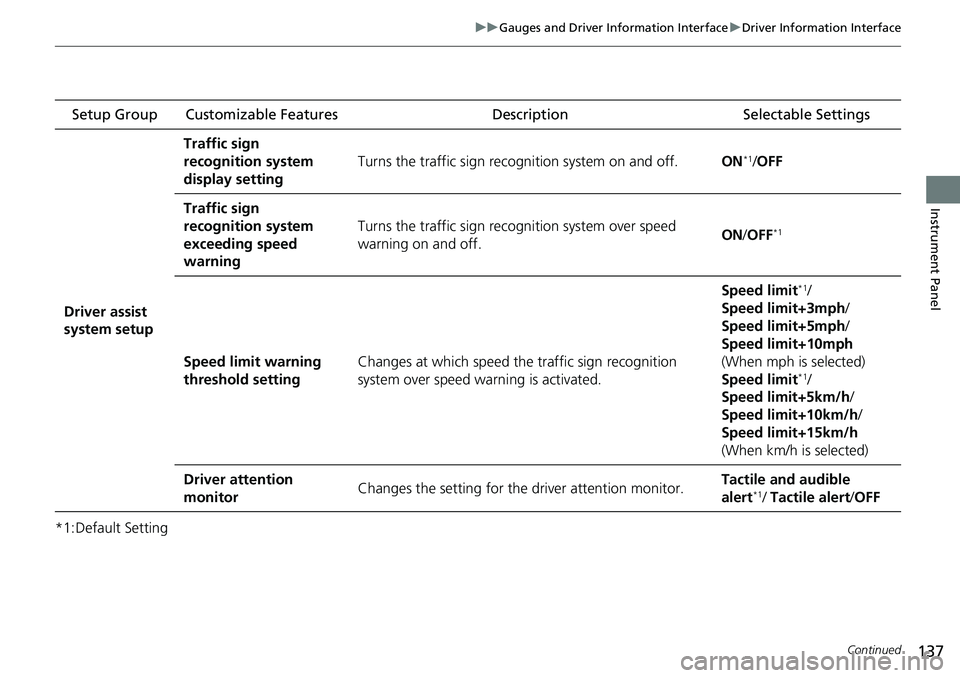
*1:Default Setting Setup Group Customizable Features
Description Selectable Settings
Driver assist
system setup
Traffic sign
recognition system
display setting
Turns the traffic sign recognition system on and off.ON*1/OFF
Traffic sign
recognition system
exceeding speed
warning
Turns the traffic sign rec ognition system over speed
warning on and off.ON /OFF*1
Speed limit warning
threshold settingChanges at which speed th e traffic sign recognition
system over speed warning is activated.
Speed limit*1/
Speed limit+3mph/
Speed limit+5mph/
Speed limit+10mph
(When mph is selected)
Speed limit
*1/
Speed limit+5km/h /
Speed limit+10km/h /
Speed limit+15km/h
(When km/h is selected)
Driver attention
monitorChanges the setting for the driver attention monitor.Tactile and audible
alert*1/ Tactile alert /OFF