2023 HONDA CRV ECU
[x] Cancel search: ECUPage 92 of 719
91
uuChild Safety uSafety of Larger Children
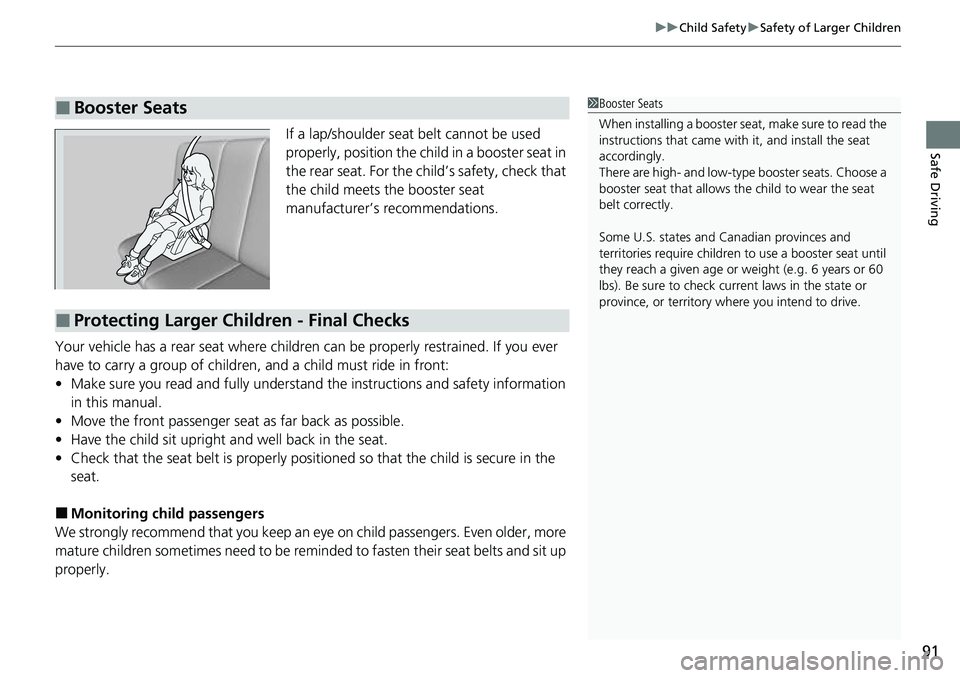
Safe DrivingIf a lap/shoulder seat belt cannot be used
properly, position the child in a booster seat in
the rear seat. For the child’s safety, check that
the child meets the booster seat
manufacturer’s recommendations.
Your vehicle has a rear seat where children can be properly restrained. If you ever
have to carry a group of children, and a child must ride in front:
• Make sure you read and fully understand the instructions and safety information
in this manual.
• Move the front passenger seat as far back as possible.
• Have the child sit upright and well back in the seat.
• Check that the seat belt is properly positi oned so that the child is secure in the
seat.
■Monitoring child passengers
We strongly recommend that you keep an eye on child passengers. Even older, more
mature children sometimes need to be remi nded to fasten their seat belts and sit up
properly.
■Booster Seats1 Booster Seats
When installing a booster seat , make sure to read the
instructions that came with it, and install the seat
accordingly.
There are high- and low-type booster seats. Choose a
booster seat that allows the child to wear the seat
belt correctly.
Some U.S. states and Canadian provinces and
territories require children to use a booster seat until
they reach a given age or weight (e.g. 6 years or 60
lbs). Be sure to check current laws in the state or
province, or territory where you intend to drive.
■Protecting Larger Children - Final Checks
Page 98 of 719

97
uuIndicators u
Continued
Instrument Panel
*1 : When you set the power mode to ON, these indicators come on to indicate that system checks are being performed. They go off a few seconds later or after the power
system has started. If an indicator does not come on or turn o ff, there may be a malfunction in the corresponding system. To re solve the issue, follow the instructions in
the owner's manual. Adaptive Cruise Control
(ACC) with Low S
p
eed
Follow Indicator (Amber)
Lane Keeping Assist System
(LKAS) Indicator (Amber)
Safety Support Indicator
(Green/Gray)
P. 109
P. 110
P. 113*1
Adaptive Cruise Control
(ACC) with Low Speed
Follow Indicator (White/
Green) P. 109
*1
Lane Keeping Assist
System (LKAS) Indicator
(White/Green) P. 110
*1Safety Support Indicator
(Amber) P. 111
System Message Indicator
Immobilizer System
Indicator
P. 107
P. 108
Cruise Mode Indicator
(White/Green) P. 109
P. 107
Hill Descent Control System
Indicator (White/Green) P. 108*1
Security System Alarm
Indicator
ECON Mode Indicator P. 108
NORMAL Mode Indicator P. 108
SNOW Mode Indicator P. 108
SPORT Mode Indicator P. 108
Auto High-Beam
Indicator
Lights On Indicator
High Beam Indicator
P. 106
P. 106
P. 106*1
Turn Signal and Hazard
Warning Indicators P. 106
Page 108 of 719

107
uuIndicators u
Continued
Instrument Panel
*1:Canadian models only: Apply and hold the brake pedal before selecting the ON mode.
IndicatorNameOn/BlinkingExplanation
Immobilizer
System Indicator
●Blinks if the immobilizer system cannot
recognize the key information.•Blinks - You cannot start the power system. Set
the power mode to VEHICLE OFF*1, then select the
ON mode again.
• Repeatedly blinks - The system may be
malfunctioning. Have your vehicle checked by a
dealer.
• Do not attempt to alter this system or add other
devices to it. Electrical problems can occur.
Security System
Alarm Indicator
●Blinks when the security system alarm has
been set.
2 Security System Alarm P. 176
U.S.
Canada
Indicator
Indicator
U.S.
Canada
Indicator
Indicator
Page 146 of 719

145
Controls
This chapter explains how to operate the various controls necessary for driving.
Clock.................................................. 146
Locking and Unlocking the Doors Key .................................................. 148
Low Keyless Remote Signal Strength ... 150
Locking/Unlocking the Doors from the Outside .......................................... 151
Locking/Unlocking the Doors from the Inside ............................................. 161
Childproof Door Locks ..................... 163
Auto Door Locking/Unlocking .......... 164
Tailgate .............................................. 165
Security System Immobilizer System .......................... 176
Security System Alarm ...................... 176Windows ............................................... 179Moonroof .......................................... 183
Operating the Switches Around the Steering Wheel
POWER Button................................. 184
Turn Signals ..................................... 187
Light Switches.................................. 188
Daytime Running Lights ................... 192
Auto High-Beam .............................. 193
Wipers and Washers ........................ 196
Rear Defogger/Heated Door Mirror Button ... 199
Heated Windshield Button ............... 199
Driving Position Memory System*.... 200
Adjusting the Steering Wheel .......... 202
Mirrors ............................................... 203
Seats .................................................. 205
Interior Convenience Items .............. 216
Climate Control System Using Automatic Climate Control .... 232
Automatic Climate Control Sensors ...... 236
Canadian models
* Not available on all models
Page 153 of 719

uuLocking and Unlocking the Doors uLocking/Unlocking the Doors from the Outside
152
Controls
■Locking the doors and tailgate
Touch the door lock sensor on the front door
or press the lock button on the tailgate. u All the doors and tailgate lock and the
security system sets.
u Some exterior lights flash once and the
beeper sounds once.1Using the Keyless Access System
If you do not open a door or the tailgate within 30
seconds of unlocking the vehicle with the keyless access
system, the doors and tailgate will automatically relock.
You can lock or unlock doors using the keyless access
system only when the power mode is in VEHICLE OFF.
•Do not leave the keyless remote in the vehicle
when you get out. Carry it with you.
•Even if you are not carryin g the keyless remote, you
can lock/unlock the doors and tailgate while someone
else with the keyless remote is within range.
•The door may be unlocked if the door handle is
covered with water in heavy rain or in a car wash if
the keyless remote is within range.
•If you grip a front door ha ndle or touch a door lock
sensor wearing gloves, the door sensor may be
slow to respond or may no t respond by locking or
unlocking the doors.
•After locking the door, you have up to 2 seconds
during which you can pull the door handle to
confirm whether the door is locked. If you need to
unlock the door immediately after locking it, wait
at least 2 seconds befo re gripping the handle,
otherwise the door will not unlock.
•The door might not open if you pull it immediately
after gripping the door handle. Grip the handle
again and confirm that th e door is unlocked before
pulling the handle.
•Even within the 32 inches (80 cm) radius, you may
not be able to lock/unlock the doors and the
tailgate with the keyless remote if it is above or
below the outside handle.
•The keyless remote may not operate if it is too close
to the door, door glass, and tailgate.
Door Lock
Sensor
Lock Button
Page 158 of 719
Continued157
uuLocking and Unlocking the Doors uLocking/Unlocking the Doors from the Outside
Controls
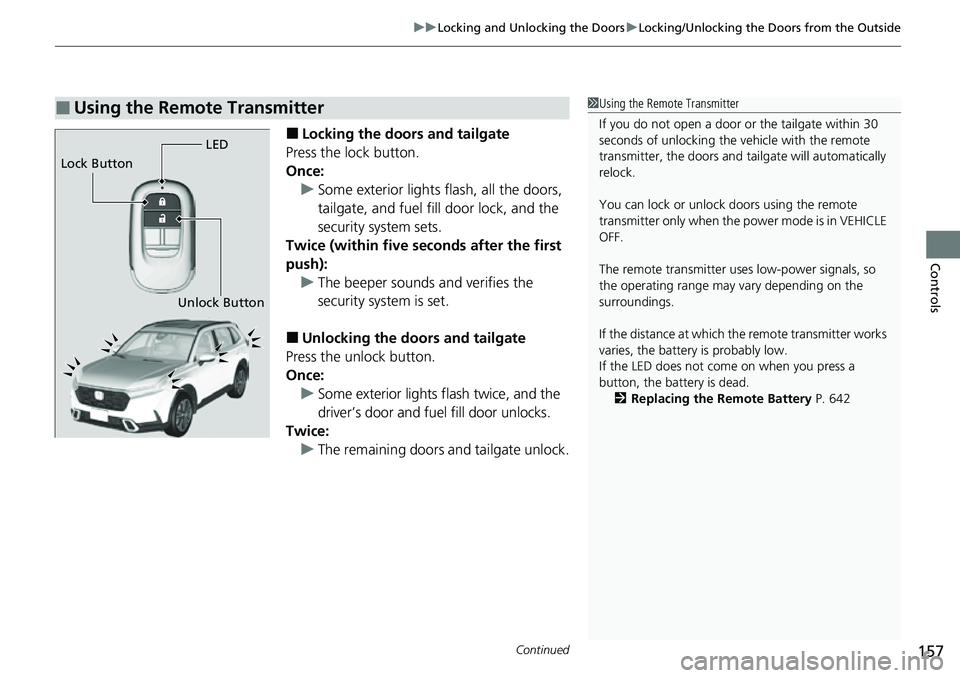
■Locking the doors and tailgate
Press the lock button.
Once: u Some exterior lights flash, all the doors,
tailgate, and fuel fill door lock, and the
security system sets.
Twice (within five se conds after the first
push): u The beeper sounds and verifies the
security system is set.
■Unlocking the doors and tailgate
Press the unlock button.
Once:
u Some exterior lights flash twice, and the
driver’s door and fuel fill door unlocks.
Twice: u The remaining doors and tailgate unlock.
■Using the Remote Transmitter1Using the Remote Transmitter
If you do not open a door or the tailgate within 30
seconds of unlocking the vehicle with the remote
transmitter, the doors and ta ilgate will automatically
relock.
You can lock or unlock doors using the remote
transmitter only when the power mode is in VEHICLE
OFF.
The remote transmitter us es low-power signals, so
the operating range may vary depending on the
surroundings.
If the distance at which the remote transmitter works
varies, the batter y is probably low.
If the LED does not come on when you press a
button, the battery is dead.
2 Replacing the Remote Battery P. 642
LED
Unlock Button
Lock Button
Page 177 of 719

176
Controls
Security System
Immobilizer System
This system prevents a key that has not been pre-registered from starting the power
system.
Pay attention to the follo wing when pressing the POWER button:
• Do not allow objects that emit strong radio waves near the POWER button.
• Make sure the key is not covered by or touching a metal object.
• Do not bring a key from another vehi cle’s immobilizer system near the POWER
button.
• Do not put the key near magnetic items. El ectronic device, such as televisions and
audio systems emit strong magnetic fields. Note that even a key chain can
become magnetic.
Security System Alarm
The security system alarm activates when the tailgate, hood, or doors are forcibly
opened. The alarm does not activate if the tailgate or doors are opened with the key,
remote transmitter or keyless access system.
However, the alarm activates if a door is opened with the key and then the hood is
opened before the power mode is set to ON.
1 Immobilizer System
NOTICE
Leaving the key in the vehicl e can result in theft or
accidental movement of the vehicle.
Always take the key with you whenever you leave the
vehicle unattended.
Do not alter the system or add other devices to it.
Doing so may damage the system and make your
vehicle inoperable.
Apply and hold the brake pedal before turning the
vehicle on the first time after the battery has been
disconnected.
Canadian models
1 Security System Alarm
Do not alter the system or add other devices to it.
Doing so may damage the system and make your
vehicle inoperable.
The security system alarm continues for a maximum
of two minutes until the security system alarm
deactivates.
Page 178 of 719

Continued177
uuSecurity System uSecurity System Alarm
Controls
■When the security system alarm activates
The horn sounds intermittently, and some exterior lights flash.
■To deactivate the security system alarm
Unlock the vehicle using the key, remote tra nsmitter, or keyless access system, or
turn the power mode is set to ON. The system, along with the horn and flashing
lights, is deactivated.
■Setting the security system alarm
The security system alarm automatically sets when the following conditions have
been met:
• The power mode is set to VEHICLE OFF.
• The hood is closed.
• All doors and tailgate are locked from ou tside with the remote transmitter or
keyless access system.
■When the security system alarm sets
The security system alarm in dicator in the instrument panel blinks and the blinking
interval changes after about 15 seconds.
■To cancel the security system alarm
The security system alarm is canceled when the vehicle is unlocked using the remote
transmitter or keyless access system, or when the power mode is set to ON. The
security system alarm indicato r goes off at the same time.
1Security System Alarm
Do not set the security system alarm when someone
is in the vehicle or a window is open. The system can
accidentally activate when:
•Unlocking the door with the lock tab.•Opening the hood with the hood release handle.
•Taking the transmission out of ( P.
If the 12-volt battery goes dead after you have set the
security system alarm, the security alarm may go off
once the 12-volt battery is recharged or replaced.
If this occurs, deactivate the security system alarm by
unlocking a door using the ke y, remote transmitter,
or keyless access system.