Page 107 of 719
106
uuIndicators u
Instrument Panel
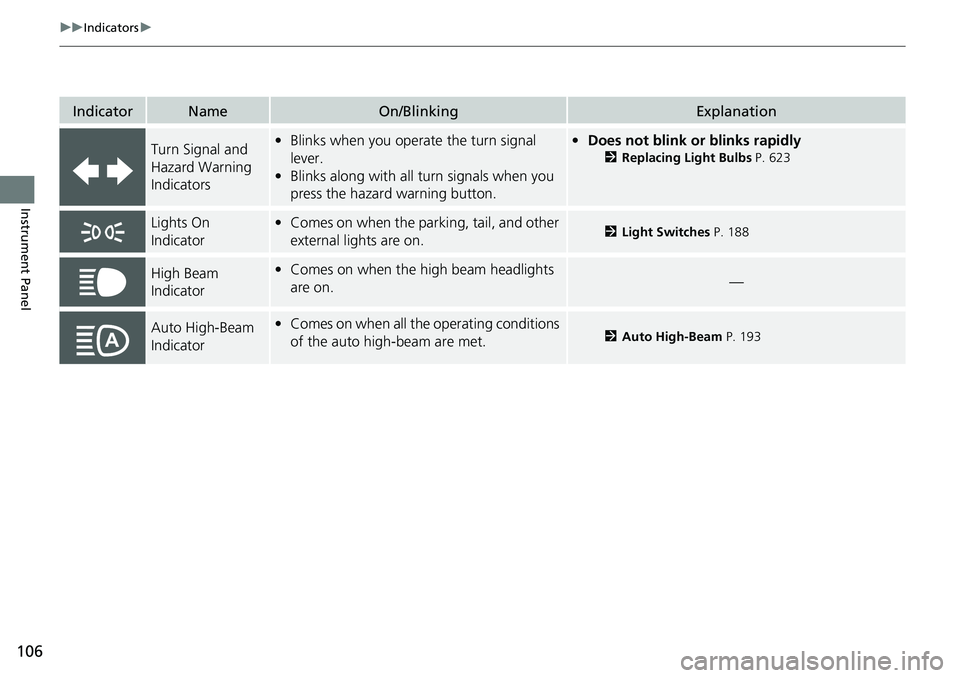
IndicatorNameOn/BlinkingExplanation
Turn Signal and
Hazard Warning
Indicators•Blinks when you oper ate the turn signal
lever.
• Blinks along with all turn signals when you
press the hazard warning button.•Does not blink or blinks rapidly
2 Replacing Light Bulbs P. 623
Lights On
Indicator•Comes on when the parking, tail, and other
external lights are on.2 Light Switches P. 188
High Beam
Indicator•Comes on when the high beam headlights
are on.—
Auto High-Beam
Indicator•Comes on when all the operating conditions
of the auto high-beam are met.2 Auto High-Beam P. 193
Page 109 of 719

108
uuIndicators u
Instrument Panel
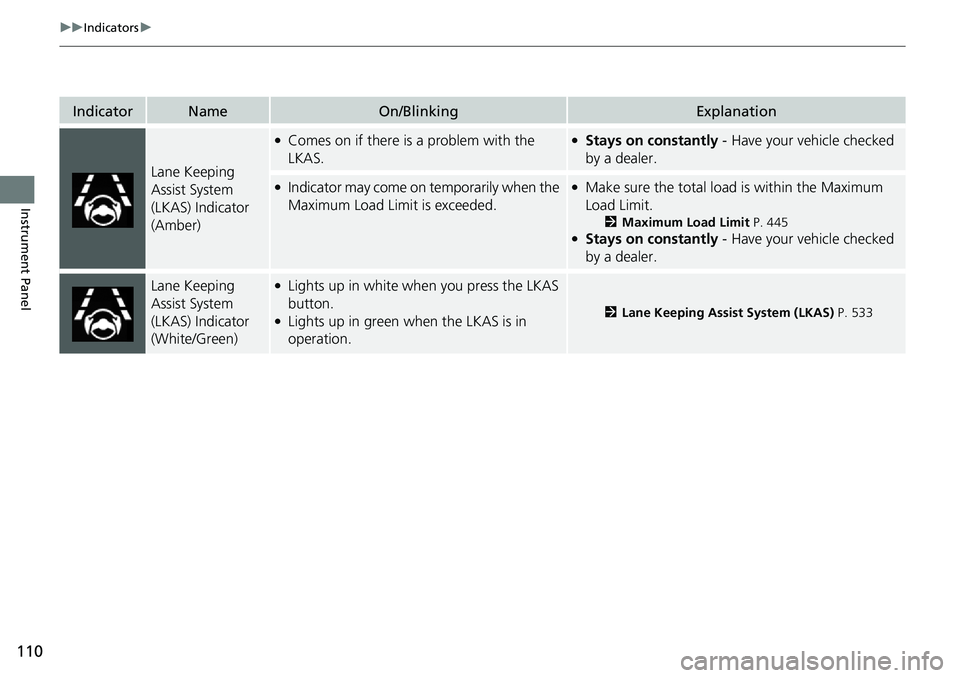
IndicatorNameOn/BlinkingExplanation
ECON Mode
Indicator• Comes on when you set the drive mode to
ECON .2Drive Mode Switch P. 470
SPORT Mode
Indicator●Comes on when you se t the drive mode to
SPORT.●The ambient meter remains lit up in red as long as
SPORT mode is selected.
2 Drive Mode Switch P. 470
NORMAL Mode
Indicator• Comes on when you set the drive mode to
NORMAL .2Drive Mode Switch P. 470
SNOW Mode
Indicator• Comes on when you set the drive mode to
SNOW .2Drive Mode Switch P. 470
Hill Descent
Control System
Indicator (White/
Green)•Lights up in white wh en the Hill Descent
Control System is on and ready to use.
• Lights up in green when the Hill Descent
Control System is in operation.
2 Hill Descent Control System P. 474
System Message
Indicator
•Comes on along with a beep when a
problem is detected. A system message on
the driver information interface appears at
the same time.•While the indicator is on, press the (home)
button, and select Warnings to see the message
again.
2 Switching the Display P. 117
•Refer to the Indicators in formation in this chapter
when a system message appears on the driver
information interface. Take the appropriate action
for the message.
• The driver information interface will not return to
the normal screen unless the warning is canceled,
or the (home) button is pressed.
Page 110 of 719
109
uuIndicators u
Continued
Instrument Panel
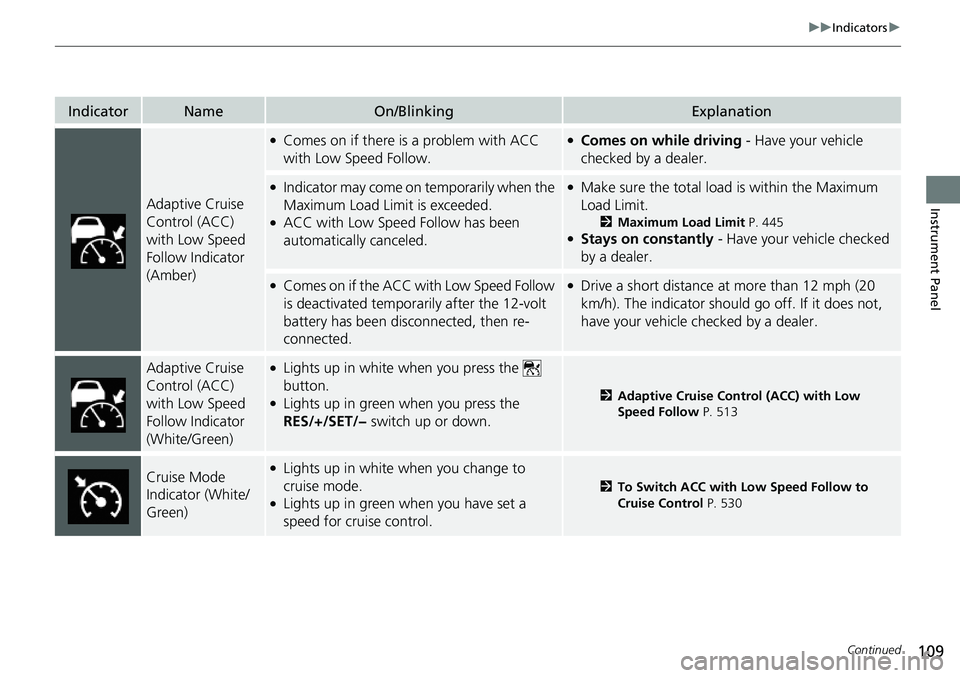
IndicatorNameOn/BlinkingExplanation
Adaptive Cruise
Control (ACC)
with Low Speed
Follow Indicator
(Amber)
●Comes on if there is a problem with ACC
with Low Speed Follow.●Comes on while driving - Have your vehicle
checked by a dealer.
●Indicator may come on temporarily when the
Maximum Load Limit is exceeded.
●ACC with Low Speed Follow has been
automatically canceled.
●Make sure the total load is within the Maximum
Load Limit.
2 Maximum Load Limit P. 445●Stays on constantly - Have your vehicle checked
by a dealer.
●Comes on if the ACC with Low Speed Follow
is deactivated temporarily after the 12-volt
battery has been disconnected, then re-
connected.●Drive a short distance at more than 12 mph (20
km/h). The indicator should go off. If it does not,
have your vehicle checked by a dealer.
Adaptive Cruise
Control (ACC)
with Low Speed
Follow Indicator
(White/Green)●Lights up in white when you press the
button.
●Lights up in green when you press the
RES/+/SET/− switch up or down.2Adaptive Cruise Control (ACC) with Low
Speed Follow P. 513
Cruise Mode
Indicator (White/
Green)●Lights up in white when you change to
cruise mode.
●Lights up in green when you have set a
speed for cruise control.
2To Switch ACC with Low Speed Follow to
Cruise Control P. 530
Page 111 of 719
110
uuIndicators u
Instrument Panel
IndicatorNameOn/BlinkingExplanation
Lane Keeping
Assist System
(LKAS) Indicator
(Amber)
●Comes on if there is a problem with the
LKAS.●Stays on constantly - Have your vehicle checked
by a dealer.
●Indicator may come on temporarily when the
Maximum Load Limi t is exceeded.●Make sure the total load is within the Maximum
Load Limit.
2 Maximum Load Limit P. 445●Stays on constantly - Have your vehicle checked
by a dealer.
Lane Keeping
Assist System
(LKAS) Indicator
(White/Green)●Lights up in white when you press the LKAS
button.
●Lights up in green when the LKAS is in
operation.2 Lane Keeping Assist System (LKAS) P. 533
Page 114 of 719
113
uuIndicators u
Instrument Panel
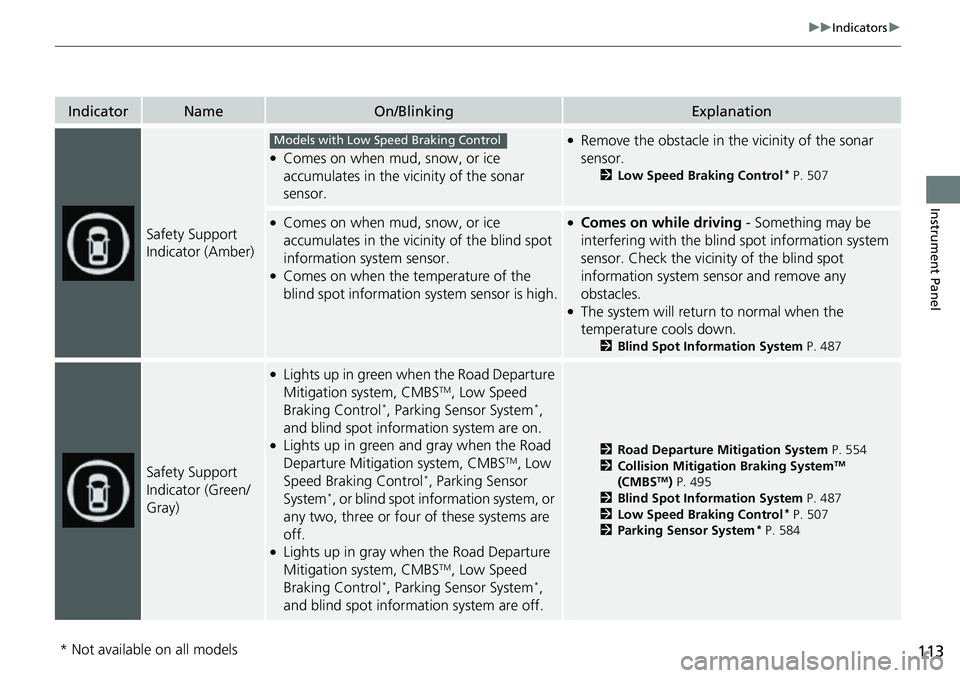
IndicatorNameOn/BlinkingExplanation
Safety Support
Indicator (Amber)
●Comes on when mud, snow, or ice
accumulates in the vicinity of the sonar
sensor.
●Remove the obstacle in the vicinity of the sonar
sensor.
2Low Speed Braking Control* P. 507
●Comes on when mud, snow, or ice
accumulates in the vicinity of the blind spot
information system sensor.
●Comes on when the temperature of the
blind spot information system sensor is high.
●Comes on while driving - Something may be
interfering with the blind spot information system
sensor. Check the vicinity of the blind spot
information system sensor and remove any
obstacles.
●The system will return to normal when the
temperature cools down.
2 Blind Spot Information System P. 487
Safety Support
Indicator (Green/
Gray)
●Lights up in green when the Road Departure
Mitigation system, CMBSTM, Low Speed
Braking Control*, Parking Sensor System*,
and blind spot information system are on.
●Lights up in green and gray when the Road
Departure Mitigation system, CMBSTM, Low
Speed Braking Control*, Parking Sensor
System*, or blind spot information system, or
any two, three or four of these systems are
off.
●Lights up in gray when the Road Departure
Mitigation system, CMBSTM, Low Speed
Braking Control*, Parking Sensor System*,
and blind spot information system are off.
2 Road Departure Mitigation System P. 554
2 Collision Mitigation Braking SystemTM
(CMBSTM) P. 495
2 Blind Spot Information System P. 487
2 Low Speed Braking Control
* P. 507
2 Parking Sensor System* P. 584
Models with Low Speed Braking Control
* Not available on all models
Page 128 of 719
127
uuGauges and Driver Information Interface uDriver Information Interface
Continued
Instrument Panel
If two bars light up, the Driver attention
level low message will appear.
If one bar lights up, the Driver attention
level low. Time for a break. message will
appear, a beep will sound, and the steering
wheel will vibrate.
If this message appears, stop in a safe location
and rest for as long as needed.
The message will disappear when the left
selector wheel is presse d or when the system
has determined that the driver is driving
normally.
If the driver does not take a break and the
monitor continues to detect that the driver is
very tired, the message will appear again after
approximately 15 minutes, accompanied by a
beep and steering wheel vibrations.
The message does not appear when the
traveling time is 30 minutes or less.
Page 140 of 719

139
uuGauges and Driver Information Interface uDriver Information Interface
Continued
Instrument Panel
*1:Default Setting Setup Group Customizable Features
Description Selectable Settings
Keyless access
setup Door unlock mode
Changes which doors unlock when you grab the driver’s
door handle. Driver door only
*1/
All
doors
Keyless access light
flash Causes some exterior lights
to flash when you unlock/
lock the doors. ON
*1/
OFF
Keyless access beep Causes the beeper to sound when you unlock/lock the
doors.
ON
*1/
OFF
Remote start system
ON/OFF Turns the remote engine start feature on and off.
ON
*1/OFF
Lighting setup
Auto high-beamTurns the auto high -beam on and off.ON*1/OFF
Interior light dimming
timeChanges the length of time the interior lights stay on
after you close the doors.60sec /30sec*1/ 15sec
Headlight auto off
timerChanges the length of time the exterior lights stay on
after you close the driver’s door.60sec /30sec /15sec*1/0sec
Auto light sensitivity*Changes the timing for th e headlights to come on.Max/High /Mid*1/Low /Min
Auto headlight ON
with wiper ONChanges the settings for the wiper operation when the
headlights automatically come on while the headlight
switch is in the AUTO position.
ON*1/OFF
* Not available on all models
Page 141 of 719

140
uuGauges and Driver Information Interface uDriver Information Interface
Instrument Panel
*1:Default Setting Setup Group Customizable Features
Description Selectable Settings
Door setup Auto door lock
Changes the setting for when the doors and the tailgate
automatically lock. With vehicle speed
*1/
Shift from P /OFF
Auto door unlock Changes the setting for when the doors and the tailgate
automatically unlock. All doors when driver’s
door opens
*1/
All doors
when shifted to Park /
All doors when ignition
switched OFF /OFF
Walk away auto lock Changes the settings for the automatic locking the
doors when you walk away
from the vehicle while
carrying the keyless remote. ON
/OFF
*1
Keyless lock answer
back LOCK/UNLOCK - The exterior lights flash.
LOCK (2nd push) - The beeper sounds.
ON*1/
OFF
Keyless remote power
window control Turns remote window control using the keyless remote
on and off.
ON
*1/
OFF
Lockout prevention Changes the settings for
the lockout protection
function. ON
*1/
OFF
Lock presetting Changes the settings for the Lock Presetting function. ON
*1/OFF