2023 HONDA CIVIC LKAS button
[x] Cancel search: LKAS buttonPage 11 of 840

9
Quick Reference Guide❚Headlights/Turn Signals (P205, 206)
❚Fog Lights* (P209)
❚Paddle Shifter (Shift down)* (P507)
❚Left Selector Wheel (P126)
❚Adaptive Cruise Control (ACC) with Low
Speed Follow Buttons* (P578)
❚Lane Keeping Assist System (LKAS) Button
(P621)
❚Interval Button (P592)
❚Steering Wheel Adjustments (P219)
❚Heated Steering Wheel* (P246)
Canadian models
❚Right Selector Wheel* (P155)
❚Bluetooth® HandsFreeLink ® System Voice Control Button* (P464)
❚Audio Remote Controls (P260)
❚ (home) Button* (P125)
❚Horn (Press an area around .)
❚Adaptive Cruise Control (ACC) Buttons*
(P598)
❚Paddle Shifter (Shift up)* (P507)
❚Wipers/Washers (P213)
* Not available on all models
23 CIVIC HATCHBACK TYPE R-31T406100_03.book 9 ページ 2022年6月23日 木曜日 午後9時28分
Page 116 of 840
114
uuIndicators u
Instrument Panel
IndicatorNameOn/BlinkingExplanation
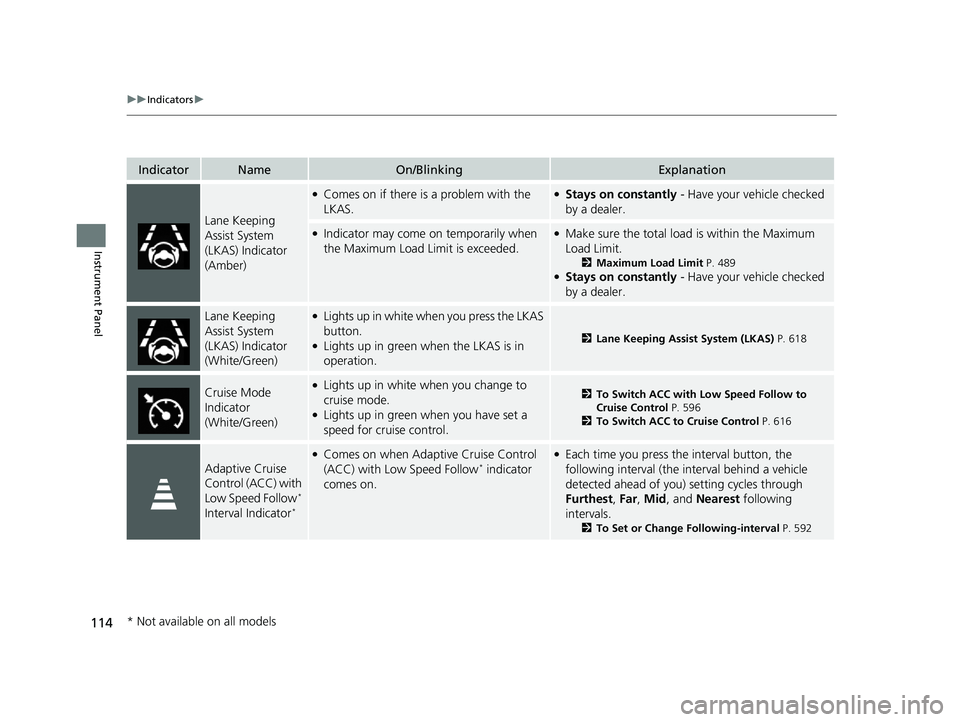
Lane Keeping
Assist System
(LKAS) Indicator
(Amber)
●Comes on if there is a problem with the
LKAS.●Stays on constantly - Have your vehicle checked
by a dealer.
●Indicator may come on temporarily when
the Maximum Load Limit is exceeded.●Make sure the total load is within the Maximum
Load Limit.
2 Maximum Load Limit P. 489●Stays on constantly - Have your vehicle checked
by a dealer.
Lane Keeping
Assist System
(LKAS) Indicator
(White/Green)●Lights up in white wh en you press the LKAS
button.
●Lights up in green when the LKAS is in
operation.2 Lane Keeping Assist System (LKAS) P. 618
Cruise Mode
Indicator
(White/Green)●Lights up in white when you change to
cruise mode.
●Lights up in green when you have set a
speed for cruise control.
2To Switch ACC with Low Speed Follow to
Cruise Control P. 596
2 To Switch ACC to Cruise Control P. 616
Adaptive Cruise
Control (ACC) with
Low Speed Follow
*
Interval Indicator*
●Comes on when Adaptive Cruise Control
(ACC) with Low Speed Follow* indicator
comes on.
●Each time you press the interval button, the
following interval (the in terval behind a vehicle
detected ahead of you) setting cycles through
Furthest , Far , Mid, and Nearest following
intervals.
2 To Set or Change Following-interval P. 592
* Not available on all models
23 CIVIC HATCHBACK TYPE R-31T406100_03.book 114 ページ 2022年6月23日 木曜日 午後9時28分
Page 487 of 840
485
Driving
This chapter discusses driving and refueling.
Before Driving................................... 486
Towing a Trailer ................................ 492
When Driving Starting the Engine .......................... 493
Precautions While Driving................. 500
Continuously Variable Transmission*... 502
Shifting ............................ 503 , 505, 509
ECON Button*................................. 513
Auto Idle Stop .......................... 514 , 520
Drive Mode Switch
*................. 525 , 529
Vehicle Stability AssistTM (VSA®), aka Electronic
Stability Control (ESC), System .............. 535
Agile Handling Assist ....................... 538
Limited Slip Differential (LSD)*......... 539Tire Pressure Monitoring System (TPMS)*. 540Tire Pressure Monitoring System (TPMS) - Required Federal Explanation*....... 545
Blind Spot Information System*....... 547
Honda Sensing ®................................ 551
Collision Mitigati on Braking System
TM
(CMBSTM) ....................................... 555
Low Speed Braking Control*.... 567, 573
Adaptive Cruise Control (ACC) with Low
Speed Follow
*............................... 578
Adaptive Cruise Control (ACC)*....... 598 Lane Keeping Assist System (LKAS) .. 618
Traffic Jam Assist
*........................... 630
Road Departure Miti gation System... 639
Traffic Sign Recognition System ....... 647
Front Wide View Camera ................. 653
Sonar Sensors
*................................ 655
Braking .............................................. 657
Parking Your Vehicle ........................ 669
Multi-View Rear Camera .................. 681
Refueling ........................................... 683
Fuel Economy and CO
2 Emissions .... 689
Turbo Engine Vehicle*...................... 690
* Not available on all models
23 CIVIC HATCHBACK TYPE R-31T406100_03.book 485 ページ 2022年6月23日 木曜日 午後9時28分
Page 539 of 840

537
uuWhen Driving uVehicle Stability AssistTM (VSA ®), aka Electronic Stability Control (ESC), System
Driving
■When in +R Drive mode
To completely disable VSA®, press and hold
the VSA® OFF button until you hear a single
beep, then later two more beeps. u Vehicle stability assist system fully
OFF message appears on the driver
information interface.
To resume VSA® full function, press the VSA ®
OFF button until a single beep is heard.
If VSA ® OFF mode is selected, and drive mode
is changed to a mode other than +R, VSA ® full
function will resume, and the VSA ® OFF
indicator will goes off.
Models without Auto Idle Stop
1 When in +R Drive mode
In OFF mode, your vehicle will have normal braking
and cornering ability, bu t it will not have VSA®
traction and stability enhancement.
When the VSA ® system is off, the traction control
system is also off.
We do not recommend driving your vehicle with the
VSA ® and traction control system switched off.
When you completely disable VSA® , you cannot use
Adaptive Cruise Control ( ACC) or the Lane Keeping
Assist System (LKAS).
Low Speed Braking Control
*, Road Departure
Mitigation System and Co llision Mitigation Braking
System
TM (CMBSTM) do not function while VSA ® is
completely disabled.
Some of the VSA ® features cannot be completely
turned off while driving.
* Not available on all models
23 CIVIC HATCHBACK TYPE R-31T406100_03.book 537 ページ 2022年6月23日 木曜日 午後9時28分
Page 554 of 840
552
uuHonda Sensing ®u
Driving
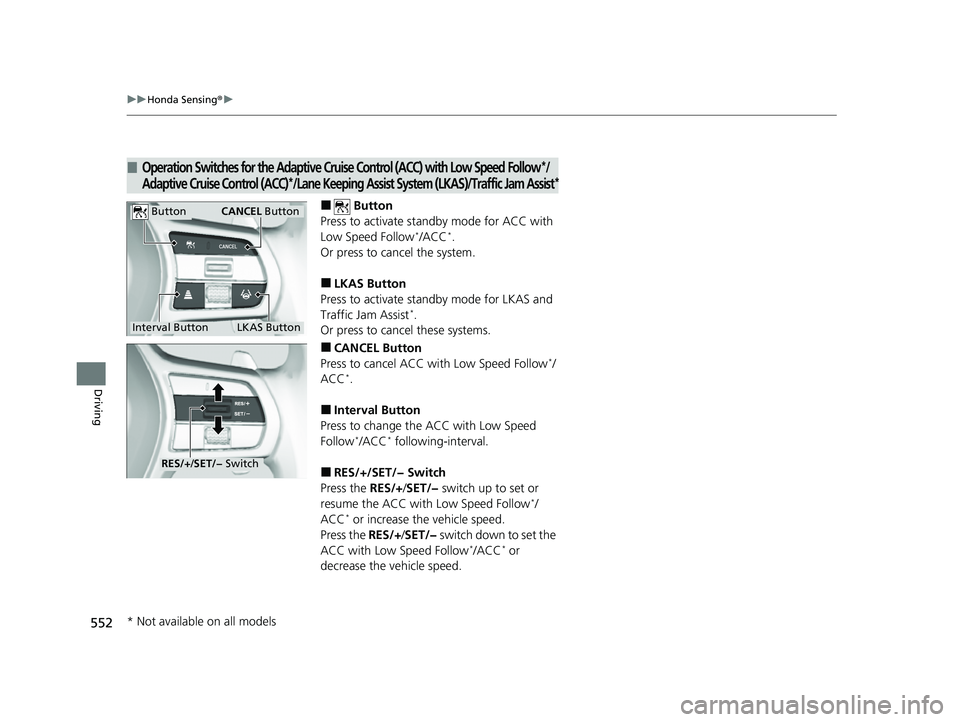
■ Button
Press to activate standby mode for ACC with
Low Speed Follow
*/ACC*.
Or press to cancel the system.
■LKAS Button
Press to activate standby mode for LKAS and
Traffic Jam Assist
*.
Or press to cancel these systems.
■CANCEL Button
Press to cancel ACC with Low Speed Follow*/
ACC*.
■Interval Button
Press to change the ACC with Low Speed
Follow
*/ACC* following-interval.
■RES/+/SET/− Switch
Press the RES/+/SET/− switch up to set or
resume the ACC with Low Speed Follow
*/
ACC* or increase the vehicle speed.
Press the RES/+/SET/− switch down to set the
ACC with Low Speed Follow
*/ACC* or
decrease the vehicle speed.
■Operation Switches for the Adaptive Cruise Control (ACC) with Low Speed Follow*/
Adaptive Cruise Control (ACC)*/Lane Keeping Assist Syste m (LKAS)/Traffic Jam Assist*
Interval Button
Button
LKAS Button
CANCEL Button
RES/+/SET/− Switch
* Not available on all models
23 CIVIC HATCHBACK TYPE R-31T406100_03.book 552 ページ 2022年6月23日 木曜日 午後9時28分
Page 597 of 840
Continued595
uuHonda Sensing ®u Adaptive Cruise Control (ACC) with Low Speed Follow*
Driving
■Automatic cancellation
The beeper sounds and a message appears on the driver information interface when
ACC with Low Speed Follow is automatically canceled. Any of these conditions may
cause the ACC with Low Speed Fo llow to automatically cancel:
• Bad weather (rain, fog, snow, etc.)
• The vehicle ahead of yo u cannot be detected.
• An abnormal tire condition is de tected, or the tires are skidding.
• Driving on a mountainous road for extended periods, or driving off road.
• Abrupt steering wheel movement.
• When the ABS, VSA ®, CMBS
TM, or Low Speed Braking Control* is activated.
• When the VSA ® system indicator comes on.
• When the vehicle is stopped on a very steep slope.
• When you manually apply the parking brake.
• Water is sprayed by or snow blown from a vehicle ahead.
• Driving into low sunlight (e.g., at dawn or dusk).
• When the detected vehicle within the AC C with Low Speed Follow range is too
close to your vehicle.
• When accelerating rapidly.
• The front of the camera is covered by dirt, fog, rain, mud, wet snow, seals,
accessories, stickers, or film on the windshield.
• The vehicle is loaded heavy load in the carg o area or rear seats.
• When passing through a dark place, such as tunnel.
• When the parking brake and brake system indicator (amber) comes on.
• The vehicle has repeatedly applied the brakes to maintain the set speed (for
example, you are descending a long slope).
• When the system doesn't detect any drivi ng actions from the driver for a certain
amount of time while the LKAS is also activated.
The ACC with Low Speed Follow automatic cancellation can be also triggered by the
following causes. In these cases, the parking brake will be automatically applied.
• The driver's seat belt is unfastened when the vehicle is stationary.
• The vehicle stops for more than 10 minutes.
• The engine is turned off.
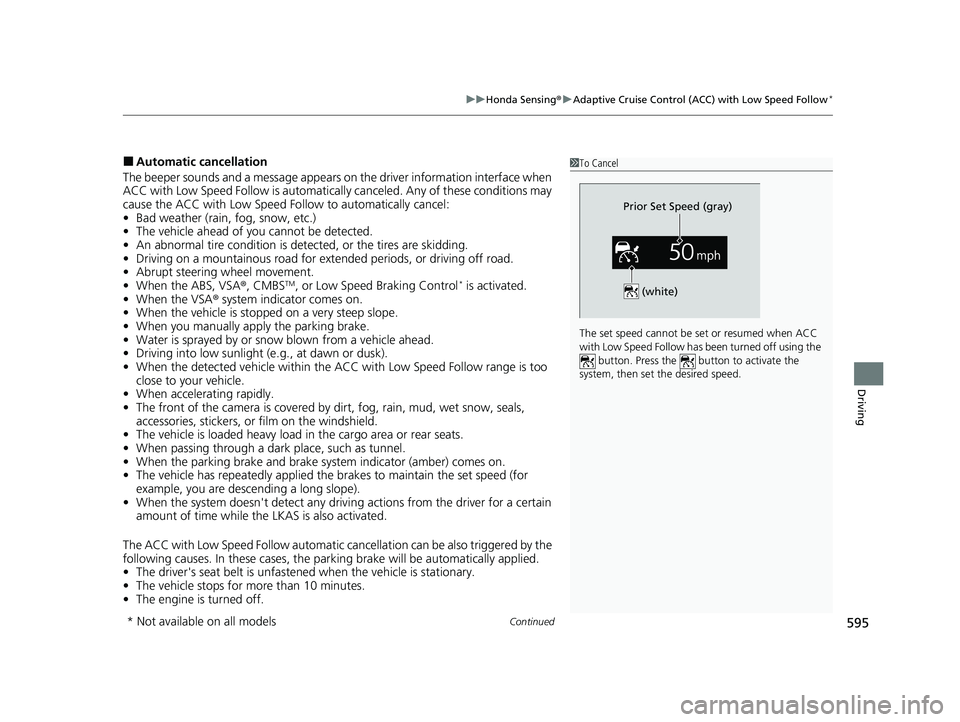
1To Cancel
The set speed cannot be set or resumed when ACC
with Low Speed Follow has been turned off using the button. Press the button to activate the
system, then set the desired speed.
(white)
Prior Set Speed (gray)
* Not available on all models
23 CIVIC HATCHBACK TYPE R-31T406100_03.book 595 ページ 2022年6月23日 木曜日 午後9時28分
Page 616 of 840
uuHonda Sensing ®u Adaptive Cruise Control (ACC)*
614
Driving
■Automatic cancellation
The beeper sounds and a message appears on the driver information interface when
ACC is automatically canceled. Any of these conditions may cause the ACC to
automatically cancel:
• Bad weather (rain, fog, snow, etc.)
• The vehicle ahead of you cannot be detected.
• An abnormal tire condition is detected, or the tires are skidding.
• Driving on a mountainous road for extended periods, or driving off road.
• Abrupt steering wheel movement.
• When the ABS, VSA ®, CMBS
TM, or Low Speed Braking Control* is activated.
• When the VSA ® system indicator comes on.
• When you manually apply the parking brake.
• When vehicle speed is less than 22 mph (35 km/h).
• Water is sprayed by or snow blown from a vehicle ahead.
• Driving into low sunlight (e.g., at dawn or dusk).
• When the detected vehicle within the ACC range is too close to your vehicle.
• When accelerating rapidly.
• The front of the camera is covered by dirt, fog, rain, mud, wet snow, seals,
accessories, stickers, or film on the windshield.
• The engine is turned off.
• The vehicle is loaded heavy load in the cargo area or rear seats.
• When passing through a dark place, such as tunnel.
• When the parking brake and brake system indicator (amber) comes on.
• The vehicle has repeatedly applied the brakes to maintain the set speed (for
example, you are descending a long slope).
• When the system doesn't detect any driv ing actions from the driver for a certain
amount of time while the LKAS is also activated.
• Ignoring shift down indication shown in the gauge will cancel the ACC after
about 10 seconds.
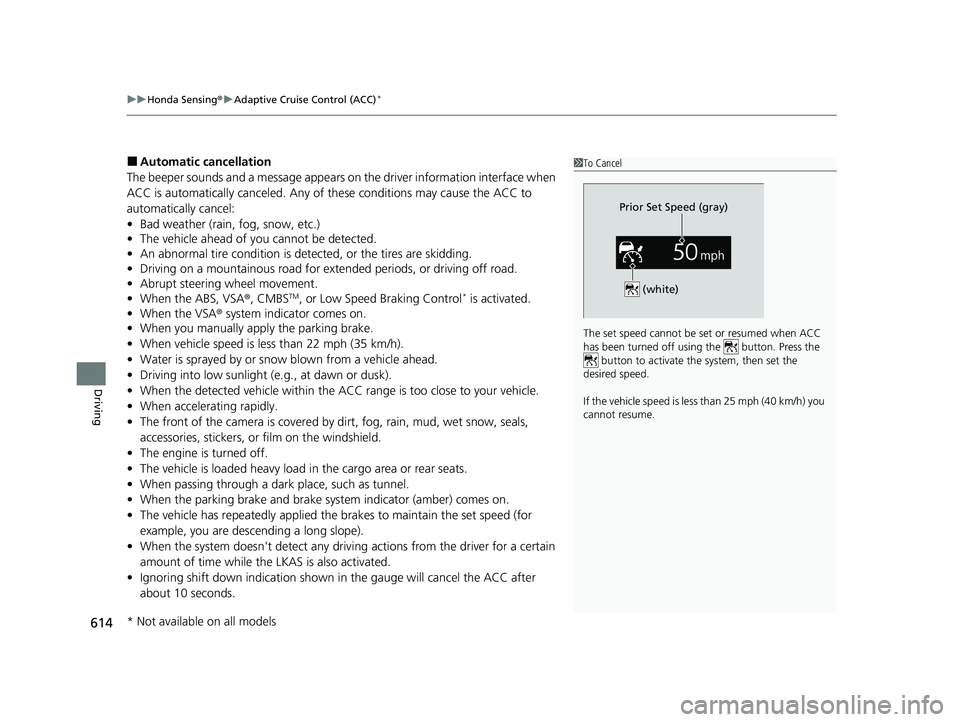
1To Cancel
The set speed cannot be set or resumed when ACC
has been turned off usi ng the button. Press the
button to activate the system, then set the
desired speed.
If the vehicle speed is less than 25 mph (40 km/h) you
cannot resume.
Prior Set Speed (gray)
(white)
* Not available on all models
23 CIVIC HATCHBACK TYPE R-31T406100_03.book 614 ページ 2022年6月23日 木曜日 午後9時28分
Page 623 of 840
Continued621
uuHonda Sensing ®u Lane Keeping Assist System (LKAS)
Driving
The system can be used when th e following conditions are met.
• The lane in which you are driving has detectable lane markers on both sides, and
your vehicle is in the center of the lane.
• The vehicle is traveling between about 45 and 90 mph (72 and 145 km/h).
• You are driving on a straight or slightly curved road.
• The turn signals are off.
• The brake pedal is not depressed.
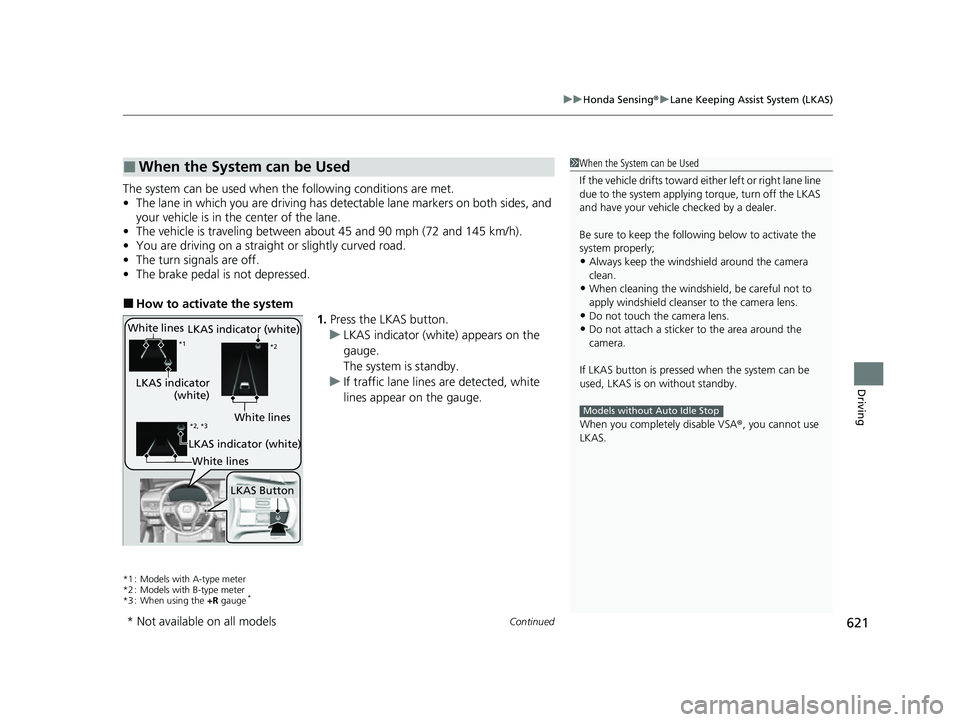
■How to activate the system
1.Press the LKAS button.
u LKAS indicator (white) appears on the
gauge.
The system is standby.
u If traffic lane lines are detected, white
lines appear on the gauge.
*1 : Models with A-type meter
*2 : Models with B-type meter
*3 : When using the +R gauge
*
■When the System can be Used1When the System can be Used
If the vehicle drifts toward ei ther left or right lane line
due to the system applying torque, turn off the LKAS
and have your vehicle checked by a dealer.
Be sure to keep the following below to activate the
system properly;
•Always keep the windshi eld around the camera
clean.
•When cleaning the windshield, be careful not to
apply windshield cleanser to the camera lens.
•Do not touch the camera lens.
•Do not attach a sticker to the area around the
camera.
If LKAS button is pressed when the system can be
used, LKAS is on without standby.
When you completely disable VSA® , you cannot use
LKAS.
Models without Auto Idle Stop
White lines
LKAS indicator
(white)
*1 *2
LKAS Button
*2, *3White lines
LKAS indicator (white)
LKAS indicator (white)
White lines
* Not available on all models
23 CIVIC HATCHBACK TYPE R-31T406100_03.book 621 ページ 2022年6月23日 木曜日 午後9時28分