Page 609 of 840
607
uuHonda Sensing ®u Adaptive Cruise Control (ACC)*
Continued
Driving
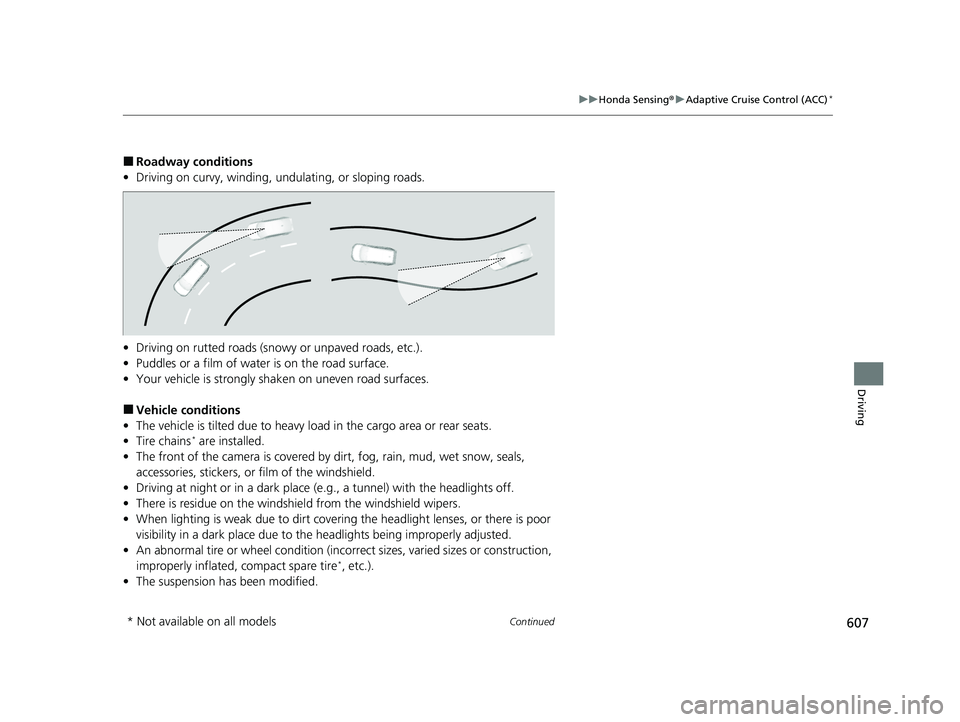
■Roadway conditions
• Driving on curvy, winding, undulating, or sloping roads.
• Driving on rutted roads (snowy or unpaved roads, etc.).
• Puddles or a film of water is on the road surface.
• Your vehicle is strongly shaken on uneven road surfaces.
■Vehicle conditions
• The vehicle is tilted due to heavy load in the cargo area or rear seats.
• Tire chains
* are installed.
• The front of the camera is covered by dirt, fog, rain, mud, wet snow, seals,
accessories, stickers, or film of the windshield.
• Driving at night or in a dark place (e.g., a tunnel) with the headlights off.
• There is residue on the windshie ld from the windshield wipers.
• When lighting is weak due to dirt coveri ng the headlight lenses, or there is poor
visibility in a dark place due to the headlights being improperly adjusted.
• An abnormal tire or wheel condition (inco rrect sizes, varied sizes or construction,
improperly inflated, compact spare tire
*, etc.).
• The suspension has been modified.
* Not available on all models
23 CIVIC HATCHBACK TYPE R-31T406100_03.book 607 ページ 2022年6月23日 木曜日 午後9時28分
Page 616 of 840
uuHonda Sensing ®u Adaptive Cruise Control (ACC)*
614
Driving
■Automatic cancellation
The beeper sounds and a message appears on the driver information interface when
ACC is automatically canceled. Any of these conditions may cause the ACC to
automatically cancel:
• Bad weather (rain, fog, snow, etc.)
• The vehicle ahead of you cannot be detected.
• An abnormal tire condition is detected, or the tires are skidding.
• Driving on a mountainous road for extended periods, or driving off road.
• Abrupt steering wheel movement.
• When the ABS, VSA ®, CMBS
TM, or Low Speed Braking Control* is activated.
• When the VSA ® system indicator comes on.
• When you manually apply the parking brake.
• When vehicle speed is less than 22 mph (35 km/h).
• Water is sprayed by or snow blown from a vehicle ahead.
• Driving into low sunlight (e.g., at dawn or dusk).
• When the detected vehicle within the ACC range is too close to your vehicle.
• When accelerating rapidly.
• The front of the camera is covered by dirt, fog, rain, mud, wet snow, seals,
accessories, stickers, or film on the windshield.
• The engine is turned off.
• The vehicle is loaded heavy load in the cargo area or rear seats.
• When passing through a dark place, such as tunnel.
• When the parking brake and brake system indicator (amber) comes on.
• The vehicle has repeatedly applied the brakes to maintain the set speed (for
example, you are descending a long slope).
• When the system doesn't detect any driv ing actions from the driver for a certain
amount of time while the LKAS is also activated.
• Ignoring shift down indication shown in the gauge will cancel the ACC after
about 10 seconds.
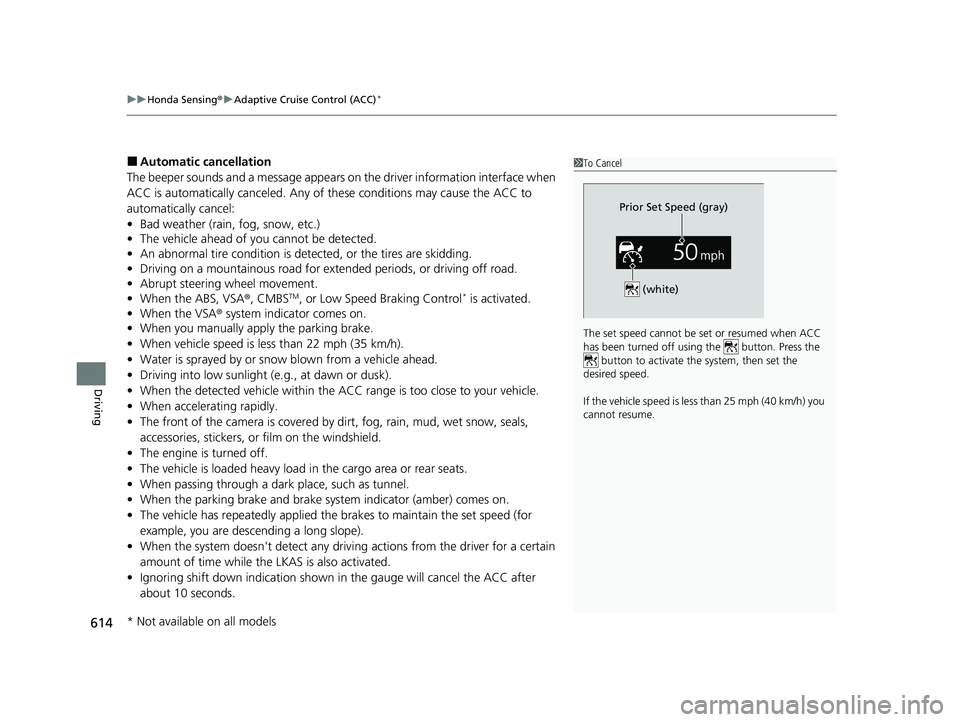
1To Cancel
The set speed cannot be set or resumed when ACC
has been turned off usi ng the button. Press the
button to activate the system, then set the
desired speed.
If the vehicle speed is less than 25 mph (40 km/h) you
cannot resume.
Prior Set Speed (gray)
(white)
* Not available on all models
23 CIVIC HATCHBACK TYPE R-31T406100_03.book 614 ページ 2022年6月23日 木曜日 午後9時28分
Page 629 of 840
627
uuHonda Sensing ®u Lane Keeping Assist System (LKAS)
Continued
Driving
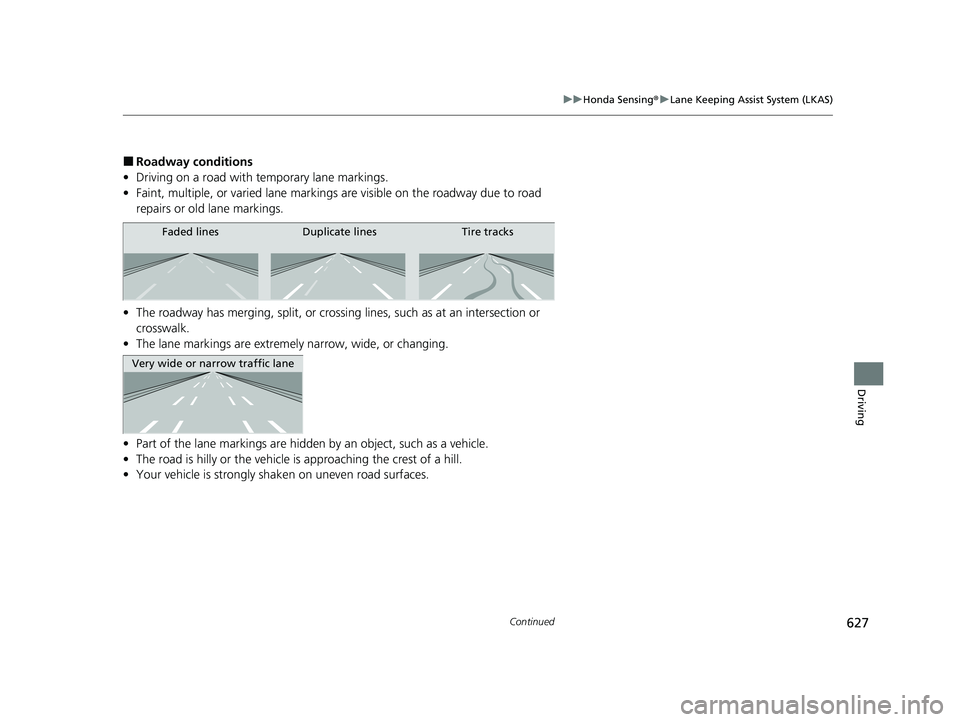
■Roadway conditions
• Driving on a road with temporary lane markings.
• Faint, multiple, or varied lane markings are visible on the roadway due to road
repairs or old lane markings.
• The roadway has merging, split, or crossi ng lines, such as at an intersection or
crosswalk.
• The lane markings are extremel y narrow, wide, or changing.
• Part of the lane markings are hidden by an object, such as a vehicle.
• The road is hilly or the vehicle is approaching the crest of a hill.
• Your vehicle is strongly shaken on uneven road surfaces.
Faded lines Duplicate lines Tire tracks
Very wide or narrow traffic lane
23 CIVIC HATCHBACK TYPE R-31T406100_03.book 627 ページ 2022年6月23日 木曜日 午後9時28分
Page 631 of 840
629
uuHonda Sensing ®u Lane Keeping Assist System (LKAS)
Driving
■Vehicle conditions
• When lighting is weak due to dirt coveri ng the headlight lenses, or there is poor
visibility in a dark place due to the headlights being improperly adjusted.
• The front of the camera is covered by dirt, fog, rain, mud, wet snow, seals,
accessories, stickers, or film on the windshield.
• Driving at night or in a dark place (e.g., a tunnel) with the headlights off.
• There is residue on the windshie ld from the windshield wipers.
• An abnormal tire or wheel condition (inco rrect sizes, varied sizes or construction,
improperly inflated, compact spare tire
*, etc.).
• The vehicle is tilted due to a heavy load in the cargo area or rear seats.
• The suspension has been modified.
• Tire chains
* are installed.
* Not available on all models
23 CIVIC HATCHBACK TYPE R-31T406100_03.book 629 ページ 2022年6月23日 木曜日 午後9時28分
Page 634 of 840
uuHonda Sensing ®u Traffic Jam Assist*
632
Driving
Traffic Jam Assist is activated when all of the following conditions exist:
• LKAS is activated.
• The lane in which you are driving has dete ctable lane markers on both sides, and
your vehicle is in the center of the lane.
• The vehicle is traveling between about 0 and 45mph (0 and 72km/h).
• You are driving on a straight or slightly curved road.
• The driver is gripping the steering wheel.
• The shift position is in
(D, (S* or (L*.
Do not use Traffic Jam Assist in any of the following situations:
• You are traveling on a ro ad with sharp curves.
u The system may not allow your vehicle to respond in a manner best suited for
the road conditions.
• You are entering a toll booth, interchange, service area, or parking area.
• You are driving in adverse weat her (rain, fog, snow, etc.).
• The surface of the road is slippery; for ex ample, it is icy or covered with snow.
u The tires may slip, causing you to lose control of the vehicle.
■Traffic Jam Assist Activation1Traffic Jam Assist Activation
Refer to the following pa ge for proper handling of
the LKAS:
2 Lane Keeping Assist System (LKAS) P. 618
Refer to the following page for steering buttons and
displays: 2 Operation Switches for the Adaptive
Cruise Control (ACC) with Low Speed
Follow
*/Adaptive Cruise Control (ACC)*/
Lane Keeping Assist System (LKAS)/Traffic
Jam Assist
* P. 552
* Not available on all models
23 CIVIC HATCHBACK TYPE R-31T406100_03.book 632 ページ 2022年6月23日 木曜日 午後9時28分
Page 638 of 840
636
uuHonda Sensing ®u Traffic Jam Assist*
Driving
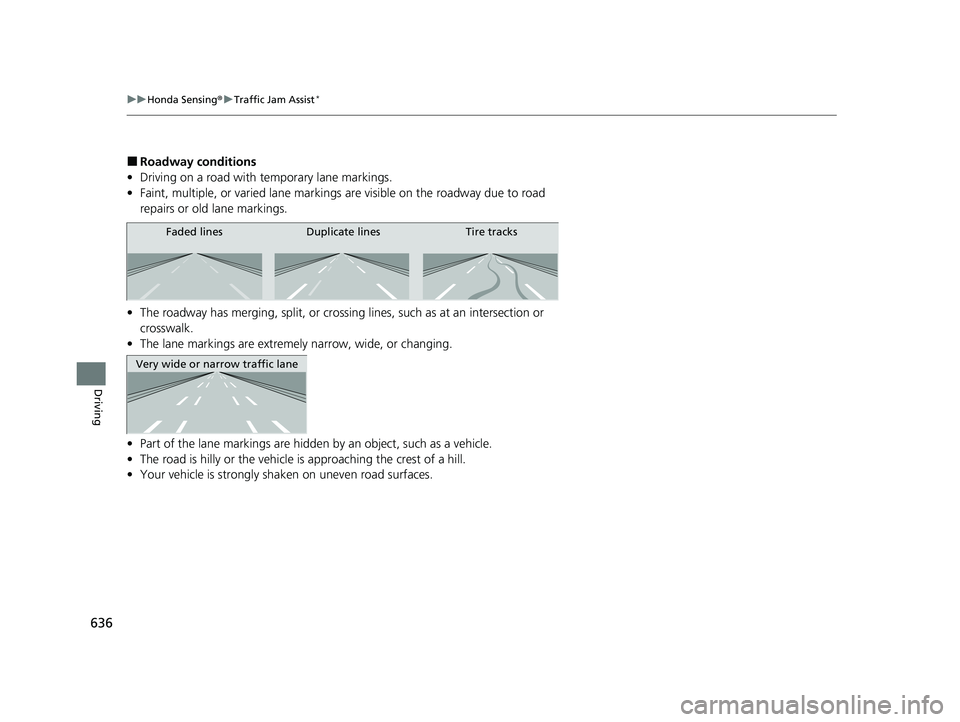
■Roadway conditions
• Driving on a road with temporary lane markings.
• Faint, multiple, or varied lane markings are visible on the roadway due to road
repairs or old lane markings.
• The roadway has merging, split, or crossing lines, such as at an intersection or
crosswalk.
• The lane markings are extremely narrow, wide, or changing.
• Part of the lane markings are hidden by an object, such as a vehicle.
• The road is hilly or the vehicle is approaching the crest of a hill.
• Your vehicle is strongly shaken on uneven road surfaces.
Faded lines Duplicate lines Tire tracks
Very wide or narrow traffic lane
23 CIVIC HATCHBACK TYPE R-31T406100_03.book 636 ページ 2022年6月23日 木曜日 午後9時28分
Page 640 of 840
638
uuHonda Sensing ®u Traffic Jam Assist*
Driving
■Vehicle conditions
• When lighting is weak due to dirt covering the headlight lenses, or there is poor
visibility in a dark place due to th e headlights being improperly adjusted.
• The front of the camera is covered by dirt, fog, rain, mud, wet snow, seals,
accessories, stickers, or film on the windshield.
• Driving at night or in a dark place (e .g., a tunnel) with the headlights off.
• There is residue on the windshie ld from the windshield wipers.
• An abnormal tire or wheel condition (incor rect sizes, varied sizes or construction,
improperly inflated, comp act spare tire, etc.).
• The vehicle is tilted due to a heavy load in the cargo area or rear seats.
• The suspension ha s been modified.
• Tire chains are installed.
23 CIVIC HATCHBACK TYPE R-31T406100_03.book 638 ページ 2022年6月23日 木曜日 午後9時28分
Page 644 of 840
uuHonda Sensing ®u Road Departure Mitigation System
642
Driving
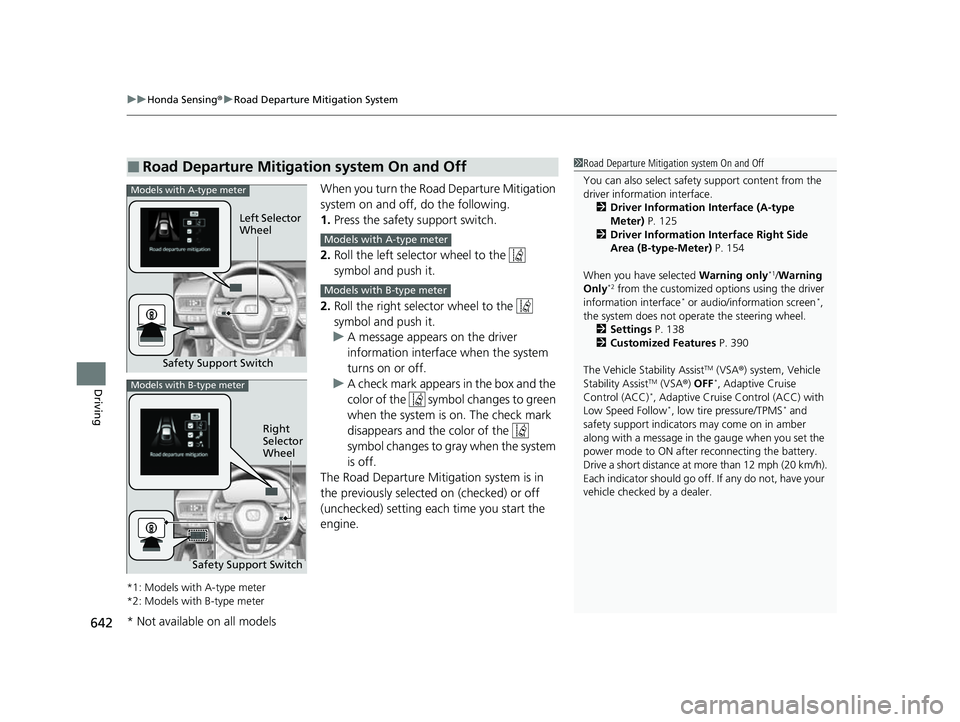
When you turn the Road Departure Mitigation
system on and off, do the following.
1. Press the safety support switch.
2. Roll the left selector wheel to the
symbol and push it.
2. Roll the right selector wheel to the
symbol and push it.
u A message appears on the driver
information interface when the system
turns on or off.
u A check mark appears in the box and the
color of the symbol changes to green
when the system is on. The check mark
disappears and the color of the
symbol changes to gray when the system
is off.
The Road Departure Mitigation system is in
the previously selected on (checked) or off
(unchecked) setting each time you start the
engine.
*1: Models with A-type meter
*2: Models with B-type meter
■Road Departure Mitigation system On and Off1 Road Departure Mitigation system On and Off
You can also sele ct safety support content from the
driver information interface.
2 Driver Information Interface (A-type
Meter) P. 125
2 Driver Information Interface Right Side
Area (B-type-Meter) P. 154
When you have selected Warning only
*1/Warning
Only*2 from the customized options using the driver
information interface* or audio/information screen*,
the system does not opera te the steering wheel.
2 Settings P. 138
2 Customized Features P. 390
The Vehicle Stability Assist
TM (VSA ®) system, Vehicle
Stability AssistTM (VSA ®) OFF*, Adaptive Cruise
Control (ACC)*, Adaptive Cruise Control (ACC) with
Low Speed Follow*, low tire pressure/TPMS* and
safety support indicators may come on in amber
along with a message in the gauge when you set the
power mode to ON after reconnecting the battery.
Drive a short distance at more than 12 mph (20 km/h).
Each indicator should go off. If any do not, have your
vehicle checked by a dealer.
Safety Support Switch Left Selector
Wheel
Models with A-type meter
Models with A-type meter
Models with B-type meter
Models with B-type meter
Right
Selector
Wheel
Safety Support Switch
* Not available on all models
23 CIVIC HATCHBACK TYPE R-31T406100_03.book 642 ページ 2022年6月23日 木曜日 午後9時28分