2023 HONDA CIVIC check engine
[x] Cancel search: check enginePage 538 of 840

uuWhen Driving uVehicle Stability AssistTM (VSA ®), aka Electronic Stability Control (ESC), System
536
Driving
This button is on the driv er side control panel.
To partially disable VSA ® functionality/
features, press and hold it until you hear a
beep.
Your vehicle will have normal braking and
cornering ability, but traction control function
will be less effective.
To restore VSA ® functionality/features, press
the (VSA ® OFF ) button until you hear a
beep.
VSA ® is turned on every time you start the
engine, even if you turned it off the last time
you drove the vehicle.
*1 : Models with A-type meter
*2 : Models with B-type meter
*3 : When using the +R gauge
*
■VSA ® On and Off1 Vehicle Stability AssistTM (VSA ®), aka Electronic Stability Control
(ESC), System
In certain unusual conditions when your vehicle gets
stuck in shallow mud or fr esh snow, it may be easier
to free it with the VSA ® temporarily switched off.
When the button is pressed, the traction control
function becomes less effective. This allows for the
wheels to spin more freely at low speed. You should
only attempt to free your vehicle with the VSA ® off if
you are not able to free it when the VSA ® is on.
Immediately after freeing your vehicle, be sure to
switch VSA ® on again. We do not recommend driving
your vehicle with the VSA ® system switched off.
You may hear a motor sound coming from the
engine compartment while system checks are being
performed immediately after starting the engine or
while driving. This is normal.
VSA ® OFF Indicator
*1
*2*3
* Not available on all models
23 CIVIC HATCHBACK TYPE R-31T406100_03.book 536 ページ 2022年6月23日 木曜日 午後9時28分
Page 551 of 840
Continued549
uuWhen Driving uBlind Spot Information System*
Driving
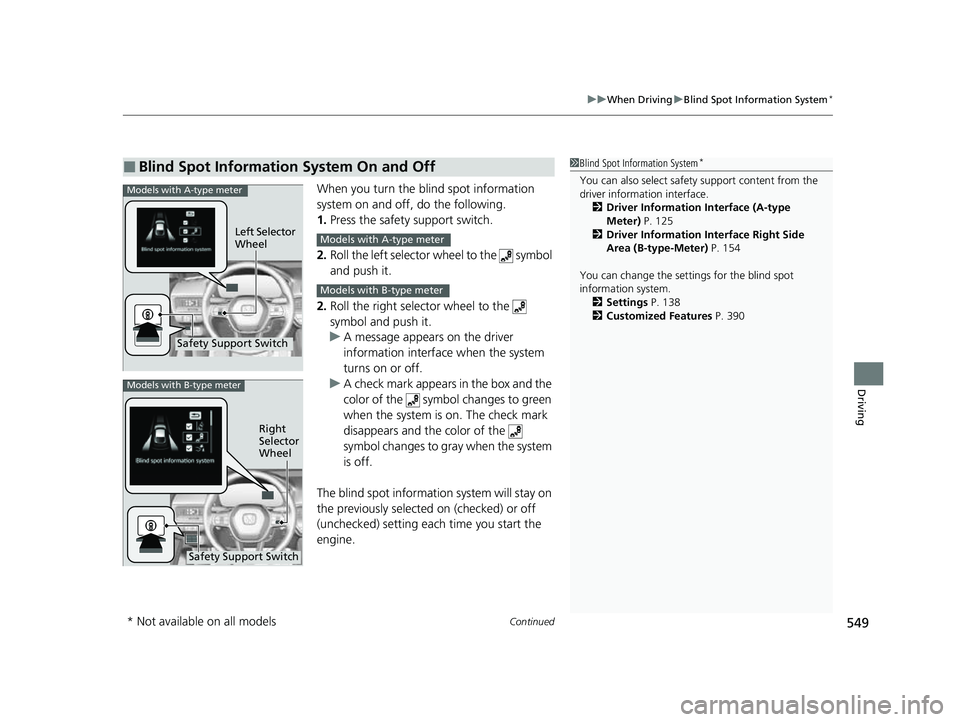
When you turn the b lind spot information
system on and off, do the following.
1. Press the safety support switch.
2. Roll the left selector wheel to the symbol
and push it.
2. Roll the right selector wheel to the
symbol and push it.
u A message appears on the driver
information interface when the system
turns on or off.
u A check mark appears in the box and the
color of the symbol changes to green
when the system is on. The check mark
disappears and the color of the
symbol changes to gray when the system
is off.
The blind spot informatio n system will stay on
the previously selected on (checked) or off
(unchecked) setting eac h time you start the
engine.
■Blind Spot Information System On and Off1 Blind Spot Information System*
You can also sele ct safety support content from the
driver information interface.
2 Driver Information Interface (A-type
Meter) P. 125
2 Driver Information Interface Right Side
Area (B-type-Meter) P. 154
You can change the settings for the blind spot
information system. 2 Settings P. 138
2 Customized Features P. 390Models with A-type meter
Left Selector
Wheel
Safety Support Switch
Models with A-type meter
Models with B-type meter
Models with B-type meter
Right
Selector
Wheel
Safety Support Switch
* Not available on all models
23 CIVIC HATCHBACK TYPE R-31T406100_03.book 549 ページ 2022年6月23日 木曜日 午後9時28分
Page 561 of 840
Continued559
uuHonda Sensing ®u Collision Mitigation Braking SystemTM (CMBSTM)
Driving
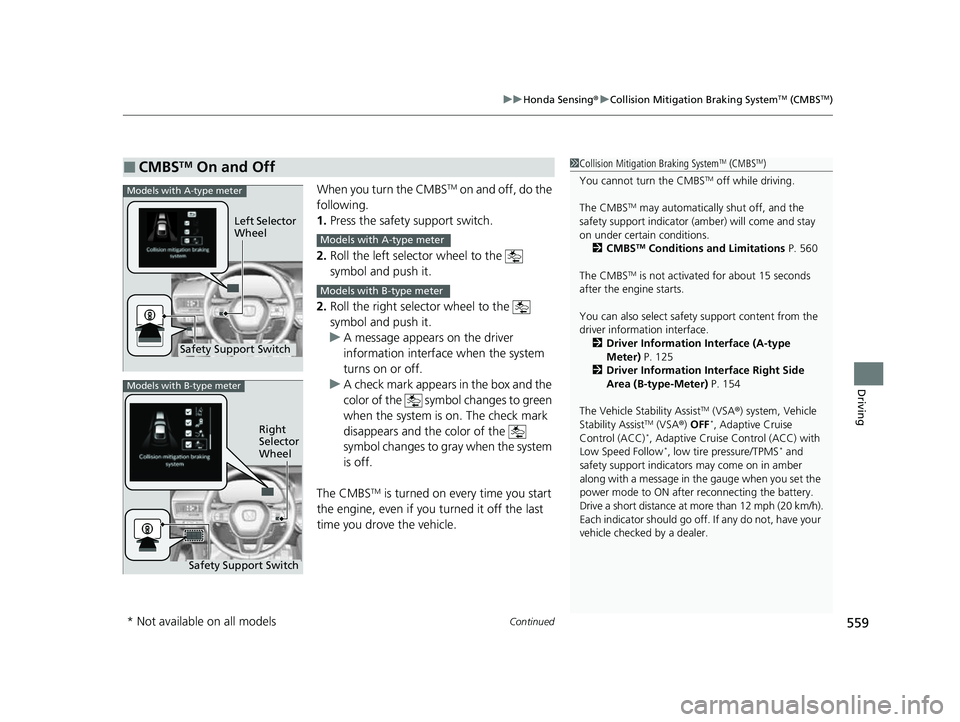
When you turn the CMBSTM on and off, do the
following.
1. Press the safety support switch.
2. Roll the left selector wheel to the
symbol and push it.
2. Roll the right selector wheel to the
symbol and push it.
u A message appears on the driver
information interface when the system
turns on or off.
u A check mark appears in the box and the
color of the symbol changes to green
when the system is on. The check mark
disappears and the color of the
symbol changes to gray when the system
is off.
The CMBS
TM is turned on every time you start
the engine, even if you turned it off the last
time you drove the vehicle.
■CMBSTM On and Off1 Collision Mitigation Braking SystemTM (CMBSTM)
You cannot turn the CMBS
TM off while driving.
The CMBS
TM may automatically shut off, and the
safety support indicator (amb er) will come and stay
on under certain conditions. 2 CMBS
TM Conditions and Limitations P. 560
The CMBS
TM is not activated for about 15 seconds
after the engine starts.
You can also sele ct safety support content from the
driver information interface.
2 Driver Information Interface (A-type
Meter) P. 125
2 Driver Information Interface Right Side
Area (B-type-Meter) P. 154
The Vehicle Stability Assist
TM (VSA ®) system, Vehicle
Stability AssistTM (VSA ®) OFF*, Adaptive Cruise
Control (ACC)*, Adaptive Cruise Control (ACC) with
Low Speed Follow*, low tire pressure/TPMS* and
safety support indicators may come on in amber
along with a message in the gauge when you set the
power mode to ON after reconnecting the battery.
Drive a short distance at more than 12 mph (20 km/h).
Each indicator should go off. If any do not, have your
vehicle checked by a dealer.
Safety Support Switch Left Selector
Wheel
Models with A-type meter
Models with A-type meter
Models with B-type meter
Models with B-type meter
Right
Selector
Wheel
Safety Support Switch
* Not available on all models
23 CIVIC HATCHBACK TYPE R-31T406100_03.book 559 ページ 2022年6月23日 木曜日 午後9時28分
Page 572 of 840
uuHonda Sensing ®u Low Speed Braking Control*
570
Driving
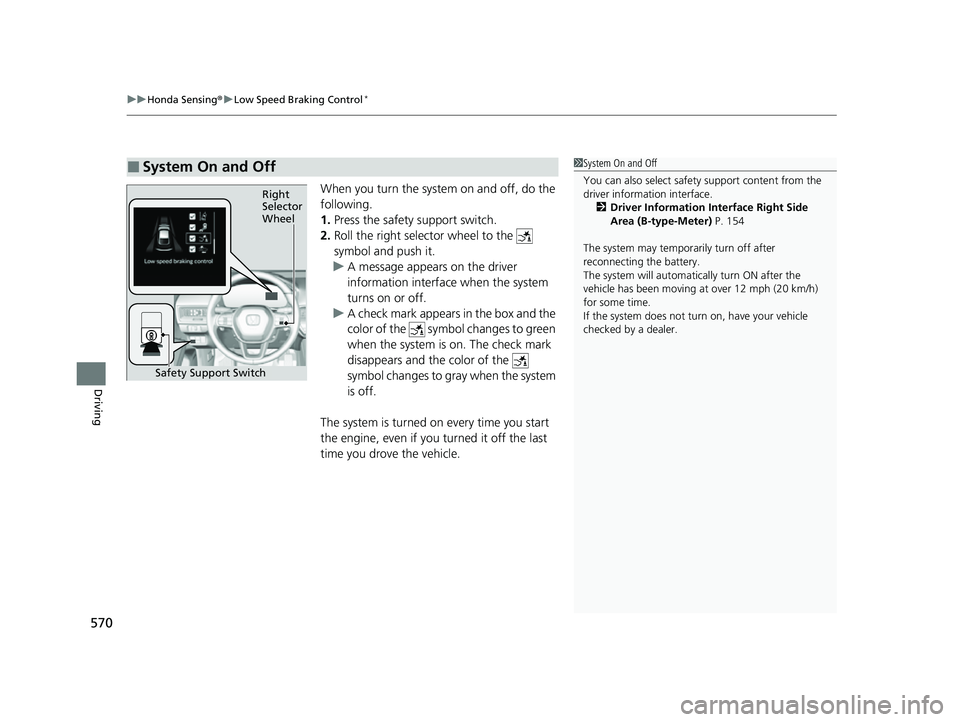
When you turn the system on and off, do the
following.
1. Press the safety support switch.
2. Roll the right selector wheel to the
symbol and push it.
u A message appears on the driver
information interface when the system
turns on or off.
u A check mark appears in the box and the
color of the symbol changes to green
when the system is on. The check mark
disappears and the color of the
symbol changes to gray when the system
is off.
The system is turned on every time you start
the engine, even if you turned it off the last
time you drove the vehicle.
■System On and Off 1 System On and Off
You can also sele ct safety support content from the
driver information interface.
2 Driver Information Interface Right Side
Area (B-type-Meter) P. 154
The system may temporarily turn off after
reconnecting the battery.
The system will automatically turn ON after the
vehicle has been moving at over 12 mph (20 km/h)
for some time.
If the system does not turn on, have your vehicle
checked by a dealer.
Right
Selector
Wheel
Safety Support Switch
23 CIVIC HATCHBACK TYPE R-31T406100_03.book 570 ページ 2022年6月23日 木曜日 午後9時28分
Page 577 of 840
Continued575
uuHonda Sensing ®u Low Speed Braking Control*
Driving
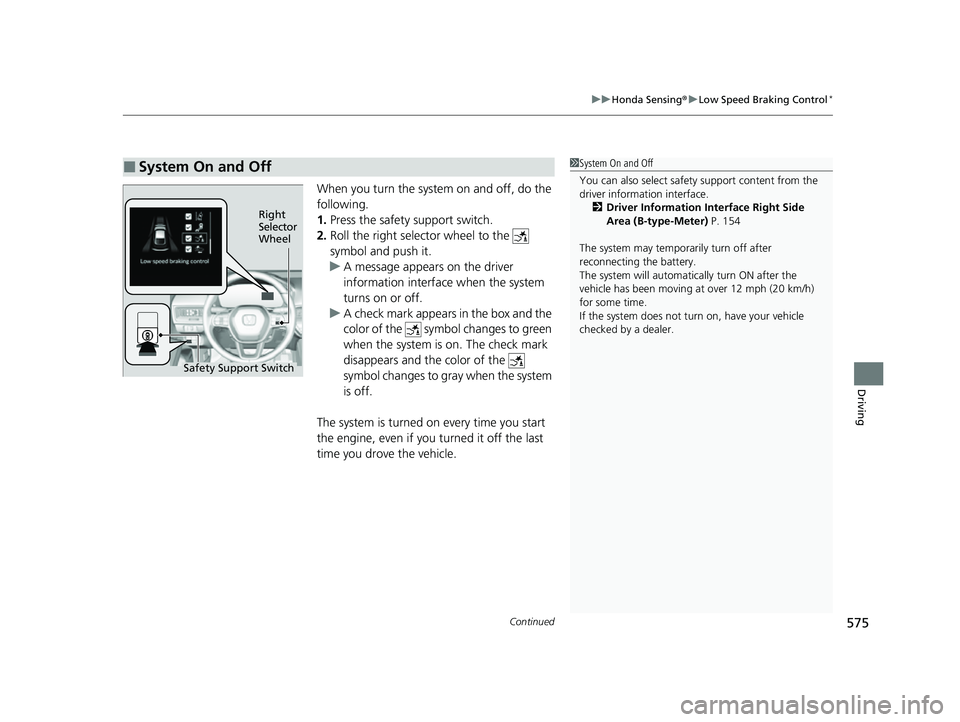
When you turn the system on and off, do the
following.
1. Press the safety support switch.
2. Roll the right selector wheel to the
symbol and push it.
u A message appears on the driver
information interface when the system
turns on or off.
u A check mark appears in the box and the
color of the symbol changes to green
when the system is on. The check mark
disappears and the color of the
symbol changes to gray when the system
is off.
The system is turned on every time you start
the engine, even if you turned it off the last
time you drove the vehicle.
■System On and Off 1 System On and Off
You can also sele ct safety support content from the
driver information interface.
2 Driver Information Interface Right Side
Area (B-type-Meter) P. 154
The system may temporarily turn off after
reconnecting the battery.
The system will automatically turn ON after the
vehicle has been moving at over 12 mph (20 km/h)
for some time.
If the system does not turn on, have your vehicle
checked by a dealer.
Right
Selector
Wheel
Safety Support Switch
23 CIVIC HATCHBACK TYPE R-31T406100_03.book 575 ページ 2022年6月23日 木曜日 午後9時28分
Page 644 of 840
uuHonda Sensing ®u Road Departure Mitigation System
642
Driving
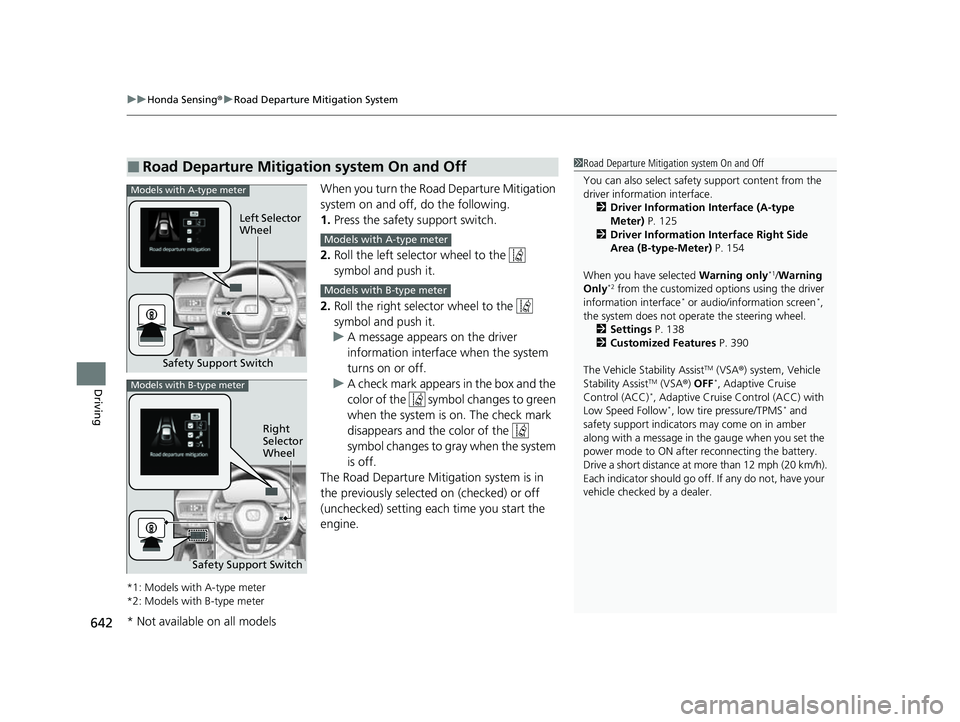
When you turn the Road Departure Mitigation
system on and off, do the following.
1. Press the safety support switch.
2. Roll the left selector wheel to the
symbol and push it.
2. Roll the right selector wheel to the
symbol and push it.
u A message appears on the driver
information interface when the system
turns on or off.
u A check mark appears in the box and the
color of the symbol changes to green
when the system is on. The check mark
disappears and the color of the
symbol changes to gray when the system
is off.
The Road Departure Mitigation system is in
the previously selected on (checked) or off
(unchecked) setting each time you start the
engine.
*1: Models with A-type meter
*2: Models with B-type meter
■Road Departure Mitigation system On and Off1 Road Departure Mitigation system On and Off
You can also sele ct safety support content from the
driver information interface.
2 Driver Information Interface (A-type
Meter) P. 125
2 Driver Information Interface Right Side
Area (B-type-Meter) P. 154
When you have selected Warning only
*1/Warning
Only*2 from the customized options using the driver
information interface* or audio/information screen*,
the system does not opera te the steering wheel.
2 Settings P. 138
2 Customized Features P. 390
The Vehicle Stability Assist
TM (VSA ®) system, Vehicle
Stability AssistTM (VSA ®) OFF*, Adaptive Cruise
Control (ACC)*, Adaptive Cruise Control (ACC) with
Low Speed Follow*, low tire pressure/TPMS* and
safety support indicators may come on in amber
along with a message in the gauge when you set the
power mode to ON after reconnecting the battery.
Drive a short distance at more than 12 mph (20 km/h).
Each indicator should go off. If any do not, have your
vehicle checked by a dealer.
Safety Support Switch Left Selector
Wheel
Models with A-type meter
Models with A-type meter
Models with B-type meter
Models with B-type meter
Right
Selector
Wheel
Safety Support Switch
* Not available on all models
23 CIVIC HATCHBACK TYPE R-31T406100_03.book 642 ページ 2022年6月23日 木曜日 午後9時28分
Page 660 of 840
uuBraking uBrake System
658
Driving
■Automatic parking brake feature operation
If the automatic parking brake feature has been activated:
• The parking brake is applied automatica lly when you set the power mode to
VEHICLE OFF.
• To confirm that the parking brake is appl ied, check if the parking brake and brake
system indicator (red) is on.
2 Activating and deactivating the automatic parking brake feature P. 660
■To release automatically
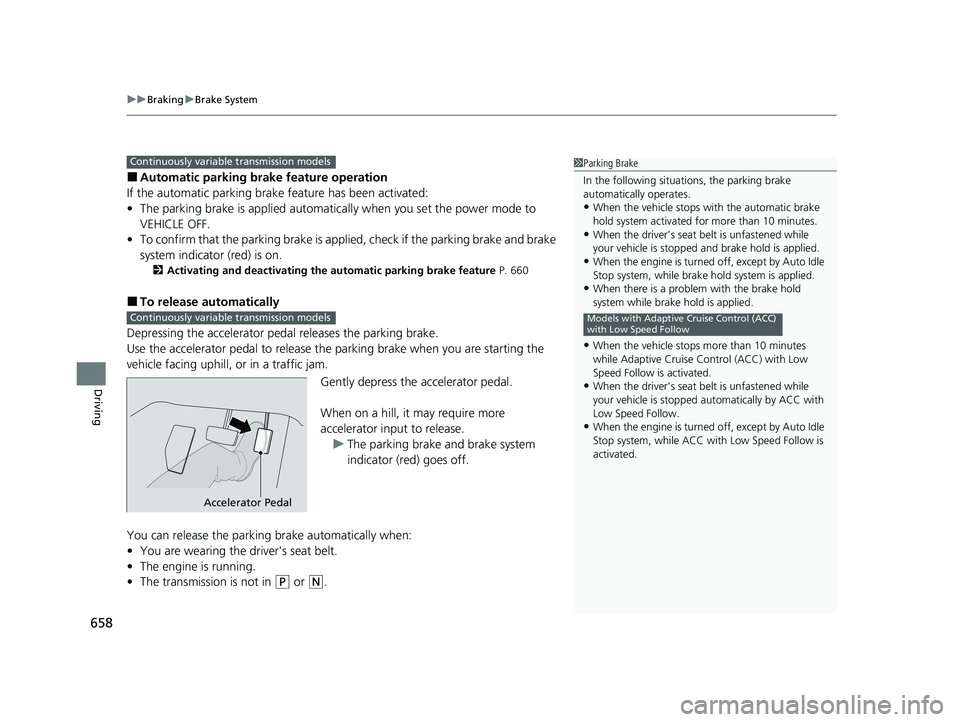
Depressing the accelerator pedal releases the parking brake.
Use the accelerator pedal to release the parking brake when you are starting the
vehicle facing uphill, or in a traffic jam.
Gently depress the accelerator pedal.
When on a hill, it may require more
accelerator input to release.u The parking brake and brake system
indicator (red) goes off.
You can release the parki ng brake automatically when:
• You are wearing the driver's seat belt.
• The engine is running.
• The transmission is not in
(P or (N.
1Parking Brake
In the following situations, the parking brake
automatically operates.
•When the vehicle stops with the automatic brake
hold system activated for more than 10 minutes.
•When the driver's seat belt is unfastened while
your vehicle is stopped and brake hold is applied.
•When the engine is turned off, except by Auto Idle
Stop system, while brake hold system is applied.
•When there is a problem with the brake hold
system while brake hold is applied.
•When the vehicle stops more than 10 minutes
while Adaptive Cruise Control (ACC) with Low
Speed Follow is activated.
•When the driver's seat belt is unfastened while
your vehicle is stopped au tomatically by ACC with
Low Speed Follow.
•When the engine is turned off, except by Auto Idle
Stop system, while ACC with Low Speed Follow is
activated.
Models with Adaptive Cruise Control (ACC)
with Low Speed Follow
Continuously variable transmission models
Continuously variable transmission models
Accelerator Pedal
23 CIVIC HATCHBACK TYPE R-31T406100_03.book 658 ページ 2022年6月23日 木曜日 午後9時28分
Page 662 of 840
uuBraking uBrake System
660
Driving
■Activating and deactivating the automatic parking brake feature
With the power mode is in ON, carry out th e following steps to either activate or
deactivate the automatic parking brake feature.
1. Put the transmission into
(P.
2. Without depressing the brake pedal, pull up and release the electric parking brake
switch.
u Check that the parking brake and brake system indicator (red) has come on.
3. Pull up and hold the electric parking br ake switch. When you hear a beeping
sound, release the switch and within 3 seconds pull up and hold the switch again.
4. When you hear a sound indicating that the procedure is completed, release the
switch.
u Two beeps indicates that the feature has been activated.
u One beep indicates that the feature has been deactivated.
u When you have completed activating the feature, the parking brake will
remain applied after you turn off the engine.
u To confirm that the parking brake is ap plied, check if the parking brake and
brake system indicator (red) is on.
If you need to temporarily deactivate the feature while putting your vehicle through
a conveyor type car wash, you can follow the procedure explained below.
1. Depress the brake pedal and bring the vehicle to a stop.
2. Set the power mode to VEHICLE OFF and then within 2 seconds push down the
electric parking brake switch.
u Activation and deactivation settings fo r the feature will not be affected.
u Before temporarily deactivating the feat ure, make sure to first turn off both
Adaptive Cruise Control (ACC) with Low Speed Follow and the automatic
brake hold system.
1 Parking Brake
In cold climates, the parking brake may freeze in
place if applied.
When parking the vehicle, chock the wheels and
make sure the automatic parking brake feature is
deactivated.
Also, when putting your vehicle through a conveyor-
type car wash or when ha ving your vehicle towed,
deactivate the automatic parking brake feature and
leave the parking brake released.
Continuously variable transmission models
23 CIVIC HATCHBACK TYPE R-31T406100_03.book 660 ページ 2022年6月23日 木曜日 午後9時28分