Page 575 of 840
573
uuHonda Sensing ®u Low Speed Braking Control*
Continued
Driving
Low Speed Braking Control*
Using sonar sensors located on the front an d rear bumpers, and the front grille, this
system detects if there is danger of a poten tial collision with a wall or other obstacle
during normal driving. The system then assists in avoiding collisions and reducing
damage from impact through assistive braking.
1 Low Speed Braking Control*
If the Low Speed Braking Control activates in a
situation where you do not want automatic brake
application (such as when the vehicle is between two
railroad crossing gates), si mply press the brake pedal
to deactivate the system and then continue to drive
as intended.
Low Speed Braking Contro l does not function while
VSA ® is completely disabled.
3WARNING
The Low Speed Braking Control System
cannot avoid all collisions and may not
reduce damage in each situation where the
accelerator is mistaken ly or aggressively
pressed. Overreliance on the system may
result in a collision with serious injury or
death. Always check your surroundings,
your shift position, and your pedal use.
Driver remains responsible for safely
operating the vehicle.
Models without Auto Idle Stop
Manual transmission models with parking sensor system
* Not available on all models
23 CIVIC HATCHBACK TYPE R-31T406100_03.book 573 ページ 2022年6月23日 木曜日 午後9時28分
Page 576 of 840
uuHonda Sensing ®u Low Speed Braking Control*
574
Driving
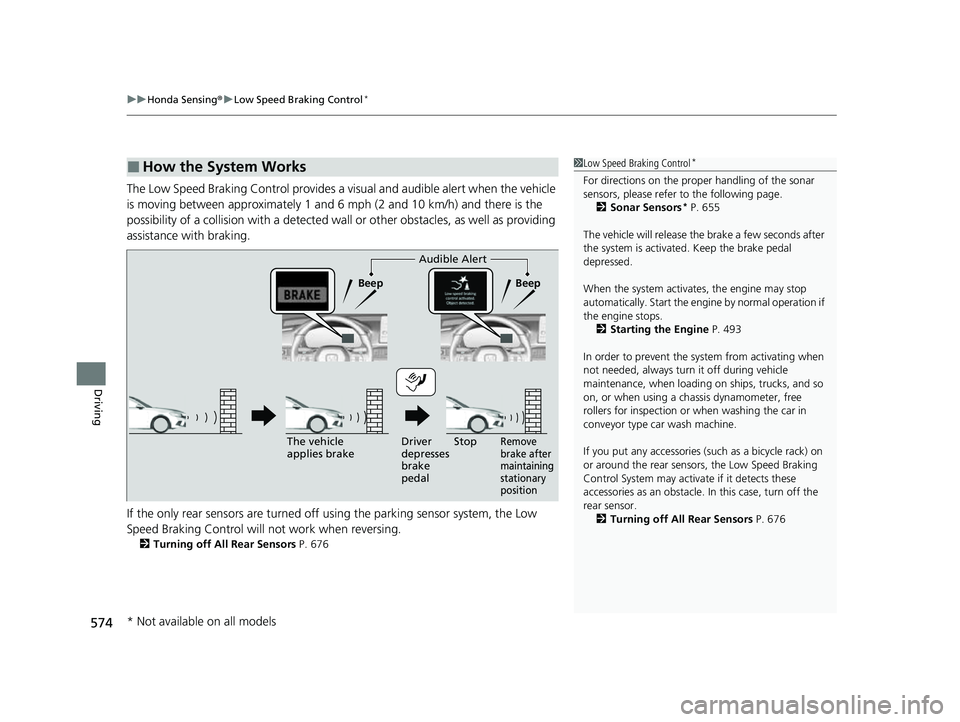
The Low Speed Braking Control provides a visual and audible alert when the vehicle
is moving between approximately 1 and 6 mph (2 and 10 km/h) and there is the
possibility of a collision with a detected wall or other obstacles, as well as providing
assistance with braking.
If the only rear sensors are turned off using the parking sensor system, the Low
Speed Braking Control will not work when reversing.
2Turning off All Rear Sensors P. 676
■How the System Works1Low Speed Braking Control*
For directions on the prop er handling of the sonar
sensors, please refer to the following page.
2 Sonar Sensors
* P. 655
The vehicle will release the brake a few seconds after
the system is activated. Keep the brake pedal
depressed.
When the system activates, the engine may stop
automatically. Start the engine by normal operation if
the engine stops. 2 Starting the Engine P. 493
In order to prevent the sy stem from activating when
not needed, always turn it off during vehicle
maintenance, when loading on ships, trucks, and so
on, or when using a chassis dynamometer, free
rollers for inspection or when washing the car in
conveyor type car wash machine.
If you put any accessories (such as a bicycle rack) on
or around the rear sensors, the Low Speed Braking
Control System may activate if it detects these
accessories as an obstacle. In this case, turn off the
rear sensor. 2 Turning off All Rear Sensors P. 676
Audible Alert
Beep Beep
The vehicle
applies brake Driver
depresses
brake
pedal
Remove
brake after
maintaining
stationary
positionStop
* Not available on all models
23 CIVIC HATCHBACK TYPE R-31T406100_03.book 574 ページ 2022年6月23日 木曜日 午後9時28分
Page 673 of 840
671
uuParking Your Vehicle uParking Sensor System*
Continued
Driving
Parking Sensor System*
The corner and center sensors monitor ob stacles around your vehicle, and the
beeper, driver information interface and a udio/information screen let you know the
approximate distance between your vehicle and the obstacle.
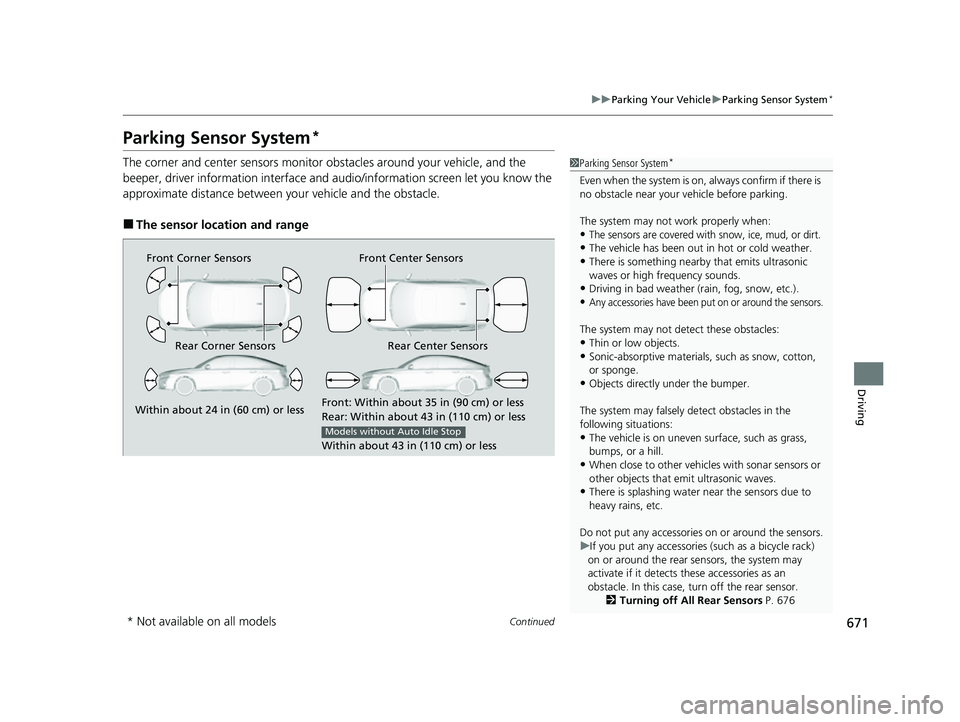
■The sensor location and range
1 Parking Sensor System*
Even when the system is on, always confirm if there is
no obstacle near your ve hicle before parking.
The system may not work properly when:
•The sensors are covered with snow, ice, mud, or dirt.
•The vehicle has been out in hot or cold weather.
•There is something nearby that emits ultrasonic
waves or high frequency sounds.
•Driving in bad weather (rain, fog, snow, etc.).
•Any accessories have been put on or around the sensors.
The system may not detect these obstacles:
•Thin or low objects.•Sonic-absorptive materials, such as snow, cotton,
or sponge.
•Objects directly under the bumper.
The system may falsely de tect obstacles in the
following situations:
•The vehicle is on uneven su rface, such as grass,
bumps, or a hill.
•When close to other vehicl es with sonar sensors or
other objects that em it ultrasonic waves.
•There is splashing water near the sensors due to
heavy rains, etc.
Do not put any accessories on or around the sensors.
u If you put any accessories (such as a bicycle rack)
on or around the rear sensors, the system may
activate if it detects these accessories as an
obstacle. In this case, turn off the rear sensor. 2Turning off All Rear Sensors P. 676
Front Corner Sensors
Rear Corner Sensors Rear Center Sensors Front Center Sensors
Within about 24 in (60 cm) or less
Front: Within about 35 in (90 cm) or less
Rear: Within
abo
ut 43 in (110 cm) or less
Within about 43 in (110 cm) or less
Models without Auto Idle Stop
* Not available on all models
23 CIVIC HATCHBACK TYPE R-31T406100_03.book 671 ページ 2022年6月23日 木曜日 午後9時28分
Page 674 of 840
uuParking Your Vehicle uParking Sensor System*
672
Driving
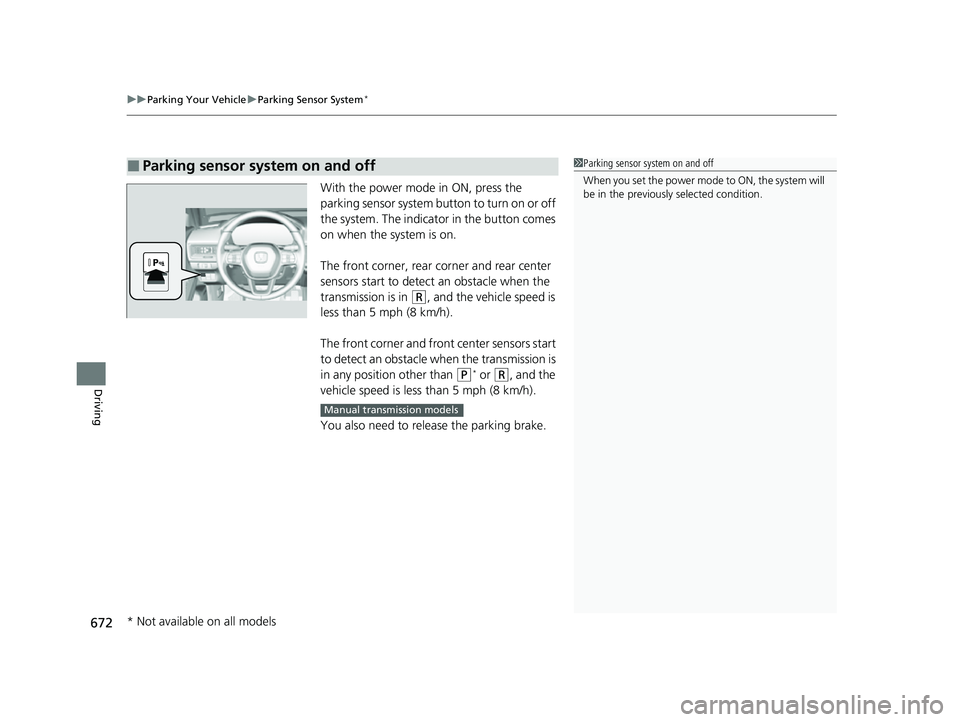
With the power mode in ON, press the
parking sensor system button to turn on or off
the system. The indicato r in the button comes
on when the system is on.
The front corner, rear corner and rear center
sensors start to detect an obstacle when the
transmission is in
(R, and the vehicle speed is
less than 5 mph (8 km/h).
The front corner and front center sensors start
to detect an obstacle wh en the transmission is
in any position other than
(P* or (R, and the
vehicle speed is less than 5 mph (8 km/h).
You also need to release the parking brake.
■Parking sensor system on and off1 Parking sensor system on and off
When you set the power mode to ON, the system will
be in the previously selected condition.
Manual transmission models
* Not available on all models
23 CIVIC HATCHBACK TYPE R-31T406100_03.book 672 ページ 2022年6月23日 木曜日 午後9時28分
Page 675 of 840
673
uuParking Your Vehicle uParking Sensor System*
Continued
Driving
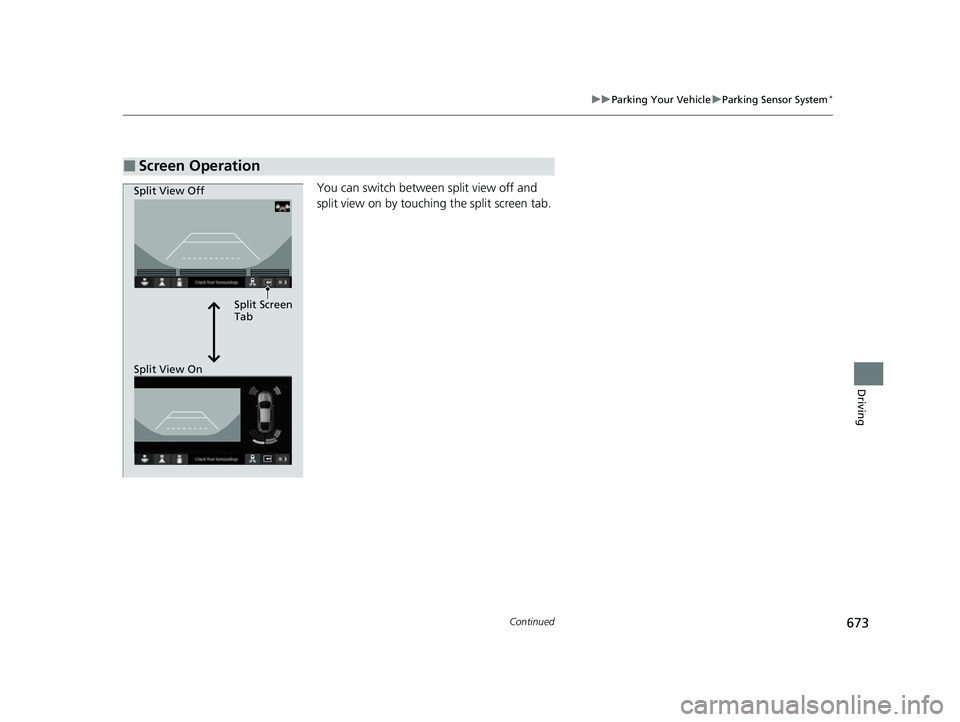
You can switch between split view off and
split view on by touchi ng the split screen tab.
■Screen Operation
Split Screen
Tab
Split View Off
Split View On
23 CIVIC HATCHBACK TYPE R-31T406100_03.book 673 ページ 2022年6月23日 木曜日 午後9時28分
Page 676 of 840
674
uuParking Your Vehicle uParking Sensor System*
Driving
*1:On the driver information interface
*2:On the audio/information screen
*3:At this stage, only the center sensors detect obstacles.
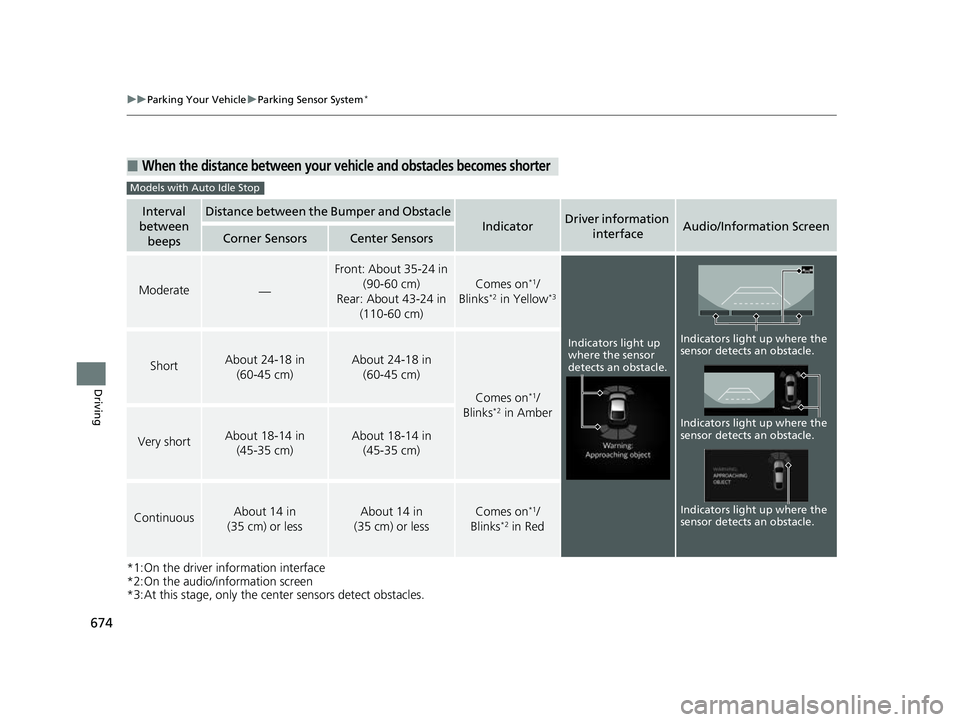
■When the distance between your ve hicle and obstacles becomes shorter
Interval
between beepsDistance between the Bumper and Obstacle
IndicatorDriver information
interfaceAudio/Information ScreenCorner SensorsCenter Sensors
Moderate—
Front: About 35-24 in (90-60 cm)
Rear: About 43-24 in (110-60 cm)
Comes on*1/
Blinks*2 in Yellow*3
ShortAbout 24-18 in (60-45 cm) About 24-18 in (60-45 cm)
Comes on*1/
Blinks*2 in Amber
Very shortAbout 18-14 in (45-35 cm) About 18-14 in (45-35 cm)
ContinuousAbout 14 in
(35 cm) or lessAbout 14 in
(35 cm) or lessComes on*1/
Blinks*2 in Red
Models with Auto Idle Stop
Indicators light up
where the sensor
detects an obstacle.
Indicators light up where the
sensor detects an obstacle.
Indicators light up where the
sensor detects an obstacle. Indicators light up where the
sensor detects an obstacle.
23 CIVIC HATCHBACK TYPE R-31T406100_03.book 674 ページ 2022年6月23日 木曜日 午後9時28分
Page 677 of 840
675
uuParking Your Vehicle uParking Sensor System*
Continued
Driving
*1: On the driver information interface
*2: On the audio/information screen
*3: At this stage, only the center sensors detect obstacles.
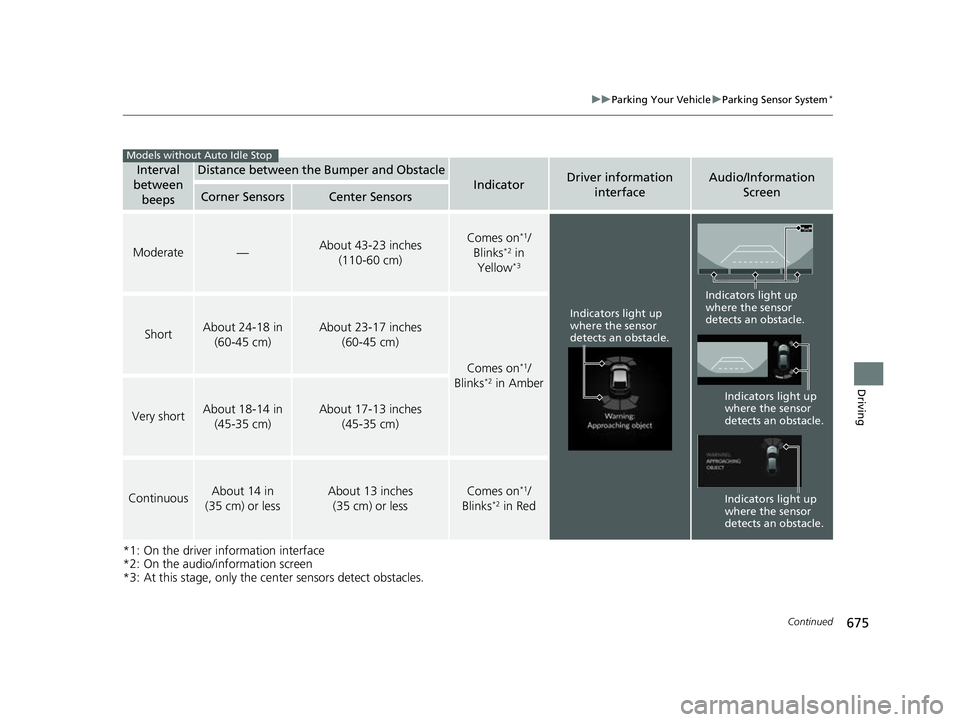
Interval
between
beepsDistance between the Bumper and Obstacle
IndicatorDriver information interfaceAudio/Information Screen
Corner SensorsCenter Sensors
Moderate—About 43-23 inches
(110-60 cm)Comes on*1/
Blinks*2 in
Yellow*3
ShortAbout 24-18 in (60-45 cm)About 23-17 inches (60-45 cm)
Comes on*1/
Blinks*2 in Amber
Very shortAbout 18-14 in (45-35 cm)About 17-13 inches (45-35 cm)
ContinuousAbout 14 in
(35 cm) or lessAbout 13 inches (35 cm) or lessComes on*1/
Blinks*2 in Red
Models without Auto Idle Stop
Indicators light up
where the sensor
detects an obstacle.
Indicators light up
where the sensor
detects an obstacle.
Indicators light up
where the sensor
detects an obstacle.
Indicators light up
where the sensor
detects an obstacle.
23 CIVIC HATCHBACK TYPE R-31T406100_03.book 675 ページ 2022年6月23日 木曜日 午後9時28分
Page 678 of 840
uuParking Your Vehicle uParking Sensor System*
676
Driving
To deactivate the rear sensors, please take the following steps:
1. Make sure that the parking sensor system is not activated.
u The indicator in th e button turns off.
2. Set the power mode to VEHICLE OFF.
3. Press and hold the parking sensor system button, and set the power mode to ON.
4. Keep pressing the button for 10 seconds. Release the button when the indicator
in the button flashes.
u The beeper sounds once.
5. While the indicator is flashi ng, press the button again. The indicator in the button
turns off.
u The beeper sounds twice. The rear sensors are now turned off. They will remain
turned off until manually turned back on again. To turn th e rear sensors on
again, follow the above procedure. The beeper sounds three times when the
rear sensors come back on.
■Turning off All Rear Sensors1 Turning off All Rear Sensors
When you put the transmission into
(R, the indicator
in the parking sensor system button blinks as a
reminder that the rear sens ors have been turned off.
If the rear sensors are turned off when using the
parking sensor system, the Low Speed Braking
Control System will not ac tivate while reversing.
2 Low Speed Braking Control
*
* Not available on all models
23 CIVIC HATCHBACK TYPE R-31T406100_03.book 676 ページ 2022年6月23日 木曜日 午後9時28分