Page 10 of 533
8
Quick Reference Guide
Quick Reference Guide
Visual Index
❚System Indicators (P84)
❚Gauges (P104)
❚Driver Information Interface (P108, 111)
❚ENGINE START/STOP Button (P164)
❚Climate Control System (P199)
❚ Rear Defogger (P177)
❚ Heated Door Mirror Button* (P177)
❚ Hazard Warning Button
❚ Front Seat Heater Buttons* (P198)
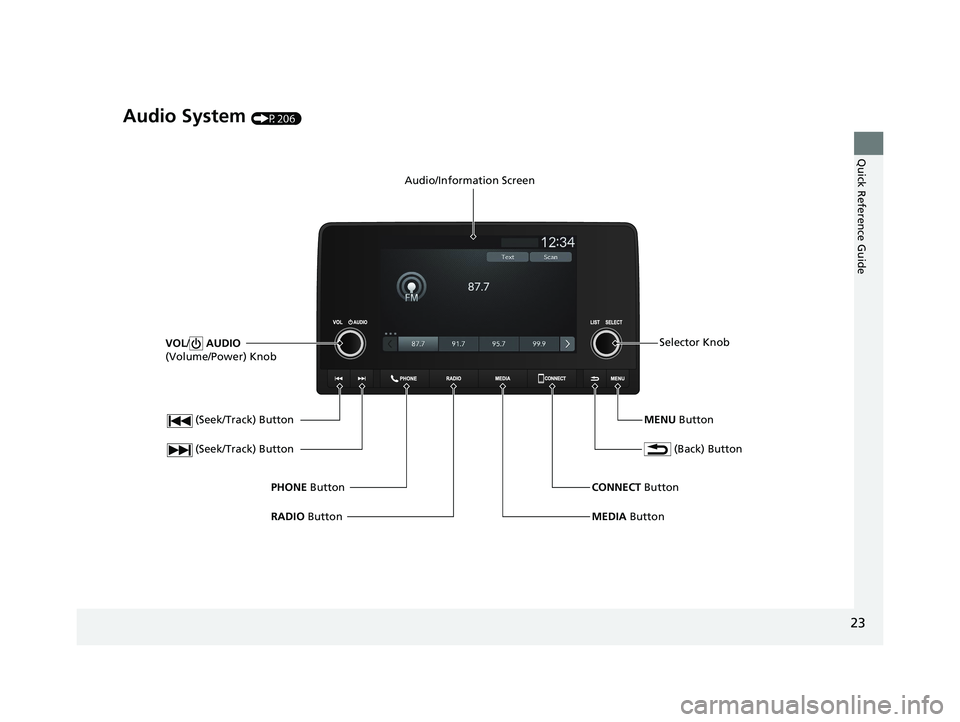
❚Audio System (P206)
23 ACCORD 4D US PET MAP-3130A6000_01.book 8 ページ 2022年10月19日 水曜日 午前11時49分
Page 11 of 533
9
Quick Reference Guide❚ Headlights/ Turn Signals (P167, 168)
❚Left Selector Wheel (P209)
❚ Adaptive Cruise Control (ACC) with
Low Speed Follow Buttons
(P342)
❚ Wipers/ Washers (P175)
❚ Lane Keeping Assist System (LKAS)
Button
(P365)
❚ Interval Button (P355)
❚Steering Wheel Adjustments (P178)
❚Right Selector Wheel (P112)
❚Bluetooth ® HandsFreeLink ® System Buttons (P265)
❚Audio Remote Controls (P209)
❚Horn (Press an area around .)
* Not available on all models
23 ACCORD 4D US PET MAP-3130A6000_01.book 9 ページ 2022年10月19日 水曜日 午前11時49分
Page 24 of 533
22
Quick Reference Guide
Features (P205)
Audio Remote Controls
(P209)
●VOL(+ / VOL(- (Volume) Switch
Press to adjust the volume up/down.
● / (Seek/Skip) Buttons
Radio:
Press / to change the preset
radio station. Press and hold /
to change the strong station.
iPod, USB flash drive, Bluetooth® Audio,
or Smartphone Connection:
Press / to skip to the
beginning of the next song or return to
the beginning of the current song.
USB flash drive:
Press and hold / to change a
folder.
Left Selector Wheel
/ (Seek/Skip) Buttons
VOL(
+/VOL(- (Volume) Switch
●Left Selector Wheel
Roll up or down: To cycle through the
modes, roll up or down and then press
the left selector wheel:
Back
AM
USB
Bluetooth ® Audio
Smartphone
(Apple CarPlay/Android Auto)
Customize display
Phone
FM
23 ACCORD 4D US PET MAP-3130A6000_01.book 22 ページ 2022年10月19日 水曜日 午前11時49分
Page 25 of 533
23
Quick Reference Guide
Audio System (P206)
(Seek/Track) Button
RADIO Button
PHONE
Button
(Seek/Track) Button
VOL
/ AUDIO
(Volume/Power) Knob
Audio/Information Screen
(Back) Button
MENU ButtonSelector Knob
MEDIA Button
CONNECT
Button
23 ACCORD 4D US PET MAP-3130A6000_01.book 23 ページ 2022年10月19日 水曜日 午前11時49分
Page 85 of 533
83
Instrument Panel
This chapter describes the buttons, indicators, and gauges that are used while driving.
Indicators............................................ 84
Gauges and Driver Information Interface Gauges ............................................ 104
Driver Information Interface (Left Side Area) ............................................. 108
Driver Information Interface (Right Side Area) ............................................. 111
23 ACCORD 4D US PET MAP-3130A6000_01.book 83 ページ 2022年10月19日 水曜日 午前11時49分
Page 201 of 533

199Continued
Controls
Climate Control System
Using Automatic Climate Control
The automatic climate control system maintains the interior temperature you select.
The system also selects the proper mix of heat ed or cooled air that raises or lowers
the interior temperature to your pr eference as quickly as possible.
Use the system when the engine is running.
1. Press the AUTO button.
2. Adjust the interior temperature using the dr iver’s side or passenger’s side control
dial.
3. Press the (ON/OFF) button to cancel.1Using Automatic Climate Control
If any buttons are presse d while using the climate
control system in auto, the function of the button
that was pressed will take priority.
The auto button indicator
*/AUTO indicator* will go
off, but functions unrelated to the button that was
pressed will be cont rolled automatically.
During idle-stops, air-conditioning is suspended, and
only the blower remains active.
If you do not want air-cond itioning suspended, press
the Auto Idle Stop OFF button to cancel idle-stop.
To prevent cold air from bl owing in from outside, the
fan may not start i mmediately when the AUTO
button is pressed.
If the interior is very warm, you can cool it down
more rapidly by partial ly opening the windows,
turning the system on auto, and setting the
temperature to low. Change the fresh air mode to
recirculation mode until the temperature cools down.
When you set the temperat ure to the lower or upper
limit, Lo or Hi is displayed.
Pressing the button switches the climate
control system between on and off. When turned on,
the system returns to your last selection.
While ECON mode is active, the climate control
system may have reduced cooling performance.Models with SYNC button
Floor and
defroster
vents
Floor vents
Dashboard
and floor
vents
Dashboard
vents
AUTO Button
Driver’s Side
Temperature
Control Dial
(Recirculation)
Button
Fan Control Dial
A/C (Air Conditioning)
Button Passenger’s Side
Temperature
Control Dial
(ON/OFF) Button
* Not available on all models
23 ACCORD 4D US PET MAP-3130A6000_01.book 199 ページ 2022年10月19日 水曜日 午前11時49分
Page 208 of 533
206
Features
Audio System
About Your Audio System
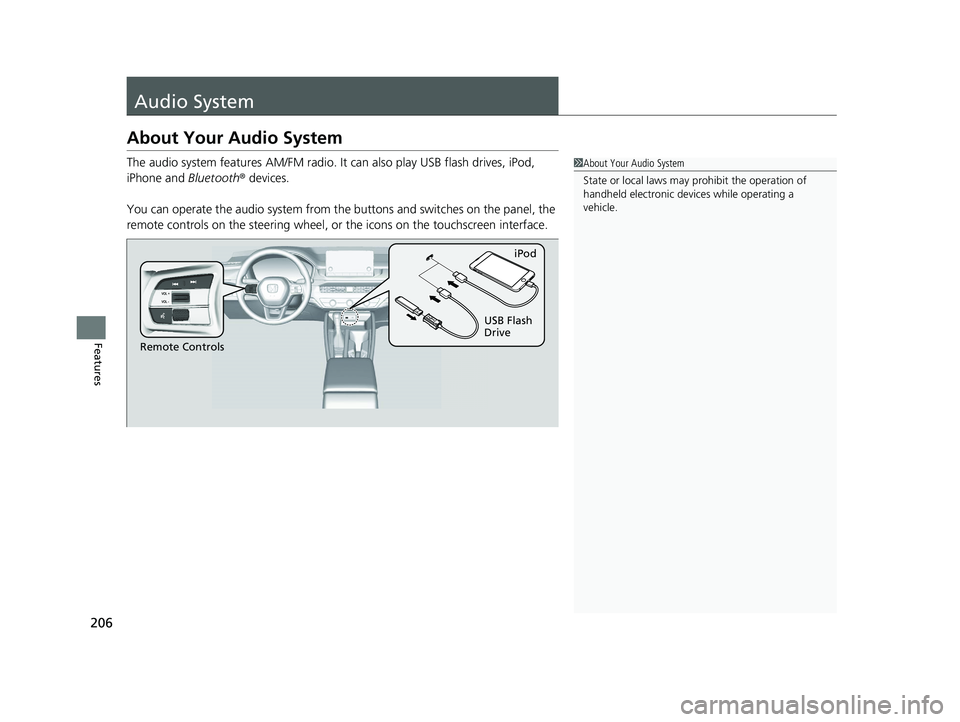
The audio system features AM/FM radio. It can also play USB flash drives, iPod,
iPhone and Bluetooth ® devices.
You can operate the audio system from the buttons and switches on the panel, the
remote controls on the steering wheel, or the icons on the touchscreen interface.1 About Your Audio System
State or local laws may pr ohibit the operation of
handheld electronic devices while operating a
vehicle.
Remote Controls iPod
USB Flash
Drive
23 ACCORD 4D US PET MAP-3130A6000_01.book 206 ページ 2022年10月19日 水曜日 午前11時49分
Page 211 of 533

209
uuAudio System uAudio Remote Controls
Continued
Features
Audio Remote Controls
Allow you to operate the audio system whil e driving. The information is shown on
the driver information interface. VOL
(+/VOL(- (Volume) Switch
Press Up: To increase the volume.
Press Down: To decrease the volume.
/ (Seek/Skip) Buttons
• When listening to the radio
Press : To select the next preset radio station.
Press : To select the previous preset radio station.
Press and hold : To select the next strong station.
Press and hold : To select the previous strong station.
• When listening to an iPod, USB flash drive, Bluetooth® Audio, or Smartphone
Connection
Press : To skip to the next song.
Press : To go back to the beginning of the current or previous song.
• When listening to a USB flash drive
Press and hold : To skip to the next folder.
Press and hold : To go back to the previous folder.
1Audio Remote Controls
Some modes appear only when an appropriate
device or medium is used.
Depending on the Bluetooth® device you connect,
some functions may not be available.
/ (Seek/Skip) Buttons
Left Selector
WheelVOL(+/VOL(-
(Volume) Switch
23 ACCORD 4D US PET MAP-3130A6000_01.book 209 ページ 2022年10月19日 水曜日 午前11時49分