2023 GMC SIERRA universal
[x] Cancel search: universalPage 105 of 430

GMC Sierra/Sierra Denali 2500 HD/3500 HD Owner Manual (GMNA-
Localizing-U.S./Canada-16504257) - 2023 - CRC - 5/9/22
104 Instruments and Controls
Instruments and Controls
Controls
Steering Wheel Adjustment . . . . . . . . . . . 105
Heated Steering Wheel . . . . . . . . . . . . . . . . 105
Horn . . . . . . . . . . . . . . . . . . . . . . . . . . . . . . . . . . 106
Windshield Wiper/Washer . . . . . . . . . . . . 106
Compass . . . . . . . . . . . . . . . . . . . . . . . . . . . . . . . 107
Clock . . . . . . . . . . . . . . . . . . . . . . . . . . . . . . . . . . 107
Power Outlets . . . . . . . . . . . . . . . . . . . . . . . . . 107
Wireless Charging . . . . . . . . . . . . . . . . . . . . . 109
Warning Lights, Gauges, and Indicators
Warning Lights, Gauges, andIndicators . . . . . . . . . . . . . . . . . . . . . . . . . . . . . 111
Instrument Cluster . . . . . . . . . . . . . . . . . . . . . 111
Speedometer . . . . . . . . . . . . . . . . . . . . . . . . . . . 115
Odometer . . . . . . . . . . . . . . . . . . . . . . . . . . . . . . 115
Trip Odometer . . . . . . . . . . . . . . . . . . . . . . . . . 115
Tachometer . . . . . . . . . . . . . . . . . . . . . . . . . . . . 115
Fuel Gauge . . . . . . . . . . . . . . . . . . . . . . . . . . . . . 115
Engine Oil Pressure Gauge . . . . . . . . . . . . . 116
Engine Coolant Temperature Gauge . . . . 117
Voltmeter Gauge . . . . . . . . . . . . . . . . . . . . . . 118
Seat Belt Reminders . . . . . . . . . . . . . . . . . . . 118
Airbag Readiness Light . . . . . . . . . . . . . . . . . 119
Passenger Airbag Status Indicator . . . . . . 119
Charging System Light . . . . . . . . . . . . . . . . 120
Malfunction Indicator Lamp (Check Engine Light) . . . . . . . . . . . . . . . . . . . . . . . . 120 Brake System Warning Light . . . . . . . . . . . 122
Electric Parking Brake Light . . . . . . . . . . . . 122
Service Electric Parking Brake Light . . . . 122
Antilock Brake System (ABS) Warning
Light . . . . . . . . . . . . . . . . . . . . . . . . . . . . . . . . . 123
Four-Wheel-Drive Light . . . . . . . . . . . . . . . . . 123
Hill Descent Control Light . . . . . . . . . . . . . . 123
Lane Departure Warning (LDW) Light . . . . . . . . . . . . . . . . . . . . . . . . . . . . . . . . . 124
Vehicle Ahead Indicator . . . . . . . . . . . . . . . . 124
Traction Off Light . . . . . . . . . . . . . . . . . . . . . . 124
Traction Control System (TCS)/Electronic Stability Control Light . . . . . . . . . . . . . . . . 124
Electronic Stability Control (ESC) Off Light . . . . . . . . . . . . . . . . . . . . . . . . . . . . . . . . . 125
Engine Coolant Temperature Warning Light . . . . . . . . . . . . . . . . . . . . . . . . . . . . . . . . . 125
Driver Mode Control Light . . . . . . . . . . . . . 125
Tire Pressure Light . . . . . . . . . . . . . . . . . . . . . 126
Engine Oil Pressure Light (Uplevel Cluster) . . . . . . . . . . . . . . . . . . . . . . . . . . . . . . 126
Low Fuel Warning Light . . . . . . . . . . . . . . . . 127
Security Light . . . . . . . . . . . . . . . . . . . . . . . . . . 127
High-Beam On Light . . . . . . . . . . . . . . . . . . . 127
Front Fog Lamp Light . . . . . . . . . . . . . . . . . . 128
Lamps On Reminder . . . . . . . . . . . . . . . . . . . 128
Cruise Control Light . . . . . . . . . . . . . . . . . . . . 128
Door Ajar Light . . . . . . . . . . . . . . . . . . . . . . . . 128
Information Displays
Driver Information Center (DIC) (Base Level) . . . . . . . . . . . . . . . . . . . . . . . . . . . . . . . . 128
Driver Information Center (DIC) (Midlevel and Uplevel) . . . . . . . . . . . . . . . 130
Head-Up Display (HUD) . . . . . . . . . . . . . . . . 132
Vehicle Messages
Vehicle Messages . . . . . . . . . . . . . . . . . . . . . . 135
Engine Power Messages . . . . . . . . . . . . . . . 135
Vehicle Speed Messages . . . . . . . . . . . . . . . 135
Universal Remote System
Universal Remote System . . . . . . . . . . . . . . 135
Universal Remote System
Programming . . . . . . . . . . . . . . . . . . . . . . . . 136
Universal Remote System Operation . . . 137
Page 136 of 430

GMC Sierra/Sierra Denali 2500 HD/3500 HD Owner Manual (GMNA-
Localizing-U.S./Canada-16504257) - 2023 - CRC - 5/9/22
Instruments and Controls 135
.The HUD brightness setting is not too
dim or too bright.
.The HUD is adjusted to the proper height.
.Polarized sunglasses are not worn.
.The windshield and HUD lens are clean.
If the HUD image is not correct, contact
your dealer.
The windshield is part of the HUD system.
See Windshield Replacement 0324.
Vehicle Messages
Messages displayed on the Driver
Information Center (DIC) indicate the status
of the vehicle or some action that may be
needed to correct a condition. Multiple
messages may appear one after another.
The messages that do not require
immediate action can be acknowledged and
cleared by pressing the thumbwheel. The
messages that require immediate action
cannot be cleared until that action is
performed.
All messages should be taken seriously;
clearing the message does not correct the
problem.
If a SERVICE message appears, see your
dealer. Follow the instructions given in the
messages. The system displays messages
regarding the following topics:
.Service Messages
.Fluid Levels
.Vehicle Security
.Brakes
.Steering
.Ride Control Systems
.Driver Assistance Systems
.Cruise Control
.Lighting and Bulb Replacement
.Wiper/Washer Systems
.Doors and Windows
.Seat Belts
.Airbag Systems
.Engine and Transmission
.Tire Pressure
.Battery
Engine Power Messages
ENGINE POWER IS REDUCED
This message displays when the vehicle's
propulsion power is reduced. A reduction in
propulsion power can affect the vehicle's
ability to accelerate. If this message is on,
but there is no observed reduction in
performance, proceed to your destination.
Under certain conditions the performance
may be reduced the next time the vehicle is
driven. The vehicle may be driven while this
message is on, but maximum acceleration
and speed may be reduced. Anytime this
message stays on, or displays repeatedly,
the vehicle should be taken to your dealer
for service as soon as possible.
Under certain operating conditions,
propulsion will be disabled. Try restarting
after the ignition has been off for
30 seconds.
Vehicle Speed Messages
SPEED LIMITED TO XXX KM/H (MPH)
This message shows that the vehicle speed
has been limited to the speed displayed. The
limited speed is a protection for various
propulsion and vehicle systems, such as
lubrication, thermal, brakes, suspension,
Teen Driver if equipped, or tires.
Universal Remote System
See
Radio Frequency Statement 0404.
Page 137 of 430
GMC Sierra/Sierra Denali 2500 HD/3500 HD Owner Manual (GMNA-
Localizing-U.S./Canada-16504257) - 2023 - CRC - 5/9/22
136 Instruments and Controls
Universal Remote System
Programming
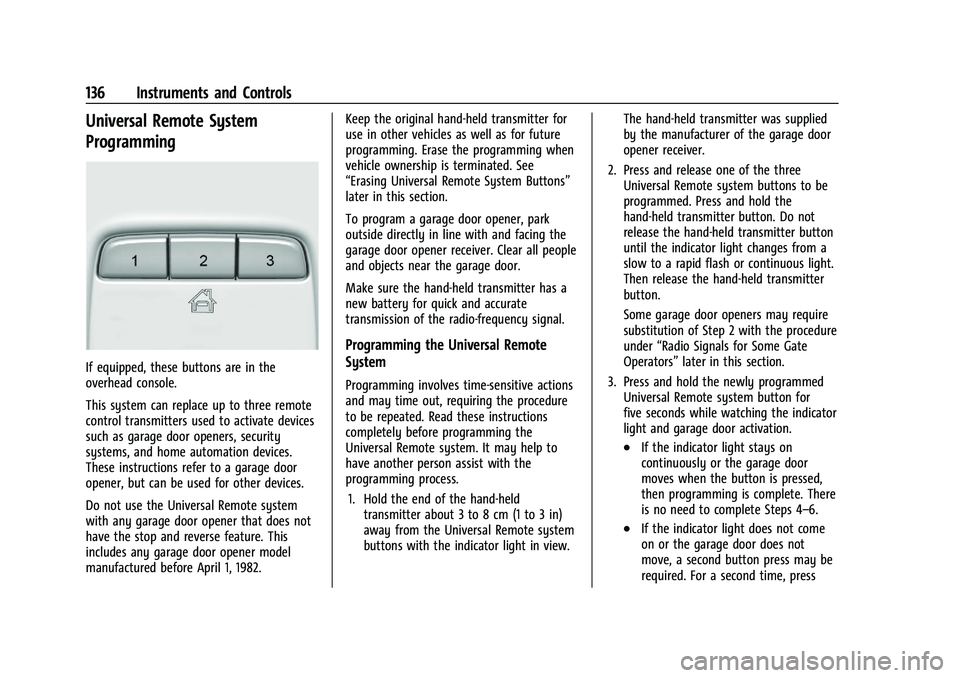
If equipped, these buttons are in the
overhead console.
This system can replace up to three remote
control transmitters used to activate devices
such as garage door openers, security
systems, and home automation devices.
These instructions refer to a garage door
opener, but can be used for other devices.
Do not use the Universal Remote system
with any garage door opener that does not
have the stop and reverse feature. This
includes any garage door opener model
manufactured before April 1, 1982.Keep the original hand-held transmitter for
use in other vehicles as well as for future
programming. Erase the programming when
vehicle ownership is terminated. See
“Erasing Universal Remote System Buttons”
later in this section.
To program a garage door opener, park
outside directly in line with and facing the
garage door opener receiver. Clear all people
and objects near the garage door.
Make sure the hand-held transmitter has a
new battery for quick and accurate
transmission of the radio-frequency signal.
Programming the Universal Remote
System
Programming involves time-sensitive actions
and may time out, requiring the procedure
to be repeated. Read these instructions
completely before programming the
Universal Remote system. It may help to
have another person assist with the
programming process.
1. Hold the end of the hand-held transmitter about 3 to 8 cm (1 to 3 in)
away from the Universal Remote system
buttons with the indicator light in view. The hand-held transmitter was supplied
by the manufacturer of the garage door
opener receiver.
2. Press and release one of the three Universal Remote system buttons to be
programmed. Press and hold the
hand-held transmitter button. Do not
release the hand-held transmitter button
until the indicator light changes from a
slow to a rapid flash or continuous light.
Then release the hand-held transmitter
button.
Some garage door openers may require
substitution of Step 2 with the procedure
under “Radio Signals for Some Gate
Operators” later in this section.
3. Press and hold the newly programmed Universal Remote system button for
five seconds while watching the indicator
light and garage door activation.
.If the indicator light stays on
continuously or the garage door
moves when the button is pressed,
then programming is complete. There
is no need to complete Steps 4–6.
.If the indicator light does not come
on or the garage door does not
move, a second button press may be
required. For a second time, press
Page 138 of 430
GMC Sierra/Sierra Denali 2500 HD/3500 HD Owner Manual (GMNA-
Localizing-U.S./Canada-16504257) - 2023 - CRC - 5/9/22
Instruments and Controls 137
and hold the newly programmed
button for five seconds. If the
indicator light stays on continuously
or the garage door moves when the
button is pressed, then programming
is complete. There is no need to
complete Steps 4–6.
.If the garage door does not move,
continue with programming
Steps 4–6.
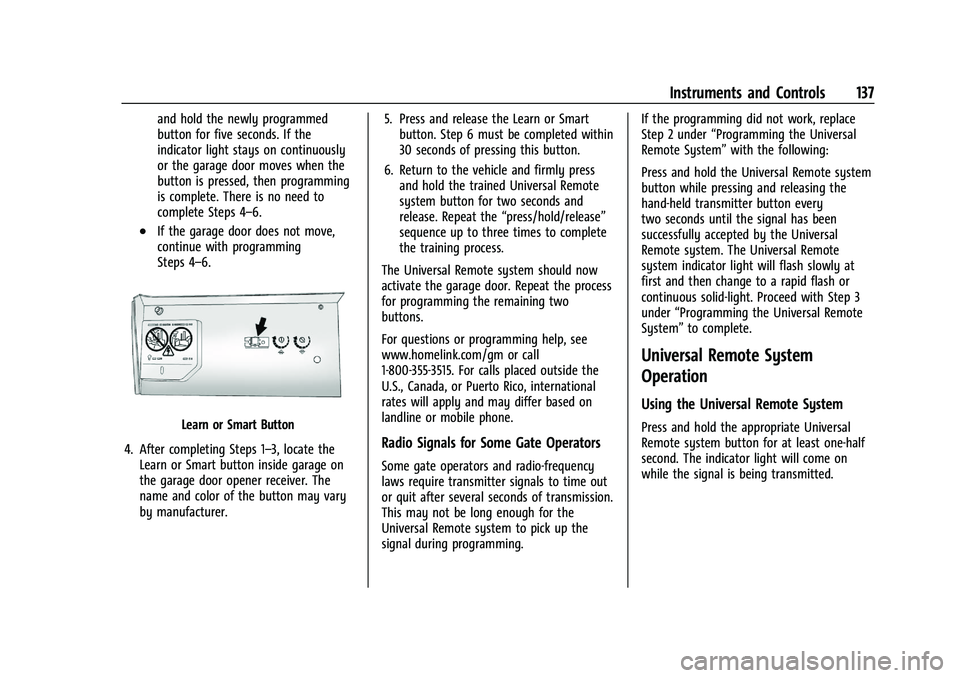
Learn or Smart Button
4. After completing Steps 1–3, locate the Learn or Smart button inside garage on
the garage door opener receiver. The
name and color of the button may vary
by manufacturer. 5. Press and release the Learn or Smart
button. Step 6 must be completed within
30 seconds of pressing this button.
6. Return to the vehicle and firmly press and hold the trained Universal Remote
system button for two seconds and
release. Repeat the “press/hold/release”
sequence up to three times to complete
the training process.
The Universal Remote system should now
activate the garage door. Repeat the process
for programming the remaining two
buttons.
For questions or programming help, see
www.homelink.com/gm or call
1-800-355-3515. For calls placed outside the
U.S., Canada, or Puerto Rico, international
rates will apply and may differ based on
landline or mobile phone.
Radio Signals for Some Gate Operators
Some gate operators and radio-frequency
laws require transmitter signals to time out
or quit after several seconds of transmission.
This may not be long enough for the
Universal Remote system to pick up the
signal during programming. If the programming did not work, replace
Step 2 under
“Programming the Universal
Remote System” with the following:
Press and hold the Universal Remote system
button while pressing and releasing the
hand-held transmitter button every
two seconds until the signal has been
successfully accepted by the Universal
Remote system. The Universal Remote
system indicator light will flash slowly at
first and then change to a rapid flash or
continuous solid-light. Proceed with Step 3
under “Programming the Universal Remote
System” to complete.
Universal Remote System
Operation
Using the Universal Remote System
Press and hold the appropriate Universal
Remote system button for at least one-half
second. The indicator light will come on
while the signal is being transmitted.
Page 139 of 430
GMC Sierra/Sierra Denali 2500 HD/3500 HD Owner Manual (GMNA-
Localizing-U.S./Canada-16504257) - 2023 - CRC - 5/9/22
138 Instruments and Controls
Erasing Universal Remote System
Buttons
Erase all programmed buttons when vehicle
ownership is terminated.
To erase:1. Press and hold the two outside buttons until the indicator light begins to flash.
This should take about 10 seconds.
2. Release both buttons.
Reprogramming a Single Universal
Remote System Button
To reprogram any of the system buttons: 1. Press and hold any one of the buttons. Do not release the button.
2. The indicator light will begin to flash after 20 seconds. Without releasing the
button, proceed with Step 1 under
“Programming the Universal Remote
System.”
Page 337 of 430
GMC Sierra/Sierra Denali 2500 HD/3500 HD Owner Manual (GMNA-
Localizing-U.S./Canada-16504257) - 2023 - CRC - 5/18/22
336 Vehicle Care
FusesUsage
F1 Right Doors
F2 Left Doors
F3 Universal Garage Door Opener
F4 –
F5 –
F6 Front Blower
F8 Lumbar Switch
F10 Body Control Module 6/ Body Control Module 7
F11 Seat/Column Lock Module
F12 Body Control Module 3/ Body Control Module 5
F14 Mirrors/Windows Module F17 Steering Wheel Controls
F18 Video Processing Module/ Obstacle Detection
F19 DLIS –Discrete Logic
Ignition Switch
F20 Ventilated Seats F21 NOT R/C Fuses
Usage
F22 Heated Steering Wheel
F23 MISC R/C
F24 Power Take Off/Reflective Light Auxiliary Display/
Instrument Panel Cluster/
Central Gateway Module/
Inside Rear View Mirror/
Overhead Console Module
Ignition
F25 Heating, Ventilation, and Air Conditioning Ignition/
Heating, Ventilation, and
Air Conditioning Auxiliary
F26 USB Ports/Special Equipment Option Retained
Accessory Power
F27 Accessory Power Outlet/ Retained Accessory Power
F28 Accessory Power Outlet/ Battery
F30 Sensing and Diagnostic Module/Parking Brake
F31 Body Control Module 4 Fuses
Usage
F32 Special Equipment Option/ Data Link Connection
F33 Body Control Module 8
F34 Cargo Lamp
F40 CGM –Central Gateway
Module
F41 Infotainment 1
F42 TCP –Telematics
Connectivity Platform
F43 –
F44 –
F45 Body Control Module 2
F46 Heating, Ventilation, and Air Conditioning/Battery 1
F47 Instrument Panel Cluster/ Battery
F48 Transmission Control Module
F49 Body Control Module 1 F50 –
F51 Battery 1
F52 Battery 2
Page 428 of 430
GMC Sierra/Sierra Denali 2500 HD/3500 HD Owner Manual (GMNA-
Localizing-U.S./Canada-16504257) - 2023 - CRC - 5/9/22
Index 427
TractionControl System (TCS)/Electronic
Stability Control Light . . . . . . . . . . . . . . . . 124
Control/Electronic Stability Control . . . . 241
Off Light . . . . . . . . . . . . . . . . . . . . . . . . . . . . . . . 124
Trademarks and License Agreements . . . . . 189
Trailer Sway Control (TSC) . . . . . . . . . . . . . . . . . . . . 285
Tow Mirrors . . . . . . . . . . . . . . . . . . . . . . . . . . . . 37
Towing . . . . . . . . . . . . . . . . . . . . . . . . . . . . . . . . 272
Towing App . . . . . . . . . . . . . . . . . . . . . . . . . . . . 287
Transfer Case Four-Wheel Drive . . . . . . . . . . . . . . . . . . . . . . 234
Transmission Automatic . . . . . . . . . . . . . . . . . . . . . . . . . . . . . 230
Fluid, Automatic . . . . . . . . . . . . . . . . . . . . . . . 309
Transportation Program, Courtesy . . . . . . . 401
Transporting a Disabled Vehicle . . . . . . . . . . . . . . . . . . . . . 370
Items That Can Catch Fire . . . . . . . . . . . . . . 33
Trip Odometer . . . . . . . . . . . . . . . . . . . . . . . . . . . . 115
Truck Bed Camera Rearview Mirror . . . . . . . 43
Truck-Camper Loading Information . . . . . . . 219
TTY Users Customer Assistance . . . . . . . . . . . . . . . . . . . 398
Turn and Lane-Change Signals . . . . . . . . . . . .143
Turn Signal Bulb Replacement . . . . . . . . . . . . . . . . . . . . . . 326U
Uniform Tire Quality Grading . . . . . . . . . . . . 353
Universal Remote System . . . . . . . . . . . . . . . . . 135Operation . . . . . . . . . . . . . . . . . . . . . . . . . . . . . . . 137
Programming . . . . . . . . . . . . . . . . . . . . . . . . . . 136
Updates Map Data . . . . . . . . . . . . . . . . . . . . . . . . . . . . . . . 171
Software . . . . . . . . . . . . . . . . . . . . . . . . . . . . . . . 154
USB Port . . . . . . . . . . . . . . . . . . . . . . . . . . . . . . . . . .158
Using Infotainment System . . . . . . . . . . . . . . . . . . 152
Navigation System . . . . . . . . . . . . . . . . . . . . . 160
This Manual . . . . . . . . . . . . . . . . . . . . . . . . . . . . . 2
V
VehicleAhead Indicator . . . . . . . . . . . . . . . . . . . . . . . . 124
Alarm System . . . . . . . . . . . . . . . . . . . . . . . . . . 34
Canadian Owners . . . . . . . . . . . . . . . . . . . . . . . . 2
Control . . . . . . . . . . . . . . . . . . . . . . . . . . . . . . . . 205
Data Recording and Privacy . . . . . . . . . . . . 405
Identification Number (VIN) . . . . . . . . . . . . 392
Load Limits . . . . . . . . . . . . . . . . . . . . . . . . . . . . 215
Messages . . . . . . . . . . . . . . . . . . . . . . . . . . . . . . 135
Positioning . . . . . . . . . . . . . . . . . . . . . . . . . . . . 170
Remote Start . . . . . . . . . . . . . . . . . . . . . . . . . . . 22
Security . . . . . . . . . . . . . . . . . . . . . . . . . . . . . . . . . 34
Speed Messages . . . . . . . . . . . . . . . . . . . . . . . 135 Vehicle (cont'd)
Symbols . . . . . . . . . . . . . . . . . . . . . . . . . . . . . . . . . 3
Vehicle Care Tire Pressure . . . . . . . . . . . . . . . . . . . . . . . . . . . 342
Vehicle Security Steering Column Lock . . . . . . . . . . . . . . . . . . . 35
Ventilation, Air . . . . . . . . . . . . . . . . . . . . . . . . . . 201
Visors . . . . . . . . . . . . . . . . . . . . . . . . . . . . . . . . . . . . . 46
Voice Recognition . . . . . . . . . . . . . . . . . . . . . . . . . 171
Voltmeter Gauge . . . . . . . . . . . . . . . . . . . . . . . . . 118
W
Warning
Brake System Light . . . . . . . . . . . . . . . . . . . . 122
Caution and Danger . . . . . . . . . . . . . . . . . . . . . 2
Hazard Flashers . . . . . . . . . . . . . . . . . . . . . . . . 142
Lane Departure (LDW) . . . . . . . . . . . . . . . . . 262
Lights, Gauges, and Indicators . . . . . . . . . . 111
Washer Fluid . . . . . . . . . . . . . . . . . . . . . . . . . . . . 316
Wheels Alignment and Tire Balance . . . . . . . . . . . . 354
Different Size . . . . . . . . . . . . . . . . . . . . . . . . . . 353
Replacement . . . . . . . . . . . . . . . . . . . . . . . . . . . 354
When It Is Time for New Tires . . . . . . . . . . . . 351
Where to Put the Restraint . . . . . . . . . . . . . . . 80
Windows . . . . . . . . . . . . . . . . . . . . . . . . . . . . . . . . . 44 Manual . . . . . . . . . . . . . . . . . . . . . . . . . . . . . . . . . 44
Power . . . . . . . . . . . . . . . . . . . . . . . . . . . . . . . . . . 44