2023 GMC ACADIA fog light
[x] Cancel search: fog lightPage 186 of 384

GMC Acadia/Acadia Denali Owner Manual (GMNA-Localizing-U.S./Canada/
Mexico-16402009) - 2023 - CRC - 3/28/22
Climate Controls 185
To improve fuel efficiency and to cool the
vehicle faster, recirculation may be
automatically selected in warm weather.
The recirculation light will not come on
when automatically controlled. Press
@to
manually select recirculation; press it again
to select outside air.
Do not cover the solar sensor on the top of
the instrument panel near the windshield.
This sensor regulates air temperature based
on sun load. See “Sensors”later in this
section.
Manual Operation
O: Press to turn the climate control system
on or off. When the system is off, outside
air will be prevented from entering the
vehicle. When the system is on, a button is
pressed, or knob is turned, the climate
control system will turn on and deliver
airflow per the current setting.
9: Turn clockwise or counterclockwise to
increase or decrease the fan speed. Press the
knob to turn the fan off.
Press AUTO to return to automatic
operation. Driver and Passenger Temperature Control :
The temperature can be adjusted separately
for the driver and passenger.
Turn the knob clockwise or counterclockwise
to increase or decrease the driver or
passenger temperature setting.
SYNC :
Press to link the passenger and rear
climate temperature settings, if equipped, to
the driver setting. The SYNC indicator light
will turn on. When the passenger or rear
climate temperature settings are adjusted,
the SYNC indicator light is off.
The driver side or passenger side
temperature display shows the temperature
setting increasing or decreasing.
Air Delivery Mode Control : Press
Y,\,
[, or-to change the direction of the
airflow. An indicator light comes on in the
selected mode button.
Changing the mode cancels the automatic
operation and the system goes into manual
mode. Press AUTO to return to automatic
operation.
Y: Air is directed to the instrument panel
outlets.
\: Air is divided between the instrument
panel and floor outlets. Some air is directed
toward the windshield and side window
outlets.
[: Air is directed to the floor outlets,
with some to the windshield, side window
outlets, and second row floor outlets.
-: This mode clears the windows of fog or
moisture. Air is directed to the windshield,
floor outlets, and side window vents. The
system automatically forces outside air into
the vehicle and the air conditioning
compressor will run, unless the outside
temperature is close to freezing.
0: Press to clear the windshield of fog or
frost more quickly. Air is directed to the
windshield and the side window vents. The
air conditioning compressor also comes on,
unless the outside temperature is below
freezing.
Do not drive the vehicle until all windows
are clear.
See Air Vents 0188.
A/C : Press to turn the air conditioning
system on or off. An indicator light comes
on to show that the air conditioning is
enabled. If the fan is turned off, the air
Page 187 of 384

GMC Acadia/Acadia Denali Owner Manual (GMNA-Localizing-U.S./Canada/
Mexico-16402009) - 2023 - CRC - 3/28/22
186 Climate Controls
conditioner will not run. The A/C light will
stay on even if the outside temperatures are
below freezing.
@:Press to turn on recirculation. An
indicator light comes on. Air is recirculated
to quickly cool the inside of the vehicle.
It can also be used to help reduce outside
air and odors that enter the vehicle. The air
conditioning compressor also comes on
when this mode is activated.
Rear Window Defogger
The rear window defogger uses a warming
grid to remove fog from the rear window.
K: Press to turn the rear window defogger
on or off. An indicator light on the button
comes on to show that the rear window
defogger is on.
The rear window defogger only works when
the ignition is on. The defogger turns off if
the ignition is turned to off or ACC/
ACCESSORY.
Caution
Using a razor blade or sharp object to
clear the inside rear window can damage
the rear window defogger. Repairs would
(Continued)
Caution (Continued)
not be covered by the vehicle warranty.
Do not clear the inside rear window with
sharp objects.
Heated Mirror : If equipped with heated
outside mirrors, the mirrors heat to help
clear fog or frost from the surface of the
mirror when the rear window defog button
is pressed. See Heated Mirrors 028.
Remote Start Climate Control Operation :
If equipped with remote start, the climate
control system may run when the vehicle is
started remotely. The rear defog may come
on during remote start based on cold
ambient conditions. The rear defog indicator
light does not come on during a remote
start.
If equipped, the heated seats will turn on if
it is cold outside or the ventilated seats will
turn on if it is hot outside. The heated and
ventilated seat indicator lights may not
come on during a remote start. If equipped,
the heated steering wheel will come on in a
remote start if it is cold outside. The heated
steering wheel indicator light may not
come on.
Sensors
The solar sensor, located in the defrost grille
in the middle of the instrument panel,
monitors the solar heat. Do not cover the
solar sensor or the system will not work
properly.
There is also an exterior temperature sensor
behind the front grille. This sensor reads the
outside air temperature and helps maintain
the temperature inside the vehicle. Any
cover on the front of the vehicle, could
cause a false reading in the displayed
temperature.
The climate control system uses the
information from these sensors to maintain
comfort settings by adjusting the outlet
Page 189 of 384

GMC Acadia/Acadia Denali Owner Manual (GMNA-Localizing-U.S./Canada/
Mexico-16402009) - 2023 - CRC - 3/28/22
188 Climate Controls
If the air delivery mode or fan speed is
manually adjusted, this cancels full
automatic operation.
Manual Operation
]:Turn the knob clockwise or
counterclockwise to increase or decrease the
airflow to the rear panel outlets.
Temperature Controls : Turn the knob
clockwise or counterclockwise to adjust the
rear passenger temperature.
Air Delivery Mode Control : Press to select
the desired air delivery mode. This changes
the direction of the airflow in the rear
seating area.
If the rear floor air delivery mode is
selected, the rear fan speed indicator will
change when adjusted, but the airflow
amount directed to the floor will not. This is
normal operation for the system.
M: If equipped, press to turn on the driver
side or passenger side rear seat heater.
Press again to lower the temperature.
Indicator lights show the level of heat
activated.
Air Vents
To adjust the center and side air outlets on
the instrument panel, use the slider switch
in the center of the outlet to change the
direction of the airflow and also to shut off
the airflow.
There may be outlets overhead in the rear
passenger area; adjust as needed.
Keep all outlets open whenever possible for
best system performance.
Operation Tips
.Clear away any ice, snow, or leaves from
the air inlets at the base of the
windshield that can block the flow of air
into the vehicle.
.Clear snow off the hood to improve
visibility and help decrease moisture
drawn into the vehicle.
.Use of non-GM approved hood deflectors
can adversely affect the performance of
the system.
.Keep the path under all seats clear of
objects to help circulate the air inside the
vehicle more effectively.
.If fogging reoccurs while inYor\
modes with mild temperature throughout
the vehicle, turn on the air conditioner to
reduce windshield fogging.
Maintenance
Passenger Compartment Air Filter
The passenger compartment air filter
reduces dust, pollen, and other airborne
irritants from outside air that is pulled into
the vehicle. The filter will need to be
replaced periodically. See Maintenance
Schedule 0339.
Using the climate control system without an
air filter installed is not recommended.
Water or other debris could enter the
system and result in leaks or noises. Always
install a new filter when removing the old
filter.
For more information on filter replacement,
see your dealer.
Service
All vehicles have a label underhood that
identifies the refrigerant used in the vehicle.
The refrigerant system should only be
serviced by trained and certified technicians.
Page 288 of 384
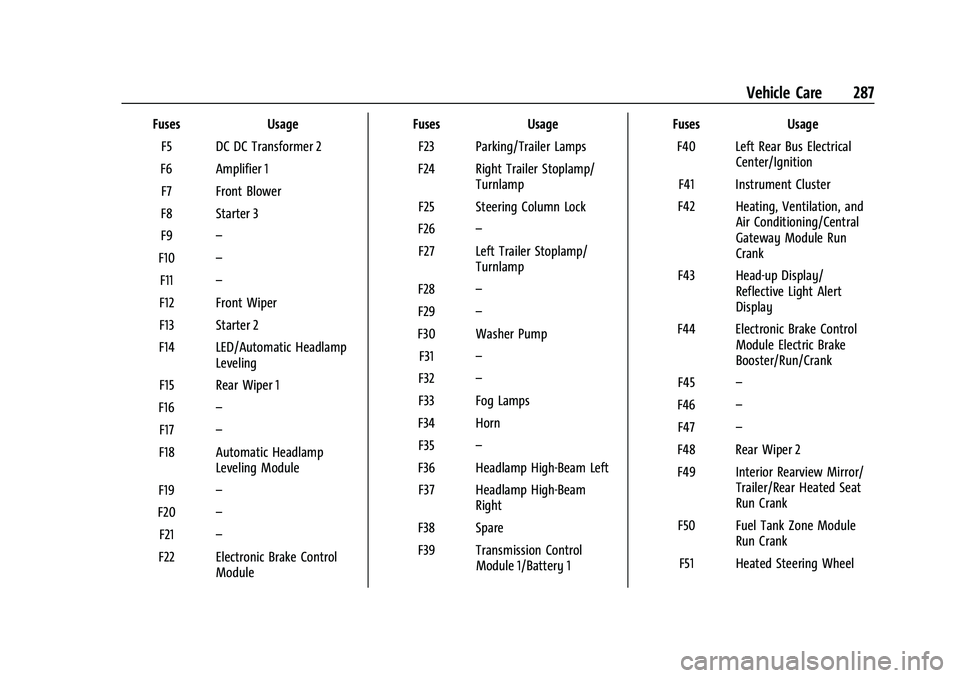
GMC Acadia/Acadia Denali Owner Manual (GMNA-Localizing-U.S./Canada/
Mexico-16402009) - 2023 - CRC - 3/28/22
Vehicle Care 287
FusesUsage
F5 DC DC Transformer 2
F6 Amplifier 1 F7 Front Blower
F8 Starter 3
F9 –
F10 –
F11 –
F12 Front Wiper
F13 Starter 2
F14 LED/Automatic Headlamp Leveling
F15 Rear Wiper 1
F16 –
F17 –
F18 Automatic Headlamp Leveling Module
F19 –
F20 –
F21 –
F22 Electronic Brake Control Module Fuses
Usage
F23 Parking/Trailer Lamps
F24 Right Trailer Stoplamp/ Turnlamp
F25 Steering Column Lock
F26 –
F27 Left Trailer Stoplamp/ Turnlamp
F28 –
F29 –
F30 Washer Pump F31 –
F32 –
F33 Fog Lamps
F34 Horn F35 –
F36 Headlamp High-Beam Left F37 Headlamp High-Beam Right
F38 Spare
F39 Transmission Control Module 1/Battery 1 Fuses
Usage
F40 Left Rear Bus Electrical Center/Ignition
F41 Instrument Cluster
F42 Heating, Ventilation, and Air Conditioning/Central
Gateway Module Run
Crank
F43 Head-up Display/ Reflective Light Alert
Display
F44 Electronic Brake Control Module Electric Brake
Booster/Run/Crank
F45 –
F46 –
F47 –
F48 Rear Wiper 2
F49 Interior Rearview Mirror/ Trailer/Rear Heated Seat
Run Crank
F50 Fuel Tank Zone Module Run Crank
F51 Heated Steering Wheel
Page 335 of 384

GMC Acadia/Acadia Denali Owner Manual (GMNA-Localizing-U.S./Canada/
Mexico-16402009) - 2023 - CRC - 3/28/22
334 Vehicle Care
Caution (Continued)
.Never rub any surface aggressively or
with too much pressure.
.Do not get any exposed electrical
components wet.
.Do not use laundry detergents or
dishwashing soaps with degreasers. Do
not use solutions that contain strong
or caustic soap.
.Do not heavily saturate the upholstery
when cleaning.
.Do not use solvents or cleaners
containing solvents.
.Do not use disinfecting wipes that are
scented or contain bleach. Do not use
wipes or cleaners that show a color
transfer to the wipe or change the
appearance of the interior surface
when used.
.Do not use scented or gel-type hand
sanitizers. If hand sanitizer comes in
contact with interior surfaces of the
vehicle, blot immediately and clean
with a soft cloth dampened with a
mild soap and water solution.
Interior Glass
To clean, use a microfiber cloth fabric
dampened with water. Wipe droplets left
behind with a clean dry cloth. If necessary,
use a commercial glass cleaner after
cleaning with plain water.
Caution
To prevent scratching, never use abrasive
cleaners on automotive glass. Abrasive
cleaners or aggressive cleaning may
damage the rear window defogger.
Cleaning the windshield with water during
the first three to six months of ownership
will reduce tendency to fog.
Speaker Covers
Vacuum around a speaker cover gently, so
that the speaker will not be damaged. Clean
spots with water and mild soap.
Coated Moldings
Coated moldings should be cleaned.
.When lightly soiled, wipe with a sponge
or soft, lint-free cloth dampened with
water.
.When heavily soiled, use warm soapy
water.
Vinyl/Rubber
If equipped with vinyl floor and rubber floor
mats, use a soft cloth and/or brush
dampened with water to remove dust and
loose dirt. For more thorough cleaning, use
a mild soap and water solution.
{Warning
Do not use cleaners that contain silicone,
wax-based products, or cleaners that
increase gloss on vinyl/rubber floor and
mats. These cleaners can permanently
change the appearance and feel of the
vinyl/rubber and can make the floor
slippery. Your foot could slip while
operating the vehicle, and you could lose
control, resulting in a crash. You or
others could be injured.
Fabric/Carpet/Suede
Start by vacuuming the surface using a soft
brush attachment. If a rotating vacuum
brush attachment is being used, only use it
on the floor carpet. Before cleaning, gently
remove as much of the soil as possible:
.Gently blot liquids with a paper towel.
Continue blotting until no more soil can
be removed.
Page 341 of 384

GMC Acadia/Acadia Denali Owner Manual (GMNA-Localizing-U.S./Canada/
Mexico-16402009) - 2023 - CRC - 3/28/22
340 Service and Maintenance
Reset the oil life system when the oil is
changed. SeeEngine Oil Life System
0 270.
.When the REPLACE AT NEXT OIL CHANGE
message displays, the engine air filter
should be replaced at the next engine oil
change. When the REPLACE ENGINE AIR
FILTER SOON message displays, the
engine air filter should be replaced at the
earliest convenience. Reset the engine air
filter life system after the engine air filter
is replaced. See Engine Air Filter Life
System 0271.
Every 36 000 km (22,500 mi)
.Replace the passenger compartment air
filter. Or every 24 months, whichever
comes first. More frequent passenger
compartment air filter replacement may
be needed if driving in areas with heavy
traffic, poor air quality, high dust levels,
or environmental allergens. Passenger
compartment air filter replacement may
also be needed if there is reduced airflow,
window fogging, or odors. Your GM
dealer can help determine when to
replace the filter. Every 96 000 km (60,000 mi)
.Replace spark plugs. (2.0L L4 Engine Only.)
Inspect spark plug wires and/or boots.
Every 156 000 km (97,500 mi)
.Replace spark plugs. (3.6L V6 Engine
Only.) Inspect spark plug wires and/or
boots.
Every 161 000 km (100,000 mi)
.Replace hood and/or body lift support gas
struts. Or every 10 years, whichever
comes first. See Gas Strut(s)0282.
Every 240 000 km (150,000 mi)
.Change rear axle fluid, if equipped with
AWD. Do not directly power wash the
transfer case and/or front/rear axle
output seals. High pressure water can
overcome the seals and contaminate the
transfer case fluid. Contaminated fluid will
decrease the life of the transfer case and/
or axles and should be replaced.
.Drain and fill engine cooling system. Or
every six years, whichever comes first.
See Cooling System 0272.
Severe Conditions Requiring More
Frequent Maintenance*
.Public service, military, or commercial use
vehicles to include the following:
‐ Ambulances, police cars, and
emergency rescue vehicles.
‐ Civilian vehicles such as light duty
pick-up trucks, SUVs, and passenger
cars that are used in military
applications.
‐ Recovery vehicles such as tow trucks
and flatbed single vehicle carriers or
any vehicle that is consistently used in
towing trailers or other loads.
‐ High use commercial vehicles such as
courier delivery vehicles, private
security patrol vehicles, or any vehicles
that operate on a 24–hour basis.
‐ Any vehicle consistently operated in a
high sand or dust environment such as
those used on oil pipelines and similar
applications.
Page 375 of 384

GMC Acadia/Acadia Denali Owner Manual (GMNA-Localizing-U.S./Canada/-
Mexico-16402009) - 2023 - CRC - 3/28/22
374 Index
DrivingAssistance Systems . . . . . . . . . . . . . . . . . . . . 237
Better Fuel Economy . . . . . . . . . . . . . . . . . . . . 191
Characteristics and Towing Tips . . . . . . . . 249
Defensive . . . . . . . . . . . . . . . . . . . . . . . . . . . . . . 192
Distracted . . . . . . . . . . . . . . . . . . . . . . . . . . . . . . 191
Hill and Mountain Roads . . . . . . . . . . . . . . 198
If the Vehicle is Stuck . . . . . . . . . . . . . . . . . 200
Impaired . . . . . . . . . . . . . . . . . . . . . . . . . . . . . . . 192
Loss of Control . . . . . . . . . . . . . . . . . . . . . . . . 194
Off-Road . . . . . . . . . . . . . . . . . . . . . . . . . . . . . . . 194
Off-Road Recovery . . . . . . . . . . . . . . . . . . . . . 193
Vehicle Load Limits . . . . . . . . . . . . . . . . . . . . 200
Wet Roads . . . . . . . . . . . . . . . . . . . . . . . . . . . . . 197
Winter . . . . . . . . . . . . . . . . . . . . . . . . . . . . . . . . . 199
Dual
Automatic Climate Control System . . . . 183
E
ElectricBrake Boost . . . . . . . . . . . . . . . . . . . . . . . . . . . . 215
Parking Brake . . . . . . . . . . . . . . . . . . . . . . . . . . 216
Parking Brake Light . . . . . . . . . . . . . . . . . . . . 108
Electrical Equipment, Add-On . . . . . . . . . . . . . . . . . . . . 259
System Overload . . . . . . . . . . . . . . . . . . . . . . 283
Electrical System Engine Compartment Fuse Block . . . . . . . 285 Electrical System (cont'd)
Fuses and Circuit Breakers . . . . . . . . . . . . . 285
Instrument Panel Fuse Block . . . . . . . . . . . 288
Rear Compartment Fuse Block . . . . . . . . . 290
Emergency OnStar . . . . . . . . . . . . . . . . . . . . . . . . . . . . . . . . . 364
Engine
Air Cleaner/Filter . . . . . . . . . . . . . . . . . . . . . . . 271
Air Filter Life System . . . . . . . . . . . . . . . . . . . 271
Check Light (Malfunction Indicator) . . . . 106
Compartment Overview . . . . . . . . . . . . . . . . 265
Coolant Temperature Gauge . . . . . . . . . . . 103
Coolant Temperature Warning Light . . . . 111
Cooling System . . . . . . . . . . . . . . . . . . . . . . . . 272
Drive Belt Routing . . . . . . . . . . . . . . . . . . . . . 350
Exhaust . . . . . . . . . . . . . . . . . . . . . . . . . . . . . . . . 210
Heater . . . . . . . . . . . . . . . . . . . . . . . . . . . . . . . . . 207
Oil Life System . . . . . . . . . . . . . . . . . . . . . . . . 270
Oil Pressure Light . . . . . . . . . . . . . . . . . . . . . . . 112
Oil Temperature Gauge . . . . . . . . . . . . . . . . 102
Overheating . . . . . . . . . . . . . . . . . . . . . . . . . . . 276
Power Messages . . . . . . . . . . . . . . . . . . . . . . . 125
Running While Parked . . . . . . . . . . . . . . . . . . 211
Starting . . . . . . . . . . . . . . . . . . . . . . . . . . . . . . . . 205
Entry Lighting . . . . . . . . . . . . . . . . . . . . . . . . . . . . 133
Equipment, Towing . . . . . . . . . . . . . . . . . . . . . . 255
Event Data Recorders . . . . . . . . . . . . . . . . . . . . 361
Exit Lighting . . . . . . . . . . . . . . . . . . . . . . . . . . . . . . 133 Extended Parking . . . . . . . . . . . . . . . . . . . . . . . . 210
Extender, Seat Belt . . . . . . . . . . . . . . . . . . . . . . . .53
Exterior
Lamp Controls . . . . . . . . . . . . . . . . . . . . . . . . . 128
Lamps Off Reminder . . . . . . . . . . . . . . . . . . . 129
Lighting Battery Saver . . . . . . . . . . . . . . . . . 134
F
FilterEngine Air Cleaner . . . . . . . . . . . . . . . . . . . . . . 271
Flash-to-Pass . . . . . . . . . . . . . . . . . . . . . . . . . . . . . 129
Flashers, Hazard Warning . . . . . . . . . . . . . . . . . 131
Flat Tire . . . . . . . . . . . . . . . . . . . . . . . . . . . . . . . . . . 311 Changing . . . . . . . . . . . . . . . . . . . . . . . . . . . . . . 318
Floor Mats . . . . . . . . . . . . . . . . . . . . . . . . . . . . . . . 336
Fluid Automatic Transmission . . . . . . . . . . . . . . . 270
Brakes . . . . . . . . . . . . . . . . . . . . . . . . . . . . . . . . . 278
Washer . . . . . . . . . . . . . . . . . . . . . . . . . . . . . . . . 277
Fog Lamp Light Front . . . . . . . . . . . . . . . . . . . . . . . . . . . . . . . . . . . 113
Fog Lamps . . . . . . . . . . . . . . . . . . . . . . . . . . . . . . . . 131
Folding Mirrors . . . . . . . . . . . . . . . . . . . . . . . . . . . .27
Forward Collision Alert (FCA) System . . . . . . . . . . . 237
Frequency Statement
Radio . . . . . . . . . . . . . . . . . . . . . . . . . . . . . . . . . . 359
Page 377 of 384

GMC Acadia/Acadia Denali Owner Manual (GMNA-Localizing-U.S./Canada/-
Mexico-16402009) - 2023 - CRC - 3/28/22
376 Index
I
If the System Needs Service . . . . . . . . . . . . . .158
Ignition Positions . . . . . . . . . . . . . . . . . . . . . . . . 204
Immobilizer . . . . . . . . . . . . . . . . . . . . . . . . . . . . . . . 26
IndicatorPedestrian Ahead . . . . . . . . . . . . . . . . . . . . . . 110
Vehicle Ahead . . . . . . . . . . . . . . . . . . . . . . . . . 110
Indicators Warning Lights and Gauges . . . . . . . . . . . . . 95
Infants and Young Children, Restraints . . . . 66
Information
Publication Ordering . . . . . . . . . . . . . . . . . . . 358
Infotainment Using the System . . . . . . . . . . . . . . . . . . . . . . 138
Infotainment System . . . . . . . . . . . . . . . . . . . . 362
Inspection Multi-Point Vehicle . . . . . . . . . . . . . . . . . . . . 341
Instrument Cluster . . . . . . . . . . . . . . . . . . . . 96, 99
Instrument Panel Overview . . . . . . . . . . . . . . . . 4
Interior Rearview Mirrors . . . . . . . . . . . . . . . . . 28
Introduction . . . . . . . . . . . . . . . . . . . . . . . . . . . 2, 135
J
Jack Auxiliary . . . . . . . . . . . . . . . . . . . . . . . . . . . . . . . 147
Jump Starting - North America . . . . . . . . . . . . . . . 324
K
Keys . . . . . . . . . . . . . . . . . . . . . . . . . . . . . . . . . . . . . . . 6Remote . . . . . . . . . . . . . . . . . . . . . . . . . . . . . . . . . . 7
Remote Operation . . . . . . . . . . . . . . . . . . . . . . . 7
L
Labeling, Tire Sidewall . . . . . . . . . . . . . . . . . . . 294
LampsCourtesy . . . . . . . . . . . . . . . . . . . . . . . . . . . . . . . 132
Daytime Running (DRL) . . . . . . . . . . . . . . . . 130
Dome . . . . . . . . . . . . . . . . . . . . . . . . . . . . . . . . . . 132
Exterior Controls . . . . . . . . . . . . . . . . . . . . . . . 128
Exterior Lamps Off Reminder . . . . . . . . . . 129
Exterior Lighting Battery Saver . . . . . . . . 134
Flash-to-Pass . . . . . . . . . . . . . . . . . . . . . . . . . . . 129
Fog . . . . . . . . . . . . . . . . . . . . . . . . . . . . . . . . . . . . . 131
High/Low Beam Changer . . . . . . . . . . . . . . 129
Malfunction Indicator (CheckEngine) . . . . . . . . . . . . . . . . . . . . . . . . . . . . . . 106
On Reminder . . . . . . . . . . . . . . . . . . . . . . . . . . . 114
Reading . . . . . . . . . . . . . . . . . . . . . . . . . . . . . . . . 132
Lane Change Alert (LCA) . . . . . . . . . . . . . . . . . . . . . 243
Keep Assist (LKA) . . . . . . . . . . . . . . . . . . . . . . 244
Keep Assist Light . . . . . . . . . . . . . . . . . . . . . . 109
Lap-Shoulder Belt . . . . . . . . . . . . . . . . . . . . . . . . . 50
LATCH System Replacing Parts after a Crash . . . . . . . . . . . 78 LATCH, Lower Anchors and Tethers for
Children . . . . . . . . . . . . . . . . . . . . . . . . . . . . . . . . . . 71
LED Lighting . . . . . . . . . . . . . . . . . . . . . . . . . . . . . 283
Liftgate . . . . . . . . . . . . . . . . . . . . . . . . . . . . . . . . . . . .18
Lighting Entry . . . . . . . . . . . . . . . . . . . . . . . . . . . . . . . . . . 133
Exit . . . . . . . . . . . . . . . . . . . . . . . . . . . . . . . . . . . . 133
Illumination Control . . . . . . . . . . . . . . . . . . . 132
LED . . . . . . . . . . . . . . . . . . . . . . . . . . . . . . . . . . . . 283
Lights Airbag Readiness . . . . . . . . . . . . . . . . . . . . . . 104
Antilock Brake System (ABS)
Warning . . . . . . . . . . . . . . . . . . . . . . . . . . . . . 109
Brake System Warning . . . . . . . . . . . . . . . . 107
Charging System . . . . . . . . . . . . . . . . . . . . . . 106
Check Engine (Malfunction Indicator) . . . . . . . . . . . . . . . . . . . . . . . . . . . . 106
Cruise Control Light . . . . . . . . . . . . . . . . . . . . . 114
Door Ajar . . . . . . . . . . . . . . . . . . . . . . . . . . . . . . . 114
Driver Mode Control . . . . . . . . . . . . . . . . . . . . 111
Electric Parking Brake . . . . . . . . . . . . . . . . . . 108
Engine Coolant Temperature Warning . . . . . . . . . . . . . . . . . . . . . . . . . . . . . . 111
Engine Oil Pressure . . . . . . . . . . . . . . . . . . . . . 112
Front Fog Lamp . . . . . . . . . . . . . . . . . . . . . . . . . 113
Gauges and Indicators . . . . . . . . . . . . . . . . . . 95
Gear Shifting . . . . . . . . . . . . . . . . . . . . . . . . . . 109
High-Beam On . . . . . . . . . . . . . . . . . . . . . . . . . . 113