2023 FORD SUPER DUTY roof
[x] Cancel search: roofPage 441 of 738
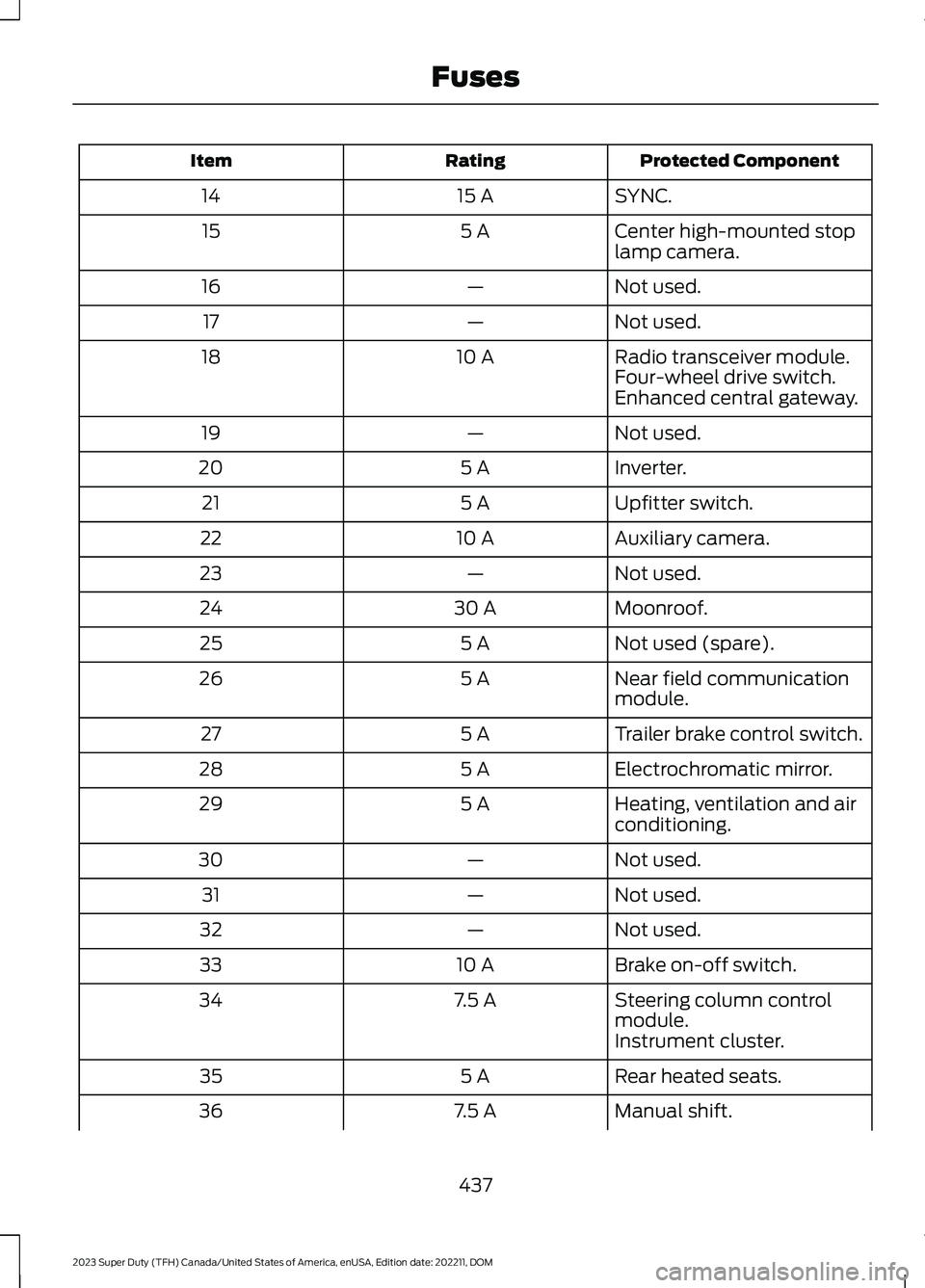
Protected ComponentRatingItem
SYNC.15 A14
Center high-mounted stoplamp camera.5 A15
Not used.—16
Not used.—17
Radio transceiver module.10 A18Four-wheel drive switch.Enhanced central gateway.
Not used.—19
Inverter.5 A20
Upfitter switch.5 A21
Auxiliary camera.10 A22
Not used.—23
Moonroof.30 A24
Not used (spare).5 A25
Near field communicationmodule.5 A26
Trailer brake control switch.5 A27
Electrochromatic mirror.5 A28
Heating, ventilation and airconditioning.5 A29
Not used.—30
Not used.—31
Not used.—32
Brake on-off switch.10 A33
Steering column controlmodule.7.5 A34
Instrument cluster.
Rear heated seats.5 A35
Manual shift.7.5 A36
437
2023 Super Duty (TFH) Canada/United States of America, enUSA, Edition date: 202211, DOMFuses
Page 478 of 738
CLEANING VINYL
WARNING: On vehicles equippedwith seat-mounted airbags, do not usechemical solvents or strong detergents.Such products could contaminate theside airbag system and affectperformance of the side airbag in a crash.
We recommend that you only clean vinylsurfaces in the following way:
1.Remove dust and loose dirt with avacuum cleaner.
2.Wipe the surface with a soft, dampcloth and a mild soap and watersolution. Dry the area with a clean, softcloth.
3.For additional information andassistance, we recommend that youcontact an authorized dealer.
CLEANING CARPETS AND FLOORMATS
We recommend that you only clean yourcarpets in the following way:
1.Remove dust and loose dirt with avacuum cleaner.
2.Wipe the surface with a soft, dampcloth and a mild soap and watersolution. Dry the area with a clean, softcloth.
3.For additional information andassistance, we recommend that youcontact an authorized dealer.
For heavy stains, spot clean the area. If aring forms on the fabric, clean the entirearea immediately, but do not oversaturateor the ring could set.
We recommend that you only clean yourfloor mats in the following way:
1.Remove dust and loose dirt with avacuum cleaner.
2.Wash rubber floor mats using mildsoap and lukewarm or cold water.
3.Completely dry the floor mat beforeplacing them back in your vehicle.
CLEANING SEATBELTS
WARNING: Do not use cleaningsolvents, bleach or dye on the vehicle'sseatbelts, as these actions may weakenthe belt webbing.
1.Wipe the surface with a soft, dampcloth and a mild soap and watersolution. Dry the area with a clean, softcloth.
CLEANING MOONROOF TRACKS
1.Remove debris from the tracks with avacuum cleaner.
2.Wipe the bulb seal and mating paintedroof metal surface with a soft, dampcloth and a mild soap and watersolution.
Note:The moonroof rail tracks are greasedto maintain proper functionality. Do notwipe off the grease.
REPAIRING MINOR PAINT
DAMAGE
We recommend that you contact anauthorized dealer to identify your vehiclecolor code. Authorized dealers havetouch-up paint to match your vehicle'scolor.
Before repairing minor paint damage, usea cleaner to remove particles such as birddroppings, tree sap, insect deposits, tarspots, road salt and industrial fallout.
474
2023 Super Duty (TFH) Canada/United States of America, enUSA, Edition date: 202211, DOMVehicle Care
Page 561 of 738
Depending on the station quality, you couldhear a slight sound change when thestation changes between analog anddigital audio.
You cannot access a saved HD station ifyour vehicle is outside the station’sreception area.
SWITCHING DIGITAL RADIORECEPTION ON AND OFF
1.Press Settings on the touchscreen.
2.Press Radio Settings.
3.Switch AM HD Radio or FM HD Radioon or off.
DIGITAL RADIO INDICATORS
HD Radio Indicator
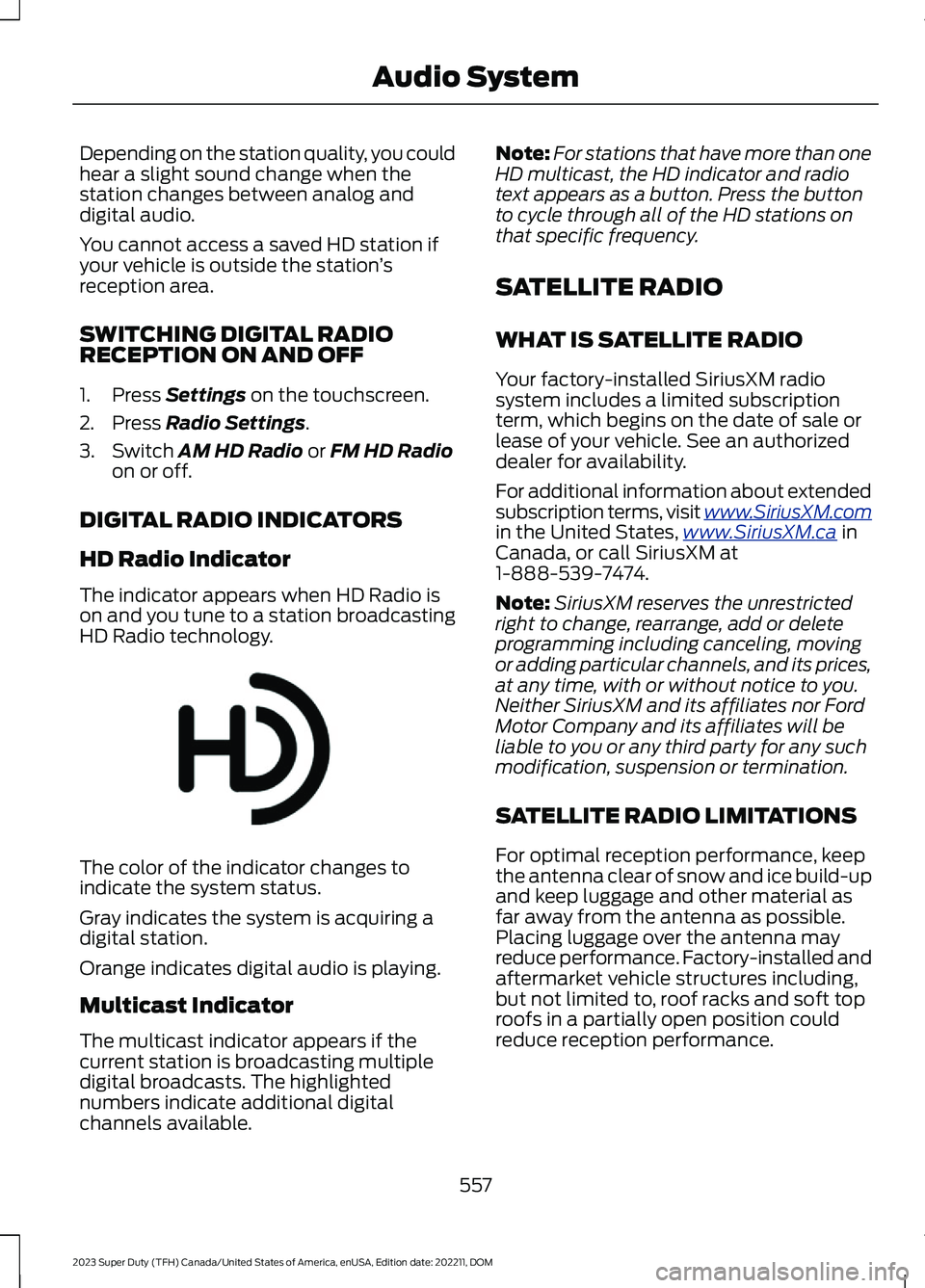
The indicator appears when HD Radio ison and you tune to a station broadcastingHD Radio technology.
The color of the indicator changes toindicate the system status.
Gray indicates the system is acquiring adigital station.
Orange indicates digital audio is playing.
Multicast Indicator
The multicast indicator appears if thecurrent station is broadcasting multipledigital broadcasts. The highlightednumbers indicate additional digitalchannels available.
Note:For stations that have more than oneHD multicast, the HD indicator and radiotext appears as a button. Press the buttonto cycle through all of the HD stations onthat specific frequency.
SATELLITE RADIO
WHAT IS SATELLITE RADIO
Your factory-installed SiriusXM radiosystem includes a limited subscriptionterm, which begins on the date of sale orlease of your vehicle. See an authorizeddealer for availability.
For additional information about extendedsubscription terms, visit www.SiriusXM.comin the United States,www.SiriusXM.ca inCanada, or call SiriusXM at1-888-539-7474.
Note:SiriusXM reserves the unrestrictedright to change, rearrange, add or deleteprogramming including canceling, movingor adding particular channels, and its prices,at any time, with or without notice to you.Neither SiriusXM and its affiliates nor FordMotor Company and its affiliates will beliable to you or any third party for any suchmodification, suspension or termination.
SATELLITE RADIO LIMITATIONS
For optimal reception performance, keepthe antenna clear of snow and ice build-upand keep luggage and other material asfar away from the antenna as possible.Placing luggage over the antenna mayreduce performance. Factory-installed andaftermarket vehicle structures including,but not limited to, roof racks and soft toproofs in a partially open position couldreduce reception performance.
557
2023 Super Duty (TFH) Canada/United States of America, enUSA, Edition date: 202211, DOMAudio SystemE142616
Page 628 of 738
try to resolve them. A Customer ClaimForm will be mailed that needs to becompleted, signed and returned to the BBBalong with proof of ownership. Uponreceipt, the BBB reviews the claim foreligibility under the Program SummaryGuidelines.
You can get more information bycalling BBB AUTO LINE at1-800-955-5100, or writing to:
BBB AUTO LINE a Division of BBBNational Programs, Inc.1676 International Drive, Suite 550McLean, VA 22102
BBB AUTO LINE applications can also berequested by calling the Ford MotorCompany Customer Relationship Centerat 1-800-392-3673.
For additional information, refer to theBetter Business Bureau website.
Note:Ford Motor Company reserves theright to change eligibility limitations, modifyprocedures, or to discontinue this processat any time without notice and withoutobligation.
THE MEDIATION AND
ARBITRATION PROGRAM
For vehicles delivered to authorizedCanadian dealers. In those cases whereyou continue to feel that the efforts by Fordof Canada and the authorized dealer toresolve a factory-related vehicle serviceconcern have been unsatisfactory, Ford ofCanada participates in an impartial thirdparty mediation/arbitration programadministered by the Canadian MotorVehicle Arbitration Plan (CAMVAP).
The CAMVAP program is a straightforwardand relatively speedy alternative to resolvea disagreement when all other efforts toproduce a settlement have failed. Thisprocedure is without cost to you and isdesigned to eliminate the need for lengthyand expensive legal proceedings.
In the CAMVAP program, impartialthird-party arbitrators conduct hearings atmutually convenient times and places inan informal environment. These impartialarbitrators review the positions of theparties, make decisions and, whenappropriate, render awards to resolvedisputes. CAMVAP decisions are fast, fair,and final as the arbitrator’s award isbinding on both you and Ford of Canada.
CAMVAP services are available in allCanadian territories and provinces. Formore information, without charge orobligation, call your CAMVAP ProvincialAdministrator directly at 1-800-207-0685or visit www.camvap.ca.
ORDERING A CANADIAN
FRENCH OWNER'S MANUAL
You can obtain a French owner's manualfrom an authorized dealer or by contactingHelm, LLC at:
HELM, LLC47911 Halyard Drive, Suite 200Plymouth, Michigan 48170Attention: Customer Service
Call toll free: 1-800-782-4356
Monday-Friday 8:00 a.m. - 6:00 p.m. EST
For additional information, visitwww.helminc.com.
624
2023 Super Duty (TFH) Canada/United States of America, enUSA, Edition date: 202211, DOMCustomer Information
Page 700 of 738
Customer Remedies
NAV2 and its suppliers’ entire liability andyour exclusive remedy shall be, at NAV2’ssole discretion, either (a) return of the pricepaid, if any, or (b) repair or replacement ofthe Data that do not meet NAV2’s LimitedWarranty and that are returned to NAV2with a copy of your receipt. This LimitedWarranty is void if failure of the Data hasresulted from accident, abuse, ormisapplication. Any replacement Data willbe warranted for the remainder of theoriginal warranty period or thirty (30) days,whichever is longer. Neither these remediesnor any product support services offeredby NAV2 are available without proof ofpurchase from an authorized internationalsource.
No Other Warranty:
EXCEPT FOR THE LMITED WARRANTYSET FORTH ABOVE AND TO THE EXTENTPERMITTED BY APPLICABLE LAW, NAV2AND ITS LICENSORS (INCLUDING THEIRLICENSORS AND SUPPLIERS) DISCLAIMANY WARRANTIES, EXPRESS OR IMPLIED,OF QUALITY, PERFORMANCE,MERCHANTABILITY, FITNESS FOR APARTICULAR PURPOSE, OWNERSHIP ORNON-INFRINGEMENT. Certain warrantyexclusions may not be permitted underapplicable law, so to that extent the aboveexclusion may not apply to you.
Limited Liability:
TO THE EXTENT PERMITTED BYAPPLICABLE LAW, NAV2 AND ITSLICENSORS (INCLUDING THEIRLICENSORS AND SUPPLIERS) SHALL NOTBE LIABLE TO YOU: IN RESPECT OF ANYCLAIM, DEMAND OR ACTION,IRRESPECTIVE OF THE NATURE OF THECAUSE OF THE CLAIM, DEMAND ORACTION ALLEGING ANY LOSS, INJURY ORDAMAGES, DIRECT OR INDIRECT, WHICHMAY RESULT FROM THE USE ORPOSSESSION OF THE INFORMATION; OR
FOR ANY LOSS OF PROFIT, REVENUE,CONTRACTS OR SAVINGS, OR ANYOTHER DIRECT, INDIRECT, INCIDENTAL,SPECIAL OR CONSEQUENTIAL DAMAGESARISING OUT OF YOUR USE OF ORINABILITY TO USE THIS INFORMATION,ANY DEFECT IN THE INFROMATION, ORTHE BREACH OF THESE TERMS ORCONDITIONS, WHETHER IN AN ACTIONIN CONTRACT OR TORT OR BASED ON AWARRANTY, EVEN IF NAV2 OR ITSLICENSORS HAVE BEEN ADVISED OF THEPOSSIBILITY OF SUCH DAMAGES. UNDERNO CIRCUMSTANCES SHALL NAV2’s ORITS SUPPLIERS’ LIABILITY HEREUNDEREXCEED THE PRICE PAID. Certain liabilityexclusions may not be permitted underapplicable law, so to that extent the aboveexclusion may not apply to you.
Export Control
You agree not to export to anywhere anypart of the Data provided to you or anydirect product thereof except incompliance with, and with all licenses andapprovals required under, applicableexport laws, rules and regulations.
IP Protection
The Data are owned by NAV2 or itssuppliers and are protected by applicablecopyright and other intellectual propertylaw and treaties. The Data are providedsolely on the basis of a license to use, notsale.
Entire Agreement
These terms and conditions constitute theentire agreement between NAV2(and itslicensors, including their licensors andsuppliers) and you pertaining to the subjectmatter hereof, and supersedes in theirentirety any and all written or oralagreements previously existing betweenus with respect to such subject matter.
696
2023 Super Duty (TFH) Canada/United States of America, enUSA, Edition date: 202211, DOMCustomer Information
Page 715 of 738

Child Restraint Anchor Points....................37Locating the Child Restraint Lower AnchorPoints...................................................................37Locating the Child Restraint Top TetherAnchor Points...................................................38What Are the Child Restraint AnchorPoints...................................................................37Child Restraints...............................................39Child Restraint Position Information............39Child Restraints Recommendation...............40Child Safety......................................................36Child Restraint Anchor Points..........................37Child Restraints.....................................................39Installing Child Restraints.................................40Child Safety Locks - Crew Cab/SuperCab.......................................................49Child Safety Precautions.............................36Cleaning Products......................................469Cleaning the Exterior..................................470Cleaning Camera Lenses andSensors..............................................................471Cleaning Chrome, Aluminium or StainlessSteel...................................................................470Cleaning Headlamps and RearLamps...............................................................470Cleaning Stripes or Graphics..........................471Cleaning the Engine Compartment.............471Cleaning the Exhaust........................................472Cleaning the Exterior Precautions...............470Cleaning the Underbody..................................471Cleaning Wheels................................................470Cleaning Windows and WiperBlades...............................................................470Cleaning the Interior....................................472Cleaning Carpets and Floor Mats................474Cleaning Displays and Screens.....................473Cleaning Fabric...................................................473Cleaning Leather................................................473Cleaning Moonroof Tracks..............................474Cleaning Plastic..................................................473Cleaning Seatbelts............................................474Cleaning the Instrument Panel.....................472Cleaning Vinyl......................................................474Climate Control.............................................152Auto Mode.............................................................154Climate Control Hints.................................154Climate Control Videos..............................155
Closing the Tailgate......................................94Closing the Tailgate From Inside YourVehicle.................................................................94Closing the Tailgate From Outside YourVehicle.................................................................94Closing the Tailgate Using the RemoteControl................................................................95Cold Weather Precautions - 6.7LDiesel..............................................................415Cold Weather Precautions - 6.8L/7.3L..................................................................415Connected Navigation...............................579Connected Vehicle......................................548Connected Vehicle –Troubleshooting............................................549Connecting the Vehicle to a MobileNetwork...........................................................548Connected Vehicle Data..............................28Connected Vehicle Limitations..............548Connected Vehicle Requirements........548Connected Vehicle –Troubleshooting........................................549Connected Vehicle – Frequently AskedQuestions........................................................549Connected Vehicle Videos.......................550Connecting a Bluetooth® Device..........574Connecting a Trailer.....................................361Connecting a Trailer –Troubleshooting............................................364Hitches...................................................................359Connecting a Trailer Precautions..........359Connecting a Trailer –Troubleshooting........................................364Connecting a Trailer – InformationMessages.........................................................364Connecting a Trailer Videos....................364Connecting the Vehicle to a MobileNetwork.......................................................548Connecting FordPass to the Modem.........548Enabling and Disabling the Modem...........548What Is the Modem..........................................548Connecting the Vehicle to a Wi-FiNetwork.......................................................548Connecting Your Phone............................569Contacting Us...................................................19Coolant...........................................................450Adding Coolant..................................................450Changing the Coolant.......................................451
711
2023 Super Duty (TFH) Canada/United States of America, enUSA, Edition date: 202211, DOMIndex
Page 724 of 738

What Is Live Traffic............................................579Load Carrying.................................................351Load Carrying Precautions........................351Loading Your Trailer....................................366Locating the 360 DegreeCameras......................................................290Locating the Auxiliary Switches............586Locating the Auxiliary SwitchWiring............................................................586Locating the Blind Spot InformationSystem Sensors........................................328Locating the Brake Fluid Reservoir.......249Locating the Cross Traffic AlertSensors.........................................................336Locating the Exit Warning Sensors.......333Locating the Keyless Entry Keypad.........87Locating the Key Readers............................73Locating the Memory FunctionButtons...........................................................177Locating the Outlets...................................188Locating the Power Outlets......................185Locating the Pre-Collision AssistSensors..........................................................341Locating the Rear View Camera.............287Locating the Safety ComplianceCertification Labels..................................352Locating the Tire label...............................478Locating the USB Ports..............................183Locating the Wireless AccessoryCharger..........................................................195Locating Your Vehicle....................................74Locking the Rear Window Controls.......129
M
Maintenance.................................................44012V Battery...........................................................45612V Battery – Troubleshooting.....................459Coolant.................................................................450Engine Air Filter..................................................445Engine Oil.............................................................444Exterior Bulbs.......................................................461Interior Bulbs......................................................468Maintenance Precautions.......................440Making and Receiving a Phone Call.......571Manually Dimming the InteriorMirror...............................................................131
Manually Releasing the Electric ParkingBrake..............................................................253Manually Shifting Gears............................235Shifting Using the Buttons on the ColumnShifter................................................................235Manual Seats.................................................162Adjusting the Head Restraint.........................162Adjusting the Lumbar Support.....................164Adjusting the Seat Backrest...........................164Folding the Seats.................................................171Head Restraint Components.........................162Installing the Head Restraint.........................163Moving the Seat Backward andForward.............................................................163Removing the Head Restraint........................163Unfolding the Seats.............................................171Massage Seats...............................................167Adjusting the Massage Seat Settings........168Massage Seat Limitations...............................167Memory Function..........................................177Memory Function Precautions.................177Memory Function Videos...........................178Mislock...............................................................82Mislock Limitations..............................................82Switching Mislock On and Off.........................82What Is Mislock.....................................................82Mobile CommunicationsEquipment...................................................674Mobile Device Data........................................29Moonroof Bounce-Back.............................135Overriding Moonroof Bounce-Back.............135What Is Moonroof Bounce-Back..................135Moonroof.........................................................134Moonroof Bounce-Back...................................135Moonroof Videos..........................................135Motorcraft Parts - 6.7L Diesel.................523Motorcraft Parts - 6.8L, Gasoline..........524Motorcraft Parts - 7.3L, Gasoline...........525Muting the Audio.........................................554
N
Navigation Map Updates..........................579Navigation......................................................579Adjusting the Map.............................................579Live Traffic............................................................579Route Guidance.................................................580Setting a Destination........................................579
720
2023 Super Duty (TFH) Canada/United States of America, enUSA, Edition date: 202211, DOMIndex
Page 725 of 738
Waypoints............................................................580Neutral TowingSee: Recreationally Towing Your Vehicle -4x2......................................................................429See: Recreationally Towing Your Vehicle -4x4......................................................................427Neutral TowSee: Recreationally Towing Your Vehicle -4x2......................................................................429See: Recreationally Towing Your Vehicle -4x4......................................................................427Normal Scheduled Maintenance -Diesel.............................................................597Normal Scheduled Maintenance -Gasoline......................................................600
O
Off-Road Driving...........................................412After Driving Your Vehicle Off-Road............414Basic Off-Road Driving Techniques.............412Driving Through Water Limitations..............413What Is Off-Road Driving................................412Onboard Generator Indicators................188Onboard Generator......................................187Onboard Generator –Troubleshooting..............................................191Onboard Generator Precautions............187Onboard Generator –Troubleshooting..........................................191Onboard Generator – Frequently AskedQuestions..........................................................192Onboard Generator – InformationMessages...........................................................191Onboard Scales Limitations...................384Onboard Scales...........................................384Opening and Closing the Flip Key............73Opening and Closing the Hood.............440Opening and Closing theMoonroof......................................................134Opening and Closing the SlidingWindows.......................................................129Opening and Closing theSunshade......................................................134Opening and Closing the Windows.......128Opening the Tailgate.....................................91
Opening the Tailgate From Inside YourVehicle.................................................................94Opening the Tailgate From Outside YourVehicle..................................................................91Opening the Tailgate Using the RemoteControl................................................................94Operating the Doors From Inside YourVehicle..............................................................81Opening the Doors From Inside YourVehicle..................................................................81Unlocking and Locking the Doors Using theCentral Locking.................................................81Operating the Doors From Outside YourVehicle..............................................................81Unlocking and Locking the Doors Using theKey Blade.............................................................81Unlocking and Locking the Doors Using theRemote Control................................................81Operating Your Vehicle With aSnowplow....................................................418Ordering a Canadian French Owner'sManual..........................................................624OTASee: Software Update Settings...................582See: Vehicle Software Updates...................582Overriding Cross Traffic Braking.............263Overriding Reverse Brake Assist............259Overriding the Set Speed.........................302Over the airSee: Software Update Settings...................582Over-the-airSee: Software Update Settings...................582See: Vehicle Software Updates...................582See: Vehicle Software Updates...................582
P
Parking Aid Indicators................................285Parking Aid Precautions............................282Parking Aids...................................................282Front Parking Aid...............................................284Parking Aids – Troubleshooting...................285Rear Parking Aid.................................................283Parking Aids – Troubleshooting.............285Parking Aids – InformationMessages.........................................................285Parking Aids Videos....................................286
721
2023 Super Duty (TFH) Canada/United States of America, enUSA, Edition date: 202211, DOMIndex